Maerium Error 0x8004230f

Walldiver7

New member
Local time
9:36 AM
Messages
6
All my backup attempts using Win7 have failed so I thought I'd give Maerium Reflect a try. First attempt: "Backup Aborted" "Failed to create Snapshot. 0x8004230f"

I'm trying to back up to an external drive and it appears that when it tries to create this folder/volume on the My Book drive,... it fails.

I've done a few searches here on this subject, and to be truthful, I'm such a newbie as this I don't understand what I'm reading. Thanks for any help!
 

My Computer

Computer type
PC/Desktop
Computer Manufacturer/Model Number
HP Pavilion dv6t-3000
OS
Windows 7 Home Premium x64
Browser
IE
See THIS from the Macrium Knowledge Base. The is a fix download at the end of the article, if what is in the article does not fix your problem.
 

My Computer

Computer type
PC/Desktop
Computer Manufacturer/Model Number
My Own Build
OS
Windows 10 64 bit
CPU
Intel i7 6700K
Motherboard
ASUS ROG Maximus VIII Hero
Memory
16GB Corsair Dominator
Graphics Card(s)
Intel CPU Graphics
Sound Card
RealTek
Monitor(s) Displays
27" Dell S2719dgf
Screen Resolution
2560X1440
Hard Drives
1 TB Samsung 850 EVO SSD for Win 10 Pro
500GB Samsung 850 EVO SSD for Win 10 Insider
2 TB drive for backup
PSU
EVGA Supernova 750G2
Case
BeQuiet Silent Base 600
Cooling
Deepcool Captain 120EX
Keyboard
Microsoft Wireless 2000
Mouse
Microsoft wireless
Internet Speed
100 MB/sec (Cable)
Antivirus
Microsoft Defender and Malwarebytes
Browser
Edge/Firefox
Other Info
Cakewalk (Sonar) by BandLab and Studio One 4.1 Pro recording studio software. MOTU 896Mk3 Hybrid recording interface, Frontier Tranzport wireless control unit, Behringer X-Touch Control Surface.
Five USB connected optical drives for CD Audio production using Nero BurningROM
My own experience using MR for years is the doing backups directly to external drives is unreliable. I've had every attempt fail for one reason or another, often just failing to continue to write to the drive. I think the USB drivers are just not robust enough to handle the data transfer reliably.

I always do the backup to an internal drive and then, when done and the backup has been verified, copy that backup to an external drive.
 

My Computer

Computer type
PC/Desktop
Computer Manufacturer/Model Number
Custom
OS
Win7 Pro 32-bit, Win8 Pro 32-bit
CPU
AMD Phenom II X6 1090T
Motherboard
Gigabyte
Memory
4GB ddr3 1300
Graphics Card(s)
AMD HD 4290 onboard
Sound Card
Builtin Realtek HD Audio
Monitor(s) Displays
Samsung 24" widescreen, LG 23" widescreen
Screen Resolution
1920x1200/1920x1080
Hard Drives
Kingston 256GB SSD
Keyboard
Logitech Illuminated Keyboard
Mouse
Logitech M705 wireless mouse
Antivirus
Norton Av 2013
Browser
IE v10
I ran the fix, and it didn't help. Thanks for trying!

See THIS from the Macrium Knowledge Base. The is a fix download at the end of the article, if what is in the article does not fix your problem.
 

My Computer

Computer type
PC/Desktop
Computer Manufacturer/Model Number
HP Pavilion dv6t-3000
OS
Windows 7 Home Premium x64
Browser
IE
I can't seem to accomplish this.... I get:

"The destination path is included in the image. Please select a different folder."

What I did was created a new folder on the C drive (internal) and I called it simply "Backup". So, what am I doing wrong here?

My own experience using MR for years is the doing backups directly to external drives is unreliable. I've had every attempt fail for one reason or another, often just failing to continue to write to the drive. I think the USB drivers are just not robust enough to handle the data transfer reliably.

I always do the backup to an internal drive and then, when done and the backup has been verified, copy that backup to an external drive.
 

My Computer

Computer type
PC/Desktop
Computer Manufacturer/Model Number
HP Pavilion dv6t-3000
OS
Windows 7 Home Premium x64
Browser
IE
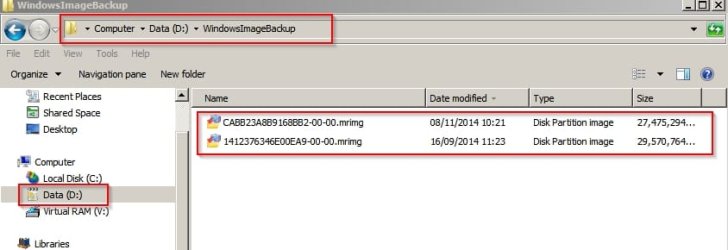
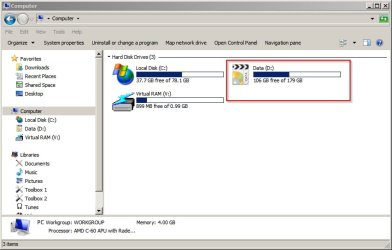
Choose another internal drive

The backup needs to be on a drive that you're not backing up.

WindowsImageBackup.jpg

WindowsImageBackup2.jpg

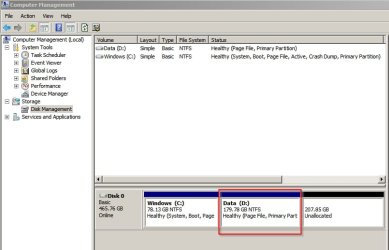
Create a small partition for backups on your current drive.

WindowsImageBackup3.jpg
 

My Computer

Computer type
Laptop
Computer Manufacturer/Model Number
ASUS
OS
Microsoft Windows 7 Home Premium 64-bit 7601 Multiprocessor Free Service Pack 1
CPU
AMD C-60 APU with Radeon(tm) HD Graphics
Motherboard
ASUSTeK COMPUTER INC. X501U
Memory
4.00 GB
Graphics Card(s)
AMD Radeon HD 6290 Graphics
Sound Card
(1) AMD High Definition Audio Device (2) Realtek High Defi
Screen Resolution
1366 x 768 x 32 bits (4294967296 colors) @ 60 Hz
Hard Drives
Hitachi HTS545050A7E380 SATA Disk Device
Antivirus
Comodo CIS & FW, SecureAplus App Whitelisting, Threatfire
Browser
Cyberfox 64bit, Opera 64bit, Airfox
Other Info
Spy-The-Spy, HitmanPro.Alert, Norton Connect Safe, MJRegWatcher, BitDefender TrafficLight, Voodoo Shield, Zemana AntiMalware
My 2Cents. I don't have any problems with USB connected drives for backup. I have both USB 2.0 and USB 3.0 drives and both work without problems with Macrium (I have the paid Pro version).
 

My Computer

Computer type
PC/Desktop
Computer Manufacturer/Model Number
My Own Build
OS
Windows 10 64 bit
CPU
Intel i7 6700K
Motherboard
ASUS ROG Maximus VIII Hero
Memory
16GB Corsair Dominator
Graphics Card(s)
Intel CPU Graphics
Sound Card
RealTek
Monitor(s) Displays
27" Dell S2719dgf
Screen Resolution
2560X1440
Hard Drives
1 TB Samsung 850 EVO SSD for Win 10 Pro
500GB Samsung 850 EVO SSD for Win 10 Insider
2 TB drive for backup
PSU
EVGA Supernova 750G2
Case
BeQuiet Silent Base 600
Cooling
Deepcool Captain 120EX
Keyboard
Microsoft Wireless 2000
Mouse
Microsoft wireless
Internet Speed
100 MB/sec (Cable)
Antivirus
Microsoft Defender and Malwarebytes
Browser
Edge/Firefox
Other Info
Cakewalk (Sonar) by BandLab and Studio One 4.1 Pro recording studio software. MOTU 896Mk3 Hybrid recording interface, Frontier Tranzport wireless control unit, Behringer X-Touch Control Surface.
Five USB connected optical drives for CD Audio production using Nero BurningROM
Back
Top