
Making bootable DVD

How can I boot the system in this situation please?

Just start the clean install over and make sure you stay by the laptop while it's installing
 

My Computer

Computer Manufacturer/Model Number
Dell Vostro 1000
OS
Windows 7 Ultimate x86
CPU
AMD Sempron 3600+
Graphics Card(s)
ATI Radeon Xpress 1150
Monitor(s) Displays
Generic PnP Monitor
Screen Resolution
1200 x 800
Hard Drives
WD Scorpio Blue 500 GB (WD5000BEVT)
Mouse
Logitech V320 Cordless Optical Mouse
How can I boot the system in this situation please?

Just start the clean install over and make sure you stay by the laptop while it's installing
Thanks for the reply.

I really don't know how you mean just start new install. I have tried doing CTRL+ALT+DEL, nothing happens - I mean no boot menue appears. And when I restart machince black screen appears, white cursor flashing on the top left corner, ,and nothing else. Hmm?

Please help what can I do.
 

My Computer

Computer Manufacturer/Model Number
TOSHIBA EQUIUM A200 (X86-based PC AT/AT COMPATIBLE)
OS
Windows 7 Ultimate x86
CPU
Intel(R) Pentium(R) Dual CPU T2310 @ 1.46GHz
Motherboard
Intel Corporation SANTA ROSA CRB
Memory
2GB
Graphics Card(s)
Mobile Intel(R) 965 Express Chipset Family
Screen Resolution
1280 * 800 Pixels
Hard Drives
ST9120822AS ATA Device (IDE)
Do you have the DVD in?
If you do then you should be able to get to the original boot menu like when you did a clean install before.

What step do you get stuck on with a clean install?
 

My Computer

Computer Manufacturer/Model Number
Dell Vostro 1000
OS
Windows 7 Ultimate x86
CPU
AMD Sempron 3600+
Graphics Card(s)
ATI Radeon Xpress 1150
Monitor(s) Displays
Generic PnP Monitor
Screen Resolution
1200 x 800
Hard Drives
WD Scorpio Blue 500 GB (WD5000BEVT)
Mouse
Logitech V320 Cordless Optical Mouse
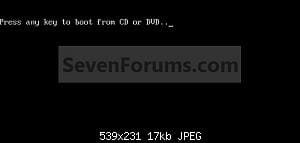
Do you have the DVD in?
If you do then you should be able to get to the original boot menu like when you did a clean install before.

What step do you get stuck on with a clean install?
Yes the DVD is in the drive, but it's just black screen. Plus, hard drive light not flashing.

I did step no. 17, and didn't get the chance to see if step no. 18 screen appeared since I was away.

I am so sorry, but please get me out of this somehow... :| I will try not to mess with all this next time. :(
 

My Computer

Computer Manufacturer/Model Number
TOSHIBA EQUIUM A200 (X86-based PC AT/AT COMPATIBLE)
OS
Windows 7 Ultimate x86
CPU
Intel(R) Pentium(R) Dual CPU T2310 @ 1.46GHz
Motherboard
Intel Corporation SANTA ROSA CRB
Memory
2GB
Graphics Card(s)
Mobile Intel(R) 965 Express Chipset Family
Screen Resolution
1280 * 800 Pixels
Hard Drives
ST9120822AS ATA Device (IDE)
one of the better programs for burning ISOs is InfraRecorder, a freeware cd/dvd burning app that's based on Brasero for linux. It's faster than the windows image burner. You can download it here.
 
one of the better programs for burning ISOs is InfraRecorder, a freeware cd/dvd burning app that's based on Brasero for linux. It's faster than the windows image burner. You can download it here.
Hang on... you can only burn as fast as your DVD burner and DVDs can support. The built-in one should do the job just as fast.

Please correct me if I am wrong.
 

My Computer

Computer Manufacturer/Model Number
Custom
OS
Windows 7 Professional x64
CPU
Intel i7 2600K OC'd @ 4620 MHz
Motherboard
Asus P8Z68-V Pro
Memory
16GB GSkill Sniper 2133 Mhz (4x4GB)
Graphics Card(s)
EVGA GeForce GTX 480 SuperClocked+
Sound Card
Realtek High Definition Audio
Monitor(s) Displays
2x Acer S273HLbmii 27"
Screen Resolution
2 x 1920x1080
Hard Drives
64GB Crucial M4 SSD

Storage: Hitachi 1TB 5400RPM, Samsung 1.5TB 5400RPM
PSU
Corsair HW Series 750w (modular)
Case
Cooler Master HAF 932 Advanced Blue Edition
Cooling
CM Hyper 212+ CPU cooler, 3x 230mm + 1x 140mm case fans
Keyboard
Logitech MK320 (wireless)
Mouse
Logitech MK320 (wireless)
Internet Speed
30 Mb/s : 2 Mb/s
You don't want speed anyways. You want a correct image
 

My Computer

Computer Manufacturer/Model Number
Dell Vostro 1000
OS
Windows 7 Ultimate x86
CPU
AMD Sempron 3600+
Graphics Card(s)
ATI Radeon Xpress 1150
Monitor(s) Displays
Generic PnP Monitor
Screen Resolution
1200 x 800
Hard Drives
WD Scorpio Blue 500 GB (WD5000BEVT)
Mouse
Logitech V320 Cordless Optical Mouse
I've never had any errors with it, been using it for years. You're assuming it can't be faster than the windows burrner, and I suggested the alternative because it works in xp and vista too
 
one of the better programs for burning ISOs is InfraRecorder, a freeware cd/dvd burning app that's based on Brasero for linux. It's faster than the windows image burner. You can download it here.
Hang on... you can only burn as fast as your DVD burner and DVDs can support. The built-in one should do the job just as fast.

Please correct me if I am wrong.

You are right.
 

My Computer

OS
ME/XP/Vista/Win7
Start from here.
 

Attachments

  • Step1.jpg
    Step1.jpg
    3.3 KB · Views: 26

My Computer

OS
ME/XP/Vista/Win7
Start from here.
Yes, but how can I do that?

I mean when I had windows on the system, I was able to go to Boot menue by pressing F2. But now Windows partition is formatted, can anything be done? Any particular software etc.?
 

My Computer

Computer Manufacturer/Model Number
TOSHIBA EQUIUM A200 (X86-based PC AT/AT COMPATIBLE)
OS
Windows 7 Ultimate x86
CPU
Intel(R) Pentium(R) Dual CPU T2310 @ 1.46GHz
Motherboard
Intel Corporation SANTA ROSA CRB
Memory
2GB
Graphics Card(s)
Mobile Intel(R) 965 Express Chipset Family
Screen Resolution
1280 * 800 Pixels
Hard Drives
ST9120822AS ATA Device (IDE)
I mean when I had windows on the system, I was able to go to Boot menue by pressing F2. But now Windows partition is formatted, can anything be done? Any particular software etc.?

Good. You can get to the boot menu. Make sure you change the boot order by putting your DVD drive first. This is done by scrolling to highlight the DVD drive and then pressing Fn > then ? (or some similar combination) to move the drive up. Be sure to then exit saving the changes and you should be good to go.
 

My Computer

Computer Manufacturer/Model Number
Dell Vostro 1000
OS
Windows 7 Ultimate x86
CPU
AMD Sempron 3600+
Graphics Card(s)
ATI Radeon Xpress 1150
Monitor(s) Displays
Generic PnP Monitor
Screen Resolution
1200 x 800
Hard Drives
WD Scorpio Blue 500 GB (WD5000BEVT)
Mouse
Logitech V320 Cordless Optical Mouse
I mean when I had windows on the system, I was able to go to Boot menue by pressing F2. But now Windows partition is formatted, can anything be done? Any particular software etc.?

Good. You can get to the boot menu. Make sure you change the boot order by putting your DVD drive first. This is done by scrolling to highlight the DVD drive and then pressing Fn > then ? (or some similar combination) to move the drive up. Be sure to then exit saving the changes and you should be good to go.
Finally! I have finally installed my fresh Windows 7 Ultimate.

Thank you guys. Thank you very much, redsoxm! You are the guru!
 

My Computer

Computer Manufacturer/Model Number
TOSHIBA EQUIUM A200 (X86-based PC AT/AT COMPATIBLE)
OS
Windows 7 Ultimate x86
CPU
Intel(R) Pentium(R) Dual CPU T2310 @ 1.46GHz
Motherboard
Intel Corporation SANTA ROSA CRB
Memory
2GB
Graphics Card(s)
Mobile Intel(R) 965 Express Chipset Family
Screen Resolution
1280 * 800 Pixels
Hard Drives
ST9120822AS ATA Device (IDE)
Finally! I have finally installed my fresh Windows 7 Ultimate.

Thank you guys. Thank you very much, redsoxm! You are the guru!

You're welcome
 

My Computer

Computer Manufacturer/Model Number
Dell Vostro 1000
OS
Windows 7 Ultimate x86
CPU
AMD Sempron 3600+
Graphics Card(s)
ATI Radeon Xpress 1150
Monitor(s) Displays
Generic PnP Monitor
Screen Resolution
1200 x 800
Hard Drives
WD Scorpio Blue 500 GB (WD5000BEVT)
Mouse
Logitech V320 Cordless Optical Mouse
Back
Top