Malware corrupted registry I have not shut down yet PLEASE HELP!

Schergz

New member
Local time
5:59 AM
Messages
8
Hi. I was checking out a webpage and when I went to close the tab a window popped up saying something like (don't remember exactly) a problem was detected with registry settings being changed, don't shutdown your computer, something about blackscreen , no microsoft support call this number and there was a button to click ok which I DID NOT click. I thought this was some kind of randsomware and quickly closed the page. next I tried to do a system restore but get an error telling me windows has detected file system corruption and to check the disk for errors. I am afraid to click the link for that because I don't have much faith in windows automatically fixing the issue. I think this might have changes something in the registry and haven't shut down the computer. Can anyone help please? Thanks.
 

My Computer My Computer

At a glance

win 7 home premium 64 bitAMD Phenom 11 Quad Core P960DDR3 1066Mhz
Computer type
Laptop
Computer Manufacturer/Model Number
Toshiba Satellite A665D-S5175
OS
win 7 home premium 64 bit
CPU
AMD Phenom 11 Quad Core P960
Memory
DDR3 1066Mhz
Hello and welcome Schergz mate looks very suspicious personally I would be running this Kaspersky Rescue Disk 10 you will of course need to make a bootable disk on another machine and set the BIOS first boot option to the disk or stick whichever method you prefer (I prefer a disk and use the optical drive for boot) but this scan runs in a non Windows environment so will not affect your system. When ready insert the disk into the drive or (USB port) and power up the machine and let it run.
 

My Computer My Computer

At a glance

Desk1 7 Home Prem / Desk2 10 Pro / Main lap A...Desk1 i5 3750K / Laptop i7 GTX 860M / Desk2 i...Desk1 8GB (1866) / Desk2 16GB (1333) / Laptop...Desk 1& 2NVidia GTX 650 & Laptops on board Intel
Computer type
PC/Desktop
Computer Manufacturer/Model Number
Own build (new) Desk1 / Asus ROG Win 7 / Desk2 1st build
OS
Desk1 7 Home Prem / Desk2 10 Pro / Main lap Asus ROG 10 Pro 2 laptop Toshiba 7 Pro Asus P2520 7 & 10
CPU
Desk1 i5 3750K / Laptop i7 GTX 860M / Desk2 i5 2500
Motherboard
Desk1 Asus P877-V / Desk2 Gigabyte H67 UD3H / Laptop ?
Memory
Desk1 8GB (1866) / Desk2 16GB (1333) / Laptop 8Gb DDR3
Graphics Card(s)
Desk 1& 2NVidia GTX 650 & Laptops on board Intel
Sound Card
Desk 1 & 2 -XONAR DG Realtek High Def audio Laptop
Monitor(s) Displays
Desk 1 Benq HD 2450 / Desk2 Philips 24" / Laptop 17.5"
Screen Resolution
1920x1080 D1 & D2 & Laptop 1
Hard Drives
Desk1 Samsung 120GB 830 SSD
Asus ROG 256GB 850 Pro SSD
Desk2 Samsung 840 256 SSD
Toshiba 120GB EVO
PSU
Desk 1 Corsair HX 1050/ Laptop ? / Desk 2 Corsair HX 650
Case
Desk 1 Cooler HAF XM ? Toshiba laptop / Desk2 Coolermaster
Cooling
Fans on all Desk1 -2 Desk2 - all Coolermasters 5 Laptop ?
Keyboard
Desk 1 MS Sidewinder X6 Desk 2 MS Sidewinder X 4
Mouse
Desk 1&2 - Gigabyte MS 900 gamer - laptop - Logitec wireless
Internet Speed
ADSL2+
Other Info
One other Desktop (tester) and spare Toshba laptop both with SSD's
Running Kaspersky 2016 ISS on all machines config'd identically
Logitec audio stereo systems on each machine (x3)
Canon MG5250MFC
Router/modem TP-Link running WPA2SK
Hi. Here's an update. after a full scan with MacAfee turning up nothing, Well I was forced to reboot the computer and windows loaded up to the login screen but After entering my password, there was a pause and then a black screen with just a movable mouse cursor and that's it.
I have read that this type of malware changes settings for permissions to access the hard drive. Before the computer was shut down I did notice that there was another computer named MYSHARE showing up in my network map and also a peripheral device named Jungo OpenRG Internet Gateway device which I hadn't noticed previously.
I called Optimum my ISP, and they said that it is not there equipment. BUT when I double click the icon for this internet gateway device it takes me to the optimum sign in page. So I am assuming that it is in fact their router. No other routers or anything are showing up in my network map. Anyway, I had them remotely reset the password for the router. I also found a lot of settings in my computer management shares folder that didn't seem right. I changed some of these settings and turned off file sharing etc. and was no longer seeing the second computer on my network. I've tried F8 on Startup but can't boot into safe mode. It just continues to load windows up to the login screen. I'm wondering if this could be because I'm using a wireless keyboard.
If anyone has had a similar experience or has any advice please let me know. Thank You.
 

My Computer My Computer

At a glance

win 7 home premium 64 bitAMD Phenom 11 Quad Core P960DDR3 1066Mhz
Computer type
Laptop
Computer Manufacturer/Model Number
Toshiba Satellite A665D-S5175
OS
win 7 home premium 64 bit
CPU
AMD Phenom 11 Quad Core P960
Memory
DDR3 1066Mhz
Yes mate try another KB and I would be disabling AVG temporarily - am not as great fan of it anyway.

I think the best thing right now is to get that rescue disk scan done because it seems to me something untoward has got into your machine. As I said you need to make a bootable disk on another machine and set the BIOS on your machine to whatever drive you intend to make the rescue disk on and power on quickly inserting the disk or stick . It doesn't need Windows to run that is the beauty of it mate there are other AV rescue disks bit the Kaspersky one is my first pick of them.

Now just in case you need to reinstall have you got all your data backed up?? If not then there are these two options for retrieving it.
My own
BOOTABLE UBUNTU
Make a bootable Ubuntu disk Download Ubuntu Desktop | Download | Ubuntu
Set the BIOS to boot from the optical when the machine boots it will show you a screen with TRY or INSTALL > select TRY not INSTALL
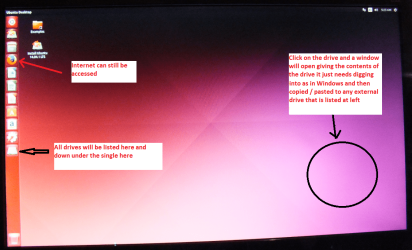
When it is finished - it takes very little time you will get a screen like in the pic .
Open the drive you want > User and dig down until you get to the data / settings you may be able to copy / paste the material you want to an external source or other installed drive doing this.
I am not sure if it will but I have recovered tons of data etc using this method both on "dead" or just plain drives that you cannot get data from using Windows.
and this both are Unix systems and do nit need Windows to start up and you just need to save data to some external device.
http://www.sevenforums.com/tutorials/287439-emergency-kit-save-your-files-dead-os.html this one also gives you a chance to experience a Linux OS working from a stick - my method is a little more simplistic see pic
 

Attachments

  • UBUNTU SCREEN X2.PNG
    UBUNTU SCREEN X2.PNG
    272.7 KB · Views: 0

My Computer My Computer

At a glance

Desk1 7 Home Prem / Desk2 10 Pro / Main lap A...Desk1 i5 3750K / Laptop i7 GTX 860M / Desk2 i...Desk1 8GB (1866) / Desk2 16GB (1333) / Laptop...Desk 1& 2NVidia GTX 650 & Laptops on board Intel
Computer type
PC/Desktop
Computer Manufacturer/Model Number
Own build (new) Desk1 / Asus ROG Win 7 / Desk2 1st build
OS
Desk1 7 Home Prem / Desk2 10 Pro / Main lap Asus ROG 10 Pro 2 laptop Toshiba 7 Pro Asus P2520 7 & 10
CPU
Desk1 i5 3750K / Laptop i7 GTX 860M / Desk2 i5 2500
Motherboard
Desk1 Asus P877-V / Desk2 Gigabyte H67 UD3H / Laptop ?
Memory
Desk1 8GB (1866) / Desk2 16GB (1333) / Laptop 8Gb DDR3
Graphics Card(s)
Desk 1& 2NVidia GTX 650 & Laptops on board Intel
Sound Card
Desk 1 & 2 -XONAR DG Realtek High Def audio Laptop
Monitor(s) Displays
Desk 1 Benq HD 2450 / Desk2 Philips 24" / Laptop 17.5"
Screen Resolution
1920x1080 D1 & D2 & Laptop 1
Hard Drives
Desk1 Samsung 120GB 830 SSD
Asus ROG 256GB 850 Pro SSD
Desk2 Samsung 840 256 SSD
Toshiba 120GB EVO
PSU
Desk 1 Corsair HX 1050/ Laptop ? / Desk 2 Corsair HX 650
Case
Desk 1 Cooler HAF XM ? Toshiba laptop / Desk2 Coolermaster
Cooling
Fans on all Desk1 -2 Desk2 - all Coolermasters 5 Laptop ?
Keyboard
Desk 1 MS Sidewinder X6 Desk 2 MS Sidewinder X 4
Mouse
Desk 1&2 - Gigabyte MS 900 gamer - laptop - Logitec wireless
Internet Speed
ADSL2+
Other Info
One other Desktop (tester) and spare Toshba laptop both with SSD's
Running Kaspersky 2016 ISS on all machines config'd identically
Logitec audio stereo systems on each machine (x3)
Canon MG5250MFC
Router/modem TP-Link running WPA2SK
ICIT2LOL First I'd like to Thank You for taking the time to try and help. I really appreciate that. Well, I went last night to buy a cheap USB keyboard to use for troubleshooting. Got it home, went to hook it up and I discovered that the F8 KEY IS BROKEN!! ARGGG!!!
So back to the store I will go today.:sick:
To answer your questions I have backed up my documents and done both a system and full backup of the computer in it's current configuration (with the issue) before the shutdown using AOMEI backupper. I also have a full backup using the same program but it's about 4 months old. Of course I would prefer to try to fix what I have first before trying to restore from the backup. Also I'm not sure but I think I would first need to do a clean install of Win 7 then install AOMEI Backupper, then do the restore. Problem is I don't have a copy of Win 7 Ultimate 32 Bit that I'm currently running. The closest I could find locally is Win 7 Professional 32 bit and I'm not sure if that will work for the backup restore or for an install repair. At least for the install repair I think I read here that it has to be the exact same version? I actually was running Kaspersky Anti Virus on this computer previously and had some bad experiences with them but I believe I still have the rescue disk I created and will give that a go as soon as I get the new keyboard.
 

My Computer My Computer

At a glance

win 7 home premium 64 bitAMD Phenom 11 Quad Core P960DDR3 1066Mhz
Computer type
Laptop
Computer Manufacturer/Model Number
Toshiba Satellite A665D-S5175
OS
win 7 home premium 64 bit
CPU
AMD Phenom 11 Quad Core P960
Memory
DDR3 1066Mhz
Okay, I got another USB Keyboard to replace the wireless and still can't access BIOS . The function keys don't respond. I've tried pressing F2 repeatedly during startup then repeated the process with F12, F8 etc. None of them work. I did notice that the Num lock light comes on. I then disconnected the hard drive and started it to see if It would go into BIOS but it didn't. This is a Dell Optiplex GX520. Any idea's???
 

My Computer My Computer

At a glance

win 7 home premium 64 bitAMD Phenom 11 Quad Core P960DDR3 1066Mhz
Computer type
Laptop
Computer Manufacturer/Model Number
Toshiba Satellite A665D-S5175
OS
win 7 home premium 64 bit
CPU
AMD Phenom 11 Quad Core P960
Memory
DDR3 1066Mhz
UPDATE: I took the CMOS battery out of the motherboard for about 15 minutes and put it back in. This evidently DID reset the BIOS settings to default because this time F2 worked and I was able to go in and change the boot sequence.:D
I am running the Kaspersky 10 rescue disk and will see what turns up.
 

My Computer My Computer

At a glance

win 7 home premium 64 bitAMD Phenom 11 Quad Core P960DDR3 1066Mhz
Computer type
Laptop
Computer Manufacturer/Model Number
Toshiba Satellite A665D-S5175
OS
win 7 home premium 64 bit
CPU
AMD Phenom 11 Quad Core P960
Memory
DDR3 1066Mhz
Ok mate now while you are waiting for the scan you do know that you can use any Windows 7 DVD to extract the version you want because all DVD's contain all versions. Now to get over what you want it just requires a friend's or relatives DVD and use the ei.cfg removal tool to get the version you want. See this tutorial to see what I mean. Now I suppose you would need a 32bit DVD of whatever flavour you need - for example if the DVD is an Ultimate one that version is locked by the ei.cfg to allow only Ultimate to be used and using the removal tool allows you to get the Home version off that disk and I am not sure if the Ultimate would ned to be 32bit.
http://www.sevenforums.com/tutorials/219487-clean-reinstall-factory-oem-windows-7-a.html

Just remember you are limited to using the activation code on the sticker to actually activate the version you extract.
 

My Computer My Computer

At a glance

Desk1 7 Home Prem / Desk2 10 Pro / Main lap A...Desk1 i5 3750K / Laptop i7 GTX 860M / Desk2 i...Desk1 8GB (1866) / Desk2 16GB (1333) / Laptop...Desk 1& 2NVidia GTX 650 & Laptops on board Intel
Computer type
PC/Desktop
Computer Manufacturer/Model Number
Own build (new) Desk1 / Asus ROG Win 7 / Desk2 1st build
OS
Desk1 7 Home Prem / Desk2 10 Pro / Main lap Asus ROG 10 Pro 2 laptop Toshiba 7 Pro Asus P2520 7 & 10
CPU
Desk1 i5 3750K / Laptop i7 GTX 860M / Desk2 i5 2500
Motherboard
Desk1 Asus P877-V / Desk2 Gigabyte H67 UD3H / Laptop ?
Memory
Desk1 8GB (1866) / Desk2 16GB (1333) / Laptop 8Gb DDR3
Graphics Card(s)
Desk 1& 2NVidia GTX 650 & Laptops on board Intel
Sound Card
Desk 1 & 2 -XONAR DG Realtek High Def audio Laptop
Monitor(s) Displays
Desk 1 Benq HD 2450 / Desk2 Philips 24" / Laptop 17.5"
Screen Resolution
1920x1080 D1 & D2 & Laptop 1
Hard Drives
Desk1 Samsung 120GB 830 SSD
Asus ROG 256GB 850 Pro SSD
Desk2 Samsung 840 256 SSD
Toshiba 120GB EVO
PSU
Desk 1 Corsair HX 1050/ Laptop ? / Desk 2 Corsair HX 650
Case
Desk 1 Cooler HAF XM ? Toshiba laptop / Desk2 Coolermaster
Cooling
Fans on all Desk1 -2 Desk2 - all Coolermasters 5 Laptop ?
Keyboard
Desk 1 MS Sidewinder X6 Desk 2 MS Sidewinder X 4
Mouse
Desk 1&2 - Gigabyte MS 900 gamer - laptop - Logitec wireless
Internet Speed
ADSL2+
Other Info
One other Desktop (tester) and spare Toshba laptop both with SSD's
Running Kaspersky 2016 ISS on all machines config'd identically
Logitec audio stereo systems on each machine (x3)
Canon MG5250MFC
Router/modem TP-Link running WPA2SK
OK. Ran a Kaspersky Rescue disk thorough full scan that took over a full day to complete which didn't turn up anything. I was about to throw in the towel but instead tryed playing around with the boot order in the BIOS some more and this time around was finally able to use the F8 key to boot up in safe mode. I then ran a system restore from the only restore point that was available. The computer rebooted but told me that system restore didn't complete successfully and none of my system files had been changed. BUT somehow, I am now able to login to windows in normal mode and no more black screen.:D 2 things though. I am seeing during bootup a message that says Floppy disk read error press F1 to continue and I don't have or have activated in the BIOS a floppy. So I am a little perplexed by that. Second, If I was not able to complete a system restore successfully, I'm thinking that there must still be some files messed up and wondering if I should do a repair install??
 

My Computer My Computer

At a glance

win 7 home premium 64 bitAMD Phenom 11 Quad Core P960DDR3 1066Mhz
Computer type
Laptop
Computer Manufacturer/Model Number
Toshiba Satellite A665D-S5175
OS
win 7 home premium 64 bit
CPU
AMD Phenom 11 Quad Core P960
Memory
DDR3 1066Mhz
Ok now I think maybe the Kaspersky disk scan might have rattled somethings cage personally and when yo say you have only one system restore point available did you check for ones further back see my pic on how to do that if you haven't done that.

Now a system repair would be good but first look into the restore and if there are no other points then run this
in safe mode http://www.sevenforums.com/tutorials/433-disk-check.html < if necessary include the /f and /r in the command line as per Option2 in fact do that very first thing.
 

Attachments

  • RESTORE 2.PNG
    RESTORE 2.PNG
    20.3 KB · Views: 10

My Computer My Computer

At a glance

Desk1 7 Home Prem / Desk2 10 Pro / Main lap A...Desk1 i5 3750K / Laptop i7 GTX 860M / Desk2 i...Desk1 8GB (1866) / Desk2 16GB (1333) / Laptop...Desk 1& 2NVidia GTX 650 & Laptops on board Intel
Computer type
PC/Desktop
Computer Manufacturer/Model Number
Own build (new) Desk1 / Asus ROG Win 7 / Desk2 1st build
OS
Desk1 7 Home Prem / Desk2 10 Pro / Main lap Asus ROG 10 Pro 2 laptop Toshiba 7 Pro Asus P2520 7 & 10
CPU
Desk1 i5 3750K / Laptop i7 GTX 860M / Desk2 i5 2500
Motherboard
Desk1 Asus P877-V / Desk2 Gigabyte H67 UD3H / Laptop ?
Memory
Desk1 8GB (1866) / Desk2 16GB (1333) / Laptop 8Gb DDR3
Graphics Card(s)
Desk 1& 2NVidia GTX 650 & Laptops on board Intel
Sound Card
Desk 1 & 2 -XONAR DG Realtek High Def audio Laptop
Monitor(s) Displays
Desk 1 Benq HD 2450 / Desk2 Philips 24" / Laptop 17.5"
Screen Resolution
1920x1080 D1 & D2 & Laptop 1
Hard Drives
Desk1 Samsung 120GB 830 SSD
Asus ROG 256GB 850 Pro SSD
Desk2 Samsung 840 256 SSD
Toshiba 120GB EVO
PSU
Desk 1 Corsair HX 1050/ Laptop ? / Desk 2 Corsair HX 650
Case
Desk 1 Cooler HAF XM ? Toshiba laptop / Desk2 Coolermaster
Cooling
Fans on all Desk1 -2 Desk2 - all Coolermasters 5 Laptop ?
Keyboard
Desk 1 MS Sidewinder X6 Desk 2 MS Sidewinder X 4
Mouse
Desk 1&2 - Gigabyte MS 900 gamer - laptop - Logitec wireless
Internet Speed
ADSL2+
Other Info
One other Desktop (tester) and spare Toshba laptop both with SSD's
Running Kaspersky 2016 ISS on all machines config'd identically
Logitec audio stereo systems on each machine (x3)
Canon MG5250MFC
Router/modem TP-Link running WPA2SK
Back
Top