Manage - Fix "File does not have a program associated"

How to Fix Manage "File does not have a program associated with it" Error

   Information
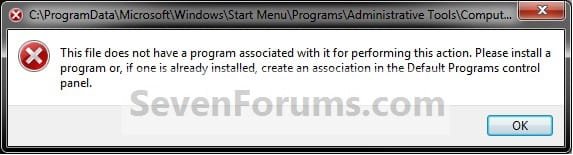
This will show you how to fix the This file does not have a program associated with it for performing this action error message you get when you click on the Manage context menu item for the Computer button in the Start Menu.
   Note
This is usually caused by trying to change the shortcut overlay arrow icon using the improper XP method of deleting the IsShortcut string value in the registry instead of using the proper Windows 7 method.

EXAMPLE: Error message
NOTE: When you right click on the Computer button in the Start Menu and click on Manage, you get this error:

"This file does not have a program associated with it for performing this action. Please install a program or, if one is already installed, create an association in the Default Programs control panel."
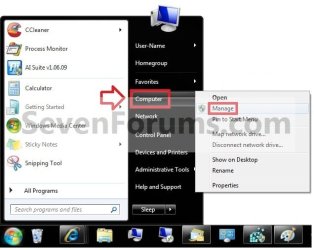
Start_Menu.jpg

Error.jpg


OPTION ONE

To Fix Using a REG File Download


1. Click on the Download button below to download the file below.
Fix_Manage_Error.reg

Download


2. Save the .reg file to the desktop.

3. Right click the downloaded .reg file on the Desktop and click on Merge.

4. Click on Run, Yes (UAC), Yes, and OK when prompted.

5. When done, you can delete the downloaded .reg file if you would like to.

   Tip
If your still get an error afterwards, then download and merge the lnk (LNK) option in the tutorial below to restore all of the default association for shortcuts (lnk), and try again.

http://www.sevenforums.com/tutorials/19449-default-file-type-associations-restore.html


OPTION TWO

To Manually Fix in Registry Editor


1. Open the Start Menu, and type regedit in the search box and press enter.

2. If prompted by UAC, then click on Yes (if administrator) or enter the administrator's password (if standard user).

3. In regedit, navigate to the location below.
HKEY_CLASSES_ROOT\lnkfile
4. In the right pane of lnkfile (LNKFILE), right click on a empty space and click on New and String Value. (see screenshot below)
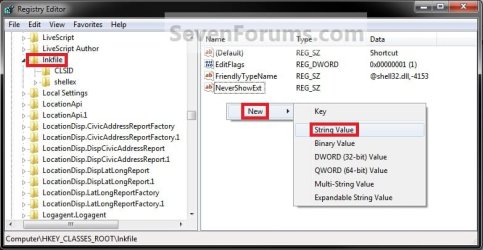
Reg2.jpg
5. Type in IsShortcut for the name and press enter. (see screenshot below)
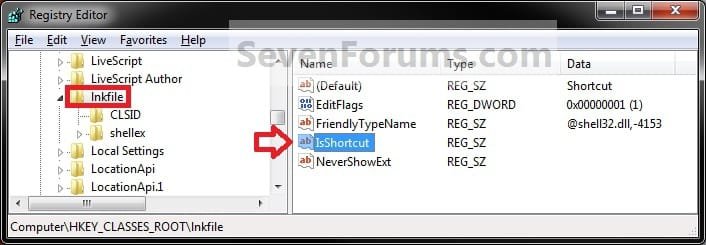
Reg1.jpg
6. In regedit, navigate to the location below.
Code:
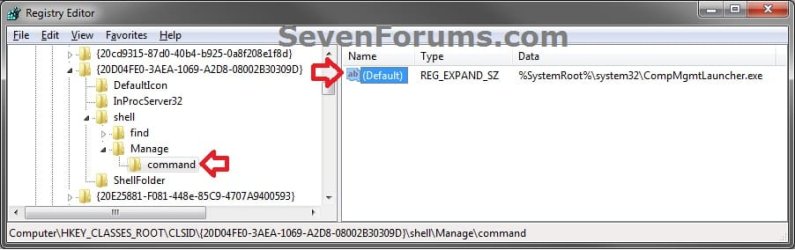
HKEY_CLASSES_ROOT\CLSID\{20D04FE0-3AEA-1069-A2D8-08002B30309D}\shell\Manage\command
Command-1.jpg
7. In the right pane of command, right click on a (Default) and click on Modify. (see screenshot above)

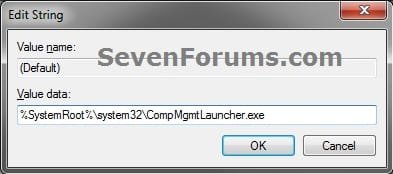
8. Type in the data below if it is not already there, and click on OK. (see screenshot below)
%SystemRoot%\system32\CompMgmtLauncher.exe
Command-2.jpg
9. Close regedit.

   Tip
If your still get an error afterwards, then download and merge the lnk (LNK) option in the tutorial below to restore all of the default association for shortcuts (lnk), and try again.

http://www.sevenforums.com/tutorials/19449-default-file-type-associations-restore.html


That's it,
Shawn


Attachments

Last edited:
You're welcome Brink ,
Any clue of what causes this issue ?
Thanks ,
Regards ,
Chris .:)
 

My Computer My Computer

At a glance

Windows 7 Ultimate 64 bitIntel 7 quadcore14 ram DDR3ASUS gtx 650
Computer type
PC/Desktop
Computer Manufacturer/Model Number
HP Pavilion H8
OS
Windows 7 Ultimate 64 bit
CPU
Intel 7 quadcore
Motherboard
Pegatron 2AB5
Memory
14 ram DDR3
Graphics Card(s)
ASUS gtx 650
Sound Card
Realtec HD
Monitor(s) Displays
HP x22Led
Screen Resolution
1440x900 ( max 1920 x 1080 )
Hard Drives
WDC 500 Gb Sata 3
Hitachi 2T sata 3
several external drives .
PSU
HP 450 W
Case
HP
Cooling
regular fans
Keyboard
Microsoft Azerty
Mouse
Microsoft wireless
Internet Speed
cable high speed
Antivirus
Windows Defender ,
Browser
IE 11
Other Info
Several malware and spy killers ( MalwareBytes , Spy Hunter 4 , Eset on line , Adware Removal Tool ).
Chris,

This is usually caused by trying to change the shortcut overlay arrow icon using the improper XP method of deleting the IsShortcut string value in the registry instead of using the proper Windows 7 method.
 

My Computer My Computer

At a glance

64-bit Windows 11 Pro for WorkstationsIntel i7-8700K OC'd to 5 GHz64 GB (4x16GB) G.SKILL TridentZ RGB DDR4 3600...ASUS ROG-STRIX-GTX1080TI-O11G-GAMING
Computer type
PC/Desktop
Computer Manufacturer/Model Number
Self built custom
OS
64-bit Windows 11 Pro for Workstations
CPU
Intel i7-8700K OC'd to 5 GHz
Motherboard
ASUS ROG Maximus XI Formula Z390
Memory
64 GB (4x16GB) G.SKILL TridentZ RGB DDR4 3600 MHz
Graphics Card(s)
ASUS ROG-STRIX-GTX1080TI-O11G-GAMING
Sound Card
Integrated
Monitor(s) Displays
2 x Samsung Odyssey G7 27"
Screen Resolution
2560x1440
Hard Drives
1TB Samsung 990 PRO M.2,
4TB Samsung 990 PRO PRO M.2,
TerraMaster F8 SSD Plus NAS
PSU
Seasonic Prime Titanium 850W
Case
Thermaltake Core P3
Cooling
Corsair Hydro H115i
Keyboard
Logitech wireless K800
Mouse
Logitech MX Master 4
Internet Speed
2 Gb/s Download and 100 Mb/s Upload
Antivirus
Malwarebyte Anti-Malware Premium
Browser
Google Chrome
Other Info
Logitech Z625 speaker system,
Logitech BRIO 4K Pro webcam,
HP Color LaserJet Pro MFP M477fdn,
APC SMART-UPS RT 1000 XL - SURT1000XLI,
Galaxy S23 Plus phone
Like using Tweak Manager to remove shortcuts arrow ?
Thanks again .
 

My Computer My Computer

At a glance

Windows 7 Ultimate 64 bitIntel 7 quadcore14 ram DDR3ASUS gtx 650
Computer type
PC/Desktop
Computer Manufacturer/Model Number
HP Pavilion H8
OS
Windows 7 Ultimate 64 bit
CPU
Intel 7 quadcore
Motherboard
Pegatron 2AB5
Memory
14 ram DDR3
Graphics Card(s)
ASUS gtx 650
Sound Card
Realtec HD
Monitor(s) Displays
HP x22Led
Screen Resolution
1440x900 ( max 1920 x 1080 )
Hard Drives
WDC 500 Gb Sata 3
Hitachi 2T sata 3
several external drives .
PSU
HP 450 W
Case
HP
Cooling
regular fans
Keyboard
Microsoft Azerty
Mouse
Microsoft wireless
Internet Speed
cable high speed
Antivirus
Windows Defender ,
Browser
IE 11
Other Info
Several malware and spy killers ( MalwareBytes , Spy Hunter 4 , Eset on line , Adware Removal Tool ).
LOL, could be. ;)
 

My Computer My Computer

At a glance

64-bit Windows 11 Pro for WorkstationsIntel i7-8700K OC'd to 5 GHz64 GB (4x16GB) G.SKILL TridentZ RGB DDR4 3600...ASUS ROG-STRIX-GTX1080TI-O11G-GAMING
Computer type
PC/Desktop
Computer Manufacturer/Model Number
Self built custom
OS
64-bit Windows 11 Pro for Workstations
CPU
Intel i7-8700K OC'd to 5 GHz
Motherboard
ASUS ROG Maximus XI Formula Z390
Memory
64 GB (4x16GB) G.SKILL TridentZ RGB DDR4 3600 MHz
Graphics Card(s)
ASUS ROG-STRIX-GTX1080TI-O11G-GAMING
Sound Card
Integrated
Monitor(s) Displays
2 x Samsung Odyssey G7 27"
Screen Resolution
2560x1440
Hard Drives
1TB Samsung 990 PRO M.2,
4TB Samsung 990 PRO PRO M.2,
TerraMaster F8 SSD Plus NAS
PSU
Seasonic Prime Titanium 850W
Case
Thermaltake Core P3
Cooling
Corsair Hydro H115i
Keyboard
Logitech wireless K800
Mouse
Logitech MX Master 4
Internet Speed
2 Gb/s Download and 100 Mb/s Upload
Antivirus
Malwarebyte Anti-Malware Premium
Browser
Google Chrome
Other Info
Logitech Z625 speaker system,
Logitech BRIO 4K Pro webcam,
HP Color LaserJet Pro MFP M477fdn,
APC SMART-UPS RT 1000 XL - SURT1000XLI,
Galaxy S23 Plus phone
Got it Shawn , thanks again .
It's a real pleasure surfing on this forum .
Regards ,
Chris .:thumbsup:
 

My Computer My Computer

At a glance

Windows 7 Ultimate 64 bitIntel 7 quadcore14 ram DDR3ASUS gtx 650
Computer type
PC/Desktop
Computer Manufacturer/Model Number
HP Pavilion H8
OS
Windows 7 Ultimate 64 bit
CPU
Intel 7 quadcore
Motherboard
Pegatron 2AB5
Memory
14 ram DDR3
Graphics Card(s)
ASUS gtx 650
Sound Card
Realtec HD
Monitor(s) Displays
HP x22Led
Screen Resolution
1440x900 ( max 1920 x 1080 )
Hard Drives
WDC 500 Gb Sata 3
Hitachi 2T sata 3
several external drives .
PSU
HP 450 W
Case
HP
Cooling
regular fans
Keyboard
Microsoft Azerty
Mouse
Microsoft wireless
Internet Speed
cable high speed
Antivirus
Windows Defender ,
Browser
IE 11
Other Info
Several malware and spy killers ( MalwareBytes , Spy Hunter 4 , Eset on line , Adware Removal Tool ).
You're most welcome Chris. :)
 

My Computer My Computer

At a glance

64-bit Windows 11 Pro for WorkstationsIntel i7-8700K OC'd to 5 GHz64 GB (4x16GB) G.SKILL TridentZ RGB DDR4 3600...ASUS ROG-STRIX-GTX1080TI-O11G-GAMING
Computer type
PC/Desktop
Computer Manufacturer/Model Number
Self built custom
OS
64-bit Windows 11 Pro for Workstations
CPU
Intel i7-8700K OC'd to 5 GHz
Motherboard
ASUS ROG Maximus XI Formula Z390
Memory
64 GB (4x16GB) G.SKILL TridentZ RGB DDR4 3600 MHz
Graphics Card(s)
ASUS ROG-STRIX-GTX1080TI-O11G-GAMING
Sound Card
Integrated
Monitor(s) Displays
2 x Samsung Odyssey G7 27"
Screen Resolution
2560x1440
Hard Drives
1TB Samsung 990 PRO M.2,
4TB Samsung 990 PRO PRO M.2,
TerraMaster F8 SSD Plus NAS
PSU
Seasonic Prime Titanium 850W
Case
Thermaltake Core P3
Cooling
Corsair Hydro H115i
Keyboard
Logitech wireless K800
Mouse
Logitech MX Master 4
Internet Speed
2 Gb/s Download and 100 Mb/s Upload
Antivirus
Malwarebyte Anti-Malware Premium
Browser
Google Chrome
Other Info
Logitech Z625 speaker system,
Logitech BRIO 4K Pro webcam,
HP Color LaserJet Pro MFP M477fdn,
APC SMART-UPS RT 1000 XL - SURT1000XLI,
Galaxy S23 Plus phone


I downloaded both of these mentioned above and I added them. I still have this message.'The file does not have a program associated with it.'
I have tried to go into my regedit and it gives me the same message above. 'The file does not have a program associated with it.' so I can't even get to it to try some of the manual methods.
I also tried to download the malware mentioned in one of the other replies but it won't let me open anything I download it gives me the same message. 'The file does not have a program associated with it.'

I did shut down after each of the seperate fix's... not sure what else to do please help.
 
Last edited by a moderator:

My Computer My Computer

At a glance

Windows 7 home premium-644.00 GB
Computer Manufacturer/Model Number
Toshiba
OS
Windows 7 home premium-64
Memory
4.00 GB
Hello Marnel, and welcome to Seven Forums.

If you do not see a Merge option when you right click on the REG file, then you will need to check in Default Programs to set the reg file extension to have it's Current Default program set as Registry Editor (C:\Windows\regedit.exe). Afterwards, try merging the REG file again.


Next, see if downloading and merging the EXE and LNK (lnk) options in the tutorial below may be able to help.

http://www.sevenforums.com/tutorials/19449-default-file-type-associations-restore.html

Hope this helps,
Shawn
 

My Computer My Computer

At a glance

64-bit Windows 11 Pro for WorkstationsIntel i7-8700K OC'd to 5 GHz64 GB (4x16GB) G.SKILL TridentZ RGB DDR4 3600...ASUS ROG-STRIX-GTX1080TI-O11G-GAMING
Computer type
PC/Desktop
Computer Manufacturer/Model Number
Self built custom
OS
64-bit Windows 11 Pro for Workstations
CPU
Intel i7-8700K OC'd to 5 GHz
Motherboard
ASUS ROG Maximus XI Formula Z390
Memory
64 GB (4x16GB) G.SKILL TridentZ RGB DDR4 3600 MHz
Graphics Card(s)
ASUS ROG-STRIX-GTX1080TI-O11G-GAMING
Sound Card
Integrated
Monitor(s) Displays
2 x Samsung Odyssey G7 27"
Screen Resolution
2560x1440
Hard Drives
1TB Samsung 990 PRO M.2,
4TB Samsung 990 PRO PRO M.2,
TerraMaster F8 SSD Plus NAS
PSU
Seasonic Prime Titanium 850W
Case
Thermaltake Core P3
Cooling
Corsair Hydro H115i
Keyboard
Logitech wireless K800
Mouse
Logitech MX Master 4
Internet Speed
2 Gb/s Download and 100 Mb/s Upload
Antivirus
Malwarebyte Anti-Malware Premium
Browser
Google Chrome
Other Info
Logitech Z625 speaker system,
Logitech BRIO 4K Pro webcam,
HP Color LaserJet Pro MFP M477fdn,
APC SMART-UPS RT 1000 XL - SURT1000XLI,
Galaxy S23 Plus phone
:confused: Ok I redid all that again after reboot and it seems to have worked.

I was told that I had a message from my Kapersky Anti Virus program, apparently my dd and her friends were dl'g some files and not sure what happened but it says that this was quarantined: PDM Generic Trojans.
Could this have caused that error message? It probably would have helped if they told me that last night :mad:

I was also able to dl the malware bytes on my computer...
Is their anything else I should do or know?
 

My Computer My Computer

At a glance

Windows 7 home premium-644.00 GB
Computer Manufacturer/Model Number
Toshiba
OS
Windows 7 home premium-64
Memory
4.00 GB
I'm happy to hear that it worked for you this round. :)

It's possible that it may have contributed to the error.

It sounds like the malware was taken care of, but it wouldn't hurt to do a full scan of your system with Malwarebytes free, and with Microsoft Standalone System Sweeper at boot to be safe.
 

My Computer My Computer

At a glance

64-bit Windows 11 Pro for WorkstationsIntel i7-8700K OC'd to 5 GHz64 GB (4x16GB) G.SKILL TridentZ RGB DDR4 3600...ASUS ROG-STRIX-GTX1080TI-O11G-GAMING
Computer type
PC/Desktop
Computer Manufacturer/Model Number
Self built custom
OS
64-bit Windows 11 Pro for Workstations
CPU
Intel i7-8700K OC'd to 5 GHz
Motherboard
ASUS ROG Maximus XI Formula Z390
Memory
64 GB (4x16GB) G.SKILL TridentZ RGB DDR4 3600 MHz
Graphics Card(s)
ASUS ROG-STRIX-GTX1080TI-O11G-GAMING
Sound Card
Integrated
Monitor(s) Displays
2 x Samsung Odyssey G7 27"
Screen Resolution
2560x1440
Hard Drives
1TB Samsung 990 PRO M.2,
4TB Samsung 990 PRO PRO M.2,
TerraMaster F8 SSD Plus NAS
PSU
Seasonic Prime Titanium 850W
Case
Thermaltake Core P3
Cooling
Corsair Hydro H115i
Keyboard
Logitech wireless K800
Mouse
Logitech MX Master 4
Internet Speed
2 Gb/s Download and 100 Mb/s Upload
Antivirus
Malwarebyte Anti-Malware Premium
Browser
Google Chrome
Other Info
Logitech Z625 speaker system,
Logitech BRIO 4K Pro webcam,
HP Color LaserJet Pro MFP M477fdn,
APC SMART-UPS RT 1000 XL - SURT1000XLI,
Galaxy S23 Plus phone
I was running malware as i was posting the above message. It seems it found 2 other items and it took care of it.
I will dl the MSSW anything to help, I don't need a virus to take down this laptop as it's only been mine for a month :/

Thank you for all your help you saved my sanity as I've been at this since yesterday but found this place this am.
 

My Computer My Computer

At a glance

Windows 7 home premium-644.00 GB
Computer Manufacturer/Model Number
Toshiba
OS
Windows 7 home premium-64
Memory
4.00 GB
You're welcome Marnel. I hope that it comes back as clean afterwards. Just to be safe, it wouldn't hurt to scan your system each day for a few days to help make sure that it's still clean.
 

My Computer My Computer

At a glance

64-bit Windows 11 Pro for WorkstationsIntel i7-8700K OC'd to 5 GHz64 GB (4x16GB) G.SKILL TridentZ RGB DDR4 3600...ASUS ROG-STRIX-GTX1080TI-O11G-GAMING
Computer type
PC/Desktop
Computer Manufacturer/Model Number
Self built custom
OS
64-bit Windows 11 Pro for Workstations
CPU
Intel i7-8700K OC'd to 5 GHz
Motherboard
ASUS ROG Maximus XI Formula Z390
Memory
64 GB (4x16GB) G.SKILL TridentZ RGB DDR4 3600 MHz
Graphics Card(s)
ASUS ROG-STRIX-GTX1080TI-O11G-GAMING
Sound Card
Integrated
Monitor(s) Displays
2 x Samsung Odyssey G7 27"
Screen Resolution
2560x1440
Hard Drives
1TB Samsung 990 PRO M.2,
4TB Samsung 990 PRO PRO M.2,
TerraMaster F8 SSD Plus NAS
PSU
Seasonic Prime Titanium 850W
Case
Thermaltake Core P3
Cooling
Corsair Hydro H115i
Keyboard
Logitech wireless K800
Mouse
Logitech MX Master 4
Internet Speed
2 Gb/s Download and 100 Mb/s Upload
Antivirus
Malwarebyte Anti-Malware Premium
Browser
Google Chrome
Other Info
Logitech Z625 speaker system,
Logitech BRIO 4K Pro webcam,
HP Color LaserJet Pro MFP M477fdn,
APC SMART-UPS RT 1000 XL - SURT1000XLI,
Galaxy S23 Plus phone
is it bad if I can't find Inkfile under HKEY_CLASSES_ROOT? I was trying to follow option 2 tutorial when I ran into that problem :/
 

My Computer My Computer

At a glance

Windows 7 x64
OS
Windows 7 x64
Hello Gouron,

It's Lnkfile (L) instead of Inkfile (I) , but you may not have reached lnkfile yet. You would need to scroll past all of the file extenstions listed first before the alphabet starts over to then find lnkfile. :)

Hope this helps,
Shawn
 

My Computer My Computer

At a glance

64-bit Windows 11 Pro for WorkstationsIntel i7-8700K OC'd to 5 GHz64 GB (4x16GB) G.SKILL TridentZ RGB DDR4 3600...ASUS ROG-STRIX-GTX1080TI-O11G-GAMING
Computer type
PC/Desktop
Computer Manufacturer/Model Number
Self built custom
OS
64-bit Windows 11 Pro for Workstations
CPU
Intel i7-8700K OC'd to 5 GHz
Motherboard
ASUS ROG Maximus XI Formula Z390
Memory
64 GB (4x16GB) G.SKILL TridentZ RGB DDR4 3600 MHz
Graphics Card(s)
ASUS ROG-STRIX-GTX1080TI-O11G-GAMING
Sound Card
Integrated
Monitor(s) Displays
2 x Samsung Odyssey G7 27"
Screen Resolution
2560x1440
Hard Drives
1TB Samsung 990 PRO M.2,
4TB Samsung 990 PRO PRO M.2,
TerraMaster F8 SSD Plus NAS
PSU
Seasonic Prime Titanium 850W
Case
Thermaltake Core P3
Cooling
Corsair Hydro H115i
Keyboard
Logitech wireless K800
Mouse
Logitech MX Master 4
Internet Speed
2 Gb/s Download and 100 Mb/s Upload
Antivirus
Malwarebyte Anti-Malware Premium
Browser
Google Chrome
Other Info
Logitech Z625 speaker system,
Logitech BRIO 4K Pro webcam,
HP Color LaserJet Pro MFP M477fdn,
APC SMART-UPS RT 1000 XL - SURT1000XLI,
Galaxy S23 Plus phone
The reg file worked fine on my system
"manage works again"
But after restart little arrows on shortcuts are back.
Again remove arrows, manage not working.
So I think its a linked thing manage or arrows.
 

My Computer My Computer

At a glance

7 Ultimate x64 sp1Intel i5-4690K16Gb HyperX furyR9-270x 2Gb
Computer type
PC/Desktop
Computer Manufacturer/Model Number
696
OS
7 Ultimate x64 sp1
CPU
Intel i5-4690K
Motherboard
GA Z97X Gaming 5
Memory
16Gb HyperX fury
Graphics Card(s)
R9-270x 2Gb
Sound Card
On Board
Monitor(s) Displays
2443NW
Screen Resolution
1920x1200
Hard Drives
WD5000 -
WD5001 -
WD1002
PSU
Cft-650-14cs
Case
Very Big Case
Cooling
stock
Keyboard
G11
Mouse
Logitech
Internet Speed
Adsl
Browser
FF
Other Info
RWD
The reg file worked fine on my system
"manage works again"
But after restart little arrows on shortcuts are back.
Again remove arrows, manage not working.
So I think its a linked thing manage or arrows.

Hello Joe,

It is if you use the old XP method to remove shortcut arrows. See the blue note box at the top of the tutorial for info and a link on how to remove shortcut arrows in Windows 7 instead. :)
 

My Computer My Computer

At a glance

64-bit Windows 11 Pro for WorkstationsIntel i7-8700K OC'd to 5 GHz64 GB (4x16GB) G.SKILL TridentZ RGB DDR4 3600...ASUS ROG-STRIX-GTX1080TI-O11G-GAMING
Computer type
PC/Desktop
Computer Manufacturer/Model Number
Self built custom
OS
64-bit Windows 11 Pro for Workstations
CPU
Intel i7-8700K OC'd to 5 GHz
Motherboard
ASUS ROG Maximus XI Formula Z390
Memory
64 GB (4x16GB) G.SKILL TridentZ RGB DDR4 3600 MHz
Graphics Card(s)
ASUS ROG-STRIX-GTX1080TI-O11G-GAMING
Sound Card
Integrated
Monitor(s) Displays
2 x Samsung Odyssey G7 27"
Screen Resolution
2560x1440
Hard Drives
1TB Samsung 990 PRO M.2,
4TB Samsung 990 PRO PRO M.2,
TerraMaster F8 SSD Plus NAS
PSU
Seasonic Prime Titanium 850W
Case
Thermaltake Core P3
Cooling
Corsair Hydro H115i
Keyboard
Logitech wireless K800
Mouse
Logitech MX Master 4
Internet Speed
2 Gb/s Download and 100 Mb/s Upload
Antivirus
Malwarebyte Anti-Malware Premium
Browser
Google Chrome
Other Info
Logitech Z625 speaker system,
Logitech BRIO 4K Pro webcam,
HP Color LaserJet Pro MFP M477fdn,
APC SMART-UPS RT 1000 XL - SURT1000XLI,
Galaxy S23 Plus phone
Back
Top