Hello and thanks in advance for your help--
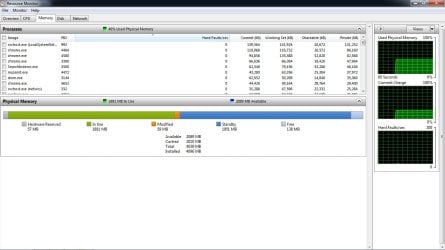
After a (still-undiagnosed) issue with booting my computer I completely wiped the hard drive, reinstalled Windows 7 Home Premium 64bit, and downloaded the drivers that shipped with my computer (Lenovo G570 laptop). I am currently waiting on a new product key, and so Windows has not yet been activated. My system seems to run fine at the moment but am noticing higher RAM usage than normal.
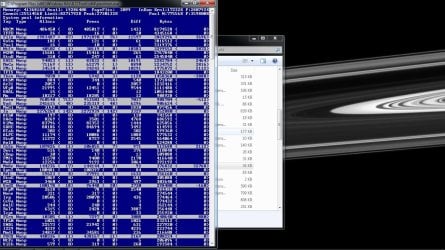
After some investigation I found I was getting some page faults, often in internet-heavy applications (trying to update dropbox, loading new pages in chrome, symantec antivirus, etc.). I've downloaded poolmon and have noted some tags that might be causing trouble (see screenshot below) but do not know what to do with this information (ie, which drivers to update/install as I have no doubt some are very very outdated or potentially missing).
I unfortunately don't have any experience debugging this sort of problem (geophysics phd student, would *love* to get back to my research and stop looking for leaky pools) but am nappy to provide any other relevant information.
After a (still-undiagnosed) issue with booting my computer I completely wiped the hard drive, reinstalled Windows 7 Home Premium 64bit, and downloaded the drivers that shipped with my computer (Lenovo G570 laptop). I am currently waiting on a new product key, and so Windows has not yet been activated. My system seems to run fine at the moment but am noticing higher RAM usage than normal.
After some investigation I found I was getting some page faults, often in internet-heavy applications (trying to update dropbox, loading new pages in chrome, symantec antivirus, etc.). I've downloaded poolmon and have noted some tags that might be causing trouble (see screenshot below) but do not know what to do with this information (ie, which drivers to update/install as I have no doubt some are very very outdated or potentially missing).
I unfortunately don't have any experience debugging this sort of problem (geophysics phd student, would *love* to get back to my research and stop looking for leaky pools) but am nappy to provide any other relevant information.
Attachments
My Computer
At a glance
Windows 7 Home Premium 64biti3-23104GB ram
- Computer type
- Laptop
- Computer Manufacturer/Model Number
- Lenovo G570
- OS
- Windows 7 Home Premium 64bit
- CPU
- i3-2310
- Memory
- 4GB ram
- Hard Drives
- 500GB
- Antivirus
- Symantec
- Browser
- Google Chrome