March 10th 2015 Windows Updates

thats odd; I dont recall getting the updates for windows yesterday. Were they supposed to be for 10 or 7?

Win 7. I often don't actually get the notification until late on Wednesday.
 

My Computer My Computer

Computer type
PC/Desktop
Computer Manufacturer/Model Number
Custom Build
OS
Win 7 Ultimate 64 bit
CPU
Intel i7-3930K
Motherboard
ASUS P9X79 WS
Memory
Kingston HyperX Genesis 32GB Kit (8x4GB Modules) 1600MHz DDR
Graphics Card(s)
MSI R7850 Twin Frozr 2GD5/OC Radeon HD 7850 2GB 256-bit GDDR
Sound Card
Asus Xonar Essence STX
Monitor(s) Displays
3x Asus VG248QE 24", Vizio 32" TV
Screen Resolution
1920 x 1080, ?
Hard Drives
Samsung 128GB 840 Pro SSD (1),
Samsung 4TB 850 EVO SSDs (4)
Samsung 4TB 850 EVO SSDs (16) external backup drives used in 2.5" hot swap bays in the computer.
PSU
Corsair HX750w
Case
Antec Two Hundred v2 (modified)
Cooling
Cooler Master GeminII S524 120mm (fan replaced with a 140mm)
Keyboard
Logitech G510s
Mouse
Logitech M525 (two in use)
Internet Speed
=< 32Mbps down, 8Mbps up
Antivirus
AVAST!, MBAM, SAS, Spybot S&D (all but MBAM free) Glary Util
Browser
IE11
Other Info
LSI 9211-8i HBA card (8 SATA III ports), 2.5" & 3.5" Hot Swap Bays, HooToo HT-CR001 PCI-E to USB 3.0 Internal Hub + 6 Slot Card Reader, and LG Model CH12LS28 BD-ROM Optical Drive. Also, ScanSnap S1500 ADF duplexing scanner, Canon 9000F flat bed scanner, Corsair SP2500 2.1 speakers, Samsung CLP 415nw laser color printer, Cyberpower PP2200SW UPS
thats odd; I dont recall getting the updates for windows yesterday. Were they supposed to be for 10 or 7?

Win 7. I often don't actually get the notification until late on Wednesday.
Same here, my daily check for updates occurres at mid-morning (usually 6 or 7am edt) so I did a forced check for updates about 10am yesterday, and they populated, but I've had occasions where I didn't notice the notification icon in the taskbar until Wednesday.

I understand that microsoft releases the updates around 10am Pacific time, and this may shed some light on the reason why some users recieve them at different times:
Bandwidth impact

Locally the Windows Update service uses the Background Intelligent Transfer Service (BITS) to only use spare bandwidth left by other applications to download the updates.
Microsoft's download servers do not honor the TCP slow-start congestion control strategy.[17] As a result, other users of the Internet may be significantly slowed from machines actively retrieving updates. This can be particularly noticeable in environments where many machines individually retrieve updates over a shared, bandwidth-constrained link such as those found in many multi-PC homes and small to medium-sized businesses. Bandwidth demands of patching large numbers of computers can be reduced significantly by deploying Windows Server Update Services to distribute the updates locally.

Source: Patch Tuesday - Wikipedia, the free encyclopedia
 

My Computer My Computer

Computer type
PC/Desktop
Computer Manufacturer/Model Number
Gateway DX4831-01e (Mid-Tower Desktop)
OS
Originally Win 7 Hm Prem x64 Ver 6.1.7600 Build 7601-SP1 | Upgraded to Windows 10 December 14, 2019
CPU
Intel i3 530 2.93GHz, 2933MHz 2 Cores 4 Logical Processors
Motherboard
Gateway H57M01 133 megahertz
Memory
6GB of 1,333MHz DDR3 SDRAM
Graphics Card(s)
32MB Intel Graphics Media Accelerator HD IGChip
Sound Card
Realtek High Definition Audio
Monitor(s) Displays
Gateway HX2000 20inch TFT active matrix TN
Screen Resolution
1600 x 900 x 59 hertz
Hard Drives
WDC WD10EADS-00M2B0 [HDD] (1000.20 GB) -- drive 0,
HL-DT-ST DVDRAM GH41N [CD-ROM dr]
Four card readers, and Four USB 2.0
PSU
300watts.
Case
Mid-Tower Desktop
Cooling
Stock from Gateway
Keyboard
Natural Ergonomic Keyboard 4000, see Other Info
Mouse
Orig. Gateway wore out now using Insignia USB wired optical
Internet Speed
Vz FIOS 10ms png 57.64Mbps down 65.53Mbps up Speedtest.org
Antivirus
Zamana Anti-logger with Anti-malware, MSE, Windows Firewall,
Browser
IE11.0.9600.19399-Upd ver11.0.135, Firefox 68.0.1 x64
Other Info
System Specs by Belarc.

BIOS: American Megatrends Inc. P01-A0 11/17/2009

Replaced the MS 'Natural' Standard PS/2 Enhanced 101-102 Keyboard with a new Natural Ergonomic Keyboard 4000 on August 1st 2014.

Canon Pixma MG3222 Printer.

Updated to IE11 on 12102015 | Fios Quantum Router g1100

Additional AV: SpywareBlaster, manual Mbam, SAS
For Borg:
I received the March msrt on the 7th so I'm not sure what's up.

Someone else reported getting an early update for that on Win 8 also.

I manually d/l it from the MS site & put it on the desktop in an easily accessible folder. That way it's not buried down in the system & I have easy access to it if I need it.

Another oddity, after d/l ing it, I run the quick scan with it, refresh the update list & it disappears from the d/l's. Not the case this time, it stayed on there even after I ran a scan. I scanned 2X with the tool & it didn't remove itself from the list.

Strange....:confused:
 

My Computer My Computer

Computer type
PC/Desktop
Computer Manufacturer/Model Number
Dell Hell oh Well
OS
Win 7 32 Home Premium, Win 7 64 Pro, Win 8.1, Win 10
CPU
Intel Core 2 Duo 2.93GHz
Memory
Not much with my ADHD
Graphics Card(s)
ATI Radeon HD 4350
Monitor(s) Displays
24" HDTV/Monitor
Screen Resolution
Blurry after a Scotch or 2
Hard Drives
1 HDD 250 GB, 1 HDD 1 TB, 3 - 1 TB Externals
Case
Don't get on my case...man :D
Cooling
I have an Air Conditioner & Diet Pepsi
Keyboard
Saitek Cyborg
Mouse
10 yr old MS optical mouse that still works
Internet Speed
Never fast enough
Antivirus
Various
Browser
Various
For Borg:
I received the March msrt on the 7th so I'm not sure what's up.

Someone else reported getting an early update for that on Win 8 also.

I manually d/l it from the MS site & put it on the desktop in an easily accessible folder. That way it's not buried down in the system & I have easy access to it if I need it.

Another oddity, after d/l ing it, I run the quick scan with it, refresh the update list & it disappears from the d/l's. Not the case this time, it stayed on there even after I ran a scan. I scanned 2X with the tool & it didn't remove itself from the list.

Strange....:confused:

Did you try installing this update from Windows Update ?
Maybe it will disappear from available updates if you install it that way ?

I too got this update early and installed it on the 8th, it disappeared from my list after installing/running.
I thought it was odd to get the update early ...
I wonder if MS is changing when they publish this update going forward, or just something odd this month ?
 

My Computer My Computer

Computer type
PC/Desktop
Computer Manufacturer/Model Number
home built
OS
Multi-Boot W7_Pro_x64 W8.1_Pro_x64 W10_Pro_x64 +Linux_VMs +Chromium_VM
CPU
AMD Athlon II x4 620
Motherboard
Gigabyte GA-MA785G-UD3H
Memory
6GB GSkill DDR2 800
Graphics Card(s)
AMD 4670 GPU + AMD 4200 IGP
Sound Card
on board Realtek ALC889A
Monitor(s) Displays
RCA 40" LCD TV, Insignia 32" LCD TV, HP 15" LCD monitor
Screen Resolution
1680 x 1050
Hard Drives
OCZ Vertex 3 120GB,
Samsung F3 1TB (3),
Several others - WD, Seagate, Hitachi, ...
PSU
Corsair 500 W
Case
Rosewill mid tower
Cooling
CM 90mm rifle
Keyboard
Gyration wireless, Logitech wireless, Dell USB wired
Mouse
Gyration wireless, Logitech wireless, V7 USB wired
Internet Speed
Spectrum - 100Mbps D / 10Mbps U
Antivirus
Avast, MBAM3, EMET, WinPatrol
Browser
Pale Moon, Firefox, IE
Other Info
2 multi-boot PC's
Mainly HTPC/Office/Gen purpose (no gaming).
Trendnet USB KVM.
LG DVD burner/Blue Ray Player.
Tray system for removable SATA backup drives.

Not currently OCd, under-volted.
I use Hybrid sleep, rarely re-boot or shutdown.

Hauppauge HD-PVR, Avermedia PCIe TV Tuner, Hauppauge PCI TV Tuner.
Yea I've never really ever looked for it and ran the scanner personally :/
I always thought it worked in the background after it was installed via the update system ?
 

My Computer My Computer

Computer type
PC/Desktop
Computer Manufacturer/Model Number
Custom assembled by me :}
OS
Win-7-Pro64bit 7-H-Prem-64bit
CPU
i7-5930K 2nd i9-9940x both water blocked VRM's too
Motherboard
ASUS SABERTOOTH X99 2nd ASUS x299 Apex
Memory
Trident-z 3200C14 2nd Trident-z 3600C16
Graphics Card(s)
EVGA 1080ti ftw3 2nd Titan Xp both water blocked
Sound Card
Built-in Realtek
Monitor(s) Displays
1-AOC G2460PG 24"G-Sync 144Hz/ 2nd 1-ASUS VG248QE 24" 144Hz
Screen Resolution
1920 x 1080 144Hz
Hard Drives
2-Samsung M.2 Evo & Evo Plus
2-Samsung 850 EVO 500GB SSD's/ 3-2.5 W.D. Black 1tb-&3-1tb/3-3.5 WD Black 1tb hdd's
PSU
EVGA SuperNOVA 1000-P2 2nd 1200-P2
Case
2-Corsair Obsidian Series 450D Black ATX Mid Tower
Cooling
Custom water loops
Keyboard
Logitech G710+/ 2nd Logitech G910
Mouse
2-RedDragon M901 Perdition 16400 dpi Gaming mouse = wired
Internet Speed
Comcast Ping 19ms 89.31mbps download speed 6.12mbps upload
Antivirus
Malwarebytes Pro/ Superantispyware Pro
Browser
FireFox & Pale moon
Other Info
2nd ASUS X299 Apex/Intel i9-9940x with Custom water loop/7H-Prem-x64/Corsair 450D case/Ram Trident-z 3600C16 4x8gb / Samsung970Evo plus 500gb SSD/Dual ssd EZ swap evo/PSU EVGA SuperNova 1200w-P2 80+Platinum/GPU Titan Xp /8-ML-140 on push-pull on 2-280GTX rads
I hope they start distributing this monthly update before patch Tuesday.
I would not run a AV/AM scan while installing Windows updates.
Isn't that what basically happens when MSRT runs in the mix of Monthly updates ?
What happens if MSRT detects malware in the middle of installing "20" monthly updates ???

imho, it's better to scan for malware before (or after), and separate from installing numerous PT updates.
For me, it adds a lot of time to updating someone's PC using Teamviewer on some PC's ...
 

My Computer My Computer

Computer type
PC/Desktop
Computer Manufacturer/Model Number
home built
OS
Multi-Boot W7_Pro_x64 W8.1_Pro_x64 W10_Pro_x64 +Linux_VMs +Chromium_VM
CPU
AMD Athlon II x4 620
Motherboard
Gigabyte GA-MA785G-UD3H
Memory
6GB GSkill DDR2 800
Graphics Card(s)
AMD 4670 GPU + AMD 4200 IGP
Sound Card
on board Realtek ALC889A
Monitor(s) Displays
RCA 40" LCD TV, Insignia 32" LCD TV, HP 15" LCD monitor
Screen Resolution
1680 x 1050
Hard Drives
OCZ Vertex 3 120GB,
Samsung F3 1TB (3),
Several others - WD, Seagate, Hitachi, ...
PSU
Corsair 500 W
Case
Rosewill mid tower
Cooling
CM 90mm rifle
Keyboard
Gyration wireless, Logitech wireless, Dell USB wired
Mouse
Gyration wireless, Logitech wireless, V7 USB wired
Internet Speed
Spectrum - 100Mbps D / 10Mbps U
Antivirus
Avast, MBAM3, EMET, WinPatrol
Browser
Pale Moon, Firefox, IE
Other Info
2 multi-boot PC's
Mainly HTPC/Office/Gen purpose (no gaming).
Trendnet USB KVM.
LG DVD burner/Blue Ray Player.
Tray system for removable SATA backup drives.

Not currently OCd, under-volted.
I use Hybrid sleep, rarely re-boot or shutdown.

Hauppauge HD-PVR, Avermedia PCIe TV Tuner, Hauppauge PCI TV Tuner.
According to MS, it's supposed to d/l, run a quick scan & then install the other updates.

My reason for doing it the way I do go back to the XP days. I once needed to pull it up to run a scan, & when I finally dug it out, I noticed MS had not removed all the older versions of the tool. I had a folder full of older versions of MSRT files taking up a good amount of space.

It was then that I found if you manually d/l it, put it in a folder where you can get to it easily, run it & then refresh the list that it disappeared from the updates. I found it convenient since I could get to it easily & I didn't have to worry about a folder getting cluttered with older files & taking up space.

I don't know if that works the same way nowadays with 7 or 8, since I've been d/l ing the tool manually & running it manually for a long time now.

I just think it's curious that they delayed the release of a new version of that. Maybe MS has something in the works?

The Malicious software removal tool currently available for download is the February 2015 version. The March 2015 version will be available in the next couple of weeks.
 

My Computer My Computer

Computer type
PC/Desktop
Computer Manufacturer/Model Number
Dell Hell oh Well
OS
Win 7 32 Home Premium, Win 7 64 Pro, Win 8.1, Win 10
CPU
Intel Core 2 Duo 2.93GHz
Memory
Not much with my ADHD
Graphics Card(s)
ATI Radeon HD 4350
Monitor(s) Displays
24" HDTV/Monitor
Screen Resolution
Blurry after a Scotch or 2
Hard Drives
1 HDD 250 GB, 1 HDD 1 TB, 3 - 1 TB Externals
Case
Don't get on my case...man :D
Cooling
I have an Air Conditioner & Diet Pepsi
Keyboard
Saitek Cyborg
Mouse
10 yr old MS optical mouse that still works
Internet Speed
Never fast enough
Antivirus
Various
Browser
Various
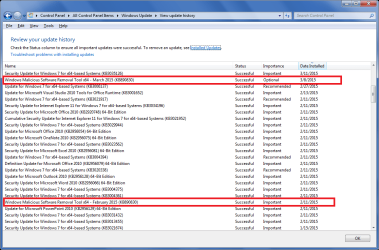
I just looked at Update History and this update changed from Important to Optional this month.

I manually install updates, and i see where it runs in the "middle" of all the updates being installed.
You can see that in my February updates ...
I don't know if it works different for folks using Auto Update ...
I install all updates auto checked by MS in "One update", I don't install them in groups such as "10 at a time" ...
Anyway, it will be interesting to see what happens with this update next month.

WUHistory.png
 

My Computer My Computer

Computer type
PC/Desktop
Computer Manufacturer/Model Number
home built
OS
Multi-Boot W7_Pro_x64 W8.1_Pro_x64 W10_Pro_x64 +Linux_VMs +Chromium_VM
CPU
AMD Athlon II x4 620
Motherboard
Gigabyte GA-MA785G-UD3H
Memory
6GB GSkill DDR2 800
Graphics Card(s)
AMD 4670 GPU + AMD 4200 IGP
Sound Card
on board Realtek ALC889A
Monitor(s) Displays
RCA 40" LCD TV, Insignia 32" LCD TV, HP 15" LCD monitor
Screen Resolution
1680 x 1050
Hard Drives
OCZ Vertex 3 120GB,
Samsung F3 1TB (3),
Several others - WD, Seagate, Hitachi, ...
PSU
Corsair 500 W
Case
Rosewill mid tower
Cooling
CM 90mm rifle
Keyboard
Gyration wireless, Logitech wireless, Dell USB wired
Mouse
Gyration wireless, Logitech wireless, V7 USB wired
Internet Speed
Spectrum - 100Mbps D / 10Mbps U
Antivirus
Avast, MBAM3, EMET, WinPatrol
Browser
Pale Moon, Firefox, IE
Other Info
2 multi-boot PC's
Mainly HTPC/Office/Gen purpose (no gaming).
Trendnet USB KVM.
LG DVD burner/Blue Ray Player.
Tray system for removable SATA backup drives.

Not currently OCd, under-volted.
I use Hybrid sleep, rarely re-boot or shutdown.

Hauppauge HD-PVR, Avermedia PCIe TV Tuner, Hauppauge PCI TV Tuner.
I just looked at Update History and this update changed from Important to Optional this month.
Not here--it continued to be listed as Important. I "installed" it back on the 9th fwiw.
 

My Computer My Computer

Computer type
Laptop
Computer Manufacturer/Model Number
Dell Latitude E6540 Laptop
OS
Windows 7 Professional 64bit
CPU
Intel Core i7 4600M @ 2.90GHz
Motherboard
Dell Inc. 0CYT5F (SOCKET 0)
Memory
16.0GB Dual-Channel DDR3 @ 797MHz (11-11-11-28)
Graphics Card(s)
Intel HD Graphics 4600 (Dell) 2048MB ATI AMD Radeon HD 8790M
Sound Card
Realtek High Definition Audio
Monitor(s) Displays
HP ZR30w (2560x1600@60Hz)
Hard Drives
256GB LITEONIT LMT-256M6M-41 mm SATA (SSD)
1TB Samsung SSD 860 EVO mSATA SATA (SSD)
2TB USB 3.0 USB Device
115GB SanDisk Ultra Fit USB
Other Info
Multiple Dell E-Port Plus II Port Replicator/Docking Stations 0Y72NH USB 3.0 + 130W AC Adapters
Issues

I'm having issues with my laptop that I believe it to be linked to the March 10th update. After I updated my computer, it began freezing for no reason. I've even gone so far as to try to use system restore to 'undo' the update (usually worked in the past for crappy updates) but the restore takes hours and keeps failing. I don't know what to do since the moment I turn on my PC, I might have five minutes before everything stops. Any advice would help.

It might not be caused by the update, but that's one heck of a coincidence.
 

My Computer My Computer

Computer type
Laptop
Computer Manufacturer/Model Number
Asus
OS
Windows 7 64 bit
Antivirus
Webroot

My Computer My Computer

Computer type
Laptop
Computer Manufacturer/Model Number
Acer 5250-0450
OS
Windows 10 Home 64-bit
CPU
AMD E-350 Zacate 40nm Technology
Motherboard
Acer HMA51-BZ (Socket FT1)
Memory
4 GB DDR3 Memory
Graphics Card(s)
1909MB ATI AMD Radeon HD
Sound Card
Conexant High Definition Audio
Monitor(s) Displays
Generic PnP Monitor (1366x768@60Hz)
Hard Drives
320 GB HDD
Mouse
ONN Wireless Mouse
Antivirus
Norton Internet Security Online
Browser
Microsoft Edge, Internet Explorer 11, and Google Chrome
Other Info
Other Computers:

Laptop: Acer Aspire 5749 Series

Desktop: Acer Aspire XC603G Series
Hi ddrkitten, welcome to 7F! :)

It's probably related to this: MS Update 3033929 Causing Reboot Loop I realize yours is freezing and not looping the reboot, but that's what one of the earlier updates did. 3033920 is a rebuild of the Rescinded 2949927 from October.

You would find much better help in our: http://www.sevenforums.com/windows-updates-activation/ Forum.

Make sure you follow the: http://www.sevenforums.com/windows-...4840-windows-update-posting-instructions.html You can follow this link or click on the second one in the sticky section.


Related:
To give you some steps you can try, you should still start a new thread in the Windows Updates and Activation forum. In step #3 instead of repairing your machine you could try Last known good configuration.
How To Fix Windows 7 Update Reboot Loop Problems: Microsoft's KB3033929 Patch Causing Restart Issues

https://Update KB3033929 fails with error code 80004005 | social.technet.microsoft.com

From Jesse's post. I've seen this around the web about the double re-boot; I failed to mention in an earlier post that my machine only rebooted once.
 
Last edited:

My Computer My Computer

Computer type
PC/Desktop
Computer Manufacturer/Model Number
Gateway DX4831-01e (Mid-Tower Desktop)
OS
Originally Win 7 Hm Prem x64 Ver 6.1.7600 Build 7601-SP1 | Upgraded to Windows 10 December 14, 2019
CPU
Intel i3 530 2.93GHz, 2933MHz 2 Cores 4 Logical Processors
Motherboard
Gateway H57M01 133 megahertz
Memory
6GB of 1,333MHz DDR3 SDRAM
Graphics Card(s)
32MB Intel Graphics Media Accelerator HD IGChip
Sound Card
Realtek High Definition Audio
Monitor(s) Displays
Gateway HX2000 20inch TFT active matrix TN
Screen Resolution
1600 x 900 x 59 hertz
Hard Drives
WDC WD10EADS-00M2B0 [HDD] (1000.20 GB) -- drive 0,
HL-DT-ST DVDRAM GH41N [CD-ROM dr]
Four card readers, and Four USB 2.0
PSU
300watts.
Case
Mid-Tower Desktop
Cooling
Stock from Gateway
Keyboard
Natural Ergonomic Keyboard 4000, see Other Info
Mouse
Orig. Gateway wore out now using Insignia USB wired optical
Internet Speed
Vz FIOS 10ms png 57.64Mbps down 65.53Mbps up Speedtest.org
Antivirus
Zamana Anti-logger with Anti-malware, MSE, Windows Firewall,
Browser
IE11.0.9600.19399-Upd ver11.0.135, Firefox 68.0.1 x64
Other Info
System Specs by Belarc.

BIOS: American Megatrends Inc. P01-A0 11/17/2009

Replaced the MS 'Natural' Standard PS/2 Enhanced 101-102 Keyboard with a new Natural Ergonomic Keyboard 4000 on August 1st 2014.

Canon Pixma MG3222 Printer.

Updated to IE11 on 12102015 | Fios Quantum Router g1100

Additional AV: SpywareBlaster, manual Mbam, SAS
Last edited:

My Computer My Computer

Computer type
PC/Desktop
Computer Manufacturer/Model Number
n/a
OS
W7 Ultimate SP1, LM19.2 MATE, W10 Home 1703, W10 Pro 1703 VM, #All 64 bit
CPU
AMD Phenom II x6 1100T, 3.3 GHz
Motherboard
ASUS M4A88T-M/USB3 (AM3)
Memory
12GB DDR3 1333 G-Skill (4GB x 2), G-Skill (2GB x 2)
Graphics Card(s)
NVIDIA GeForce GTX 660
Sound Card
Realtek?
Monitor(s) Displays
Samsung S23B350
Screen Resolution
1920x1080
Hard Drives
WD Green 2TB (SATA), WD Green 3TB (SATA), WD Blue 4TB (SATA), WD Blue 6TB (SATA)
PSU
Cooler Master
Case
Antec GX300 Tower
Cooling
3x Antec TRICOOL 120mm Fans
Mouse
Wired Optical
Internet Speed
DSL
Antivirus
Avast
Browser
Pale Moon (64 bit)
Other Info
2018-12-27 Upgraded HDDs
2015-12-10 Upgraded case, graphics card, storage
2015-08-15 Upgraded motherboard & RAM
2015-07-15 Upgraded LM17.1 to LM17.2
Mine rebooted twice as well. But no problems experienced with this update at all.

I check for updates manually everyday as I use MSE & update it daily just after I start up each morning. Although I have install updates automatically set, I always check manually & install all updates as they become available. In years of doing this I have never had a problem with updates.

I don't pick & choose updates to install, I just install all of them & install them in the order that MS supplies them.
 

My Computer My Computer

Computer type
PC/Desktop
Computer Manufacturer/Model Number
Self built using existing case
OS
Windows 7 Home Premium 64 bit sp1
CPU
Intel i5 3570 3.4Ghz Ivy Bridge SKT 1155 quad core
Motherboard
Gigabyte Z77-HD3 SKT 1155 2xSata 3, 4x USB 3.0
Memory
G-Skill Rip Jaws 16Gb (8x2) DDR3 -1600 PC3 12800 CL 10 red
Graphics Card(s)
Gigabyte NVIDIA GT610 1Gb DDR3 810/1200 PCI-E 2.0 Silent
Sound Card
NVIDIA High Definition & Realtech High Definition Audio
Monitor(s) Displays
2 x Philips 226V4L 16:9 aspect ratio
Screen Resolution
1920 x 1080 HD
Hard Drives
Samsung 840 Pro 256gb SSD, SATA 3.
Hitachi Touro Portable 1tb, USB 3.0 HDD used for image b/ups.
PSU
Corsair VS450
Case
Codeng
Cooling
PSU fan & CPU fan
Keyboard
Logitech
Mouse
Logitech Wireless trackball M570
Internet Speed
Wireless 3G. 3mg down & 550kb up.
Antivirus
Bitdefender Internet Security 2020
Browser
Opera (Current Version) & Firefox
Other Info
MS Office 2013 Pro. Davis weather station software. MGE Nova 600 avr UPS.
Mine rebooted twice as well. But no problems experienced with this update at all.

I check for updates manually everyday as I use MSE & update it daily just after I start up each morning. Although I have install updates automatically set, I always check manually & install all updates as they become available. In years of doing this I have never had a problem with updates.

I don't pick & choose updates to install, I just install all of them & install them in the order that MS supplies them.

I do the same!
 

My Computer My Computer

Computer type
Laptop
Computer Manufacturer/Model Number
Acer 5250-0450
OS
Windows 10 Home 64-bit
CPU
AMD E-350 Zacate 40nm Technology
Motherboard
Acer HMA51-BZ (Socket FT1)
Memory
4 GB DDR3 Memory
Graphics Card(s)
1909MB ATI AMD Radeon HD
Sound Card
Conexant High Definition Audio
Monitor(s) Displays
Generic PnP Monitor (1366x768@60Hz)
Hard Drives
320 GB HDD
Mouse
ONN Wireless Mouse
Antivirus
Norton Internet Security Online
Browser
Microsoft Edge, Internet Explorer 11, and Google Chrome
Other Info
Other Computers:

Laptop: Acer Aspire 5749 Series

Desktop: Acer Aspire XC603G Series
I'm having issues with my laptop that I believe it to be linked to the March 10th update. After I updated my computer, it began freezing for no reason. I've even gone so far as to try to use system restore to 'undo' the update (usually worked in the past for crappy updates) but the restore takes hours and keeps failing. I don't know what to do since the moment I turn on my PC, I might have five minutes before everything stops. Any advice would help.

It might not be caused by the update, but that's one heck of a coincidence.

Uninstalling updates through Control Panel/Programs is usually a far more reliable way of rolling back to pre-updates than using system restore. You might want to give that a try.
 

My Computer My Computer

Computer type
PC/Desktop
Computer Manufacturer/Model Number
Custom build by PC Specialist
OS
Windows 7 Home Premium 64
CPU
AMD Phenom II X4 955
Motherboard
Asus M4A78T-E
Memory
8GB Corsair XMS3 DDR3
Graphics Card(s)
Gigabyte Geforce GTX 960 2GB
Sound Card
SB Audigy
Monitor(s) Displays
BenQ 24"
Screen Resolution
1920 x 1080
Hard Drives
500GB Serial ATA
PSU
1010W Quiet Quad Rail
Case
Antec 900
Cooling
Fenrir
Keyboard
Corsair
Mouse
Logitech
Internet Speed
20mbps
Antivirus
MSE plus MBAM 2.x Free
Browser
Chrome
Other Info
Second desktop different spec but similar level.
I'm having issues with my laptop that I believe it to be linked to the March 10th update. After I updated my computer, it began freezing for no reason. I've even gone so far as to try to use system restore to 'undo' the update (usually worked in the past for crappy updates) but the restore takes hours and keeps failing. I don't know what to do since the moment I turn on my PC, I might have five minutes before everything stops. Any advice would help.

It might not be caused by the update, but that's one heck of a coincidence.

Uninstalling updates through Control Panel/Programs is usually a far more reliable way of rolling back to pre-updates than using system restore. You might want to give that a try.
Having a system image prior to updates is the best way of getting out of trouble. In my experience update trouble doesn't happen often but it can occasionally. I have all my PCs on "tell me about updates but don't download or install until I say so".
 

My Computer My Computer

Computer type
PC/Desktop
Computer Manufacturer/Model Number
Own build
OS
Windows 7x64 Home Premium SP1
CPU
Intel i7 2600k
Motherboard
ASUS P8Z68 Deluxe
Memory
G.Skill Ripjaws (DDR3-1600) 2x4GB
Graphics Card(s)
Nvidia GeForce GTS 450; Intel HD Graphics 3000(GT2+)
Monitor(s) Displays
Dell Ultrasharp IPS panel U2311H, Samsung SyncMaster P2350
Screen Resolution
1920x1080
Hard Drives
Samsung 850 Pro SSD 256GB, Samsung SSD 840 120GB, Seagates 1TB Barracuda ST31000528AS x2
PSU
Seasonic M12II 520W
Case
Lian Li Lancool PC-K60
Cooling
Case: 1x120mm, 3x140mm CPU: Hyper 212+
Keyboard
Logitech MK520 (wireless)
Mouse
Logitech MK520
Internet Speed
6-7 Mbps
Antivirus
Norton Security Premium, Malwarebytes on 2 (MSE on 3rd PC)
Browser
FireFox
Other Info
Audio: Logitech Z523 2.1
I'm having issues with my laptop that I believe it to be linked to the March 10th update. After I updated my computer, it began freezing for no reason. I've even gone so far as to try to use system restore to 'undo' the update (usually worked in the past for crappy updates) but the restore takes hours and keeps failing. I don't know what to do since the moment I turn on my PC, I might have five minutes before everything stops. Any advice would help.

It might not be caused by the update, but that's one heck of a coincidence.

Uninstalling updates through Control Panel/Programs is usually a far more reliable way of rolling back to pre-updates than using system restore. You might want to give that a try.
Having a system image prior to updates is the best way of getting out of trouble. In my experience update trouble doesn't happen often but it can occasionally. I have all my PCs on "tell me about updates but don't download or install until I say so".

System Restore was sometimes iffy with XP and I never was able to get the thing to work at all with Win 7 so I now just shut it off and use imaging (via Macrium Reflect)to go back to when the image was made. I have never had a verified image later fail on me and I've had only one image that failed verification (I have MR set to automatically verify an image after making it).

I also have my PCs set to "tell me about updates but don't download or install until I say so". One reason I always wait until Saturday morning to run M$ updates is on Friday I run full security scans on my computer (instead of the faster quick scans) and immediately after that, I make an image of my boot drive before running my data drive backups. That way, when I run the updates on Saturday morning, if something should go pear shaped, I can just restore my boot drive using the image from the evening before. When running the updates, I will run no more than a set of fifteen at a time, starting with the ones at the bottom of the list, rebooting between each set.

That said, I had a significantly stupidly serious Senior moment this morning. I have had a rough week with my asinine allergies, sinuses, TMJ (it's weird having a toothache where there are no teeth), and back so my head wasn't where it belonged (it's dark up there!) when I started to run the updates. After I double checked to make sure KB3033929 hadn't been pulled, I hit OK without first unchecking all but the bottom fifteen updates and KB3033929 and running all 26 updates at once. I started to interrupt the process but decided the heck with it and let it run while I laid down for a while to see what would happen since I could always restore from the image if things went south. It did the two reboots others have reported and everything has been working fine since then.
 

My Computer My Computer

Computer type
PC/Desktop
Computer Manufacturer/Model Number
Custom Build
OS
Win 7 Ultimate 64 bit
CPU
Intel i7-3930K
Motherboard
ASUS P9X79 WS
Memory
Kingston HyperX Genesis 32GB Kit (8x4GB Modules) 1600MHz DDR
Graphics Card(s)
MSI R7850 Twin Frozr 2GD5/OC Radeon HD 7850 2GB 256-bit GDDR
Sound Card
Asus Xonar Essence STX
Monitor(s) Displays
3x Asus VG248QE 24", Vizio 32" TV
Screen Resolution
1920 x 1080, ?
Hard Drives
Samsung 128GB 840 Pro SSD (1),
Samsung 4TB 850 EVO SSDs (4)
Samsung 4TB 850 EVO SSDs (16) external backup drives used in 2.5" hot swap bays in the computer.
PSU
Corsair HX750w
Case
Antec Two Hundred v2 (modified)
Cooling
Cooler Master GeminII S524 120mm (fan replaced with a 140mm)
Keyboard
Logitech G510s
Mouse
Logitech M525 (two in use)
Internet Speed
=< 32Mbps down, 8Mbps up
Antivirus
AVAST!, MBAM, SAS, Spybot S&D (all but MBAM free) Glary Util
Browser
IE11
Other Info
LSI 9211-8i HBA card (8 SATA III ports), 2.5" & 3.5" Hot Swap Bays, HooToo HT-CR001 PCI-E to USB 3.0 Internal Hub + 6 Slot Card Reader, and LG Model CH12LS28 BD-ROM Optical Drive. Also, ScanSnap S1500 ADF duplexing scanner, Canon 9000F flat bed scanner, Corsair SP2500 2.1 speakers, Samsung CLP 415nw laser color printer, Cyberpower PP2200SW UPS
I had another 4 updates this morning, plus the usual MSE update & as you can see 2 of them were installed twice. No reboot & all went well.

Windows_Update_15_3_15.png
 

My Computer My Computer

Computer type
PC/Desktop
Computer Manufacturer/Model Number
Self built using existing case
OS
Windows 7 Home Premium 64 bit sp1
CPU
Intel i5 3570 3.4Ghz Ivy Bridge SKT 1155 quad core
Motherboard
Gigabyte Z77-HD3 SKT 1155 2xSata 3, 4x USB 3.0
Memory
G-Skill Rip Jaws 16Gb (8x2) DDR3 -1600 PC3 12800 CL 10 red
Graphics Card(s)
Gigabyte NVIDIA GT610 1Gb DDR3 810/1200 PCI-E 2.0 Silent
Sound Card
NVIDIA High Definition & Realtech High Definition Audio
Monitor(s) Displays
2 x Philips 226V4L 16:9 aspect ratio
Screen Resolution
1920 x 1080 HD
Hard Drives
Samsung 840 Pro 256gb SSD, SATA 3.
Hitachi Touro Portable 1tb, USB 3.0 HDD used for image b/ups.
PSU
Corsair VS450
Case
Codeng
Cooling
PSU fan & CPU fan
Keyboard
Logitech
Mouse
Logitech Wireless trackball M570
Internet Speed
Wireless 3G. 3mg down & 550kb up.
Antivirus
Bitdefender Internet Security 2020
Browser
Opera (Current Version) & Firefox
Other Info
MS Office 2013 Pro. Davis weather station software. MGE Nova 600 avr UPS.
I had another 4 updates this morning, plus the usual MSE update & as you can see 2 of them were installed twice. No reboot & all went well.

View attachment 352671

With the exception of KB3032359 which is from this week's updates, the other Windows Updates (as opposed to the MSE one) were all from last month's list. Had you already installed them last month?
 

My Computer My Computer

Computer type
PC/Desktop
Computer Manufacturer/Model Number
Custom build by PC Specialist
OS
Windows 7 Home Premium 64
CPU
AMD Phenom II X4 955
Motherboard
Asus M4A78T-E
Memory
8GB Corsair XMS3 DDR3
Graphics Card(s)
Gigabyte Geforce GTX 960 2GB
Sound Card
SB Audigy
Monitor(s) Displays
BenQ 24"
Screen Resolution
1920 x 1080
Hard Drives
500GB Serial ATA
PSU
1010W Quiet Quad Rail
Case
Antec 900
Cooling
Fenrir
Keyboard
Corsair
Mouse
Logitech
Internet Speed
20mbps
Antivirus
MSE plus MBAM 2.x Free
Browser
Chrome
Other Info
Second desktop different spec but similar level.
Back
Top