
marvell 91xx sata 6g controller. This device cannot start. (Code 10)

kevawo

New member
Local time
1:19 AM
Messages
23
Hey there, I recently updated my BIOS to a newer version due to BSODs and now it's been running perfectly. Although my system works fine now without any problems, I'm not too sure as to what marvell 91xx sata 6g controller is and if it'll affect my system. This never appeared before the BIOS update so could it be some settings in BIOS I have to tweak? I'm not sure if I should be in the Drivers Section or here as I do not know what marvell 91xx sata 6g controller really is, I know it has something to do with SSDs. Thanks!
 

My Computer

Computer type
PC/Desktop
Computer Manufacturer/Model Number
Custom Build
OS
Windows 7 Ultimate x64
CPU
AMD FX(tm)-8120 Eight-Core Processor
Motherboard
Gigabyte Technology Co., Ltd. GA-990FXA-UD5
Memory
16.00 GB
Graphics Card(s)
NVIDIA GeForce GTX 670
Sound Card
Realtek High Definition Audio
Hard Drives
ADATA SSD S510 120GB ATA Device &
WDC WD20EURS-63S48Y0 ATA Device 1.82 TB
Marvell 91 xxm is a driver controller that works the 6 gig sata (3.0) connection on my Asus motherboard. I have never been able to use it because it causes problems. If you can get it to work it will speed up a SSD I/O, R/W slightly.
I use the Intel 2.0 sata connection with no problems. Because it is a SSD it still is very fast. If you are using a hard drive their would be no advantage on using sata 3.0 because of the speed a hard drive works at.

It would be helpful if you would completely fill in your specs. This Tutorial by
Brink will help you with that.

http://www.sevenforums.com/tutorials/180324-system-info-see-your-system-specs.html
 

My Computer

Computer type
PC/Desktop
Computer Manufacturer/Model Number
Home made Desktop
OS
Windows 10 Pro. 64/ version 1709 Windows 7 Pro/64
CPU
Intel i7-6800K @ 4.3
Motherboard
ASUS X-99 Deluxe II
Memory
Corsair Platinum 16 gig @2400
Graphics Card(s)
EVGA GTX 1070 OC
Monitor(s) Displays
Asus 27" LED LCD/VE278Q
Screen Resolution
1920-1080 or 1280-720 HDMI
Hard Drives
INTEL SSD 730-240 Gb Sata 3.0/
PSU
EVGA Platium 1200W
Case
Phanteks Luxe Tempered Glass 8 fans/ one radiator
Cooling
XSPC/ Water Cooled CPU
Keyboard
Das 4 Professional
Mouse
Logitech M705/MX Anywhere 2-S
Internet Speed
100 mbits
Antivirus
Microsoft Security Essentials/ Malwarebytes Premium 3.0/ SAS
Browser
I.E. 11 default/Firefox/ ISP Time Warner Cable/Spectrum
Other Info
LG BluRay Burner/
Sound system-KLipsch-THX/
Icy Dock ssd Hot Swap bays.
Hey there, sorry about that, I just filled in my system specs.

But here it is anyways, I have also attached a jpg to show you what I'm talking about

OS Name Microsoft Windows 7 Ultimate
System Manufacturer Gigabyte Technology Co., Ltd.
System Model GA-990FXA-UD5
System Type x64-based PC
Processor AMD FX(tm)-8120 Eight-Core Processor, 3100 Mhz, 4 Core(s), 8 Logical Processor(s)
Installed Physical Memory (RAM) 16.0 GB
Total Physical Memory 16.0 GB
Available Physical Memory 13.3 GB
Total Virtual Memory 63.9 GB
Available Virtual Memory 61.1 GB
CPU Speed 3.14 GHz
Video Card Model NVIDIA GeForce GTX 670
Video Card Memory 4.24 GB
 

Attachments

  • marvell.jpg
    marvell.jpg
    35.7 KB · Views: 11
  • marvell 2.jpg
    marvell 2.jpg
    19.3 KB · Views: 15

My Computer

Computer type
PC/Desktop
Computer Manufacturer/Model Number
Custom Build
OS
Windows 7 Ultimate x64
CPU
AMD FX(tm)-8120 Eight-Core Processor
Motherboard
Gigabyte Technology Co., Ltd. GA-990FXA-UD5
Memory
16.00 GB
Graphics Card(s)
NVIDIA GeForce GTX 670
Sound Card
Realtek High Definition Audio
Hard Drives
ADATA SSD S510 120GB ATA Device &
WDC WD20EURS-63S48Y0 ATA Device 1.82 TB
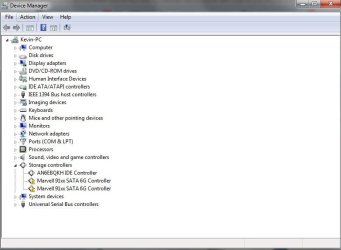
Looking at your motherboard specs I don't see a choice for you. You have to use the Marvell ports.

2 x Marvell 88SE9172 chips:

  1. 2 x SATA 6Gb/s connectors (GSATA3_6, GSATA3_7) supporting up to 2 SATA 6Gb/s devices
  2. 2 x eSATA 6Gb/s connectors on the back panel supporting up to 2 SATA 6Gb/s devices
  3. Support for RAID 0 and RAID 1
GIGABYTE - Motherboard - Socket AM3+ - GA-990FXA-UD5 (rev. 1.x)

Have you updated those two marked Marvell drivers?
Try right ticking on one of them and select Update Drivers.
You could also check Windows Updates and see if it picks up and needed driver updates.
Don't forget to reboot.
 

My Computer

Computer type
PC/Desktop
Computer Manufacturer/Model Number
Home made Desktop
OS
Windows 10 Pro. 64/ version 1709 Windows 7 Pro/64
CPU
Intel i7-6800K @ 4.3
Motherboard
ASUS X-99 Deluxe II
Memory
Corsair Platinum 16 gig @2400
Graphics Card(s)
EVGA GTX 1070 OC
Monitor(s) Displays
Asus 27" LED LCD/VE278Q
Screen Resolution
1920-1080 or 1280-720 HDMI
Hard Drives
INTEL SSD 730-240 Gb Sata 3.0/
PSU
EVGA Platium 1200W
Case
Phanteks Luxe Tempered Glass 8 fans/ one radiator
Cooling
XSPC/ Water Cooled CPU
Keyboard
Das 4 Professional
Mouse
Logitech M705/MX Anywhere 2-S
Internet Speed
100 mbits
Antivirus
Microsoft Security Essentials/ Malwarebytes Premium 3.0/ SAS
Browser
I.E. 11 default/Firefox/ ISP Time Warner Cable/Spectrum
Other Info
LG BluRay Burner/
Sound system-KLipsch-THX/
Icy Dock ssd Hot Swap bays.
Hey there, thanks for all your help, those two drivers are indeed updated to the latest version. What exactly are the Marvell ports and how do I use them?

The picture showing those two drivers with exclamation marks did not appear before the BIOS update, it only appeared after. I did not touch any of my hardware nor did I switch up any cables if that's what you were referring to on the Marvell ports.
 

My Computer

Computer type
PC/Desktop
Computer Manufacturer/Model Number
Custom Build
OS
Windows 7 Ultimate x64
CPU
AMD FX(tm)-8120 Eight-Core Processor
Motherboard
Gigabyte Technology Co., Ltd. GA-990FXA-UD5
Memory
16.00 GB
Graphics Card(s)
NVIDIA GeForce GTX 670
Sound Card
Realtek High Definition Audio
Hard Drives
ADATA SSD S510 120GB ATA Device &
WDC WD20EURS-63S48Y0 ATA Device 1.82 TB
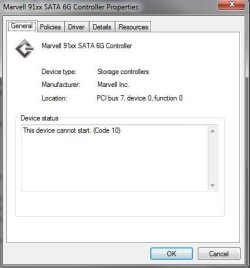
Marvell Sata ports = Sata Ports on your motherboard that have the Marvell Controller that controls them.
Please use your motherboard manual to locate them. You probable have your hard drive plugged into one of them. If the hardware in your computer hasn't been changed and the connections are also the same as before the bios update is probably causing the problem. Why; I don't know. I will look for some help on this matter.

Why did you update your bios?
Were you having a problem before you updated your bios?
Are you having any problems now with the way your system is working?

GIGABYTE - Motherboard - Socket AM3+ - GA-990FXA-UD5 (rev. 1.x)
 

My Computer

Computer type
PC/Desktop
Computer Manufacturer/Model Number
Home made Desktop
OS
Windows 10 Pro. 64/ version 1709 Windows 7 Pro/64
CPU
Intel i7-6800K @ 4.3
Motherboard
ASUS X-99 Deluxe II
Memory
Corsair Platinum 16 gig @2400
Graphics Card(s)
EVGA GTX 1070 OC
Monitor(s) Displays
Asus 27" LED LCD/VE278Q
Screen Resolution
1920-1080 or 1280-720 HDMI
Hard Drives
INTEL SSD 730-240 Gb Sata 3.0/
PSU
EVGA Platium 1200W
Case
Phanteks Luxe Tempered Glass 8 fans/ one radiator
Cooling
XSPC/ Water Cooled CPU
Keyboard
Das 4 Professional
Mouse
Logitech M705/MX Anywhere 2-S
Internet Speed
100 mbits
Antivirus
Microsoft Security Essentials/ Malwarebytes Premium 3.0/ SAS
Browser
I.E. 11 default/Firefox/ ISP Time Warner Cable/Spectrum
Other Info
LG BluRay Burner/
Sound system-KLipsch-THX/
Icy Dock ssd Hot Swap bays.
Marvell ports = Sata Ports on your motherboard that have the Marvell Controller that controls them.
Please use your motherboard manual to locate them. You probable have your hard drive plugged into one of them.

So what do I do after I have located them? Do I unplug them?

Why did you update your bios?
Were you having a problem?

Yes, I was having BSOD issues with certain games such as Rome 2 and Call of Duty, but after the BIOS update they disappeared.

By the way, if my system is working fine, should I be worried about the driver controllers?
 

My Computer

Computer type
PC/Desktop
Computer Manufacturer/Model Number
Custom Build
OS
Windows 7 Ultimate x64
CPU
AMD FX(tm)-8120 Eight-Core Processor
Motherboard
Gigabyte Technology Co., Ltd. GA-990FXA-UD5
Memory
16.00 GB
Graphics Card(s)
NVIDIA GeForce GTX 670
Sound Card
Realtek High Definition Audio
Hard Drives
ADATA SSD S510 120GB ATA Device &
WDC WD20EURS-63S48Y0 ATA Device 1.82 TB
I would not do anything at this time. Do not unplug anything at this time. Your system is working properly.
Using your motherboard manual and having a general knowledge of where things are located and what they are is just a good practice.
Like I posted before I will request help from some friends.
 

My Computer

Computer type
PC/Desktop
Computer Manufacturer/Model Number
Home made Desktop
OS
Windows 10 Pro. 64/ version 1709 Windows 7 Pro/64
CPU
Intel i7-6800K @ 4.3
Motherboard
ASUS X-99 Deluxe II
Memory
Corsair Platinum 16 gig @2400
Graphics Card(s)
EVGA GTX 1070 OC
Monitor(s) Displays
Asus 27" LED LCD/VE278Q
Screen Resolution
1920-1080 or 1280-720 HDMI
Hard Drives
INTEL SSD 730-240 Gb Sata 3.0/
PSU
EVGA Platium 1200W
Case
Phanteks Luxe Tempered Glass 8 fans/ one radiator
Cooling
XSPC/ Water Cooled CPU
Keyboard
Das 4 Professional
Mouse
Logitech M705/MX Anywhere 2-S
Internet Speed
100 mbits
Antivirus
Microsoft Security Essentials/ Malwarebytes Premium 3.0/ SAS
Browser
I.E. 11 default/Firefox/ ISP Time Warner Cable/Spectrum
Other Info
LG BluRay Burner/
Sound system-KLipsch-THX/
Icy Dock ssd Hot Swap bays.
I would not do anything at this time. Do not unplug anything at this time. Your system is working properly.
Using your motherboard manual and having a general knowledge of where things are located and what they are is just a good practice.
Like I posted before I will request help from some friends.


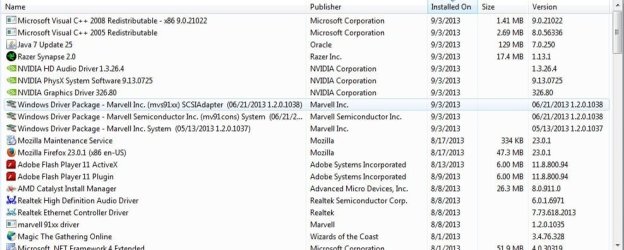
Not sure if this would help but I realized I had recently updated them but they don't seem to match with the versions on the gigabyte site. I used a program called Driver Genius to automatically update my drivers for me. Could this be the culprit and if so how do I roll back?
 

Attachments

  • marvell 3.jpg
    marvell 3.jpg
    72.7 KB · Views: 3

My Computer

Computer type
PC/Desktop
Computer Manufacturer/Model Number
Custom Build
OS
Windows 7 Ultimate x64
CPU
AMD FX(tm)-8120 Eight-Core Processor
Motherboard
Gigabyte Technology Co., Ltd. GA-990FXA-UD5
Memory
16.00 GB
Graphics Card(s)
NVIDIA GeForce GTX 670
Sound Card
Realtek High Definition Audio
Hard Drives
ADATA SSD S510 120GB ATA Device &
WDC WD20EURS-63S48Y0 ATA Device 1.82 TB
Hi there ... Try and Reset your BIOS to Default Under Advanced Options
 

My Computer

Computer Manufacturer/Model Number
W530-3630QM1
OS
windows 7 home 64bit
CPU
INTEL-CORE I7
Memory
16GB
Hard Drives
750GB
Browser
Chrome
Gigabyte has a weird habit of calling Marvel drivers "G-SATA" sometime, if that helps. To roll back drivers, in Device manager double click the device in question to open its Properties window, click Driver tab then Roll Back Driver, if your PC has one it will do so.
Second option is to Uninstall the driver and reboot, then try the Gigabyte site for the correct driver. I never recommend using a driver finder program, they will often show the wrong ones and drivers for hardware you don't even have.
 

My Computer

Computer type
PC/Desktop
Computer Manufacturer/Model Number
Home Built Desktop By DataTech
OS
Windows 7 Ultimate X64 SP1
CPU
Intel i5-2550K, Differing ~4.4-4.8GHz No built in GPU
Motherboard
ASUS P8Z68-V PRO/GEN3
Memory
16GB G.Skill Sniper 1866MHz @ 2133MHz 2x8GB
Graphics Card(s)
ASUS GTX650TIB-DC2OC-2GD5, (650TI Boost)
Sound Card
Onboard Realtek 5-1
Monitor(s) Displays
Samsung P2570HD
Screen Resolution
1920x1080
Hard Drives
Samsung 840 Pro 256GB SSD for OS, 500GB Seagate Constellation (Enterprise drive) for Data
PSU
Corsair HX650W
Case
Inwin Dragon Rider
Cooling
Hyper 212 EVO w/two Noctua fans, push-pull, @1300 RPM
Keyboard
E-Z Eyes, bright yellow keys with large characters
Mouse
steelseries SENSEI Laser Pro Gaming
Internet Speed
48-51Mbs Mbs down, 11 Mbs up Xfinity Cable
Antivirus
Norton Internet Security 2013
Browser
IE 10, Opera, Pale Moon if needed
Other Info
4 case fans, LG BluRay-RE, ASUS DVD-RW, Mr. Fusion power supply, 1.21 gigawatts.
Hi there ... Try and Reset your BIOS to Default Under Advanced Options

My settings are set to Optimized default settings, and I did not change anything.


Gigabyte has a weird habit of calling Marvel drivers "G-SATA" sometime, if that helps. To roll back drivers, in Device manager double click the device in question to open its Properties window, click Driver tab then Roll Back Driver, if your PC has one it will do so.
Second option is to Uninstall the driver and reboot, then try the Gigabyte site for the correct driver. I never recommend using a driver finder program, they will often show the wrong ones and drivers for hardware you don't even have.

I do not have a roll back driver option.

So I went ahead and downloaded the files from the gigabyte main site but it requires I have a floppy which I do not have, but I tried uninstalling anyways and after the restart, it gives me a BSOD at the Windows Logo screen so I had to do system repair to System Restore back to a previous working state.

Edit: Okay, I have found a backup of my drivers dated back to July of 2012 within the Driver Genius program I was talking about in earlier posts, should I roll back the drivers using that?
 

My Computer

Computer type
PC/Desktop
Computer Manufacturer/Model Number
Custom Build
OS
Windows 7 Ultimate x64
CPU
AMD FX(tm)-8120 Eight-Core Processor
Motherboard
Gigabyte Technology Co., Ltd. GA-990FXA-UD5
Memory
16.00 GB
Graphics Card(s)
NVIDIA GeForce GTX 670
Sound Card
Realtek High Definition Audio
Hard Drives
ADATA SSD S510 120GB ATA Device &
WDC WD20EURS-63S48Y0 ATA Device 1.82 TB
The Driver Genius drivers may work, but just install them.

Have you obtained a Genuine Windows installation now?
 

My Computer

Computer type
PC/Desktop
Computer Manufacturer/Model Number
Home Built Desktop By DataTech
OS
Windows 7 Ultimate X64 SP1
CPU
Intel i5-2550K, Differing ~4.4-4.8GHz No built in GPU
Motherboard
ASUS P8Z68-V PRO/GEN3
Memory
16GB G.Skill Sniper 1866MHz @ 2133MHz 2x8GB
Graphics Card(s)
ASUS GTX650TIB-DC2OC-2GD5, (650TI Boost)
Sound Card
Onboard Realtek 5-1
Monitor(s) Displays
Samsung P2570HD
Screen Resolution
1920x1080
Hard Drives
Samsung 840 Pro 256GB SSD for OS, 500GB Seagate Constellation (Enterprise drive) for Data
PSU
Corsair HX650W
Case
Inwin Dragon Rider
Cooling
Hyper 212 EVO w/two Noctua fans, push-pull, @1300 RPM
Keyboard
E-Z Eyes, bright yellow keys with large characters
Mouse
steelseries SENSEI Laser Pro Gaming
Internet Speed
48-51Mbs Mbs down, 11 Mbs up Xfinity Cable
Antivirus
Norton Internet Security 2013
Browser
IE 10, Opera, Pale Moon if needed
Other Info
4 case fans, LG BluRay-RE, ASUS DVD-RW, Mr. Fusion power supply, 1.21 gigawatts.
You said in your other thread that you wanted to correct the illegal activation on the install, but only reported back that you'd fixed it by running a BIOS Update which would not.

We need to know that you are running with a legal copy of Windows, so please install and run http://go.microsoft.com/fwlink/?linkid=52012 and post back its full output before any further help is given.

If you truly want to get clean we will help you but there is no getting around this as the forums has a zero tolerance policy for piracy and your install has been flagged as illegal so unless you cooperate its likely you'll be banned soon.
 

My Computer

Computer type
PC/Desktop
Computer Manufacturer/Model Number
Home made Desktop
OS
Windows 10 Pro. 64/ version 1709 Windows 7 Pro/64
CPU
Intel i7-6800K @ 4.3
Motherboard
ASUS X-99 Deluxe II
Memory
Corsair Platinum 16 gig @2400
Graphics Card(s)
EVGA GTX 1070 OC
Monitor(s) Displays
Asus 27" LED LCD/VE278Q
Screen Resolution
1920-1080 or 1280-720 HDMI
Hard Drives
INTEL SSD 730-240 Gb Sata 3.0/
PSU
EVGA Platium 1200W
Case
Phanteks Luxe Tempered Glass 8 fans/ one radiator
Cooling
XSPC/ Water Cooled CPU
Keyboard
Das 4 Professional
Mouse
Logitech M705/MX Anywhere 2-S
Internet Speed
100 mbits
Antivirus
Microsoft Security Essentials/ Malwarebytes Premium 3.0/ SAS
Browser
I.E. 11 default/Firefox/ ISP Time Warner Cable/Spectrum
Other Info
LG BluRay Burner/
Sound system-KLipsch-THX/
Icy Dock ssd Hot Swap bays.
Thank you all for answering my call for help.
 

My Computer

Computer type
PC/Desktop
Computer Manufacturer/Model Number
Home made Desktop
OS
Windows 10 Pro. 64/ version 1709 Windows 7 Pro/64
CPU
Intel i7-6800K @ 4.3
Motherboard
ASUS X-99 Deluxe II
Memory
Corsair Platinum 16 gig @2400
Graphics Card(s)
EVGA GTX 1070 OC
Monitor(s) Displays
Asus 27" LED LCD/VE278Q
Screen Resolution
1920-1080 or 1280-720 HDMI
Hard Drives
INTEL SSD 730-240 Gb Sata 3.0/
PSU
EVGA Platium 1200W
Case
Phanteks Luxe Tempered Glass 8 fans/ one radiator
Cooling
XSPC/ Water Cooled CPU
Keyboard
Das 4 Professional
Mouse
Logitech M705/MX Anywhere 2-S
Internet Speed
100 mbits
Antivirus
Microsoft Security Essentials/ Malwarebytes Premium 3.0/ SAS
Browser
I.E. 11 default/Firefox/ ISP Time Warner Cable/Spectrum
Other Info
LG BluRay Burner/
Sound system-KLipsch-THX/
Icy Dock ssd Hot Swap bays.
You're welcome. :D
 

My Computer

Computer type
PC/Desktop
Computer Manufacturer/Model Number
Home Built Desktop By DataTech
OS
Windows 7 Ultimate X64 SP1
CPU
Intel i5-2550K, Differing ~4.4-4.8GHz No built in GPU
Motherboard
ASUS P8Z68-V PRO/GEN3
Memory
16GB G.Skill Sniper 1866MHz @ 2133MHz 2x8GB
Graphics Card(s)
ASUS GTX650TIB-DC2OC-2GD5, (650TI Boost)
Sound Card
Onboard Realtek 5-1
Monitor(s) Displays
Samsung P2570HD
Screen Resolution
1920x1080
Hard Drives
Samsung 840 Pro 256GB SSD for OS, 500GB Seagate Constellation (Enterprise drive) for Data
PSU
Corsair HX650W
Case
Inwin Dragon Rider
Cooling
Hyper 212 EVO w/two Noctua fans, push-pull, @1300 RPM
Keyboard
E-Z Eyes, bright yellow keys with large characters
Mouse
steelseries SENSEI Laser Pro Gaming
Internet Speed
48-51Mbs Mbs down, 11 Mbs up Xfinity Cable
Antivirus
Norton Internet Security 2013
Browser
IE 10, Opera, Pale Moon if needed
Other Info
4 case fans, LG BluRay-RE, ASUS DVD-RW, Mr. Fusion power supply, 1.21 gigawatts.
Back
Top