
Solved MBR error on reinstalling Win7 to clean HD

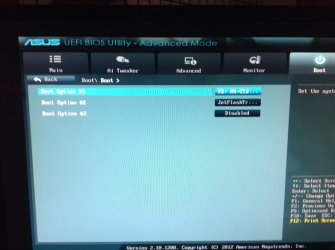
Boot\Boot menu after selecting >Hard Drive BBS Priorities.
 

Attachments

  • image.jpg
    image.jpg
    436.2 KB · Views: 3

My Computer My Computer

At a glance

win 7 pro 64Intel Core i5-2500K 3.3GHz (3.7GHz Turbo Boos...CORSAIR Vengeance 8GB (2x4GB) 240-Pin DDR3 SDRAMEVGA 01G-P3-1556-KR GeForce GTX550 Ti (Fermi)...
Computer type
PC/Desktop
Computer Manufacturer/Model Number
custom build
OS
win 7 pro 64
CPU
Intel Core i5-2500K 3.3GHz (3.7GHz Turbo Boost) LGA 1155 95W
Motherboard
ASUS P8Z68-V LX LGA 1155 Intel Z68 HDMI SATA 6Gb/sUSB3.0 ATX
Memory
CORSAIR Vengeance 8GB (2x4GB) 240-Pin DDR3 SDRAM
Graphics Card(s)
EVGA 01G-P3-1556-KR GeForce GTX550 Ti (Fermi) FPB 1GB
Monitor(s) Displays
ASUS VW246H 24" 2ms(GTG) HDMI Widescreen LCD
Hard Drives
C:\ Crucial M4 CT256M4SSD2CCA 256GB SATA III MLC
D:\ Western Digital WD1002FAEX 1TB 7200 RPM SATA 6.0Gb/s
both internally mounted
PSU
Antec EA-500D 500W
Case
Antec Sonata III 500 Mid Tower Case
Cooling
Cooler Master Hyper 212 Plus RR-B10-212P-G1 120mm CPU Cooler
Keyboard
Logitech Cordless MK700
Mouse
Logitech Cordless MK700
Internet Speed
1.5 Mbps for both upload and download
Other Info
Additional cooling fan: Antec 761345-75121-6 120mm Case Fan

BIOS: ASUS with UEFI, Build date: 7/1/2013, Version 4105
One last post!

Can you click on each of the Boot Options, one at a time, and post what the available picks for each Boot Option?

Thanks,

Bill
.
 

My Computer My Computer

At a glance

x64 (6.3.9600) Win8.1 Pro & soon dual boot x6...AMD A6-3420M APU with Radeon(tm) HD Graphics6.00 GBAMD Radeon(TM) HD 6520G
Computer type
Laptop
Computer Manufacturer/Model Number
HP Pavilion dv6-6c10us
OS
x64 (6.3.9600) Win8.1 Pro & soon dual boot x64 (6.1.7601) Win7_SP1 HomePrem
CPU
AMD A6-3420M APU with Radeon(tm) HD Graphics
Motherboard
Hewlett-Packard 1805
Memory
6.00 GB
Graphics Card(s)
AMD Radeon(TM) HD 6520G
Sound Card
(1) AMD High Definition Audio Device (2) IDT High Definiti
Monitor(s) Displays
HP W2072a 20" LCD (1600 x 900) @ 60 Hz
Screen Resolution
1366 x 768 x 32 bits (4294967296 colors) @ 60 Hz
Hard Drives
ST640LM0 00 HM641JI SATA Disk Device
Keyboard
Logitech k520 wireless KB
Mouse
Logitech m320 wireless mouse (bundled with KB)
Internet Speed
15/5 | 54 MB Wireless 'n'
Antivirus
Realtime: Defender or Avast | On-demand: Malwarebytes, ESET
Browser
IE 11 on Win8, IE 10 on win 7
Other Info
Media: [Gimp, Audacity, VLC] || Comm: [WEmail 2012, Skype] || Productivity: [OpenOffice,| Textpad] || Utils: [Sysinternals, cCleaner, Speccy, Defraggler]
I don't have a "Boot>Boot" screen. To get the image from BIOS, I explained before. Put in a USB flash drive stick, boot into BIOS, pressing F12 will ask you where to save, it should show the USB stick, click it and OK, it will say the screenshot has been saved. Booting bavck to Windows and opening the USB stick will show the captures.
 

My Computer My Computer

At a glance

Windows 7 Ultimate X64 SP1Intel i5-2550K, Differing ~4.4-4.8GHz No buil...16GB G.Skill Sniper 1866MHz @ 2133MHz 2x8GBASUS GTX650TIB-DC2OC-2GD5, (650TI Boost)
Computer type
PC/Desktop
Computer Manufacturer/Model Number
Home Built Desktop By DataTech
OS
Windows 7 Ultimate X64 SP1
CPU
Intel i5-2550K, Differing ~4.4-4.8GHz No built in GPU
Motherboard
ASUS P8Z68-V PRO/GEN3
Memory
16GB G.Skill Sniper 1866MHz @ 2133MHz 2x8GB
Graphics Card(s)
ASUS GTX650TIB-DC2OC-2GD5, (650TI Boost)
Sound Card
Onboard Realtek 5-1
Monitor(s) Displays
Samsung P2570HD
Screen Resolution
1920x1080
Hard Drives
Samsung 840 Pro 256GB SSD for OS, 500GB Seagate Constellation (Enterprise drive) for Data
PSU
Corsair HX650W
Case
Inwin Dragon Rider
Cooling
Hyper 212 EVO w/two Noctua fans, push-pull, @1300 RPM
Keyboard
E-Z Eyes, bright yellow keys with large characters
Mouse
steelseries SENSEI Laser Pro Gaming
Internet Speed
48-51Mbs Mbs down, 11 Mbs up Xfinity Cable
Antivirus
Norton Internet Security 2013
Browser
IE 10, Opera, Pale Moon if needed
Other Info
4 case fans, LG BluRay-RE, ASUS DVD-RW, Mr. Fusion power supply, 1.21 gigawatts.
Boot\Boot menu after selecting >Hard Drive BBS Priorities.

It's for choosing which device of that type (HD) to boot first.

By now its pretty clear UEFI vs Legacy is chosen solely in Boot Device 1,2,3... But it doesn't explain the error during UEFI install for which every other thing was tried.

Still not clear on difference between Boot Device 1,2,3 and Boot Override menu though. Anyone? Don't you have this board Gary?
 
Boot device 1, 2, 3, etc will boot the first bootable device it comes too. Example, you have a bootable CD/DVD in the tray, that will boot before the hard drive. If the tray is empty it will then go to the next in line, e.g. the HDD.

Boot override allows you to set what device you want to boot at only the next boot up, for example if USB is in P3 and you want it to boot, bypassing the HDD.
 

My Computer My Computer

At a glance

Windows 7 Ultimate X64 SP1Intel i5-2550K, Differing ~4.4-4.8GHz No buil...16GB G.Skill Sniper 1866MHz @ 2133MHz 2x8GBASUS GTX650TIB-DC2OC-2GD5, (650TI Boost)
Computer type
PC/Desktop
Computer Manufacturer/Model Number
Home Built Desktop By DataTech
OS
Windows 7 Ultimate X64 SP1
CPU
Intel i5-2550K, Differing ~4.4-4.8GHz No built in GPU
Motherboard
ASUS P8Z68-V PRO/GEN3
Memory
16GB G.Skill Sniper 1866MHz @ 2133MHz 2x8GB
Graphics Card(s)
ASUS GTX650TIB-DC2OC-2GD5, (650TI Boost)
Sound Card
Onboard Realtek 5-1
Monitor(s) Displays
Samsung P2570HD
Screen Resolution
1920x1080
Hard Drives
Samsung 840 Pro 256GB SSD for OS, 500GB Seagate Constellation (Enterprise drive) for Data
PSU
Corsair HX650W
Case
Inwin Dragon Rider
Cooling
Hyper 212 EVO w/two Noctua fans, push-pull, @1300 RPM
Keyboard
E-Z Eyes, bright yellow keys with large characters
Mouse
steelseries SENSEI Laser Pro Gaming
Internet Speed
48-51Mbs Mbs down, 11 Mbs up Xfinity Cable
Antivirus
Norton Internet Security 2013
Browser
IE 10, Opera, Pale Moon if needed
Other Info
4 case fans, LG BluRay-RE, ASUS DVD-RW, Mr. Fusion power supply, 1.21 gigawatts.
Back by request:

Beanster, I'm not familiar with the AMI BIOS, so please bear with me.

In an early post you gave the following information as it relates to Boot:
P3: ASUS DRW-24B1ST
JetFlashTranscend 4GB 1100
P2: M4-CT256M4SSD2
P1: WDC WD1002FAEX-00Z3AO
UEFI: JetFlashTranscend 4GB 1100​

I don't know what P1, P2 and P3 signify or how they get assigned, so here's my question.

If P# get assigned by physical connection (the port the drive is connected to on the Mobo) then
I'd say that you should swap the SATA ports that the WD and Crucial drives are connected.

If you can assign the P# in the BIOS, then I think this is the order you want
P1: M4-CT256M4SSD2
P2: WDC WD1002FAEX-00Z3AO

In either case, I believe you want P1: M4 and P2:WD

I've lost track of the current objective, but at some point... NOT NOW ... it might be advisable to hit that F5 key ... but not just yet.

Let Greg and Bitton30 think about setting defaults - besides yourself, they have invested the most time.

I'm offering it as something for everyone to consider, not an action item.
 

My Computer My Computer

At a glance

x64 (6.3.9600) Win8.1 Pro & soon dual boot x6...AMD A6-3420M APU with Radeon(tm) HD Graphics6.00 GBAMD Radeon(TM) HD 6520G
Computer type
Laptop
Computer Manufacturer/Model Number
HP Pavilion dv6-6c10us
OS
x64 (6.3.9600) Win8.1 Pro & soon dual boot x64 (6.1.7601) Win7_SP1 HomePrem
CPU
AMD A6-3420M APU with Radeon(tm) HD Graphics
Motherboard
Hewlett-Packard 1805
Memory
6.00 GB
Graphics Card(s)
AMD Radeon(TM) HD 6520G
Sound Card
(1) AMD High Definition Audio Device (2) IDT High Definiti
Monitor(s) Displays
HP W2072a 20" LCD (1600 x 900) @ 60 Hz
Screen Resolution
1366 x 768 x 32 bits (4294967296 colors) @ 60 Hz
Hard Drives
ST640LM0 00 HM641JI SATA Disk Device
Keyboard
Logitech k520 wireless KB
Mouse
Logitech m320 wireless mouse (bundled with KB)
Internet Speed
15/5 | 54 MB Wireless 'n'
Antivirus
Realtime: Defender or Avast | On-demand: Malwarebytes, ESET
Browser
IE 11 on Win8, IE 10 on win 7
Other Info
Media: [Gimp, Audacity, VLC] || Comm: [WEmail 2012, Skype] || Productivity: [OpenOffice,| Textpad] || Utils: [Sysinternals, cCleaner, Speccy, Defraggler]
The P is for boot priority Position. P1 first in boot order, P2 second, etc. I find the best configuration is as follows:
P1 CD/DVD drive
P2 USB if the option is available.
P3 Drive with the OS

That allows any bootable media to boot before the OS, say a Linux Live CD.
 

My Computer My Computer

At a glance

Windows 7 Ultimate X64 SP1Intel i5-2550K, Differing ~4.4-4.8GHz No buil...16GB G.Skill Sniper 1866MHz @ 2133MHz 2x8GBASUS GTX650TIB-DC2OC-2GD5, (650TI Boost)
Computer type
PC/Desktop
Computer Manufacturer/Model Number
Home Built Desktop By DataTech
OS
Windows 7 Ultimate X64 SP1
CPU
Intel i5-2550K, Differing ~4.4-4.8GHz No built in GPU
Motherboard
ASUS P8Z68-V PRO/GEN3
Memory
16GB G.Skill Sniper 1866MHz @ 2133MHz 2x8GB
Graphics Card(s)
ASUS GTX650TIB-DC2OC-2GD5, (650TI Boost)
Sound Card
Onboard Realtek 5-1
Monitor(s) Displays
Samsung P2570HD
Screen Resolution
1920x1080
Hard Drives
Samsung 840 Pro 256GB SSD for OS, 500GB Seagate Constellation (Enterprise drive) for Data
PSU
Corsair HX650W
Case
Inwin Dragon Rider
Cooling
Hyper 212 EVO w/two Noctua fans, push-pull, @1300 RPM
Keyboard
E-Z Eyes, bright yellow keys with large characters
Mouse
steelseries SENSEI Laser Pro Gaming
Internet Speed
48-51Mbs Mbs down, 11 Mbs up Xfinity Cable
Antivirus
Norton Internet Security 2013
Browser
IE 10, Opera, Pale Moon if needed
Other Info
4 case fans, LG BluRay-RE, ASUS DVD-RW, Mr. Fusion power supply, 1.21 gigawatts.
Thanks Gary,

So you're saying that the Priority can be set in BIOS. Good.

Boot Priority has long been a subject for debate. For "security" purposes and installation reasons, many professionals call for the HD to be first, followed by the OD, and then the flash. Using the Priority nomenclature:
P1: OS
P2: Optical Drive
P3: USB

I don't buy the security reasons (someone can always hit the Fkey and get to the Boot Order menu), but installation reasons makes sense. P2 and P3 could be switched around, it depends on the media you use most.

@Beanster: any chance you could comply with post# 82? I think it got buried along the way, but I'd still like to see what's under the covers on the screen in post# 81. Thanks.

Bill
.
 

My Computer My Computer

At a glance

x64 (6.3.9600) Win8.1 Pro & soon dual boot x6...AMD A6-3420M APU with Radeon(tm) HD Graphics6.00 GBAMD Radeon(TM) HD 6520G
Computer type
Laptop
Computer Manufacturer/Model Number
HP Pavilion dv6-6c10us
OS
x64 (6.3.9600) Win8.1 Pro & soon dual boot x64 (6.1.7601) Win7_SP1 HomePrem
CPU
AMD A6-3420M APU with Radeon(tm) HD Graphics
Motherboard
Hewlett-Packard 1805
Memory
6.00 GB
Graphics Card(s)
AMD Radeon(TM) HD 6520G
Sound Card
(1) AMD High Definition Audio Device (2) IDT High Definiti
Monitor(s) Displays
HP W2072a 20" LCD (1600 x 900) @ 60 Hz
Screen Resolution
1366 x 768 x 32 bits (4294967296 colors) @ 60 Hz
Hard Drives
ST640LM0 00 HM641JI SATA Disk Device
Keyboard
Logitech k520 wireless KB
Mouse
Logitech m320 wireless mouse (bundled with KB)
Internet Speed
15/5 | 54 MB Wireless 'n'
Antivirus
Realtime: Defender or Avast | On-demand: Malwarebytes, ESET
Browser
IE 11 on Win8, IE 10 on win 7
Other Info
Media: [Gimp, Audacity, VLC] || Comm: [WEmail 2012, Skype] || Productivity: [OpenOffice,| Textpad] || Utils: [Sysinternals, cCleaner, Speccy, Defraggler]
Boot device 1, 2, 3, etc will boot the first bootable device it comes too. Example, you have a bootable CD/DVD in the tray, that will boot before the hard drive. If the tray is empty it will then go to the next in line, e.g. the HDD.

Boot override allows you to set what device you want to boot at only the next boot up, for example if USB is in P3 and you want it to boot, bypassing the HDD.

Is there a one-time BIOS Boot Menu key? Doesn't it show every bootable device? Why the override then? Just askin.
 
Last edited:
Boot device 1, 2, 3, etc will boot the first bootable device it comes too. Example, you have a bootable CD/DVD in the tray, that will boot before the hard drive. If the tray is empty it will then go to the next in line, e.g. the HDD.

Boot override allows you to set what device you want to boot at only the next boot up, for example if USB is in P3 and you want it to boot, bypassing the HDD.

Is there a one-time BIOS Boot Menu key? Doesn't it show every bootable advice? Why the override then? Just askin.
Yes there is a button, in this case it is F8 (F5 to get to Advanced options) and is another choice is all. I think all retail motherboards offer both.
 

My Computer My Computer

At a glance

Windows 7 Ultimate X64 SP1Intel i5-2550K, Differing ~4.4-4.8GHz No buil...16GB G.Skill Sniper 1866MHz @ 2133MHz 2x8GBASUS GTX650TIB-DC2OC-2GD5, (650TI Boost)
Computer type
PC/Desktop
Computer Manufacturer/Model Number
Home Built Desktop By DataTech
OS
Windows 7 Ultimate X64 SP1
CPU
Intel i5-2550K, Differing ~4.4-4.8GHz No built in GPU
Motherboard
ASUS P8Z68-V PRO/GEN3
Memory
16GB G.Skill Sniper 1866MHz @ 2133MHz 2x8GB
Graphics Card(s)
ASUS GTX650TIB-DC2OC-2GD5, (650TI Boost)
Sound Card
Onboard Realtek 5-1
Monitor(s) Displays
Samsung P2570HD
Screen Resolution
1920x1080
Hard Drives
Samsung 840 Pro 256GB SSD for OS, 500GB Seagate Constellation (Enterprise drive) for Data
PSU
Corsair HX650W
Case
Inwin Dragon Rider
Cooling
Hyper 212 EVO w/two Noctua fans, push-pull, @1300 RPM
Keyboard
E-Z Eyes, bright yellow keys with large characters
Mouse
steelseries SENSEI Laser Pro Gaming
Internet Speed
48-51Mbs Mbs down, 11 Mbs up Xfinity Cable
Antivirus
Norton Internet Security 2013
Browser
IE 10, Opera, Pale Moon if needed
Other Info
4 case fans, LG BluRay-RE, ASUS DVD-RW, Mr. Fusion power supply, 1.21 gigawatts.
Yes from what I've seen most all retail mobo's offer a one-time BIOS Boot menu key, and also setting in BIOS setup to prioritize the boot devices.

What I don't understand is the need for the Boot Override settings at all if you already have separate settings in Setup for Boot order priority, and a one-time BIOS Boot menu key which gives all choices.
 
Last edited:
The key is a lot easier to use than drilling down through a lot of BIOS menus, I guess? I have no good answer for why both though, it is what it is, as they say.
 

My Computer My Computer

At a glance

Windows 7 Ultimate X64 SP1Intel i5-2550K, Differing ~4.4-4.8GHz No buil...16GB G.Skill Sniper 1866MHz @ 2133MHz 2x8GBASUS GTX650TIB-DC2OC-2GD5, (650TI Boost)
Computer type
PC/Desktop
Computer Manufacturer/Model Number
Home Built Desktop By DataTech
OS
Windows 7 Ultimate X64 SP1
CPU
Intel i5-2550K, Differing ~4.4-4.8GHz No built in GPU
Motherboard
ASUS P8Z68-V PRO/GEN3
Memory
16GB G.Skill Sniper 1866MHz @ 2133MHz 2x8GB
Graphics Card(s)
ASUS GTX650TIB-DC2OC-2GD5, (650TI Boost)
Sound Card
Onboard Realtek 5-1
Monitor(s) Displays
Samsung P2570HD
Screen Resolution
1920x1080
Hard Drives
Samsung 840 Pro 256GB SSD for OS, 500GB Seagate Constellation (Enterprise drive) for Data
PSU
Corsair HX650W
Case
Inwin Dragon Rider
Cooling
Hyper 212 EVO w/two Noctua fans, push-pull, @1300 RPM
Keyboard
E-Z Eyes, bright yellow keys with large characters
Mouse
steelseries SENSEI Laser Pro Gaming
Internet Speed
48-51Mbs Mbs down, 11 Mbs up Xfinity Cable
Antivirus
Norton Internet Security 2013
Browser
IE 10, Opera, Pale Moon if needed
Other Info
4 case fans, LG BluRay-RE, ASUS DVD-RW, Mr. Fusion power supply, 1.21 gigawatts.
Does anyone else know? I don't have a mobo like that so can't test the difference.

Override must have some ancillary function rather than just duplicating the Boot Priority on the same page.
 
Last edited:
This page seems to cover everything, and just came up for the first time searching Asus BIOS UEFI and Boot Override jointly. I think it is new ("Under Development") since I've been looking for a page this explanatory for years and just checked last week: Architecture Intel Sandy Bridge -- Info-Coach
 
That's a great reference Greg.

My question now is, does Beanster reset BIOS and make changes as required or does he try to unravel what was done before and then make changes as required?

My take is a reset and using the page you found along with your and Gary's knowledge to make changes to the optimized settings. It's entirely possible that the reset will be sufficient. The screens I looked at show F5 as the reset key.

Any thoughts?
 

My Computer My Computer

At a glance

x64 (6.3.9600) Win8.1 Pro & soon dual boot x6...AMD A6-3420M APU with Radeon(tm) HD Graphics6.00 GBAMD Radeon(TM) HD 6520G
Computer type
Laptop
Computer Manufacturer/Model Number
HP Pavilion dv6-6c10us
OS
x64 (6.3.9600) Win8.1 Pro & soon dual boot x64 (6.1.7601) Win7_SP1 HomePrem
CPU
AMD A6-3420M APU with Radeon(tm) HD Graphics
Motherboard
Hewlett-Packard 1805
Memory
6.00 GB
Graphics Card(s)
AMD Radeon(TM) HD 6520G
Sound Card
(1) AMD High Definition Audio Device (2) IDT High Definiti
Monitor(s) Displays
HP W2072a 20" LCD (1600 x 900) @ 60 Hz
Screen Resolution
1366 x 768 x 32 bits (4294967296 colors) @ 60 Hz
Hard Drives
ST640LM0 00 HM641JI SATA Disk Device
Keyboard
Logitech k520 wireless KB
Mouse
Logitech m320 wireless mouse (bundled with KB)
Internet Speed
15/5 | 54 MB Wireless 'n'
Antivirus
Realtime: Defender or Avast | On-demand: Malwarebytes, ESET
Browser
IE 11 on Win8, IE 10 on win 7
Other Info
Media: [Gimp, Audacity, VLC] || Comm: [WEmail 2012, Skype] || Productivity: [OpenOffice,| Textpad] || Utils: [Sysinternals, cCleaner, Speccy, Defraggler]
He got it installed. If performance is OK he should leave it.

If he wants to troubleshoot a UEFI install he could use another HD plugged in alone. If he really wants UEFI then he can save an image and try troubleshooting one on SSD.

But he said early on he didn't even want UEFI so we can wait for someone else with identical issue to find this thread as often happens.
 
He got it installed. If performance is OK he should leave it.

If he wants to troubleshoot a UEFI install he could use another HD plugged in alone. If he really wants UEFI then he can save an image and try troubleshooting one on SSD.

But he said early on he didn't even want UEFI so we can wait for someone else with identical issue to find this thread as often happens.

Agreed.

I was wondering about the Fat32 considerations for USB installs and UEFI. I think it might be easier to direct members to use a DVD instead of a USB drive when UEFI is involved. It simplifies things for everyone.

Asus P8P67 Deluxe UEFI Firmware said:
  • In order to be detected as “UEFI bootable” a device needs to have a specific EFI file in a specific location. For example if you place a Windows 7 X64 DVD installation disk in your DVD drive it will be recognized as an UEFI boot device and you will be able to perform the Windows installation in UEFI mode. In contrast a Windows 7 X86 DVD installation disk does not have the appropriate efi file and therefore in that case the DVD will not be displayed as an UEFI boot device.
    picture.php
  • Beware that you cannot boot in UEFI mode from an USB stick formatted in NTFS (UEFI do not handle NTFS partitions). For example a Windows 7 X64 Installation USB Stick created using the “Windows USB DVD Download” tool provided by Microsoft will not boot in UEFI (but work well in BIOS legacy mode). Therefore you have to format the USB stick in FAT32, make it bootable, and copy the proper files in the proper location (see references at the end) so you can successfully install Windows 7 X64 in UEFI mode from it.
 

My Computer My Computer

At a glance

x64 (6.3.9600) Win8.1 Pro & soon dual boot x6...AMD A6-3420M APU with Radeon(tm) HD Graphics6.00 GBAMD Radeon(TM) HD 6520G
Computer type
Laptop
Computer Manufacturer/Model Number
HP Pavilion dv6-6c10us
OS
x64 (6.3.9600) Win8.1 Pro & soon dual boot x64 (6.1.7601) Win7_SP1 HomePrem
CPU
AMD A6-3420M APU with Radeon(tm) HD Graphics
Motherboard
Hewlett-Packard 1805
Memory
6.00 GB
Graphics Card(s)
AMD Radeon(TM) HD 6520G
Sound Card
(1) AMD High Definition Audio Device (2) IDT High Definiti
Monitor(s) Displays
HP W2072a 20" LCD (1600 x 900) @ 60 Hz
Screen Resolution
1366 x 768 x 32 bits (4294967296 colors) @ 60 Hz
Hard Drives
ST640LM0 00 HM641JI SATA Disk Device
Keyboard
Logitech k520 wireless KB
Mouse
Logitech m320 wireless mouse (bundled with KB)
Internet Speed
15/5 | 54 MB Wireless 'n'
Antivirus
Realtime: Defender or Avast | On-demand: Malwarebytes, ESET
Browser
IE 11 on Win8, IE 10 on win 7
Other Info
Media: [Gimp, Audacity, VLC] || Comm: [WEmail 2012, Skype] || Productivity: [OpenOffice,| Textpad] || Utils: [Sysinternals, cCleaner, Speccy, Defraggler]
Bean,

If things are running well after a few days, please mark your thread as solved - thanks.

I learned a lot in this thread - thanks everyone.

Bill
.
 

My Computer My Computer

At a glance

x64 (6.3.9600) Win8.1 Pro & soon dual boot x6...AMD A6-3420M APU with Radeon(tm) HD Graphics6.00 GBAMD Radeon(TM) HD 6520G
Computer type
Laptop
Computer Manufacturer/Model Number
HP Pavilion dv6-6c10us
OS
x64 (6.3.9600) Win8.1 Pro & soon dual boot x64 (6.1.7601) Win7_SP1 HomePrem
CPU
AMD A6-3420M APU with Radeon(tm) HD Graphics
Motherboard
Hewlett-Packard 1805
Memory
6.00 GB
Graphics Card(s)
AMD Radeon(TM) HD 6520G
Sound Card
(1) AMD High Definition Audio Device (2) IDT High Definiti
Monitor(s) Displays
HP W2072a 20" LCD (1600 x 900) @ 60 Hz
Screen Resolution
1366 x 768 x 32 bits (4294967296 colors) @ 60 Hz
Hard Drives
ST640LM0 00 HM641JI SATA Disk Device
Keyboard
Logitech k520 wireless KB
Mouse
Logitech m320 wireless mouse (bundled with KB)
Internet Speed
15/5 | 54 MB Wireless 'n'
Antivirus
Realtime: Defender or Avast | On-demand: Malwarebytes, ESET
Browser
IE 11 on Win8, IE 10 on win 7
Other Info
Media: [Gimp, Audacity, VLC] || Comm: [WEmail 2012, Skype] || Productivity: [OpenOffice,| Textpad] || Utils: [Sysinternals, cCleaner, Speccy, Defraggler]
Gentlemen,
I am now communicating from the desktop and not the iPad. After resolving the password issue, and the network driver issue, I followed the instructions from post # 42, then began the Updates. I'm experiencing the same problem that started this whole mess: Important updates failing repeatedly to install. I cannot get a screen shot from here. F12, Print Screen, Alt-PrintScreen --- no captures. I will try manually installing each update to see if that will work. Back later...
 

My Computer My Computer

At a glance

win 7 pro 64Intel Core i5-2500K 3.3GHz (3.7GHz Turbo Boos...CORSAIR Vengeance 8GB (2x4GB) 240-Pin DDR3 SDRAMEVGA 01G-P3-1556-KR GeForce GTX550 Ti (Fermi)...
Computer type
PC/Desktop
Computer Manufacturer/Model Number
custom build
OS
win 7 pro 64
CPU
Intel Core i5-2500K 3.3GHz (3.7GHz Turbo Boost) LGA 1155 95W
Motherboard
ASUS P8Z68-V LX LGA 1155 Intel Z68 HDMI SATA 6Gb/sUSB3.0 ATX
Memory
CORSAIR Vengeance 8GB (2x4GB) 240-Pin DDR3 SDRAM
Graphics Card(s)
EVGA 01G-P3-1556-KR GeForce GTX550 Ti (Fermi) FPB 1GB
Monitor(s) Displays
ASUS VW246H 24" 2ms(GTG) HDMI Widescreen LCD
Hard Drives
C:\ Crucial M4 CT256M4SSD2CCA 256GB SATA III MLC
D:\ Western Digital WD1002FAEX 1TB 7200 RPM SATA 6.0Gb/s
both internally mounted
PSU
Antec EA-500D 500W
Case
Antec Sonata III 500 Mid Tower Case
Cooling
Cooler Master Hyper 212 Plus RR-B10-212P-G1 120mm CPU Cooler
Keyboard
Logitech Cordless MK700
Mouse
Logitech Cordless MK700
Internet Speed
1.5 Mbps for both upload and download
Other Info
Additional cooling fan: Antec 761345-75121-6 120mm Case Fan

BIOS: ASUS with UEFI, Build date: 7/1/2013, Version 4105
Back
Top