Solved MBR error on reinstalling Win7 to clean HD

You're the lead here Greg. I just want to make a comment.
My ASUS motherboard definitely does not have CSM/Legacy BIOS options since I believe later UEFI firmware may have done away with this need. What if the destination HDD is preformatted GPT - what do you think?

(BYW I stick with MBR boot)
 

My Computer My Computer

At a glance

Windows 7x64 Home Premium SP1Intel i7 2600kG.Skill Ripjaws (DDR3-1600) 2x4GBNvidia GeForce GTS 450; Intel HD Graphics 300...
Computer type
PC/Desktop
Computer Manufacturer/Model Number
Own build
OS
Windows 7x64 Home Premium SP1
CPU
Intel i7 2600k
Motherboard
ASUS P8Z68 Deluxe
Memory
G.Skill Ripjaws (DDR3-1600) 2x4GB
Graphics Card(s)
Nvidia GeForce GTS 450; Intel HD Graphics 3000(GT2+)
Monitor(s) Displays
Dell Ultrasharp IPS panel U2311H, Samsung SyncMaster P2350
Screen Resolution
1920x1080
Hard Drives
Samsung 850 Pro SSD 256GB, Samsung SSD 840 120GB, Seagates 1TB Barracuda ST31000528AS x2
PSU
Seasonic M12II 520W
Case
Lian Li Lancool PC-K60
Cooling
Case: 1x120mm, 3x140mm CPU: Hyper 212+
Keyboard
Logitech MK520 (wireless)
Mouse
Logitech MK520
Internet Speed
6-7 Mbps
Antivirus
Norton Security Premium, Malwarebytes on 2 (MSE on 3rd PC)
Browser
FireFox
Other Info
Audio: Logitech Z523 2.1
Normally deleting all partitions will allow installer to change format to what is set in BIOS. But it may take wiping with Clean command.

There should be a way to change to/from Legacy on most every mobo but it may be hidden or tricky, even require a firmware Update.

If you'll post back screenshots of BIOS settings choices we can all look together as an exercise. I once found it under Reset to Defaults instead of Reset to Windows 8 Defaults.
 
Mine is the same BIOS version, 2-10-1208, AMI. There are no CSM nor Secure boot options as mjf said.

While I had the USB stick in my BIOS also shows it as "UEFI Patriot Memory" although I don't use it.
 

My Computer My Computer

At a glance

Windows 7 Ultimate X64 SP1Intel i5-2550K, Differing ~4.4-4.8GHz No buil...16GB G.Skill Sniper 1866MHz @ 2133MHz 2x8GBASUS GTX650TIB-DC2OC-2GD5, (650TI Boost)
Computer type
PC/Desktop
Computer Manufacturer/Model Number
Home Built Desktop By DataTech
OS
Windows 7 Ultimate X64 SP1
CPU
Intel i5-2550K, Differing ~4.4-4.8GHz No built in GPU
Motherboard
ASUS P8Z68-V PRO/GEN3
Memory
16GB G.Skill Sniper 1866MHz @ 2133MHz 2x8GB
Graphics Card(s)
ASUS GTX650TIB-DC2OC-2GD5, (650TI Boost)
Sound Card
Onboard Realtek 5-1
Monitor(s) Displays
Samsung P2570HD
Screen Resolution
1920x1080
Hard Drives
Samsung 840 Pro 256GB SSD for OS, 500GB Seagate Constellation (Enterprise drive) for Data
PSU
Corsair HX650W
Case
Inwin Dragon Rider
Cooling
Hyper 212 EVO w/two Noctua fans, push-pull, @1300 RPM
Keyboard
E-Z Eyes, bright yellow keys with large characters
Mouse
steelseries SENSEI Laser Pro Gaming
Internet Speed
48-51Mbs Mbs down, 11 Mbs up Xfinity Cable
Antivirus
Norton Internet Security 2013
Browser
IE 10, Opera, Pale Moon if needed
Other Info
4 case fans, LG BluRay-RE, ASUS DVD-RW, Mr. Fusion power supply, 1.21 gigawatts.
Gary wouldn't there need to be a Windows Boot Manager or Hard drive listed as one of the Boot order items? He only has the stick listed as first boot device, none others.
 
Yes, I just noticed that, only the Stick is attached.

Beanster, when Greg said remove all other drives, he meant remove all other hard drives EXCEPT the one you will install w7 on.


Did this PC have a factory install of Win 8? Did you build it?


Do this the best you can with exact brand and model numbers.

To better help us to help you would you please add your systems specs? Here's the correct way to do it. :SystemInfo See Your System Specs Under System Manufacturer/Model Number add whether it is a desktop or laptop and whether self built. Very important

Log in to Seven Forums and you will be able to transfer the info directly to the specs page in your profile from within the System Info app.

Your System Specs here.

After doing this your specs will be available in each of your posts.
Click on My system Specs in the lower left of this post to see how it should look.:)
Full instructions are in the tutorial.
 

My Computer My Computer

At a glance

Windows 7 Ultimate X64 SP1Intel i5-2550K, Differing ~4.4-4.8GHz No buil...16GB G.Skill Sniper 1866MHz @ 2133MHz 2x8GBASUS GTX650TIB-DC2OC-2GD5, (650TI Boost)
Computer type
PC/Desktop
Computer Manufacturer/Model Number
Home Built Desktop By DataTech
OS
Windows 7 Ultimate X64 SP1
CPU
Intel i5-2550K, Differing ~4.4-4.8GHz No built in GPU
Motherboard
ASUS P8Z68-V PRO/GEN3
Memory
16GB G.Skill Sniper 1866MHz @ 2133MHz 2x8GB
Graphics Card(s)
ASUS GTX650TIB-DC2OC-2GD5, (650TI Boost)
Sound Card
Onboard Realtek 5-1
Monitor(s) Displays
Samsung P2570HD
Screen Resolution
1920x1080
Hard Drives
Samsung 840 Pro 256GB SSD for OS, 500GB Seagate Constellation (Enterprise drive) for Data
PSU
Corsair HX650W
Case
Inwin Dragon Rider
Cooling
Hyper 212 EVO w/two Noctua fans, push-pull, @1300 RPM
Keyboard
E-Z Eyes, bright yellow keys with large characters
Mouse
steelseries SENSEI Laser Pro Gaming
Internet Speed
48-51Mbs Mbs down, 11 Mbs up Xfinity Cable
Antivirus
Norton Internet Security 2013
Browser
IE 10, Opera, Pale Moon if needed
Other Info
4 case fans, LG BluRay-RE, ASUS DVD-RW, Mr. Fusion power supply, 1.21 gigawatts.
He probably had the hard drives attached at that point, but one was not chosen. I have not seen the need to select Windows Boot Manager or EFI Boot Manager before when installing to UEFI, assuming the installer did it for you, but it does end up being what's listed in BIOS after a UEFI install - whereas with an MBR install it is the HD itself which is listed as the OS boot device.

Perhaps this is what's generating an error message that he's attempting to install to an MBR disk, since UEFI Boot manager is not selected in BIOS to assure formatting of disk as GPT. It's just a guess but I thought I'd put it out there.

Good calling for specs so the mobo can be thoroughly vetted. Often when I run into these problems I find that others have asked google about the problem for their board or PC model.
 
Perhaps this is what's generating an error message that he's attempting to install to an MBR disk, since UEFI Boot manager is not selected in BIOS to assure formatting of disk as GPT.
I thought that was what I was suggesting. However, if the disk was unallocated then I wouldn't expect an installation error message.
@Beanster
try installing to either an unallocated or GPT formatted drive.
 

My Computer My Computer

At a glance

Windows 7x64 Home Premium SP1Intel i7 2600kG.Skill Ripjaws (DDR3-1600) 2x4GBNvidia GeForce GTS 450; Intel HD Graphics 300...
Computer type
PC/Desktop
Computer Manufacturer/Model Number
Own build
OS
Windows 7x64 Home Premium SP1
CPU
Intel i7 2600k
Motherboard
ASUS P8Z68 Deluxe
Memory
G.Skill Ripjaws (DDR3-1600) 2x4GB
Graphics Card(s)
Nvidia GeForce GTS 450; Intel HD Graphics 3000(GT2+)
Monitor(s) Displays
Dell Ultrasharp IPS panel U2311H, Samsung SyncMaster P2350
Screen Resolution
1920x1080
Hard Drives
Samsung 850 Pro SSD 256GB, Samsung SSD 840 120GB, Seagates 1TB Barracuda ST31000528AS x2
PSU
Seasonic M12II 520W
Case
Lian Li Lancool PC-K60
Cooling
Case: 1x120mm, 3x140mm CPU: Hyper 212+
Keyboard
Logitech MK520 (wireless)
Mouse
Logitech MK520
Internet Speed
6-7 Mbps
Antivirus
Norton Security Premium, Malwarebytes on 2 (MSE on 3rd PC)
Browser
FireFox
Other Info
Audio: Logitech Z523 2.1
I'm gathering my specs manually, just so y'all don't think I died. I have no access to internet on the pc, so I cannot download that file. Still, I have the required info, just need to find my purchase paperwork and transfer the info. Thank you so much, Gary, for showing me the link on my own profile so I can populate it manually. I'll post when it's done.
 

My Computer My Computer

At a glance

win 7 pro 64Intel Core i5-2500K 3.3GHz (3.7GHz Turbo Boos...CORSAIR Vengeance 8GB (2x4GB) 240-Pin DDR3 SDRAMEVGA 01G-P3-1556-KR GeForce GTX550 Ti (Fermi)...
Computer type
PC/Desktop
Computer Manufacturer/Model Number
custom build
OS
win 7 pro 64
CPU
Intel Core i5-2500K 3.3GHz (3.7GHz Turbo Boost) LGA 1155 95W
Motherboard
ASUS P8Z68-V LX LGA 1155 Intel Z68 HDMI SATA 6Gb/sUSB3.0 ATX
Memory
CORSAIR Vengeance 8GB (2x4GB) 240-Pin DDR3 SDRAM
Graphics Card(s)
EVGA 01G-P3-1556-KR GeForce GTX550 Ti (Fermi) FPB 1GB
Monitor(s) Displays
ASUS VW246H 24" 2ms(GTG) HDMI Widescreen LCD
Hard Drives
C:\ Crucial M4 CT256M4SSD2CCA 256GB SATA III MLC
D:\ Western Digital WD1002FAEX 1TB 7200 RPM SATA 6.0Gb/s
both internally mounted
PSU
Antec EA-500D 500W
Case
Antec Sonata III 500 Mid Tower Case
Cooling
Cooler Master Hyper 212 Plus RR-B10-212P-G1 120mm CPU Cooler
Keyboard
Logitech Cordless MK700
Mouse
Logitech Cordless MK700
Internet Speed
1.5 Mbps for both upload and download
Other Info
Additional cooling fan: Antec 761345-75121-6 120mm Case Fan

BIOS: ASUS with UEFI, Build date: 7/1/2013, Version 4105
Did I miss the post where the SSD was initialized GPT or MBR?

I saw it cleaned, but

Sorry to interrupt... carry on
 

My Computer My Computer

At a glance

x64 (6.3.9600) Win8.1 Pro & soon dual boot x6...AMD A6-3420M APU with Radeon(tm) HD Graphics6.00 GBAMD Radeon(TM) HD 6520G
Computer type
Laptop
Computer Manufacturer/Model Number
HP Pavilion dv6-6c10us
OS
x64 (6.3.9600) Win8.1 Pro & soon dual boot x64 (6.1.7601) Win7_SP1 HomePrem
CPU
AMD A6-3420M APU with Radeon(tm) HD Graphics
Motherboard
Hewlett-Packard 1805
Memory
6.00 GB
Graphics Card(s)
AMD Radeon(TM) HD 6520G
Sound Card
(1) AMD High Definition Audio Device (2) IDT High Definiti
Monitor(s) Displays
HP W2072a 20" LCD (1600 x 900) @ 60 Hz
Screen Resolution
1366 x 768 x 32 bits (4294967296 colors) @ 60 Hz
Hard Drives
ST640LM0 00 HM641JI SATA Disk Device
Keyboard
Logitech k520 wireless KB
Mouse
Logitech m320 wireless mouse (bundled with KB)
Internet Speed
15/5 | 54 MB Wireless 'n'
Antivirus
Realtime: Defender or Avast | On-demand: Malwarebytes, ESET
Browser
IE 11 on Win8, IE 10 on win 7
Other Info
Media: [Gimp, Audacity, VLC] || Comm: [WEmail 2012, Skype] || Productivity: [OpenOffice,| Textpad] || Utils: [Sysinternals, cCleaner, Speccy, Defraggler]
Did I miss the post where the SSD was initialized GPT or MBR?

I saw it cleaned, but

Sorry to interrupt... carry on
Yeah we got it Bill, do not touch.
 

My Computer My Computer

At a glance

Windows 7 Ultimate X64 SP1Intel i5-2550K, Differing ~4.4-4.8GHz No buil...16GB G.Skill Sniper 1866MHz @ 2133MHz 2x8GBASUS GTX650TIB-DC2OC-2GD5, (650TI Boost)
Computer type
PC/Desktop
Computer Manufacturer/Model Number
Home Built Desktop By DataTech
OS
Windows 7 Ultimate X64 SP1
CPU
Intel i5-2550K, Differing ~4.4-4.8GHz No built in GPU
Motherboard
ASUS P8Z68-V PRO/GEN3
Memory
16GB G.Skill Sniper 1866MHz @ 2133MHz 2x8GB
Graphics Card(s)
ASUS GTX650TIB-DC2OC-2GD5, (650TI Boost)
Sound Card
Onboard Realtek 5-1
Monitor(s) Displays
Samsung P2570HD
Screen Resolution
1920x1080
Hard Drives
Samsung 840 Pro 256GB SSD for OS, 500GB Seagate Constellation (Enterprise drive) for Data
PSU
Corsair HX650W
Case
Inwin Dragon Rider
Cooling
Hyper 212 EVO w/two Noctua fans, push-pull, @1300 RPM
Keyboard
E-Z Eyes, bright yellow keys with large characters
Mouse
steelseries SENSEI Laser Pro Gaming
Internet Speed
48-51Mbs Mbs down, 11 Mbs up Xfinity Cable
Antivirus
Norton Internet Security 2013
Browser
IE 10, Opera, Pale Moon if needed
Other Info
4 case fans, LG BluRay-RE, ASUS DVD-RW, Mr. Fusion power supply, 1.21 gigawatts.
Just my two cents.

I would recommend setting SSD as the first boot device in BIOS and then use F8 key when powering on to temporally change the boot priority. Usually the flash drive will be listed twice in the boot menu. One with a UEFI prefix and one with normal model name. For an MBR mode install, make sure to choose the one without UEFI prefix.

Also the SSD seems to be a "Crucial M4" model which is famous for buggy firmwares. It will be wise to update the firmware to the latest revision before installing Windows. Bootable image of firmware update disc and instructions can be downloaded from the below link.

Crucial SSD Firmware Updates

Also disconnect the HDD until the installation is finished and Windows is up and running.
 

My Computer My Computer

At a glance

Windows 7 Ultimate x64
Computer type
PC/Desktop
OS
Windows 7 Ultimate x64
I understand that you were in Advanced Mode when you took the screenshot. My question is if you had clicked on the Advanced Tab from the four tabs there along the top.

Is this screenshot made from the Advanced tab? Can we see the settings on all four tabs?

Untitled.png

If you click on each setting it will tell you what they do on the right side margin.

Have you tried to install with the stick booted in normal and not UEFI mode? We can see it offers that choice.

In the Second Boot Option does Windows Boot Manager show up when stick is set to UEFI mode? Does the SSD show up? Try each of those. Then see what choices are available when stick is chosen without UEFI and settings are saved. Try install both ways.
 
OK, I've entered my system specs. Let me know what I missed. Also, regarding disconnecting other drives: I have unplugged the WD data drive. The Crucial SSD drive is plugged in and this is the drive that Windows will be installed on. However, I did not unplug the DVD burner. Should I? I await further direction. Thank you!
 

My Computer My Computer

At a glance

win 7 pro 64Intel Core i5-2500K 3.3GHz (3.7GHz Turbo Boos...CORSAIR Vengeance 8GB (2x4GB) 240-Pin DDR3 SDRAMEVGA 01G-P3-1556-KR GeForce GTX550 Ti (Fermi)...
Computer type
PC/Desktop
Computer Manufacturer/Model Number
custom build
OS
win 7 pro 64
CPU
Intel Core i5-2500K 3.3GHz (3.7GHz Turbo Boost) LGA 1155 95W
Motherboard
ASUS P8Z68-V LX LGA 1155 Intel Z68 HDMI SATA 6Gb/sUSB3.0 ATX
Memory
CORSAIR Vengeance 8GB (2x4GB) 240-Pin DDR3 SDRAM
Graphics Card(s)
EVGA 01G-P3-1556-KR GeForce GTX550 Ti (Fermi) FPB 1GB
Monitor(s) Displays
ASUS VW246H 24" 2ms(GTG) HDMI Widescreen LCD
Hard Drives
C:\ Crucial M4 CT256M4SSD2CCA 256GB SATA III MLC
D:\ Western Digital WD1002FAEX 1TB 7200 RPM SATA 6.0Gb/s
both internally mounted
PSU
Antec EA-500D 500W
Case
Antec Sonata III 500 Mid Tower Case
Cooling
Cooler Master Hyper 212 Plus RR-B10-212P-G1 120mm CPU Cooler
Keyboard
Logitech Cordless MK700
Mouse
Logitech Cordless MK700
Internet Speed
1.5 Mbps for both upload and download
Other Info
Additional cooling fan: Antec 761345-75121-6 120mm Case Fan

BIOS: ASUS with UEFI, Build date: 7/1/2013, Version 4105
Greg, just saw your last post. Let me get those shots and send.....
 

My Computer My Computer

At a glance

win 7 pro 64Intel Core i5-2500K 3.3GHz (3.7GHz Turbo Boos...CORSAIR Vengeance 8GB (2x4GB) 240-Pin DDR3 SDRAMEVGA 01G-P3-1556-KR GeForce GTX550 Ti (Fermi)...
Computer type
PC/Desktop
Computer Manufacturer/Model Number
custom build
OS
win 7 pro 64
CPU
Intel Core i5-2500K 3.3GHz (3.7GHz Turbo Boost) LGA 1155 95W
Motherboard
ASUS P8Z68-V LX LGA 1155 Intel Z68 HDMI SATA 6Gb/sUSB3.0 ATX
Memory
CORSAIR Vengeance 8GB (2x4GB) 240-Pin DDR3 SDRAM
Graphics Card(s)
EVGA 01G-P3-1556-KR GeForce GTX550 Ti (Fermi) FPB 1GB
Monitor(s) Displays
ASUS VW246H 24" 2ms(GTG) HDMI Widescreen LCD
Hard Drives
C:\ Crucial M4 CT256M4SSD2CCA 256GB SATA III MLC
D:\ Western Digital WD1002FAEX 1TB 7200 RPM SATA 6.0Gb/s
both internally mounted
PSU
Antec EA-500D 500W
Case
Antec Sonata III 500 Mid Tower Case
Cooling
Cooler Master Hyper 212 Plus RR-B10-212P-G1 120mm CPU Cooler
Keyboard
Logitech Cordless MK700
Mouse
Logitech Cordless MK700
Internet Speed
1.5 Mbps for both upload and download
Other Info
Additional cooling fan: Antec 761345-75121-6 120mm Case Fan

BIOS: ASUS with UEFI, Build date: 7/1/2013, Version 4105
Aw, geez, I hope I'm gonna be ok......but when I was navigating the BIOS, I inadvertently clicked on Boot Override and selected the stick without the UEFI label. It is proceeding with the install! No MBR message! I'm at Expanding Windows files...51%. I appreciate that you suggested it. My fingers are crossed. Will check in with my progress as this proceeds. Holding my breath...
 

My Computer My Computer

At a glance

win 7 pro 64Intel Core i5-2500K 3.3GHz (3.7GHz Turbo Boos...CORSAIR Vengeance 8GB (2x4GB) 240-Pin DDR3 SDRAMEVGA 01G-P3-1556-KR GeForce GTX550 Ti (Fermi)...
Computer type
PC/Desktop
Computer Manufacturer/Model Number
custom build
OS
win 7 pro 64
CPU
Intel Core i5-2500K 3.3GHz (3.7GHz Turbo Boost) LGA 1155 95W
Motherboard
ASUS P8Z68-V LX LGA 1155 Intel Z68 HDMI SATA 6Gb/sUSB3.0 ATX
Memory
CORSAIR Vengeance 8GB (2x4GB) 240-Pin DDR3 SDRAM
Graphics Card(s)
EVGA 01G-P3-1556-KR GeForce GTX550 Ti (Fermi) FPB 1GB
Monitor(s) Displays
ASUS VW246H 24" 2ms(GTG) HDMI Widescreen LCD
Hard Drives
C:\ Crucial M4 CT256M4SSD2CCA 256GB SATA III MLC
D:\ Western Digital WD1002FAEX 1TB 7200 RPM SATA 6.0Gb/s
both internally mounted
PSU
Antec EA-500D 500W
Case
Antec Sonata III 500 Mid Tower Case
Cooling
Cooler Master Hyper 212 Plus RR-B10-212P-G1 120mm CPU Cooler
Keyboard
Logitech Cordless MK700
Mouse
Logitech Cordless MK700
Internet Speed
1.5 Mbps for both upload and download
Other Info
Additional cooling fan: Antec 761345-75121-6 120mm Case Fan

BIOS: ASUS with UEFI, Build date: 7/1/2013, Version 4105
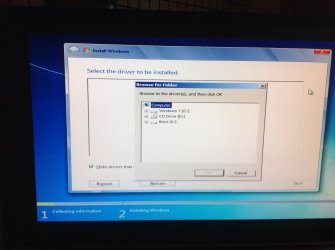
Installation stalled. "No device drivers were found. Make sure that the installation media contains the correct drivers, and then click ok." ???
 

My Computer My Computer

At a glance

win 7 pro 64Intel Core i5-2500K 3.3GHz (3.7GHz Turbo Boos...CORSAIR Vengeance 8GB (2x4GB) 240-Pin DDR3 SDRAMEVGA 01G-P3-1556-KR GeForce GTX550 Ti (Fermi)...
Computer type
PC/Desktop
Computer Manufacturer/Model Number
custom build
OS
win 7 pro 64
CPU
Intel Core i5-2500K 3.3GHz (3.7GHz Turbo Boost) LGA 1155 95W
Motherboard
ASUS P8Z68-V LX LGA 1155 Intel Z68 HDMI SATA 6Gb/sUSB3.0 ATX
Memory
CORSAIR Vengeance 8GB (2x4GB) 240-Pin DDR3 SDRAM
Graphics Card(s)
EVGA 01G-P3-1556-KR GeForce GTX550 Ti (Fermi) FPB 1GB
Monitor(s) Displays
ASUS VW246H 24" 2ms(GTG) HDMI Widescreen LCD
Hard Drives
C:\ Crucial M4 CT256M4SSD2CCA 256GB SATA III MLC
D:\ Western Digital WD1002FAEX 1TB 7200 RPM SATA 6.0Gb/s
both internally mounted
PSU
Antec EA-500D 500W
Case
Antec Sonata III 500 Mid Tower Case
Cooling
Cooler Master Hyper 212 Plus RR-B10-212P-G1 120mm CPU Cooler
Keyboard
Logitech Cordless MK700
Mouse
Logitech Cordless MK700
Internet Speed
1.5 Mbps for both upload and download
Other Info
Additional cooling fan: Antec 761345-75121-6 120mm Case Fan

BIOS: ASUS with UEFI, Build date: 7/1/2013, Version 4105
Does this look right? It needs a driver... Is it somewhere in here? Thank god for this iPad...
 

Attachments

  • image.jpg
    image.jpg
    370.5 KB · Views: 2

My Computer My Computer

At a glance

win 7 pro 64Intel Core i5-2500K 3.3GHz (3.7GHz Turbo Boos...CORSAIR Vengeance 8GB (2x4GB) 240-Pin DDR3 SDRAMEVGA 01G-P3-1556-KR GeForce GTX550 Ti (Fermi)...
Computer type
PC/Desktop
Computer Manufacturer/Model Number
custom build
OS
win 7 pro 64
CPU
Intel Core i5-2500K 3.3GHz (3.7GHz Turbo Boost) LGA 1155 95W
Motherboard
ASUS P8Z68-V LX LGA 1155 Intel Z68 HDMI SATA 6Gb/sUSB3.0 ATX
Memory
CORSAIR Vengeance 8GB (2x4GB) 240-Pin DDR3 SDRAM
Graphics Card(s)
EVGA 01G-P3-1556-KR GeForce GTX550 Ti (Fermi) FPB 1GB
Monitor(s) Displays
ASUS VW246H 24" 2ms(GTG) HDMI Widescreen LCD
Hard Drives
C:\ Crucial M4 CT256M4SSD2CCA 256GB SATA III MLC
D:\ Western Digital WD1002FAEX 1TB 7200 RPM SATA 6.0Gb/s
both internally mounted
PSU
Antec EA-500D 500W
Case
Antec Sonata III 500 Mid Tower Case
Cooling
Cooler Master Hyper 212 Plus RR-B10-212P-G1 120mm CPU Cooler
Keyboard
Logitech Cordless MK700
Mouse
Logitech Cordless MK700
Internet Speed
1.5 Mbps for both upload and download
Other Info
Additional cooling fan: Antec 761345-75121-6 120mm Case Fan

BIOS: ASUS with UEFI, Build date: 7/1/2013, Version 4105
The error most often means a bad installer. Did you ever create a newer installer from a fresh download using tool also provided in Clean Reinstall - Factory OEM Windows 7 ? I'm sure I've given you this step several times, but I think you said you had no other PC to do it on, as though one could not be borrowed to complete the step.

What do you mean you clicked on Boot Override to trigger non-UEFI flash stick installer? Is this a setting we have not even been shown yet? Where are the rest of the tabs' settings you were going to finally show us 3 days later after we've asked til our face is blue?

And what are the settings choices for Second Boot device both when UEFI and Legacy stick are selected for First Boot Device?


I understand you were excited about accidentally discovering the Legacy Stick choice I'd already suggested you try, but there is no way we can properly troubleshoot this when only half of our questions are being answered.
 
Greg the UEFI potion is shown in the Boot Priority option in his snip below. Mine is the exact same, it gives a normal boot or UEFI boot for all flash drives, Don't know why.

HE is in the Boot tab in this shot also.

Untitled[1].png
 

My Computer My Computer

At a glance

Windows 7 Ultimate X64 SP1Intel i5-2550K, Differing ~4.4-4.8GHz No buil...16GB G.Skill Sniper 1866MHz @ 2133MHz 2x8GBASUS GTX650TIB-DC2OC-2GD5, (650TI Boost)
Computer type
PC/Desktop
Computer Manufacturer/Model Number
Home Built Desktop By DataTech
OS
Windows 7 Ultimate X64 SP1
CPU
Intel i5-2550K, Differing ~4.4-4.8GHz No built in GPU
Motherboard
ASUS P8Z68-V PRO/GEN3
Memory
16GB G.Skill Sniper 1866MHz @ 2133MHz 2x8GB
Graphics Card(s)
ASUS GTX650TIB-DC2OC-2GD5, (650TI Boost)
Sound Card
Onboard Realtek 5-1
Monitor(s) Displays
Samsung P2570HD
Screen Resolution
1920x1080
Hard Drives
Samsung 840 Pro 256GB SSD for OS, 500GB Seagate Constellation (Enterprise drive) for Data
PSU
Corsair HX650W
Case
Inwin Dragon Rider
Cooling
Hyper 212 EVO w/two Noctua fans, push-pull, @1300 RPM
Keyboard
E-Z Eyes, bright yellow keys with large characters
Mouse
steelseries SENSEI Laser Pro Gaming
Internet Speed
48-51Mbs Mbs down, 11 Mbs up Xfinity Cable
Antivirus
Norton Internet Security 2013
Browser
IE 10, Opera, Pale Moon if needed
Other Info
4 case fans, LG BluRay-RE, ASUS DVD-RW, Mr. Fusion power supply, 1.21 gigawatts.
Re: your SSD
I'm running virtually the same motherboard as you (P8Z68 Deluxe), Crucial M4 128GB Firmware 0309. I don't find the firmware an issue. I'd leave flashing your SSD as a last resort and only for a known issue that a particular firmware version addresses.
 

My Computer My Computer

At a glance

Windows 7x64 Home Premium SP1Intel i7 2600kG.Skill Ripjaws (DDR3-1600) 2x4GBNvidia GeForce GTS 450; Intel HD Graphics 300...
Computer type
PC/Desktop
Computer Manufacturer/Model Number
Own build
OS
Windows 7x64 Home Premium SP1
CPU
Intel i7 2600k
Motherboard
ASUS P8Z68 Deluxe
Memory
G.Skill Ripjaws (DDR3-1600) 2x4GB
Graphics Card(s)
Nvidia GeForce GTS 450; Intel HD Graphics 3000(GT2+)
Monitor(s) Displays
Dell Ultrasharp IPS panel U2311H, Samsung SyncMaster P2350
Screen Resolution
1920x1080
Hard Drives
Samsung 850 Pro SSD 256GB, Samsung SSD 840 120GB, Seagates 1TB Barracuda ST31000528AS x2
PSU
Seasonic M12II 520W
Case
Lian Li Lancool PC-K60
Cooling
Case: 1x120mm, 3x140mm CPU: Hyper 212+
Keyboard
Logitech MK520 (wireless)
Mouse
Logitech MK520
Internet Speed
6-7 Mbps
Antivirus
Norton Security Premium, Malwarebytes on 2 (MSE on 3rd PC)
Browser
FireFox
Other Info
Audio: Logitech Z523 2.1
Back
Top