MBR - Restore Windows 7 Master Boot Record

How to Restore the Windows 7 MBR (Master Boot Record)

   Information
If you have been dual booting with Linux, then you probably know one of the Linux boot managers like Grub or LILO has been installed in the MBR of your hard drive. What can you do when you no longer want Linux on that hard drive? This tutorial will show you how to use your 7 DVD and BOOTSECT.EXE to restore the "bootsector code" of the MBR and allow you to begin booting to Windows 7 again.
   Tip
You can use this method to update the bootsector code for Windows 7, Vista, XP, 2000 or switch between Bootmgr and NTLDR. Just check the Microsoft TechNet site for the correct command.


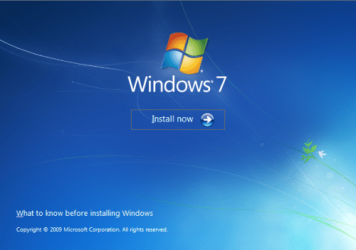
Here's How:1. Boot your computer to the Windows 7 DVD (or to a "Repair CD"). At this screen choose to install now.
25672d1251414873-mbr-restore-windows-7-master-boot-record-mbr_02.png


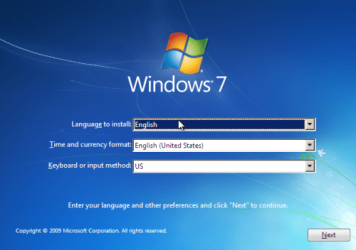
2. Select your language and click next.
25673d1251414836-mbr-restore-windows-7-master-boot-record-mbr_03.png


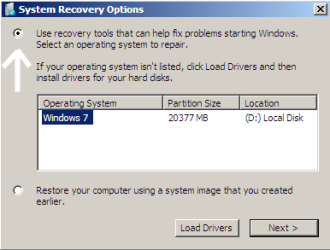
3. Click the button for "Use recovery tools".
25674d1251414836-mbr-restore-windows-7-master-boot-record-mbr_04.png


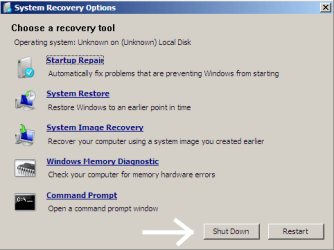
4. Then select "Command Prompt".
25675d1251414836-mbr-restore-windows-7-master-boot-record-mbr_05.png


5. When open, the command prompt will look like this:
53598d1251414836-mbr-restore-windows-7-master-boot-record-mbr_16.png


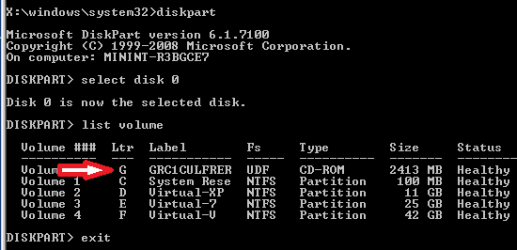
6. The command we will use, bootsect.exe, is in a folder (named boot) on the DVD.We need to know what drive letter has been assigned the DVD drive to access the folder.

Code:
Type: [B]diskpart[/B]
and press [B]Enter[/B]
 
Type: [B]select disk 0[/B] (zero)
and press [B]Enter[/B]
 
type: [B]list volume[/B]
and press [B]Enter[/B]
In this screen shot, the 7 DVD is letter: G
53599d1251414836-mbr-restore-windows-7-master-boot-record-mbr_17a.png


7. Use your DVD drive letter and

Code:
Type: [B]exit[/B]
and press [B]Enter[/B]
 
to close Diskpart
 
Type: [B]G:[/B] (use the letter of your DVD drive)
and press [B]Enter[/B]
 
Type: [B]cd boot[/B]
and press [B]Enter[/B]
 
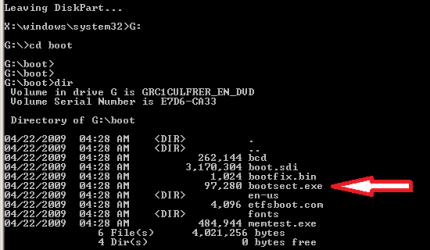
Type: [B]dir[/B]
and press [B]Enter[/B]
to verify that bootcect.exe is there (if you really need to)
53600d1251414836-mbr-restore-windows-7-master-boot-record-mbr_18a.png


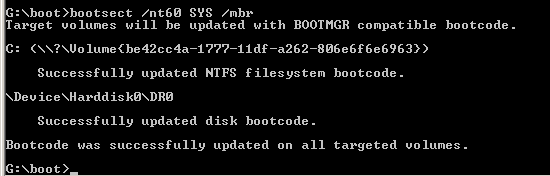
8. To restore the "bootsector code":

Code:
TYPE: [B]bootsect /nt60 SYS /mbr[/B]
and press [B]Enter[/B]
53601d1251414836-mbr-restore-windows-7-master-boot-record-mbr_19.png


NOTE: If this method fails to restore the MBR, you can try the bootrec command as it is also a tool for repairing the MBR.


9. When completed successfully,

Code:
Type: [B]exit[/B]
and press [B]Enter[/B]
This will close the command prompt window.

10. Now select Shut Down or Restart
25680d1251414836-mbr-restore-windows-7-master-boot-record-mbr_10.png


11. Then you can reboot your computer into Windows.
25681d1251414836-mbr-restore-windows-7-master-boot-record-mbr_12.png


Attachments

  • mbr_02.png
    mbr_02.png
    53.7 KB · Views: 1,640,316
  • mbr_03.png
    mbr_03.png
    54.3 KB · Views: 1,635,478
  • mbr_04.png
    mbr_04.png
    6.9 KB · Views: 1,633,763
  • mbr_05.png
    mbr_05.png
    10.5 KB · Views: 1,579,666
  • mbr_10.png
    mbr_10.png
    10.4 KB · Views: 1,576,678
  • mbr_12.png
    mbr_12.png
    5.3 KB · Views: 1,552,307
  • mbr_16.png
    mbr_16.png
    3.3 KB · Views: 1,554,623
  • mbr_17a.png
    mbr_17a.png
    3.8 KB · Views: 1,565,873
  • mbr_18a.png
    mbr_18a.png
    3.7 KB · Views: 1,620,585
  • mbr_19.png
    mbr_19.png
    2.4 KB · Views: 1,569,958
Last edited by a moderator:
Another update: I feel like an idiot. I agreed with Robert's analysis of 2 SSD's plugged in at a time probably being a bad thing, but avoided taking out the secondary one because of the annoyance of taking my heavy case out of an uncomfortable corner of the room. I then remembered that I can take it out very, very easily from the front of the case and did just that. Voila! Two instances of Startup Repair and I booted into Windows. :)
Thank you, Robert!!!
 

My Computer My Computer

At a glance

Windows 7 Professional x64
OS
Windows 7 Professional x64
Hard Drives
Crucial M4 256GB SSD
Intel 600GB SSD
No, I don't have any additional suggestions from my previous post. It is good to hear you have made some progress! Great!

Vista and early beta 7s had 200MB "System Reserved" boot partitions, later only 100MB were created during installation. A partition of the size 2MB would definitely be from somewhere else.

A data partition/hard drive does not need a boot flag to be active. During POST, the BIOS looks for the first hard drive and partition with the Boot Flag, if it does not find the necessary boot code, it will look for the next hard drive and so on depending on how many hard drives there are. If the BIOS cannot find the boot code, you will get the "Element not found" error. Your boot code is either corrupted or missing and needs to be reinstalled.

Please let us know how things turn out!

Cheers!
Robert
 

My Computer My Computer

At a glance

...
OS
...
Another update: I feel like an idiot. I agreed with Robert's analysis of 2 SSD's plugged in at a time probably being a bad thing, but avoided taking out the secondary one because of the annoyance of taking my heavy case out of an uncomfortable corner of the room. I then remembered that I can take it out very, very easily from the front of the case and did just that. Voila! Two instances of Startup Repair and I booted into Windows. :)
Thank you, Robert!!!
You are most welcome! Glad to see you have things sorted!
 

My Computer My Computer

At a glance

...
OS
...
life saver

you simply saved my life!! thank you so much!:party:
 

My Computer My Computer

At a glance

windows 7 home premium 64 biti7
OS
windows 7 home premium 64 bit
CPU
i7
you simply saved my life!! thank you so much!:party:
Thank you astvan, and Welcome to Windows Seven Forums!

Cheers!
Robert
 

My Computer My Computer

At a glance

...
OS
...
Will this apply to my situation

Will this tutorial help me?

My problem is when it loads then BIOS first tells me that there are no Physical disks or logical disks, then restarts and then it's loading my Server OS.

I have 3 SATA disks.

2 of them were in a Hardware raid 0 until I flashed my BIOS.

the 3rd I have installed windows Server 2008R2 on it.

before I installed the 3rd hdd BIOS asked me if I wanted to continue with the old information or the new information.

I pushed F2 for continue with the new information. Then my HW raid setup disappeared.

I then installed the Server 2008R2. This is were it gets spooky, because my Server can only see one of the two disks I mentioned before. In the BIOS menu I can see all three disks.

But if I try to open the disk from my Server it asks if I want to format it, and that I do not want, because of well same song again... important data which there is no backup of and so on.

An importent note: When I go to diskmanagement in my server it asks if the disk that it can see should have a new MBR created.
 

My Computer My Computer

At a glance

Windows 7 64 bit and Windows Server 2008R2 64...INTEL i7 Quad core 920 2.67 GHzCorsair Dominator GT DDR3 20000 MHzEVGA Geforce GTX470
Computer Manufacturer/Model Number
Selfbuild
OS
Windows 7 64 bit and Windows Server 2008R2 64 bit
CPU
INTEL i7 Quad core 920 2.67 GHz
Motherboard
Asus P6T7 WS SuperComputer
Memory
Corsair Dominator GT DDR3 20000 MHz
Graphics Card(s)
EVGA Geforce GTX470
Sound Card
Onboard
Monitor(s) Displays
Flatscreen
Hard Drives
Western Digital Velociraptor 300GB 10000RPM
Both drives are in a RAID0 setup
_______________________________________
SEAGATE Barracuda 2 TB 7200 RPM
PSU
Corsair HX 750W PSU
Case
Antec Twelve Hundred
Cooling
YES
Will this tutorial help me?

My problem is ... I flashed my BIOS.
Hello sabeltiger81, and welcome to Windows Seven Forums!

With the limited info you have supplied so far, I can only guess you used the RAID features provided by the Motherboard manufacturer to set up your RAID drives. When you FLASHED the bios, the RAID settings were 'turned off'. My best guess for a solution is to disconnect the third hard drive with Windows Server, boot to the BIOS and enable the RAID settings for your two hard drives. I would think you could use the steps you followed when you first set up the RAID to re-activate the RAID. Hopefully, the RAID will rebuild itself preserving your data.

This Tutorial will not be of any help to you in rebuilding your RAID data. Sorry.

Cheers!
Robert
 

My Computer My Computer

At a glance

...
OS
...
thanks a lot

thanks a lot. what a great tip... more power!
 

My Computer My Computer

At a glance

windows 7 ultimate x64
OS
windows 7 ultimate x64

My Computer My Computer

At a glance

...
OS
...
HELP!!!

hello i have a ?, :rolleyes:how do you restore a boot sector from a now uninstalled version of 7 home premium. someone changed it to linux on me:cry:
 

My Computer My Computer

At a glance

Linux fedora 64 bit, trying to reinstall wind...Amd athalon X2 at 2.2GHz
Computer Manufacturer/Model Number
compaq presario cq61
OS
Linux fedora 64 bit, trying to reinstall windows 7 home premium 64bit
CPU
Amd athalon X2 at 2.2GHz
disable digital driver signature enforcement (need help doing this)

i fixed the mbr file and the bcd backup file and I restart and I get

it comes up to hardware or software has changed, may be damaged of corrupted. go to "last known good."

If you know the problem then disable the driver signature enforcement
... press f8 to go to driver sign. enforcement to disable verifier checks


a friend of mine said I need to take my HDD out and get a copy of MBR file the master boot record from another win7 and i will be fine.

well the Bcdedit file works but the verify windows is stopping me from loading...
loading completely. how do I disable digital driver signature enforcement
 

My Computer My Computer

At a glance

Windows 7 Home Premium 64bit
OS
Windows 7 Home Premium 64bit
hello i have a ?, :rolleyes:how do you restore a boot sector from a now uninstalled version of 7 home premium. someone changed it to linux on me:cry:
Hello Manomeat, and welcome to Windows Seven Forums!

Did you follow the steps as laid out at the beginning of this thread? What happened?

Cheers!
Robert
 

My Computer My Computer

At a glance

...
OS
...
i fixed the mbr file and the bcd backup file and I restart and I get

it comes up to hardware or software has changed, may be damaged of corrupted. go to "last known good."

If you know the problem then disable the driver signature enforcement
... press f8 to go to driver sign. enforcement to disable verifier checks


a friend of mine said I need to take my HDD out and get a copy of MBR file the master boot record from another win7 and i will be fine.

well the Bcdedit file works but the verify windows is stopping me from loading...
loading completely. how do I disable digital driver signature enforcement
Welcome to Windows Seven Forums, GizmoMechanic!

The command in this tutorial will re-write the MBR to the hard drive so you do not need to "get a copy of MBR file the master boot record from another win7."

It sounds like to me your next step might be a "Startup Repair", "Repair Install", "Backup Restore", or something along that line?

http://www.sevenforums.com/tutorials/681-startup-repair.html
http://www.sevenforums.com/tutorials/105541-startup-repair-run-3-separate-times.html
http://www.sevenforums.com/tutorials/668-system-recovery-options.html

Cheers!
Robert
 

My Computer My Computer

At a glance

...
OS
...
Life saver

I've just had to register to express my extreme gratitude at this tutorial of yours. I am doing the photo's at a wedding tomorrow in which I have to edit the photo's while I'm there this weekend, so to free up space I deleted the linux partition of my dual boot setup. This resulted in the laptop becoming a brick, and recovery disc or Win7 DVD didn't fix it. I was about to do a clean re-install, which would have been a total pain having to install all my photography software again, when I found your tutorial.

A few minutes later my laptop was up and running again and my pounding headache from the stress of it all finally started to diminish. Sincerely, thank you so much for putting this tutorial online.

Next time I have a dual boot and remove linux I will have to do it the correct way (whatever that is!!!)
 

My Computer My Computer

At a glance

Windows 7 Professional 64bit
OS
Windows 7 Professional 64bit
I've just had to register to express my extreme gratitude at this tutorial of yours. I am doing the photo's at a wedding tomorrow in which I have to edit the photo's while I'm there this weekend, so to free up space I deleted the linux partition of my dual boot setup. This resulted in the laptop becoming a brick, and recovery disc or Win7 DVD didn't fix it. I was about to do a clean re-install, which would have been a total pain having to install all my photography software again, when I found your tutorial.

A few minutes later my laptop was up and running again and my pounding headache from the stress of it all finally started to diminish. Sincerely, thank you so much for putting this tutorial online.

Next time I have a dual boot and remove linux I will have to do it the correct way (whatever that is!!!)
Hello IncredibleMulk, thank you for your kind words! And welcome to Windows Seven Forums!

Yes ... heart pounding ... headache ... stress ... been there, done that. Glad you were able to restore booting to Windows. If you let Linux replace the Windows boot manager with the Grub boot manager, you just have to restore the Windows boot manager when you remove Linux. This way is as good as any ...

Cheers!
Robert
 

My Computer My Computer

At a glance

...
OS
...
still getting blink cursor

Hi Robert,

I tried your tutorial but it is still not working. I noticed there is no boot folder in my c directory (c-drive is Win7 and d-drive is CDROM). I tried to copy the boot folder from a recovery win7 DVD to c-drive and do the MBR fix and elsewhere about using attrib command but nothing is working.

I don't want to reinstall. Is there a way to delete MBR (not sure it it even exists) and the partition, recreate from scratch and then boot to windows?

Thank you.
 

My Computer My Computer

At a glance

Win7 64-Bit
OS
Win7 64-Bit

My Computer My Computer

At a glance

64-bit Windows 11 Pro for WorkstationsIntel i7-8700K OC'd to 5 GHz64 GB (4x16GB) G.SKILL TridentZ RGB DDR4 3600...ASUS ROG-STRIX-GTX1080TI-O11G-GAMING
Computer type
PC/Desktop
Computer Manufacturer/Model Number
Self built custom
OS
64-bit Windows 11 Pro for Workstations
CPU
Intel i7-8700K OC'd to 5 GHz
Motherboard
ASUS ROG Maximus XI Formula Z390
Memory
64 GB (4x16GB) G.SKILL TridentZ RGB DDR4 3600 MHz
Graphics Card(s)
ASUS ROG-STRIX-GTX1080TI-O11G-GAMING
Sound Card
Integrated
Monitor(s) Displays
2 x Samsung Odyssey G7 27"
Screen Resolution
2560x1440
Hard Drives
1TB Samsung 990 PRO M.2,
4TB Samsung 990 PRO PRO M.2,
TerraMaster F8 SSD Plus NAS
PSU
Seasonic Prime Titanium 850W
Case
Thermaltake Core P3
Cooling
Corsair Hydro H115i
Keyboard
Logitech wireless K800
Mouse
Logitech MX Master 4
Internet Speed
2 Gb/s Download and 100 Mb/s Upload
Antivirus
Malwarebyte Anti-Malware Premium
Browser
Google Chrome
Other Info
Logitech Z625 speaker system,
Logitech BRIO 4K Pro webcam,
HP Color LaserJet Pro MFP M477fdn,
APC SMART-UPS RT 1000 XL - SURT1000XLI,
Galaxy S23 Plus phone
Thanks Shawn that fixed my problem :)
 

My Computer My Computer

At a glance

Win7 64-Bit
OS
Win7 64-Bit
You're most welcome Sam. That's great news. :)
 

My Computer My Computer

At a glance

64-bit Windows 11 Pro for WorkstationsIntel i7-8700K OC'd to 5 GHz64 GB (4x16GB) G.SKILL TridentZ RGB DDR4 3600...ASUS ROG-STRIX-GTX1080TI-O11G-GAMING
Computer type
PC/Desktop
Computer Manufacturer/Model Number
Self built custom
OS
64-bit Windows 11 Pro for Workstations
CPU
Intel i7-8700K OC'd to 5 GHz
Motherboard
ASUS ROG Maximus XI Formula Z390
Memory
64 GB (4x16GB) G.SKILL TridentZ RGB DDR4 3600 MHz
Graphics Card(s)
ASUS ROG-STRIX-GTX1080TI-O11G-GAMING
Sound Card
Integrated
Monitor(s) Displays
2 x Samsung Odyssey G7 27"
Screen Resolution
2560x1440
Hard Drives
1TB Samsung 990 PRO M.2,
4TB Samsung 990 PRO PRO M.2,
TerraMaster F8 SSD Plus NAS
PSU
Seasonic Prime Titanium 850W
Case
Thermaltake Core P3
Cooling
Corsair Hydro H115i
Keyboard
Logitech wireless K800
Mouse
Logitech MX Master 4
Internet Speed
2 Gb/s Download and 100 Mb/s Upload
Antivirus
Malwarebyte Anti-Malware Premium
Browser
Google Chrome
Other Info
Logitech Z625 speaker system,
Logitech BRIO 4K Pro webcam,
HP Color LaserJet Pro MFP M477fdn,
APC SMART-UPS RT 1000 XL - SURT1000XLI,
Galaxy S23 Plus phone
Hi Robert,

I tried your tutorial but it is still not working. I noticed there is no boot folder in my c directory (c-drive is Win7 and d-drive is CDROM). I tried to copy the boot folder from a recovery win7 DVD to c-drive and do the MBR fix and elsewhere about using attrib command but nothing is working.

I don't want to reinstall. Is there a way to delete MBR (not sure it it even exists) and the partition, recreate from scratch and then boot to windows?

Thank you.
Hello sam2012, and welcome!

I am afraid you misunderstand the purpose of locating the boot folder. Why would you copy the boot folder to the "C" drive if Windows is not booting? You cannot fix a Windows from Windows when Windows will not boot. That is like trying to plug holes in a boat while in the middle of the ocean. The best place to repair a boat is in dry dock. That is why you boot to the repair CD or the install DVD and use the utilities to repair Windows from the CD/DVD Drive while Windows is in a dry dock like condition.

Glad to hear the startup repair worked for you.

Cheers!
Robert
 

My Computer My Computer

At a glance

...
OS
...
Back
Top