MBR - Restore Windows 7 Master Boot Record

How to Restore the Windows 7 MBR (Master Boot Record)

   Information
If you have been dual booting with Linux, then you probably know one of the Linux boot managers like Grub or LILO has been installed in the MBR of your hard drive. What can you do when you no longer want Linux on that hard drive? This tutorial will show you how to use your 7 DVD and BOOTSECT.EXE to restore the "bootsector code" of the MBR and allow you to begin booting to Windows 7 again.
   Tip
You can use this method to update the bootsector code for Windows 7, Vista, XP, 2000 or switch between Bootmgr and NTLDR. Just check the Microsoft TechNet site for the correct command.


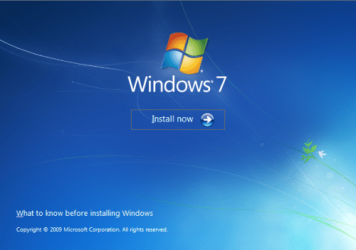
Here's How:1. Boot your computer to the Windows 7 DVD (or to a "Repair CD"). At this screen choose to install now.
25672d1251414873-mbr-restore-windows-7-master-boot-record-mbr_02.png


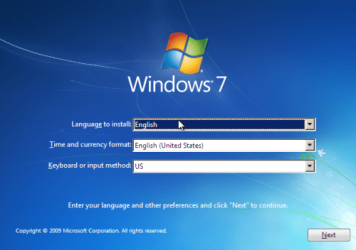
2. Select your language and click next.
25673d1251414836-mbr-restore-windows-7-master-boot-record-mbr_03.png


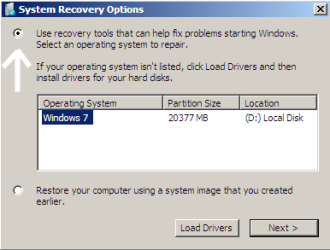
3. Click the button for "Use recovery tools".
25674d1251414836-mbr-restore-windows-7-master-boot-record-mbr_04.png


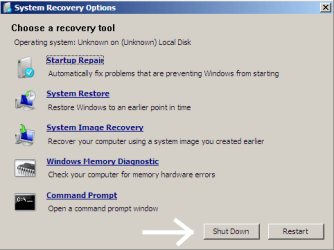
4. Then select "Command Prompt".
25675d1251414836-mbr-restore-windows-7-master-boot-record-mbr_05.png


5. When open, the command prompt will look like this:
53598d1251414836-mbr-restore-windows-7-master-boot-record-mbr_16.png


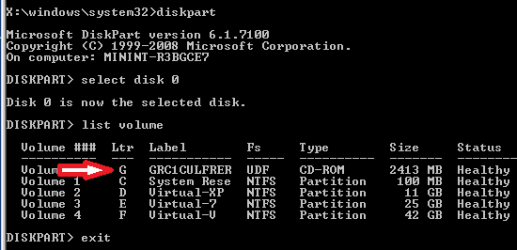
6. The command we will use, bootsect.exe, is in a folder (named boot) on the DVD.We need to know what drive letter has been assigned the DVD drive to access the folder.

Code:
Type: [B]diskpart[/B]
and press [B]Enter[/B]
 
Type: [B]select disk 0[/B] (zero)
and press [B]Enter[/B]
 
type: [B]list volume[/B]
and press [B]Enter[/B]
In this screen shot, the 7 DVD is letter: G
53599d1251414836-mbr-restore-windows-7-master-boot-record-mbr_17a.png


7. Use your DVD drive letter and

Code:
Type: [B]exit[/B]
and press [B]Enter[/B]
 
to close Diskpart
 
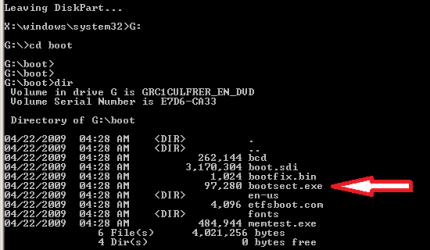
Type: [B]G:[/B] (use the letter of your DVD drive)
and press [B]Enter[/B]
 
Type: [B]cd boot[/B]
and press [B]Enter[/B]
 
Type: [B]dir[/B]
and press [B]Enter[/B]
to verify that bootcect.exe is there (if you really need to)
53600d1251414836-mbr-restore-windows-7-master-boot-record-mbr_18a.png


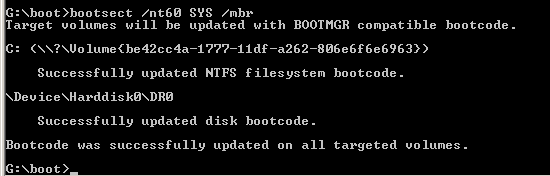
8. To restore the "bootsector code":

Code:
TYPE: [B]bootsect /nt60 SYS /mbr[/B]
and press [B]Enter[/B]
53601d1251414836-mbr-restore-windows-7-master-boot-record-mbr_19.png


NOTE: If this method fails to restore the MBR, you can try the bootrec command as it is also a tool for repairing the MBR.


9. When completed successfully,

Code:
Type: [B]exit[/B]
and press [B]Enter[/B]
This will close the command prompt window.

10. Now select Shut Down or Restart
25680d1251414836-mbr-restore-windows-7-master-boot-record-mbr_10.png


11. Then you can reboot your computer into Windows.
25681d1251414836-mbr-restore-windows-7-master-boot-record-mbr_12.png


Attachments

  • mbr_02.png
    mbr_02.png
    53.7 KB · Views: 1,640,315
  • mbr_03.png
    mbr_03.png
    54.3 KB · Views: 1,635,478
  • mbr_04.png
    mbr_04.png
    6.9 KB · Views: 1,633,763
  • mbr_05.png
    mbr_05.png
    10.5 KB · Views: 1,579,666
  • mbr_10.png
    mbr_10.png
    10.4 KB · Views: 1,576,678
  • mbr_12.png
    mbr_12.png
    5.3 KB · Views: 1,552,307
  • mbr_16.png
    mbr_16.png
    3.3 KB · Views: 1,554,623
  • mbr_17a.png
    mbr_17a.png
    3.8 KB · Views: 1,565,873
  • mbr_18a.png
    mbr_18a.png
    3.7 KB · Views: 1,620,585
  • mbr_19.png
    mbr_19.png
    2.4 KB · Views: 1,569,958
Last edited by a moderator:
Thanks Brink. Having a problem. I get as far icon on desktop, I click it as administrator and a window comes up with a blank source file. The window says Windows 7 USB?DVD tool. Next line is: Step 1 of 4: Choose ISO File and shows a blank space Titled "Source File"-------------Browse, and last line a button with Next inside.
I have searched C: for an ISO file but get nothing that pertains to this subject. What am I doing wrong? Enjoy your weekend, I am in no hurry. I just wish that the people over at Neosmart Tech would make a removal tool that returns the old MBR to my computer.
Ugh.
 

My Computer My Computer

Computer type
PC/Desktop
Computer Manufacturer/Model Number
Acer1430Z-4677
OS
windows home premium 7 - 64bit
CPU
intell Pentium Dual core US600, 1.33GHz
Motherboard
No idea
Memory
6 MB
Graphics Card(s)
internal
Hard Drives
WDC 500 GB
Antivirus
ESET
Browser
I.E.
Well guys/gals,

I did follow the directions for MRB Repair. I had to use a Windows install disk from my other computer, as the disks supplied from Acer didnt work.

So I boot in BIOS and set my disk drive to boot first.
I followed all direction and here is what I received:

C:<\\?\Volume<b9aecec5-d002-11e3-bd5b-806e6f6e6963>>
Successfully updated disk bootcode

\Device|Harddisk 0\Dr0
Successfully updated disk bootcode.

Bootcode was successfully updated on all targeted volumes.
D:\boot >exit

Well that looks good but when I restarted, Bios reset to boot from the HD, it still goes into the revised, by Easybsd, boot with asking if I want to boot from windows .

OK, whats next.

Thanks to all.

Mahalo :geek:
 

My Computer My Computer

Computer type
PC/Desktop
Computer Manufacturer/Model Number
Acer1430Z-4677
OS
windows home premium 7 - 64bit
CPU
intell Pentium Dual core US600, 1.33GHz
Motherboard
No idea
Memory
6 MB
Graphics Card(s)
internal
Hard Drives
WDC 500 GB
Antivirus
ESET
Browser
I.E.
Solved...

Installed clean copy of Windows 7 - 64. Takes a little time but ensures clean machine.

Thanks for your help.
 

My Computer My Computer

Computer type
PC/Desktop
Computer Manufacturer/Model Number
Acer1430Z-4677
OS
windows home premium 7 - 64bit
CPU
intell Pentium Dual core US600, 1.33GHz
Motherboard
No idea
Memory
6 MB
Graphics Card(s)
internal
Hard Drives
WDC 500 GB
Antivirus
ESET
Browser
I.E.

My Computer My Computer

Computer type
PC/Desktop
Computer Manufacturer/Model Number
custom build
OS
Windows 7 64-bit SP1
CPU
Intel Core2 Quad Q6600 2.40 GHz
Motherboard
Intel DP35DP
Memory
Kingston ValueRAM 3x2GB PC2-5300 667 MHz
Graphics Card(s)
Asus ENGTX460
Sound Card
Creative Xtreme Fatality
Monitor(s) Displays
Acer V193w
Screen Resolution
1440x900
Hard Drives
Samsung HD502HJ 500GB
Seagate Barracuda 320GB
PSU
EVGA 100-B1-0500-KR
Case
Tsunami Dream
Cooling
1x90mm fan, 2x120mm fan
Keyboard
Mincrosoft Digital Media Pro Keyboard
Mouse
Razer Diamondback
Internet Speed
20mbps
Other Info
DVD Drive
DVD-RW Drive
Is this possible after a disk wipe?
 

My Computer My Computer

Computer type
PC/Desktop
Computer Manufacturer/Model Number
Dell Optiplex 740 enhanced
OS
WIndows 7Home Premium 32 bit
Is this possible after a disk wipe?

Hello Rockfingers, and welcome to Seven Forums.

If the disk has been wiped, then it's time for a clean install instead since there's nothing left to restore. :(
 

My Computer My Computer

Computer type
PC/Desktop
Computer Manufacturer/Model Number
Self built custom
OS
64-bit Windows 11 Pro for Workstations
CPU
Intel i7-8700K OC'd to 5 GHz
Motherboard
ASUS ROG Maximus XI Formula Z390
Memory
64 GB (4x16GB) G.SKILL TridentZ RGB DDR4 3600 MHz
Graphics Card(s)
ASUS ROG-STRIX-GTX1080TI-O11G-GAMING
Sound Card
Integrated
Monitor(s) Displays
2 x Samsung Odyssey G7 27"
Screen Resolution
2560x1440
Hard Drives
1TB Samsung 990 PRO M.2,
4TB Samsung 990 PRO PRO M.2,
TerraMaster F8 SSD Plus NAS
PSU
Seasonic Prime Titanium 850W
Case
Thermaltake Core P3
Cooling
Corsair Hydro H115i
Keyboard
Logitech wireless K800
Mouse
Logitech MX Master 4
Internet Speed
2 Gb/s Download and 100 Mb/s Upload
Antivirus
Malwarebyte Anti-Malware Premium
Browser
Google Chrome
Other Info
Logitech Z625 speaker system,
Logitech BRIO 4K Pro webcam,
HP Color LaserJet Pro MFP M477fdn,
APC SMART-UPS RT 1000 XL - SURT1000XLI,
Galaxy S23 Plus phone
Mbr

Thank you! I ask because after reinstalling win 7 several times, the malware is residing in the bootsector!
 

My Computer My Computer

Computer type
PC/Desktop
Computer Manufacturer/Model Number
Dell Optiplex 740 enhanced
OS
WIndows 7Home Premium 32 bit

My Computer My Computer

Computer type
PC/Desktop
Computer Manufacturer/Model Number
Self built custom
OS
64-bit Windows 11 Pro for Workstations
CPU
Intel i7-8700K OC'd to 5 GHz
Motherboard
ASUS ROG Maximus XI Formula Z390
Memory
64 GB (4x16GB) G.SKILL TridentZ RGB DDR4 3600 MHz
Graphics Card(s)
ASUS ROG-STRIX-GTX1080TI-O11G-GAMING
Sound Card
Integrated
Monitor(s) Displays
2 x Samsung Odyssey G7 27"
Screen Resolution
2560x1440
Hard Drives
1TB Samsung 990 PRO M.2,
4TB Samsung 990 PRO PRO M.2,
TerraMaster F8 SSD Plus NAS
PSU
Seasonic Prime Titanium 850W
Case
Thermaltake Core P3
Cooling
Corsair Hydro H115i
Keyboard
Logitech wireless K800
Mouse
Logitech MX Master 4
Internet Speed
2 Gb/s Download and 100 Mb/s Upload
Antivirus
Malwarebyte Anti-Malware Premium
Browser
Google Chrome
Other Info
Logitech Z625 speaker system,
Logitech BRIO 4K Pro webcam,
HP Color LaserJet Pro MFP M477fdn,
APC SMART-UPS RT 1000 XL - SURT1000XLI,
Galaxy S23 Plus phone
Thank you! Used clean all! Doing that now once again. Will go to system security!
 

My Computer My Computer

Computer type
PC/Desktop
Computer Manufacturer/Model Number
Dell Optiplex 740 enhanced
OS
WIndows 7Home Premium 32 bit
You're welcome. I hope they can help clean your system.
 

My Computer My Computer

Computer type
PC/Desktop
Computer Manufacturer/Model Number
Self built custom
OS
64-bit Windows 11 Pro for Workstations
CPU
Intel i7-8700K OC'd to 5 GHz
Motherboard
ASUS ROG Maximus XI Formula Z390
Memory
64 GB (4x16GB) G.SKILL TridentZ RGB DDR4 3600 MHz
Graphics Card(s)
ASUS ROG-STRIX-GTX1080TI-O11G-GAMING
Sound Card
Integrated
Monitor(s) Displays
2 x Samsung Odyssey G7 27"
Screen Resolution
2560x1440
Hard Drives
1TB Samsung 990 PRO M.2,
4TB Samsung 990 PRO PRO M.2,
TerraMaster F8 SSD Plus NAS
PSU
Seasonic Prime Titanium 850W
Case
Thermaltake Core P3
Cooling
Corsair Hydro H115i
Keyboard
Logitech wireless K800
Mouse
Logitech MX Master 4
Internet Speed
2 Gb/s Download and 100 Mb/s Upload
Antivirus
Malwarebyte Anti-Malware Premium
Browser
Google Chrome
Other Info
Logitech Z625 speaker system,
Logitech BRIO 4K Pro webcam,
HP Color LaserJet Pro MFP M477fdn,
APC SMART-UPS RT 1000 XL - SURT1000XLI,
Galaxy S23 Plus phone
This thread helps my windows 7 to revive again. Thanks a lot.:)
 

My Computer My Computer

Computer type
PC/Desktop
Computer Manufacturer/Model Number
Custom Build
OS
Windows 7 Ultimate x64
CPU
Intel
Motherboard
Gigabyte
Memory
Kingston HyperX 4GB
Graphics Card(s)
Nvidia GT440
Hard Drives
Seagate 1TB
Antivirus
ESET Smart Security
Browser
Mozilla Firefox
Thank all
 

My Computer My Computer

Computer type
PC/Desktop
Computer Manufacturer/Model Number
Sony Vaio
OS
win 8.1 pro
CPU
i5
I have no DVD or CD drive

When I boot from my W7 USB it says versions are incompatible.

What now?
 

My Computer My Computer

Computer type
PC/Desktop
OS
W7 ult 64bit
CPU
i7 970
Memory
16gb
Still no luck here. I have to manually select my boot drive each day.
 

My Computer My Computer

Computer type
PC/Desktop
OS
W7 ult 64bit
CPU
i7 970
Memory
16gb

My Computer My Computer

Computer type
PC/Desktop
Computer Manufacturer/Model Number
Self built custom
OS
64-bit Windows 11 Pro for Workstations
CPU
Intel i7-8700K OC'd to 5 GHz
Motherboard
ASUS ROG Maximus XI Formula Z390
Memory
64 GB (4x16GB) G.SKILL TridentZ RGB DDR4 3600 MHz
Graphics Card(s)
ASUS ROG-STRIX-GTX1080TI-O11G-GAMING
Sound Card
Integrated
Monitor(s) Displays
2 x Samsung Odyssey G7 27"
Screen Resolution
2560x1440
Hard Drives
1TB Samsung 990 PRO M.2,
4TB Samsung 990 PRO PRO M.2,
TerraMaster F8 SSD Plus NAS
PSU
Seasonic Prime Titanium 850W
Case
Thermaltake Core P3
Cooling
Corsair Hydro H115i
Keyboard
Logitech wireless K800
Mouse
Logitech MX Master 4
Internet Speed
2 Gb/s Download and 100 Mb/s Upload
Antivirus
Malwarebyte Anti-Malware Premium
Browser
Google Chrome
Other Info
Logitech Z625 speaker system,
Logitech BRIO 4K Pro webcam,
HP Color LaserJet Pro MFP M477fdn,
APC SMART-UPS RT 1000 XL - SURT1000XLI,
Galaxy S23 Plus phone
Thanks, will look at those!
 

My Computer My Computer

Computer type
PC/Desktop
OS
W7 ult 64bit
CPU
i7 970
Memory
16gb
I stumbled across this tutorial when I installed a cloned SSD in an HP Mini Notebook. The original conventional drive had Win 10 installed and I just wanted the notebook to boot up a little faster. After the cloning all I could get with the SSD was a letter J and a blank screen although the PC worked fine with the old drive. I followed the instructions for the Command Prompt fix as suggested here and it worked perfectly for Windows 10, so thank you for the tutorial, it is now bookmarked.
 

My Computer My Computer

Computer type
PC/Desktop
OS
Windows 7
Post-Clone Failure

After cloning my hard drive, neither drive will boot. I ran the Reinstallation CD Startup Repair options and they said the startup could not be repaired because it was "CorruptBootConfigData". I then did the tutorial. Everything seemed to go smoothly. However, the disk will still not boot. I seem to be in a never-ending loop now of repair, trying to reboot, and then I get Windows Boot Manager error screen with STATUS: 0xc000000e INFO: The boot selection faied because a required device is inaccessible.

When the Windows repair disc starts, it shows Windows 7 as location (unknown). When I do the diskpart, I do see it as drive C. At one point I hit the "load drivers" button and it looked like my data files were not on the c drive.
 

My Computer My Computer

Computer Manufacturer/Model Number
Dell Optiplex390
OS
Windows 7 64 bit Professional with XP mode
CPU
Intel® Core™ i5 2400 Processor (3.1GHz, 6M)
Memory
4gb
Graphics Card(s)
1GB AMD RADEON HD 6450
Thank god for this post with very easy precise instructions (with pics). I decided to give linux mint a try on my old laptop and ended up having some issues along with no WiFi. I then decided screw it im going back to windows, but to my surprise after a clean win 7 install completed it would not boot into windows. These instructions saved my bacon so my sincerest thank you is in order, i am very grateful, thank you so much :D
 

My Computer My Computer

Computer type
PC/Desktop
OS
Windows 7 Pro 64bit
Back
Top