MBR - Restore Windows 7 Master Boot Record

How to Restore the Windows 7 MBR (Master Boot Record)

   Information
If you have been dual booting with Linux, then you probably know one of the Linux boot managers like Grub or LILO has been installed in the MBR of your hard drive. What can you do when you no longer want Linux on that hard drive? This tutorial will show you how to use your 7 DVD and BOOTSECT.EXE to restore the "bootsector code" of the MBR and allow you to begin booting to Windows 7 again.
   Tip
You can use this method to update the bootsector code for Windows 7, Vista, XP, 2000 or switch between Bootmgr and NTLDR. Just check the Microsoft TechNet site for the correct command.


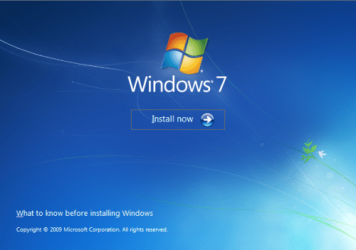
Here's How:1. Boot your computer to the Windows 7 DVD (or to a "Repair CD"). At this screen choose to install now.
25672d1251414873-mbr-restore-windows-7-master-boot-record-mbr_02.png


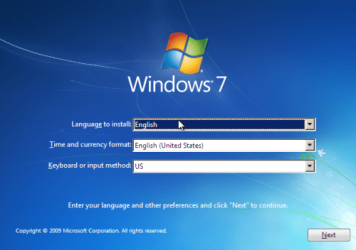
2. Select your language and click next.
25673d1251414836-mbr-restore-windows-7-master-boot-record-mbr_03.png


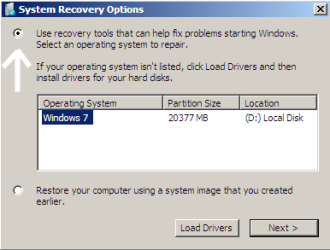
3. Click the button for "Use recovery tools".
25674d1251414836-mbr-restore-windows-7-master-boot-record-mbr_04.png


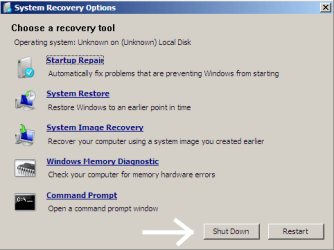
4. Then select "Command Prompt".
25675d1251414836-mbr-restore-windows-7-master-boot-record-mbr_05.png


5. When open, the command prompt will look like this:
53598d1251414836-mbr-restore-windows-7-master-boot-record-mbr_16.png


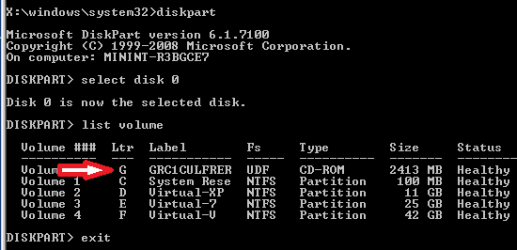
6. The command we will use, bootsect.exe, is in a folder (named boot) on the DVD.We need to know what drive letter has been assigned the DVD drive to access the folder.

Code:
Type: [B]diskpart[/B]
and press [B]Enter[/B]
 
Type: [B]select disk 0[/B] (zero)
and press [B]Enter[/B]
 
type: [B]list volume[/B]
and press [B]Enter[/B]
In this screen shot, the 7 DVD is letter: G
53599d1251414836-mbr-restore-windows-7-master-boot-record-mbr_17a.png


7. Use your DVD drive letter and

Code:
Type: [B]exit[/B]
and press [B]Enter[/B]
 
to close Diskpart
 
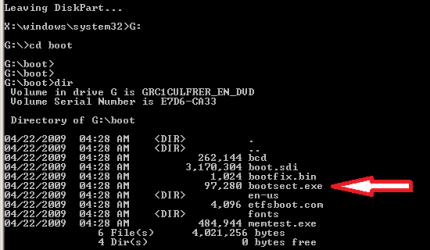
Type: [B]G:[/B] (use the letter of your DVD drive)
and press [B]Enter[/B]
 
Type: [B]cd boot[/B]
and press [B]Enter[/B]
 
Type: [B]dir[/B]
and press [B]Enter[/B]
to verify that bootcect.exe is there (if you really need to)
53600d1251414836-mbr-restore-windows-7-master-boot-record-mbr_18a.png


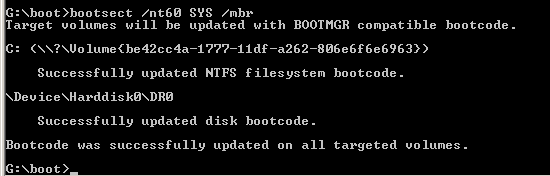
8. To restore the "bootsector code":

Code:
TYPE: [B]bootsect /nt60 SYS /mbr[/B]
and press [B]Enter[/B]
53601d1251414836-mbr-restore-windows-7-master-boot-record-mbr_19.png


NOTE: If this method fails to restore the MBR, you can try the bootrec command as it is also a tool for repairing the MBR.


9. When completed successfully,

Code:
Type: [B]exit[/B]
and press [B]Enter[/B]
This will close the command prompt window.

10. Now select Shut Down or Restart
25680d1251414836-mbr-restore-windows-7-master-boot-record-mbr_10.png


11. Then you can reboot your computer into Windows.
25681d1251414836-mbr-restore-windows-7-master-boot-record-mbr_12.png


Attachments

  • mbr_02.png
    mbr_02.png
    53.7 KB · Views: 1,640,315
  • mbr_03.png
    mbr_03.png
    54.3 KB · Views: 1,635,478
  • mbr_04.png
    mbr_04.png
    6.9 KB · Views: 1,633,763
  • mbr_05.png
    mbr_05.png
    10.5 KB · Views: 1,579,666
  • mbr_10.png
    mbr_10.png
    10.4 KB · Views: 1,576,678
  • mbr_12.png
    mbr_12.png
    5.3 KB · Views: 1,552,307
  • mbr_16.png
    mbr_16.png
    3.3 KB · Views: 1,554,623
  • mbr_17a.png
    mbr_17a.png
    3.8 KB · Views: 1,565,873
  • mbr_18a.png
    mbr_18a.png
    3.7 KB · Views: 1,620,585
  • mbr_19.png
    mbr_19.png
    2.4 KB · Views: 1,569,958
Last edited by a moderator:
Hey there guys! Thank you very much for the great forum, even-though I guess I've ****ed up my Windows 7 completely.
So, I know that I seem to be quite dumb, but I am not Bill Gates :)

I had three partitions -
200 GB with my music, movies and documents (which i should not screw up)
20 GB where I have installed windows 7 32 bit
but then i decided to upgrade to 64 bit, so I installed a second wind 7 64 bit on a third partition. So far so good, until i formatted the second partition (with the win 32 bit) and my lovely machine turned me down (not surprising, duh)
I was prepared with an installation disc and went though all the steps till the 8th one (the start up repair did not work out) and got this:

The system partition was not found:
The requested system device cannot be found.

any ideas? :confused:

As you have format the partition, this would be right.
 

My Computer My Computer

OS
ME/XP/Vista/Win7
Hey there guys! Thank you very much for the great forum, even-though I guess I've ****ed up my Windows 7 completely.
So, I know that I seem to be quite dumb, but I am not Bill Gates :)

I had three partitions -
200 GB with my music, movies and documents (which i should not screw up)
20 GB where I have installed windows 7 32 bit
but then i decided to upgrade to 64 bit, so I installed a second wind 7 64 bit on a third partition. So far so good, until i formatted the second partition (with the win 32 bit) and my lovely machine turned me down (not surprising, duh)
I was prepared with an installation disc and went though all the steps till the 8th one (the start up repair did not work out) and got this:

The system partition was not found:
The requested system device cannot be found.

any ideas? :confused:
Hello Joro, and welcome to Windows Seven Forums.

I do not think you are dumb ... as you have come to the smart place to get help! The first time I visit a new city I feel dumb, but it is just because I haven't learned my way around yet! Give it time and a chance to learn a little ... OK?

You have not given us a lot of information ... so I will have to guess at a few things ... since your x32 partition was there when installed x64, most likely the boot code went into the x32 partition, because unless you changed it, it was marked as the "Active" partition. This also assumes you do not use the 100MB "System Reserved" partition as a boot partition? So when you deleted the x32 data, you deleted all your boot code.

Most likely, the x32 partition is still the "Active" partition, but since there is nothing there for Windows to repair, the repairs fail. If you just want to be able to boot to the x64 partition, you would need a third party partitioning utility like Partition Wizard. You would boot to the CD and use the utility to mark your x64 partition as "Active". Then the Windows 7 DVD should be able to run its "Startup Repair" and restore your boot code.

However since I do not know what you want to do after that, I can not offer any further suggestions ...

Cheers!
Robert
 

My Computer My Computer

OS
...
hi.. guys this si the 1st time iv asked help at a Forum..andi think all the admin n supporters are helping here in a big way..

WEll lets come to my Problem, basically which I,MYSELF have doubled and im hitting n cursin myslef for the same..


1) One Nite i come home frm wrk, switched on my PC, and i am welcomed wit the "BCD corrupt error, which u are aware of....the typical long one which states the BCD error"
2) I happen to have a Clients PC which fortunately i had got home to repair n which had Windows 7 Installed on it..nw i connect my Hard-Disk which is in this form:
1000GB Seagate Baracuda - in 5 Partitions - Windows/Games/Music/Movies/Trash
3) So i go ahead n connect my HDD along to the clients PC which tis the 1st Bootbale HDD,however windows does nt start and the CLeints PC gets stuck at the Windows Starting LOGO..and does nt go ahead..SO i remove my HDDD and the PC startsNormaly..
4) Tried the same again, to no avail the same problem is faced..
5) Nw icome to ur Forum (this thread) and da 1st ting i try is the WIndows Recovery Options..
6) Windows just does nt get detected as i get no WIndows Installed option, its just blank..so i go ahead n try a system restore, bt since no windows is detected how wil it restore..and i dnt have any ghost or drive img backup as well..so i try the command Promt options u all have given right from the
bootsect / nt60 c:\
bootsect / nt60 SYS
bootsect / nt60 ALL to da very bootrec/rebuildbcd..

the computer just goes on and gives sm error at da end or it just goes on and on till nothing happens
7) and then i try smting wat my frnd was telling me in a long while and dats to INstall Ubuntu 9.10...did that on a frnds spare 160GB HDD n then connected my HDD to it..Booted Ubuntu and then Ununtu - Viola!! everythin showed up all my drvies like a beauty including the Windows..bt smhow when i went to the windows drive, there was nothing showing up all the folders were empty..even though it showed Space Occupied in Properties..i dnt understand this part?
8) so i gave up and then Tried to format da WINDOWS drive on my HDD, the Authentication options came up..enterd the passwrod twice, and then it gave an error saying it cannot format..went to the Drive utitliy of Ubuntu..and the drive showed Alot of Bad sectors..bt somehow all the other drives were showing up,with all my data safe in it..im so HAPPY here..
9) ....and then i act STUPID!! and somehow chose to delete the Windows Partition,that happnd and then another small partiotion got created and none of my other drives were now accesible..in fact they showd up as "UNRECOGNISE or UNKNOWN"... the same is stil happinin...pLS HELP!!

10) i can frgt the Windows data....bt all i want to know is can i get my data from the other Drives safely backed up to another HDD and if YES!! how and after that i shall get the HDD replaced at the Seagate service Centre.... i dnt want to loose all MY LIFES HARD WRK, in just a jiffy or my Stupidity...


PLS Need sm help and fast.. thanks... i hpe i have explained the problem and matter clearly..if any1 needs a clarification im ready to do anythin to HELp get my Data Back..
 

My Computer My Computer

OS
Windows 7
hi.. guys this si the 1st time iv asked help at a Forum..andi think all the admin n supporters are helping here in a big way..
Hello fernandesjude and welcome to Windows Seven Forums.

Many of us here have experienced hard drive failures also, so you are not alone. It does sound like the failing hard drive corrupted your Windows installation causing it to not boot.

Sorry about the deleted hard drive partition. Software (or services that restore hard drive data) capable of restoring your Windows partition are expensive, but it can be done.

However, what might help you now is to go to this Seagate web site: Obrigado por registrar o SeaTools! | Seagate

Download the utility and burn it to a bootable CD. Boot to the CD and allow the utility to run. It may be able to make some repairs, but you can also use the report it creates to prove to Seagate that the drive should be replaced by them.

Cheers!
Robert
 
Last edited:

My Computer My Computer

OS
...

My Computers My Computers

System One System Two

  • Computer type
    PC/Desktop
    OS
    7 X64
    CPU
    i5 8400
    Motherboard
    gigabyte b365m ds3h
    Memory
    2x8gb 3200mhz
    Hard Drives
    various
    PSU
    pure power 11 400w cm
    Case
    Coolermaster
    Cooling
    cryorig m9i
  • Computer type
    PC/Desktop
    OS
    7x64
    CPU
    g5400
    Motherboard
    ga b365m ds3h
    Memory
    8gb ddr4 2400
    PSU
    xfx pro 450w
THANKS iseeuu!

My set up was like this:

HP laptop, Centrino 2, Windows Vista

Had the machine for well over a year.

Shortly after Windows 7 came out I Upgraded to Windows 7

I'm really liking Windows 7 a lot. Like really like, like.

So for reasons unbeknownst to even me I decided to do a dual boot with Ubuntu.

I was ready to remove it in less than a month.

I found this site and your thread via Google.

I brought my laptop upstairs to the main (Windows XP) machine....

Put the laptop next to me.

Got on this messageboard with your instructions.

Followed them EXACTLY from top to bottom.

Hot damn! Worked like a charm

I'm impressed.

And THANKS! Again
 

My Computer My Computer

OS
Windows 7
My set up was like this:

HP laptop, Centrino 2, Windows Vista

Had the machine for well over a year.

Shortly after Windows 7 came out I Upgraded to Windows 7

I'm really liking Windows 7 a lot. Like really like, like.

So for reasons unbeknownst to even me I decided to do a dual boot with Ubuntu.

I was ready to remove it in less than a month.

I found this site and your thread via Google.

I brought my laptop upstairs to the main (Windows XP) machine....

Put the laptop next to me.

Got on this messageboard with your instructions.

Followed them EXACTLY from top to bottom.

Hot damn! Worked like a charm

I'm impressed.

And THANKS! Again
Thank you, Hobie Lapatka, for lettings us know you were helped by Windows Seven Forums. And you are most welcome.

Cheers!
Robert
 

My Computer My Computer

OS
...
Repair MBR Tutorial

Just used this tutorial now and it works perfect!
I wanted to give Ubuntu a little test run and set up a dual boot with Win7.

I gave it a go and I still don't think it anywhere near as polished and useable as Win7 especially with regard to drivers. Sounds on youtube are horrendous.

I'll always be a Windows/MS guy but I just wanted to see what the fuss was about.

Glad to get back to a solely Windows 7 PC.

Thanks!!!
 

My Computer My Computer

OS
W7 Ultimate 32bit
Just used this tutorial now and it works perfect!
I wanted to give Ubuntu a little test run and set up a dual boot with Win7.

I gave it a go and I still don't think it anywhere near as polished and useable as Win7 especially with regard to drivers. Sounds on youtube are horrendous.

I'll always be a Windows/MS guy but I just wanted to see what the fuss was about.

Glad to get back to a solely Windows 7 PC.

Thanks!!!
Hello bnpguy, and welcome to Windows Seven Forums.

Thanks for letting us know the tutorial was helpful to you!

The last Ubuntu version I found useful was v9. This latest release will not work on any of my old test computers. I guess, for me anyway, it is time to find another Linux distro to use. Like you I find that Linux cannot hold a candle to Windows 7, but we all can be glad we have choices!

Cheers!
Robert
 

My Computer My Computer

OS
...
Excellent tutorial with easy-to-read snapshots.

A suggestion would be to modify so that people understand that they also do this using a System Repair Disc.
 

My Computer My Computer

Computer Manufacturer/Model Number
Toshiba Satellite S875D-S7239 laptop
OS
MS Windows 7 Ultimate SP1 64-bit
CPU
AMD A10-4600M
Motherboard
AMD Pumori (Socket FT1)
Memory
6.00 GB Dual-Channel DDR3 @ 798MHz (11-11-12-28)
Graphics Card(s)
AMD Radeon HD 7660G
Sound Card
High Definition Audio Device
Monitor(s) Displays
Generic PnP Monitor (1600x900@60Hz)
Screen Resolution
1600x900@60Hz
Hard Drives
SSD 119GB Corsair CSSD-V128GB2 ATA Device
Keyboard
Standard PS/2 Keyboard
Mouse
HP Wireless Optical Mobile Mouse Model FHA-3410
Internet Speed
What the local pub, local coffee shop offers.
Other Info
Optical Drive:MATSHITA BD-CMB UJ160B ATA Device


Also have an Asus ha1002xp netbook with Win 7 Ultimate installed.
Excellent tutorial with easy-to-read snapshots.

A suggestion would be to modify so that people understand that they also do this using a System Repair Disc.
Thank you Karl, that is an excellent suggestion. I will add that option right away.

Your input is appreciated!

Cheers!
Robert
 

My Computer My Computer

OS
...
And I thank you. Very quick.
 

My Computer My Computer

Computer Manufacturer/Model Number
Toshiba Satellite S875D-S7239 laptop
OS
MS Windows 7 Ultimate SP1 64-bit
CPU
AMD A10-4600M
Motherboard
AMD Pumori (Socket FT1)
Memory
6.00 GB Dual-Channel DDR3 @ 798MHz (11-11-12-28)
Graphics Card(s)
AMD Radeon HD 7660G
Sound Card
High Definition Audio Device
Monitor(s) Displays
Generic PnP Monitor (1600x900@60Hz)
Screen Resolution
1600x900@60Hz
Hard Drives
SSD 119GB Corsair CSSD-V128GB2 ATA Device
Keyboard
Standard PS/2 Keyboard
Mouse
HP Wireless Optical Mobile Mouse Model FHA-3410
Internet Speed
What the local pub, local coffee shop offers.
Other Info
Optical Drive:MATSHITA BD-CMB UJ160B ATA Device


Also have an Asus ha1002xp netbook with Win 7 Ultimate installed.
First, I've read through a lot of these posts and I'm sorry if I missed the answer to my questions. Second, I'm glad I found this place. TONS of great and highly informative information here. Thanks to all who put this site together.

My Question (as easy as possible):
I started with Windows Vista 32 bit. I added a dual boot for Ubuntu. Screwed the pooch (not literally) by accident and killed the partition Ubuntu was on. Unable to restore the partition, I recreated it. Did not reinstall Ubuntu as that is what cause my little fiasco to begin with and is an even longer story best served for another forum. :)

Okay, So back to Vista 32bit, no Ubuntu. System of course still wants to dual boot. Not a big deal, I can handle the extra keyboard slam to get to windows.

Down the road, upgraded to Windows 7 32bit to test it out and make sure I was going to like it. Dual boot of course didn't go away.

Recently decided to go to Windows 7 64bit. As expected, dual boot stayed.

Now I want to rid myself of the dual boot option but of course 'msconfig' boot tab only shows Windows 7.

So, if I follow the tutorial at the beginning of this threat and delete the code for Ubuntu, will that cause an issue with booting? I did read that it shouldn't be a problem but I wanted to make sure that my particular situation wasn't far off the beaten path of what had already been said. I hate dealing with my DVD drive simply because it likes to stop responding in the middle of reading discs and I don't have a replacement for it at this time so using the Windows 7 CD to rebuild the boot records would probably result in additional problems.

I'll leave the dual boot and change the boot time to 5 seconds if I have to but I'd rather just get rid of the dual boot all together. If you think there will be a high percentage that I won't have to fuss with the rebuilding the MBR from the Windows 7 CD then I'll take a chance. Otherwise, like I said, I'll just change the boot time to 5 seconds or 0 if that'll work.

Thanks and I eagerly await your replies.
 

My Computer My Computer

Computer Manufacturer/Model Number
Custom
OS
Windows 7 x64
CPU
Athlon 64 X2 5200+
Motherboard
ASUS M2A VM-HDMI
Memory
4 Gigs
Graphics Card(s)
RADEON HD4650
Sound Card
Onboard
Monitor(s) Displays
Dual Screen // 1: 23" WS - 2: 19" 4:3 // Both FS
Hard Drives
Maxtor 6Y250P0 // WDC WD3200AAKS-00SBA0
PSU
650 Watt
Cooling
Air Cooled
sbus,
Welcome to SevenForums.

Could you help us out and start a fresh thread stating your problem.

Thanks
 

My Computer My Computer

Computer Manufacturer/Model Number
Toshiba Satellite S875D-S7239 laptop
OS
MS Windows 7 Ultimate SP1 64-bit
CPU
AMD A10-4600M
Motherboard
AMD Pumori (Socket FT1)
Memory
6.00 GB Dual-Channel DDR3 @ 798MHz (11-11-12-28)
Graphics Card(s)
AMD Radeon HD 7660G
Sound Card
High Definition Audio Device
Monitor(s) Displays
Generic PnP Monitor (1600x900@60Hz)
Screen Resolution
1600x900@60Hz
Hard Drives
SSD 119GB Corsair CSSD-V128GB2 ATA Device
Keyboard
Standard PS/2 Keyboard
Mouse
HP Wireless Optical Mobile Mouse Model FHA-3410
Internet Speed
What the local pub, local coffee shop offers.
Other Info
Optical Drive:MATSHITA BD-CMB UJ160B ATA Device


Also have an Asus ha1002xp netbook with Win 7 Ultimate installed.
First, I've read through a lot of these posts and I'm sorry if I missed the answer to my questions. Second, I'm glad I found this place. TONS of great and highly informative information here. Thanks to all who put this site together.

My Question (as easy as possible):
I started with Windows Vista 32 bit. I added a dual boot for Ubuntu. Screwed the pooch (not literally) by accident and killed the partition Ubuntu was on. Unable to restore the partition, I recreated it. Did not reinstall Ubuntu as that is what cause my little fiasco to begin with and is an even longer story best served for another forum. :)

Okay, So back to Vista 32bit, no Ubuntu. System of course still wants to dual boot. Not a big deal, I can handle the extra keyboard slam to get to windows.

Down the road, upgraded to Windows 7 32bit to test it out and make sure I was going to like it. Dual boot of course didn't go away.

Recently decided to go to Windows 7 64bit. As expected, dual boot stayed.

Now I want to rid myself of the dual boot option but of course 'msconfig' boot tab only shows Windows 7.

So, if I follow the tutorial at the beginning of this threat and delete the code for Ubuntu, will that cause an issue with booting? I did read that it shouldn't be a problem but I wanted to make sure that my particular situation wasn't far off the beaten path of what had already been said. I hate dealing with my DVD drive simply because it likes to stop responding in the middle of reading discs and I don't have a replacement for it at this time so using the Windows 7 CD to rebuild the boot records would probably result in additional problems.

I'll leave the dual boot and change the boot time to 5 seconds if I have to but I'd rather just get rid of the dual boot all together. If you think there will be a high percentage that I won't have to fuss with the rebuilding the MBR from the Windows 7 CD then I'll take a chance. Otherwise, like I said, I'll just change the boot time to 5 seconds or 0 if that'll work.

Thanks and I eagerly await your replies.
Hello sbus1976;

Would you clarify something for me? Installing a new OS, ie Windows 7 x32 or x64, should have rewritten the MBR boot code each time. So what "boot manager" is in place now? Did the Ubuntu boot manager (Grub) get installed in the MBR? Is it the Windows 7 boot manager, and what menu choices (dual boot) does the menu offer?

As this tutorial will overwrite the boot code with Windows 7 boot code, it does not seem that is what you need? Can you post a screen shot of your Windows Disk Management drive map?

Cheers
Robert
 

My Computer My Computer

OS
...
this way did not work on my case. i have a laptop installed windows 7, it was okay. until today i saw a article about removing the 100MB of "system reserved" partition.......and yeah...i did removed it by using my win7 installation dvd.. now my laptop wouldnt boot...it shows only operating systen not found"

i tried the method above but at Step 3, mine did not show up any operating system..all blank so i just clicked next

then at Step 9

it couldnt restore the bootsector code.
it only shows "the system partition was not found: the requested system device cannot be found"

and then everything remain the same, still cannot boot.

i know i am stupid to remove the system reserved partiton..

but i really need help here, i have imporant data in the laptop so i dont want to format and reinstall...

if anyone can help, i really appreciate


my small help
is that of copying through a dos interface,
from the dvd utility

the staff u want
in mobile hdd, or a device with enough space
and then,

make the format,
or search if, there is a way to make the system partition through this again
after ofcourse the rescue coping! :huh:
 

My Computer My Computer

Computer type
PC/Desktop
Computer Manufacturer/Model Number
intel - albatron 7016
OS
Debian Ubuntu 12.04.1 LTS x64 ell
CPU
Intel Pentium 4 630, 3000 MHz (15 x 200) Hyper Threading
Motherboard
Intel Avalon D915GAV
Memory
2046mb/-- 200mhz 1gb kingstone channel A - 2x512mb channelB
Graphics Card(s)
Intel® 915G
Sound Card
SB Live! 24-bit
Monitor(s) Displays
Samsung SyncMaster 913N 19" LCD (SXGA)
Screen Resolution
1280x1024 96ppi
Hard Drives
ST3160815AS (9RA2P1Y9) [with a Puppy Racy partition]
system WDC WD360ADFD-00NLR1 (WD-WMANT1046405)
PSU
ISO-P500SPP 420W
Case
middleATX
Cooling
3.. fans >> cpu:intel, hdds.. + PSU's = 3~
Keyboard
Labtec wireless
Mouse
wired microsoft basic optical
Internet Speed
2.0 mbps wifi adsl
Antivirus
I Prefer Microsoft Security Essentials for WindowsSeven.
Browser
checking SUPERBIRD (a google like chrome browser) on a Win7
Other Info
classified
Excellent suggestion, TeYuMi.

Thank you!
 

My Computer My Computer

OS
...
iseeuu -

Thanks for posting this tutorial, it is very straightforward and easy to follow. I am having a problem, however, first a background...
My laptop was dual boot Win7Ultimate and Ubuntu Linux. I decided to remove Linux as I never use it and it was taking up 30GB of space. So I googled on how to do this and followed another website that said to first go into Disk Management in Windows and delete the partitions that have no file system listed. I did this then rebooted and ran from a Windows Vista ISO the fixboot and fixmbr commands. I did not have a Windows 7 ISO handy at the time. When I rebooted, I just got a cursor in the upper left corner - no errors or anything. I then downloaded a Win 7 OEM ISO and ran the repair options in your thread. Everything went through, no errors but when I reboot I still get the cursor that just blinks in the upper left corner and nothing is displayed.
I feel that my data is still safe and there has to be someway to fix the boot record. Any thoughts/suggestions would be helpful :D.
 

My Computer My Computer

OS
Windows 7
iseeuu -

Thanks for posting this tutorial, it is very straightforward and easy to follow. I am having a problem, however, first a background...
My laptop was dual boot Win7Ultimate and Ubuntu Linux. I decided to remove Linux as I never use it and it was taking up 30GB of space. So I googled on how to do this and followed another website that said to first go into Disk Management in Windows and delete the partitions that have no file system listed. I did this then rebooted and ran from a Windows Vista ISO the fixboot and fixmbr commands. I did not have a Windows 7 ISO handy at the time. When I rebooted, I just got a cursor in the upper left corner - no errors or anything. I then downloaded a Win 7 OEM ISO and ran the repair options in your thread. Everything went through, no errors but when I reboot I still get the cursor that just blinks in the upper left corner and nothing is displayed.
I feel that my data is still safe and there has to be someway to fix the boot record. Any thoughts/suggestions would be helpful :D.
Hello pinto4598 and welcome to Windows Seven Forums.

If the commands you executed were successful in restoring the Windows Seven boot manager, then possibly it cannot find the "Active" partition with the proper boot code? What partitions does "Diskpart" display? Which partition is marked "Active"?

If you cannot resolve the issue with "Dsikpart", a temporary solution is to restore the Grub bootloader using the "Live" Ubuntu CD:
http://www.sevenforums.com/installation-setup/62840-fixed-windows-but-now-grub-gone.html

Once you have restored the boot manager, you should be able to boot into Windows again and post a screen shot of your disk management hard drive map?

You can also use the Ubuntu "Live" CD and the program "GParted" to take a screen shot in Ubuntu, then log in to Seven Forums with FireFox to post the screen shot. With the additional information, we may be able to offer other suggestions.

Cheers!
Robert
 

My Computer My Computer

OS
...
Very definitive and helpful guide! Great thanks!
 

My Computer My Computer

OS
Windows 7 home premium 64Bit
CPU
AMD X2 6000+ 3.10Ghz
Motherboard
Asus M2N-E SLI
Memory
6.00Gb DDR2 800mhz
Graphics Card(s)
Nvidia 8600GT
Sound Card
On board 7.1
Monitor(s) Displays
Samsung peeble 2232BW
Screen Resolution
1680X1050
Hard Drives
750GB
PSU
600W
Case
Asus
Cooling
Fans
Keyboard
ZBoard Merch
Mouse
Razer Diamondback
Internet Speed
>20MBPS
Other Info
Also runnig an Asus EEE pc 1005HA with Windows 7 Home Premium 32bit
Back
Top