McAfee and MSE?

well.........with McAfee your pc cannot be infected....why?.... read on
1.McAfee will make it so slow that let alone malware you will find difficult to run normal programmes.
2.McAfee will hog all your RAM leaving no place for bots/virus/trojans to cram.
3.With McAfee installed infections find it embarrassing to infect...because there is nothing new to do :p

so......install the other M -MSE and give your pc a life....fast...secure and safe

disclaimer: the statement above is nothing but a light hearted buffoonery on my part :o

Howdy thathagat,
I was worried and was going to say my experience with McAfee does not mirror your list. Then I saw the disclaimer. Thanks for the levity and info.
glennc

Well, McAfee had been the only one to catch the "bredolab" password stealer Trojan on my computer....:confused:

Mse did well his job too (catched some obvious one) on another computer. i did only install it briefly on my actual, so can't tell much but was obvious the scan engine messed up the ressources.

I'm not taking full cause for McAfee (far from it)...because might test another after this year.

Tested version 2009 five month and was just Ok, and now on version 2010, looks a little smoothly scan and Av engine doesn't taking any ressources appart during the daily updates. Updates comes about 3 or 4 times during the day for a 40 seconds installation.

I've been a little tricky with them and my credit-card, because i knew it will end-up before the full year subscription!!:p
 

My Computer

Computer type
PC/Desktop
Computer Manufacturer/Model Number
Custom Build
OS
Windows 7 Professional SP1 - x64 [Non-UEFI Boot]
CPU
Ivy Bridge Core i5 3570K (Delidded)
Motherboard
Asus P8Z77-V LE PLUS
Memory
G.Skill "Ares" DDR3 PC3-12800 - 1600MHz (16Gb)
Graphics Card(s)
Asus Dual-RX480-O4G
Sound Card
Creative Sound Blaster Z w/5.1 sound system
Monitor(s) Displays
Asus IPS 23"
Screen Resolution
16/9
Hard Drives
Internal:
500Go Sata 6Gb/s (x2)
500Go Sata 3Gb/s (x2)
SSD 60Go Sata 6Gb/s
PSU
In Win C 900W Series 80+ Platinum
Case
Thermaltake Chaser A71
Cooling
Custom Water Cooling Loop
Keyboard
Cooler Master QuickFire XTi
Mouse
Razer Imperator 2012 (4G)
Antivirus
MSE
Browser
IE 11.0.xxx Rtm
Other Info
"Raid0" with Intel Smart Response Technology (HDD/SSD)
Hello Borg 386,
Thanks for adding your experience to the discussion. I am in a similar position regarding McAfee. I have standalone scanner AntiMalware, and a resident program called Threatfire. I have not heard anyone mention it, but I and the friend who suggested it seem to be having success. It is specifically designed small and lightweight and to complement your existing protection, rather than be the sole protection. I have had it catch changes, and immediately afterwards McAfee signals the catch. I am pretty sure I'm safe. I appreciate you joining the discussion.
glennc

Threatfire is a behavior based program and I have tried it. A lot of other AV programs have included behavior based units in their newer releases so Threatfire is not as relevant. I now use WinPatrol which is also a behavior based program and I like it better than Threatfire.

Jim :geek:
 

My Computer

Computer type
PC/Desktop
Computer Manufacturer/Model Number
Home Built
OS
Windows 8.1 Pro w/Media Center 64bit, Windows 7 HP 64bit
CPU
Phenom II X6 1100T
Motherboard
ASUS M5A99X EVO
Memory
Crucial Balistic 8gb DDR3-1866 CL9
Graphics Card(s)
MSI R6850 Cyclone IGD5 PE
Sound Card
On Board
Monitor(s) Displays
ASUS VE258Q 25" LED with DVI-HDMI-DisplayPort
Screen Resolution
1920 x 1080
Hard Drives
Two WD Cavier Black 2TB Sata III, WD My Book Essential 2TB USB 3.0
PSU
Seasonic X650 80 Plus GOLD Modular
Case
Corsair 400R
Cooling
Antec Kuhler H2O 620, Two 120mm and four 140mm
Keyboard
Logitech K120
Mouse
Logitech Marble Mouse USB, Logitech Precision Game Pad
Internet Speed
15MB
Antivirus
Norton IS 2013, Malwarebytes Pro Beta 2
Browser
IE-11, FF-27
Other Info
APC UPS ES 750, Netgear WNR3500L Gigabit & Wireless N Router with SamKnows Test Program, Motorola SB6120 Gigabit Cable Modem. Brother HL-2170W Laser Printer, Epson V300 Scanner
well.........with McAfee your pc cannot be infected....why?.... read on
1.McAfee will make it so slow that let alone malware you will find difficult to run normal programmes.
2.McAfee will hog all your RAM leaving no place for bots/virus/trojans to cram.
3.With McAfee installed infections find it embarrassing to infect...because there is nothing new to do :p

so......install the other M -MSE and give your pc a life....fast...secure and safe

disclaimer: the statement above is nothing but a light hearted buffoonery on my part :o

Howdy thathagat,
I was worried and was going to say my experience with McAfee does not mirror your list. Then I saw the disclaimer. Thanks for the levity and info.
glennc

Well, McAfee had been the only one to catch the "bredolab" password stealer Trojan on my computer....:confused:

Mse did well his job too (catched some obvious one) on another computer. i did only install it briefly on my actual, so can't tell much but was obvious the scan engine messed up the ressources.

I'm not taking full cause for McAfee (far from it)...because might test another after this year.

Tested version 2009 five month and was just Ok, and now on version 2010, looks a little smoothly scan and Av engine doesn't taking any ressources appart during the daily updates. Updates comes about 3 or 4 times during the day for a 40 seconds installation.

I've been a little tricky with them and my credit-card, because i knew it will end-up before the full year subscription!!:p

Hey NoN,
You've given me more confidence that McAfee will do a fairly up to date job. As I am stuck, I am appreciative. I seem to try different things, which is a reason that Windows 7 has been such a chore. Never seem to be satisfied and as I wasn't paying for it I was o.k. Like I said before, I'll keep my fingers crossed, but I guess everyone should, none of us are truly safe completely and finally. We come close.
Take it easy .
glennc
 

My Computer

Computer type
PC/Desktop
Computer Manufacturer/Model Number
Self-Built
OS
Windows 7 Ultimate
CPU
AMD Phenom-II X4 965
Motherboard
Gigabyte GA-MA785GM-US2H
Memory
8192 MB DDR2-SDRAM
Graphics Card(s)
ATI Radeon HD 4200
Sound Card
ATI Radeon HD 4200 High Definition Audo
Monitor(s) Displays
LG Electronics W1943
Screen Resolution
1360 X 768
Hard Drives
C: 500 GB Caviar Black SATA
E: 500 GB Caviar Black SATA
PSU
Ultra LSP 750
Case
Ultra XBlaster
Cooling
2 Fans, CPU Fan, PS Fan
Keyboard
Acer
Mouse
Logitech
Internet Speed
6 MB
Hello Borg 386,
Thanks for adding your experience to the discussion. I am in a similar position regarding McAfee. I have standalone scanner AntiMalware, and a resident program called Threatfire. I have not heard anyone mention it, but I and the friend who suggested it seem to be having success. It is specifically designed small and lightweight and to complement your existing protection, rather than be the sole protection. I have had it catch changes, and immediately afterwards McAfee signals the catch. I am pretty sure I'm safe. I appreciate you joining the discussion.
glennc

Threatfire is a behavior based program and I have tried it. A lot of other AV programs have included behavior based units in their newer releases so Threatfire is not as relevant. I now use WinPatrol which is also a behavior based program and I like it better than Threatfire.

Jim :geek:

Hey Phone Man,
Thanks for explaining the concept. I'm happy with it and believe it helps to a degree. It is not surprising that the idea is incorporated in other software.
I am personally getting confused with what a firewall is supposed to stop, what an AV is supposed to stop and what Anti Malware is supposed to stop. Wish they would get it all in one package. I believe that is what McAfee is attempting but I still feel the need for seperate malware detection. Oh well, computers, you can't live with them and you can't live without them.
Appreciate the explanation.
glennc
 

My Computer

Computer type
PC/Desktop
Computer Manufacturer/Model Number
Self-Built
OS
Windows 7 Ultimate
CPU
AMD Phenom-II X4 965
Motherboard
Gigabyte GA-MA785GM-US2H
Memory
8192 MB DDR2-SDRAM
Graphics Card(s)
ATI Radeon HD 4200
Sound Card
ATI Radeon HD 4200 High Definition Audo
Monitor(s) Displays
LG Electronics W1943
Screen Resolution
1360 X 768
Hard Drives
C: 500 GB Caviar Black SATA
E: 500 GB Caviar Black SATA
PSU
Ultra LSP 750
Case
Ultra XBlaster
Cooling
2 Fans, CPU Fan, PS Fan
Keyboard
Acer
Mouse
Logitech
Internet Speed
6 MB
Hey Phone Man,
Thanks for explaining the concept. I'm happy with it and believe it helps to a degree. It is not surprising that the idea is incorporated in other software.
I am personally getting confused with what a firewall is supposed to stop, what an AV is supposed to stop and what Anti Malware is supposed to stop. Wish they would get it all in one package. I believe that is what McAfee is attempting but I still feel the need for seperate malware detection. Oh well, computers, you can't live with them and you can't live without them.
Appreciate the explanation.
glennc

I'll explain it, as I understand it. Malware is short for malicious software, and is usually used as a catch-all term for all undesirable, hostile, intrusive, or annoying software. A virus is a particular type of malware. Anti-viruses are often made to just stop viruses and similar software, but sometimes (in the case of McAfee and Nortan anti-virus) the word virus is used as a synonym for malware. Anti-malware programs are always for all types of malware. Firewalls are made to prevent hacking. They keep certain programs or people from accessing your computer or making changes on it. Some people are foolish enough to keep all their banking info and other personal info on their computer and not have any firewall, even turning windows firewall off. This makes it where anyone could connect to there network or directly to there computer, and make copies of all that information. Some downloadable software also makes copies of these files and sends them to other people.
 

My Computer

Computer type
Laptop
Computer Manufacturer/Model Number
Toshiba P775-S7100
OS
Windows 7 Professional SP1 64-bit
CPU
Intel Core i5-2450M @2.5 GHz
Memory
6 GB DDR3 1333MHz
Graphics Card(s)
Intel HD 3000
Monitor(s) Displays
Built-in 17.3" LED; 22" Insignia NS-L22Q-10A
Screen Resolution
1600x900; 1360x768
Hard Drives
750 GB Hitachi
1TB Seagate FreeAgent External
Internet Speed
Verizon DSL Speed(Down/Up): 3360 Kbps / 800 Kbps
Antivirus
MSE and MBAM Pro
Browser
IE10
Hey Phone Man,
Thanks for explaining the concept. I'm happy with it and believe it helps to a degree. It is not surprising that the idea is incorporated in other software.
I am personally getting confused with what a firewall is supposed to stop, what an AV is supposed to stop and what Anti Malware is supposed to stop. Wish they would get it all in one package. I believe that is what McAfee is attempting but I still feel the need for seperate malware detection. Oh well, computers, you can't live with them and you can't live without them.
Appreciate the explanation.
glennc

I'll explain it, as I understand it. Malware is short for malicious software, and is usually used as a catch-all term for all undesirable, hostile, intrusive, or annoying software. A virus is a particular type of malware. Anti-viruses are often made to just stop viruses and similar software, but sometimes (in the case of McAfee and Nortan anti-virus) the word virus is used as a synonym for malware. Anti-malware programs are always for all types of malware. Firewalls are made to prevent hacking. They keep certain programs or people from accessing your computer or making changes on it. Some people are foolish enough to keep all their banking info and other personal info on their computer and not have any firewall, even turning windows firewall off. This makes it where anyone could connect to there network or directly to there computer, and make copies of all that information. Some downloadable software also makes copies of these files and sends them to other people.

Petey7,
Your clarification seems to fit what I was guessing at. Thanks for it. It is just confusing. I would think it is a marketing ploy. So Norton Antivirus, a current version would scan for viruses and any malware, am I correct in my interpretation?
Take care dude!
glennc
 

My Computer

Computer type
PC/Desktop
Computer Manufacturer/Model Number
Self-Built
OS
Windows 7 Ultimate
CPU
AMD Phenom-II X4 965
Motherboard
Gigabyte GA-MA785GM-US2H
Memory
8192 MB DDR2-SDRAM
Graphics Card(s)
ATI Radeon HD 4200
Sound Card
ATI Radeon HD 4200 High Definition Audo
Monitor(s) Displays
LG Electronics W1943
Screen Resolution
1360 X 768
Hard Drives
C: 500 GB Caviar Black SATA
E: 500 GB Caviar Black SATA
PSU
Ultra LSP 750
Case
Ultra XBlaster
Cooling
2 Fans, CPU Fan, PS Fan
Keyboard
Acer
Mouse
Logitech
Internet Speed
6 MB
Yes, it is made to detect all Malware. They just use the term virus because more people are familiar with the term.
 

My Computer

Computer type
Laptop
Computer Manufacturer/Model Number
Toshiba P775-S7100
OS
Windows 7 Professional SP1 64-bit
CPU
Intel Core i5-2450M @2.5 GHz
Memory
6 GB DDR3 1333MHz
Graphics Card(s)
Intel HD 3000
Monitor(s) Displays
Built-in 17.3" LED; 22" Insignia NS-L22Q-10A
Screen Resolution
1600x900; 1360x768
Hard Drives
750 GB Hitachi
1TB Seagate FreeAgent External
Internet Speed
Verizon DSL Speed(Down/Up): 3360 Kbps / 800 Kbps
Antivirus
MSE and MBAM Pro
Browser
IE10
Cool, certainly clearer now.
glennc
 

My Computer

Computer type
PC/Desktop
Computer Manufacturer/Model Number
Self-Built
OS
Windows 7 Ultimate
CPU
AMD Phenom-II X4 965
Motherboard
Gigabyte GA-MA785GM-US2H
Memory
8192 MB DDR2-SDRAM
Graphics Card(s)
ATI Radeon HD 4200
Sound Card
ATI Radeon HD 4200 High Definition Audo
Monitor(s) Displays
LG Electronics W1943
Screen Resolution
1360 X 768
Hard Drives
C: 500 GB Caviar Black SATA
E: 500 GB Caviar Black SATA
PSU
Ultra LSP 750
Case
Ultra XBlaster
Cooling
2 Fans, CPU Fan, PS Fan
Keyboard
Acer
Mouse
Logitech
Internet Speed
6 MB
I'll go ahead and put this link up. If you want to run a free Symantec online scan on your system, you can do so from here.

You will be prompted to d/l a program that will run independently.

The program will download, run the scan on your entire system with the latest virus/malware definitions, then give you the result. There's also a Security scan which is also free.

NOTE - in order to run Virus Detection you must be using Microsoft Internet Explorer 5.0 or higher with ActiveX and Scripting enabled.

( I thought they would have fixed that and allowed other browsers by now...I guess we know who's sleeping with MS)

http://security.symantec.com/sscv6/...lfid=21&pkj=BVNUYHGBYNCJEIMXQKC&auth_status=0

You've given me more confidence that McAfee will do a fairly up to date job.
I still have McAfee on the system because every layer of protection you can get helps nowadays.
 

My Computer

Computer type
PC/Desktop
Computer Manufacturer/Model Number
Dell Hell oh Well
OS
Win 7 32 Home Premium, Win 7 64 Pro, Win 8.1, Win 10
CPU
Intel Core 2 Duo 2.93GHz
Memory
Not much with my ADHD
Graphics Card(s)
ATI Radeon HD 4350
Monitor(s) Displays
24" HDTV/Monitor
Screen Resolution
Blurry after a Scotch or 2
Hard Drives
1 HDD 250 GB, 1 HDD 1 TB, 3 - 1 TB Externals
Case
Don't get on my case...man :D
Cooling
I have an Air Conditioner & Diet Pepsi
Keyboard
Saitek Cyborg
Mouse
10 yr old MS optical mouse that still works
Internet Speed
Never fast enough
Antivirus
Various
Browser
Various
Thanks Borg 386,
I recall using the site in the past, but forgot about it. Will give it a try and see how I stand. Cool Dude
glennc
 

My Computer

Computer type
PC/Desktop
Computer Manufacturer/Model Number
Self-Built
OS
Windows 7 Ultimate
CPU
AMD Phenom-II X4 965
Motherboard
Gigabyte GA-MA785GM-US2H
Memory
8192 MB DDR2-SDRAM
Graphics Card(s)
ATI Radeon HD 4200
Sound Card
ATI Radeon HD 4200 High Definition Audo
Monitor(s) Displays
LG Electronics W1943
Screen Resolution
1360 X 768
Hard Drives
C: 500 GB Caviar Black SATA
E: 500 GB Caviar Black SATA
PSU
Ultra LSP 750
Case
Ultra XBlaster
Cooling
2 Fans, CPU Fan, PS Fan
Keyboard
Acer
Mouse
Logitech
Internet Speed
6 MB
I've been running MSE since it came out and have had no problems at all. I have this running constantly along with Windows Firewall.
One a week I run a MalwareBytes scan and then a SuperAntiSpyware scan. These usually come up with some adware cookies but nothing serious.
About once a month I run Sophos Anti Rootkit. This will usually show a few things but if I click on them I am advised not to remove them as they present no threat. (?)
Touch wood I've had no problems since adopting this routine.
 

My Computer

Computer Manufacturer/Model Number
The Monolith. 3.1
OS
Windows 7 Home Premium 64 bit
CPU
i7 [email protected]
Motherboard
Gigabyte Z77-D3H
Memory
2x4GB Corsair Vegeance DDR3
Graphics Card(s)
XFX GTX 260 Black Edition
Sound Card
none-through large stereo hi fi
Monitor(s) Displays
Croosover 27MDP LED IPS Dell 2408 WFP
Screen Resolution
2560x1440 1920x1200
Hard Drives
1x Samsung 840Pro 128GB SSD
1x Samsung Spinpoint F1 1TB
PSU
Corsair AX 850 Watt
Case
Cooler Master ACTS 840
Cooling
Be Quiet! Dark Rock Pro
Keyboard
Enermax Aurora
Mouse
Logitech Ballmouse
Internet Speed
20MBPS
Hello johnwillyums,
Thanks for adding to the discussion. A friend of mine swears by Sophos and I know a few County School systems use the Sophos products. No personal experience.
Take care.
glennc
 

My Computer

Computer type
PC/Desktop
Computer Manufacturer/Model Number
Self-Built
OS
Windows 7 Ultimate
CPU
AMD Phenom-II X4 965
Motherboard
Gigabyte GA-MA785GM-US2H
Memory
8192 MB DDR2-SDRAM
Graphics Card(s)
ATI Radeon HD 4200
Sound Card
ATI Radeon HD 4200 High Definition Audo
Monitor(s) Displays
LG Electronics W1943
Screen Resolution
1360 X 768
Hard Drives
C: 500 GB Caviar Black SATA
E: 500 GB Caviar Black SATA
PSU
Ultra LSP 750
Case
Ultra XBlaster
Cooling
2 Fans, CPU Fan, PS Fan
Keyboard
Acer
Mouse
Logitech
Internet Speed
6 MB
Hey Phone Man,
Thanks for explaining the concept. I'm happy with it and believe it helps to a degree. It is not surprising that the idea is incorporated in other software.
I am personally getting confused with what a firewall is supposed to stop, what an AV is supposed to stop and what Anti Malware is supposed to stop. Wish they would get it all in one package. I believe that is what McAfee is attempting but I still feel the need for seperate malware detection. Oh well, computers, you can't live with them and you can't live without them.
Appreciate the explanation.
glennc

Some have been already explain to you.

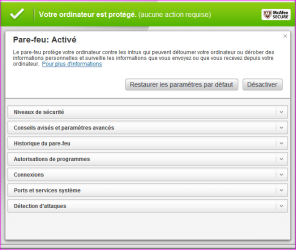
But one thing in McAfee is that this software override the native Windows 7 firewall and you'll have to go in the McAfee "Firewall Parameters" to find some tricks and boxes to check, to be better protected.

You can aswell slightly parameter the Windows Firewall rules behavior in Control Panel=>Windows Firewall=>Advanced Parameters
 

Attachments

  • Capture.PNG
    Capture.PNG
    15.9 KB · Views: 1

My Computer

Computer type
PC/Desktop
Computer Manufacturer/Model Number
Custom Build
OS
Windows 7 Professional SP1 - x64 [Non-UEFI Boot]
CPU
Ivy Bridge Core i5 3570K (Delidded)
Motherboard
Asus P8Z77-V LE PLUS
Memory
G.Skill "Ares" DDR3 PC3-12800 - 1600MHz (16Gb)
Graphics Card(s)
Asus Dual-RX480-O4G
Sound Card
Creative Sound Blaster Z w/5.1 sound system
Monitor(s) Displays
Asus IPS 23"
Screen Resolution
16/9
Hard Drives
Internal:
500Go Sata 6Gb/s (x2)
500Go Sata 3Gb/s (x2)
SSD 60Go Sata 6Gb/s
PSU
In Win C 900W Series 80+ Platinum
Case
Thermaltake Chaser A71
Cooling
Custom Water Cooling Loop
Keyboard
Cooler Master QuickFire XTi
Mouse
Razer Imperator 2012 (4G)
Antivirus
MSE
Browser
IE 11.0.xxx Rtm
Other Info
"Raid0" with Intel Smart Response Technology (HDD/SSD)
Hello Non,
Bon appremedie, I think. Can't read a single word of your snip:D But I get the idea. Being a meathead or independent spirit, depending on your point of view, I am currently running MSE + Firewall + McAfee Security Suite. Got to be protected. Have seen no unusual activity as yet. As a standalone I ran ASquared and no problems.
Thanks for the snip, I'll look into McAfee to see if I can figure out how to tighten it down more. You have been of great assistance.
glennc
 

My Computer

Computer type
PC/Desktop
Computer Manufacturer/Model Number
Self-Built
OS
Windows 7 Ultimate
CPU
AMD Phenom-II X4 965
Motherboard
Gigabyte GA-MA785GM-US2H
Memory
8192 MB DDR2-SDRAM
Graphics Card(s)
ATI Radeon HD 4200
Sound Card
ATI Radeon HD 4200 High Definition Audo
Monitor(s) Displays
LG Electronics W1943
Screen Resolution
1360 X 768
Hard Drives
C: 500 GB Caviar Black SATA
E: 500 GB Caviar Black SATA
PSU
Ultra LSP 750
Case
Ultra XBlaster
Cooling
2 Fans, CPU Fan, PS Fan
Keyboard
Acer
Mouse
Logitech
Internet Speed
6 MB
Hello Non,
Bon appremedie, I think. Can't read a single word of your snip:D But I get the idea. Being a meathead or independent spirit, depending on your point of view, I am currently running MSE + Firewall + McAfee Security Suite. Got to be protected. Have seen no unusual activity as yet. As a standalone I ran ASquared and no problems.
Thanks for the snip, I'll look into McAfee to see if I can figure out how to tighten it down more. You have been of great assistance.
glennc

You're welcome glennc, hope MSE & McAfee will do good together...I do aswell running Windows Defender + McAfee and both runs well actually.

Some parameters in McAfee are essential to set, as "protect at start up", "Activate UDP", uncheck "ICMP"...."Security level" set to recommended level...

Edit:
"Bon après-midi!!!:D
 

My Computer

Computer type
PC/Desktop
Computer Manufacturer/Model Number
Custom Build
OS
Windows 7 Professional SP1 - x64 [Non-UEFI Boot]
CPU
Ivy Bridge Core i5 3570K (Delidded)
Motherboard
Asus P8Z77-V LE PLUS
Memory
G.Skill "Ares" DDR3 PC3-12800 - 1600MHz (16Gb)
Graphics Card(s)
Asus Dual-RX480-O4G
Sound Card
Creative Sound Blaster Z w/5.1 sound system
Monitor(s) Displays
Asus IPS 23"
Screen Resolution
16/9
Hard Drives
Internal:
500Go Sata 6Gb/s (x2)
500Go Sata 3Gb/s (x2)
SSD 60Go Sata 6Gb/s
PSU
In Win C 900W Series 80+ Platinum
Case
Thermaltake Chaser A71
Cooling
Custom Water Cooling Loop
Keyboard
Cooler Master QuickFire XTi
Mouse
Razer Imperator 2012 (4G)
Antivirus
MSE
Browser
IE 11.0.xxx Rtm
Other Info
"Raid0" with Intel Smart Response Technology (HDD/SSD)
Hello Non,
Bon appremedie, I think. Can't read a single word of your snip:D But I get the idea. Being a meathead or independent spirit, depending on your point of view, I am currently running MSE + Firewall + McAfee Security Suite. Got to be protected. Have seen no unusual activity as yet. As a standalone I ran ASquared and no problems.
Thanks for the snip, I'll look into McAfee to see if I can figure out how to tighten it down more. You have been of great assistance.
glennc

You're welcome glennc, hope MSE & McAfee will do good together...I do aswell running Windows Defender + McAfee and both runs well actually.

Some parameters in McAfee are essential to set, as "protect at start up", "Activate UDP", uncheck "ICMP"...."Security level" set to recommended level...

Edit:
"Bon après-midi!!!:D

Mercie bo coup Monsieur NoN,
I will look into those after dinner and check them. I have absolutely no idea about those parameters or hardly any others. Thanks again, wondered why the French dictionary wouldn't give me a definition. Luckily my neighbor and coworker speak as a now secondary language. Hope you don't mind if I confer with you more on the parmeters.
glennc
 

My Computer

Computer type
PC/Desktop
Computer Manufacturer/Model Number
Self-Built
OS
Windows 7 Ultimate
CPU
AMD Phenom-II X4 965
Motherboard
Gigabyte GA-MA785GM-US2H
Memory
8192 MB DDR2-SDRAM
Graphics Card(s)
ATI Radeon HD 4200
Sound Card
ATI Radeon HD 4200 High Definition Audo
Monitor(s) Displays
LG Electronics W1943
Screen Resolution
1360 X 768
Hard Drives
C: 500 GB Caviar Black SATA
E: 500 GB Caviar Black SATA
PSU
Ultra LSP 750
Case
Ultra XBlaster
Cooling
2 Fans, CPU Fan, PS Fan
Keyboard
Acer
Mouse
Logitech
Internet Speed
6 MB
Hello Non,
Bon appremedie, I think. Can't read a single word of your snip:D But I get the idea. Being a meathead or independent spirit, depending on your point of view, I am currently running MSE + Firewall + McAfee Security Suite. Got to be protected. Have seen no unusual activity as yet. As a standalone I ran ASquared and no problems.
Thanks for the snip, I'll look into McAfee to see if I can figure out how to tighten it down more. You have been of great assistance.
glennc

You're welcome glennc, hope MSE & McAfee will do good together...I do aswell running Windows Defender + McAfee and both runs well actually.

Some parameters in McAfee are essential to set, as "protect at start up", "Activate UDP", uncheck "ICMP"...."Security level" set to recommended level...

Edit:
"Bon après-midi!!!:D

Mercie bo coup Monsieur NoN,
I will look into those after dinner and check them. I have absolutely no idea about those parameters or hardly any others. Thanks again, wondered why the French dictionary wouldn't give me a definition. Luckily my neighbor and coworker speak as a now secondary language. Hope you don't mind if I confer with you more on the parmeters.
glennc

No, i would be glad to help you if you need on those...but you might have to wait a little as i have to go :sleepy:...early to work!:shock:
 

My Computer

Computer type
PC/Desktop
Computer Manufacturer/Model Number
Custom Build
OS
Windows 7 Professional SP1 - x64 [Non-UEFI Boot]
CPU
Ivy Bridge Core i5 3570K (Delidded)
Motherboard
Asus P8Z77-V LE PLUS
Memory
G.Skill "Ares" DDR3 PC3-12800 - 1600MHz (16Gb)
Graphics Card(s)
Asus Dual-RX480-O4G
Sound Card
Creative Sound Blaster Z w/5.1 sound system
Monitor(s) Displays
Asus IPS 23"
Screen Resolution
16/9
Hard Drives
Internal:
500Go Sata 6Gb/s (x2)
500Go Sata 3Gb/s (x2)
SSD 60Go Sata 6Gb/s
PSU
In Win C 900W Series 80+ Platinum
Case
Thermaltake Chaser A71
Cooling
Custom Water Cooling Loop
Keyboard
Cooler Master QuickFire XTi
Mouse
Razer Imperator 2012 (4G)
Antivirus
MSE
Browser
IE 11.0.xxx Rtm
Other Info
"Raid0" with Intel Smart Response Technology (HDD/SSD)
Certainly not a problem. Sorry to hear about the work thing. Bummer. Thanks and we'll get back when ya can.
Take care.
glennc
 

My Computer

Computer type
PC/Desktop
Computer Manufacturer/Model Number
Self-Built
OS
Windows 7 Ultimate
CPU
AMD Phenom-II X4 965
Motherboard
Gigabyte GA-MA785GM-US2H
Memory
8192 MB DDR2-SDRAM
Graphics Card(s)
ATI Radeon HD 4200
Sound Card
ATI Radeon HD 4200 High Definition Audo
Monitor(s) Displays
LG Electronics W1943
Screen Resolution
1360 X 768
Hard Drives
C: 500 GB Caviar Black SATA
E: 500 GB Caviar Black SATA
PSU
Ultra LSP 750
Case
Ultra XBlaster
Cooling
2 Fans, CPU Fan, PS Fan
Keyboard
Acer
Mouse
Logitech
Internet Speed
6 MB

My Computer

Computer Manufacturer/Model Number
Emachines 1331G
OS
MS Windows 7 Home Premium 64-bit
CPU
AMD Athlon II X2 235 Regor 45nm Technology 2.7 Ghz
Motherboard
eMachines MCP61PM-GM (CPU 1)
Memory
6.0GB Dual-Channel DDR2 @ 401MHz (5-5-5-18)
Graphics Card(s)
1024MB GeForce 9800 GT (Pny) overclocked at 662
Sound Card
Speakers (Realtek High Definition Audio)
Monitor(s) Displays
Generic Non-PnP Monitor @ 1280x1024
Screen Resolution
1280x1024
Hard Drives
733GB Seagate ST375052 8AS SCSI Disk Device (IDE)
PSU
450W
Case
not sure
Cooling
fan/air
Keyboard
Standard PS/2 Keyboard
Mouse
Microsoft PS/2 Mouse
Internet Speed
26mbps

My Computer

Computer type
PC/Desktop
Computer Manufacturer/Model Number
Self-Built
OS
Windows 7 Ultimate
CPU
AMD Phenom-II X4 965
Motherboard
Gigabyte GA-MA785GM-US2H
Memory
8192 MB DDR2-SDRAM
Graphics Card(s)
ATI Radeon HD 4200
Sound Card
ATI Radeon HD 4200 High Definition Audo
Monitor(s) Displays
LG Electronics W1943
Screen Resolution
1360 X 768
Hard Drives
C: 500 GB Caviar Black SATA
E: 500 GB Caviar Black SATA
PSU
Ultra LSP 750
Case
Ultra XBlaster
Cooling
2 Fans, CPU Fan, PS Fan
Keyboard
Acer
Mouse
Logitech
Internet Speed
6 MB
Back
Top