Media Center- Setup Movie Library

How to Setup a Media Center Movie Library in Windows 7

   Information
This tutorial will show how to manage your movie library in Media Center, including poster images & full synopsis information.
   Note
Windows Media Center is not available in Windows 7 Starter and Windows 7 Home Basic editions.


The N and KN editions of Windows 7 have all the features that normally come with each individual Windows 7 edition, except for Windows Media Player 12 and related programs, such as Windows Media Center or Windows DVD Maker.

The N editions of Windows 7 allow you to choose your own media player and software required to manage and play CDs, DVDs, and other digital media files. If you choose to use Windows Media Player 12, downloading it, along with related software, is free. Download Media Feature Pack for Windows 7 N with Service Pack 1 and Windows 7 KN with Service Pack 1 (KB968211) from Official Microsoft Download Center

Examples: With & without poster information.
7 Example Media Center (Movies without posters).PNG8 Example Media Center (Movies with posters).png

Before you start:
NOTE: Special thanks to DemonSeed for the file2folder batch file. 1. Click on the Download button below to download the file2folder.zip file and extract the file2folder.bat file to the drive containing your movie files (e.g. G:\MOVIES). Run the file which will create directories based on the movie file name (e.g. Babylon A.D.avi will have the directory Babylon A.D created) and the movie file moved to the directory.

2. Search for & download a file for the movie you would like as a poster and save it in the movie folder and name it folder.jpg. Do this for each movie.
   Warning
I would advise at least 2GB of memory as due to the size of the folder.jpg files there is a lot of memory used. You could (like me) resize all folder.jpg files to a width of 300 pixels & maintain aspect ratio.


Here's How: 1. Run Media Center and navigate to Movies 1 Media Center (Start Page).PNG
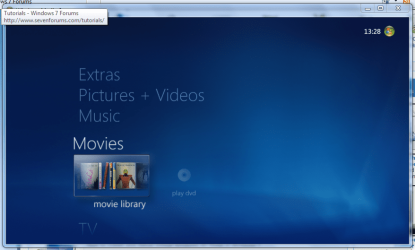
2. Open movie library, you should notice no movies shown 2 Media Center (Movie Library - Empty).PNG
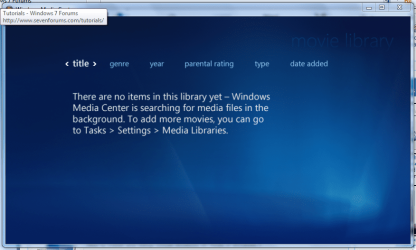
3. Right-Click within the inner (empty area) and select Manage Library, you will be shown the 'Add folders' wizard. Select 'Add folders to the library' and click next 3 Media Center (Add folder to library).PNG
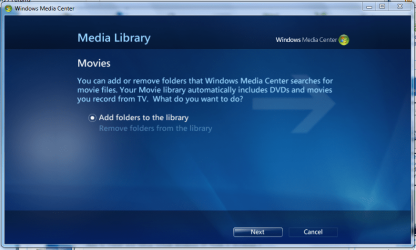
4. Select the location where your drive with the videos is stored, and click on next. 4 Media Center (Folder Selection 1).PNG
5. Navigate to the folder where your videos are stored (e.g. G:\MOVIES), and click next. 5 Media Center (Select Folder).PNG
6. On the final screen select 'Yes, use these locations' and click finish 6 Media Center (Finish Selection).PNG


Now your folder is added, Media Center will show the Video folders (with posters if you downloaded an image file for each movie).

   Note
If you wish to include metadata you will need to download Yammm. The meta data will download the DVDID.XML file which will allow for Media Center to download full synopsis information for each movie
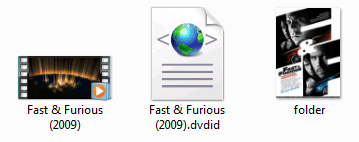

Example folder view.PNG

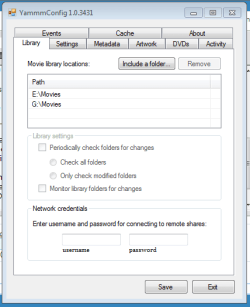
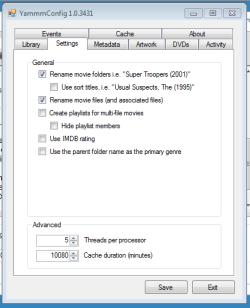
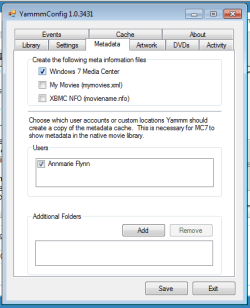
Recommended Yammm settings
1 yammm paths.PNG2 yammm settings.PNG
3 yammm metadata.PNG
   Note
These setting will automatically rename folders/files, download folder.jpg & DVDID.XML files for Media Center to read from.


Update

The Yammm application has been updated to include Image Resizing
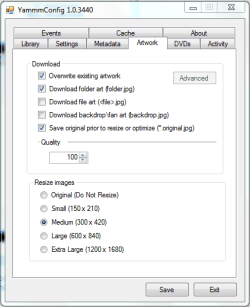
Yammm (Artwork).PNG

This will allow Media Center to use less memory when rendering folder images.

   Tip
It's recommended that you use a setting of 92 Quality & 300x420 medium size as this will greatly reduce the amount of memory used by 7MC when viewing a large movie library


Update 2: More Synopsis

I thought i'd include an example of how the DVDID.XML file works.

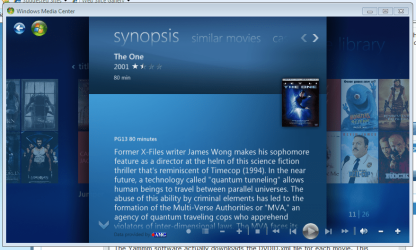
1, Full synopsis information Movie Library (Full Synopsis).PNG
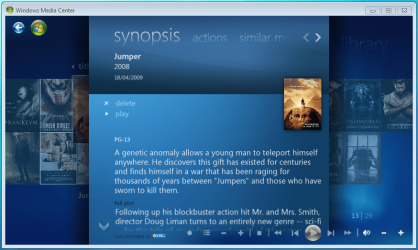
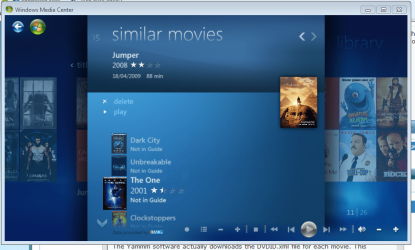
2, Similar Movies shown, with posters Movie Library (Similar Movies).PNG
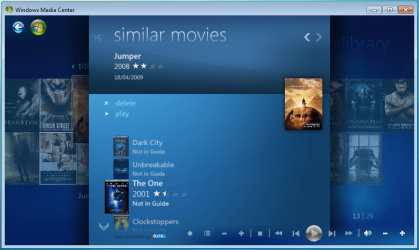
3, Click the similar movie to get full details of that movie Movie Library (Similar Movies - Synopsis).PNG
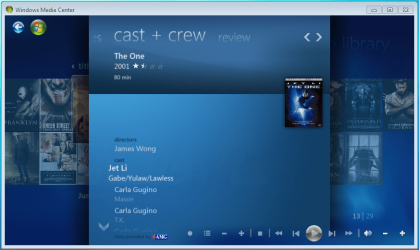
4, Cast & Crew information Movie Library (Cast & Crew).PNG
5, Click on a name to see a fimography (film list) relating to that actor/director Movie Library (Cast & Crew - Filmography).PNG

Enjoy
 

Attachments

  • file2folder.zip
    file2folder.zip
    230 bytes · Views: 22,835
  • synopsis.PNG
    synopsis.PNG
    127.1 KB · Views: 85
  • similar movies.PNG
    similar movies.PNG
    131.5 KB · Views: 66
  • similar movies detail.PNG
    similar movies detail.PNG
    140 KB · Views: 60
Last edited by a moderator:
Hi jimpict, welcome to the forums.

Not sure about extenders as i've never used 1. I hope that someone with more experience with extenders may be able to help, maybe even mikinho himself :p


OS
 

My Computer My Computer

At a glance

Windows 7 Ultimate x64AMD Sempron Dual Core3GBNVIDIA GeForce 6150SE nForce 430
Computer Manufacturer/Model Number
Compaq Desktop
OS
Windows 7 Ultimate x64
CPU
AMD Sempron Dual Core
Memory
3GB
Graphics Card(s)
NVIDIA GeForce 6150SE nForce 430
Screen Resolution
1024x768
Hard Drives
150GB Sata
i got it worked out. it was a stupid mistake on my part.

thanks a lot for the tutorial, and thanks especially for yammm.
 

My Computer My Computer

At a glance

windows 7
OS
windows 7
i got it worked out. it was a stupid mistake on my part.

thanks a lot for the tutorial, and thanks especially for yammm.

What did you do that was "stupid"? I appear to be having the same issue and would like to know how to fix it.

Thanks
 

My Computer My Computer

At a glance

Windows 7
OS
Windows 7
Hi, i have extracted file2folder.bat to my /movies directory (which contains both individual movies as well as some existing movie folders). however, when I run the file nothing happens to the file structure. I get a brief black window with text and then back to explorer. Any suggestions?
 

My Computer My Computer

At a glance

Win 7 Ultimate
OS
Win 7 Ultimate
Nice. Just in time because I need to rebuild my messy library of movies :D
 

My Computer My Computer

At a glance

Windows 7 x64 Ultimate RTMAMD Turion X2 Ultra Dual-Core Mobile ZM-85 @ ...DDR2 800MHz 2GBx2ATI Mobility Radeon 4650 1GB GDDR3
Computer Manufacturer/Model Number
HP Pavilion dv6-1210ee Artist Edition 2 Notebook
OS
Windows 7 x64 Ultimate RTM
CPU
AMD Turion X2 Ultra Dual-Core Mobile ZM-85 @ 2.30 GHz
Memory
DDR2 800MHz 2GBx2
Graphics Card(s)
ATI Mobility Radeon 4650 1GB GDDR3
Screen Resolution
1366 x 768
Internet Speed
1Mbit ADSL
Hello everyone. I just wanted to share some information with you all that is sort of related to the discussion. I recently just switched from media browser to yammm, and I wrote a batch script to help me delete the files that I no longer needed left over from MB.

The following code is to be pasted into notepad and saved with the extension .bat (you can name it whatever you want to):

del /s "C:\YOUR MOVIES DIRECTORY HERE\*.xml"
del /s "C:\YOUR MOVIES DIRECTORY HERE\*.url"

Do NOT try to use this code before you read ALL the following information!
This code will erase all files with .xml and .url file extensions from the specified folders and their sub-folders. You must replace the "C:\YOUR MOVIES DIRECTORY HERE" with where you store your movies, making sure you keep the \*.url and \*.xml extensions, or it will delete everything in those folders!!! You can of course include other commands to delete other types of files.

Good luck!
 

My Computer My Computer

At a glance

Windows 7 Ultimate
OS
Windows 7 Ultimate
Hello, I was just switching from using media browser to yammm, and I wanted to share something.


Hiya.

Just wondered why your are "switching from using media browser to yammm" ??

I started with YAMMM but went the other way to Media Browser.

Just curious.
 

My Computer My Computer

At a glance

Windows 7Atom 3304GbNvidia ION
Computer Manufacturer/Model Number
AsRock ION330
OS
Windows 7
CPU
Atom 330
Motherboard
ASRock ION
Memory
4Gb
Graphics Card(s)
Nvidia ION
Sound Card
Nvidia ION
Monitor(s) Displays
42" Pioneer Plasma
Screen Resolution
1920 x 1080
Hard Drives
300Gb SATA internal, and 2Tb in NAS on LAN.
PSU
Standard
Case
ASRock
Cooling
ASRock
Keyboard
Basic
Mouse
Basic
Internet Speed
50 Mb/s
Other Info
6" 4"", top lip, and walks about a lot !!
I made the switch because Yammm is automated and resizes pictures so that MC loads faster. I would rather not have to worry about metadata, but maybe there are features in media browser that are of interest to others.
 

My Computer My Computer

At a glance

Windows 7 Ultimate
OS
Windows 7 Ultimate
EDIT:
does anyone know why the extra info, such as synopsis, etc, does not show up on extenders?

In the Metadata tab did you check all the extenders accounts? If not, it won't be there by default.
 

My Computer My Computer

At a glance

6x W2K8 R2 (x64), 6x W7 7600 (x64), 2x Gentoo...Core2 Duo E8400 3.0GhzCorsair DDR-800 4GB RAMEVGA NVidia GeForce GT240
Computer Manufacturer/Model Number
My HTPC
OS
6x W2K8 R2 (x64), 6x W7 7600 (x64), 2x Gentoo (x64), 1x Ubuntu 9.04 (x64), 1x pfSense (FreeBSD)
CPU
Core2 Duo E8400 3.0Ghz
Motherboard
ASUS P5E-VM
Memory
Corsair DDR-800 4GB RAM
Graphics Card(s)
EVGA NVidia GeForce GT240
Screen Resolution
1080p
Hard Drives
OCZ Vertex 60GB (C:\D: System\Apps)
WD 1TB x1 (G: Temp\Recorded TV)
WD 2TB x8 (On Server)
PSU
Corsair HX520w
Case
Antec Fusion Max
Cooling
Passive Thermalright HR-1 CPU Heatsink w/ Nexus Fan
I've installed yammm and set it up as shown in the guide but there's still no covers or info for any of my movies. The movie folder is correctly set in yammm (D:\Films) and I used the file2folder script to move all my movies into folders (all of which are properly named). I've gone into services and tried to start the yammm service manually but it tells me:
"The Yet Another Media Meta Manager service on Local Computer started and then stopped. Some services stop automatically if they are not in use by other services or programs"
Any ideas?
Thanks
 

My Computer My Computer

At a glance

Windows 7 Home Premium x64AMD Phenom 2 X3 720ATI Radeon HD3200
OS
Windows 7 Home Premium x64
CPU
AMD Phenom 2 X3 720
Motherboard
Gigabyte GA-MA78GM-S2H
Graphics Card(s)
ATI Radeon HD3200
Monitor(s) Displays
Dell S2209W
Screen Resolution
1920x1080
Mouse
Microsoft IntelliMouse Optical
Hi descenent87, welcome to the forums.

The best I can suggest for that issue is to uninstall Yammm then remove any sign from the Program Data folder in your root folder e.g. C:\Program Data
   Note
You will need hidden files & folder viewable. Explorer -> Organize -> Folder & Search Options -> View


Then try re-installing it to see if that resolves the issue as I had the same happen early on to me.
 

My Computer My Computer

At a glance

Windows 7 Ultimate x64AMD Sempron Dual Core3GBNVIDIA GeForce 6150SE nForce 430
Computer Manufacturer/Model Number
Compaq Desktop
OS
Windows 7 Ultimate x64
CPU
AMD Sempron Dual Core
Memory
3GB
Graphics Card(s)
NVIDIA GeForce 6150SE nForce 430
Screen Resolution
1024x768
Hard Drives
150GB Sata
I've installed yammm and set it up as shown in the guide but there's still no covers or info for any of my movies. The movie folder is correctly set in yammm (D:\Films) and I used the file2folder script to move all my movies into folders (all of which are properly named). I've gone into services and tried to start the yammm service manually but it tells me:
"The Yet Another Media Meta Manager service on Local Computer started and then stopped. Some services stop automatically if they are not in use by other services or programs"
Any ideas?
Thanks

Any errors in your Event Log?
 

My Computer My Computer

At a glance

6x W2K8 R2 (x64), 6x W7 7600 (x64), 2x Gentoo...Core2 Duo E8400 3.0GhzCorsair DDR-800 4GB RAMEVGA NVidia GeForce GT240
Computer Manufacturer/Model Number
My HTPC
OS
6x W2K8 R2 (x64), 6x W7 7600 (x64), 2x Gentoo (x64), 1x Ubuntu 9.04 (x64), 1x pfSense (FreeBSD)
CPU
Core2 Duo E8400 3.0Ghz
Motherboard
ASUS P5E-VM
Memory
Corsair DDR-800 4GB RAM
Graphics Card(s)
EVGA NVidia GeForce GT240
Screen Resolution
1080p
Hard Drives
OCZ Vertex 60GB (C:\D: System\Apps)
WD 1TB x1 (G: Temp\Recorded TV)
WD 2TB x8 (On Server)
PSU
Corsair HX520w
Case
Antec Fusion Max
Cooling
Passive Thermalright HR-1 CPU Heatsink w/ Nexus Fan
Tried uninstalling and removing all program data, made no difference.
Checked event log and can't see any errors to do with media center or yammm.
EDIT: Solved it, had to use the take ownership shortcut on my movies folder, it's downloading all the data at the moment. Thanks for the help though
 

My Computer My Computer

At a glance

Windows 7 Home Premium x64AMD Phenom 2 X3 720ATI Radeon HD3200
OS
Windows 7 Home Premium x64
CPU
AMD Phenom 2 X3 720
Motherboard
Gigabyte GA-MA78GM-S2H
Graphics Card(s)
ATI Radeon HD3200
Monitor(s) Displays
Dell S2209W
Screen Resolution
1920x1080
Mouse
Microsoft IntelliMouse Optical
What file structure in DvdInfoCache, for MC adds 'Similar Movies', 'Cast & Crew' & 'Reviews' to the movie data? May be post any example?

I used DVD Library Manager, for adds synopsis and actors to movie library but 'Cast & Crew' and other not visible for me.
 

My Computer My Computer

At a glance

Windows 7
OS
Windows 7
"Similar Movies" and "Reviews" is not cached in the xml file. A new version of Yammm will have this functionality to cache it using an alternative method. But for now the best you can do is either whatever you have to rename the folders so that Media Center can pull that information.
 

My Computer My Computer

At a glance

6x W2K8 R2 (x64), 6x W7 7600 (x64), 2x Gentoo...Core2 Duo E8400 3.0GhzCorsair DDR-800 4GB RAMEVGA NVidia GeForce GT240
Computer Manufacturer/Model Number
My HTPC
OS
6x W2K8 R2 (x64), 6x W7 7600 (x64), 2x Gentoo (x64), 1x Ubuntu 9.04 (x64), 1x pfSense (FreeBSD)
CPU
Core2 Duo E8400 3.0Ghz
Motherboard
ASUS P5E-VM
Memory
Corsair DDR-800 4GB RAM
Graphics Card(s)
EVGA NVidia GeForce GT240
Screen Resolution
1080p
Hard Drives
OCZ Vertex 60GB (C:\D: System\Apps)
WD 1TB x1 (G: Temp\Recorded TV)
WD 2TB x8 (On Server)
PSU
Corsair HX520w
Case
Antec Fusion Max
Cooling
Passive Thermalright HR-1 CPU Heatsink w/ Nexus Fan
Help me please! Where MC cached this files? My Language is not english, and I want manually adds same information in movie library. And what's about 'Cast & Crew' this info present in the xml file, but not visible in MC? :(
 

My Computer My Computer

At a glance

Windows 7
OS
Windows 7
It isn't cached. I am doing it programmatically with Yammm, as fas as I know you can't do it manually.
 

My Computer My Computer

At a glance

6x W2K8 R2 (x64), 6x W7 7600 (x64), 2x Gentoo...Core2 Duo E8400 3.0GhzCorsair DDR-800 4GB RAMEVGA NVidia GeForce GT240
Computer Manufacturer/Model Number
My HTPC
OS
6x W2K8 R2 (x64), 6x W7 7600 (x64), 2x Gentoo (x64), 1x Ubuntu 9.04 (x64), 1x pfSense (FreeBSD)
CPU
Core2 Duo E8400 3.0Ghz
Motherboard
ASUS P5E-VM
Memory
Corsair DDR-800 4GB RAM
Graphics Card(s)
EVGA NVidia GeForce GT240
Screen Resolution
1080p
Hard Drives
OCZ Vertex 60GB (C:\D: System\Apps)
WD 1TB x1 (G: Temp\Recorded TV)
WD 2TB x8 (On Server)
PSU
Corsair HX520w
Case
Antec Fusion Max
Cooling
Passive Thermalright HR-1 CPU Heatsink w/ Nexus Fan
Thanks for this info, I look forward to giving it a go tonight.

On a similar note, I'm struggling to find any info on how to force an update of the WMC library, having noted that they are a bit different to the standard Windows 7 library. Is this meant to happen automatically... or to a schedule? as I don't want to have to jump through a heap of hoops every time I put a new file in.

Cheers,
Paul
 

My Computer My Computer

At a glance

Windows 7
OS
Windows 7
Thanks for this info, I look forward to giving it a go tonight.

On a similar note, I'm struggling to find any info on how to force an update of the WMC library, having noted that they are a bit different to the standard Windows 7 library. Is this meant to happen automatically... or to a schedule? as I don't want to have to jump through a heap of hoops every time I put a new file in.

Cheers,
Paul

It should be automatically updated when a file is added. Sometimes you'll need to close Media Center and re-open for it to pick up the change though.
 

My Computer My Computer

At a glance

6x W2K8 R2 (x64), 6x W7 7600 (x64), 2x Gentoo...Core2 Duo E8400 3.0GhzCorsair DDR-800 4GB RAMEVGA NVidia GeForce GT240
Computer Manufacturer/Model Number
My HTPC
OS
6x W2K8 R2 (x64), 6x W7 7600 (x64), 2x Gentoo (x64), 1x Ubuntu 9.04 (x64), 1x pfSense (FreeBSD)
CPU
Core2 Duo E8400 3.0Ghz
Motherboard
ASUS P5E-VM
Memory
Corsair DDR-800 4GB RAM
Graphics Card(s)
EVGA NVidia GeForce GT240
Screen Resolution
1080p
Hard Drives
OCZ Vertex 60GB (C:\D: System\Apps)
WD 1TB x1 (G: Temp\Recorded TV)
WD 2TB x8 (On Server)
PSU
Corsair HX520w
Case
Antec Fusion Max
Cooling
Passive Thermalright HR-1 CPU Heatsink w/ Nexus Fan
thanks in advance

Hello to all!!! First time here, first time with Media center, so please bear with me. I have browsed through a couple post on here trying to figure out how to rip dvds and save them in media center. I Tried the "file2"thing and the "yamma" with no results. I hate being the new guy...lol. Can someone point me in the direction of a "newbie" tutorial or any other info. I was using dvd shrink to rip movie, i placed it in a folder and setup folder in WMC. I could watch movie but had no pic for dvd or any info etc. Im sure I am missing something simple but just too new to WMC to begin figuring it out. Thanks for any help in advance!!!
 

My Computer My Computer

At a glance

windows 7
OS
windows 7
Back
Top