Media Center- Setup Movie Library

How to Setup a Media Center Movie Library in Windows 7

   Information
This tutorial will show how to manage your movie library in Media Center, including poster images & full synopsis information.
   Note
Windows Media Center is not available in Windows 7 Starter and Windows 7 Home Basic editions.


The N and KN editions of Windows 7 have all the features that normally come with each individual Windows 7 edition, except for Windows Media Player 12 and related programs, such as Windows Media Center or Windows DVD Maker.

The N editions of Windows 7 allow you to choose your own media player and software required to manage and play CDs, DVDs, and other digital media files. If you choose to use Windows Media Player 12, downloading it, along with related software, is free. Download Media Feature Pack for Windows 7 N with Service Pack 1 and Windows 7 KN with Service Pack 1 (KB968211) from Official Microsoft Download Center

Examples: With & without poster information.
7 Example Media Center (Movies without posters).PNG8 Example Media Center (Movies with posters).png

Before you start:
NOTE: Special thanks to DemonSeed for the file2folder batch file. 1. Click on the Download button below to download the file2folder.zip file and extract the file2folder.bat file to the drive containing your movie files (e.g. G:\MOVIES). Run the file which will create directories based on the movie file name (e.g. Babylon A.D.avi will have the directory Babylon A.D created) and the movie file moved to the directory.

2. Search for & download a file for the movie you would like as a poster and save it in the movie folder and name it folder.jpg. Do this for each movie.
   Warning
I would advise at least 2GB of memory as due to the size of the folder.jpg files there is a lot of memory used. You could (like me) resize all folder.jpg files to a width of 300 pixels & maintain aspect ratio.


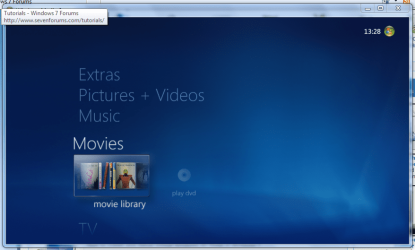
Here's How: 1. Run Media Center and navigate to Movies 1 Media Center (Start Page).PNG
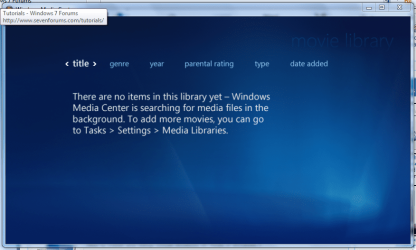
2. Open movie library, you should notice no movies shown 2 Media Center (Movie Library - Empty).PNG
3. Right-Click within the inner (empty area) and select Manage Library, you will be shown the 'Add folders' wizard. Select 'Add folders to the library' and click next 3 Media Center (Add folder to library).PNG
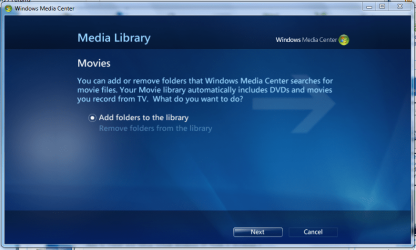
4. Select the location where your drive with the videos is stored, and click on next. 4 Media Center (Folder Selection 1).PNG
5. Navigate to the folder where your videos are stored (e.g. G:\MOVIES), and click next. 5 Media Center (Select Folder).PNG
6. On the final screen select 'Yes, use these locations' and click finish 6 Media Center (Finish Selection).PNG


Now your folder is added, Media Center will show the Video folders (with posters if you downloaded an image file for each movie).

   Note
If you wish to include metadata you will need to download Yammm. The meta data will download the DVDID.XML file which will allow for Media Center to download full synopsis information for each movie
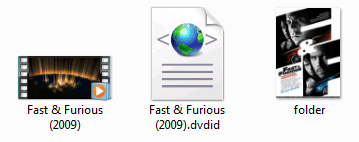

Example folder view.PNG

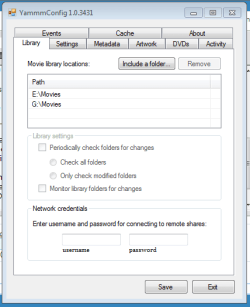
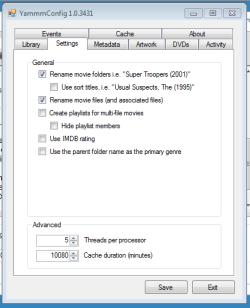
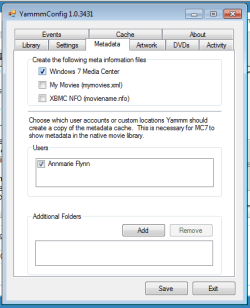
Recommended Yammm settings
1 yammm paths.PNG2 yammm settings.PNG
3 yammm metadata.PNG
   Note
These setting will automatically rename folders/files, download folder.jpg & DVDID.XML files for Media Center to read from.


Update

The Yammm application has been updated to include Image Resizing
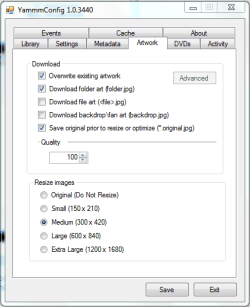
Yammm (Artwork).PNG

This will allow Media Center to use less memory when rendering folder images.

   Tip
It's recommended that you use a setting of 92 Quality & 300x420 medium size as this will greatly reduce the amount of memory used by 7MC when viewing a large movie library


Update 2: More Synopsis

I thought i'd include an example of how the DVDID.XML file works.

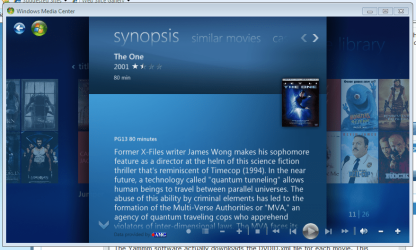
1, Full synopsis information Movie Library (Full Synopsis).PNG
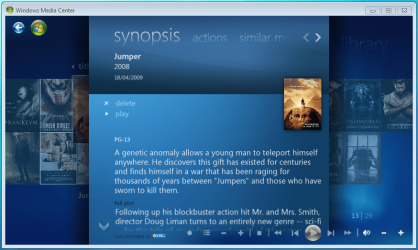
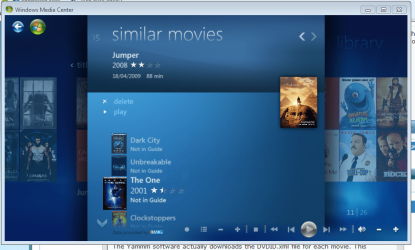
2, Similar Movies shown, with posters Movie Library (Similar Movies).PNG
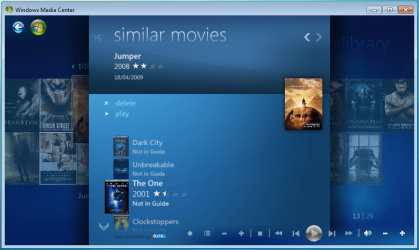
3, Click the similar movie to get full details of that movie Movie Library (Similar Movies - Synopsis).PNG
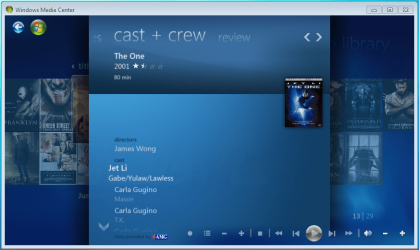
4, Cast & Crew information Movie Library (Cast & Crew).PNG
5, Click on a name to see a fimography (film list) relating to that actor/director Movie Library (Cast & Crew - Filmography).PNG

Enjoy
 

Attachments

  • file2folder.zip
    file2folder.zip
    230 bytes · Views: 22,835
  • synopsis.PNG
    synopsis.PNG
    127.1 KB · Views: 85
  • similar movies.PNG
    similar movies.PNG
    131.5 KB · Views: 66
  • similar movies detail.PNG
    similar movies detail.PNG
    140 KB · Views: 60
Last edited by a moderator:

My Computer My Computer

At a glance

Windows 7 Ultimate x64AMD Turion(tm) 64 X2 Mobile Technology TL-563GB Nanya PC2-6400 DDR2-SDRAM SO-DIM (400MHz)NVIDIA GeForce Go 7600 256MB GDDR3 SDRAM
Computer Manufacturer/Model Number
HP Touchsmart IQ771.uk
OS
Windows 7 Ultimate x64
CPU
AMD Turion(tm) 64 X2 Mobile Technology TL-56
Motherboard
ASUS Pheonix
Memory
3GB Nanya PC2-6400 DDR2-SDRAM SO-DIM (400MHz)
Graphics Card(s)
NVIDIA GeForce Go 7600 256MB GDDR3 SDRAM
Sound Card
High Definition Intergrated NVIDIA MCP51
Monitor(s) Displays
46" Sony Bravia HDTV
Screen Resolution
1600x1200
Hard Drives
1.5TB Samsug
320GB Seagate ST3320820AS - SATA 3Gb/s 8MB
500GB Maxtor Basics STM305003EHD301-RK
Internet Speed
↓6.32 Mb/s ↑0.35 Mb/s ↔26ms
Other Info
BIOS - American Megatrends Inc. 5.07
Ethernet Port - NVIDIA nForce 10/100/1000 Mbps
DVD Drive - TSSTcorp DVDR/RW TS-T632L
How do I get actors images? I put the imagesbyname folder in the programdata subforum. Can yammm do this? I just got that standard image? Thanks.
 

My Computer My Computer

At a glance

Windows 7
OS
Windows 7
How do I get actors images? I put the imagesbyname folder in the programdata subforum. Can yammm do this? I just got that standard image? Thanks.
I don't think it does that.
 

My Computer My Computer

At a glance

Windows 8 64bit ProfessionalIntel Q9400 Quad Core 2.66GhzG.Skill 4GB DDR3-1600NVidia GeForce 560GTX
Computer type
PC/Desktop
Computer Manufacturer/Model Number
Custom Built
OS
Windows 8 64bit Professional
CPU
Intel Q9400 Quad Core 2.66Ghz
Motherboard
Gigabyte
Memory
G.Skill 4GB DDR3-1600
Graphics Card(s)
NVidia GeForce 560GTX
Sound Card
On-board
Monitor(s) Displays
24" LCD
Screen Resolution
1920x1080
Hard Drives
160GB WD
WD Caviar Black 640GB
WD 500GB
WD 1TB
WD 1TB
PSU
Cooler Master 1300W Silent Pro
Case
Sunbeam Transformer Black
Cooling
Fans
Keyboard
Logitech G15 (Original Screen + 18G Keys)
Mouse
Logitech MX518
Internet Speed
10mbit up/down Fiber Optic
Browser
FireFox / Chrome
Other Info
SF is amazing!
Dreadstar is correct, Yammm does not yet incorporate ImagesByName. I'm not sure if future releases will though, yet :p
 

My Computer My Computer

At a glance

Windows 7 Ultimate x64AMD Sempron Dual Core3GBNVIDIA GeForce 6150SE nForce 430
Computer Manufacturer/Model Number
Compaq Desktop
OS
Windows 7 Ultimate x64
CPU
AMD Sempron Dual Core
Memory
3GB
Graphics Card(s)
NVIDIA GeForce 6150SE nForce 430
Screen Resolution
1024x768
Hard Drives
150GB Sata
I need a step by step info ?

Could someone please tell me how to make a movie using mm2.6 on the windows 7. All my friends has xp and tell me how easy it is , but none of them has windows 7. When I tell them that no more info. Please help.
 

My Computer My Computer

At a glance

toshiba laptop L305D
OS
toshiba laptop L305D
I am stumped!

Shark:

1st off awesome tutorial, wish I had read it BEFORE I fiddled around for days with this. YAMM made everything so SIMPLE! Dont worry, reps are on the way!

However, I have an issue... I have only 1 directory with my movies in it, yet I show 2 icons of each movie! I have everything in a sub-directory of my Videos directory... C:\Users\Jonathan\Videos\DVDRips.

I am stumped! Any ideas?
 

My Computer My Computer

At a glance

Windows 7 Ultimate 64 bit Steve Ballmer Signa...Intel Core 2 Quad - Q9550 - 2.83GHz stock - O...4GB DDR2 800MHz (PC6400) OCZ ReaperNvidia GE Force 8800 GTS
Computer Manufacturer/Model Number
Homebrew PC - "Alpha_Dawg"
OS
Windows 7 Ultimate 64 bit Steve Ballmer Signature Edition
CPU
Intel Core 2 Quad - Q9550 - 2.83GHz stock - OC'd to 3.6GHz
Motherboard
Gigabyte EP45-UD3P
Memory
4GB DDR2 800MHz (PC6400) OCZ Reaper
Graphics Card(s)
Nvidia GE Force 8800 GTS
Sound Card
Asus Xonar DX
Monitor(s) Displays
Samsung SyncMaster 2333HD
Screen Resolution
1920 x 1080
Hard Drives
WD Caviar Black 750GB - 7200RPM - 32MB cache
WD Caviar Green 1.5TB - 5400RPM - 64MB cache
WD Caviar Green 2.0TB - 5400RPM - 64MB cache
PSU
PC Power & Cooling Silencer 750
Case
Gigabyte 3D Aurora
Cooling
Case is Air - 5ea. 120mm fans (mix of Arctic and Xigmatec)
Keyboard
MS Natural Wireless KB
Mouse
MS Wireless Mouse
Internet Speed
50 mbps down/5 mbps up
Other Info
AVerMedia - AVerTVHD G2 Dual Tuner Card
The "My Videos" folder is monitoring by Movie Library by default, did you happen to add it manually as well? In general I would never use the "My Videos" folder as a root. Too many default actions that you have no control over. I'm a big fan of the native libraries and always use them over wmp's library but not of the "My" shell folders.

Try moving it a different location, clear out your Movie Library watched folder list and then adding the new location.
 

My Computer My Computer

At a glance

6x W2K8 R2 (x64), 6x W7 7600 (x64), 2x Gentoo...Core2 Duo E8400 3.0GhzCorsair DDR-800 4GB RAMEVGA NVidia GeForce GT240
Computer Manufacturer/Model Number
My HTPC
OS
6x W2K8 R2 (x64), 6x W7 7600 (x64), 2x Gentoo (x64), 1x Ubuntu 9.04 (x64), 1x pfSense (FreeBSD)
CPU
Core2 Duo E8400 3.0Ghz
Motherboard
ASUS P5E-VM
Memory
Corsair DDR-800 4GB RAM
Graphics Card(s)
EVGA NVidia GeForce GT240
Screen Resolution
1080p
Hard Drives
OCZ Vertex 60GB (C:\D: System\Apps)
WD 1TB x1 (G: Temp\Recorded TV)
WD 2TB x8 (On Server)
PSU
Corsair HX520w
Case
Antec Fusion Max
Cooling
Passive Thermalright HR-1 CPU Heatsink w/ Nexus Fan
Miknho:

Yeah, I wondered if that directory/sub-dir might be the issue. I will move to a completely different drive and see how that works!

Thanks for the great work on YAMM! Any idea when the next update will be or what new features you are adding?

EDIT --- miknho... yep you were correct... moved them to a different HDD and all is good!
 

My Computer My Computer

At a glance

Windows 7 Ultimate 64 bit Steve Ballmer Signa...Intel Core 2 Quad - Q9550 - 2.83GHz stock - O...4GB DDR2 800MHz (PC6400) OCZ ReaperNvidia GE Force 8800 GTS
Computer Manufacturer/Model Number
Homebrew PC - "Alpha_Dawg"
OS
Windows 7 Ultimate 64 bit Steve Ballmer Signature Edition
CPU
Intel Core 2 Quad - Q9550 - 2.83GHz stock - OC'd to 3.6GHz
Motherboard
Gigabyte EP45-UD3P
Memory
4GB DDR2 800MHz (PC6400) OCZ Reaper
Graphics Card(s)
Nvidia GE Force 8800 GTS
Sound Card
Asus Xonar DX
Monitor(s) Displays
Samsung SyncMaster 2333HD
Screen Resolution
1920 x 1080
Hard Drives
WD Caviar Black 750GB - 7200RPM - 32MB cache
WD Caviar Green 1.5TB - 5400RPM - 64MB cache
WD Caviar Green 2.0TB - 5400RPM - 64MB cache
PSU
PC Power & Cooling Silencer 750
Case
Gigabyte 3D Aurora
Cooling
Case is Air - 5ea. 120mm fans (mix of Arctic and Xigmatec)
Keyboard
MS Natural Wireless KB
Mouse
MS Wireless Mouse
Internet Speed
50 mbps down/5 mbps up
Other Info
AVerMedia - AVerTVHD G2 Dual Tuner Card
Hi Darryl, sorry for the late reply, i've been on XP until now :o

Glad Mikinho managed to sort it out for you :)
 

My Computer My Computer

At a glance

Windows 7 Ultimate x64AMD Sempron Dual Core3GBNVIDIA GeForce 6150SE nForce 430
Computer Manufacturer/Model Number
Compaq Desktop
OS
Windows 7 Ultimate x64
CPU
AMD Sempron Dual Core
Memory
3GB
Graphics Card(s)
NVIDIA GeForce 6150SE nForce 430
Screen Resolution
1024x768
Hard Drives
150GB Sata
Hi i am new in the forum. I read all the thread and i have a question. I am having a problem with the movie folder, with the movies that has 2 divx's files in it.

Example

C:\Movies\Iron Man\Iron Man A.Avi

and

C:\Movies\Iron Man\Iron Man B.Avi

In the Movie Library inside the media center app, in the list Iron Man appears two times instead of one. How can i do to media center take one Iron Man folder with the two files?.

Thanks in advance.
 

My Computer My Computer

At a glance

Windows Seven
OS
Windows Seven
Currently unavailable with Movie Library. A future version of Yammm will though. I'll post when available to public.
 

My Computer My Computer

At a glance

6x W2K8 R2 (x64), 6x W7 7600 (x64), 2x Gentoo...Core2 Duo E8400 3.0GhzCorsair DDR-800 4GB RAMEVGA NVidia GeForce GT240
Computer Manufacturer/Model Number
My HTPC
OS
6x W2K8 R2 (x64), 6x W7 7600 (x64), 2x Gentoo (x64), 1x Ubuntu 9.04 (x64), 1x pfSense (FreeBSD)
CPU
Core2 Duo E8400 3.0Ghz
Motherboard
ASUS P5E-VM
Memory
Corsair DDR-800 4GB RAM
Graphics Card(s)
EVGA NVidia GeForce GT240
Screen Resolution
1080p
Hard Drives
OCZ Vertex 60GB (C:\D: System\Apps)
WD 1TB x1 (G: Temp\Recorded TV)
WD 2TB x8 (On Server)
PSU
Corsair HX520w
Case
Antec Fusion Max
Cooling
Passive Thermalright HR-1 CPU Heatsink w/ Nexus Fan
So, how do you manage the ripped movies that comes in two files in the MCE?.
 

My Computer My Computer

At a glance

Windows Seven
OS
Windows Seven
I use Yammm but the new version isn't available yet to the public. No ETA but it will be posted here when it is.
 

My Computer My Computer

At a glance

6x W2K8 R2 (x64), 6x W7 7600 (x64), 2x Gentoo...Core2 Duo E8400 3.0GhzCorsair DDR-800 4GB RAMEVGA NVidia GeForce GT240
Computer Manufacturer/Model Number
My HTPC
OS
6x W2K8 R2 (x64), 6x W7 7600 (x64), 2x Gentoo (x64), 1x Ubuntu 9.04 (x64), 1x pfSense (FreeBSD)
CPU
Core2 Duo E8400 3.0Ghz
Motherboard
ASUS P5E-VM
Memory
Corsair DDR-800 4GB RAM
Graphics Card(s)
EVGA NVidia GeForce GT240
Screen Resolution
1080p
Hard Drives
OCZ Vertex 60GB (C:\D: System\Apps)
WD 1TB x1 (G: Temp\Recorded TV)
WD 2TB x8 (On Server)
PSU
Corsair HX520w
Case
Antec Fusion Max
Cooling
Passive Thermalright HR-1 CPU Heatsink w/ Nexus Fan
Not even an estimated ETA?????? LOL!
 

My Computer My Computer

At a glance

Windows 7 Ultimate 64 bit Steve Ballmer Signa...Intel Core 2 Quad - Q9550 - 2.83GHz stock - O...4GB DDR2 800MHz (PC6400) OCZ ReaperNvidia GE Force 8800 GTS
Computer Manufacturer/Model Number
Homebrew PC - "Alpha_Dawg"
OS
Windows 7 Ultimate 64 bit Steve Ballmer Signature Edition
CPU
Intel Core 2 Quad - Q9550 - 2.83GHz stock - OC'd to 3.6GHz
Motherboard
Gigabyte EP45-UD3P
Memory
4GB DDR2 800MHz (PC6400) OCZ Reaper
Graphics Card(s)
Nvidia GE Force 8800 GTS
Sound Card
Asus Xonar DX
Monitor(s) Displays
Samsung SyncMaster 2333HD
Screen Resolution
1920 x 1080
Hard Drives
WD Caviar Black 750GB - 7200RPM - 32MB cache
WD Caviar Green 1.5TB - 5400RPM - 64MB cache
WD Caviar Green 2.0TB - 5400RPM - 64MB cache
PSU
PC Power & Cooling Silencer 750
Case
Gigabyte 3D Aurora
Cooling
Case is Air - 5ea. 120mm fans (mix of Arctic and Xigmatec)
Keyboard
MS Natural Wireless KB
Mouse
MS Wireless Mouse
Internet Speed
50 mbps down/5 mbps up
Other Info
AVerMedia - AVerTVHD G2 Dual Tuner Card
Not even an estimated ETA?????? LOL!

I do but I'm trying to not publish anymore since I've been delayed months due to various things coming up at home.
 

My Computer My Computer

At a glance

6x W2K8 R2 (x64), 6x W7 7600 (x64), 2x Gentoo...Core2 Duo E8400 3.0GhzCorsair DDR-800 4GB RAMEVGA NVidia GeForce GT240
Computer Manufacturer/Model Number
My HTPC
OS
6x W2K8 R2 (x64), 6x W7 7600 (x64), 2x Gentoo (x64), 1x Ubuntu 9.04 (x64), 1x pfSense (FreeBSD)
CPU
Core2 Duo E8400 3.0Ghz
Motherboard
ASUS P5E-VM
Memory
Corsair DDR-800 4GB RAM
Graphics Card(s)
EVGA NVidia GeForce GT240
Screen Resolution
1080p
Hard Drives
OCZ Vertex 60GB (C:\D: System\Apps)
WD 1TB x1 (G: Temp\Recorded TV)
WD 2TB x8 (On Server)
PSU
Corsair HX520w
Case
Antec Fusion Max
Cooling
Passive Thermalright HR-1 CPU Heatsink w/ Nexus Fan

My Computer My Computer

At a glance

Windows 7 Ultimate 64 bit Steve Ballmer Signa...Intel Core 2 Quad - Q9550 - 2.83GHz stock - O...4GB DDR2 800MHz (PC6400) OCZ ReaperNvidia GE Force 8800 GTS
Computer Manufacturer/Model Number
Homebrew PC - "Alpha_Dawg"
OS
Windows 7 Ultimate 64 bit Steve Ballmer Signature Edition
CPU
Intel Core 2 Quad - Q9550 - 2.83GHz stock - OC'd to 3.6GHz
Motherboard
Gigabyte EP45-UD3P
Memory
4GB DDR2 800MHz (PC6400) OCZ Reaper
Graphics Card(s)
Nvidia GE Force 8800 GTS
Sound Card
Asus Xonar DX
Monitor(s) Displays
Samsung SyncMaster 2333HD
Screen Resolution
1920 x 1080
Hard Drives
WD Caviar Black 750GB - 7200RPM - 32MB cache
WD Caviar Green 1.5TB - 5400RPM - 64MB cache
WD Caviar Green 2.0TB - 5400RPM - 64MB cache
PSU
PC Power & Cooling Silencer 750
Case
Gigabyte 3D Aurora
Cooling
Case is Air - 5ea. 120mm fans (mix of Arctic and Xigmatec)
Keyboard
MS Natural Wireless KB
Mouse
MS Wireless Mouse
Internet Speed
50 mbps down/5 mbps up
Other Info
AVerMedia - AVerTVHD G2 Dual Tuner Card
So, how do you manage the ripped movies that comes in two files in the MCE?.


With Free Video Joiner you can join several videos into one large video file, it is a powerful tool and easy to use, works fast and keep the quality of video, supports video formats include: AVI ((Divx,XviD,MPEG4), WMV, MPEG (MPEG1 and MPEG2), MP4, MOV, DVD, VCD and other formats.
I'm using it for a while, handy and easy to use:)
If you want to try it, you can download it here
cheers
 

My Computer My Computer

At a glance

Windows 7 Ultimate x32DualCore Intel Pentium E2200, 2218 MHz (11 x ...2 GB DDR2-800 DDR2 SDRAMnVIDIA GeForce 9500GT 1GB
Computer Manufacturer/Model Number
Micro-Star International/MS-7529
OS
Windows 7 Ultimate x32
CPU
DualCore Intel Pentium E2200, 2218 MHz (11 x 202)
Motherboard
MSI G31M3 V2 (MS-7529) (2 PCI, 1 PCI-E x16,2 DDR2 DIMM)
Memory
2 GB DDR2-800 DDR2 SDRAM
Graphics Card(s)
nVIDIA GeForce 9500GT 1GB
Sound Card
Realtek ALC888/1200 @ Intel 82801GB ICH7
Monitor(s) Displays
Samsung SyncMaster 2253BW (Digital) 22'' LCD
Screen Resolution
1680x1050
Hard Drives
SAMSUNG HD322IJ ATA Device (298 GB , IDE)
Thanks for the help. But in my case i have over 200 movies, not including subtitles in srt format, which should sync again. There is no way to make a playlist for the movies?, or other way?.
 

My Computer My Computer

At a glance

Windows Seven
OS
Windows Seven
Yammm will create the playlist for you but the Movie Library will still show hidden files so you get duplicates.
 

My Computer My Computer

At a glance

6x W2K8 R2 (x64), 6x W7 7600 (x64), 2x Gentoo...Core2 Duo E8400 3.0GhzCorsair DDR-800 4GB RAMEVGA NVidia GeForce GT240
Computer Manufacturer/Model Number
My HTPC
OS
6x W2K8 R2 (x64), 6x W7 7600 (x64), 2x Gentoo (x64), 1x Ubuntu 9.04 (x64), 1x pfSense (FreeBSD)
CPU
Core2 Duo E8400 3.0Ghz
Motherboard
ASUS P5E-VM
Memory
Corsair DDR-800 4GB RAM
Graphics Card(s)
EVGA NVidia GeForce GT240
Screen Resolution
1080p
Hard Drives
OCZ Vertex 60GB (C:\D: System\Apps)
WD 1TB x1 (G: Temp\Recorded TV)
WD 2TB x8 (On Server)
PSU
Corsair HX520w
Case
Antec Fusion Max
Cooling
Passive Thermalright HR-1 CPU Heatsink w/ Nexus Fan
what kind of insanity is this!!!

is this the only way to put folders in there? to make and compile a script in EVERY FOLDER!

well someone needs to figure out a reg hack or tweak so we can enable folders cuz right now i have over 15000 videos showing up in my videos livrary like im ever going to btoher to navigate that, well ill just stick to VLC until sherlock gets on this one
 

My Computer My Computer

At a glance

Windows 7 Ultimate x64
Computer type
PC/Desktop
OS
Windows 7 Ultimate x64
Back
Top