Memory Usage - Windows 7 too high

k1bb5

New member
Local time
3:21 AM
Messages
4
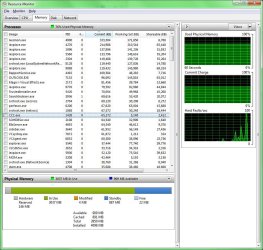
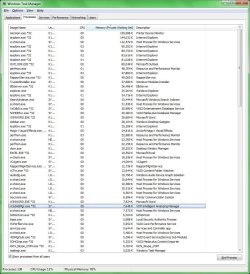
Does this look excessive? I am using a Sony Vaio and there are 142 processes which seem too high. The Physical Memory is 78% or higher typically. Could anyone advise?
 

Attachments

  • rm.jpg
    rm.jpg
    127.8 KB · Views: 714
  • wtm.jpg
    wtm.jpg
    150.6 KB · Views: 401

My Computer

OS
windows 7 64bit
Hello there, k1bb5. Welcome to SevenForums

Yes, it's very high usage for a regular PC.

1) lxecmon.exe is using way too much memory. Do you have any Lexmark hardware?
2) 142 processes is WAY too much for regular use, right now i have 40 processes and using 1.34GBs of RAM
3) Does the laptop have its original Windows installation? (with all the bloatware)
4) Have you analyzed your PC for virus/malware?

Something is not right with that CPU/RAM usage :huh:
 

My Computer

Computer type
PC/Desktop
OS
Windows
Does this look excessive? I am using a Sony Vaio and there are 142 processes which seem too high. The Physical Memory is 78% or higher typically. Could anyone advise?

In task manager you have 8 instances of Internet explorer running for over 400 Mb, and as Punkster says your Printer software is also using way too much

Why 8 separate instances of IE? For each IE instance there also has to be an instance of svchosts running as well contributing yet again to more processes and memory used.
 

My Computer

Computer Manufacturer/Model Number
HP Pavillion dv-7 1005 Tx
OS
Win 8 Release candidate 8400
CPU
[email protected]
Memory
4 gigs
Graphics Card(s)
Nvidia 9600M
Sound Card
HD built-in
Monitor(s) Displays
17" Wxga
Screen Resolution
1440x900
Cooling
none
Internet Speed
45Mb down 5Mb up
Practically everything is using way too much memory..

Why don't you download Malwarebytes' Anti Malware from here: Malwarebytes : Thank you!

Install it, update it, reboot your PC, boot into safe mode with networking (Pressing F8 after BIOS post) and perform a full scan... just to be sure.

There are a lot of processes that i don't even recognize and could (not 100% sure but could) be virus/malware.

Do that and report back. :)
 

My Computer

Computer type
PC/Desktop
OS
Windows
HI Punkster/Zig thanks for the reply. Much appreciated!

Malware found a couple of Adware
xvidsetup(1).exe (Adware.Hotbar) -> No action taken.
xvidsetup.exe (Adware.Hotbar) -> No action taken.
HKEY_LOCAL_MACHINE\SOFTWARE\Microsoft\Internet Explorer\Low Rights\ElevationPolicy\{A078F691-9C07-4AF2-BF43-35E79EECF8B7} (Adware.Softomate) -> No action taken.

The Lexmark Wifi printer has normalised that did look odd. lxecmon.exe The printer was off anyway so that was v strange.

Aside from that its back to the old wmpnetwk.exe that was the initial cause of large mem usage. Its difficult to get rid of it and SKype.exe at start up doesn't help either. These I had gotten rid off from start up but they have since bounced back of their own accord today.

The laptop by the way is probably top heavy with Sony Media products as part of initial set up of windows installation. Yes so original bloatware + Sony additionals. which take all processes now to 127. however 15 are svchost.


ZigZag - you mentioned IE; I had three instances and probably 10 tabs, alot i know but that should be normal, thought that was the point of tabbed browsers?

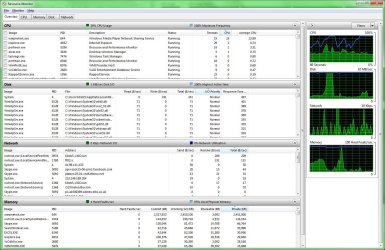
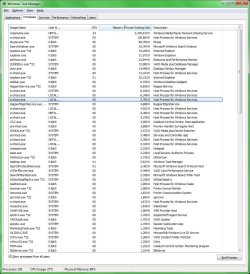
Have attached new Resource Montitor and WTM. It's actually quite laughable the system can be so badly configured.:o. Thanks again.
 

Attachments

  • rm2.jpg
    rm2.jpg
    198.6 KB · Views: 203
  • wtm2.jpg
    wtm2.jpg
    152.4 KB · Views: 229

My Computer

OS
windows 7 64bit
OOOOOOOOOOOOOOOOOOOOOOOOOOK!

wmpnetwk.exe is using 2.5GBs????? :shock:

Go to your media player and disable its connection to the internet.. don't let it go to the internet..

Here's a quick solution for that:

1) go to start and type "services.msc" without the quotes, open it.
2) go to Media Player Network Sharing Service, right click it, stop it.
3) right click it again, go to properties.
4) on startup type, change it to manual. Apply and accept.
5) reboot your PC and check that the service is not running automatically.

Do that if you don't use WMP to share music/videos/stuff on the network (your house, another PC, etc.)
 

My Computer

Computer type
PC/Desktop
OS
Windows
HI Punkster/Zig thanks for the reply. Much appreciated!

Malware found a couple of Adware
xvidsetup(1).exe (Adware.Hotbar) -> No action taken.
xvidsetup.exe (Adware.Hotbar) -> No action taken.
HKEY_LOCAL_MACHINE\SOFTWARE\Microsoft\Internet Explorer\Low Rights\ElevationPolicy\{A078F691-9C07-4AF2-BF43-35E79EECF8B7} (Adware.Softomate) -> No action taken.

The Lexmark Wifi printer has normalised that did look odd. lxecmon.exe The printer was off anyway so that was v strange.

Aside from that its back to the old wmpnetwk.exe that was the initial cause of large mem usage. Its difficult to get rid of it and SKype.exe at start up doesn't help either. These I had gotten rid off from start up but they have since bounced back of their own accord today.

The laptop by the way is probably top heavy with Sony Media products as part of initial set up of windows installation. Yes so original bloatware + Sony additionals. which take all processes now to 127. however 15 are svchost.


ZigZag - you mentioned IE; I had three instances and probably 10 tabs, alot i know but that should be normal, thought that was the point of tabbed browsers?

Have attached new Resource Montitor and WTM. It's actually quite laughable the system can be so badly configured.:o. Thanks again.

There were 8 "separate" instances of IE. Tabs just increase that instances ram usage. For each instance there is a separate communication service running (also increasing ram usage0

It may be what tabbed browser are for but then one cant complain about the number of processes or ram usage.

Perhaps your usage requires a faster processor and more ram.
 

My Computer

Computer Manufacturer/Model Number
HP Pavillion dv-7 1005 Tx
OS
Win 8 Release candidate 8400
CPU
[email protected]
Memory
4 gigs
Graphics Card(s)
Nvidia 9600M
Sound Card
HD built-in
Monitor(s) Displays
17" Wxga
Screen Resolution
1440x900
Cooling
none
Internet Speed
45Mb down 5Mb up
His PC has 4GBs of RAM, i don't think that's the problem :huh:

Probably the processor. or the fact that there's a process that's eating 2.5GBs of RAM :shock:

Can you believe that?
 

My Computer

Computer type
PC/Desktop
OS
Windows
Noted. I was just saying that his usage pattern may be exceeding his resources.

I have seen users who need 8 gigs just for their day to day work. There is no way 8 instances of IE plus his printer software is going to be easy on h is cpu, ram, power, or heat.
 

My Computer

Computer Manufacturer/Model Number
HP Pavillion dv-7 1005 Tx
OS
Win 8 Release candidate 8400
CPU
[email protected]
Memory
4 gigs
Graphics Card(s)
Nvidia 9600M
Sound Card
HD built-in
Monitor(s) Displays
17" Wxga
Screen Resolution
1440x900
Cooling
none
Internet Speed
45Mb down 5Mb up
Noted. I was just saying that his usage pattern may be exceeding his resources.

I have seen users who need 8 gigs just for their day to day work. There is no way 8 instances of IE plus his printer software is going to be easy on h is cpu, ram, power, or heat.

Of course, the average user needs 2 ~ 4GB of ram, even so... there are some users that need at least 8GB, Lexmark software has always given me problems... they're not fully compatible with windows 7 and they're memory hungry!

But yes, 8 instances of IE is not "normal", he's probably a multitasking guy.. and yes, multitasking = more ram, more CPU.

And if the OP hasn't filled his system specs, it's kinda hard not to speculate :p
 

My Computer

Computer type
PC/Desktop
OS
Windows
IE and the 8 IE processes are not the problem, alright. 400 MB is nothing. The problem is else where or a combination, remember not all memory usage can be identified with to a process. It is also completely normal for there to be multiple IE processes, it was designed that way.
 

My Computer

Computer type
PC/Desktop
Computer Manufacturer/Model Number
Alienware Aurora ALX R4
OS
Windows 10 Pro (x64)
CPU
Intel Core i7-3930K (3.2GHz - 4.5GHz)
Motherboard
Alienware Aurora-R4 x79
Memory
4x Samsung 4GB PC3-12800 DDR3 (16GB 1600MHz)
Graphics Card(s)
Nvidia Geforce GTX 690
Sound Card
SteelSeries Siberia Elite
Monitor(s) Displays
Dell UltraSharp U3011
Screen Resolution
2560x1600
Hard Drives
Samsung 850 Pro 256 GB, Seagate 1TB Desktop Hybrid HDD, 2x Western Digital 4TB Green HDD
PSU
875W Some Dell PSU <.<
Case
Alienware Aurora ALX
Cooling
Custom Liquid Cooling (EK CPU & GPU blocks) dual EK 480RAD
Keyboard
Logitech G710+ Mechanical
Mouse
Logitech G700s
Internet Speed
Verizon Fios (50 mbps average)
Other Info
Server: Intel NUC D54250WYK: i5-4250U, 16GB, 256 GB mSATA, Windows Server 2012 R2
Hi Punskster I had actually set it to Manual a week or so ago. It just seems to have bounced back of its own accord I actually wanted to uninstall it and did that - it doesn't show in "Programs and Features" but appears in my shortcuts Start menu and is still located in %\Program Files\(x86)\% Maybe I should just HARD delete it there? I did initially want a network version for obvious streaming benefits but the reliability and memory outweighs that.

4GB is more than enough for my needs only upgraded from 2GB a year ago and its now an I5 processor (whatever that means) I know only I7 is faster though. Not doing anything wild my usuage hasn't changed and that was a basic Dell. Its simply a wifi & network services issue causing a problem just cannot figure it out.

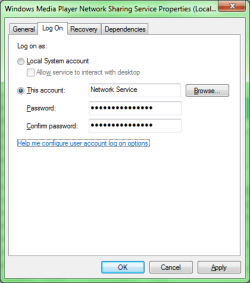
I have noticed in "services.msc" and WMPNS properties I try Local System Account rather than network service. will report back. Much appreciated.
 

Attachments

  • wmpns.png
    wmpns.png
    12 KB · Views: 5

My Computer

OS
windows 7 64bit
No, don't hard delete it. just set it to manual!

If it keeps appearing randomly and without permission, turn it off for good and test if something changes drastically.

Here:

NOTE: Obviously you won't be able to share media with you xbox 360 etc if you do any of this or try TVersity (which I believe is much better).

1. In Windows Media Player turn off media sharing

in the library tab right click on it > click "media sharing" unclick the media sharing tab and click ok


2. Turn off the "WMPnetwk.exe" service


Under the "RUN" command in the start meni type "services.msc" scroll down to "Windows media player network sharing" double click and under startup type set to disabled

I believe i have it set to "Manual" but i do have the media sharing disabled in WMP, i'd throw a screenshot here to show you but my Windows is in spanish, so... :rolleyes: it'd be just the same hehe...

Don't worry about that, follow the steps and if the issue persist, we'll have to use a much bigger tool to fix it, but we will :geek:

Cheers
 

My Computer

Computer type
PC/Desktop
OS
Windows
Ok I'll see how that goes. The thing is I believe you are saying that WMP under network services is using correct amount of RAM (i.e. if i was purposelyfully streaming media) or even still would be excessive? Anyway I am sure you have many other better things :devil: to keep you busy in Valencia. Muchos Gracias. Its just a shame because the idea streaming and "Play to" will not really make it off the ground otherwise.
Adios.
 

My Computer

OS
windows 7 64bit
No. I do believe that it uses some RAM, but then i read in a website that it's a bug when it uses almost your entire RAM (the issue that's been hunting you :p), so i don't think that a single tiny process should be eating almost 2.5GBs of RAM :shock:

Try to keep your windows installation completely updated, you never know when one of those updates could solve an issue!

Let us know if the problem solves, by any means :geek:

De nada
Adiós!

PS: i'll leave attached my WTM window for you to check what's a "normal" usage (at least for me)

37 Processes
28% of RAM (1.14GB)
0% CPU (not doing anything ATM)
 

My Computer

Computer type
PC/Desktop
OS
Windows
Back
Top