
Memory usage

CC123

New member
Local time
1:29 PM
Messages
33
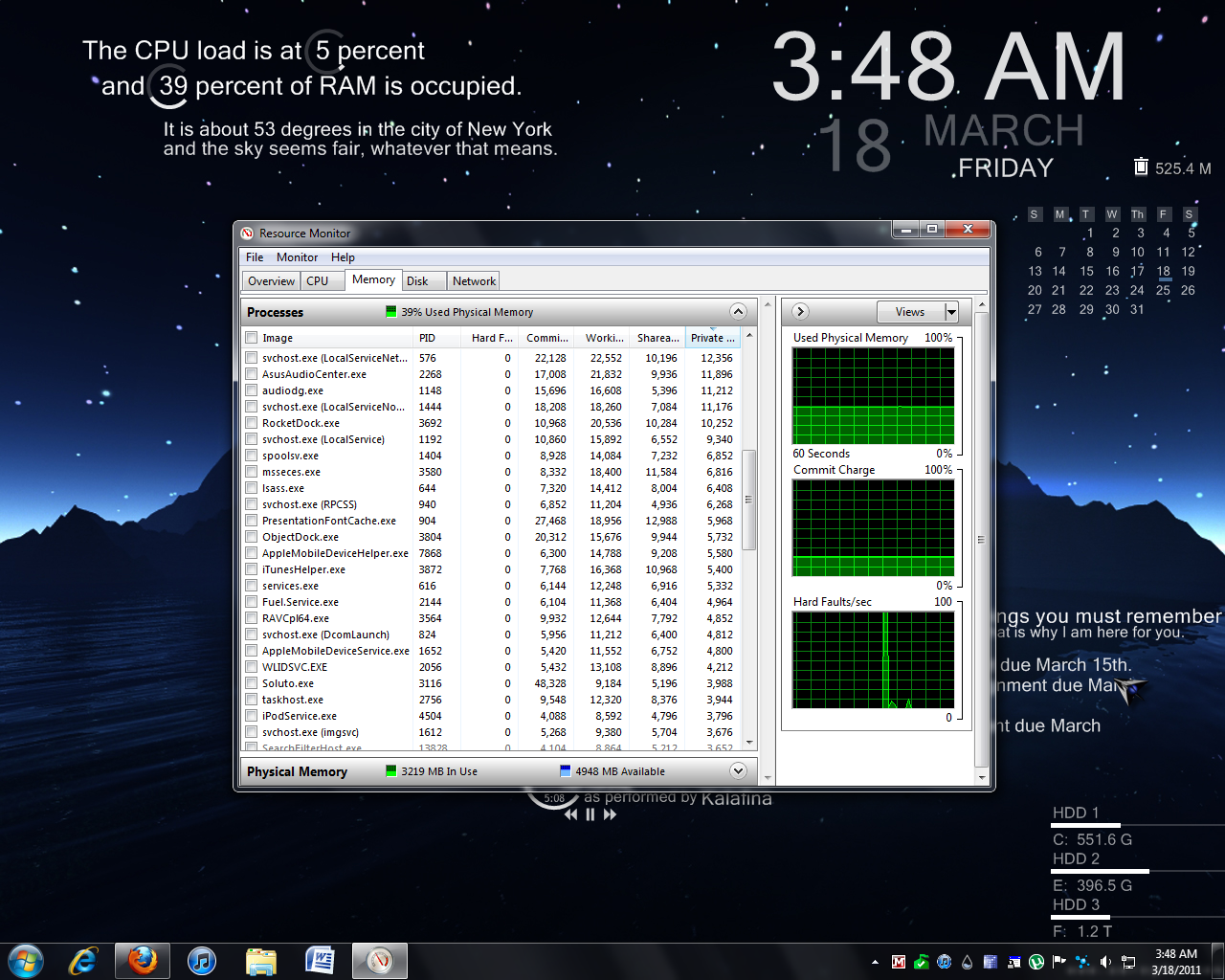
Can someone tell me why my computer is using so much RAM and if it's normal or not? It's always somewhere between 35%- 40%. I currently have four sticks of 2GB ram, so 8GB in total. Here are some pics from my resource monitor.

RAM.png

RAM2.png

RAM3.png

RAM4.png
 

My Computer

OS
Microsoft Windows 7 Home Premium 64-bit 1-Pack for System Builders - OEM
CPU
AMD Phenom II X6 1055T Thuban 2.8GHz Socket AM3 125W Six-Cor
Motherboard
ASUS M4A88TD-M/USB3 AM3 AMD 880G SATA 6Gb/s USB 3.0 HDMI Mic
Memory
Kingston ValueRAM 4GB (2 x 2GB) 240-Pin DDR3 SDRAM DDR3 1333
Graphics Card(s)
SAPPHIRE 100314SR Radeon HD 6870 1GB 256-bit GDDR5 PCI Expre
Sound Card
ASUS Xonar DX 7.1 Channels PCI Express x1 Interface Sound Ca
Monitor(s) Displays
DELL E173FP
Hard Drives
SAMSUNG Spinpoint F3 HD103SJ 1TB 7200 RPM SATA 3.0Gb/s 3.5" Internal Hard Drive -Bare Drive
PSU
CORSAIR CMPSU-650TX 650W ATX12V / EPS12V SLI Ready CrossFire
Case
Antec Three Hundred Illusion Black Steel ATX Mid Tower Compu
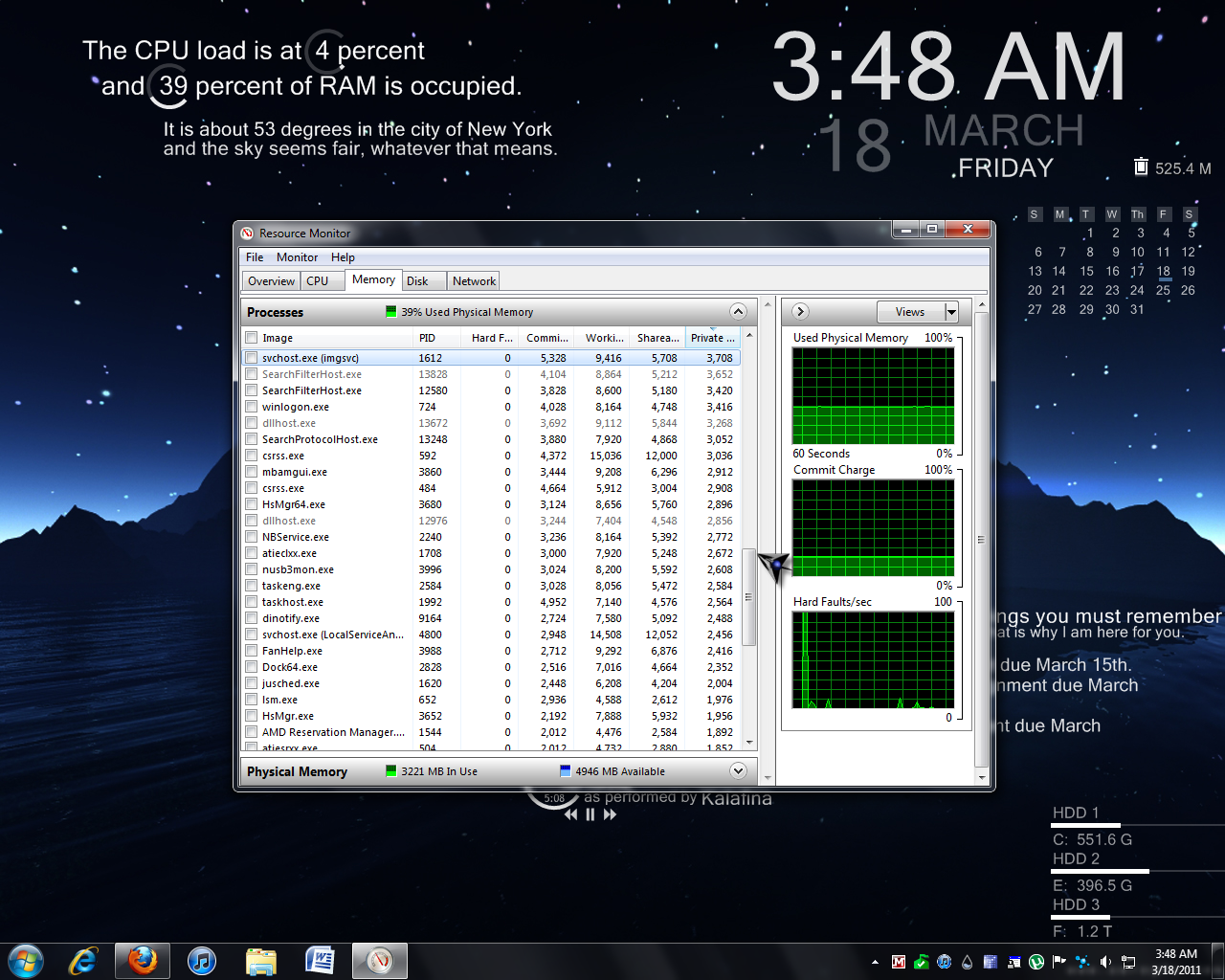
Can someone tell me why my computer is using so much RAM and if it's normal or not? It's always somewhere between 35%- 40%. I currently have four sticks of 2GB ram, so 8GB in total. Here are some pics from my resource monitor.
RAM.png

RAM2.png

RAM3.png

RAM4.png

You have Windows running, gadgets all over your desktop, Firefox is running, MS Security Essentials, iTunes, Truecrypt, Malwarebytes, bittorrent, and lord knows what else because you have some items hidden in the notification area in the lower right. Turn off whatever you dont need on all the time and get some memory back...
 

My Computer

Computer Manufacturer/Model Number
Homebrew PC - "Alpha_Dawg"
OS
Windows 7 Ultimate 64 bit Steve Ballmer Signature Edition
CPU
Intel Core 2 Quad - Q9550 - 2.83GHz stock - OC'd to 3.6GHz
Motherboard
Gigabyte EP45-UD3P
Memory
4GB DDR2 800MHz (PC6400) OCZ Reaper
Graphics Card(s)
Nvidia GE Force 8800 GTS
Sound Card
Asus Xonar DX
Monitor(s) Displays
Samsung SyncMaster 2333HD
Screen Resolution
1920 x 1080
Hard Drives
WD Caviar Black 750GB - 7200RPM - 32MB cache
WD Caviar Green 1.5TB - 5400RPM - 64MB cache
WD Caviar Green 2.0TB - 5400RPM - 64MB cache
PSU
PC Power & Cooling Silencer 750
Case
Gigabyte 3D Aurora
Cooling
Case is Air - 5ea. 120mm fans (mix of Arctic and Xigmatec)
Keyboard
MS Natural Wireless KB
Mouse
MS Wireless Mouse
Internet Speed
50 mbps down/5 mbps up
Other Info
AVerMedia - AVerTVHD G2 Dual Tuner Card
Or...Just don't bloody worry about it. You have 8 frickin gigabytes!!!!! ...Sorry...but I'm just fend up with people who have all this RAM, compared to me, complaining about RAM usage. IT IS IRRITATING! There is nothing you need to change or alter. It is perfectly fine as is. You spent all that money on having that large amount of RAM, you should bloody well use it. Otherwise why did you waste all of your money?

/rant ...
 

My Computer

Computer type
PC/Desktop
Computer Manufacturer/Model Number
Alienware Aurora ALX R4
OS
Windows 10 Pro (x64)
CPU
Intel Core i7-3930K (3.2GHz - 4.5GHz)
Motherboard
Alienware Aurora-R4 x79
Memory
4x Samsung 4GB PC3-12800 DDR3 (16GB 1600MHz)
Graphics Card(s)
Nvidia Geforce GTX 690
Sound Card
SteelSeries Siberia Elite
Monitor(s) Displays
Dell UltraSharp U3011
Screen Resolution
2560x1600
Hard Drives
Samsung 850 Pro 256 GB, Seagate 1TB Desktop Hybrid HDD, 2x Western Digital 4TB Green HDD
PSU
875W Some Dell PSU <.<
Case
Alienware Aurora ALX
Cooling
Custom Liquid Cooling (EK CPU & GPU blocks) dual EK 480RAD
Keyboard
Logitech G710+ Mechanical
Mouse
Logitech G700s
Internet Speed
Verizon Fios (50 mbps average)
Other Info
Server: Intel NUC D54250WYK: i5-4250U, 16GB, 256 GB mSATA, Windows Server 2012 R2
Look at Task Manager, Performance tab. Look at the Physical memory block at the bottom. On my box with 8GB of RAM, I've only got 4GB free....but my Available RAM is 6.5GB. So the rest is used as cache and Windows has preloaded and populated it with information that I am likely going to use..but if an application comes along and needs to use it, it will free it immediately.

Personally, I'd rather see all 8GB of RAM in use at all time. Getting data to and from RAM is faster than any hard drive out there.
 

My Computer

Computer Manufacturer/Model Number
Self-Built in July 2009
OS
Windows 7 Ultimate x64
CPU
Intel Q9550 2.83Ghz OC'd to 3.40Ghz
Motherboard
Gigabyte GA-EP45-UD3R rev. 1.1, F12 BIOS
Memory
8GB G.Skill PI DDR2-800, 4-4-4-12 timings
Graphics Card(s)
EVGA 1280MB Nvidia GeForce GTX570
Sound Card
Realtek ALC899A 8 channel onboard audio
Monitor(s) Displays
23" Acer x233H
Screen Resolution
1920x1080
Hard Drives
Intel X25-M 80GB Gen 2 SSD
Western Digital 1TB Caviar Black, 32MB cache. WD1001FALS
PSU
Corsair 620HX modular
Case
Antec P182
Cooling
stock
Keyboard
ABS M1 Mechanical
Mouse
Logitech G9 Laser Mouse
Internet Speed
15/2 cable modem
Other Info
Windows and Linux enthusiast. Logitech G35 Headset.
Frankly, under that sort of load, using 3.5GB of RAM is pretty good. You probably have a large cache, but that is also good - you're using the RAM (efficiently, I might add) that you paid for. I wouldn't worry about it unless you're having issues, which aren't likely to be memory-usage related anyway.
 

My Computer

Computer type
PC/Desktop
Computer Manufacturer/Model Number
Custom
OS
Windows 10 Pro x64
CPU
Intel Core i7 4790K @ 4.5GHz
Motherboard
Asus Maximus Hero VII
Memory
32GB DDR3
Graphics Card(s)
Nvidia GeForce GTX970
Sound Card
Realtek HD Audio
Screen Resolution
1920x1200
Hard Drives
1x Samsung 250GB SSD
4x WD RE 2TB (RAIDZ)
PSU
Corsair AX760i
Case
Fractal Design Define R4
Cooling
Noctua NH-D15
Back
Top