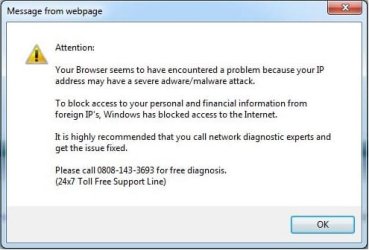
Message From Webpage

Thornz

New member
Local time
3:52 AM
Messages
22
Hi, I keep getting this continuous pop-up that won't go away.
ScreenShot006.jpg
I don't know what to do.
 

My Computer

Computer type
PC/Desktop
Computer Manufacturer/Model Number
Asus
OS
Windows 7 Ultimate x64
Memory
16GB
Graphics Card(s)
AMD Radeon HD 6700
Hard Drives
Primary - 500GB
Secondary - 1TB
Antivirus
Avast Premier Antivirus
Browser
Google Chrome, Mozilla Firefox, Internet Explorer
Run a full anti virus scan
Download and run a full scan with Malwarebytes.
If these do not help. Download and use ADw cleaner
AdwCleaner Download
 

My Computer

Computer type
PC/Desktop
Computer Manufacturer/Model Number
Dell XPS 420
OS
Windows 10, Home Clean Install
CPU
Intel Core2 processsor Q8200(2.33Ghz 1333FSB) Quad Core Tech
Motherboard
Dell
Memory
6 gb
Graphics Card(s)
ATI Radeon 256MB HD3650
Sound Card
Intergrated 7.1 Channel Audio
Monitor(s) Displays
Dell SP2009W 20"
Hard Drives
640 GB Serial ATA Hard drive
Cooling
Fan
Keyboard
Dell USB Keyboard
Mouse
Dell Premium Optical USB
Internet Speed
DSL 2.85

My Computer

Computer type
PC/Desktop
Computer Manufacturer/Model Number
Asus
OS
Windows 7 Ultimate x64
Memory
16GB
Graphics Card(s)
AMD Radeon HD 6700
Hard Drives
Primary - 500GB
Secondary - 1TB
Antivirus
Avast Premier Antivirus
Browser
Google Chrome, Mozilla Firefox, Internet Explorer
Avast is an Anti Virus and can be used.
Try Malwarebytes next.
If they fail ADW should work
 

My Computer

Computer type
PC/Desktop
Computer Manufacturer/Model Number
Dell XPS 420
OS
Windows 10, Home Clean Install
CPU
Intel Core2 processsor Q8200(2.33Ghz 1333FSB) Quad Core Tech
Motherboard
Dell
Memory
6 gb
Graphics Card(s)
ATI Radeon 256MB HD3650
Sound Card
Intergrated 7.1 Channel Audio
Monitor(s) Displays
Dell SP2009W 20"
Hard Drives
640 GB Serial ATA Hard drive
Cooling
Fan
Keyboard
Dell USB Keyboard
Mouse
Dell Premium Optical USB
Internet Speed
DSL 2.85
Thanks. I'll try it!
 

My Computer

Computer type
PC/Desktop
Computer Manufacturer/Model Number
Asus
OS
Windows 7 Ultimate x64
Memory
16GB
Graphics Card(s)
AMD Radeon HD 6700
Hard Drives
Primary - 500GB
Secondary - 1TB
Antivirus
Avast Premier Antivirus
Browser
Google Chrome, Mozilla Firefox, Internet Explorer
I wish you luck
 

My Computer

Computer type
PC/Desktop
Computer Manufacturer/Model Number
Dell XPS 420
OS
Windows 10, Home Clean Install
CPU
Intel Core2 processsor Q8200(2.33Ghz 1333FSB) Quad Core Tech
Motherboard
Dell
Memory
6 gb
Graphics Card(s)
ATI Radeon 256MB HD3650
Sound Card
Intergrated 7.1 Channel Audio
Monitor(s) Displays
Dell SP2009W 20"
Hard Drives
640 GB Serial ATA Hard drive
Cooling
Fan
Keyboard
Dell USB Keyboard
Mouse
Dell Premium Optical USB
Internet Speed
DSL 2.85
Thornz,

In addition to using ADWCleaner and Malwarebytes Anti-Malware, you may also want to consider resetting whichever browsers you use. :)
 

My Computer

Computer type
PC/Desktop
Computer Manufacturer/Model Number
An ol' eMachines
OS
Windows 7 Home Premium
Internet Speed
Fine for me...I'm retired!
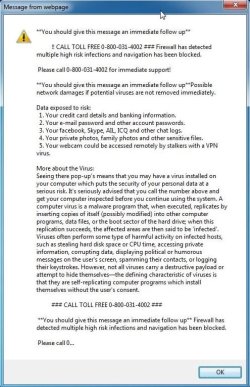
I had another error.
ScreenShot007.jpg
I'll be sure to reset my browser settings :D
 

My Computer

Computer type
PC/Desktop
Computer Manufacturer/Model Number
Asus
OS
Windows 7 Ultimate x64
Memory
16GB
Graphics Card(s)
AMD Radeon HD 6700
Hard Drives
Primary - 500GB
Secondary - 1TB
Antivirus
Avast Premier Antivirus
Browser
Google Chrome, Mozilla Firefox, Internet Explorer
Whatever you do, please do not call the number on any of those warnings!!!

What browsers do you use?
 

My Computer

Computer type
PC/Desktop
Computer Manufacturer/Model Number
An ol' eMachines
OS
Windows 7 Home Premium
Internet Speed
Fine for me...I'm retired!
I use Google Chrome (For almost everything I do). If there is nothing I can do on it, I use Mozilla Firefox.
 

My Computer

Computer type
PC/Desktop
Computer Manufacturer/Model Number
Asus
OS
Windows 7 Ultimate x64
Memory
16GB
Graphics Card(s)
AMD Radeon HD 6700
Hard Drives
Primary - 500GB
Secondary - 1TB
Antivirus
Avast Premier Antivirus
Browser
Google Chrome, Mozilla Firefox, Internet Explorer
Thornz,

Please use the tool: Zoek

First, temporarily disable your AV program.
Info on how to disable your security applications > How To Temporarily Disable Your Anti-virus, Firewall And Anti-malware Programs - Security Mini-Guides

Zoek Download > Download z o e k . e x e version 5.0.0.0
When the download appears, save to the Desktop.
On the Desktop, right-click the Zoek.exe file and select: Run as Administrator (Give it a few seconds to appear.)

Next, copy/paste the entire script inside the code box below to the input field of Zoek:
Code:
createsrpoint; 
emptyfolderscheck;delete
emptyclsid;
emptyalltemp;
resethosts;
ipconfig /flushdns;b;
autoclean;
firefoxlook; 
chromelook;
hijackthis;  
srestore;

Now...
Close any open Browsers.
Click the Run script button, and wait. It takes a few minutes to run all the script.

When the tool finishes, the zoek-results.log is opened in Notepad on the Desktop.
The log is also found on the systemdrive, normally C:\
If a reboot is needed, the log is opened after the reboot.

Please provide the zoek-results.log in your reply.

Also, please provide an update on how the computer is doing. Any more obnoxious notices?

 

My Computer

Computer type
PC/Desktop
Computer Manufacturer/Model Number
An ol' eMachines
OS
Windows 7 Home Premium
Internet Speed
Fine for me...I'm retired!
  • Like
Reactions: Arc
Thornz,

Also, please provide an update on how the computer is doing. Any more obnoxious notices?
THANKS!!!

I had used ADWCleaner, and Malwarebytes Anti-Malware I had also resetted my browser settings. I had then rebooted my PC and I had still got the pop-up.

Also, 2 of my desktop gadgets was inactive, (GPU Observer and Network Meter).
Network Meter - Windows 7 Desktop Gadget
Gpu Observer - Windows 7 Desktop Gadget

After reading the latest reply, I used Zoek. It rebooted my PC and I had no pop-ups or errors and the gadgets was active.

Here are the zoek-results.log: View attachment zoek-results.log

Thanks for helping me out. :)
 

My Computer

Computer type
PC/Desktop
Computer Manufacturer/Model Number
Asus
OS
Windows 7 Ultimate x64
Memory
16GB
Graphics Card(s)
AMD Radeon HD 6700
Hard Drives
Primary - 500GB
Secondary - 1TB
Antivirus
Avast Premier Antivirus
Browser
Google Chrome, Mozilla Firefox, Internet Explorer
Looks like things worked out for you. Using Zoek was just a 'gut feeling'. It has taken care of issues like this before.

Any more messages showing up?
 

My Computer

Computer type
PC/Desktop
Computer Manufacturer/Model Number
An ol' eMachines
OS
Windows 7 Home Premium
Internet Speed
Fine for me...I'm retired!
Back
Top