Microsoft Office 2010 32-bit vs 64-bit?

StElmoQn

New member
Local time
3:49 AM
Messages
5
My husband tried to email a word document and an excel spreadsheet from his office to his home laptop but is having problems.

The document from the office was created in MS Office 2010 32-bit but saved as a 97-2003 compatible document since not everyone is on 2010.

His new home laptop is set up with MS 2010 64-bit, but when tried to open the word document, it would not open until he saved it as a MS Word 2010 document, and Excel would not open.

Does it make any difference that the home pc is 64-bit MS Office for compatability problems?
 

My Computer My Computer

OS
Windows 7 Home Premium 64bit
When you have pressed 'Open' and get the list of files available, ensure that in the drop-down menu to the right of the 'file name' box', it says ALL Word Documents, not just Word Documents.
.
.
 

Attachments

  • Open Word Doc.jpg
    Open Word Doc.jpg
    11.3 KB · Views: 16

My Computer My Computer

Computer type
PC/Desktop
Computer Manufacturer/Model Number
Packard Bell
OS
Windows 7 Home Premium 64bit
CPU
Intel(R) Core(TM) i3-2120 CPU @ 3.30GHz
Motherboard
Packard Bell IPISB-AG
Memory
3.00 GB
Graphics Card(s)
(1) Intel(R) HD Graphics (2) VNC Mirror Driver
Sound Card
Realtek High Definition Audio
Monitor(s) Displays
AIO LCD
Screen Resolution
1920 x 1080
Hard Drives
WDC WD10EADX-22TDHB0 ATA Device
Fixed hard disk media
4 partitions
931.51 GB
Keyboard
Wireless
Mouse
Wireless
Antivirus
Microsoft Security Essentials
Browser
IE; Firefox
Other Info
Also:
Samsung N220 Plus Netbook - Windows 7 Home
HP laptop
iPad 5
Here's a screen cap of what the "error" looks lie - just the MS 2010 logo.Capture.JPG

Capture2.JPG

Any suggestions?
 

My Computer My Computer

OS
Windows 7 Home Premium 64bit
Hi there
unless you are running really HUGE spreadsheets the general consensus seems to be go with the 32 bit version of Office 2010 at least until a service pack or two appears -- regardless of whether or not you are using W7 x-86 / x-64.

The 64 bit version of office 2010 is still largely regarded as experimental.

Cheers
jimbo
 

My Computer My Computer

Computer type
PC/Desktop
Computer Manufacturer/Model Number
Custom built, several laptops HP/ASUS
OS
Linux CENTOS 7 / various Windows OS'es and servers
CPU
Intel i7 Intel i5
Memory
8GB, 16GB
Graphics Card(s)
On Motherboard
Sound Card
Realtek HD audio
Monitor(s) Displays
Apple Cinema display, Samsung LCD
Screen Resolution
1920 X 1080
Hard Drives
4 X 1TB SATA
Mouse
Toshiba wireless laser
Internet Speed
> 20MB up
I think the problem is that the file was e-mailed to you. Word 2010 treats such files with suspicion.
 

My Computer My Computer

Computer type
Laptop
Computer Manufacturer/Model Number
Hewlett-Packard/G62-107SA Notebook
OS
Microsoft Windows 7 Home Premium 64-bit Service Pack 1
CPU
Intel(R) Core(TM) i3 CPU M 330 @ 2.13GHz
Motherboard
Hewlett-Packard 1425
Memory
8 GB DDR3
Graphics Card(s)
Intel(R) HD Graphics
Sound Card
Realtek High Definition Audio
Monitor(s) Displays
Builtin
Screen Resolution
1366 x 768 x 32 bits (4294967296 colors) @ 60 Hz
Hard Drives
250 GB SATA Hard Disk Drive 7200 rpm
2TB Seagate GoFlex USB 2 Drive
1TB Iomega Prestige USB 2 Drive
1.5TB Iomega Prestige USB 2 Drive (Samsung)
2TB WD MyBook Live NAS.
Mouse
Logitech Anywhere MX
Internet Speed
152 Mbs download 10 Mbs upload
Antivirus
Norton 360
Browser
Chrome
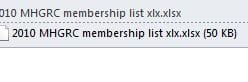
Ok, I went back and uninstalled MS2010 64-bit and reinstalled as 32-bit. However, now instead of the MS Office logo, I get thisCapture.JPG

A blank page. I can open in preview, but surely there is a workaround for this.

the original document was emailed from his company email through Citrix, so maybe there is some way to identify email coming in from there is automatically safe to open?
 

My Computer My Computer

OS
Windows 7 Home Premium 64bit
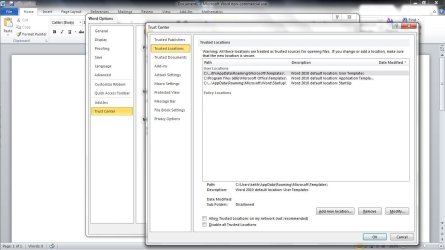
You may be able to do something in Trust Center. I've not used it but it's worth a try.

Capture4.JPG
 

My Computer My Computer

Computer type
Laptop
Computer Manufacturer/Model Number
Hewlett-Packard/G62-107SA Notebook
OS
Microsoft Windows 7 Home Premium 64-bit Service Pack 1
CPU
Intel(R) Core(TM) i3 CPU M 330 @ 2.13GHz
Motherboard
Hewlett-Packard 1425
Memory
8 GB DDR3
Graphics Card(s)
Intel(R) HD Graphics
Sound Card
Realtek High Definition Audio
Monitor(s) Displays
Builtin
Screen Resolution
1366 x 768 x 32 bits (4294967296 colors) @ 60 Hz
Hard Drives
250 GB SATA Hard Disk Drive 7200 rpm
2TB Seagate GoFlex USB 2 Drive
1TB Iomega Prestige USB 2 Drive
1.5TB Iomega Prestige USB 2 Drive (Samsung)
2TB WD MyBook Live NAS.
Mouse
Logitech Anywhere MX
Internet Speed
152 Mbs download 10 Mbs upload
Antivirus
Norton 360
Browser
Chrome
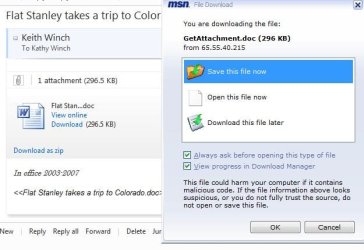
ok, got the excel problem solved - it will open and download.

word however is another bugger, here's the screenshot which clearly shows its not reading and downloading to word.Word Snip.JPG
 

My Computer My Computer

OS
Windows 7 Home Premium 64bit
Here's a screen cap of what the "error" looks lie - just the MS 2010 logo.View attachment 135584

View attachment 135585

Any suggestions?

What's really interesting (and strange) is that, the icon/logo you posted
135585d1296478119-microsoft-office-2010-32-bit-vs-64-bit-capture2.jpg


is the icon/logo for Microsoft Office Picture Manager, so maybe the spread sheet (and word doc) were coming across as IMAGE files that were supposed to be opened with Microsoft Office Picture Manager (a GREAT photo editor, by the way, and is on your system if you have MS Office). The problem could've been caused by trying to open the image files with MS Office.
 

My Computer My Computer

Computer Manufacturer/Model Number
HP Pavillion dv5t (generation 1)
OS
Vista 64 bit and 32 bit (SP2)
CPU
Intel(R) Core(TM)2 Duo Processor T9400 (2.53 GHz
Memory
4GB DDR2 System Memory (2 Dimm)
Graphics Card(s)
512 MB NVIDIA GeForce 9600M GT
Monitor(s) Displays
15.4" diagonal WSXGA+ High-Definition HP BrightView Widescre
Screen Resolution
1680 x 1050
Hard Drives
320GB 5400RPM SATA Hard Drive with HP ProtectSmart Hard Drive Protection
Keyboard
Built-in HP
Mouse
Built in - Synaptics TouchPad V6.5 on PS/2 Port
Internet Speed
Max
Other Info
~ Intel Next-Gen Wireless-N Mini-card w/Bluetooth ~ Blu-Ray ROM DVD+/-R/RW ~ Integ. HDTV Hybrid Tuner ~ 12 Cell Battery ~ MS Office (Home Premium) 2007 ~
Here's a screen cap of what the "error" looks lie - just the MS 2010 logo.View attachment 135584

View attachment 135585

Any suggestions?

What's really interesting (and strange) is that, the icon/logo you posted
135585d1296478119-microsoft-office-2010-32-bit-vs-64-bit-capture2.jpg


is the icon/logo for Microsoft Office Picture Manager, so maybe the spread sheet (and word doc) were coming across as IMAGE files that were supposed to be opened with Microsoft Office Picture Manager (a GREAT photo editor, by the way, and is on your system if you have MS Office). The problem could've been caused by trying to open the image files with MS Office.


That logo went away when I uninstalled the 64-bit office and reinstalled the 32-bit version. I can now preview open and download excel spreadsheets, but nada with word documents.
 

My Computer My Computer

OS
Windows 7 Home Premium 64bit
Back
Top