microsoft security essentials not working and windows update error

graphic333

New member
Member
Local time
7:41 AM
Messages
33
Location
United Kingdom
Hi forum,

I'm having some problem about a week ago with Microsoft security essentials bugging out on me and not opening or updating. Basically the message I got on opening MSE was windows cannot access specified path or file. You may not have the appropriate permission to access the file. Upon reading this about a week ago, I think! I proceeded to foolishly downloading a Zeroroot access program and a few MSE alternatives. Since then I have still been unable to re-install MSE by deleting all components in the registry.

The error code I get with trying to re-install MSE is 0x80070643

Having then unistalled the zeroaccess program and the previous alternative antivirus programs, I still cannot get MSE working, and I now have a windows 7 update error. The new system update I believe may be to do with security as-well!! The error code on doing a windows 7 update is 80070005, and it did cut out at 9% every time. (although now I think it is just 0%)


Can someone please help me as I have had a very successful streak of avoiding viruses by always usin MSE. I don't want, and can't afford to get a virus attack, not to mention Im runnign windows 7 ultimate so I need the windows 7 updates too because the ultimate can be dodgy sometimes. Nb the update I cannot do is 1.4mb but I am anticipating windows will throw me a new update any day soon which could be anywhere from 30mb to 200mb and it could fail all of it leaving me prone to attacks.

I can post my specs, attach some log files or run any program through support on here.
 

My Computer

Computer type
PC/Desktop
Computer Manufacturer/Model Number
custom build
OS
windows 7 64 bit OEM ultimate
CPU
core i7 2600k unlocked
Motherboard
asus gigabit d3 b3
Memory
4GB elixer DDR3
Graphics Card(s)
ASUS EAH6950 DCII-2DI4S-2GD5
Sound Card
usb speaker
Monitor(s) Displays
6 dell ultrasharp 1707/1708 custom debezzled
Screen Resolution
3840 x 2048
Hard Drives
f3 spinpoint 1tb, wd caviar green 3tb ordred, 150 gb velicraptor
PSU
corsair 650w
Case
coolermaster with some foam
Cooling
stock fans, noisy and terrible
Keyboard
logitech k708
Mouse
logiitech g500
Internet Speed
slowish
Antivirus
MSE
Browser
firefox
Other Info
weak motherboard
Hi graphic333 welcome to SevenForums

Download the two programs below

Run Farbar Recovery Scan Tool


2j4a9si.png
64-Bit Version OS Farbar Recovery Scan Tool x64 <===== Download Link

Drag the FRST64.exe from the Downloads folder to your Desktop

Right click on FRST64.exe and choose
mawket.jpg


When the tool opens click Yes on the disclaimer window .

Press Scan button.

FRST will let you know when the scan is complete and has written the FRST.txt to file

   Note
The first time Farbar Recovery Scan Tool is run, it makes also another log Addition.txt


Please upload both logs in your reply.(FRST.txt and Addition.txt)

:note: FRST.txt and Addition.txt will be on the Desktop :note:


2ytpm5u.png
Farbar Service Scanner

Click here :ar: Farbar Service Scanner to DOWNLOAD

Place file into your desktop

Place a check mark next to the following options

  • ⬜ Internet Services
  • ⬜ Windows Firewall
  • ⬜ System Restore
  • ⬜ Security Center
  • ⬜ Windows Update
  • ⬜ Windows Defender
Press the Scan button

Farbar Service Scanner will create a log, called FSS.txt, on the Desktop. Upload the FSS.txt with your reply

Upload a File
Click on the Go Advanced button under the Message box . Scroll down to Additional Options then click on Manage Attachments in the Attach Files sections . Click the Browse button locate the file then click on the Open button . In the Upload File from your Computer section click on the Upload button . Wait until it finishes uploading then close the window . Then click Submit Reply .
 

My Computer

Computer Manufacturer/Model Number
Custom Built
OS
Windows 7 Ultimate 32-Bit & Windows 7 Ultimate 64-Bit
CPU
Intel Core i7 CPU 950 @ 3.07GHz
Motherboard
ASUS P6T DELUXE V2
Memory
OCZ 6GB (3 x 2GB) 240-Pin DDR3 SDRAM DDR3 1600 OCZ3X1600R2
Graphics Card(s)
ATI Radeon HD 5700 Series
Sound Card
OnBoard
Hard Drives
WD6400AACS-00M3B0 (640GB SATA )
PSU
CORSAIR 850w
Case
NZXT LEXA
Cooling
Intel Stock Heatsink Fan
Keyboard
Microsoft Wireless Laser Keyboard 7000
Mouse
Microsoft Wireless Laser Mouse 7000
hi thanks vistaking!

they're attached!
 

Attachments

My Computer

Computer type
PC/Desktop
Computer Manufacturer/Model Number
custom build
OS
windows 7 64 bit OEM ultimate
CPU
core i7 2600k unlocked
Motherboard
asus gigabit d3 b3
Memory
4GB elixer DDR3
Graphics Card(s)
ASUS EAH6950 DCII-2DI4S-2GD5
Sound Card
usb speaker
Monitor(s) Displays
6 dell ultrasharp 1707/1708 custom debezzled
Screen Resolution
3840 x 2048
Hard Drives
f3 spinpoint 1tb, wd caviar green 3tb ordred, 150 gb velicraptor
PSU
corsair 650w
Case
coolermaster with some foam
Cooling
stock fans, noisy and terrible
Keyboard
logitech k708
Mouse
logiitech g500
Internet Speed
slowish
Antivirus
MSE
Browser
firefox
Other Info
weak motherboard
Open notepad. Inside notepad paste the highlighted items below


start
HKLM\...\Run: [MSC] - "c:\Program Files\Microsoft Security Client\mssecex.exe" -hide -runkey [x] <===== ATTENTION (File name is altered)
Winlogon\Notify\WB: C:\PROGRA~2\Stardock\OBJECT~1\WINDOW~1\fast64.dll [X]
HKCU\...\Run: [DeskSpace] - C:\Users\phoenix\AppData\Roaming\DeskSpace\deskspace.exe [x]
HKCU\...\Run: [AdobeBridge] - [x]
HKCU\...\Run: [Akamai NetSession Interface] - "C:\Users\phoenix\AppData\Local\Akamai\netsession_win.exe" [x]
HKLM-x32\...\Run: [Conime] - %windir%\system32\conime.exe [x]
HKLM-x32\...\Run: [] - [x]
AppInit_DLLs: [0 ] ()
AppInit_DLLs-x32: c:\progra~3\browse~1\25976~1.107\{c16c1~1\mngr.dll c:\progra~3\browse~1\25911~1.18\{c16c1~1\mngr.dll [0 ] ()
URLSearchHook: (No Name) - {bf7380fa-e3b4-4db2-af3e-9d8783a45bfc} - No File
URLSearchHook: (No Name) - {d40b90b4-d3b1-4d6b-a5d7-dc041c1b76c0} - No File
Toolbar: HKLM-x32 - No Name - {98889811-442D-49dd-99D7-DC866BE87DBC} - No File
Toolbar: HKCU - No Name - {2318C2B1-4965-11D4-9B18-009027A5CD4F} - No File
Toolbar: HKCU - No Name - {47833539-D0C5-4125-9FA8-0819E2EAAC93} - No File
Toolbar: HKCU - No Name - {E7DF6BFF-55A5-4EB7-A673-4ED3E9456D39} - No File
Handler: skype-ie-addon-data - {91774881-D725-4E58-B298-07617B9B86A8} - No File
Filter: application/xhtml+xml - {32F66A26-7614-11D4-BD11-00104BD3F987} - No File
Filter: application/xhtml+xml; charset=iso-8859-1 - {32F66A26-7614-11D4-BD11-00104BD3F987} - No File
Filter: application/xhtml+xml; charset=utf-8 - {32F66A26-7614-11D4-BD11-00104BD3F987} - No File
Filter: text/xml; charset=iso-8859-1 - {32F66A26-7614-11D4-BD11-00104BD3F987} - No File
Filter: text/xml; charset=utf-8 - {32F66A26-7614-11D4-BD11-00104BD3F987} - No File
Winsock: Catalog5 01 mswsock.dll File Not found (Microsoft Corporation) ATTENTION: The LibraryPath should be "%SystemRoot%\system32\NLAapi.dll"
Winsock: Catalog5 07 mswsock.dll File Not found (Microsoft Corporation) ATTENTION: The LibraryPath should be "%SystemRoot%\System32\mswsock.dll"
Winsock: Catalog5-x64 01 mswsock.dll File Not found (Microsoft Corporation) ATTENTION: The LibraryPath should be "%SystemRoot%\system32\NLAapi.dll"
Winsock: Catalog5-x64 07 mswsock.dll File Not found (Microsoft Corporation) ATTENTION: The LibraryPath should be "%SystemRoot%\System32\mswsock.dll"
cmd: netsh winsock reset
cmd: ipconfig /flushdns
FF Plugin-x32: @pandonetworks.com/PandoWebPlugin - C:\Program Files (x86)\Pando Networks\Media Booster\npPandoWebPlugin.dll No File
FF Plugin HKCU: wacom.com/WacomTabletPlugin - C:\Program Files (x86)\TabletPlugins\npWacomTabletPlugin.dll No File
ZeroAccess:
C:\Windows\Installer\{44723464-d4ce-4ef0-77ce-7ef4d55fc90c}
DeleteJunctionsIndirectory: C:\Program Files\Windows Defender
DeleteJunctionsIndirectory: C:\Program Files\Microsoft Security Client
Unlock: C:\Program Files\Microsoft Security Client
Unlock: C:\Program Files (x86)\Microsoft Security Client
end


Click on File select Save As
Location to save file : Desktop
File Name: Fixlist.txt
Save as type : All Files

Click on the Save button

Open FRST64.exe again and this time click on the [FIX] button once complete . Restart your PC . You will have a log called Fixlog.txt upload the log with your reply .
 
Last edited:

My Computer

Computer Manufacturer/Model Number
Custom Built
OS
Windows 7 Ultimate 32-Bit & Windows 7 Ultimate 64-Bit
CPU
Intel Core i7 CPU 950 @ 3.07GHz
Motherboard
ASUS P6T DELUXE V2
Memory
OCZ 6GB (3 x 2GB) 240-Pin DDR3 SDRAM DDR3 1600 OCZ3X1600R2
Graphics Card(s)
ATI Radeon HD 5700 Series
Sound Card
OnBoard
Hard Drives
WD6400AACS-00M3B0 (640GB SATA )
PSU
CORSAIR 850w
Case
NZXT LEXA
Cooling
Intel Stock Heatsink Fan
Keyboard
Microsoft Wireless Laser Keyboard 7000
Mouse
Microsoft Wireless Laser Mouse 7000
Open Notepad . Inside notepad paste the highlighted text below


Windows Registry Editor Version 5.00

[HKEY_LOCAL_MACHINE\SOFTWARE\Microsoft\Windows\CurrentVersion\Explorer\ShellServiceObjects\{F56F6FDD-AA9D-4618-A949-C1B91AF43B1A}]
"AutoStart"=""


Click on File select Save As

File Name : ActionCenterIcon.reg

Save as type: All Files

and save it to your Desktop .


Right click the ActionCenterIcon.reg file and Select Merge and then reboot your machine


Run these two programs

s1lva1.png
AdwCleaner

Click here AdwCleaner

:ar: Click on Download Now button

:ar: Save to the Desktop

:ar: Right-click on AdwCleaner.exe and choose
mawket.jpg


:ar: Click on Delete and confirm the prompt.

axcoj5.jpg


:ar: Your computer will be rebooted automatically. A text file will open after the restart.

Upload the log : The log file is at C:\AdwCleaner[Sn].txt


Download Junkware Removal Toolkit

Click here Junkware Removal Tool to download

Drag the JRT.exe from the Downloads folder to your Desktop

Right click JRT.exe and choose
mawket.jpg


Once done upload the JRT.txt file
 

My Computer

Computer Manufacturer/Model Number
Custom Built
OS
Windows 7 Ultimate 32-Bit & Windows 7 Ultimate 64-Bit
CPU
Intel Core i7 CPU 950 @ 3.07GHz
Motherboard
ASUS P6T DELUXE V2
Memory
OCZ 6GB (3 x 2GB) 240-Pin DDR3 SDRAM DDR3 1600 OCZ3X1600R2
Graphics Card(s)
ATI Radeon HD 5700 Series
Sound Card
OnBoard
Hard Drives
WD6400AACS-00M3B0 (640GB SATA )
PSU
CORSAIR 850w
Case
NZXT LEXA
Cooling
Intel Stock Heatsink Fan
Keyboard
Microsoft Wireless Laser Keyboard 7000
Mouse
Microsoft Wireless Laser Mouse 7000
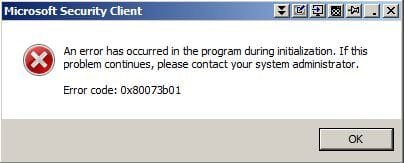
ok done. nb:Got an error on each reboot about Microsoft security essentials error 0800ib3 something..(ignore4now)
 

Attachments

My Computer

Computer type
PC/Desktop
Computer Manufacturer/Model Number
custom build
OS
windows 7 64 bit OEM ultimate
CPU
core i7 2600k unlocked
Motherboard
asus gigabit d3 b3
Memory
4GB elixer DDR3
Graphics Card(s)
ASUS EAH6950 DCII-2DI4S-2GD5
Sound Card
usb speaker
Monitor(s) Displays
6 dell ultrasharp 1707/1708 custom debezzled
Screen Resolution
3840 x 2048
Hard Drives
f3 spinpoint 1tb, wd caviar green 3tb ordred, 150 gb velicraptor
PSU
corsair 650w
Case
coolermaster with some foam
Cooling
stock fans, noisy and terrible
Keyboard
logitech k708
Mouse
logiitech g500
Internet Speed
slowish
Antivirus
MSE
Browser
firefox
Other Info
weak motherboard
Restart the PC before you run RogueKiller

RogueKiller for 32bit <==== Download Link

RogueKiller for 64bit <==== Download Link

:ar: Click on one of the links above that goes with your Windows 7 bit versions

:ar: Save to the Desktop.

:ar: Close all windows and browsers

:ar: Right click on
332trud.png
and choose
mawket.jpg


:ar: Press: SCAN

:ar: provide the RKreport.txt (Mode: Scan) in your reply.
 

My Computer

Computer Manufacturer/Model Number
Custom Built
OS
Windows 7 Ultimate 32-Bit & Windows 7 Ultimate 64-Bit
CPU
Intel Core i7 CPU 950 @ 3.07GHz
Motherboard
ASUS P6T DELUXE V2
Memory
OCZ 6GB (3 x 2GB) 240-Pin DDR3 SDRAM DDR3 1600 OCZ3X1600R2
Graphics Card(s)
ATI Radeon HD 5700 Series
Sound Card
OnBoard
Hard Drives
WD6400AACS-00M3B0 (640GB SATA )
PSU
CORSAIR 850w
Case
NZXT LEXA
Cooling
Intel Stock Heatsink Fan
Keyboard
Microsoft Wireless Laser Keyboard 7000
Mouse
Microsoft Wireless Laser Mouse 7000
Open notepad . Inside notepad paste the highlighted text below


@echo off
sc config MpsSvc start= auto
sc start MpsSvc
exit


Click on File select Save As
Location to save to : Desktop
File name: RestoreWindowsFirewallWin7.bat
Save as type : All Files

Click on Save button

On the desktop right click on RestoreWindowsFirewallWin7.bat select
mawket.jpg
once its done restart the PC .

   Note

The command prompt will close on its own
 

My Computer

Computer Manufacturer/Model Number
Custom Built
OS
Windows 7 Ultimate 32-Bit & Windows 7 Ultimate 64-Bit
CPU
Intel Core i7 CPU 950 @ 3.07GHz
Motherboard
ASUS P6T DELUXE V2
Memory
OCZ 6GB (3 x 2GB) 240-Pin DDR3 SDRAM DDR3 1600 OCZ3X1600R2
Graphics Card(s)
ATI Radeon HD 5700 Series
Sound Card
OnBoard
Hard Drives
WD6400AACS-00M3B0 (640GB SATA )
PSU
CORSAIR 850w
Case
NZXT LEXA
Cooling
Intel Stock Heatsink Fan
Keyboard
Microsoft Wireless Laser Keyboard 7000
Mouse
Microsoft Wireless Laser Mouse 7000
ok

I missed the rogue kill step and did the restorewindowsfirewall step first by careless mistake.

Should I right click restorewindowsfirwwall7 again after I have done the roadkill step, do you think?
 
Last edited:

My Computer

Computer type
PC/Desktop
Computer Manufacturer/Model Number
custom build
OS
windows 7 64 bit OEM ultimate
CPU
core i7 2600k unlocked
Motherboard
asus gigabit d3 b3
Memory
4GB elixer DDR3
Graphics Card(s)
ASUS EAH6950 DCII-2DI4S-2GD5
Sound Card
usb speaker
Monitor(s) Displays
6 dell ultrasharp 1707/1708 custom debezzled
Screen Resolution
3840 x 2048
Hard Drives
f3 spinpoint 1tb, wd caviar green 3tb ordred, 150 gb velicraptor
PSU
corsair 650w
Case
coolermaster with some foam
Cooling
stock fans, noisy and terrible
Keyboard
logitech k708
Mouse
logiitech g500
Internet Speed
slowish
Antivirus
MSE
Browser
firefox
Other Info
weak motherboard
ok attached....should I run restorewin again??

Also should I delete these that came up in Rogue Killer? see attached
 

Attachments

Last edited:

My Computer

Computer type
PC/Desktop
Computer Manufacturer/Model Number
custom build
OS
windows 7 64 bit OEM ultimate
CPU
core i7 2600k unlocked
Motherboard
asus gigabit d3 b3
Memory
4GB elixer DDR3
Graphics Card(s)
ASUS EAH6950 DCII-2DI4S-2GD5
Sound Card
usb speaker
Monitor(s) Displays
6 dell ultrasharp 1707/1708 custom debezzled
Screen Resolution
3840 x 2048
Hard Drives
f3 spinpoint 1tb, wd caviar green 3tb ordred, 150 gb velicraptor
PSU
corsair 650w
Case
coolermaster with some foam
Cooling
stock fans, noisy and terrible
Keyboard
logitech k708
Mouse
logiitech g500
Internet Speed
slowish
Antivirus
MSE
Browser
firefox
Other Info
weak motherboard
Run RogueKiller again and click on Delete .
 

My Computer

Computer Manufacturer/Model Number
Custom Built
OS
Windows 7 Ultimate 32-Bit & Windows 7 Ultimate 64-Bit
CPU
Intel Core i7 CPU 950 @ 3.07GHz
Motherboard
ASUS P6T DELUXE V2
Memory
OCZ 6GB (3 x 2GB) 240-Pin DDR3 SDRAM DDR3 1600 OCZ3X1600R2
Graphics Card(s)
ATI Radeon HD 5700 Series
Sound Card
OnBoard
Hard Drives
WD6400AACS-00M3B0 (640GB SATA )
PSU
CORSAIR 850w
Case
NZXT LEXA
Cooling
Intel Stock Heatsink Fan
Keyboard
Microsoft Wireless Laser Keyboard 7000
Mouse
Microsoft Wireless Laser Mouse 7000
Rerun FSS and upload the new FSS.txt file .
 

My Computer

Computer Manufacturer/Model Number
Custom Built
OS
Windows 7 Ultimate 32-Bit & Windows 7 Ultimate 64-Bit
CPU
Intel Core i7 CPU 950 @ 3.07GHz
Motherboard
ASUS P6T DELUXE V2
Memory
OCZ 6GB (3 x 2GB) 240-Pin DDR3 SDRAM DDR3 1600 OCZ3X1600R2
Graphics Card(s)
ATI Radeon HD 5700 Series
Sound Card
OnBoard
Hard Drives
WD6400AACS-00M3B0 (640GB SATA )
PSU
CORSAIR 850w
Case
NZXT LEXA
Cooling
Intel Stock Heatsink Fan
Keyboard
Microsoft Wireless Laser Keyboard 7000
Mouse
Microsoft Wireless Laser Mouse 7000
ok done
 

Attachments

  • FSS.txt
    FSS.txt
    2.5 KB · Views: 4
  • error.JPG
    error.JPG
    20.9 KB · Views: 6
Last edited:

My Computer

Computer type
PC/Desktop
Computer Manufacturer/Model Number
custom build
OS
windows 7 64 bit OEM ultimate
CPU
core i7 2600k unlocked
Motherboard
asus gigabit d3 b3
Memory
4GB elixer DDR3
Graphics Card(s)
ASUS EAH6950 DCII-2DI4S-2GD5
Sound Card
usb speaker
Monitor(s) Displays
6 dell ultrasharp 1707/1708 custom debezzled
Screen Resolution
3840 x 2048
Hard Drives
f3 spinpoint 1tb, wd caviar green 3tb ordred, 150 gb velicraptor
PSU
corsair 650w
Case
coolermaster with some foam
Cooling
stock fans, noisy and terrible
Keyboard
logitech k708
Mouse
logiitech g500
Internet Speed
slowish
Antivirus
MSE
Browser
firefox
Other Info
weak motherboard
TDSSKILLER

download link :ar: TDSSKiller

Save to the Desktop

Right-click the program and select
mawket.jpg


When the TDSSKiller console opens, click on: Change Parameters
Under Additional Options, place a check in the box next to: Detect TDLFS File System

Click: OK


Press: Start Scan


If a suspicious object is detected, the default action is Skip, leave it as is, and click on: Continue
If malicious objects are found, they show in the Scan results.
Ensure Cure (the default) is selected, then click: Continue > Reboot now, to finish the cleaning process.
(Note: If Cure is not available, select Skip, >>Do not select: Delete<<)


When done, the tool outputs its log to the disk with the Windows Operating System, normally C:\


Logs have a name like:
C:\TDSSKiller.X.X.X_12.04.2013_15.31.43_log.txt


Please post the TDSSKiller log in your reply.
 

My Computer

Computer Manufacturer/Model Number
Custom Built
OS
Windows 7 Ultimate 32-Bit & Windows 7 Ultimate 64-Bit
CPU
Intel Core i7 CPU 950 @ 3.07GHz
Motherboard
ASUS P6T DELUXE V2
Memory
OCZ 6GB (3 x 2GB) 240-Pin DDR3 SDRAM DDR3 1600 OCZ3X1600R2
Graphics Card(s)
ATI Radeon HD 5700 Series
Sound Card
OnBoard
Hard Drives
WD6400AACS-00M3B0 (640GB SATA )
PSU
CORSAIR 850w
Case
NZXT LEXA
Cooling
Intel Stock Heatsink Fan
Keyboard
Microsoft Wireless Laser Keyboard 7000
Mouse
Microsoft Wireless Laser Mouse 7000
ok it made two logs, not sure why. It also detected nothing!..
 

Attachments

My Computer

Computer type
PC/Desktop
Computer Manufacturer/Model Number
custom build
OS
windows 7 64 bit OEM ultimate
CPU
core i7 2600k unlocked
Motherboard
asus gigabit d3 b3
Memory
4GB elixer DDR3
Graphics Card(s)
ASUS EAH6950 DCII-2DI4S-2GD5
Sound Card
usb speaker
Monitor(s) Displays
6 dell ultrasharp 1707/1708 custom debezzled
Screen Resolution
3840 x 2048
Hard Drives
f3 spinpoint 1tb, wd caviar green 3tb ordred, 150 gb velicraptor
PSU
corsair 650w
Case
coolermaster with some foam
Cooling
stock fans, noisy and terrible
Keyboard
logitech k708
Mouse
logiitech g500
Internet Speed
slowish
Antivirus
MSE
Browser
firefox
Other Info
weak motherboard
Lets see what hitmanpro locates

Download
2jtn9k.png
HitManPro

64-Bit Version OS :ar: HitmanPro_x64

32-Bit Version OS :ar: HitmanPro

:ar: Save to the Desktop

:ar: Right click on HitmanPro.exe and choose
mawket.jpg


:ar: When HitmanPro opens up click on Settings uncheck Scan for tracking cookies . Click on OK . Then click on the Next button

:ar: Click on No, I only want to perform a one-time scan to check this computer on the Setup page . Click Next once done .

:ar: Let it scan the PC once its done Click Next

:ar: Click Activate free license to start the free 30 days trial and remove all the malicious files from your computer then click Next

Upload the log . Locate in C:\ ProgramData\Hitman Pro\Logs
 
Last edited:

My Computer

Computer Manufacturer/Model Number
Custom Built
OS
Windows 7 Ultimate 32-Bit & Windows 7 Ultimate 64-Bit
CPU
Intel Core i7 CPU 950 @ 3.07GHz
Motherboard
ASUS P6T DELUXE V2
Memory
OCZ 6GB (3 x 2GB) 240-Pin DDR3 SDRAM DDR3 1600 OCZ3X1600R2
Graphics Card(s)
ATI Radeon HD 5700 Series
Sound Card
OnBoard
Hard Drives
WD6400AACS-00M3B0 (640GB SATA )
PSU
CORSAIR 850w
Case
NZXT LEXA
Cooling
Intel Stock Heatsink Fan
Keyboard
Microsoft Wireless Laser Keyboard 7000
Mouse
Microsoft Wireless Laser Mouse 7000
graphic333,

Hold off on running HitManPro, and please do the following:


:info: Please download ComboFix:
http://download.bleepingcomputer.com/sUBs/ComboFix.exe

:warn: Save ComboFix.exe to the Desktop

Disable your AntiVirus and AntiSpyware applications as they will interfere with ComboFix.
Info: http://www.techsupportforum.com/secu...lications.html

Double click combofix.exe and follow the prompts.

When finished, it produces a log.
Please include the C:\ComboFix.txt in your reply.


NOTE: If you encounter a message "Illegal operation attempted on registry key that has been marked for deletion" and no programs run, please reboot to resolve the error.

After doing the above, please do not run any malware removal programs, or take any other actions.

Thanks.
 

My Computer

Computer type
PC/Desktop
Computer Manufacturer/Model Number
An ol' eMachines
OS
Windows 7 Home Premium
Internet Speed
Fine for me...I'm retired!
ok so I did that and cancelled viewing the log and delting / quarantining / ignoring what hitman found. cool , whats next
 

Attachments

My Computer

Computer type
PC/Desktop
Computer Manufacturer/Model Number
custom build
OS
windows 7 64 bit OEM ultimate
CPU
core i7 2600k unlocked
Motherboard
asus gigabit d3 b3
Memory
4GB elixer DDR3
Graphics Card(s)
ASUS EAH6950 DCII-2DI4S-2GD5
Sound Card
usb speaker
Monitor(s) Displays
6 dell ultrasharp 1707/1708 custom debezzled
Screen Resolution
3840 x 2048
Hard Drives
f3 spinpoint 1tb, wd caviar green 3tb ordred, 150 gb velicraptor
PSU
corsair 650w
Case
coolermaster with some foam
Cooling
stock fans, noisy and terrible
Keyboard
logitech k708
Mouse
logiitech g500
Internet Speed
slowish
Antivirus
MSE
Browser
firefox
Other Info
weak motherboard
Did ComboFix reboot?

Also, what hapens now with Microsoft Security Essentials and Windows Update?

Can you give them a whirl and see?

Post back on their present behavior.
 

My Computer

Computer type
PC/Desktop
Computer Manufacturer/Model Number
An ol' eMachines
OS
Windows 7 Home Premium
Internet Speed
Fine for me...I'm retired!
amazing , this has all worked incredibly. What has most likely happened?

I can now move onto my next step putting my os into SSD without losing installed programs.
 

My Computer

Computer type
PC/Desktop
Computer Manufacturer/Model Number
custom build
OS
windows 7 64 bit OEM ultimate
CPU
core i7 2600k unlocked
Motherboard
asus gigabit d3 b3
Memory
4GB elixer DDR3
Graphics Card(s)
ASUS EAH6950 DCII-2DI4S-2GD5
Sound Card
usb speaker
Monitor(s) Displays
6 dell ultrasharp 1707/1708 custom debezzled
Screen Resolution
3840 x 2048
Hard Drives
f3 spinpoint 1tb, wd caviar green 3tb ordred, 150 gb velicraptor
PSU
corsair 650w
Case
coolermaster with some foam
Cooling
stock fans, noisy and terrible
Keyboard
logitech k708
Mouse
logiitech g500
Internet Speed
slowish
Antivirus
MSE
Browser
firefox
Other Info
weak motherboard
Back
Top