microsoft security essentials not working and windows update error

Please answer the questions in Post #19.

It will help determine what else needs done.

Thanks!
 

My Computer

Computer type
PC/Desktop
Computer Manufacturer/Model Number
An ol' eMachines
OS
Windows 7 Home Premium
Internet Speed
Fine for me...I'm retired!
yes the security update has worked and microsoft security essentials has upgraded, scanned and everything is fine!
 

My Computer

Computer type
PC/Desktop
Computer Manufacturer/Model Number
custom build
OS
windows 7 64 bit OEM ultimate
CPU
core i7 2600k unlocked
Motherboard
asus gigabit d3 b3
Memory
4GB elixer DDR3
Graphics Card(s)
ASUS EAH6950 DCII-2DI4S-2GD5
Sound Card
usb speaker
Monitor(s) Displays
6 dell ultrasharp 1707/1708 custom debezzled
Screen Resolution
3840 x 2048
Hard Drives
f3 spinpoint 1tb, wd caviar green 3tb ordred, 150 gb velicraptor
PSU
corsair 650w
Case
coolermaster with some foam
Cooling
stock fans, noisy and terrible
Keyboard
logitech k708
Mouse
logiitech g500
Internet Speed
slowish
Antivirus
MSE
Browser
firefox
Other Info
weak motherboard
Good to know!!

Please use the computer as much as you can today, and see how it goes.

Will get back with you later (maybe too late in UK). Have to go out for a while, and later need to review the thread and see if there is anything else we need to do.

Thanks for your patience. :)
 

My Computer

Computer type
PC/Desktop
Computer Manufacturer/Model Number
An ol' eMachines
OS
Windows 7 Home Premium
Internet Speed
Fine for me...I'm retired!
Hopefully, all is going well.

Since ComboFix is no longer needed, we need to uninstall it. This program is very powerful, and just like it can perform repairs as it processes its 50+ phases, if used improperly when you need to act upon any of the information it displays, it can render a computer useless. Needless to say, it is not for casual use
if you do not know how or what to do in case of there are problems.

:info: Please do the following to uninstall:
Click on the Start orb, and, in the Search programs and files field copy/paste: combofix /uninstall
(Note there is a space between combofix and /uninstall)
Press: Enter (on the keyboard)
A security warning appears asking if you are sure you want to run ComboFix.
Click on the Run button to start the program.

ComboFix uninstalls itself from the computer and removes any backups and quarantined files.
When finished, you are greeted by a dialog box stating that ComboFix is uninstalled.
You can now delete the ComboFix.exe icon from the Desktop (if still there).


:info: Next...
Remove any fixlist.txt from the Desktop.

Open Notepad (Start > All Programs > Accessories > Notepad)
Copy/paste all the contents of the quote box below to Notepad (do not copy the word 'Quote').
Save it on the Desktop as: fixlist.txt

start
DeleteQuarantine:
End

Run FRST from the Desktop again, press the Fix button once.
When done, you can delete the FRST icon from the Desktop (if still there).


:info: Also, the following can be removed:
RogueKiller
Farbar Service Scanner
ActionCenterIcon.reg
AdwCleaner
Junkware Removal Tool
RestoreWindowsFirewallWin7.bat
TDSSKiller
HitManPro (free 30 days trial)


:info: Last, let’s check your Security status with the following...
Download Security Check:
http://screen317.spywareinfoforum.org/
Save to your Desktop.
Double-click: SecurityCheck.exe
Follow the onscreen instructions inside the black box.

When done, a Notepad report opens automatically, called: checkup.txt
Please post the checkup.txt in your reply.
(Please do not take any corrective actions!)

 

My Computer

Computer type
PC/Desktop
Computer Manufacturer/Model Number
An ol' eMachines
OS
Windows 7 Home Premium
Internet Speed
Fine for me...I'm retired!
To Remove AdwCleaner program from your PC

:ar: Right click on adwcleaner.exe choose Run as administrator to open the tool.

:ar: Click on Uninstall, then confirm with yes to remove this utility from your computer.

2q9f3fr.jpg
 

My Computer

Computer Manufacturer/Model Number
Custom Built
OS
Windows 7 Ultimate 32-Bit & Windows 7 Ultimate 64-Bit
CPU
Intel Core i7 CPU 950 @ 3.07GHz
Motherboard
ASUS P6T DELUXE V2
Memory
OCZ 6GB (3 x 2GB) 240-Pin DDR3 SDRAM DDR3 1600 OCZ3X1600R2
Graphics Card(s)
ATI Radeon HD 5700 Series
Sound Card
OnBoard
Hard Drives
WD6400AACS-00M3B0 (640GB SATA )
PSU
CORSAIR 850w
Case
NZXT LEXA
Cooling
Intel Stock Heatsink Fan
Keyboard
Microsoft Wireless Laser Keyboard 7000
Mouse
Microsoft Wireless Laser Mouse 7000
ok thanks guys I will get this done by the end of the day. It seems to be running absolutely fine. I often noticed CPU lag when I had multiple firefox tabs like (50+ which is low for me actually) on random occasions and also hard drive or gpu fan spinning too fast. This seems to have stabled out too !
 

My Computer

Computer type
PC/Desktop
Computer Manufacturer/Model Number
custom build
OS
windows 7 64 bit OEM ultimate
CPU
core i7 2600k unlocked
Motherboard
asus gigabit d3 b3
Memory
4GB elixer DDR3
Graphics Card(s)
ASUS EAH6950 DCII-2DI4S-2GD5
Sound Card
usb speaker
Monitor(s) Displays
6 dell ultrasharp 1707/1708 custom debezzled
Screen Resolution
3840 x 2048
Hard Drives
f3 spinpoint 1tb, wd caviar green 3tb ordred, 150 gb velicraptor
PSU
corsair 650w
Case
coolermaster with some foam
Cooling
stock fans, noisy and terrible
Keyboard
logitech k708
Mouse
logiitech g500
Internet Speed
slowish
Antivirus
MSE
Browser
firefox
Other Info
weak motherboard
Hi I'm sorry I never got back to posting the checkup.txt. Here it is (attached).

I uninstalled everything. One of them needed an update, but I ignored it and followed all the instructions above.

Finally, the updates were successful but, since the 9 days ago,,,there have been some more updates that I can't install. When restarting my pc I get the error message,, failure configuring windows updates, reverting changes and I'm left with 40.3 mb of important updates that need installing.

I really need to get this fixed before I attempt to copy my OS to an SSD and buy an extra internal HDD.


Oh wait, I didn't delete the fixlog... hang on....(ok basically I think I may have deleted any existing fixlog before I created that new fixlog) which I have now deleted, so I think that is ok

I hope you guys are still around :)
 

Attachments

My Computer

Computer type
PC/Desktop
Computer Manufacturer/Model Number
custom build
OS
windows 7 64 bit OEM ultimate
CPU
core i7 2600k unlocked
Motherboard
asus gigabit d3 b3
Memory
4GB elixer DDR3
Graphics Card(s)
ASUS EAH6950 DCII-2DI4S-2GD5
Sound Card
usb speaker
Monitor(s) Displays
6 dell ultrasharp 1707/1708 custom debezzled
Screen Resolution
3840 x 2048
Hard Drives
f3 spinpoint 1tb, wd caviar green 3tb ordred, 150 gb velicraptor
PSU
corsair 650w
Case
coolermaster with some foam
Cooling
stock fans, noisy and terrible
Keyboard
logitech k708
Mouse
logiitech g500
Internet Speed
slowish
Antivirus
MSE
Browser
firefox
Other Info
weak motherboard
Still around...:D

You mention there are 40.3MB of updates needing installation.
:ar: How many individual updates do the 40.3MB contain and need installed?

:info: Also, on the results of Security Check:
Currently shows:
``````````````Antivirus/Firewall Check:``````````````
Windows Firewall Enabled!
WMI entry may not exist for antivirus; attempting automatic update.

Expected the following:
``````````````Antivirus/Firewall Check:``````````````
Windows Firewall Enabled!
Microsoft Security Essentials
Antivirus up to date!


:info: Let's find out what WMI is reporting for the AntiVirus...

Please go to Start > All Programs > Accessories > Command Prompt
Right-click the Command Prompt and select: Run as administrator
At the Command Prompt, type in: wbemtest
Press: Enter

At the Windows Manager Instrumentation Tester console, click: Connect
In the Namespace field type in the following and press Enter: root\SecurityCenter2
At the next window, click on: Enum Instances
At the Class Info prompt, type in: AntivirusProduct as the superclass name, and click OK.

How many AntiVirusProduct.instanceGuid= entries do you see?
Highlite and double-click each one and review its Properties.
Scroll down to displayName, and take note of the name displayed.
Double-click: instanceGUID
Copy and provide the Value
Close the Object Editor, and Close or Exit all the open windows.

:ar: Please provide the following info:
How many AntiVirusProduct.instanceGuid= entries do you see?
By displayName, what is the name displayed?
For instanceGUID, please provide the Value.


:info: Next, please run Farbar Service Scanner once again.
Make sure the following options are checked:
Internet Services
Windows Firewall
System Restore
Security Center
Windows Update
Windows Defender

Press: Scan
FSS creates a log, FSS.txt, on the Desktop.
:ar: Please provide the FSS.txt in your reply.

:info: Also run the Farbar Recovery Scan Tool
Check the Addition option!!
Press the Scan button.
:ar: Also provide the FRST.txt and the Addition.txt in your reply.
 

My Computer

Computer type
PC/Desktop
Computer Manufacturer/Model Number
An ol' eMachines
OS
Windows 7 Home Premium
Internet Speed
Fine for me...I'm retired!
When I type wbemtest I'm given that it is not recognized as an internal or external command operable program or batch file

anyone got any ideas?
 
Last edited:

My Computer

Computer type
PC/Desktop
Computer Manufacturer/Model Number
custom build
OS
windows 7 64 bit OEM ultimate
CPU
core i7 2600k unlocked
Motherboard
asus gigabit d3 b3
Memory
4GB elixer DDR3
Graphics Card(s)
ASUS EAH6950 DCII-2DI4S-2GD5
Sound Card
usb speaker
Monitor(s) Displays
6 dell ultrasharp 1707/1708 custom debezzled
Screen Resolution
3840 x 2048
Hard Drives
f3 spinpoint 1tb, wd caviar green 3tb ordred, 150 gb velicraptor
PSU
corsair 650w
Case
coolermaster with some foam
Cooling
stock fans, noisy and terrible
Keyboard
logitech k708
Mouse
logiitech g500
Internet Speed
slowish
Antivirus
MSE
Browser
firefox
Other Info
weak motherboard
Hmm....

:info: Try pressing the Windows key and the R key at the same time.
In the Run prompt, type the following in the Open area: wbemtest
Press: OK

Does it work, or do you get the same "...is not recognized as an internal or external command, operable program or batch file"?

If you get the same notice, at some point the malware may have altered the Windows Environment Variables.


:info: To find out, please do the following:
Check that the wbem folder exists in C:\Windows\system32.

If it is there, access the Environment Variables as follows:
Go to Start, right-click Computer and select: Properties
On the left side, click: Advanced system settings

In the System Properties prompt, press: Environment Variables

In Environment Variables, go to the System variables area, and scroll down to: Path
Highlite Path, and press: Edit

In the Edit System variable prompt, right-click the Variable value, and select: Copy
Paste the value to Notepad.

Close/Cancel out of any prompts.

:ar: Please post the Path variable value in your reply, and let's see what it shows.

:note: Example Path:
%SystemRoot%\system32;%SystemRoot%;%SystemRoot%\System32\Wbem;%SYSTEMROOT%\System32\WindowsPowerShell\v1.0\
 

My Computer

Computer type
PC/Desktop
Computer Manufacturer/Model Number
An ol' eMachines
OS
Windows 7 Home Premium
Internet Speed
Fine for me...I'm retired!
the path just seems to be C:\Windows;C:\Windows\system32

(I found the folder wbem in system 32)
'

which I think is some kind of error, as it seems to be written twice or something and it also bears no resemblance of your example path above!


In the meantime , I'm going to do the Hitman scan and delete everything that is useless that could potentially carry adware. Then delete the free version of hitman as advised earlier, I will also do a full scan of MSE to do a similar job.
 

Attachments

My Computer

Computer type
PC/Desktop
Computer Manufacturer/Model Number
custom build
OS
windows 7 64 bit OEM ultimate
CPU
core i7 2600k unlocked
Motherboard
asus gigabit d3 b3
Memory
4GB elixer DDR3
Graphics Card(s)
ASUS EAH6950 DCII-2DI4S-2GD5
Sound Card
usb speaker
Monitor(s) Displays
6 dell ultrasharp 1707/1708 custom debezzled
Screen Resolution
3840 x 2048
Hard Drives
f3 spinpoint 1tb, wd caviar green 3tb ordred, 150 gb velicraptor
PSU
corsair 650w
Case
coolermaster with some foam
Cooling
stock fans, noisy and terrible
Keyboard
logitech k708
Mouse
logiitech g500
Internet Speed
slowish
Antivirus
MSE
Browser
firefox
Other Info
weak motherboard
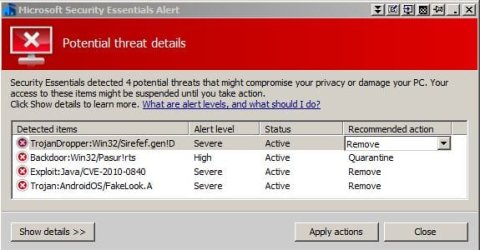
Hi, so Ive just completed a full MSE scan and the results are attached. I will remove them in the next hour unless told otherwise

I will move onto the Hitman scan again which I know seems to pickup alot of things in either misjudgement but also revelas alot of adware and unused applications. This will be useful for finding perhaps the cause of these trojans/malware.
 

Attachments

  • CaptureMSE_trojans.JPG
    CaptureMSE_trojans.JPG
    47.8 KB · Views: 8

My Computer

Computer type
PC/Desktop
Computer Manufacturer/Model Number
custom build
OS
windows 7 64 bit OEM ultimate
CPU
core i7 2600k unlocked
Motherboard
asus gigabit d3 b3
Memory
4GB elixer DDR3
Graphics Card(s)
ASUS EAH6950 DCII-2DI4S-2GD5
Sound Card
usb speaker
Monitor(s) Displays
6 dell ultrasharp 1707/1708 custom debezzled
Screen Resolution
3840 x 2048
Hard Drives
f3 spinpoint 1tb, wd caviar green 3tb ordred, 150 gb velicraptor
PSU
corsair 650w
Case
coolermaster with some foam
Cooling
stock fans, noisy and terrible
Keyboard
logitech k708
Mouse
logiitech g500
Internet Speed
slowish
Antivirus
MSE
Browser
firefox
Other Info
weak motherboard
The Sirefef is a zero access virus .

Did you run Farbar Recovery Scan Tool
 

My Computer

Computer Manufacturer/Model Number
Custom Built
OS
Windows 7 Ultimate 32-Bit & Windows 7 Ultimate 64-Bit
CPU
Intel Core i7 CPU 950 @ 3.07GHz
Motherboard
ASUS P6T DELUXE V2
Memory
OCZ 6GB (3 x 2GB) 240-Pin DDR3 SDRAM DDR3 1600 OCZ3X1600R2
Graphics Card(s)
ATI Radeon HD 5700 Series
Sound Card
OnBoard
Hard Drives
WD6400AACS-00M3B0 (640GB SATA )
PSU
CORSAIR 850w
Case
NZXT LEXA
Cooling
Intel Stock Heatsink Fan
Keyboard
Microsoft Wireless Laser Keyboard 7000
Mouse
Microsoft Wireless Laser Mouse 7000
yeh I think I ran that, I followed all instructions from before so I did.


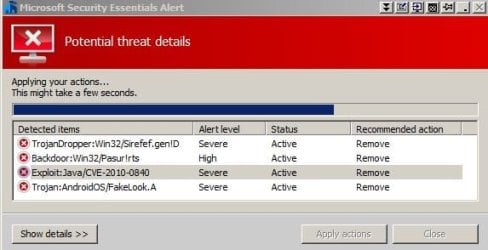
MSE alert is stuck at 75% in removing all four of them. The MSE main window is saying it is protected though(red to green). Basically I have been here (see attached) for the past hour
 

Attachments

  • Captureremoving.JPG
    Captureremoving.JPG
    40.4 KB · Views: 3

My Computer

Computer type
PC/Desktop
Computer Manufacturer/Model Number
custom build
OS
windows 7 64 bit OEM ultimate
CPU
core i7 2600k unlocked
Motherboard
asus gigabit d3 b3
Memory
4GB elixer DDR3
Graphics Card(s)
ASUS EAH6950 DCII-2DI4S-2GD5
Sound Card
usb speaker
Monitor(s) Displays
6 dell ultrasharp 1707/1708 custom debezzled
Screen Resolution
3840 x 2048
Hard Drives
f3 spinpoint 1tb, wd caviar green 3tb ordred, 150 gb velicraptor
PSU
corsair 650w
Case
coolermaster with some foam
Cooling
stock fans, noisy and terrible
Keyboard
logitech k708
Mouse
logiitech g500
Internet Speed
slowish
Antivirus
MSE
Browser
firefox
Other Info
weak motherboard
Is it still stuck on 75% ?
 

My Computer

Computer Manufacturer/Model Number
Custom Built
OS
Windows 7 Ultimate 32-Bit & Windows 7 Ultimate 64-Bit
CPU
Intel Core i7 CPU 950 @ 3.07GHz
Motherboard
ASUS P6T DELUXE V2
Memory
OCZ 6GB (3 x 2GB) 240-Pin DDR3 SDRAM DDR3 1600 OCZ3X1600R2
Graphics Card(s)
ATI Radeon HD 5700 Series
Sound Card
OnBoard
Hard Drives
WD6400AACS-00M3B0 (640GB SATA )
PSU
CORSAIR 850w
Case
NZXT LEXA
Cooling
Intel Stock Heatsink Fan
Keyboard
Microsoft Wireless Laser Keyboard 7000
Mouse
Microsoft Wireless Laser Mouse 7000
I ended it in the task manager, shutdown, failed to configure the installed 19 updates 40.3mb mentioned earlier.

Logging back into Microsoft security essentials it appears the only one not removed was the Backdoor:Win32/Pasur!rts

Does this virus allow remote access to that program on my pc? Im manually deleting this Backdoor:Win32/Pasur!rt now now, and then re-runing MSE full scan. The hoping I can update (quite doubtful)
 

My Computer

Computer type
PC/Desktop
Computer Manufacturer/Model Number
custom build
OS
windows 7 64 bit OEM ultimate
CPU
core i7 2600k unlocked
Motherboard
asus gigabit d3 b3
Memory
4GB elixer DDR3
Graphics Card(s)
ASUS EAH6950 DCII-2DI4S-2GD5
Sound Card
usb speaker
Monitor(s) Displays
6 dell ultrasharp 1707/1708 custom debezzled
Screen Resolution
3840 x 2048
Hard Drives
f3 spinpoint 1tb, wd caviar green 3tb ordred, 150 gb velicraptor
PSU
corsair 650w
Case
coolermaster with some foam
Cooling
stock fans, noisy and terrible
Keyboard
logitech k708
Mouse
logiitech g500
Internet Speed
slowish
Antivirus
MSE
Browser
firefox
Other Info
weak motherboard
Can you Redownload FRST64.exe and upload the FRST.txt file
 

My Computer

Computer Manufacturer/Model Number
Custom Built
OS
Windows 7 Ultimate 32-Bit & Windows 7 Ultimate 64-Bit
CPU
Intel Core i7 CPU 950 @ 3.07GHz
Motherboard
ASUS P6T DELUXE V2
Memory
OCZ 6GB (3 x 2GB) 240-Pin DDR3 SDRAM DDR3 1600 OCZ3X1600R2
Graphics Card(s)
ATI Radeon HD 5700 Series
Sound Card
OnBoard
Hard Drives
WD6400AACS-00M3B0 (640GB SATA )
PSU
CORSAIR 850w
Case
NZXT LEXA
Cooling
Intel Stock Heatsink Fan
Keyboard
Microsoft Wireless Laser Keyboard 7000
Mouse
Microsoft Wireless Laser Mouse 7000
sure
 

Attachments

My Computer

Computer type
PC/Desktop
Computer Manufacturer/Model Number
custom build
OS
windows 7 64 bit OEM ultimate
CPU
core i7 2600k unlocked
Motherboard
asus gigabit d3 b3
Memory
4GB elixer DDR3
Graphics Card(s)
ASUS EAH6950 DCII-2DI4S-2GD5
Sound Card
usb speaker
Monitor(s) Displays
6 dell ultrasharp 1707/1708 custom debezzled
Screen Resolution
3840 x 2048
Hard Drives
f3 spinpoint 1tb, wd caviar green 3tb ordred, 150 gb velicraptor
PSU
corsair 650w
Case
coolermaster with some foam
Cooling
stock fans, noisy and terrible
Keyboard
logitech k708
Mouse
logiitech g500
Internet Speed
slowish
Antivirus
MSE
Browser
firefox
Other Info
weak motherboard
Run this

On
3133y8w.png

Hold down Control and click on ESET Online Scanner to open ESET OnlineScan in a new window
Click the
30jij2b.png
button
Check YES, I accept the Terms of Use.
Click the Start button.
Accept any security warnings from your browser.
Under scan settings, check "Scan Archives" and "Remove found threats"
Click Advanced settings and select the following:
° Scan potentially unwanted applications
° Scan for potentially unsafe applications
° Enable Anti-Stealth technology
ESET will then download updates for itself, install itself, and begin scanning your computer. Please be patient as this can take some time.
When the scan completes, click List Threats
Click Export, and save the file to your desktop using a unique name, such as ESETScan. Include the contents of this report in your next reply.
Click the Back button.
Click the Finish button.


On
5b5jza.png
or
4l6ro8.png

Click on esetsmartinstaller_enu.exe to download the ESET Smart Installer. Save it to your desktop.
Right click on
2wohcn4.png
choose
mawket.jpg
on your desktop
Check YES, I accept the Terms of Use.
Click the Start button.
Accept any security warnings from your browser.
Under scan settings, check "Scan Archives" and "Remove found threats"
Click Advanced settings and select the following:
° Scan potentially unwanted applications
° Scan for potentially unsafe applications
° Enable Anti-Stealth technology
ESET will then download updates for itself, install itself, and begin scanning your computer. Please be patient as this can take some time.
When the scan completes, click List Threats
Click Export, and save the file to your desktop using a unique name, such as ESETScan. Include the contents of this report in your next reply.
Click the Back button.
Click the Finish button.
 

My Computer

Computer Manufacturer/Model Number
Custom Built
OS
Windows 7 Ultimate 32-Bit & Windows 7 Ultimate 64-Bit
CPU
Intel Core i7 CPU 950 @ 3.07GHz
Motherboard
ASUS P6T DELUXE V2
Memory
OCZ 6GB (3 x 2GB) 240-Pin DDR3 SDRAM DDR3 1600 OCZ3X1600R2
Graphics Card(s)
ATI Radeon HD 5700 Series
Sound Card
OnBoard
Hard Drives
WD6400AACS-00M3B0 (640GB SATA )
PSU
CORSAIR 850w
Case
NZXT LEXA
Cooling
Intel Stock Heatsink Fan
Keyboard
Microsoft Wireless Laser Keyboard 7000
Mouse
Microsoft Wireless Laser Mouse 7000
my internet explorer just doesnt work. I noticed the other day in the half a year since I ever open it. I used to have two version 32 bit and 64 bit and no add on version or something. Now when I click on the only remaining version just 'internet explorer' it opens up a blank white webpage and nothing works like google, the link bar.
AH problem solved, ran as administrater. hold on
 
Last edited:

My Computer

Computer type
PC/Desktop
Computer Manufacturer/Model Number
custom build
OS
windows 7 64 bit OEM ultimate
CPU
core i7 2600k unlocked
Motherboard
asus gigabit d3 b3
Memory
4GB elixer DDR3
Graphics Card(s)
ASUS EAH6950 DCII-2DI4S-2GD5
Sound Card
usb speaker
Monitor(s) Displays
6 dell ultrasharp 1707/1708 custom debezzled
Screen Resolution
3840 x 2048
Hard Drives
f3 spinpoint 1tb, wd caviar green 3tb ordred, 150 gb velicraptor
PSU
corsair 650w
Case
coolermaster with some foam
Cooling
stock fans, noisy and terrible
Keyboard
logitech k708
Mouse
logiitech g500
Internet Speed
slowish
Antivirus
MSE
Browser
firefox
Other Info
weak motherboard
Back
Top