Microsoft update blunders going out of control

My Computer My Computer

At a glance

Windows 10 Pro. EFI boot partition, full EFI ...i7 4770k 4.4GHz (44-44-43-43 turbo) @ 1.248V16GB (8GBx2) @2200 MHz G.skill Sniper 10-11-1...MSI GTX 970 Gaming 4G
Computer type
PC/Desktop
Computer Manufacturer/Model Number
Home built (GeneO industries)/Model 4
OS
Windows 10 Pro. EFI boot partition, full EFI boot
CPU
i7 4770k 4.4GHz (44-44-43-43 turbo) @ 1.248V
Motherboard
ASUS Maximus VI Hero
Memory
16GB (8GBx2) @2200 MHz G.skill Sniper 10-11-10-30-1, 1.6V
Graphics Card(s)
MSI GTX 970 Gaming 4G
Sound Card
Onboard SupremeFX Audio
Monitor(s) Displays
NEC Spectraview 2490WUXi-SV
Screen Resolution
1920 x 1200
Hard Drives
Samsung 850 Pro 256GB (OS), Samsung 2x 128GB 840 Pro SSD in RAID0, 3x WD Blue 6Gb/s 1TB RAID0, WD 2TB Black external USB 3.0, 2TB WD20EARS Green external USB 3.0, 2x 500GB Seagate and 1 750 GB external USB, 1x 350GB external USB3
PSU
Seasonic X-850 (2012 KM3 model)
Case
Fractal Design Define R4
Cooling
NH-D14, NF-F12, NF-A15; NF-P14, NF-P12,NF-A14, S12A PWM
Keyboard
Cooler Master Storm Quickfire Rapid - Brown
Mouse
Logitech G602
Internet Speed
126.4 Mb/s down, 24.3 Mb/s up
Other Info
USB 3.0 x8 , SATA III x8, eSATA, USB 2.0 x6. Samsung DVD R/W drive.

WEI: CPU 7.8, Memory 7.9, Graphics 7.9, Disk 7.9
I haven't run a Windows update since mid 2013 after one of their updates conflicted with my video drivers and made the system nearly useless.

Reading this I am not regretting that decision. My system still runs fine, I have plenty of antimalware scanners and protection, and between Adblock Plus and NoScript I don't get hit by malware via browser. It sounds to me like the MS updates are borderline malware themselves, since they are causing too many problems.
 

My Computer My Computer

At a glance

Windows 7 Home Premium x64Intel Pentium Dual Core 2.6 GHz6 GBstock factory for this model
Computer type
PC/Desktop
Computer Manufacturer/Model Number
Gateway DX4822-01
OS
Windows 7 Home Premium x64
CPU
Intel Pentium Dual Core 2.6 GHz
Motherboard
stock factory for this model
Memory
6 GB
Graphics Card(s)
stock factory for this model
Sound Card
stock factory for this model
Monitor(s) Displays
Dell P2010Ht
Screen Resolution
1600 x 900
Hard Drives
1 TB Western Digital
PSU
300 watt
Cooling
80mm case fan, CPU fan, 60mm front intake
Keyboard
Logitech
Mouse
HP 3-button optical wheel mouse
Internet Speed
fiber optic
Antivirus
MSE, SuperAntiSpyware, Malwarebytes Free
Service Pack 2

You can say that again! If anything, it's past due. Even if all M$ did was roll all the previous updates into a package and did nothing else, that would be hugely welcome!
I wouldn't hold your breath.

I'm not. :(

Seems it is time for a service pack 2 final roll up.

You can say that again! If anything, it's past due. Even if all M$ did was roll all the previous updates into a package and did nothing else, that would be hugely welcome!

Interesting article here:

Waiting to Download Service Pack 2 (SP2) for Windows 7 and Server 2008 R2? - AskVG

I've never needed to use that download. :)
 

My Computer My Computer

At a glance

Microsoft Windows 7 Home Premium 64-bit 7601 ...AMD C-60 APU with Radeon(tm) HD Graphics4.00 GBAMD Radeon HD 6290 Graphics
Computer type
Laptop
Computer Manufacturer/Model Number
ASUS
OS
Microsoft Windows 7 Home Premium 64-bit 7601 Multiprocessor Free Service Pack 1
CPU
AMD C-60 APU with Radeon(tm) HD Graphics
Motherboard
ASUSTeK COMPUTER INC. X501U
Memory
4.00 GB
Graphics Card(s)
AMD Radeon HD 6290 Graphics
Sound Card
(1) AMD High Definition Audio Device (2) Realtek High Defi
Screen Resolution
1366 x 768 x 32 bits (4294967296 colors) @ 60 Hz
Hard Drives
Hitachi HTS545050A7E380 SATA Disk Device
Antivirus
Comodo CIS & FW, SecureAplus App Whitelisting, Threatfire
Browser
Cyberfox 64bit, Opera 64bit, Airfox
Other Info
Spy-The-Spy, HitmanPro.Alert, Norton Connect Safe, MJRegWatcher, BitDefender TrafficLight, Voodoo Shield, Zemana AntiMalware
I also haven't run a Windows Update in a long time. Last time I ran it was in October. And even then I was behind. While I've not had any incidents with WU on my computer yet you just never know when it'll break you. I've read about these Windows update errors every month now and it's become ridiculous. Every time there's been some BSOD or freezes or hangs or whatever. And then you're encouraged to uninstall the offending updates if you've installed it. And then I thought "I will not get involved in this mess!".

And since this is my only computer I don't want to risk it. I know it's "not recommended" but how often are you going to run into trouble because you have not updated? It seems to me that if you're careful there's a very low chance.
 

My Computer My Computer

At a glance

Windows 7 x64 Home Premium SP1Intel Pentium 6100 dual core4GBATI mobility radeon 5470, 512 MB RAM
Computer type
Laptop
Computer Manufacturer/Model Number
HP
OS
Windows 7 x64 Home Premium SP1
CPU
Intel Pentium 6100 dual core
Memory
4GB
Graphics Card(s)
ATI mobility radeon 5470, 512 MB RAM
Screen Resolution
1366 x 768
Mouse
Logitech M100
Internet Speed
42 Mbps Dual Carrier 4G
Antivirus
Microsoft security essentials, MSE
Browser
Palemoon
I haven't run a Windows update since mid 2013 after one of their updates conflicted with my video drivers and made the system nearly useless.

Reading this I am not regretting that decision. My system still runs fine, I have plenty of antimalware scanners and protection, and between Adblock Plus and NoScript I don't get hit by malware via browser. It sounds to me like the MS updates are borderline malware themselves, since they are causing too many problems.

I also haven't run a Windows Update in a long time. Last time I ran it was in October. And even then I was behind. While I've not had any incidents with WU on my computer yet you just never know when it'll break you. I've read about these Windows update errors every month now and it's become ridiculous. Every time there's been some BSOD or freezes or hangs or whatever. And then you're encouraged to uninstall the offending updates if you've installed it. And then I thought "I will not get involved in this mess!".

And since this is my only computer I don't want to risk it. I know it's "not recommended" but how often are you going to run into trouble because you have not updated? It seems to me that if you're careful there's a very low chance.

Actually, you are at far greater risk for getting infected by NOT downloading and installing updates than you are by doing so every month. And being careful will not protect you nearly as much as you seem to think. As long as your computer is connected to the internet, unplugged security holes can let nasties sneak in without you even opening up a browser.

If you are paranoid about downloading and installing M$ updates (and I don't blame you; I am), you can always set Windows Updates to just notify you that updates are available, then wait until Saturday to download and install them, like I do. That way, you have time to learn if there were any problem updates or not. Besides, M$ almost always pulls problem updates before Saturday.
 

My Computer My Computer

At a glance

Win 7 Ultimate 64 bitIntel i7-3930KKingston HyperX Genesis 32GB Kit (8x4GB Modul...MSI R7850 Twin Frozr 2GD5/OC Radeon HD 7850 2...
Computer type
PC/Desktop
Computer Manufacturer/Model Number
Custom Build
OS
Win 7 Ultimate 64 bit
CPU
Intel i7-3930K
Motherboard
ASUS P9X79 WS
Memory
Kingston HyperX Genesis 32GB Kit (8x4GB Modules) 1600MHz DDR
Graphics Card(s)
MSI R7850 Twin Frozr 2GD5/OC Radeon HD 7850 2GB 256-bit GDDR
Sound Card
Asus Xonar Essence STX
Monitor(s) Displays
3x Asus VG248QE 24", Vizio 32" TV
Screen Resolution
1920 x 1080, ?
Hard Drives
Samsung 128GB 840 Pro SSD (1),
Samsung 4TB 850 EVO SSDs (4)
Samsung 4TB 850 EVO SSDs (16) external backup drives used in 2.5" hot swap bays in the computer.
PSU
Corsair HX750w
Case
Antec Two Hundred v2 (modified)
Cooling
Cooler Master GeminII S524 120mm (fan replaced with a 140mm)
Keyboard
Logitech G510s
Mouse
Logitech M525 (two in use)
Internet Speed
=< 32Mbps down, 8Mbps up
Antivirus
AVAST!, MBAM, SAS, Spybot S&D (all but MBAM free) Glary Util
Browser
IE11
Other Info
LSI 9211-8i HBA card (8 SATA III ports), 2.5" & 3.5" Hot Swap Bays, HooToo HT-CR001 PCI-E to USB 3.0 Internal Hub + 6 Slot Card Reader, and LG Model CH12LS28 BD-ROM Optical Drive. Also, ScanSnap S1500 ADF duplexing scanner, Canon 9000F flat bed scanner, Corsair SP2500 2.1 speakers, Samsung CLP 415nw laser color printer, Cyberpower PP2200SW UPS
Good advice Lady !

I'll also add, I always create a System Backup Image before installing updates.
If anything goes wrong I can quickly restore a backup image to recover from any problems.
 

My Computer My Computer

At a glance

Multi-Boot W7_Pro_x64 W8.1_Pro_x64 W10_Pro_x6...AMD Athlon II x4 6206GB GSkill DDR2 800AMD 4670 GPU + AMD 4200 IGP
Computer type
PC/Desktop
Computer Manufacturer/Model Number
home built
OS
Multi-Boot W7_Pro_x64 W8.1_Pro_x64 W10_Pro_x64 +Linux_VMs +Chromium_VM
CPU
AMD Athlon II x4 620
Motherboard
Gigabyte GA-MA785G-UD3H
Memory
6GB GSkill DDR2 800
Graphics Card(s)
AMD 4670 GPU + AMD 4200 IGP
Sound Card
on board Realtek ALC889A
Monitor(s) Displays
RCA 40" LCD TV, Insignia 32" LCD TV, HP 15" LCD monitor
Screen Resolution
1680 x 1050
Hard Drives
OCZ Vertex 3 120GB,
Samsung F3 1TB (3),
Several others - WD, Seagate, Hitachi, ...
PSU
Corsair 500 W
Case
Rosewill mid tower
Cooling
CM 90mm rifle
Keyboard
Gyration wireless, Logitech wireless, Dell USB wired
Mouse
Gyration wireless, Logitech wireless, V7 USB wired
Internet Speed
Spectrum - 100Mbps D / 10Mbps U
Antivirus
Avast, MBAM3, EMET, WinPatrol
Browser
Pale Moon, Firefox, IE
Other Info
2 multi-boot PC's
Mainly HTPC/Office/Gen purpose (no gaming).
Trendnet USB KVM.
LG DVD burner/Blue Ray Player.
Tray system for removable SATA backup drives.

Not currently OCd, under-volted.
I use Hybrid sleep, rarely re-boot or shutdown.

Hauppauge HD-PVR, Avermedia PCIe TV Tuner, Hauppauge PCI TV Tuner.
Actually, you are at far greater risk for getting infected by NOT downloading and installing updates than you are by doing so every month. And being careful will not protect you nearly as much as you seem to think. As long as your computer is connected to the internet, unplugged security holes can let nasties sneak in without you even opening up a browser.

Lady Fitzgerald,

I am actually mixed on this. I experiences issues both ways not so much with Windows 7 though. When I used 98se on my old computer not updated anymore, I got no viruses or malware that wasn't my fault. I used it on highspeed just a couple of months ago until surge damaged my network card. When I used xp even with virus protections I still got a couple of viruses that were not my fault & windows xp was updated at that time. I update it on a Tuesday because I have a backup, that I can go back to if needed. The only thing that makes me :mad: is the out of bounds updates like KB3025390. I may start waiting tell Saturday like you do.

The real issues is Microsoft needs to do further testing before releasing an update, even if it means extended mainstream support for Windows 7 for a couple of more months.
 

My Computer My Computer

At a glance

W10 32 bit, XUbuntu 18.xx 64 bitIntel(R) Celeron(R) CPU G1620T @ 2.40GHz, 240...4GBIntel HD graphics
Computer type
PC/Desktop
Computer Manufacturer/Model Number
Dell All in one Inspiron 2020
OS
W10 32 bit, XUbuntu 18.xx 64 bit
CPU
Intel(R) Celeron(R) CPU G1620T @ 2.40GHz, 2400 Mhz
Motherboard
Dell
Memory
4GB
Graphics Card(s)
Intel HD graphics
Sound Card
High Definition Audio Device
Monitor(s) Displays
20 inch Screen
Screen Resolution
W7=1280 x 720 & Linux Mint Xfce=1360 x 768
Hard Drives
500 GB hard drive
Keyboard
Usb
Mouse
Usb
Internet Speed
High-Speed
Antivirus
MSE
Browser
Main Browser Firefox
Other Info
I have done a clean install of Windows 7 using Dell re-installation disk (Dell sent me one). I also use Free Macrium reflect backup and restore.
Actually, you are at far greater risk for getting infected by NOT downloading and installing updates than you are by doing so every month. And being careful will not protect you nearly as much as you seem to think. As long as your computer is connected to the internet, unplugged security holes can let nasties sneak in without you even opening up a browser.

Lady Fitzgerald,

I am actually mixed on this. I experiences issues both ways not so much with Windows 7 though. When I used 98se on my old computer not updated anymore, I got no viruses or malware that wasn't my fault. I used it on highspeed just a couple of months ago until surge damaged my network card. When I used xp even with virus protections I still got a couple of viruses that were not my fault & windows xp was updated at that time. I update it on a Tuesday because I have a backup, that I can go back to if needed. The only thing that makes me :mad: is the out of bounds updates like KB3025390. I may start waiting tell Saturday like you do.

The real issues is Microsoft needs to do further testing before releasing an update, even if it means extended mainstream support for Windows 7 for a couple of more months.

M$ updates alone will not ensure that you will not get viruses. It takes a combination of M$ updates, an anti-virus program, and additional anti-malware programs to fig and using ht against infections, not to mention safe surfing habits. But even the most stringent (read anal) protection is no guarantee you will not ever get infected. However, you put the odds vastly in your favor by keeping up with M$ updates and using good AV and anti-malware programs.

As I already stated (here or somewhere else), there are literally thousands (if not millions) of possible combinations of software and hardware that M$ would have to test to be able to completely avoid conflict. That simply isn't possible. In fact, I find it remarkable that M$ does as well as it does. Even more remarkable is how quickly it responds to problems when they do occur. Adding to the mix are programs that actually use security holes as part of their programming or use Windows programming in ways M$ never intended.

I would much rather that M$ continue releasing non-scheduled updates when a really serious security hole has been discovered rather than leave us at risk for getting infected while waiting for the next scheduled batch of updates. Besides, the out of cycle updates don't happen often enough to really be that big of a deal anyway.

Despite keeping updated and running Avast Free, MBAM Pro, SAS and Spybot S&D, I still got hit with a virus a couple of weeks ago (the first one in several years) that was pegging my CPU usage at 100% and was dumping adware onto my computer (70-130 at a time). My AV/antimalware programs couldn't find a problem so it must have been a new nasty. I tracked it down to a process that replicating itself faster than I could delete it. When I would manage to delete the file that was creating the process and zap the adware it dumped on my computer, it would come back when I rebooted. I could find nothing anywhere on the interwebz about the process nor the file that was creating it (I don't remember the names now but they looked East European). After wasting time trying to track it down and zap it for good (my guess is it was in the System Reserve partition), I resorted to restoring an earlier image. That killed it for good.
 

My Computer My Computer

At a glance

Win 7 Ultimate 64 bitIntel i7-3930KKingston HyperX Genesis 32GB Kit (8x4GB Modul...MSI R7850 Twin Frozr 2GD5/OC Radeon HD 7850 2...
Computer type
PC/Desktop
Computer Manufacturer/Model Number
Custom Build
OS
Win 7 Ultimate 64 bit
CPU
Intel i7-3930K
Motherboard
ASUS P9X79 WS
Memory
Kingston HyperX Genesis 32GB Kit (8x4GB Modules) 1600MHz DDR
Graphics Card(s)
MSI R7850 Twin Frozr 2GD5/OC Radeon HD 7850 2GB 256-bit GDDR
Sound Card
Asus Xonar Essence STX
Monitor(s) Displays
3x Asus VG248QE 24", Vizio 32" TV
Screen Resolution
1920 x 1080, ?
Hard Drives
Samsung 128GB 840 Pro SSD (1),
Samsung 4TB 850 EVO SSDs (4)
Samsung 4TB 850 EVO SSDs (16) external backup drives used in 2.5" hot swap bays in the computer.
PSU
Corsair HX750w
Case
Antec Two Hundred v2 (modified)
Cooling
Cooler Master GeminII S524 120mm (fan replaced with a 140mm)
Keyboard
Logitech G510s
Mouse
Logitech M525 (two in use)
Internet Speed
=< 32Mbps down, 8Mbps up
Antivirus
AVAST!, MBAM, SAS, Spybot S&D (all but MBAM free) Glary Util
Browser
IE11
Other Info
LSI 9211-8i HBA card (8 SATA III ports), 2.5" & 3.5" Hot Swap Bays, HooToo HT-CR001 PCI-E to USB 3.0 Internal Hub + 6 Slot Card Reader, and LG Model CH12LS28 BD-ROM Optical Drive. Also, ScanSnap S1500 ADF duplexing scanner, Canon 9000F flat bed scanner, Corsair SP2500 2.1 speakers, Samsung CLP 415nw laser color printer, Cyberpower PP2200SW UPS
If you are paranoid about downloading and installing M$ updates (and I don't blame you; I am), you can always set Windows Updates to just notify you that updates are available, then wait until Saturday to download and install them, like I do. That way, you have time to learn if there were any problem updates or not. Besides, M$ almost always pulls problem updates before Saturday.
I am doing this sort of thing now. Ultimately I will install the updates but have some system images to fall back on if things go pear shape.
 

My Computer My Computer

At a glance

Windows 7x64 Home Premium SP1Intel i7 2600kG.Skill Ripjaws (DDR3-1600) 2x4GBNvidia GeForce GTS 450; Intel HD Graphics 300...
Computer type
PC/Desktop
Computer Manufacturer/Model Number
Own build
OS
Windows 7x64 Home Premium SP1
CPU
Intel i7 2600k
Motherboard
ASUS P8Z68 Deluxe
Memory
G.Skill Ripjaws (DDR3-1600) 2x4GB
Graphics Card(s)
Nvidia GeForce GTS 450; Intel HD Graphics 3000(GT2+)
Monitor(s) Displays
Dell Ultrasharp IPS panel U2311H, Samsung SyncMaster P2350
Screen Resolution
1920x1080
Hard Drives
Samsung 850 Pro SSD 256GB, Samsung SSD 840 120GB, Seagates 1TB Barracuda ST31000528AS x2
PSU
Seasonic M12II 520W
Case
Lian Li Lancool PC-K60
Cooling
Case: 1x120mm, 3x140mm CPU: Hyper 212+
Keyboard
Logitech MK520 (wireless)
Mouse
Logitech MK520
Internet Speed
6-7 Mbps
Antivirus
Norton Security Premium, Malwarebytes on 2 (MSE on 3rd PC)
Browser
FireFox
Other Info
Audio: Logitech Z523 2.1
Plus, there are the threats you do not see and do not announce themselves. Not patching windows and your browser is the worst thing you could possibly do.

Modern malware does not announce itself, it makes every attempt so you don't discover it.
 

My Computer My Computer

At a glance

Windows 10 ProAMD Ryzen 5 2400G Processor with Radeon RX Ve...G.SKILL Ripjaws V Series 16GB (2 x 8GB) 288-P...2047MB NVIDIA GeForce GTX 1060 6GB (EVGA)
Computer type
PC/Desktop
Computer Manufacturer/Model Number
Custom Built
OS
Windows 10 Pro
CPU
AMD Ryzen 5 2400G Processor with Radeon RX Vega 11 Graphics
Motherboard
ASRock X470 Master SLI/AC AM4 AMD Promontory X470 SATA 6Gb/s
Memory
G.SKILL Ripjaws V Series 16GB (2 x 8GB) 288-Pin DDR4 SDRAM D
Graphics Card(s)
2047MB NVIDIA GeForce GTX 1060 6GB (EVGA)
Sound Card
Motherboard Built in
Monitor(s) Displays
Acer R240HY bidx 23.8-Inch IPS HDMI DVI VGA (1920 x 1080) Wi
Screen Resolution
1920 x 1080
Hard Drives
1TB Sandisk SSD PLUS (Main drive)
500 GB Seagate 7200 RPM (Games)
500 GB Western Digital 7200 RPM (Virtual Machines)
PSU
CORSAIR TX Series TX650M 650W 80+ Gold Modular Power Supply
Case
CORSAIR CARBIDE SPEC-02 Mid-Tower Gaming Case, Red LED Fan
Cooling
220mm, two 120mm, and four 60mm fans
Keyboard
Wired Dell keyboard
Mouse
Wireless Logitech mouse
Internet Speed
250mb down, 30mb up
Antivirus
Panda Cloud Antivirus
Browser
Chrome-ish x64
Other Info
Your awesome for reading this.
Plus, there are the threats you do not see and do not announce themselves. Not patching windows and your browser is the worst thing you could possibly do.

Modern malware does not announce itself, it makes every attempt so you don't discover it.

You got that right. The only reason I discovered the virus I recently had was the sound on my music player was breaking up a bit. I initially thought the DVD player (I was using my notebook at the time) was failing until I noticed one of my forums was running a bit jerky. That was when I went to the task manager and saw what was going on. Had that been my much more powerful desktop rig, I might never have had noticed it until I ran SAS (and all it could catch was the adware). Most malware nowadays is much more subtle.
 

My Computer My Computer

At a glance

Win 7 Ultimate 64 bitIntel i7-3930KKingston HyperX Genesis 32GB Kit (8x4GB Modul...MSI R7850 Twin Frozr 2GD5/OC Radeon HD 7850 2...
Computer type
PC/Desktop
Computer Manufacturer/Model Number
Custom Build
OS
Win 7 Ultimate 64 bit
CPU
Intel i7-3930K
Motherboard
ASUS P9X79 WS
Memory
Kingston HyperX Genesis 32GB Kit (8x4GB Modules) 1600MHz DDR
Graphics Card(s)
MSI R7850 Twin Frozr 2GD5/OC Radeon HD 7850 2GB 256-bit GDDR
Sound Card
Asus Xonar Essence STX
Monitor(s) Displays
3x Asus VG248QE 24", Vizio 32" TV
Screen Resolution
1920 x 1080, ?
Hard Drives
Samsung 128GB 840 Pro SSD (1),
Samsung 4TB 850 EVO SSDs (4)
Samsung 4TB 850 EVO SSDs (16) external backup drives used in 2.5" hot swap bays in the computer.
PSU
Corsair HX750w
Case
Antec Two Hundred v2 (modified)
Cooling
Cooler Master GeminII S524 120mm (fan replaced with a 140mm)
Keyboard
Logitech G510s
Mouse
Logitech M525 (two in use)
Internet Speed
=< 32Mbps down, 8Mbps up
Antivirus
AVAST!, MBAM, SAS, Spybot S&D (all but MBAM free) Glary Util
Browser
IE11
Other Info
LSI 9211-8i HBA card (8 SATA III ports), 2.5" & 3.5" Hot Swap Bays, HooToo HT-CR001 PCI-E to USB 3.0 Internal Hub + 6 Slot Card Reader, and LG Model CH12LS28 BD-ROM Optical Drive. Also, ScanSnap S1500 ADF duplexing scanner, Canon 9000F flat bed scanner, Corsair SP2500 2.1 speakers, Samsung CLP 415nw laser color printer, Cyberpower PP2200SW UPS
There was another article just recently stating that a lot of malware can be "crippled" by running as a Standard user or Guest user.
 

My Computer My Computer

At a glance

W7 Ultimate SP1, LM19.2 MATE, W10 Home 1703, ...AMD Phenom II x6 1100T, 3.3 GHz12GB DDR3 1333 G-Skill (4GB x 2), G-Skill (2G...NVIDIA GeForce GTX 660
Computer type
PC/Desktop
Computer Manufacturer/Model Number
n/a
OS
W7 Ultimate SP1, LM19.2 MATE, W10 Home 1703, W10 Pro 1703 VM, #All 64 bit
CPU
AMD Phenom II x6 1100T, 3.3 GHz
Motherboard
ASUS M4A88T-M/USB3 (AM3)
Memory
12GB DDR3 1333 G-Skill (4GB x 2), G-Skill (2GB x 2)
Graphics Card(s)
NVIDIA GeForce GTX 660
Sound Card
Realtek?
Monitor(s) Displays
Samsung S23B350
Screen Resolution
1920x1080
Hard Drives
WD Green 2TB (SATA), WD Green 3TB (SATA), WD Blue 4TB (SATA), WD Blue 6TB (SATA)
PSU
Cooler Master
Case
Antec GX300 Tower
Cooling
3x Antec TRICOOL 120mm Fans
Mouse
Wired Optical
Internet Speed
DSL
Antivirus
Avast
Browser
Pale Moon (64 bit)
Other Info
2018-12-27 Upgraded HDDs
2015-12-10 Upgraded case, graphics card, storage
2015-08-15 Upgraded motherboard & RAM
2015-07-15 Upgraded LM17.1 to LM17.2
I really don't believe their will every be a SP-2 for Windows 7. My reasoning.

1. SP's take a lot of time to make and they are free. Microsoft wants to sell things.

2. SP-2 would make Windows 7 even better therefore slowing down sales to Window 8.xx and W-10.
In Microsoft's eyes that would not be a good thing.

Layback I think you're right on the money. After the way they got strung out with XP, MS just wants 7 to go away ASAP.
I agree with you, no SP2 coming. I'd love to be wrong though.
 

My Computer My Computer

At a glance

Windows 7 Pro x64Intel I7 6700 3.40 GHz8GB
Computer type
PC/Desktop
Computer Manufacturer/Model Number
HP ProDesk 400 G3
OS
Windows 7 Pro x64
CPU
Intel I7 6700 3.40 GHz
Memory
8GB
Monitor(s) Displays
Samsung 21.5" LED
Hard Drives
1 TB
Keyboard
Ducky mechanical with PBT double shot keycaps.
Good advice Lady !

I'll also add, I always create a System Backup Image before installing updates.
If anything goes wrong I can quickly restore a backup image to recover from any problems.

+=1

I don't usually wait, I just read what they purport to do and mostly just install them. I always have an image backup that is not too old.
 

My Computer My Computer

At a glance

Windows 10 Pro. EFI boot partition, full EFI ...i7 4770k 4.4GHz (44-44-43-43 turbo) @ 1.248V16GB (8GBx2) @2200 MHz G.skill Sniper 10-11-1...MSI GTX 970 Gaming 4G
Computer type
PC/Desktop
Computer Manufacturer/Model Number
Home built (GeneO industries)/Model 4
OS
Windows 10 Pro. EFI boot partition, full EFI boot
CPU
i7 4770k 4.4GHz (44-44-43-43 turbo) @ 1.248V
Motherboard
ASUS Maximus VI Hero
Memory
16GB (8GBx2) @2200 MHz G.skill Sniper 10-11-10-30-1, 1.6V
Graphics Card(s)
MSI GTX 970 Gaming 4G
Sound Card
Onboard SupremeFX Audio
Monitor(s) Displays
NEC Spectraview 2490WUXi-SV
Screen Resolution
1920 x 1200
Hard Drives
Samsung 850 Pro 256GB (OS), Samsung 2x 128GB 840 Pro SSD in RAID0, 3x WD Blue 6Gb/s 1TB RAID0, WD 2TB Black external USB 3.0, 2TB WD20EARS Green external USB 3.0, 2x 500GB Seagate and 1 750 GB external USB, 1x 350GB external USB3
PSU
Seasonic X-850 (2012 KM3 model)
Case
Fractal Design Define R4
Cooling
NH-D14, NF-F12, NF-A15; NF-P14, NF-P12,NF-A14, S12A PWM
Keyboard
Cooler Master Storm Quickfire Rapid - Brown
Mouse
Logitech G602
Internet Speed
126.4 Mb/s down, 24.3 Mb/s up
Other Info
USB 3.0 x8 , SATA III x8, eSATA, USB 2.0 x6. Samsung DVD R/W drive.

WEI: CPU 7.8, Memory 7.9, Graphics 7.9, Disk 7.9
There was another article just recently stating that a lot of malware can be "crippled" by running as a Standard user or Guest user.

That is true. That is why UAC is so effective, and should be set to the always notify setting. Unfortunately, most people do not use UAC as intended, either turning it off, or using it under an admin account. The protection is better then not having it on at all, but UAC was made with the mindset of running as a standard user, and then using UAC to elevate yourself. But having it set to always notify on an admin account is a good decent step to protecting your pc if you do not want to bother putting in your password to elevate.
 

My Computer My Computer

At a glance

Windows 10 ProAMD Ryzen 5 2400G Processor with Radeon RX Ve...G.SKILL Ripjaws V Series 16GB (2 x 8GB) 288-P...2047MB NVIDIA GeForce GTX 1060 6GB (EVGA)
Computer type
PC/Desktop
Computer Manufacturer/Model Number
Custom Built
OS
Windows 10 Pro
CPU
AMD Ryzen 5 2400G Processor with Radeon RX Vega 11 Graphics
Motherboard
ASRock X470 Master SLI/AC AM4 AMD Promontory X470 SATA 6Gb/s
Memory
G.SKILL Ripjaws V Series 16GB (2 x 8GB) 288-Pin DDR4 SDRAM D
Graphics Card(s)
2047MB NVIDIA GeForce GTX 1060 6GB (EVGA)
Sound Card
Motherboard Built in
Monitor(s) Displays
Acer R240HY bidx 23.8-Inch IPS HDMI DVI VGA (1920 x 1080) Wi
Screen Resolution
1920 x 1080
Hard Drives
1TB Sandisk SSD PLUS (Main drive)
500 GB Seagate 7200 RPM (Games)
500 GB Western Digital 7200 RPM (Virtual Machines)
PSU
CORSAIR TX Series TX650M 650W 80+ Gold Modular Power Supply
Case
CORSAIR CARBIDE SPEC-02 Mid-Tower Gaming Case, Red LED Fan
Cooling
220mm, two 120mm, and four 60mm fans
Keyboard
Wired Dell keyboard
Mouse
Wireless Logitech mouse
Internet Speed
250mb down, 30mb up
Antivirus
Panda Cloud Antivirus
Browser
Chrome-ish x64
Other Info
Your awesome for reading this.
I have a new HDD on hand to replace my current one whenever it fails or I see fit- if and when I install the new drive and do a fresh OS install, I'll run the update package to current. Until then I'm not worried. If something there breaks the computer I can restart easily.

I hate how PCs and such try to decide what is best and override the end user's choices. I can understand patching holes, but for every one they patch, there are still many not found or new ones that come up. How long was Heartbleed out there before any security people noticed it? I'm also paranoid enough to think they don't want to patch too many holes- making a totally secure OS would neuter the antimalware industry. Plus it's Microsoft, a company that can't even make an OS that maintains my per-folder view settings. I want my GZDoom install folder to stay in list view sorted by date to find the new WAD packs easily- 7 seems to think that detail view sorted by letter is what I want and I am constantly changing this back. I have this hassle with many folders. Oh I have it on XP too, but at least there I have TweakUI to bypass it. I have tried every setting on 7 to stop this behavior yet it refuses to listen. I have a bit of a lack of faith in MS to really do things right when they can't even get simple things to work.

Flash player decided to disable itself the other day, forcing an update. No huge deal. Then I had to do the same on my XP computer as I use that as a Youtube media device. But for whatever reason, when I updated on the XP computer the Flash update decided to instal McAffee without my consent alongside it. I don't care for that. I don't think any company should install such programs without consent. It kills my faith in even reputable companies.
 

My Computer My Computer

At a glance

Windows 7 Home Premium x64Intel Pentium Dual Core 2.6 GHz6 GBstock factory for this model
Computer type
PC/Desktop
Computer Manufacturer/Model Number
Gateway DX4822-01
OS
Windows 7 Home Premium x64
CPU
Intel Pentium Dual Core 2.6 GHz
Motherboard
stock factory for this model
Memory
6 GB
Graphics Card(s)
stock factory for this model
Sound Card
stock factory for this model
Monitor(s) Displays
Dell P2010Ht
Screen Resolution
1600 x 900
Hard Drives
1 TB Western Digital
PSU
300 watt
Cooling
80mm case fan, CPU fan, 60mm front intake
Keyboard
Logitech
Mouse
HP 3-button optical wheel mouse
Internet Speed
fiber optic
Antivirus
MSE, SuperAntiSpyware, Malwarebytes Free
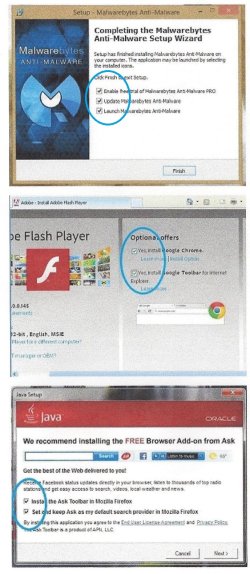
But for whatever reason, when I updated on the XP computer the Flash update decided to instal McAffee without my consent alongside it
This image shows examples of how that happens and why a user has to be diligent in paying attention:
 

Attachments

  • 1_Add-ons.jpg
    1_Add-ons.jpg
    233.2 KB · Views: 10

My Computer My Computer

At a glance

Windows 7 Ultimate 64-bit, Windows 8.1 64-bit...
Computer type
PC/Desktop
Computer Manufacturer/Model Number
Customs, Dell, Gateway, HP, Toshiba, Acer, ASUS
OS
Windows 7 Ultimate 64-bit, Windows 8.1 64-bit, Mac OS X 10.10, Linux Mint 17, Windows 10 Pro TP
Keyboard
Microsoft
Mouse
Microsoft
But for whatever reason, when I updated on the XP computer the Flash update decided to instal McAffee without my consent alongside it
This image shows examples of how that happens and why a user has to be diligent in paying attention:

This certainly seems to be becoming a bigger & bigger problem. Updating often needs careful scrutiny & is like negotiating a mine field.
If I elect to update Adobe Reader I don't want the Google option included, so I have to opt out, whereas it should be the other way around, so if I want it I have to opt in.
If software companies persist with this irritating feature then I will start to look for alternatives that only provide the update & nothing else, which is all I want anyway.
If you inadvertently neglect to opt out of the inclusion then you have to go to a whole lot of trouble to uninstall it & hope that is all you have to do.
 

My Computer My Computer

At a glance

Windows 7 Home Premium 64 bit sp1Intel i5 3570 3.4Ghz Ivy Bridge SKT 1155 quad...G-Skill Rip Jaws 16Gb (8x2) DDR3 -1600 PC3 12...Gigabyte NVIDIA GT610 1Gb DDR3 810/1200 PCI-E...
Computer type
PC/Desktop
Computer Manufacturer/Model Number
Self built using existing case
OS
Windows 7 Home Premium 64 bit sp1
CPU
Intel i5 3570 3.4Ghz Ivy Bridge SKT 1155 quad core
Motherboard
Gigabyte Z77-HD3 SKT 1155 2xSata 3, 4x USB 3.0
Memory
G-Skill Rip Jaws 16Gb (8x2) DDR3 -1600 PC3 12800 CL 10 red
Graphics Card(s)
Gigabyte NVIDIA GT610 1Gb DDR3 810/1200 PCI-E 2.0 Silent
Sound Card
NVIDIA High Definition & Realtech High Definition Audio
Monitor(s) Displays
2 x Philips 226V4L 16:9 aspect ratio
Screen Resolution
1920 x 1080 HD
Hard Drives
Samsung 840 Pro 256gb SSD, SATA 3.
Hitachi Touro Portable 1tb, USB 3.0 HDD used for image b/ups.
PSU
Corsair VS450
Case
Codeng
Cooling
PSU fan & CPU fan
Keyboard
Logitech
Mouse
Logitech Wireless trackball M570
Internet Speed
Wireless 3G. 3mg down & 550kb up.
Antivirus
Bitdefender Internet Security 2020
Browser
Opera (Current Version) & Firefox
Other Info
MS Office 2013 Pro. Davis weather station software. MGE Nova 600 avr UPS.
People are complaining on the Limited Connectivity problem in Windows 8 and Microsoft didn't care about it.
 

My Computer My Computer

At a glance

Windows 7 Home Premium 64-BITAMD A8 7200P8GB 1600mhzRadeon R5 (APU) + Radeon R5 M230 2GB Dual Gra...
Computer type
PC/Desktop
Computer Manufacturer/Model Number
ASUS X550ZE
OS
Windows 7 Home Premium 64-BIT
CPU
AMD A8 7200P
Motherboard
N/A
Memory
8GB 1600mhz
Graphics Card(s)
Radeon R5 (APU) + Radeon R5 M230 2GB Dual Graphics
Sound Card
Realtek ALC269 with SonicMaster
Monitor(s) Displays
Laptop Display
Screen Resolution
1920 x 1080 @60hz
Hard Drives
WDC WD50 00LPVX-80V0TT0 (500GB)
PSU
Laptop Charger
Mouse
ARMAGGEDON TEXTRON SCORPION 7
Internet Speed
100 mbps DOWN / 50 mbps UP
Antivirus
Windows Defender
Browser
Mozzila FireFox, Valve Steam in-game internet browser
But for whatever reason, when I updated on the XP computer the Flash update decided to instal McAffee without my consent alongside it.
The Flash Player Standalone/Distributed installers don't have any of the Opt-in/Opt-out junk.
Adobe Flash runtimes / Adobe Flash Player Distribution

I've never had any McAfee or other addons installed using these to update Flash Player.
imho they are much simpler and easier to use - no checkboxes to uncheck.
 

My Computer My Computer

At a glance

Multi-Boot W7_Pro_x64 W8.1_Pro_x64 W10_Pro_x6...AMD Athlon II x4 6206GB GSkill DDR2 800AMD 4670 GPU + AMD 4200 IGP
Computer type
PC/Desktop
Computer Manufacturer/Model Number
home built
OS
Multi-Boot W7_Pro_x64 W8.1_Pro_x64 W10_Pro_x64 +Linux_VMs +Chromium_VM
CPU
AMD Athlon II x4 620
Motherboard
Gigabyte GA-MA785G-UD3H
Memory
6GB GSkill DDR2 800
Graphics Card(s)
AMD 4670 GPU + AMD 4200 IGP
Sound Card
on board Realtek ALC889A
Monitor(s) Displays
RCA 40" LCD TV, Insignia 32" LCD TV, HP 15" LCD monitor
Screen Resolution
1680 x 1050
Hard Drives
OCZ Vertex 3 120GB,
Samsung F3 1TB (3),
Several others - WD, Seagate, Hitachi, ...
PSU
Corsair 500 W
Case
Rosewill mid tower
Cooling
CM 90mm rifle
Keyboard
Gyration wireless, Logitech wireless, Dell USB wired
Mouse
Gyration wireless, Logitech wireless, V7 USB wired
Internet Speed
Spectrum - 100Mbps D / 10Mbps U
Antivirus
Avast, MBAM3, EMET, WinPatrol
Browser
Pale Moon, Firefox, IE
Other Info
2 multi-boot PC's
Mainly HTPC/Office/Gen purpose (no gaming).
Trendnet USB KVM.
LG DVD burner/Blue Ray Player.
Tray system for removable SATA backup drives.

Not currently OCd, under-volted.
I use Hybrid sleep, rarely re-boot or shutdown.

Hauppauge HD-PVR, Avermedia PCIe TV Tuner, Hauppauge PCI TV Tuner.
Back
Top