Solved Microsoft Windows Operating System missing from msconfig startup.

Shards

New member
Local time
10:33 AM
Messages
9
So I've encountered something strange with my computer. I was performing maintenance that had a long time coming, and decided to take out some of my startup programs. Now I know to keep Microsoft Windows Operating System, however when I looked in msconfig, it's not there. At all. As far as restore points go, I have none (have already tried), and reinstallation is out of the question, not to mention it doesn't make sense that I should because the computer is reacting as if it's in there and checked. I'm thinking it may have something to do with a registry setting.

I'm running Windows 7 Home 64 bit. The last time I remembered it in there was sometime last year. Maybe a little before that. I just knew to leave it alone. I mean if there's no way to fix it without a reinstall, I'll just suffer with it not being in there as I know it's reacting as if it were active as my gadgets are working, my system boots up fine, everything runs just peachy. I've used programs like CCleaner in the past as well, I don't know if that could be the issue too, I don't have any backups of the registry either. It's a head scratcher for sure though, not seeing it there, yet everything being fine and dandy. Any ideas? :shock:
 

My Computer

OS
Windows Home Premium 64bit
Startup tab is missing or the entire msconfig is missing .
 

My Computer

Computer Manufacturer/Model Number
Custom Built
OS
Windows 7 Ultimate 32-Bit & Windows 7 Ultimate 64-Bit
CPU
Intel Core i7 CPU 950 @ 3.07GHz
Motherboard
ASUS P6T DELUXE V2
Memory
OCZ 6GB (3 x 2GB) 240-Pin DDR3 SDRAM DDR3 1600 OCZ3X1600R2
Graphics Card(s)
ATI Radeon HD 5700 Series
Sound Card
OnBoard
Hard Drives
WD6400AACS-00M3B0 (640GB SATA )
PSU
CORSAIR 850w
Case
NZXT LEXA
Cooling
Intel Stock Heatsink Fan
Keyboard
Microsoft Wireless Laser Keyboard 7000
Mouse
Microsoft Wireless Laser Mouse 7000
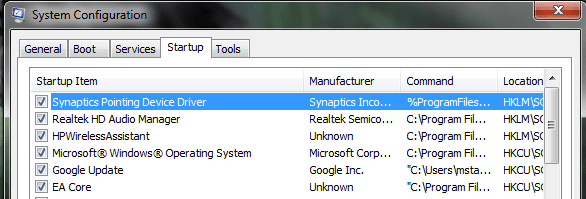
Neither of those are missing. It's the Microsoft Windows Operating System entry under the Startup tab is missing. Sorry about that confusion!
 

My Computer

OS
Windows Home Premium 64bit
I believe the Operating System entry is in BOOT tab . The Startup tab has the programs that startup while the PC boots up . Can you prnt scrn what you are referring to please
 

My Computer

Computer Manufacturer/Model Number
Custom Built
OS
Windows 7 Ultimate 32-Bit & Windows 7 Ultimate 64-Bit
CPU
Intel Core i7 CPU 950 @ 3.07GHz
Motherboard
ASUS P6T DELUXE V2
Memory
OCZ 6GB (3 x 2GB) 240-Pin DDR3 SDRAM DDR3 1600 OCZ3X1600R2
Graphics Card(s)
ATI Radeon HD 5700 Series
Sound Card
OnBoard
Hard Drives
WD6400AACS-00M3B0 (640GB SATA )
PSU
CORSAIR 850w
Case
NZXT LEXA
Cooling
Intel Stock Heatsink Fan
Keyboard
Microsoft Wireless Laser Keyboard 7000
Mouse
Microsoft Wireless Laser Mouse 7000
One second, I can show you on my roomie's computer. It's not under the Boot tab. It is specifically the startup tab. Hopefully the attachment works. If not I can host it on a different site.
 

Attachments

  • Capture.PNG
    Capture.PNG
    13.6 KB · Views: 20

My Computer

OS
Windows Home Premium 64bit
I don't have that in my startup tab, is there something in the startup folder in the start menu?
 

My Computer

Computer type
PC/Desktop
Computer Manufacturer/Model Number
Self Built
OS
Win 10 Pro x64
CPU
Intel I5-2500K @3.3GHz
Motherboard
Asrock P67 Extreme4
Memory
16GB G.Skill Ripjaws X (4x4GB)
Graphics Card(s)
EVGA GeForce 750 Ti SC 2GB
Sound Card
ASUS Xonar DG 5.1 Channels 24-bit 96KHz PCI Interface Sound
Monitor(s) Displays
auria eq2367
Screen Resolution
1920 x 1080
Hard Drives
250GB Samsung 850 EVO SSD
1TB WD Blue
1TB Hitachi
PSU
SeaSonic X 650W 80 Plus Gold
Case
Corsair Obsidian 750D
Cooling
Corsair H60, Three 140mm case fans
Keyboard
Logitech Wireless Keyboard K520
Mouse
Logitech Wireless Mouse M310
Internet Speed
Wave Broadband ~ 100 dn 5 up
Antivirus
Windows Defender, Malwarebytes Premium
Browser
Edge, IE11, Chrome
Other Info
Laptop specs: HP g7-1365dx /
CPU: AMD A6-3420M APU with Radeon(tm) HD Graphics /
RAM: Crucial 8Gb (2x4Gb) /
SSD: Crucial M4-CT128M4SSD2 ATA Device/ FW 000F /
GFX: AMD Radeon HD 6520G /
OS: Windows 10 Pro x64
Have you tried a system restore to when you saw that entry ?
 

My Computer

Computer Manufacturer/Model Number
Custom Built
OS
Windows 7 Ultimate 32-Bit & Windows 7 Ultimate 64-Bit
CPU
Intel Core i7 CPU 950 @ 3.07GHz
Motherboard
ASUS P6T DELUXE V2
Memory
OCZ 6GB (3 x 2GB) 240-Pin DDR3 SDRAM DDR3 1600 OCZ3X1600R2
Graphics Card(s)
ATI Radeon HD 5700 Series
Sound Card
OnBoard
Hard Drives
WD6400AACS-00M3B0 (640GB SATA )
PSU
CORSAIR 850w
Case
NZXT LEXA
Cooling
Intel Stock Heatsink Fan
Keyboard
Microsoft Wireless Laser Keyboard 7000
Mouse
Microsoft Wireless Laser Mouse 7000
Nope. I figured it out though. What it is exactly is Windows Sidebar. It works with the gadgets, I had thought they were working correctly, but then again, I don't have any enabled (had a derp moment). I just found the registry path in my roomie's computer.

Which it's found under HKEY_Current_User>Software>Microsoft>Windows>Current Version>Run

After I located that one, I created a new string, titled it Sidebar (like my roomie's) and then modify the value data to the following:

C:\Program Files\Windows Sidebar\sidebar.exe /autoRun

Exit regedit and test it by going into msconfig and it should be there. Thanks for trying though!
 
Last edited:

My Computer

OS
Windows Home Premium 64bit
Glad you got it working .
 

My Computer

Computer Manufacturer/Model Number
Custom Built
OS
Windows 7 Ultimate 32-Bit & Windows 7 Ultimate 64-Bit
CPU
Intel Core i7 CPU 950 @ 3.07GHz
Motherboard
ASUS P6T DELUXE V2
Memory
OCZ 6GB (3 x 2GB) 240-Pin DDR3 SDRAM DDR3 1600 OCZ3X1600R2
Graphics Card(s)
ATI Radeon HD 5700 Series
Sound Card
OnBoard
Hard Drives
WD6400AACS-00M3B0 (640GB SATA )
PSU
CORSAIR 850w
Case
NZXT LEXA
Cooling
Intel Stock Heatsink Fan
Keyboard
Microsoft Wireless Laser Keyboard 7000
Mouse
Microsoft Wireless Laser Mouse 7000
Back
Top