Solved migrate hdd to ssd

metaguy

Always Appreciative
Member
VIP
Local time
3:08 PM
Messages
140
Location
California
Have ordered an ssd to replace my hdd on Dell E6420 laptop with Win 7. There are many articles on migration via google. Does anyone have warnings or advice on how to safely migrate? Thanks
 

My Computer

Computer type
Laptop
Computer Manufacturer/Model Number
Dell E6420 Laptop 64 bit
OS
Win 7 Ultimate
CPU
Intel i5-2520M CPU 2.50 Ghz
Memory
8 GB
Graphics Card(s)
Intel(R) HD Graphics 3000
Sound Card
Intel(R) Display Audio
Monitor(s) Displays
Samsung 32" and Dell 23"
Screen Resolution
1920 x 1080 and 1366 x 768
Hard Drives
Hitachi HTS545032B9A300
Fantom G-Force 2GB
Antivirus
Bitdefender
Browser
Firefox, primary
metaguy

When I upgraded all my HDDs to SSDs I used AOMEI Backupper Standard (Free) & AOMEI Partition Assistant (Free). I also use AOMEI Backupper Standard for backups to External Hard Drives.
Sevenforums recommends AOMEI Backupper Standard (Free) and Macrium Reflect (Free) (little harder to navigate Macrium GUI in my opinion)

Make sure you backup your drive, preferably to an external hard drive, before you attempt to clone. Better safe than sorry!
I have a couple 4TB USB 3.0 external hard drives I use for backup.
See blue text in my footer.

Here's good explanations on both AOMEI products for Cloning HDD to SSD
Clone with AOMEI Backupper
Clone with AOMEI Partition Assistant

Please note, the above are not Official AOMEI Websites.
Download AOMEI from the below link!

Official AOMEI Website Download Center for Both


Snick
 

My Computer

Computer type
PC/Desktop
Computer Manufacturer/Model Number
HP Desktop & Compaq Laptop
OS
Win 10 x64, Linux Lite, Win 7 x64, BlackArch, & Kali
Hard Drives
Samsung 850 Pro 256Gb,
Hitachi HDD 1Tb,
Crucial MX SSD 250Gb
Segate 3Tb USB 3.0 Ext. Backup HDD
Internet Speed
150Mbps dn, 20Mbps up
Antivirus
Avast Free, Malwarebytes Anti-Exploit & Anti-Ransomware
Browser
Firefox, Chrome, Opera, & VPN
As you have a Laptop a you must:
1) create a disk image on an external disk
2) Replace the HDD with the SSD.
3) Boot from and external media and restore the disk image to the SSD.

I recommend that you make a USB flash drive with Bootable-rescue-disk

You can boot from it and do task 1 & 3

If you have a caddy to use with the SSD, you can clone the HDD to the SSD and then replace the HDD with the SSD.

When you have the SSD working is good to do a boot repair so it changes the drive ID from the HDD to the SSD. You can do it by booting the Win 7 installation disk or on Macrium reflect.
 

My Computers

System One System Two

  • Computer type
    PC/Desktop
    Computer Manufacturer/Model Number
    custom build
    OS
    Windows 7 HP 64
    CPU
    i5 6600K - 800MHz to 4200MHz
    Motherboard
    GA-Z170-HD3P
    Memory
    4+4G GSkill DDR4 3000
    Graphics Card(s)
    IG - Intel 530
    Monitor(s) Displays
    Samsung 226BW
    Screen Resolution
    1680x1050
    Hard Drives
    (1) -1 SM951 – 128GB M.2 AHCI PCIe SSD drive for Windows 7 and Lubuntu
    (2) -1 WD SATA 3 - 1T for Data
    (3) -1 WD SATA 3 - 1T for backup
    PSU
    Thermaltake 450W TR2 gold
    Keyboard
    Old and good Chicony mechanical keyboard
    Mouse
    Logitech mX performance - 9 buttons (had to disable some)
    Internet Speed
    500Mb/s
    Browser
    Firefox 64
    Other Info
    TinyWall firewall
  • Computer type
    Laptop
    System Manufacturer/Model Number
    Asus Q550LF
    OS
    Windows 7 Pro
    CPU
    i7-4500U 800MHz to 3.0GHz
    Motherboard
    Asus Q550LF
    Memory
    (4+4)G DDR3 1600
    Graphics Card(s)
    IG intel 4400 + NVIDIA GeForce GT 745M
    Sound Card
    Realtek
    Monitor(s) Displays
    LG Display LP156WF4-SPH1
    Screen Resolution
    1920 x 1080
    Hard Drives
    BX500 120G SSD for Windows and programs +
    1T HDD for data
    Internet Speed
    500 Mb/s
    Browser
    Firefox
    Other Info
    TinyWall firewall
As you have a Laptop a you must:
1) create a disk image on an external disk
2) Replace the HDD with the SSD.
3) Boot from and external media and restore the disk image to the SSD.

I recommend that you make a USB flash drive with Bootable-rescue-disk

You can boot from it and do task 1 & 3

I agree, that works as I've done that too!
:thumbsup:
 

My Computer

Computer type
PC/Desktop
Computer Manufacturer/Model Number
HP Desktop & Compaq Laptop
OS
Win 10 x64, Linux Lite, Win 7 x64, BlackArch, & Kali
Hard Drives
Samsung 850 Pro 256Gb,
Hitachi HDD 1Tb,
Crucial MX SSD 250Gb
Segate 3Tb USB 3.0 Ext. Backup HDD
Internet Speed
150Mbps dn, 20Mbps up
Antivirus
Avast Free, Malwarebytes Anti-Exploit & Anti-Ransomware
Browser
Firefox, Chrome, Opera, & VPN
Definitely make an OS full image onto external media, best for me - platter-driven hard-drive. If possible, make 2 such images...I do that with both Macrium Reflect and Image for Windows -- because, on rare occasions, one of the two ext USB HDDs failed, thankfully the 2nd one did just fine.
 
Last edited:

My Computer

Computer type
PC/Desktop
Computer Manufacturer/Model Number
Antec desktop; Acer Aspire laptops
OS
Windows 7 Professional 64-bit
CPU
Desktop i5; Acers i5 & i7
Memory
desktop 16GB; 1 Acer 8GB & 1 Acer 16GB
Hard Drives
1TB split into 2 equal partitions [OS and data] usable by RJS
Internet Speed
AT&T DSL
Browser
FF, GChrome, msIE
Other Info
Windows 7 Firewall, Emsisoft AM/AV, MSE [scan-only], SpywareBlaster, Ruiware/BillP combine
Ya all know I joined Ten Forum for advice, and I was surprised what good info I got. So as you can see I'm staying with my E6420 & Win 7. SSD is ordered, though delayed. I'm going through explorer and cleaning up C: drive b4 the action starts.
You all have also been so kind and helpful.

Other's input is also welcome. Leaving post open for now. Thanks.
 

My Computer

Computer type
Laptop
Computer Manufacturer/Model Number
Dell E6420 Laptop 64 bit
OS
Win 7 Ultimate
CPU
Intel i5-2520M CPU 2.50 Ghz
Memory
8 GB
Graphics Card(s)
Intel(R) HD Graphics 3000
Sound Card
Intel(R) Display Audio
Monitor(s) Displays
Samsung 32" and Dell 23"
Screen Resolution
1920 x 1080 and 1366 x 768
Hard Drives
Hitachi HTS545032B9A300
Fantom G-Force 2GB
Antivirus
Bitdefender
Browser
Firefox, primary
metaguy

Glad to hear you received positive assistance.
If you wish to use disk cleanup on C: drive, are you aware of built in additional cleanup functions?
From Admiistrative CMD,which is accessed via Start :orb: searchbox, type cmd, right click and choose Run as Administrator
Then copy and paste
cleanmgr /lowdisk
Popup for disk choice, then popup scanning, then popup for choices of what you wish to clean up. The default is all checked. Then verification to delete popup and cleanup process starts.
If you wish to forgo all the prompts
cleanmgr /verylowdisk

Snick
 

My Computer

Computer type
PC/Desktop
Computer Manufacturer/Model Number
HP Desktop & Compaq Laptop
OS
Win 10 x64, Linux Lite, Win 7 x64, BlackArch, & Kali
Hard Drives
Samsung 850 Pro 256Gb,
Hitachi HDD 1Tb,
Crucial MX SSD 250Gb
Segate 3Tb USB 3.0 Ext. Backup HDD
Internet Speed
150Mbps dn, 20Mbps up
Antivirus
Avast Free, Malwarebytes Anti-Exploit & Anti-Ransomware
Browser
Firefox, Chrome, Opera, & VPN
Problem - Switched to SSD. Changed bios to USB Cold boot to USB with clone of entire system. POST ok, but Boot Mgr failed, required device inaccessible, Status 0xc000000f. However, with HDD back in and normal boot, computer recognizes cloned USB. Why bios set to USB and can't see USB drive, don't know I'm stuck.
 

My Computer

Computer type
Laptop
Computer Manufacturer/Model Number
Dell E6420 Laptop 64 bit
OS
Win 7 Ultimate
CPU
Intel i5-2520M CPU 2.50 Ghz
Memory
8 GB
Graphics Card(s)
Intel(R) HD Graphics 3000
Sound Card
Intel(R) Display Audio
Monitor(s) Displays
Samsung 32" and Dell 23"
Screen Resolution
1920 x 1080 and 1366 x 768
Hard Drives
Hitachi HTS545032B9A300
Fantom G-Force 2GB
Antivirus
Bitdefender
Browser
Firefox, primary
Sounds like your usb is not properly set up as a bootable device.

What is the usb device you are trying to boot from ?

It is not clear what you are trying to do.

Why would you try and boot a cloned disk via usb?
 

My Computers

System One System Two

  • Computer type
    PC/Desktop
    OS
    7 X64
    CPU
    i5 8400
    Motherboard
    gigabyte b365m ds3h
    Memory
    2x8gb 3200mhz
    Hard Drives
    various
    PSU
    pure power 11 400w cm
    Case
    Coolermaster
    Cooling
    cryorig m9i
  • Computer type
    PC/Desktop
    OS
    7x64
    CPU
    g5400
    Motherboard
    ga b365m ds3h
    Memory
    8gb ddr4 2400
    PSU
    xfx pro 450w
The usual procedure is to use a program ( e.g. aomei ) to clone the internal operating system disk to another disk which is attached via usb or some adapter.

Then remove the original source disk and attach the cloned disk internally.

You post seems to imply you are trying to boot the cloned disk via usb. Why?
 

My Computers

System One System Two

  • Computer type
    PC/Desktop
    OS
    7 X64
    CPU
    i5 8400
    Motherboard
    gigabyte b365m ds3h
    Memory
    2x8gb 3200mhz
    Hard Drives
    various
    PSU
    pure power 11 400w cm
    Case
    Coolermaster
    Cooling
    cryorig m9i
  • Computer type
    PC/Desktop
    OS
    7x64
    CPU
    g5400
    Motherboard
    ga b365m ds3h
    Memory
    8gb ddr4 2400
    PSU
    xfx pro 450w
In a typical disk clone procedure, the disk signature of the source is also applied to the cloned disk.

If you bring both disks online at the same time, windows doesn't like two identical disk sigs, so will change the sig of the second disk. Then you will have issues booting it.

That is why you remove the original and replace it with the clone.

Don't panic. It is easily fixed.

There is another unrelated issue - win7 does not natively support boot over usb.
 

My Computers

System One System Two

  • Computer type
    PC/Desktop
    OS
    7 X64
    CPU
    i5 8400
    Motherboard
    gigabyte b365m ds3h
    Memory
    2x8gb 3200mhz
    Hard Drives
    various
    PSU
    pure power 11 400w cm
    Case
    Coolermaster
    Cooling
    cryorig m9i
  • Computer type
    PC/Desktop
    OS
    7x64
    CPU
    g5400
    Motherboard
    ga b365m ds3h
    Memory
    8gb ddr4 2400
    PSU
    xfx pro 450w
I cloned to usb via EaseUS so as to go from hdd to ssd. According to instructions, I switched the 2 drives, change bios to USB, and then suppose to restore back to ssd.
 

My Computer

Computer type
Laptop
Computer Manufacturer/Model Number
Dell E6420 Laptop 64 bit
OS
Win 7 Ultimate
CPU
Intel i5-2520M CPU 2.50 Ghz
Memory
8 GB
Graphics Card(s)
Intel(R) HD Graphics 3000
Sound Card
Intel(R) Display Audio
Monitor(s) Displays
Samsung 32" and Dell 23"
Screen Resolution
1920 x 1080 and 1366 x 768
Hard Drives
Hitachi HTS545032B9A300
Fantom G-Force 2GB
Antivirus
Bitdefender
Browser
Firefox, primary
I cloned to usb via EaseUS so as to go from hdd to ssd. According to instructions, I switched the 2 drives, change bios to USB, and then suppose to restore back to ssd.


1. Still not clear what you mean. If you cloned a disk to another disk, you should replace the original disk with the cloned disk . There is no "restoring back"

If you made an image file of the original disk, then you use the imaging program ( typically by booting the imaging program recovery media) locate the image file, and apply it to the the new disk.
Presumably that is what you mean by "restoring back"

Those are different procedures.


2. If you have cloned , then you can fix it using this:

View attachment nt6repair9x86.zip

After fixing the os letter and using the boot fix, you can replace the internal source disk with the cloned disk.

3. In addition, you cannot boot a cloned disk via usb because win7 does not natively support booting over usb.
 

My Computers

System One System Two

  • Computer type
    PC/Desktop
    OS
    7 X64
    CPU
    i5 8400
    Motherboard
    gigabyte b365m ds3h
    Memory
    2x8gb 3200mhz
    Hard Drives
    various
    PSU
    pure power 11 400w cm
    Case
    Coolermaster
    Cooling
    cryorig m9i
  • Computer type
    PC/Desktop
    OS
    7x64
    CPU
    g5400
    Motherboard
    ga b365m ds3h
    Memory
    8gb ddr4 2400
    PSU
    xfx pro 450w
The link brought up 4 .exe files. sorry for ignorance, which ones and in what order? My Dell Win 7 Ultimate is a 64 bit.
So, to understand... w/hdd back in, I run the newly directed .exe file(s) and then what?
 

My Computer

Computer type
Laptop
Computer Manufacturer/Model Number
Dell E6420 Laptop 64 bit
OS
Win 7 Ultimate
CPU
Intel i5-2520M CPU 2.50 Ghz
Memory
8 GB
Graphics Card(s)
Intel(R) HD Graphics 3000
Sound Card
Intel(R) Display Audio
Monitor(s) Displays
Samsung 32" and Dell 23"
Screen Resolution
1920 x 1080 and 1366 x 768
Hard Drives
Hitachi HTS545032B9A300
Fantom G-Force 2GB
Antivirus
Bitdefender
Browser
Firefox, primary
To clarify, the clone is on the USB drive.
 

My Computer

Computer type
Laptop
Computer Manufacturer/Model Number
Dell E6420 Laptop 64 bit
OS
Win 7 Ultimate
CPU
Intel i5-2520M CPU 2.50 Ghz
Memory
8 GB
Graphics Card(s)
Intel(R) HD Graphics 3000
Sound Card
Intel(R) Display Audio
Monitor(s) Displays
Samsung 32" and Dell 23"
Screen Resolution
1920 x 1080 and 1366 x 768
Hard Drives
Hitachi HTS545032B9A300
Fantom G-Force 2GB
Antivirus
Bitdefender
Browser
Firefox, primary
It can be confusing for neophytes.

In one procedure a disk ( or a volume ) is cloned (i.e copied ) directly onto a different disk.

In the other procedure a disk ( or volume ) is copied (or cloned) into an image file. The image file then needs to be applied ( which means copying out the contents of the image file) onto a disk.
 

My Computers

System One System Two

  • Computer type
    PC/Desktop
    OS
    7 X64
    CPU
    i5 8400
    Motherboard
    gigabyte b365m ds3h
    Memory
    2x8gb 3200mhz
    Hard Drives
    various
    PSU
    pure power 11 400w cm
    Case
    Coolermaster
    Cooling
    cryorig m9i
  • Computer type
    PC/Desktop
    OS
    7x64
    CPU
    g5400
    Motherboard
    ga b365m ds3h
    Memory
    8gb ddr4 2400
    PSU
    xfx pro 450w
To clarify, the clone is on the USB drive.

That doesn't help.

Did you do a direct copy to disk ( Usually called clone)

OR

Did you make an image file ? ( usually called imaging )

Post a screenshot of the "usb drive" contents and we will be able to tell by looking at it.
 

My Computers

System One System Two

  • Computer type
    PC/Desktop
    OS
    7 X64
    CPU
    i5 8400
    Motherboard
    gigabyte b365m ds3h
    Memory
    2x8gb 3200mhz
    Hard Drives
    various
    PSU
    pure power 11 400w cm
    Case
    Coolermaster
    Cooling
    cryorig m9i
  • Computer type
    PC/Desktop
    OS
    7x64
    CPU
    g5400
    Motherboard
    ga b365m ds3h
    Memory
    8gb ddr4 2400
    PSU
    xfx pro 450w
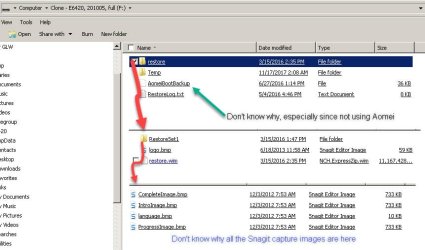
UHHD Cloned  to USB.jpg

USB Drive - capture.jpgsing EaseUS Backup, I cloned hdd to USB (attached)
 

My Computer

Computer type
Laptop
Computer Manufacturer/Model Number
Dell E6420 Laptop 64 bit
OS
Win 7 Ultimate
CPU
Intel i5-2520M CPU 2.50 Ghz
Memory
8 GB
Graphics Card(s)
Intel(R) HD Graphics 3000
Sound Card
Intel(R) Display Audio
Monitor(s) Displays
Samsung 32" and Dell 23"
Screen Resolution
1920 x 1080 and 1366 x 768
Hard Drives
Hitachi HTS545032B9A300
Fantom G-Force 2GB
Antivirus
Bitdefender
Browser
Firefox, primary
Assign drive letters to the partitions on your cloned disk.
The first partition might already have a drive letter, looks like F:
So you might as well assign G: to the second partition

The first partition F: is the Active partition on the cloned disk

The second partition is the Windows partition on the cloned disk.
It currently shows *:, but you are going to assign G: before running nt6repair


To fix a non booting clone:

1. run nt6repair exe file

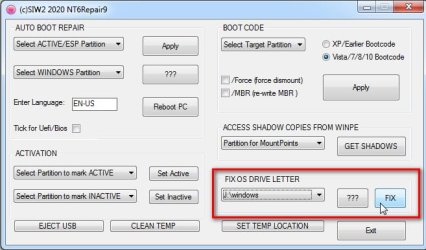
one.jpg

2. Select the cloned windows partition ( in your case select G:\windows) in the dropdown. Click FIX

two.jpg

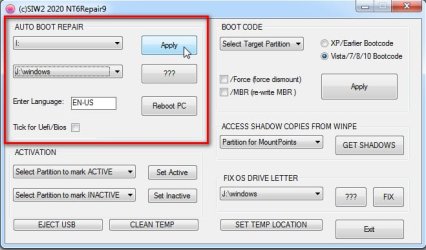
3. Select the Active partition on the cloned disk (in your case select F:).
Select the Windows partition on the cloned disk (in your case select G:\windows ).
Then click Apply

three.jpg

four.jpg
 
Last edited:

My Computers

System One System Two

  • Computer type
    PC/Desktop
    OS
    7 X64
    CPU
    i5 8400
    Motherboard
    gigabyte b365m ds3h
    Memory
    2x8gb 3200mhz
    Hard Drives
    various
    PSU
    pure power 11 400w cm
    Case
    Coolermaster
    Cooling
    cryorig m9i
  • Computer type
    PC/Desktop
    OS
    7x64
    CPU
    g5400
    Motherboard
    ga b365m ds3h
    Memory
    8gb ddr4 2400
    PSU
    xfx pro 450w
That restore.wim on the first partition is presumably the Dell recovery image that came with machine. Unless you made it using win10 or some other application.Might as well just leave it there.
 
Last edited:

My Computers

System One System Two

  • Computer type
    PC/Desktop
    OS
    7 X64
    CPU
    i5 8400
    Motherboard
    gigabyte b365m ds3h
    Memory
    2x8gb 3200mhz
    Hard Drives
    various
    PSU
    pure power 11 400w cm
    Case
    Coolermaster
    Cooling
    cryorig m9i
  • Computer type
    PC/Desktop
    OS
    7x64
    CPU
    g5400
    Motherboard
    ga b365m ds3h
    Memory
    8gb ddr4 2400
    PSU
    xfx pro 450w
Back
Top