Solved Missing \Boot\BCD

trimmer

New member
Local time
6:38 PM
Messages
21
Good day. I uninstalled (CSC) "COMODO System Cleaner 3.0.172695.53" - I started using it in 2011, and I got so used to it I don't feel comfortable using any other cleaners, besides CCleaner. I've uninstalled it before w/o any problems. I was going to use (CSU) "COMODO System Utilities".....I use "CSU" now & then but normally I stick with "COMODO System-Cleaner 3.0.172695.53". I like it better than any I've used.

After the uninstall, I rebooted, I got "Windows failed to start, a recent hardware or software change might be the cause, Insert your install disc and restart your PC". I don't have a W 7 CD, this is a OEM?...hope that's right. The error is, File: \Boot\BCD Status: 0xc0000034 + "The Windows boot config data file is missing required Info". BTW, I used Revo uninstaller, never had any problems w/it, but..?
I have a Rescue CD I made long ago, a blue box was displayed & I booted with it. I had to boot from it #3 times, every time I boot.

I 'restored to factory state' in 2013, a virus got it....besides that it's never been out of this room. I'm using Windows 7 Home Premium x64. The exact date I set it up was August 4, 2010. (COMODO System Cleaner): MajorGeeks http://tinyurl.com/kjobn3r). Thank you in advance,
-Roy PS, ...hope I fixed typos & spelling.
 

My Computer

Computer type
PC/Desktop
Computer Manufacturer/Model Number
HP Pavillion p6550z CTO
OS
Windows 7 SP 1 Home Premium x64
CPU
2.90 Ghz
Motherboard
FOXCONN
Memory
4 GB
Graphics Card(s)
ATI Radeon HD 4200
Hard Drives
Western Digital
TOSHIBA External USB 3.0 USB 1TB
Antivirus
Avast free
Browser
IE 11
I recommend that you get an install disk. Reboot with it in your CD/DVD drive. Proceed carefully, being careful NOT to click on "Install Now". You will get to a screen that has a "Repair your Computer" link. Click on that to do the repair. Remove the install disk and reboot. If the repair doesn't work, you've got the disk you need to reinstall.

Charles Knell

P.S. You might need to change the device boot order in the BIOS in order to boot from your CD/DVD drive.
 

My Computer

Computer type
PC/Desktop
Computer Manufacturer/Model Number
Dell Precision T3600
OS
Windows 7 Ultimate 64 bit
CPU
Intel Xeon E5-1620 @ 3.6GHz
Memory
8GB
Graphics Card(s)
NVIDEA Quatro 4000
Hard Drives
DELL PERC H310 SCSI
Antivirus
McAfee
Browser
Firefox
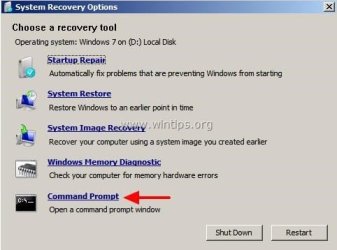
By "install disk", you mean an original W 7 disc, like people that got one with their original PC/setup? I seen "Repair your Computer" in the repair disc, or another disc I have. I didn't know which (of #4 options) one to choose. I got this imagewhile I was trying to figure out what to do. My system restore don't work. One virus (in 2013) wiped out everything.....It's the only time I had to do a factory restore. Besides that, I've never had to reformat it. That's why I don't know what to do, nothing like this has ever happened to this PC.

It needs to be reformatted. A MS Update broke W 7 Mail. I've read a lot about the same thing happened to other people. AskWood (InfoWorld) said it was indeed a botched patch. I'm sorry about asking about the W 7 disk, I'll check in if/when you reply, thanks for your time,
-Roy
 

Attachments

  • startup-repair-command-prompt.jpg
    startup-repair-command-prompt.jpg
    21.7 KB · Views: 27

My Computer

Computer type
PC/Desktop
Computer Manufacturer/Model Number
HP Pavillion p6550z CTO
OS
Windows 7 SP 1 Home Premium x64
CPU
2.90 Ghz
Motherboard
FOXCONN
Memory
4 GB
Graphics Card(s)
ATI Radeon HD 4200
Hard Drives
Western Digital
TOSHIBA External USB 3.0 USB 1TB
Antivirus
Avast free
Browser
IE 11

My Computers

System One System Two

  • Computer type
    PC/Desktop
    OS
    7 X64
    CPU
    i5 8400
    Motherboard
    gigabyte b365m ds3h
    Memory
    2x8gb 3200mhz
    Hard Drives
    various
    PSU
    pure power 11 400w cm
    Case
    Coolermaster
    Cooling
    cryorig m9i
  • Computer type
    PC/Desktop
    OS
    7x64
    CPU
    g5400
    Motherboard
    ga b365m ds3h
    Memory
    8gb ddr4 2400
    PSU
    xfx pro 450w
regarding: By "install disk", you mean an original W 7 disc, like people that got one with their original PC/setup?

Yes, but since you have a system repair disk, I believe that you have the same recovery tools on that.
I agree with SIW2 above.
If "Startup Repair" doesn't fix the problem completely, try a "System Restore".
 

My Computer

Computer type
PC/Desktop
Computer Manufacturer/Model Number
Dell Precision T3600
OS
Windows 7 Ultimate 64 bit
CPU
Intel Xeon E5-1620 @ 3.6GHz
Memory
8GB
Graphics Card(s)
NVIDEA Quatro 4000
Hard Drives
DELL PERC H310 SCSI
Antivirus
McAfee
Browser
Firefox
I'll follow you guys' directions best I can. I'll need some time to get at it, I was up all night (until 6 AM central time Sat.) & and I had to take my mother to several places starting #3 hr.'s later, I haven't had much sleep. If I have to d'load the .ISO file it'll just take about 45 minutes. Please stick w/me because I'll prob. have a few questions, plus I'll have to go through 2-3 CDs in order to get the System Recovery Options.

Answer this, please: Is my PC rebooting when I shut it down? I believe it is because I uninstalled an app, and most all software leaves at least one folder(s) with a file or two that can't be deleted until reboot. I believe that's right....when I started it using the repair CD the app's file & folder got deleted, as it should. Thanks very much, I'll be back with you-all soon as I can,
-Roy
 

My Computer

Computer type
PC/Desktop
Computer Manufacturer/Model Number
HP Pavillion p6550z CTO
OS
Windows 7 SP 1 Home Premium x64
CPU
2.90 Ghz
Motherboard
FOXCONN
Memory
4 GB
Graphics Card(s)
ATI Radeon HD 4200
Hard Drives
Western Digital
TOSHIBA External USB 3.0 USB 1TB
Antivirus
Avast free
Browser
IE 11
I'll follow you guys' directions best I can. I'll need some time to get at it, I was up all night (until 6 AM central time Sat.) & had to take my mother to several places starting #3 hr.'s later, I haven't had much sleep. If I have to d'load the .ISO file it'll just take about 45 minutes. Please stick w/me because I'll prob. have a few questions, plus I'll have to go through 2-3 CDs in order to get the System Recovery Options.

Answer this, please: Is my PC rebooting when I shut it down? I believe it is because I uninstalled an app, and most all software leaves at least one folder(s) with a file or two that can't be deleted until reboot. I believe that's right....when I started it using the repair CD the app's file & folder got deleted, as it should. Thanks very much, I'll be back with you-all soon as I can,
-Roy
 

My Computer

Computer type
PC/Desktop
Computer Manufacturer/Model Number
HP Pavillion p6550z CTO
OS
Windows 7 SP 1 Home Premium x64
CPU
2.90 Ghz
Motherboard
FOXCONN
Memory
4 GB
Graphics Card(s)
ATI Radeon HD 4200
Hard Drives
Western Digital
TOSHIBA External USB 3.0 USB 1TB
Antivirus
Avast free
Browser
IE 11
I tell you what, guys, I can't figure out how I got the recovery environment command prompt box to come up. I'm going to tell my sister to bring me a 1 or 2 TB external drive, she's coming down for my mom's 83rd b'day May 1st. I'll back my C:\ files up to it and do a factory restore....I hear bad thing happen when you do that also, but it needs to be done. Like I said(?)...here or another form, about my Toshiba 1 TB (thin) external drive....it has 776 GB free space, counting two Macrium Reflect 56 GB backups. I don't like the idea of backing up my C: files to it....I have a huge audio/video library on it and I'm can't risk loosing that, again. Funny thing, I ran Reflect backup I made the day before and it failed. In the morning I'll try one more 2 hr. session (going through 2-3 DVDs) trying to find the command prompt box to come up. I got to get some sleep.

Off topic - I have a (year old) 2 TB external drive. I was cleaning the carpet and accidentally plugged my sub-woofer's bigger plug in t/back of it & it fried the wiring. A guy at Staples said they no longer put them back in a case, they put it in the PC bay. More than likely the data is still valid on it. Best regards,
-Roy PS, excuse typos.
 

My Computer

Computer type
PC/Desktop
Computer Manufacturer/Model Number
HP Pavillion p6550z CTO
OS
Windows 7 SP 1 Home Premium x64
CPU
2.90 Ghz
Motherboard
FOXCONN
Memory
4 GB
Graphics Card(s)
ATI Radeon HD 4200
Hard Drives
Western Digital
TOSHIBA External USB 3.0 USB 1TB
Antivirus
Avast free
Browser
IE 11
regarding: Answer this, please: Is my PC rebooting when I shut it down?

Your PC is rebooting when the manufacturer's logo appears on your screen.
-Charles
 

My Computer

Computer type
PC/Desktop
Computer Manufacturer/Model Number
Dell Precision T3600
OS
Windows 7 Ultimate 64 bit
CPU
Intel Xeon E5-1620 @ 3.6GHz
Memory
8GB
Graphics Card(s)
NVIDEA Quatro 4000
Hard Drives
DELL PERC H310 SCSI
Antivirus
McAfee
Browser
Firefox
First off: I d'loaded that .ISO, 344 MB - Is it a W 7 SP 1 setup, or a fix?

Trying the startup repair, I got an error. There was a long list of explaining, too much to write down. Now, the last option 'command prompt', I typed bootrec /rebuildbcd and it said successful, but the PC wouldn't boot. Then second time I typed bootrec /fixboot (enter) then bootrec /fixmbr.both of them said successful. This is from the boot Repair Disk. I'm getting an external drive and backing up my C: files then reformat, I've been putting it off too long & it needs to be done anyway. And besides, I'm wasting my time & more importantly you guys' time. It's going to storm pretty soon here between Nashville & Knoxville, I'll stay online if it's not lightning, in case anyone wants to reply, thanks very much,
-Roy
 

My Computer

Computer type
PC/Desktop
Computer Manufacturer/Model Number
HP Pavillion p6550z CTO
OS
Windows 7 SP 1 Home Premium x64
CPU
2.90 Ghz
Motherboard
FOXCONN
Memory
4 GB
Graphics Card(s)
ATI Radeon HD 4200
Hard Drives
Western Digital
TOSHIBA External USB 3.0 USB 1TB
Antivirus
Avast free
Browser
IE 11
First off: I d'loaded that .ISO, 344 MB - Is it a W 7 SP 1 setup, or a fix?

Trying the startup repair, I got an error. There was a long list of explaining why, too much to write down. Now, the last option 'command prompt', I typed bootrec /rebuildbcd and it said successful, but the PC wouldn't boot. Then second time I typed bootrec /fixboot (enter) then bootrec /fixmbr.....both of them said successful. This is from the boot Repair Disk I made when I first set up the PC. I'm getting an external drive and backing up my C: files then reformat, I've been putting it off too long & it needs to be done anyway. And besides, I'm wasting my time & more importantly you guys' time.

Off topic: It's going to storm pretty soon here between Nashville & Knoxville, I'll stay online if it's not lightning, in case anyone wants to reply, thanks very much,
-Roy
 

My Computer

Computer type
PC/Desktop
Computer Manufacturer/Model Number
HP Pavillion p6550z CTO
OS
Windows 7 SP 1 Home Premium x64
CPU
2.90 Ghz
Motherboard
FOXCONN
Memory
4 GB
Graphics Card(s)
ATI Radeon HD 4200
Hard Drives
Western Digital
TOSHIBA External USB 3.0 USB 1TB
Antivirus
Avast free
Browser
IE 11

My Computer

Computer type
PC/Desktop
Computer Manufacturer/Model Number
Dell Precision T3600
OS
Windows 7 Ultimate 64 bit
CPU
Intel Xeon E5-1620 @ 3.6GHz
Memory
8GB
Graphics Card(s)
NVIDEA Quatro 4000
Hard Drives
DELL PERC H310 SCSI
Antivirus
McAfee
Browser
Firefox
CharlesKnell - Thanks very much, I'm reading there now....read below:

I'm in the middle of backing my files up now (5:30 PM, our central time). The power, to my house, blinked off & back on an hour ago and when I was holding down 'Escape' I got an error, then I got options to boot in safe mode, normal, and a few more options. It was t/same options (screen) I get when I go into safe mode....and I haven't seen that since last Friday. I hit 'enter' on 'boot normally', from C: and it worked. I think it may be fixed......I ran the command prompts 3 times yesterday and once more before I went to bed, they may have finally worked. I'm going to back up the rest of my files then try to reboot. I should right now but I need to back up t/rest of my C: files. If it won't boot I'll sure try the directions at the link you sent.

You guys are, and always have been a big help...I can't thank everyone enough.
-Roy PS, I'll reply later & let you all know what (eventually) happens. Sorry if I repeated myself and/or typos.
 

My Computer

Computer type
PC/Desktop
Computer Manufacturer/Model Number
HP Pavillion p6550z CTO
OS
Windows 7 SP 1 Home Premium x64
CPU
2.90 Ghz
Motherboard
FOXCONN
Memory
4 GB
Graphics Card(s)
ATI Radeon HD 4200
Hard Drives
Western Digital
TOSHIBA External USB 3.0 USB 1TB
Antivirus
Avast free
Browser
IE 11
CharlesKnell - Thanks very much, I'm reading there now....read below:

I'm in the middle of backing my files up now (5:30 PM, our central time). The power, to my house, blinked off & back on an hour ago and when I was holding down 'Escape' I got an error, then I got options to boot in safe mode, normal, and a few more options. It was t/same options (screen) I get when I go into safe mode....and I haven't seen that since last Friday. I hit 'enter' on 'boot normally', from C: and it worked. I think it may be fixed......I ran the command prompts 3 times yesterday and once more before I went to bed, they may have finally worked. I'm going to back up the rest of my files then try to reboot. I should right now but I need to back up t/rest of my C: files. If it won't boot I'll sure try the directions at the link you sent. You guys are, and always have been a big help...I can't thank everyone enough.
-Roy PS, I'll reply later & let you all know what (eventually) happens. Sorry if I repeated myself and/or typos.
 

My Computer

Computer type
PC/Desktop
Computer Manufacturer/Model Number
HP Pavillion p6550z CTO
OS
Windows 7 SP 1 Home Premium x64
CPU
2.90 Ghz
Motherboard
FOXCONN
Memory
4 GB
Graphics Card(s)
ATI Radeon HD 4200
Hard Drives
Western Digital
TOSHIBA External USB 3.0 USB 1TB
Antivirus
Avast free
Browser
IE 11
Back
Top