I have a asus p5n-e sli windows 7 with two hard drives each with 500gb. I have windows installed on HD 1 and it isn't showing up in bios setup or select boot device so windows won't boot. I had a power outage in my area and afterwards seems like the computer can't find hd that windows is installed on?? Any help with this would be very much appreciated..
I don't think its MBR because in the setup bios there should be two WD Hard drives showing up but only one is. I assume the missing one is where windows 7 is installed cause when I try to boot from the other drive just a bleeping cursor shows then reboots. Even if the MBR is missing shouldn't the HD still show up as a boot option and show is the bios HD menu? Sometimes when I boot up and go to boot selection menu the missing one shows up but without any other info, the other hd shows the type ie WD with alot of numbers etc..... while the other one is just blank?
I just made sure both sata were connected right and swapped connections and still won't boot. The only thing that changed was at first two drives were listed and the top one had no other info and after swap the bottom one was the one with no info from the boot menu after pressing f8. It didn't work so I decided to just switch them back the way they were connected before just in case.on the hard drives there were two cables connected to each drive, one that says sata and was wider and a smaller one right next to it, I just swapped both cables from both hd's.
Ok just checked and noticed that the smaller cables from each drive are connected to the mobo and right next to each other, should I disconnect this and swap as well? Is this the psu?
My Computer
Computer type
PC/Desktop
Computer Manufacturer/Model Number
custom build
OS
Windows 7 Home Premium 64-bit SP1
CPU
6.00GB Dual-Channel DDR3 @ 666MHz (9-9-9-24)
Motherboard
Dell Inc. 0DPRF9 (CPU 1)
Memory
2 gig
Graphics Card(s)
NSPIRON ONE (1280x768@60Hz) ATI Mobility Radeon HD 4200 (Del
TJGOA Mate sounds like the power outage may have wrecked the drive. It does spin up I am assuming? and you should try the disconnecting the secondary drive and try booting using the one with Windows on it.
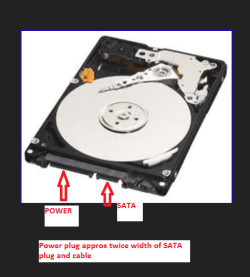
Any chance of some pics of the cabling as I don't understand what you mean by there is is smaller cable next to the SATA data one there should be one about twice the width of the SATA plug which is the power cable. see pic
Attachments
SATA.PNG
38.2 KB
· Views: 23
My Computer
Computer type
PC/Desktop
Computer Manufacturer/Model Number
Own build (new) Desk1 / Asus ROG Win 7 / Desk2 1st build
OS
Desk1 7 Home Prem / Desk2 10 Pro / Main lap Asus ROG 10 Pro 2 laptop Toshiba 7 Pro Asus P2520 7 & 10
One other Desktop (tester) and spare Toshba laptop both with SSD's
Running Kaspersky 2016 ISS on all machines config'd identically
Logitec audio stereo systems on each machine (x3)
Canon MG5250MFC
Router/modem TP-Link running WPA2SK
I have never had a power outage hurt anything but I do use surge protectors.
I have had power outages make me reset the cmos again on older systems. Using the instruction from the motherboard manual is the best way to reset cmos but here are some other methods.
TJGOA Mate sounds like the power outage may have wrecked the drive. It does spin up I am assuming? and you should try the disconnecting the secondary drive and try booting using the one with Windows on it.
Any chance of some pics of the cabling as I don't understand what you mean by there is is smaller cable next to the SATA data one there should be one about twice the width of the SATA plug which is the power cable. see pic
Your pic clears everything up thanks. Is there some software that I can boot from usb to see if it reads the hd with windows on it and check for errors, I want to make sure now that it isn't an MBR issue? Just in case I might want to install windows again on the other HD, hopefully I can salvage the files from the other drive but if windows isn't booting from the drive maybe that's a no go? Is there some other way to boot into the system to get my files from it?
My Computer
Computer type
PC/Desktop
Computer Manufacturer/Model Number
custom build
OS
Windows 7 Home Premium 64-bit SP1
CPU
6.00GB Dual-Channel DDR3 @ 666MHz (9-9-9-24)
Motherboard
Dell Inc. 0DPRF9 (CPU 1)
Memory
2 gig
Graphics Card(s)
NSPIRON ONE (1280x768@60Hz) ATI Mobility Radeon HD 4200 (Del
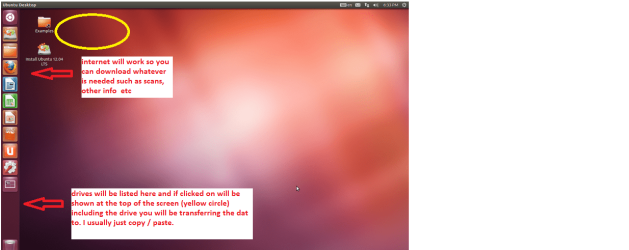
Set the BIOS to boot from theoptical when the machine boots it will show you a screen with TRY or INSTALL> select TRYnot INSTALL
When it is finished - it takes verylittle time you will get a screen like in the pic .
Open the drive you want > Userand dig down until you get to the data / settings you may be able to copy /paste the material you want to an external source or other installed drive doingthis.
I am not sure if it will but I haverecovered tons of data etc using this method both on "dead" or justplain drives that you cannot get data from using Windows. You can still access the net with this too as in my pic.
One other Desktop (tester) and spare Toshba laptop both with SSD's
Running Kaspersky 2016 ISS on all machines config'd identically
Logitec audio stereo systems on each machine (x3)
Canon MG5250MFC
Router/modem TP-Link running WPA2SK
Thanks will try ubuntu right now and see if that works, How do I make it bootable from usb though, should I try poweriso make bootable usb option or is there another way for ubuntu?
Just found this, http://www.ubuntu.com/download/desktop/create-a-usb-stick-on-windows
will i be able to use the try now function using this method?
My Computer
Computer type
PC/Desktop
Computer Manufacturer/Model Number
custom build
OS
Windows 7 Home Premium 64-bit SP1
CPU
6.00GB Dual-Channel DDR3 @ 666MHz (9-9-9-24)
Motherboard
Dell Inc. 0DPRF9 (CPU 1)
Memory
2 gig
Graphics Card(s)
NSPIRON ONE (1280x768@60Hz) ATI Mobility Radeon HD 4200 (Del
One other Desktop (tester) and spare Toshba laptop both with SSD's
Running Kaspersky 2016 ISS on all machines config'd identically
Logitec audio stereo systems on each machine (x3)
Canon MG5250MFC
Router/modem TP-Link running WPA2SK
Thanks Ubuntu works like a charm and I was able to salvage all the data from the drive which is just awesome. Seeing that I was able to salvage the data doesn't this mean the drive still works, so why can't windows boot up? Maybe I'm missing the boot files after all? Maybe a partition is marked as inactive where the windows is installed to? Funny thing is that in ubuntu only one drive shows up, the one with the windows installed and the other isn't showing up, but from the bios menu the exact opposite is happening. Anybody have any idea what could be going on here? Would anyone recomend some software I could run in ubuntu to solve this, maybe partition software, disk repair, disk management,, etc??
My Computer
Computer type
PC/Desktop
Computer Manufacturer/Model Number
custom build
OS
Windows 7 Home Premium 64-bit SP1
CPU
6.00GB Dual-Channel DDR3 @ 666MHz (9-9-9-24)
Motherboard
Dell Inc. 0DPRF9 (CPU 1)
Memory
2 gig
Graphics Card(s)
NSPIRON ONE (1280x768@60Hz) ATI Mobility Radeon HD 4200 (Del
EDIT: I do not know why Ubuntu does not see the other drive. May be ICit2 can throw some light on it.
Usually in Linux there is a process to mount the drives.
I am not real sure why it will not see the other drive I just guessing it is so corrupted and or its physical structure is damaged Jumanji. It could even be something to do with Linux type system.
I just I know one can recover data this way even when you don't know the admin PW from drives that do appear dead or so corrupted in Windows. Having said that I have found too that in some forms of files - that some data cannot be accessed but just the majority of times I have used it has performed without a hitch.
I don't know what the Rufus is but that is why I mention the net can still be accessed using Ubuntu as it still gives you chance to download scans and other useful stuff - like an ISO for examle
My Computer
Computer type
PC/Desktop
Computer Manufacturer/Model Number
Own build (new) Desk1 / Asus ROG Win 7 / Desk2 1st build
OS
Desk1 7 Home Prem / Desk2 10 Pro / Main lap Asus ROG 10 Pro 2 laptop Toshiba 7 Pro Asus P2520 7 & 10
One other Desktop (tester) and spare Toshba laptop both with SSD's
Running Kaspersky 2016 ISS on all machines config'd identically
Logitec audio stereo systems on each machine (x3)
Canon MG5250MFC
Router/modem TP-Link running WPA2SK
Thanks, I will try that out but for right now I will explore ubuntu a little more then post a pic showing the details of the drive. I only have one usb so i'd have to erase it before I can load anything new. I know this is probably impossible but is there a way to load the programs I have installed on the drive with ubuntu. Also I tried to install something inside ubuntu and it wouldn't let me, is this normal for the 'try it' option without installing it?
My Computer
Computer type
PC/Desktop
Computer Manufacturer/Model Number
custom build
OS
Windows 7 Home Premium 64-bit SP1
CPU
6.00GB Dual-Channel DDR3 @ 666MHz (9-9-9-24)
Motherboard
Dell Inc. 0DPRF9 (CPU 1)
Memory
2 gig
Graphics Card(s)
NSPIRON ONE (1280x768@60Hz) ATI Mobility Radeon HD 4200 (Del
One other Desktop (tester) and spare Toshba laptop both with SSD's
Running Kaspersky 2016 ISS on all machines config'd identically
Logitec audio stereo systems on each machine (x3)
Canon MG5250MFC
Router/modem TP-Link running WPA2SK
I see. Is it possible to create something like a dual boot with windows using the old windows files from with ubuntu, basically a way to open windows from within ubuntu?
My Computer
Computer type
PC/Desktop
Computer Manufacturer/Model Number
custom build
OS
Windows 7 Home Premium 64-bit SP1
CPU
6.00GB Dual-Channel DDR3 @ 666MHz (9-9-9-24)
Motherboard
Dell Inc. 0DPRF9 (CPU 1)
Memory
2 gig
Graphics Card(s)
NSPIRON ONE (1280x768@60Hz) ATI Mobility Radeon HD 4200 (Del
No I am pretty sure it isn't mate as the OS's are really quite different I think you need to boot from either or.
Personally I tried a dual boot Windows / Ubuntu a while back an it was really not my cup of tea so I keep Ubuntu just as a tool really as I haven't used it that much I don't understand the ins and outs of that OS. Not that I am that clever with Windows of course., but I am guessing if you boot into Ubuntu the same things is going to happen re seeing the drive/s Windows data.
My Computer
Computer type
PC/Desktop
Computer Manufacturer/Model Number
Own build (new) Desk1 / Asus ROG Win 7 / Desk2 1st build
OS
Desk1 7 Home Prem / Desk2 10 Pro / Main lap Asus ROG 10 Pro 2 laptop Toshiba 7 Pro Asus P2520 7 & 10
One other Desktop (tester) and spare Toshba laptop both with SSD's
Running Kaspersky 2016 ISS on all machines config'd identically
Logitec audio stereo systems on each machine (x3)
Canon MG5250MFC
Router/modem TP-Link running WPA2SK

 Any help with this would be very much appreciated..


 . Seeing that I was able to salvage the data doesn't this mean the drive still works, so why can't windows boot up? Maybe I'm missing the boot files after all? Maybe a partition is marked as inactive where the windows is installed to? Funny thing is that in ubuntu only one drive shows up, the one with the windows installed and the other isn't showing up, but from the bios menu the exact opposite is happening. Anybody have any idea what could be going on here? Would anyone recomend some software I could run in ubuntu to solve this, maybe partition software, disk repair, disk management,, etc??


