Solved Most logical thing to do after secondary drive failure?

Dhansak

New member
Local time
11:45 PM
Messages
3
Hi All

My situation is that my secondary WD drive has failed after 2 years and 1 month (yes the warranty was for 2 years - how does hardware know that lol!).

I have my primary boot/system drive (SSD) intact - just has Windows etc on it (Win 7 Ult x64) . All other programs were installed on my now defunct D: drive. I have just received a new drive ready to replace the faulty one and would like your opinion on the best way forward please.

My current windows install has registry entries for installed apps that now no longer exist. Can I "uninstall" them successfully or will Win 7 just dislike the fact that the drive is no longer there? If this works I can just reinstall my programs.

Or - do nothing except just reinstall my progs? - would this even work as they are already seen as "installed"

Or - do I have just have to do a fresh install of the OS and start from scratch - hoping not!

Thanks in advance for your help and input
 

My Computer My Computer

At a glance

WIndows 7 Ultimate x64 and x32 (2 PCs)i35708GbNvidia 560ti
Computer type
PC/Desktop
OS
WIndows 7 Ultimate x64 and x32 (2 PCs)
CPU
i3570
Motherboard
Gigabyte z77-d3h
Memory
8Gb
Graphics Card(s)
Nvidia 560ti
Hard Drives
SSD and WD 1TB HD
Antivirus
AVG Free
Browser
Firefox
1. You can't uninstall the programs since the uninstaller resides on the now defunct drive.

2. Reinstalling the programs might work and new registry entries will be written, but

3. A clean install ab-initio will be the best option since there will be no possibility whatsoever of left-over registry entries ( as may happen in 2.above) and it will be a clean slate with just a little extra-effort you put in a clean install but the price is worth paying.

When I started off my adventures with the computer, I used to put the programs on a separate partition thinking that it will make restoring only the OS partition easy and quick but in due course I found that it is more of a pain than a convenience. Backup programs too evolved pretty smart that would not make much difference. So I later changed over to installing the programs in the OS partition itself. In my opinion it is more of a pain than a convenience to install the programs on a separate partition/drive. You have already experienced it. :)
 

My Computer My Computer

At a glance

Windows 7 Home Premium 32 bit
OS
Windows 7 Home Premium 32 bit
I do agree.

The only thing I would add to that is any program that has a activation code; I would wright that code down and store it in a safe place. That way you can always install the program again and activate it.

I found that it is more of a pain than a convenience. Backup programs too evolved pretty smart that would not make much difference. So I later changed over to installing the programs in the OS partition itself. In my opinion it is more of a pain than a convenience to install the programs on a separate partition/drive. You have already experienced it.
 
Last edited:

My Computer My Computer

At a glance

Windows 10 Pro. 64/ version 1709 Windows 7 Pr...Intel i7-6800K @ 4.3Corsair Platinum 16 gig @2400EVGA GTX 1070 OC
Computer type
PC/Desktop
Computer Manufacturer/Model Number
Home made Desktop
OS
Windows 10 Pro. 64/ version 1709 Windows 7 Pro/64
CPU
Intel i7-6800K @ 4.3
Motherboard
ASUS X-99 Deluxe II
Memory
Corsair Platinum 16 gig @2400
Graphics Card(s)
EVGA GTX 1070 OC
Monitor(s) Displays
Asus 27" LED LCD/VE278Q
Screen Resolution
1920-1080 or 1280-720 HDMI
Hard Drives
INTEL SSD 730-240 Gb Sata 3.0/
PSU
EVGA Platium 1200W
Case
Phanteks Luxe Tempered Glass 8 fans/ one radiator
Cooling
XSPC/ Water Cooled CPU
Keyboard
Das 4 Professional
Mouse
Logitech M705/MX Anywhere 2-S
Internet Speed
100 mbits
Antivirus
Microsoft Security Essentials/ Malwarebytes Premium 3.0/ SAS
Browser
I.E. 11 default/Firefox/ ISP Time Warner Cable/Spectrum
Other Info
LG BluRay Burner/
Sound system-KLipsch-THX/
Icy Dock ssd Hot Swap bays.
[QUOTEBackup programs too evolved pretty smart that would not make much difference. So I later changed over to installing the programs in the OS partition itself. In my opinion it is more of a pain than a convenience to install the programs on a separate partition/drive. You have already experienced it][/QUO*E]
I have to be real careful when pasting data into a Quote that I get it between the ] and [ brackets. There is one site that when clicking the Quote icon places the cursor in the right place. [Had to 'break' the quote to get it to show properly.]
 

My Computer My Computer

At a glance

Windows 7 Ultimate 64-bit, Windows 8.1 64-bit...
Computer type
PC/Desktop
Computer Manufacturer/Model Number
Customs, Dell, Gateway, HP, Toshiba, Acer, ASUS
OS
Windows 7 Ultimate 64-bit, Windows 8.1 64-bit, Mac OS X 10.10, Linux Mint 17, Windows 10 Pro TP
Keyboard
Microsoft
Mouse
Microsoft
Fixed.
 

My Computer My Computer

At a glance

Windows 10 Pro. 64/ version 1709 Windows 7 Pr...Intel i7-6800K @ 4.3Corsair Platinum 16 gig @2400EVGA GTX 1070 OC
Computer type
PC/Desktop
Computer Manufacturer/Model Number
Home made Desktop
OS
Windows 10 Pro. 64/ version 1709 Windows 7 Pro/64
CPU
Intel i7-6800K @ 4.3
Motherboard
ASUS X-99 Deluxe II
Memory
Corsair Platinum 16 gig @2400
Graphics Card(s)
EVGA GTX 1070 OC
Monitor(s) Displays
Asus 27" LED LCD/VE278Q
Screen Resolution
1920-1080 or 1280-720 HDMI
Hard Drives
INTEL SSD 730-240 Gb Sata 3.0/
PSU
EVGA Platium 1200W
Case
Phanteks Luxe Tempered Glass 8 fans/ one radiator
Cooling
XSPC/ Water Cooled CPU
Keyboard
Das 4 Professional
Mouse
Logitech M705/MX Anywhere 2-S
Internet Speed
100 mbits
Antivirus
Microsoft Security Essentials/ Malwarebytes Premium 3.0/ SAS
Browser
I.E. 11 default/Firefox/ ISP Time Warner Cable/Spectrum
Other Info
LG BluRay Burner/
Sound system-KLipsch-THX/
Icy Dock ssd Hot Swap bays.
[QUOTEBackup programs too evolved pretty smart that would not make much difference. So I later changed over to installing the programs in the OS partition itself. In my opinion it is more of a pain than a convenience to install the programs on a separate partition/drive. You have already experienced it][/QUO*E]
I have to be real careful when pasting data into a Quote that I get it between the ] and [ brackets. There is one site that when clicking the Quote icon places the cursor in the right place. [Had to 'break' the quote to get it to show properly.]

Welcome to a Microsoft Mouse and Mouse and Keyboard center crapware ;)
Throw it away and buy another non-Microsoft one :p
 

My Computer My Computer

At a glance

Win-7-Pro64bit 7-H-Prem-64biti7-5930K 2nd i9-9940x both water blocked VRM'...Trident-z 3200C14 2nd Trident-z 3600C16EVGA 1080ti ftw3 2nd Titan Xp both water blocked
Computer type
PC/Desktop
Computer Manufacturer/Model Number
Custom assembled by me :}
OS
Win-7-Pro64bit 7-H-Prem-64bit
CPU
i7-5930K 2nd i9-9940x both water blocked VRM's too
Motherboard
ASUS SABERTOOTH X99 2nd ASUS x299 Apex
Memory
Trident-z 3200C14 2nd Trident-z 3600C16
Graphics Card(s)
EVGA 1080ti ftw3 2nd Titan Xp both water blocked
Sound Card
Built-in Realtek
Monitor(s) Displays
1-AOC G2460PG 24"G-Sync 144Hz/ 2nd 1-ASUS VG248QE 24" 144Hz
Screen Resolution
1920 x 1080 144Hz
Hard Drives
2-Samsung M.2 Evo & Evo Plus
2-Samsung 850 EVO 500GB SSD's/ 3-2.5 W.D. Black 1tb-&3-1tb/3-3.5 WD Black 1tb hdd's
PSU
EVGA SuperNOVA 1000-P2 2nd 1200-P2
Case
2-Corsair Obsidian Series 450D Black ATX Mid Tower
Cooling
Custom water loops
Keyboard
Logitech G710+/ 2nd Logitech G910
Mouse
2-RedDragon M901 Perdition 16400 dpi Gaming mouse = wired
Internet Speed
Comcast Ping 19ms 89.31mbps download speed 6.12mbps upload
Antivirus
Malwarebytes Pro/ Superantispyware Pro
Browser
FireFox & Pale moon
Other Info
2nd ASUS X299 Apex/Intel i9-9940x with Custom water loop/7H-Prem-x64/Corsair 450D case/Ram Trident-z 3600C16 4x8gb / Samsung970Evo plus 500gb SSD/Dual ssd EZ swap evo/PSU EVGA SuperNova 1200w-P2 80+Platinum/GPU Titan Xp /8-ML-140 on push-pull on 2-280GTX rads
Thank you all for the help and info - reinstall the OS it is!

By the way jumanji - may I ask which backup solutions you use?

I have been using, Acronis, Paragon and Macrium reflect to back up the ssd for the past couple of years. I had never had an SSD before - always used Acronis before that but heard it wasn't good on solid state so have played with the other software. Have never had to try a restore till now. Will be interesting :) (I know - you don't really have a backup till you know you can restore it lol) Though in this case I have to find the very first image before I installed "extra" stuff otherwise I'm no further forward.

I've never backed up my secondary drive before - I am a gamer so loads of room gets taken up - too much to cram onto my poor ssd! I have an old 1TB usb drive I think I can clear down - will use that for future D drive backups. Lesson learnt - guess I've been lucky to have avoided secondary failure for so long!
 

My Computer My Computer

At a glance

WIndows 7 Ultimate x64 and x32 (2 PCs)i35708GbNvidia 560ti
Computer type
PC/Desktop
OS
WIndows 7 Ultimate x64 and x32 (2 PCs)
CPU
i3570
Motherboard
Gigabyte z77-d3h
Memory
8Gb
Graphics Card(s)
Nvidia 560ti
Hard Drives
SSD and WD 1TB HD
Antivirus
AVG Free
Browser
Firefox
Wow what an experience you had. I am glad you sorted it out. I too use WD drives. One desktop I have has WD drives that are way above the warranty period of 3 years and still are chugging perfectly. My experience with Seagate is different though..Anyway, all my programs are also in the OS partition I back it up using ATI Home 2012. All data and files are in a separate drive (I back it up also via ATI). Backups go to an internal WD drive 1TB and an external drive 1TB. :)
 

My Computer My Computer

At a glance

Win7 Ultimate 64bitAMD A8 5600K APU16gb DDR3Radeon 7560
Computer type
PC/Desktop
Computer Manufacturer/Model Number
Custom Build
OS
Win7 Ultimate 64bit
CPU
AMD A8 5600K APU
Motherboard
Gigabyte F2A75MD3H
Memory
16gb DDR3
Graphics Card(s)
Radeon 7560
Sound Card
onboard
Monitor(s) Displays
kingston lcd 23inch wide
Hard Drives
WD 500gb (2)
WD 1TB
Antivirus
EAM + Online Armor Premium -- desktop
........By the way jumanji - may I ask which backup solutions you use?

....Have never had to try a restore till now. Will be interesting :) (I know - you don't really have a backup till you know you can restore it lol) Though in this case I have to find the very first image before I installed "extra" stuff otherwise I'm no further forward......

I would recommend the easy to use AOMEI Backupper. Free Download AOMEI Backupper Standard: Windows Backup & Cloning Software ( I have been using Paragon Hard Disk Manager Suite which I had purchased long back)

Once you reinstall Windows, do not update, do not activate. Do not install any programs except the backupper.

Copy a few files and folders to the system drive and take a backup. Then restore. Check that the backup works. In short do a trial and make sure you can backup right and restore works. ( I had always done it during the initial install)

Then do your updates and install the programs.When you have groomed your system right, then activate. ( You have 30 days to activate)

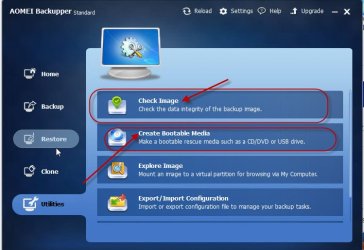
Always check image integrity after a backup.

Create a WinPE bootable media. ( I always prefer to do a backup and restore with the bootable media.)

06-01-2015 14-03-28.jpg

If you are not happy with AOMEI Backupper, you can go for Macrium Reflect, which is most recommended here but I know nothing of it. :)

EDIT: OK, I forgot to mention: For data backup, I use 2BrightSparks SyncBackFree, 2BrightSparks | SyncBackFree, SyncBackSE, and SyncBackPro ( There may be other good programs but I belong to the "Old School" :D)
 
Last edited:

My Computer My Computer

At a glance

Windows 7 Home Premium 32 bit
OS
Windows 7 Home Premium 32 bit
Thanks damien76 - my version of ATI is so old I can't even remember when I bought it lol; it was to replace Ghost so it has been awhile!

jumanji - thanks for that info - that sw (image or the data backup) wasn't even on my radar! - much appreciated :)

I will be going for the boot from dvd/usb to create image backups - I am old school too and can't quite trust anything that creates an image of a drive whilst the os is running from it ... that's just my irrationality I know :) Will have to run through the imaging software and see what suits; also will check the syncbackfree as well as freefilesync mentioned elsewhere on this forum.

Thanks again all :)
 

My Computer My Computer

At a glance

WIndows 7 Ultimate x64 and x32 (2 PCs)i35708GbNvidia 560ti
Computer type
PC/Desktop
OS
WIndows 7 Ultimate x64 and x32 (2 PCs)
CPU
i3570
Motherboard
Gigabyte z77-d3h
Memory
8Gb
Graphics Card(s)
Nvidia 560ti
Hard Drives
SSD and WD 1TB HD
Antivirus
AVG Free
Browser
Firefox
Back
Top