Motherboard Software

bigmck

Very Senior Member
Guru
Gold Member
VIP
Local time
4:48 AM
Messages
4,745
Location
Houston, Texas
I have a couple question about this. -- When I had my computer built a couple years ago, he gave me the cd for the motherboard software that had been installed. This past November, when I formated my HD and installed Win 7, I did not install my motherboard software again. Should I have done that? == Also I have heard that there should be on the motherboard software CD a program to monitor my temps. I have not looked for it, but just wondering if any of you have that on your CD? Thanks,
 

My Computer

Computer type
PC/Desktop
Computer Manufacturer/Model Number
Custom Build
OS
Windows 7 Home Premium 32-Bit - Build 7600 SP1
CPU
Intel Core i3-2120 3.30Ghz
Motherboard
Asus P8Z68-V LX Intel Z68 Socket H2 ATX
Memory
Kingston 4 GB DDR3 1333 mhz
Graphics Card(s)
AMD Radeon HD6670
Sound Card
Sound Blaster Audigy SE 24-Bit
Monitor(s) Displays
Asus VE228
Screen Resolution
1440 X 900
Hard Drives
OCZ Vertex 3 120 GB Sata 3 SSD ==
Kingston SH103/S3 120 G Hyper X 120 GB SSD ==
Western Digital 500 GB Caviar Green 7200 RPM ==
PSU
Corsair CX600M == 600 Watt
Case
NZXT Apollo - Silver with Clear Side Panel
Cooling
Three 120 mm Fans
Keyboard
Microsoft Natural 4000
Mouse
Microsoft Custom Optical 3000
Internet Speed
AT&T Fiber Optic Wireless Network
Antivirus
Microsoft Security Essentials
Browser
Chrome
Other Info
120 mm Blue LED Fan -- Three Blue LED Lazer Light Sticks
I have a couple question about this. -- When I had my computer built a couple years ago, he gave me the cd for the motherboard software that had been installed. This past November, when I formated my HD and installed Win 7, I did not install my motherboard software again. Should I have done that? == Also I have heard that there should be on the motherboard software CD a program to monitor my temps. I have not looked for it, but just wondering if any of you have that on your CD? Thanks,

Bigmck

Whatever you got on that CD is hopelessly old. I would go to the mfr site and check for the most recent BIOS. It should have all the functionality of the old cd but be compatible (hopefully) with win 7.

Let us know if you need help


ken
 

My Computer

Computer Manufacturer/Model Number
HP Pavillion dv-7 1005 Tx
OS
Win 8 Release candidate 8400
CPU
[email protected]
Memory
4 gigs
Graphics Card(s)
Nvidia 9600M
Sound Card
HD built-in
Monitor(s) Displays
17" Wxga
Screen Resolution
1440x900
Cooling
none
Internet Speed
45Mb down 5Mb up
Depends. Good answer, eh?

I have used ASUS mobos exclusively for some time. Each comes with an install disc that contains drivers and sundry apps/utilities. When I seek upgrades, more often than not, the sundry apps/utilities are not, or only partially, listed: only driver and essential SW (integrated audio, network adaptor, etc) updates are routinely listed.

What you might have to do is extract missing stuff from the install disc, easy enough and, hopefully, it will be compatible with Win7.

Monk
 

My Computer

Computer Manufacturer/Model Number
Custom
OS
Dual boot XP Pro SP3x86 and Win7 Pro x64
CPU
AMD Phenom II x3 720 BE OCed to 3.3 GHz
Motherboard
Asus M3A79T Deluxe
Memory
2x2GB OCZ OCZ2RPR10664GK PC2-8500 DDR2
Graphics Card(s)
Sapphire ATi Radeon 4830 HD x2 (XFire)
Sound Card
Integrated (SoundMax)
Monitor(s) Displays
Dual: LG L227WTG/LG M237WD
Screen Resolution
1680 x 1050; 1920 x1280
Hard Drives
3 WDC WD7501AALS-00J7B0
PSU
Zalman 750HD Modular
Case
Antec 900
Cooling
4 120mm, 1 200mm fans
Keyboard
Black with lots of keys
Mouse
Razer Lachesis, Logitech RumbePad2, Logitech Marble
Internet Speed
Who counts
Other Info
7:1 SS
Whatever you got on that CD is hopelessly old.

Er.... What zigzag said. In addition to the BIOS update, which you may or may not want to mess with, I would look to the manufacture's website and get the latest drivers for your motherboard and hardware.

As zizgag said, whatever is on that CD is old, and outdated... Win 7 wasn't out yet ;)

Good luck.
 

My Computer

Computer type
PC/Desktop
Computer Manufacturer/Model Number
Custom built by me.
OS
Windows 10 Pro
CPU
Intel Core i7-4770K (3.5Ghz)
Motherboard
Gigabyte G1 Sniper 5 (F10 Bios)
Memory
32 gig Corsair Dominator Platinum (4x8Gig)
Graphics Card(s)
Sapphire Tri-X R9 Fury
Sound Card
Soundblaster ZXR
Monitor(s) Displays
NEC PA242W 24" LCD Monitor
Screen Resolution
1920 x 1200
Hard Drives
Primary - Samsung 850 Pro (512gig), Samsung 840 Pro (256gig), 2TB WD Caviar Black.
PSU
EVGA Supernova 1000 G2
Case
Cooler Master HAF X
Cooling
Corsair H100i with Corsair Air Series SP120 Quiet Fans
Keyboard
Logitech Wireless Wave
Mouse
Logitech Performance MX
Internet Speed
High Speed Cable
Antivirus
Norton Security
Browser
IE11
Other Info
Memory Timings - 1866MHz @ 9-9-9-27-1T @ 1.5 volts
My main question was about a temperature monitoring program being on the CD. I just wondered if any of you found that on yours? Thanks,
 

My Computer

Computer type
PC/Desktop
Computer Manufacturer/Model Number
Custom Build
OS
Windows 7 Home Premium 32-Bit - Build 7600 SP1
CPU
Intel Core i3-2120 3.30Ghz
Motherboard
Asus P8Z68-V LX Intel Z68 Socket H2 ATX
Memory
Kingston 4 GB DDR3 1333 mhz
Graphics Card(s)
AMD Radeon HD6670
Sound Card
Sound Blaster Audigy SE 24-Bit
Monitor(s) Displays
Asus VE228
Screen Resolution
1440 X 900
Hard Drives
OCZ Vertex 3 120 GB Sata 3 SSD ==
Kingston SH103/S3 120 G Hyper X 120 GB SSD ==
Western Digital 500 GB Caviar Green 7200 RPM ==
PSU
Corsair CX600M == 600 Watt
Case
NZXT Apollo - Silver with Clear Side Panel
Cooling
Three 120 mm Fans
Keyboard
Microsoft Natural 4000
Mouse
Microsoft Custom Optical 3000
Internet Speed
AT&T Fiber Optic Wireless Network
Antivirus
Microsoft Security Essentials
Browser
Chrome
Other Info
120 mm Blue LED Fan -- Three Blue LED Lazer Light Sticks
It depends. Some motherboards come with monitoring programs, some don't. My Gigabyte board has monitoring software, which has temp reading programs for CPU & GPU, though it’s not as extensive as Core Temp or GPU-Z.

Not sure what you're looking for. Again, I would check out you board's vendor and see what they have for monitoring software.

But to answer your question, yes my CD came with monitoring software on it.
 

My Computer

Computer type
PC/Desktop
Computer Manufacturer/Model Number
Custom built by me.
OS
Windows 10 Pro
CPU
Intel Core i7-4770K (3.5Ghz)
Motherboard
Gigabyte G1 Sniper 5 (F10 Bios)
Memory
32 gig Corsair Dominator Platinum (4x8Gig)
Graphics Card(s)
Sapphire Tri-X R9 Fury
Sound Card
Soundblaster ZXR
Monitor(s) Displays
NEC PA242W 24" LCD Monitor
Screen Resolution
1920 x 1200
Hard Drives
Primary - Samsung 850 Pro (512gig), Samsung 840 Pro (256gig), 2TB WD Caviar Black.
PSU
EVGA Supernova 1000 G2
Case
Cooler Master HAF X
Cooling
Corsair H100i with Corsair Air Series SP120 Quiet Fans
Keyboard
Logitech Wireless Wave
Mouse
Logitech Performance MX
Internet Speed
High Speed Cable
Antivirus
Norton Security
Browser
IE11
Other Info
Memory Timings - 1866MHz @ 9-9-9-27-1T @ 1.5 volts
I use core temp. their are plenty of others out their I suggest you find one your comfortable with and install it.
As with everything I install I first create a restore point, I find it a good habit to get into just in case you download an app, driver or anything you find you don't like for whatever reason you can un-install it then restore back to where your system was before. This way it helps keep it clean and some applications can be harder to remove all the residual folders than others. JMO. Fabe
 

My Computer

Computer Manufacturer/Model Number
Self Built
OS
Windows 7 ultimate 64 bit / XP Home sp3
CPU
intel Core 2 Duo E8400 3.0ghz
Motherboard
Asus P5ND bios 1401
Memory
8 gigs 1066 OCZ Fata1ty
Graphics Card(s)
EVGA GTX 580 Call of Duty Black Ops Edition
Sound Card
Creative Soundblaster Audigy 2zs
Monitor(s) Displays
Asus 24in LCD's 2MS X2
Screen Resolution
1920x1080p @60Hz
Hard Drives
WD Caviar 500 Black/ WD Caviar 200 Blue
PSU
OCZ 700W GameXtreme
Case
NZXT Apollo
Cooling
Corsair H50 CPU/120mm x3 /60mm x2 /Corsair Dominator Ram
Keyboard
Logitech Bluetooth Wireless MX5000
Mouse
Logitech Bluetooth Wireless MX1000
Internet Speed
Download 19.83 Upload 0.97
Other Info
Logitech Z2300 Speakers/ Bose Noise Cancelling Headphones/Avermedia PCI-e Hybrid TV Bravo/Epson NX415 all in one/ 4 Port Powered USB Hub/ LG 10x Bluray Burner /TSST Corp DVDRW External
My Asus MB has temp monitoring SW, but usually BIOS monitoring software isn't as accurate or detailed as readily available free programs. Some examples are:

Real Temp (Intel)

Real Temp is a temperature monitoring program designed for all Intel single Core, Dual Core and Quad Core processors. Each core on these processors has a digital thermal sensor (DTS) that reports temperature data relative to TjMax which is the safe maximum operating core temperature for the CPU. As your CPU heats up, your Distance to TjMax will decrease. If it reaches zero your processor will start to throttle or slow down so maximizing your distance away from TjMax will help your computer run at full speed and more reliably too.

screen1.jpg

Main Features
Reads temperature information from all Intel Core based processors.
Ability to individually calibrate Real Temp for each core of your CPU.
Program is based on temperature data gathered using a Fluke 62 IR Thermometer.
Test Sensors feature will check your DTS sensors for any sign of problems.
Keeps track of Minimum and Maximum temperatures with full logging features.
Reporting and logging of the Intel PROCHOT# thermal throttle activity bit.
Quick, very accurate and repeatable benchmark.
Displays MHz, TjMax, VID, CPUID and Calibration settings.
No installation or registry modifications required.
Support for Windows 2000 / XP / Vista (32 and 64 bit versions)

It is Windows 7 compatible

Real Temp - CPU temperature monitoring

HWMonitor

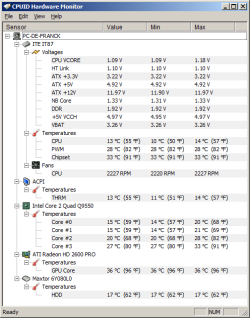
HWMonitor is a hardware monitoring program that reads PC systems main health sensors : voltages, temperatures, fans speed.

hwm1.png

The program handles the most common sensor chips, like ITE® IT87 series, most Winbond® ICs, and others. In addition, it can read modern CPUs on-die core thermal sensors, as well has hard drives temperature via S.M.A.R.T, and video card GPU temperature.

Special hardware monitors such as abit® uGuru and Gigabyte® ODIN™ power supplies serie are supported too.

CPUID

SFkilla also made a HWMonitor Meter gadget:

hwm.jpg

SFKilla - HWMonitor Meter

A Guy
 

My Computer

Computer type
PC/Desktop
OS
Windows 10 Home x64
CPU
INTEL Core i5-750 Quad-Core 3.37GHz
Motherboard
ASUS P7P55D
Memory
HyperX Fury Black Series 8GB (2 x 4GB) 1866Mhz
Graphics Card(s)
EVGA GeForce GTX 750 Superclocked 1GB 128-Bit GDDR5
Monitor(s) Displays
LG 32MA68HY 32" IPS
Screen Resolution
1920 x 1080
Hard Drives
Samsung 840 Evo 120GB, SEAGATE 500GB Barracuda® 7200.12, SATA 3 Gb/s, 7200 RPM, 16MB cache
PSU
ANTEC TruePower New TP-550, 80 PLUS, 550W
Case
ANTEC Three Hundred Illusion
Cooling
COOLER MASTER Hyper 212 Plus, 4 x 120mm 1 x 140mm Noctua's
Internet Speed
85 + Mbps
Antivirus
Avast
Browser
Vivaldi
Try one of the already suggested third-party temp monitoring utilities or go to the Asus Support site to see if they have the updated tools you're looking for.

Asus is pretty good at updating drivers for a new OS, but they suck when it comes to their apps.

I'd highly recommend that you do NOT extract utilities from your MB driver disc and try to install them in Win 7. That's a clear recipe for disaster... ;)
 

My Computer

Computer Manufacturer/Model Number
Home Grown
OS
Windows 7 Ultimate (64)
CPU
i7-2600K
Motherboard
Asus P8P67-M Pro
Memory
G.SKILL Ripjaws X Series 8GB (2 x 4GB)
Graphics Card(s)
ATI 5750
Sound Card
On-Board
Monitor(s) Displays
LG W2486L
Screen Resolution
1920X1080
Hard Drives
Intel X-25M 80 Gig SSD | Intel X-25M 160 Gig SSD | WD Black 500MB - External eSata
PSU
Zalman ZM770-XT 770 Watts
Case
Antec 180 mini
Cooling
Cooler Master V8
Internet Speed
15MB - Cable
Other Info
Sissy OC - 4.6 @ 1.3175 24/7 | 18' Idle - 55' Load
Try one of the already suggested third-party temp monitoring utilities or go to the Asus Support site to see if they have the updated tools you're looking for.

Asus is pretty good at updating drivers for a new OS, but they suck when it comes to their apps.

I'd highly recommend that you do NOT extract utilities from your MB driver disc and try to install them in Win 7. That's a clear recipe for disaster... ;)

It's what I said about the apps; however, if you extract and attempt to install a utility from the disc and, it is incompatible, Windows will simply alert you to that fact as it does with any incompatible app and you will not be able to proceed with the installation.

Monk
 

My Computer

Computer Manufacturer/Model Number
Custom
OS
Dual boot XP Pro SP3x86 and Win7 Pro x64
CPU
AMD Phenom II x3 720 BE OCed to 3.3 GHz
Motherboard
Asus M3A79T Deluxe
Memory
2x2GB OCZ OCZ2RPR10664GK PC2-8500 DDR2
Graphics Card(s)
Sapphire ATi Radeon 4830 HD x2 (XFire)
Sound Card
Integrated (SoundMax)
Monitor(s) Displays
Dual: LG L227WTG/LG M237WD
Screen Resolution
1680 x 1050; 1920 x1280
Hard Drives
3 WDC WD7501AALS-00J7B0
PSU
Zalman 750HD Modular
Case
Antec 900
Cooling
4 120mm, 1 200mm fans
Keyboard
Black with lots of keys
Mouse
Razer Lachesis, Logitech RumbePad2, Logitech Marble
Internet Speed
Who counts
Other Info
7:1 SS
Try one of the already suggested third-party temp monitoring utilities or go to the Asus Support site to see if they have the updated tools you're looking for.

Asus is pretty good at updating drivers for a new OS, but they suck when it comes to their apps.

I'd highly recommend that you do NOT extract utilities from your MB driver disc and try to install them in Win 7. That's a clear recipe for disaster... ;)

It's what I said about the apps; however, if you extract and attempt to install a utility from the disc and, it is incompatible, Windows will simply alert you to that fact as it does with any incompatible app and you will not be able to proceed with the installation.

Monk

I think we're getting sidetracked here....

My main question was about a temperature monitoring program being on the CD. I just wondered if any of you found that on yours? Thanks,

My answer was yes, there is a temperature monitoring program on my CD.
 

My Computer

Computer type
PC/Desktop
Computer Manufacturer/Model Number
Custom built by me.
OS
Windows 10 Pro
CPU
Intel Core i7-4770K (3.5Ghz)
Motherboard
Gigabyte G1 Sniper 5 (F10 Bios)
Memory
32 gig Corsair Dominator Platinum (4x8Gig)
Graphics Card(s)
Sapphire Tri-X R9 Fury
Sound Card
Soundblaster ZXR
Monitor(s) Displays
NEC PA242W 24" LCD Monitor
Screen Resolution
1920 x 1200
Hard Drives
Primary - Samsung 850 Pro (512gig), Samsung 840 Pro (256gig), 2TB WD Caviar Black.
PSU
EVGA Supernova 1000 G2
Case
Cooler Master HAF X
Cooling
Corsair H100i with Corsair Air Series SP120 Quiet Fans
Keyboard
Logitech Wireless Wave
Mouse
Logitech Performance MX
Internet Speed
High Speed Cable
Antivirus
Norton Security
Browser
IE11
Other Info
Memory Timings - 1866MHz @ 9-9-9-27-1T @ 1.5 volts
Right, Sygnus21.

Yes my install disc contains ProbeII, Asus's utility that monitors various component parameters including various temps.
 

My Computer

Computer Manufacturer/Model Number
Custom
OS
Dual boot XP Pro SP3x86 and Win7 Pro x64
CPU
AMD Phenom II x3 720 BE OCed to 3.3 GHz
Motherboard
Asus M3A79T Deluxe
Memory
2x2GB OCZ OCZ2RPR10664GK PC2-8500 DDR2
Graphics Card(s)
Sapphire ATi Radeon 4830 HD x2 (XFire)
Sound Card
Integrated (SoundMax)
Monitor(s) Displays
Dual: LG L227WTG/LG M237WD
Screen Resolution
1680 x 1050; 1920 x1280
Hard Drives
3 WDC WD7501AALS-00J7B0
PSU
Zalman 750HD Modular
Case
Antec 900
Cooling
4 120mm, 1 200mm fans
Keyboard
Black with lots of keys
Mouse
Razer Lachesis, Logitech RumbePad2, Logitech Marble
Internet Speed
Who counts
Other Info
7:1 SS
TBH I was a little confused by the original post as well... thus his reply :)
 

My Computer

Computer type
PC/Desktop
Computer Manufacturer/Model Number
Custom built by me.
OS
Windows 10 Pro
CPU
Intel Core i7-4770K (3.5Ghz)
Motherboard
Gigabyte G1 Sniper 5 (F10 Bios)
Memory
32 gig Corsair Dominator Platinum (4x8Gig)
Graphics Card(s)
Sapphire Tri-X R9 Fury
Sound Card
Soundblaster ZXR
Monitor(s) Displays
NEC PA242W 24" LCD Monitor
Screen Resolution
1920 x 1200
Hard Drives
Primary - Samsung 850 Pro (512gig), Samsung 840 Pro (256gig), 2TB WD Caviar Black.
PSU
EVGA Supernova 1000 G2
Case
Cooler Master HAF X
Cooling
Corsair H100i with Corsair Air Series SP120 Quiet Fans
Keyboard
Logitech Wireless Wave
Mouse
Logitech Performance MX
Internet Speed
High Speed Cable
Antivirus
Norton Security
Browser
IE11
Other Info
Memory Timings - 1866MHz @ 9-9-9-27-1T @ 1.5 volts
Back
Top