Mouse issue

Doctor Device

New member
Member
Local time
6:56 AM
Messages
10
I have had windows 7 x64 for a while and suddenly, my USB mouse (OCZ Behemoth) stopped working. oddly, only the pointer stopped working, the clicker and scroll wheel work fine. It's a corded mouse, so no "new battery" comments.

WHAT I HAVE TRIED

  • Different port
  • Device manager->Reinstall (it appeared as "Unknown USB device". it now appears as "USB Human Interface Device" but still does not work.)
  • Rolled back using System Restore to yesterday when it worked, nothing.
  • Rebooting
  • Going into my WinXP x64 install, it works there
  • putting the Behemoth in my laptop, it works.
  • Using another USB mouse on my computer (doesn't work with 3 mice that work fine on other computers)
  • Trying other USB devices in my ports (all ports work fine with a thumb drive, as well as USB devices that require power)
POSSIBLE CAUSES

  • I recently set up a "guest" account on my computer. this is the only major change i can think of (this was removed when i used System Restore)
IT IS NOT

  • Motherboard Drivers (USB works fine with other devices)
  • OCZ drivers (no mouse works correctly)
  • Mouse Battery (corded mouse)
  • Bad install (it worked fine for the approximate month i had Windows 7 on my computer)
  • Proprietary driver clash (self-built rig, not HP/Compaq/whatever)
NOTES

  • I have not tried a PS/2 mouse or USB->PS/2 adapter because i do not own one.
  • The "new hardware wizard" does not pop up upon a mouse insertion
  • I am admin account
 

My Computer

OS
Windows 7 Ultimate x64/Windows XP Professional x64
CPU
AMD Phenom II x4 64-bit @3.2 GHz
Motherboard
GIGABYTE GA-MA78GM
Memory
4GB
Graphics Card(s)
ATI Radeon 4770
Monitor(s) Displays
1x 1360x720 widescreen 1x 2048x1152 widescreen
Hard Drives
2x Western Digital Caviar 500GB
PSU
CORSAIR 700w
Case
NZXT Apollo
Cooling
2 high-velocity case fans, Coolmax Rifle CPU cooler
I have had windows 7 x64 for a while and suddenly, my USB mouse (OCZ Behemoth) stopped working. oddly, only the pointer stopped working, the clicker and scroll wheel work fine. It's a corded mouse, so no "new battery" comments.

WHAT I HAVE TRIED

  • Different port
  • Device manager->Reinstall (it appeared as "Unknown USB device". it now appears as "USB Human Interface Device" but still does not work.)
  • Rolled back using System Restore to yesterday when it worked, nothing.
  • Rebooting
  • Going into my WinXP x64 install, it works there
  • putting the Behemoth in my laptop, it works.
  • Using another USB mouse on my computer (doesn't work with 3 mice that work fine on other computers)
  • Trying other USB devices in my ports (all ports work fine with a thumb drive, as well as USB devices that require power)
POSSIBLE CAUSES

  • I recently set up a "guest" account on my computer. this is the only major change i can think of (this was removed when i used System Restore)
IT IS NOT

  • Motherboard Drivers (USB works fine with other devices)
  • OCZ drivers (no mouse works correctly)
  • Mouse Battery (corded mouse)
  • Bad install (it worked fine for the approximate month i had Windows 7 on my computer)
  • Proprietary driver clash (self-built rig, not HP/Compaq/whatever)
NOTES

  • I have not tried a PS/2 mouse or USB->PS/2 adapter because i do not own one.
  • The "new hardware wizard" does not pop up upon a mouse insertion
  • I am admin account
Nice details on your issue (helps cut down what needs to be said;))

Try this...http://www.sevenforums.com/tutorials/3413-repair-install.html

Sounds like mice in general got corrupted in your 7 installation....see if the repair install fixes it
 

My Computer

Computer Manufacturer/Model Number
Compal JFT02 (Custom Build Laptop)
OS
Windows 7 Home Premium x64 - Mac OS X 10.6.4 x64
CPU
Intel Core 2 Duo T9300 2.5 GHz
Motherboard
JFT02
Memory
4GB Kingston DDR2-800
Graphics Card(s)
NVIDIA Geforce 8600M GT (512MB Model)
Sound Card
Realtek HD Audio
Monitor(s) Displays
WUXGA Standard Laptop Display
Screen Resolution
1680*1050
Hard Drives
Toshiba 320GB 5400RPM Laptop HD
PSU
Standard Laptop Power Supply
Case
Standard Laptop Case
Cooling
Standard Laptop Cooling
Keyboard
Standard Laptop 105 Key-Keyboard
Mouse
Synaptics Touchpad
Internet Speed
Verizion Online DSL 3360/864 kbs (dl/up)
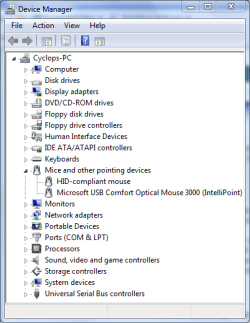
What does Device Manager show?
Capture.PNG
 

My Computer

Computer type
PC/Desktop
Computer Manufacturer/Model Number
Dwarf Dwf/11/2012 r09/2013
OS
Windows 8.1 Pro RTM x64
CPU
Intel Core-i5-3570K 4-core @ 3.4GHz (Ivy Bridge) (OC 4.4GHz)
Motherboard
ASRock Z77 Extreme4-M
Memory
4 x 4GB DDR3-1600 Corsair Vengeance CMZ8GX3M2A1600C9B (16GB)
Graphics Card(s)
MSI GeForce GTX770 Gaming OC 2GB
Sound Card
Realtek High Definition on board solution (ALC 898)
Monitor(s) Displays
ViewSonic VA1912w Widescreen (VGA)
Screen Resolution
1440x900
Hard Drives
OCZ Agility 3 SSD 120GB SATA III x2 (RAID 0)
Samsung HD501LJ 500GB SATA II x2
Hitachi HDS721010CLA332 1TB SATA II
Iomega 1.5TB Ext USB 2.0
WD 2.0TB Ext USB 3.0
PSU
XFX Pro Series 850W Semi-Modular
Case
Gigabyte IF233
Cooling
1 x 120mm Front Inlet 1 x 120mm Rear Exhaust
Keyboard
Microsoft Comfort Curve Keyboard 3000 (USB)
Mouse
Microsoft Comfort Mouse 3000 for Business (USB)
Internet Speed
NetGear DG834Gv3 ADSL Modem/Router (Ethernet) ~4.0 Mb/s (O2)
Antivirus
Avast! 8.0.1497
Browser
IE 11
Other Info
Optical Drive: HL-DT-ST BD-RE BH10LS30 SATA Bluray
Lexmark S305 Printer/Scanner/Copier (USB)
WEI Score: 8.1/8.1/8.5/8.5/8.25
Asus Eee PC 1011PX Netbook (Windows 7 x86 Starter)
IT IS NOT

  • Bad install (it worked fine for the approximate month i had Windows 7 on my computer)
Nice details on your issue (helps cut down what needs to be said;))

Try this...http://www.sevenforums.com/tutorials/3413-repair-install.html

Sounds like mice in general got corrupted in your 7 installation....see if the repair install fixes it
How would this happen, exactly? and i will try when i get home from school. I'm going to try other things because i don't want to lose my sound, etc. settings. Plus, the mouse worked fine for a long time in Win7, i got it day after launch and the mouse worked great without any installation needed.
 

My Computer

OS
Windows 7 Ultimate x64/Windows XP Professional x64
CPU
AMD Phenom II x4 64-bit @3.2 GHz
Motherboard
GIGABYTE GA-MA78GM
Memory
4GB
Graphics Card(s)
ATI Radeon 4770
Monitor(s) Displays
1x 1360x720 widescreen 1x 2048x1152 widescreen
Hard Drives
2x Western Digital Caviar 500GB
PSU
CORSAIR 700w
Case
NZXT Apollo
Cooling
2 high-velocity case fans, Coolmax Rifle CPU cooler
What does Device Manager show?
it shows "HID-Compliant Mouse". before i did some driver reinstalls, it said "Unknown USB Device".
 

My Computer

OS
Windows 7 Ultimate x64/Windows XP Professional x64
CPU
AMD Phenom II x4 64-bit @3.2 GHz
Motherboard
GIGABYTE GA-MA78GM
Memory
4GB
Graphics Card(s)
ATI Radeon 4770
Monitor(s) Displays
1x 1360x720 widescreen 1x 2048x1152 widescreen
Hard Drives
2x Western Digital Caviar 500GB
PSU
CORSAIR 700w
Case
NZXT Apollo
Cooling
2 high-velocity case fans, Coolmax Rifle CPU cooler
IT IS NOT

  • Bad install (it worked fine for the approximate month i had Windows 7 on my computer)
Nice details on your issue (helps cut down what needs to be said;))

Try this...http://www.sevenforums.com/tutorials/3413-repair-install.html

Sounds like mice in general got corrupted in your 7 installation....see if the repair install fixes it
How would this happen, exactly? and i will try when i get home from school.
If your asking how mice in general got corrupted...I don't have a clear concise answer of why. In your notes above you mention that you only made a guest account as a major change. It would be a stretch to say this was the cause. Unless you might be forgetting anything else you did to the computer (such as installing a program...) than this might just be a fluke...

The repair install is the same as an upgrade install...it is just with itself. This means that you replace the Windows 7 files (files that might be corrupt) with the same ones in their stable entitys from the disc
 

My Computer

Computer Manufacturer/Model Number
Compal JFT02 (Custom Build Laptop)
OS
Windows 7 Home Premium x64 - Mac OS X 10.6.4 x64
CPU
Intel Core 2 Duo T9300 2.5 GHz
Motherboard
JFT02
Memory
4GB Kingston DDR2-800
Graphics Card(s)
NVIDIA Geforce 8600M GT (512MB Model)
Sound Card
Realtek HD Audio
Monitor(s) Displays
WUXGA Standard Laptop Display
Screen Resolution
1680*1050
Hard Drives
Toshiba 320GB 5400RPM Laptop HD
PSU
Standard Laptop Power Supply
Case
Standard Laptop Case
Cooling
Standard Laptop Cooling
Keyboard
Standard Laptop 105 Key-Keyboard
Mouse
Synaptics Touchpad
Internet Speed
Verizion Online DSL 3360/864 kbs (dl/up)
[/LIST]
Nice details on your issue (helps cut down what needs to be said;))

Try this...http://www.sevenforums.com/tutorials/3413-repair-install.html

Sounds like mice in general got corrupted in your 7 installation....see if the repair install fixes it
How would this happen, exactly? and i will try when i get home from school.
If your asking how mice in general got corrupted...I don't have a clear concise answer of why. In your notes above you mention that you only made a guest account as a major change. It would be a stretch to say this was the cause. Unless you might be forgetting anything else you did to the computer (such as installing a program...) than this might just be a fluke...

The repair install is the same as an upgrade install...it is just with itself. This means that you replace the Windows 7 files (files that might be corrupt) with the same ones in their stable entitys from the disc
I didn't install a program.
 

My Computer

OS
Windows 7 Ultimate x64/Windows XP Professional x64
CPU
AMD Phenom II x4 64-bit @3.2 GHz
Motherboard
GIGABYTE GA-MA78GM
Memory
4GB
Graphics Card(s)
ATI Radeon 4770
Monitor(s) Displays
1x 1360x720 widescreen 1x 2048x1152 widescreen
Hard Drives
2x Western Digital Caviar 500GB
PSU
CORSAIR 700w
Case
NZXT Apollo
Cooling
2 high-velocity case fans, Coolmax Rifle CPU cooler
Not to overlook the obvious, but maybe the mouse just went bung. Laser failure?
 

My Computer

Computer type
PC/Desktop
Computer Manufacturer/Model Number
Custom
OS
7 x64 Ultimate
CPU
AMD Ryzen 5
Motherboard
Gigabyte GA-AB350-Gaming
Memory
16GB DDR4
Graphics Card(s)
Radeon R7 360
Monitor(s) Displays
2 x Dell U2518D
Screen Resolution
2560x1440 2560x1440
Hard Drives
WD 500GB x2
Samsung SSD 128MB (OS)
XPG SX8200 Pro M.2 2280 1TB
PSU
Antec 500
Cooling
Hyper 212 EVO
Keyboard
Logitech cordless K800
Mouse
Logitech M510
Antivirus
Avira
Not to overlook the obvious, but maybe the mouse just went bung. Laser failure?
Like i said in the OP, i tried multiple mice that work fine on others, plus my Behemoth worked on my laptop.
 

My Computer

OS
Windows 7 Ultimate x64/Windows XP Professional x64
CPU
AMD Phenom II x4 64-bit @3.2 GHz
Motherboard
GIGABYTE GA-MA78GM
Memory
4GB
Graphics Card(s)
ATI Radeon 4770
Monitor(s) Displays
1x 1360x720 widescreen 1x 2048x1152 widescreen
Hard Drives
2x Western Digital Caviar 500GB
PSU
CORSAIR 700w
Case
NZXT Apollo
Cooling
2 high-velocity case fans, Coolmax Rifle CPU cooler
Just uninstalled all my USB drivers, reinstalled and it is recognized as "unidentified Device"
 

My Computer

OS
Windows 7 Ultimate x64/Windows XP Professional x64
CPU
AMD Phenom II x4 64-bit @3.2 GHz
Motherboard
GIGABYTE GA-MA78GM
Memory
4GB
Graphics Card(s)
ATI Radeon 4770
Monitor(s) Displays
1x 1360x720 widescreen 1x 2048x1152 widescreen
Hard Drives
2x Western Digital Caviar 500GB
PSU
CORSAIR 700w
Case
NZXT Apollo
Cooling
2 high-velocity case fans, Coolmax Rifle CPU cooler
Can you run sfc /scannow at an elevated command prompt? Type cmd into the start menu and then right click the app and select run as administrator or press Ctrl+Shift+Enter. Also, disconnect every other USB device. They may be causing interference. Finally, update the chipset and BIOS.
 

My Computer

Computer Manufacturer/Model Number
Sony Vaio Z46GDU
OS
Windows 7 Ultimate x86-64
CPU
[email protected] 1066MHz FSB
Motherboard
Sony branded
Memory
6GB DDR3 1066MHz
Graphics Card(s)
9300M GS 256MB Dedicated (Speed) + Intel4500MHD (Stamina)
Sound Card
Realtek HD Audio
Monitor(s) Displays
13.1' WXGA
Screen Resolution
1600x900
Hard Drives
320GB 7200RPM w/ 16MB cache
Internet Speed
1MB/s
Doing sfc /scannow now. I now have a PS/2 mouse hooked up, it works fine but is ancient so it's awful for gaming, especially with my 2048x1152 resolution.
 

My Computer

OS
Windows 7 Ultimate x64/Windows XP Professional x64
CPU
AMD Phenom II x4 64-bit @3.2 GHz
Motherboard
GIGABYTE GA-MA78GM
Memory
4GB
Graphics Card(s)
ATI Radeon 4770
Monitor(s) Displays
1x 1360x720 widescreen 1x 2048x1152 widescreen
Hard Drives
2x Western Digital Caviar 500GB
PSU
CORSAIR 700w
Case
NZXT Apollo
Cooling
2 high-velocity case fans, Coolmax Rifle CPU cooler
Scannow results in the following:
Beginning system scan. This process will take some time.

Beginning verification phase of system scan.
Verification 100% complete.
Windows Resource Protection found corrupt files but was unable to fix some of them.
Details are included in the CBS.log windir\Logs\CBS\CBS.log. For example C:\Windows\Logs\CBS\CBS.log
 

My Computer

OS
Windows 7 Ultimate x64/Windows XP Professional x64
CPU
AMD Phenom II x4 64-bit @3.2 GHz
Motherboard
GIGABYTE GA-MA78GM
Memory
4GB
Graphics Card(s)
ATI Radeon 4770
Monitor(s) Displays
1x 1360x720 widescreen 1x 2048x1152 widescreen
Hard Drives
2x Western Digital Caviar 500GB
PSU
CORSAIR 700w
Case
NZXT Apollo
Cooling
2 high-velocity case fans, Coolmax Rifle CPU cooler
... bump
 

My Computer

OS
Windows 7 Ultimate x64/Windows XP Professional x64
CPU
AMD Phenom II x4 64-bit @3.2 GHz
Motherboard
GIGABYTE GA-MA78GM
Memory
4GB
Graphics Card(s)
ATI Radeon 4770
Monitor(s) Displays
1x 1360x720 widescreen 1x 2048x1152 widescreen
Hard Drives
2x Western Digital Caviar 500GB
PSU
CORSAIR 700w
Case
NZXT Apollo
Cooling
2 high-velocity case fans, Coolmax Rifle CPU cooler
Back
Top