Solved Mouse: Left click not working properly due to driver conflict

domm89

New member
Local time
9:13 PM
Messages
4
Hi guys!

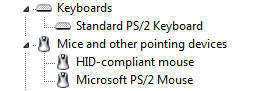
I have a USB mouse and my left click is not working properly, i think it's because of this driver conflict.
Do you know how to solve this problem?

Thanks for help!

Mouse.png
 

Attachments

  • Mouse.png
    Mouse.png
    2 KB · Views: 25

My Computer My Computer

At a glance

Windows 7 Professional 32bit
Computer type
Laptop
Computer Manufacturer/Model Number
MSI
OS
Windows 7 Professional 32bit
Well the mouse that you use is a ps/2 - to be sure if is a driver issue ,use'it to a friend computer. Maybe is the mouse.Try to use a usb atacched mouse instead a ps/2 ,and if this won't work then it could be a chipset driver issue.Why chipset and not mouse driver? - because the input signal that you send when you use your mouse is go to a serial gate (strange that -becouse also the keyboard that you use could have the same trouble-but you don't specified), that go untill the processor,and elaborate the signal imput as an electric signal.You could uninstall the specified driver by clicking on the microsoft ps2 mouse and go to (right click) and select the column uninstall.To go on bios and search on harware if the usb ps/2 is enable it could be exagerate since you use the same keyboard.
 

My Computer My Computer

At a glance

Windows 7 Ultimate x64amd fx-63004 gb kingston ddr3none
Computer type
PC/Desktop
Computer Manufacturer/Model Number
custom build
OS
Windows 7 Ultimate x64
CPU
amd fx-6300
Motherboard
asus mk
Memory
4 gb kingston ddr3
Graphics Card(s)
none
Hard Drives
160 gb
320 gb maxtor
Antivirus
malwarebytes
Browser
google
The funniest thing is that mouse is not a PS/2, it's brand new USB mouse I bought just the other day, I don't know why system recognisses it as PS/2.
I changed the USB port and nothing, typed in RUN "regsvr32 urlmon.dll" and nothing, uninstalled driver from device manager(one or both) still doesn't work.
I'm all out of ideas please help guys?

Also what I forgot to mention is that I have a laptop MSI VR601x, I formated whole hard disk and installed new windows professional 32bit couple days ago.
 

My Computer My Computer

At a glance

Windows 7 Professional 32bit
Computer type
Laptop
Computer Manufacturer/Model Number
MSI
OS
Windows 7 Professional 32bit
Actually, just a thought here (confess I haven't read the whole thread... sorry) - but in your BIOS, there may be an option that says something like "USB keyboard/mouse/input support" (I doubt it will have the same wording, but an option similar. Usually in the "Peripherals" section. With your LAN options) usually with some options like "on/legacy/off" make sure this is set to ON. Even if your USB ports are turned on (and I suspect they are! otherwise it wouldn't even show up) this option needs turning on as well.

Also, have you checked the mouse on a different PC to make sure its not a problem with the actual mouse?
 

My Computer My Computer

At a glance

Windows 10 Pro x64Intel Core i5 7400 @ 3.00GHz8GB 2133Mhz DDR4 (OEM supplied)Gygabyte Windforce GTX 1050Ti (Factory Overcl...
Computer type
PC/Desktop
Computer Manufacturer/Model Number
Medion Erazer (note to self: insert model number) - with custom additions
OS
Windows 10 Pro x64
CPU
Intel Core i5 7400 @ 3.00GHz
Motherboard
OEM supllied with PC
Memory
8GB 2133Mhz DDR4 (OEM supplied)
Graphics Card(s)
Gygabyte Windforce GTX 1050Ti (Factory Overclocked)
Sound Card
Realtek
Monitor(s) Displays
Acer Al1980 + HKC
Screen Resolution
1360*768(HKC) / 1280*1024(Acer)
Hard Drives
1TB Toshiba
1TB WD Caviar Green
120GB Samsung Evo 840
PSU
OEM supplied (no power rating on case)
Case
OEM Supplied
Cooling
Stock
Keyboard
Logitech Wireless
Mouse
Logitect Wireless
Internet Speed
40Mb/s Down 10Mb/s Up
Antivirus
Defender
Browser
Firefox
This is only options that I have in my Bios Advanced tab:
Image0331.jpg


And I have put "Legacy USB Support" on "enabled". Guess I did something wrong because mouse still isn't working :(
 

My Computer My Computer

At a glance

Windows 7 Professional 32bit
Computer type
Laptop
Computer Manufacturer/Model Number
MSI
OS
Windows 7 Professional 32bit
The easiest way to check is to see if the mouse works on another machine. I've had this problem myself, where again the left mouse button stopped working or was only working intermittently. This was probably due to that button being the most used on the mouse. A replacement mouse solved the problem for me.
 

My Computer My Computer

At a glance

Windows 8.1 Pro RTM x64Intel Core-i5-3570K 4-core @ 3.4GHz (Ivy Brid...4 x 4GB DDR3-1600 Corsair Vengeance CMZ8GX3M2...MSI GeForce GTX770 Gaming OC 2GB
Computer type
PC/Desktop
Computer Manufacturer/Model Number
Dwarf Dwf/11/2012 r09/2013
OS
Windows 8.1 Pro RTM x64
CPU
Intel Core-i5-3570K 4-core @ 3.4GHz (Ivy Bridge) (OC 4.4GHz)
Motherboard
ASRock Z77 Extreme4-M
Memory
4 x 4GB DDR3-1600 Corsair Vengeance CMZ8GX3M2A1600C9B (16GB)
Graphics Card(s)
MSI GeForce GTX770 Gaming OC 2GB
Sound Card
Realtek High Definition on board solution (ALC 898)
Monitor(s) Displays
ViewSonic VA1912w Widescreen (VGA)
Screen Resolution
1440x900
Hard Drives
OCZ Agility 3 SSD 120GB SATA III x2 (RAID 0)
Samsung HD501LJ 500GB SATA II x2
Hitachi HDS721010CLA332 1TB SATA II
Iomega 1.5TB Ext USB 2.0
WD 2.0TB Ext USB 3.0
PSU
XFX Pro Series 850W Semi-Modular
Case
Gigabyte IF233
Cooling
1 x 120mm Front Inlet 1 x 120mm Rear Exhaust
Keyboard
Microsoft Comfort Curve Keyboard 3000 (USB)
Mouse
Microsoft Comfort Mouse 3000 for Business (USB)
Internet Speed
NetGear DG834Gv3 ADSL Modem/Router (Ethernet) ~4.0 Mb/s (O2)
Antivirus
Avast! 8.0.1497
Browser
IE 11
Other Info
Optical Drive: HL-DT-ST BD-RE BH10LS30 SATA Bluray
Lexmark S305 Printer/Scanner/Copier (USB)
WEI Score: 8.1/8.1/8.5/8.5/8.25
Asus Eee PC 1011PX Netbook (Windows 7 x86 Starter)
I threw the mouse through a 6-story window and by the sound it made hitting the pavement I think it works just fine now.

Thank you all for your help! :)
 

My Computer My Computer

At a glance

Windows 7 Professional 32bit
Computer type
Laptop
Computer Manufacturer/Model Number
MSI
OS
Windows 7 Professional 32bit
Back
Top