Move Windows 7 to another disk

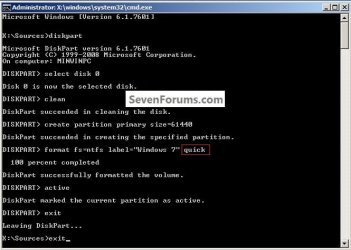
I would suggest if you are going to do a clean install to Disk 0 that you do not create / let Windows create the System Reserved partition, that will be a big help moving the image successfully when you try that.

Here's how, boot to diskpart and run these commands exactly, just leave the "quick" off, that will let it run a full format, I just added the quick argument to speed it up for me and I'm not actually going to run the install.
click to enlarge
1.jpg
 

My Computer My Computer

Computer Manufacturer/Model Number
* BFK Customs *
OS
W 7 64-bit Ultimate
CPU
Intel Q9550 Yorkfield
Motherboard
ASUS P5Q Pro
Memory
8GB Dominator 8500C5D
Graphics Card(s)
ATI : XFX 5870
Sound Card
Realtek HD Audio 7-1
Monitor(s) Displays
1x 47" LCD HDMI & 3x 26" LCD HDMI
Screen Resolution
1920x1080P & 1920x1200
Hard Drives
1x 80GB Intel X25-M G2 SSD : 1x 500GB & 1x 640GB WD Caviar Black(s)
PSU
Corsair 620HX
Case
Cooler Master RC-690
Cooling
Tuniq Tower 120, 2x 140mm and 3x 120mm case fans
Keyboard
Microsoft 500
Mouse
Razer Diamondback 3G
Internet Speed
14 Mb/s
Other Info
1x Koutech 3Gb/s SATA HDD Hot Swap Rack
I was trying to work out a way for you to do a clean install with the old/bad Disk 0 still connected but I couldn't sort a method so far, if you can't find a way to disconnect the Disk 0 data cable from the motherboard; Sysprep does seem your best bet at this point.
Actually, I might have fixed it! It's also possible I'm totally wrong:)

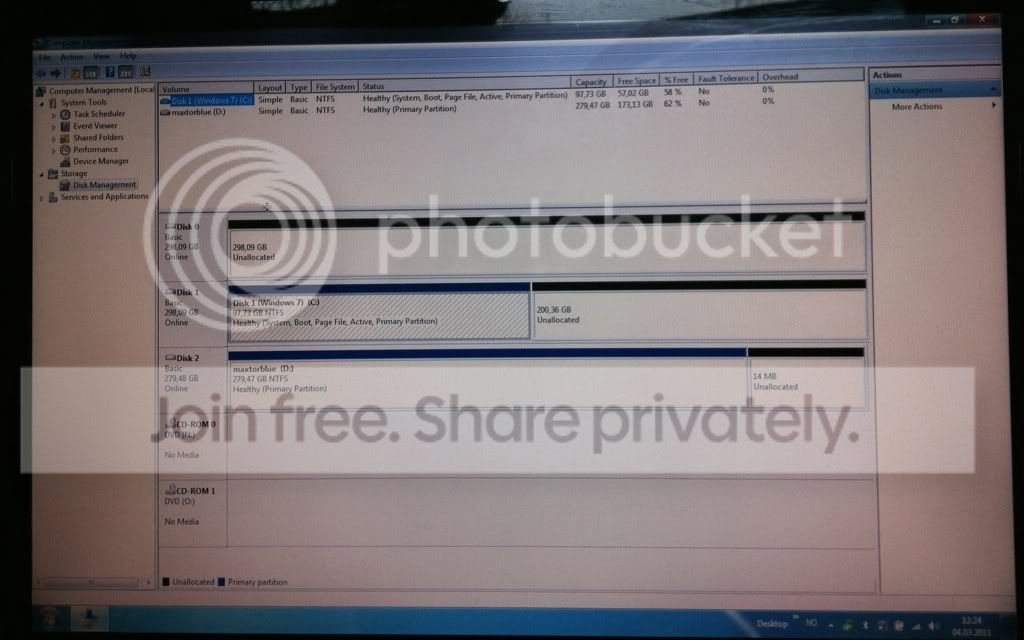
When I was installing the backup image of Windows I was asked where I wanted to install it. The unusual thing is that my external hard disk was labelled disk 0, and my laptop disks were labelled disk 1 and disk 2. So, I decided to installed it to what it was calling disk 1, even though it's really disk 0. My view from Computer Management seems to suggest that the problem is solved:
cbed6a14.jpg

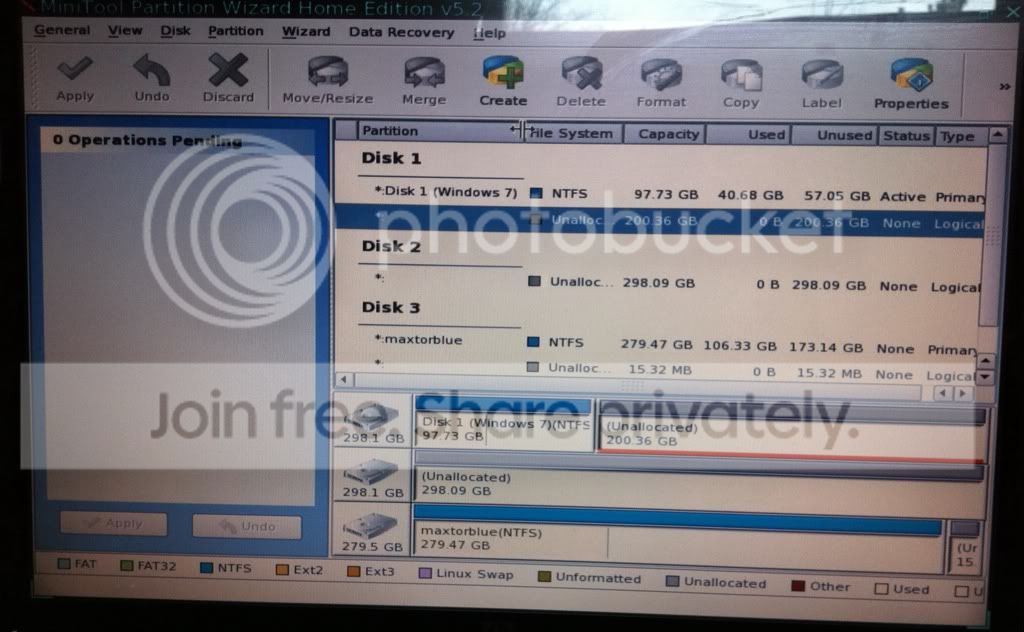
but my view in Partition Manager makes my doubt it:
bde61db5.jpg

My laptop is being surprisingly quiet now, but that's not proof because sometimes the "clicking sound" does go away temporarily.

How do I tell if Windows is on the faulty disk (disk 0) or the healthy one (disk 1)?
 

My Computer My Computer

Computer type
Laptop
OS
Microsoft Windows 7 Home Premium 64-bit 7601 Multiprocessor Free Service Pack 1
CPU
Intel(R) Core(TM) i7-2720QM CPU @ 2.20GHz
Motherboard
Dell Inc. 0XN71K
Memory
6,00 GB
Graphics Card(s)
(1) NVIDIA GeForce GT 555M (2) Intel(R) HD Graphics Fa
Sound Card
(1) Realtek High Definition Audio (2) Intel(R) Display Aud
Screen Resolution
0 x 0 x 0 bits (0 colors) @ 0 Hz
Hard Drives
(1) WDC WD5000BPKT-75PK4T0 (2) USB2.0 Mobile Disk USB Device
Deleted all partitions on disk 0 and disk 1.
Did a clean install of Windows 7 to disk 1 - it works.
Then I used my backup image to recover Windows to disk 1 - it works, but not as I want it to. All my programs, settings, etc are back, but I still have my original problem of having my system partition (created by Windows) on disk 0 I want it on disk 1).
So basically I'm back to square 1 :banghead:

If you clean installed Win7 to Disk 1 successfully then reapplied your image to an adjacent partition, how did you start the image - did you add it to Boot Menu using EasyBCD 2.0? This could work as it doesn't require the image to have boot files.

Once you do this, try marking the reimaged Win7 active and running the repairs to see if it will recover the System boot files into the image. If not, we can help you chop down the installed Win7 into a 200mb System Reserved partition by deleting all but the boot files.

Now, looking at screenshots just posted I see you have something different than described. Disk Mgmt looks correct - will that installation start on its own?

To find out which HD is clicking, enter BIOS setup to temporarily disable DISK0. This might also enable your repairs to work better if you still need to move System files to Win7 as Partition Wizard indicates - keep in mind that we've found PW boot CD is the ultimate authority with conflicting views like this.
 
[I'm using terminology Disk0 and Disk1]
In your post #26 attempt did you change the BIOS as I suggested? Did you place the 2nd disk (disk 1) at the first boot option?

If you are following your new strategy then try using the windows inbuilt imaging as well. It images Sys reserved AND c: (Windows OS partition). It reimages both.

But more basically.
(1) Do you know which of the HDDs is "clicking" in the first place. Is the clicking a regular sound? Head movements will make some noise and Windows 7 can do a lot of housekeeping when you're doing nothing.
(2) Can you get hold of any service manual for your laptop or similar laptop to see what the disassembly steps are. You need to know how to get to your HDDs eventually.
 

My Computer My Computer

Computer type
PC/Desktop
Computer Manufacturer/Model Number
Own build
OS
Windows 7x64 Home Premium SP1
CPU
Intel i7 2600k
Motherboard
ASUS P8Z68 Deluxe
Memory
G.Skill Ripjaws (DDR3-1600) 2x4GB
Graphics Card(s)
Nvidia GeForce GTS 450; Intel HD Graphics 3000(GT2+)
Monitor(s) Displays
Dell Ultrasharp IPS panel U2311H, Samsung SyncMaster P2350
Screen Resolution
1920x1080
Hard Drives
Samsung 850 Pro SSD 256GB, Samsung SSD 840 120GB, Seagates 1TB Barracuda ST31000528AS x2
PSU
Seasonic M12II 520W
Case
Lian Li Lancool PC-K60
Cooling
Case: 1x120mm, 3x140mm CPU: Hyper 212+
Keyboard
Logitech MK520 (wireless)
Mouse
Logitech MK520
Internet Speed
6-7 Mbps
Antivirus
Norton Security Premium, Malwarebytes on 2 (MSE on 3rd PC)
Browser
FireFox
Other Info
Audio: Logitech Z523 2.1
Deleted all partitions on disk 0 and disk 1.
Did a clean install of Windows 7 to disk 1 - it works.
Then I used my backup image to recover Windows to disk 1 - it works, but not as I want it to. All my programs, settings, etc are back, but I still have my original problem of having my system partition (created by Windows) on disk 0 I want it on disk 1).
So basically I'm back to square 1 :banghead:

If you clean installed Win7 to Disk 1 successfully then reapplied your image to an adjacent partition, how did you start the image - did you add it to Boot Menu using EasyBCD 2.0? This could work as it doesn't require the image to have boot files.
I installed it in the same position as the clean install of Windows. So maybe I just overwrote it?
I started the image just by booting as normal. I think the clean install created a system partition on disk 0 which helped my restored backup Windows to start. It seemed as if virtually everything was on disk 1 and the system partition was on disk 0. It's messy but it allowed me to boot normally.


Once you do this, try marking the reimaged Win7 active and running the repairs to see if it will recover the System boot files into the image. If not, we can help you chop down the installed Win7 into a 200mb System Reserved partition by deleting all but the boot files.

Now, looking at screenshots just posted I see you have something different than described. Disk Mgmt looks correct - will that installation start on its own?
Yes, starts on it's own.

To find out which HD is clicking, enter BIOS setup to temporarily disable DISK0. This might also enable your repairs to work better if you still need to move System files to Win7 as Partition Wizard indicates - keep in mind that we've found PW boot CD is the ultimate authority with conflicting views like this.
See red text for answers.

Now that I think about it, I'm 99% sure that everything is working the way I want it. When I hear the clicking/rattling noise from my disk, the activity light at the front is off. When I do a quick virus scan, the light flickers, but the noise remains constant. I think the noise I'm hearing is the old, empty disk just spinning. It's not accessing anything or doing anything, it's just spinning noisily. My next step will be to disable this and then I'll be left with my lovely Windows 7 installation on a healthy disk:cool:.
I'm going to create a new backup of this, just in case I want to do some more tinkering!

You guys were such a great help to me - thanks! I guess you can consider my original answer solved, unless anyone has anything else to add. If there's any info you want about my system I'll check back here and reply.
 

My Computer My Computer

Computer type
Laptop
OS
Microsoft Windows 7 Home Premium 64-bit 7601 Multiprocessor Free Service Pack 1
CPU
Intel(R) Core(TM) i7-2720QM CPU @ 2.20GHz
Motherboard
Dell Inc. 0XN71K
Memory
6,00 GB
Graphics Card(s)
(1) NVIDIA GeForce GT 555M (2) Intel(R) HD Graphics Fa
Sound Card
(1) Realtek High Definition Audio (2) Intel(R) Display Aud
Screen Resolution
0 x 0 x 0 bits (0 colors) @ 0 Hz
Hard Drives
(1) WDC WD5000BPKT-75PK4T0 (2) USB2.0 Mobile Disk USB Device
[I'm using terminology Disk0 and Disk1]
In your post #26 attempt did you change the BIOS as I suggested? Did you place the 2nd disk (disk 1) at the first boot option?
I didn't. I couldn't find out how to do it. None of the options fitted what I wanted.
If you are following your new strategy then try using the windows inbuilt imaging as well. It images Sys reserved AND c: (Windows OS partition). It reimages both.
I didn't know Windows had built in imaging. I always assumed 3rd party software would be better for that kind of thing. Also, I've been really happy with Paragon's free backup and recovery software. I've used it several times in the past few weeks to backup and restore my system and it hasn't failed me once. It has allowed me to do complicated things like backup and restoring images without knowing much about the technical definitions (MBR, system reserved partition, etc). Although this thread has help a lot with that.

But more basically.
(1) Do you know which of the HDDs is "clicking" in the first place. Is the clicking a regular sound? Head movements will make some noise and Windows 7 can do a lot of housekeeping when you're doing nothing.
It's quite regular with occasional quiet periods. It's definitely a bad sound. It's very different to the sounds a hard working disk makes. I'm pretty sure it's my disk 0. I do some intensive tasks there - video editing, etc so I can see how it would get damaged over time.
(2) Can you get hold of any service manual for your laptop or similar laptop to see what the disassembly steps are. You need to know how to get to your HDDs eventually.
By the time the 2nd one goes I'll be ready to upgrade to a better laptop:)
Answers in red.
 

My Computer My Computer

Computer type
Laptop
OS
Microsoft Windows 7 Home Premium 64-bit 7601 Multiprocessor Free Service Pack 1
CPU
Intel(R) Core(TM) i7-2720QM CPU @ 2.20GHz
Motherboard
Dell Inc. 0XN71K
Memory
6,00 GB
Graphics Card(s)
(1) NVIDIA GeForce GT 555M (2) Intel(R) HD Graphics Fa
Sound Card
(1) Realtek High Definition Audio (2) Intel(R) Display Aud
Screen Resolution
0 x 0 x 0 bits (0 colors) @ 0 Hz
Hard Drives
(1) WDC WD5000BPKT-75PK4T0 (2) USB2.0 Mobile Disk USB Device
Back
Top