

Perrorist
New member
- Local time
- 8:46 AM
- Messages
- 12
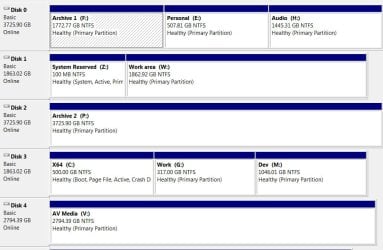
I currently have one drive that contains a System Reserved partition (which includes the boot files). The status is System, Active, Primary Partition.
I have another drive with the C: partition. The status is Boot, Page File, Active, Crash Dump, Primary Partition.
I've been told that if I remove the disk (it's a bit flaky) with the System Reserved partition, I won't be able to boot up. If this is true, is it possible to transfer that partition to another drive? If so, does it have to be at the start of the drive?
Alternatively, can I make the C: partition include System status?
I have another drive with the C: partition. The status is Boot, Page File, Active, Crash Dump, Primary Partition.
I've been told that if I remove the disk (it's a bit flaky) with the System Reserved partition, I won't be able to boot up. If this is true, is it possible to transfer that partition to another drive? If so, does it have to be at the start of the drive?
Alternatively, can I make the C: partition include System status?
My Computer
- Computer type
- PC/Desktop
- Computer Manufacturer/Model Number
- Custom
- OS
- Windows 8.1 Update x64 Professional
- CPU
- Intel i7 4770K
- Motherboard
- Asus Sabertooth Z87
- Memory
- 32GB
- Graphics Card(s)
- Gigabyte GeForce GTX 780 3GB GHz
- Hard Drives
- 16TB over 5 drives
- PSU
- Seasonic 1000W Platinum
- Case
- Li-Lian D600
- Antivirus
- Malwarebytes Anti-Malware, Windows 8 Defender
- Browser
- Chrome, Waterfox, IE9



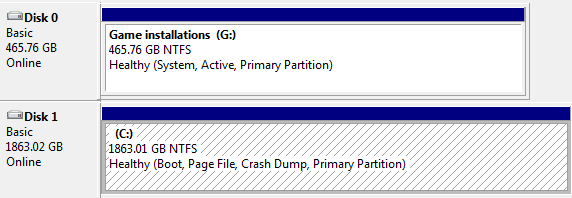
 Looks like a new drive is in order, I'll just have to make sure to connect it to the Disk 0 sata port when I install.


