Mozilla Firefox errors

You should only have to select "Remember History" to completely disable "Auto-Cleanup".
You could also update to the latest version (it is supposed to be faster). :)
Ah, then thats it. Do this, Patti, and it should remember it.
 

My Computer

Computer type
PC/Desktop
Computer Manufacturer/Model Number
Custom Asus Build
OS
Microsoft Windows 8.1 Pro 64-bit
CPU
Intel(R) Core(TM) i3-4130 CPU @ 3.40GHz
Motherboard
B85M-E
Memory
8.00 GB
Graphics Card(s)
None
Sound Card
Realtek High Definition Audio
Monitor(s) Displays
Asus 23.6" Monitor
Screen Resolution
1920 x 1080 x 32 bits (4294967296 colors) @ 60 Hz
Hard Drives
INTEL SSDSC2BW180A4
Samsung SSD 840 PRO Series
PSU
Seasonic S12II-380Bronze
Case
Lian Li
Cooling
Fan, Passive
Keyboard
Logitech K120
Mouse
Microsoft Touch Mouse
Internet Speed
4ms Ping, 19.0 Mbps Download, 19.0 Mbps Upload
Antivirus
Eset Endpoint
Browser
Internet Explorer, Chrome
FF Safe Mode 1

You should only have to select "Remember History" to completely disable "Auto-Cleanup".You could also update to the latest version (it is supposed to be faster). :)
Ah, then thats it. Do this, Patti, and it should remember it.

I haven't checked out all of the posts between you and Patti, but one thing that is renowned for causing slowdowns is extensions (add-ons).
If you have a lot of add-ons (or one is faulty) that could be the reason for slow FF performance.

You could start FF in "Safe Mode" and see if you FF performance improves.
I'll post some screenshots & instructions shortly.
 
Last edited:

My Computer

Computer type
PC/Desktop
Computer Manufacturer/Model Number
n/a
OS
W7 Ultimate SP1, LM19.2 MATE, W10 Home 1703, W10 Pro 1703 VM, #All 64 bit
CPU
AMD Phenom II x6 1100T, 3.3 GHz
Motherboard
ASUS M4A88T-M/USB3 (AM3)
Memory
12GB DDR3 1333 G-Skill (4GB x 2), G-Skill (2GB x 2)
Graphics Card(s)
NVIDIA GeForce GTX 660
Sound Card
Realtek?
Monitor(s) Displays
Samsung S23B350
Screen Resolution
1920x1080
Hard Drives
WD Green 2TB (SATA), WD Green 3TB (SATA), WD Blue 4TB (SATA), WD Blue 6TB (SATA)
PSU
Cooler Master
Case
Antec GX300 Tower
Cooling
3x Antec TRICOOL 120mm Fans
Mouse
Wired Optical
Internet Speed
DSL
Antivirus
Avast
Browser
Pale Moon (64 bit)
Other Info
2018-12-27 Upgraded HDDs
2015-12-10 Upgraded case, graphics card, storage
2015-08-15 Upgraded motherboard & RAM
2015-07-15 Upgraded LM17.1 to LM17.2
I haven't checked out all of the posts between you and Patti, but one thing that is renowned for causing slowdowns is extensions (add-ons).
If you have a lot of add-ons (or one is faulty) that could be the reason for slow FF performance.

You could start FF in "Safe Mode" and see if you FF performance improves.
I'll post some screenshots & instructions shortly.
Yea, we've gone through and fixed up her add-ons, and her programs too. Really, a bunch of us went through everything short of a reinstall, no clue why the internet is slow except for it being on the ISP's side (slower internet, etc.)

Her near 500 posts were questions that many members and I have been answering. Its been interesting and fun, and it seems like her computer is a lot better, except for this small internet speed quirk. Believe me, there is not a thing we've not tried.
 

My Computer

Computer type
PC/Desktop
Computer Manufacturer/Model Number
Custom Asus Build
OS
Microsoft Windows 8.1 Pro 64-bit
CPU
Intel(R) Core(TM) i3-4130 CPU @ 3.40GHz
Motherboard
B85M-E
Memory
8.00 GB
Graphics Card(s)
None
Sound Card
Realtek High Definition Audio
Monitor(s) Displays
Asus 23.6" Monitor
Screen Resolution
1920 x 1080 x 32 bits (4294967296 colors) @ 60 Hz
Hard Drives
INTEL SSDSC2BW180A4
Samsung SSD 840 PRO Series
PSU
Seasonic S12II-380Bronze
Case
Lian Li
Cooling
Fan, Passive
Keyboard
Logitech K120
Mouse
Microsoft Touch Mouse
Internet Speed
4ms Ping, 19.0 Mbps Download, 19.0 Mbps Upload
Antivirus
Eset Endpoint
Browser
Internet Explorer, Chrome
FF Safe Mode 2

Her near 500 posts were questions that many members and I have been answering. Its been interesting and fun, and it seems like her computer is a lot better, except for this small internet speed quirk. Believe me, there is not a thing we've not tried.

OK. :)

I said I'd post these instructions so here they are.

How to start FF in "Safe Mode"


Quick Method
Hold the "Shift" key and click on the Firefox icon in the "Start Menu" (or on the pinned "Taskbar" icon).
This only works for single click icons (doesn't work with double click icons).

The Long Method
This works without the Firefox icon.

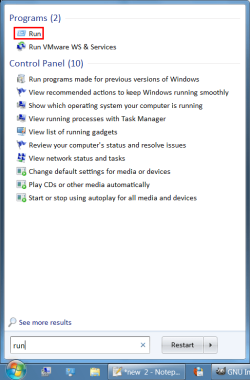
1 - Open the "Start Menu" and type "run" in the "Search" box (or use "Windows Logo key + R" and go to step 3).

2 - Click on "Run" in the results.
FF SM 01a (Run).png
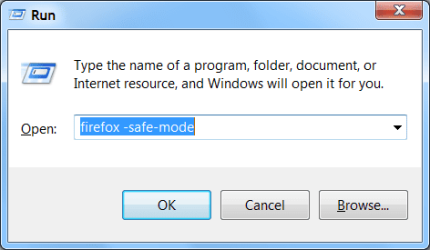
3 - Type "firefox -safe-mode" (without the quotes). Click on the "OK" button.
FF SM 02 (Run).png
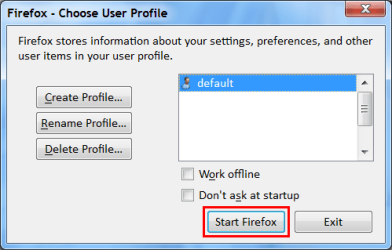
4 - If you have enabled "Firefox - Choose User Profile", this window will open (if not, go to step 5). Click on the "Start Firefox" button.
FF SM 03a (Profile Manager).png
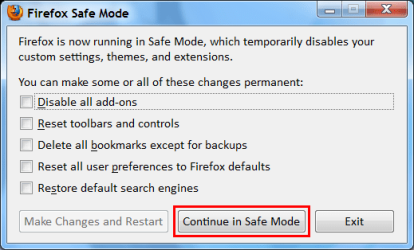
5 - The "Firefox Safe Mode" window will open. Click on the "Continue in Safe Mode" button.
FF SM 04a (Safe Mode).png
See if FF performs better. :)
 
Last edited:

My Computer

Computer type
PC/Desktop
Computer Manufacturer/Model Number
n/a
OS
W7 Ultimate SP1, LM19.2 MATE, W10 Home 1703, W10 Pro 1703 VM, #All 64 bit
CPU
AMD Phenom II x6 1100T, 3.3 GHz
Motherboard
ASUS M4A88T-M/USB3 (AM3)
Memory
12GB DDR3 1333 G-Skill (4GB x 2), G-Skill (2GB x 2)
Graphics Card(s)
NVIDIA GeForce GTX 660
Sound Card
Realtek?
Monitor(s) Displays
Samsung S23B350
Screen Resolution
1920x1080
Hard Drives
WD Green 2TB (SATA), WD Green 3TB (SATA), WD Blue 4TB (SATA), WD Blue 6TB (SATA)
PSU
Cooler Master
Case
Antec GX300 Tower
Cooling
3x Antec TRICOOL 120mm Fans
Mouse
Wired Optical
Internet Speed
DSL
Antivirus
Avast
Browser
Pale Moon (64 bit)
Other Info
2018-12-27 Upgraded HDDs
2015-12-10 Upgraded case, graphics card, storage
2015-08-15 Upgraded motherboard & RAM
2015-07-15 Upgraded LM17.1 to LM17.2
Well that isn't the place you are supposed to be. it will automatically be like that, but it shouldn't matter because the box I had you uncheck prevents that from automatically clearing the data. It should be fine anyhow, you're all set Patti :)

Thanks so much Dusty for your help. Hopefully this will be the end of it. I think one of the things that got me in trouble this time is I wanted to try out Google Chrome and see what it was like.
 

My Computer

Computer Manufacturer/Model Number
Vostro 220 Mini Tower Desktop Details | Dell
OS
Windows 7 Home Premium SP 1, 32-bit
CPU
Intel(R) Core(TM)2 Duo CPU E7400 @ 2.80GHz
Motherboard
Dell Inc. 0P301D
Memory
3.00 GB
Graphics Card(s)
(1) Intel(R) G45/G43 Express Chipset (2) Intel(R) G45/G43
Sound Card
(1) High Definition Audio Device (2) High Definition Audio
Monitor(s) Displays
Dell 22" wide E228WFP Analog flat panelq
Mouse
Dell optical usb mouse vostro
Other Info
OPTICAL READER, MOUSE,SPEAKERS, MONITOR, MODEM
Thanks - I tried what you said and will see how it goes. I already have ff 8.0. Thanks so much
 

My Computer

Computer Manufacturer/Model Number
Vostro 220 Mini Tower Desktop Details | Dell
OS
Windows 7 Home Premium SP 1, 32-bit
CPU
Intel(R) Core(TM)2 Duo CPU E7400 @ 2.80GHz
Motherboard
Dell Inc. 0P301D
Memory
3.00 GB
Graphics Card(s)
(1) Intel(R) G45/G43 Express Chipset (2) Intel(R) G45/G43
Sound Card
(1) High Definition Audio Device (2) High Definition Audio
Monitor(s) Displays
Dell 22" wide E228WFP Analog flat panelq
Mouse
Dell optical usb mouse vostro
Other Info
OPTICAL READER, MOUSE,SPEAKERS, MONITOR, MODEM

My Computer

Computer type
PC/Desktop
Computer Manufacturer/Model Number
n/a
OS
W7 Ultimate SP1, LM19.2 MATE, W10 Home 1703, W10 Pro 1703 VM, #All 64 bit
CPU
AMD Phenom II x6 1100T, 3.3 GHz
Motherboard
ASUS M4A88T-M/USB3 (AM3)
Memory
12GB DDR3 1333 G-Skill (4GB x 2), G-Skill (2GB x 2)
Graphics Card(s)
NVIDIA GeForce GTX 660
Sound Card
Realtek?
Monitor(s) Displays
Samsung S23B350
Screen Resolution
1920x1080
Hard Drives
WD Green 2TB (SATA), WD Green 3TB (SATA), WD Blue 4TB (SATA), WD Blue 6TB (SATA)
PSU
Cooler Master
Case
Antec GX300 Tower
Cooling
3x Antec TRICOOL 120mm Fans
Mouse
Wired Optical
Internet Speed
DSL
Antivirus
Avast
Browser
Pale Moon (64 bit)
Other Info
2018-12-27 Upgraded HDDs
2015-12-10 Upgraded case, graphics card, storage
2015-08-15 Upgraded motherboard & RAM
2015-07-15 Upgraded LM17.1 to LM17.2
Back
Top