MS Online Programs- Excel in particular

eknirb

Go SF Giants
Member
VIP
Local time
7:25 PM
Messages
242
Question: I use the Excel Online a lot. I have tabs for each week of the year that I use for scheduling. Now is the week of 5/12-5/18. So I bookmark the Excel Online spreadsheet, and when I click on the bookmark, the first week tab it brings up is like December 1-8 or something. How do I have it point to the current tab?

Also:

I wanted to download the Excel Online spreadsheet to desktop Excel, which U can do, and a little LOG INTO WINDOWS LIVE dialog box pops up, and I log in with my Outlook.com email and password- and it will not accept it.

Any ideas? Posted this to the appropriate MS forums, no response as yet. Plus U guys know everything.

Thank U!
 

My Computer

OS
Windows 7 Home Premium 64bit.
Try logging into windows live by going to their login page and see if it lets you in.

As for the first point can you use screenshots to show me what you mean?
 

My Computer

Computer type
PC/Desktop
Computer Manufacturer/Model Number
Custom Built
OS
Windows 10 Pro
CPU
AMD Ryzen 5 2400G Processor with Radeon RX Vega 11 Graphics
Motherboard
ASRock X470 Master SLI/AC AM4 AMD Promontory X470 SATA 6Gb/s
Memory
G.SKILL Ripjaws V Series 16GB (2 x 8GB) 288-Pin DDR4 SDRAM D
Graphics Card(s)
2047MB NVIDIA GeForce GTX 1060 6GB (EVGA)
Sound Card
Motherboard Built in
Monitor(s) Displays
Acer R240HY bidx 23.8-Inch IPS HDMI DVI VGA (1920 x 1080) Wi
Screen Resolution
1920 x 1080
Hard Drives
1TB Sandisk SSD PLUS (Main drive)
500 GB Seagate 7200 RPM (Games)
500 GB Western Digital 7200 RPM (Virtual Machines)
PSU
CORSAIR TX Series TX650M 650W 80+ Gold Modular Power Supply
Case
CORSAIR CARBIDE SPEC-02 Mid-Tower Gaming Case, Red LED Fan
Cooling
220mm, two 120mm, and four 60mm fans
Keyboard
Wired Dell keyboard
Mouse
Wireless Logitech mouse
Internet Speed
250mb down, 30mb up
Antivirus
Panda Cloud Antivirus
Browser
Chrome-ish x64
Other Info
Your awesome for reading this.
the first point has resolved itself, i fixed it somehow.

where is the URL for windows live?
 

My Computer

OS
Windows 7 Home Premium 64bit.

My Computer

Computer type
PC/Desktop
Computer Manufacturer/Model Number
Custom Built
OS
Windows 10 Pro
CPU
AMD Ryzen 5 2400G Processor with Radeon RX Vega 11 Graphics
Motherboard
ASRock X470 Master SLI/AC AM4 AMD Promontory X470 SATA 6Gb/s
Memory
G.SKILL Ripjaws V Series 16GB (2 x 8GB) 288-Pin DDR4 SDRAM D
Graphics Card(s)
2047MB NVIDIA GeForce GTX 1060 6GB (EVGA)
Sound Card
Motherboard Built in
Monitor(s) Displays
Acer R240HY bidx 23.8-Inch IPS HDMI DVI VGA (1920 x 1080) Wi
Screen Resolution
1920 x 1080
Hard Drives
1TB Sandisk SSD PLUS (Main drive)
500 GB Seagate 7200 RPM (Games)
500 GB Western Digital 7200 RPM (Virtual Machines)
PSU
CORSAIR TX Series TX650M 650W 80+ Gold Modular Power Supply
Case
CORSAIR CARBIDE SPEC-02 Mid-Tower Gaming Case, Red LED Fan
Cooling
220mm, two 120mm, and four 60mm fans
Keyboard
Wired Dell keyboard
Mouse
Wireless Logitech mouse
Internet Speed
250mb down, 30mb up
Antivirus
Panda Cloud Antivirus
Browser
Chrome-ish x64
Other Info
Your awesome for reading this.
I can sign into that just fine. But this dopey dialogue box will not accept the very same password.

Clipboard01_zpsde710200.jpg
 

My Computer

OS
Windows 7 Home Premium 64bit.
are you putting your full email address and then password in there?
 

My Computer

Computer type
PC/Desktop
Computer Manufacturer/Model Number
Custom Built
OS
Windows 10 Pro
CPU
AMD Ryzen 5 2400G Processor with Radeon RX Vega 11 Graphics
Motherboard
ASRock X470 Master SLI/AC AM4 AMD Promontory X470 SATA 6Gb/s
Memory
G.SKILL Ripjaws V Series 16GB (2 x 8GB) 288-Pin DDR4 SDRAM D
Graphics Card(s)
2047MB NVIDIA GeForce GTX 1060 6GB (EVGA)
Sound Card
Motherboard Built in
Monitor(s) Displays
Acer R240HY bidx 23.8-Inch IPS HDMI DVI VGA (1920 x 1080) Wi
Screen Resolution
1920 x 1080
Hard Drives
1TB Sandisk SSD PLUS (Main drive)
500 GB Seagate 7200 RPM (Games)
500 GB Western Digital 7200 RPM (Virtual Machines)
PSU
CORSAIR TX Series TX650M 650W 80+ Gold Modular Power Supply
Case
CORSAIR CARBIDE SPEC-02 Mid-Tower Gaming Case, Red LED Fan
Cooling
220mm, two 120mm, and four 60mm fans
Keyboard
Wired Dell keyboard
Mouse
Wireless Logitech mouse
Internet Speed
250mb down, 30mb up
Antivirus
Panda Cloud Antivirus
Browser
Chrome-ish x64
Other Info
Your awesome for reading this.
you betcha
 

My Computer

OS
Windows 7 Home Premium 64bit.
I can sign into that just fine. But this dopey dialogue box will not accept the very same password.

Clipboard01_zpsde710200.jpg


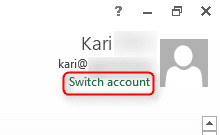
Notice that the email address used here must be the same used for storing the Excel Online document in OneDrive. For instance I have four different Microsoft email addresses added to Excel desktop application (and other Office products), to be able to open documents from Office Online applications from four different OneDrive accounts. Excel Desktop App can only open documents from Excel Online if the accounts are connected.

You can see which email accounts are connected to Excel desktop application (and other Office apps) from the upper right corner when you launch the app. You can also add or change accounts here. Screenshot from Office 2013:

2014-05-18_20h24_17.png

When working with a workbook, click your name in the upper right corner to see connected accounts. Here the yellow highlight = my primary Office 365 account, green = first Microsoft account and so on:

2014-05-18_20h36_28.png
 

My Computer

Computer type
Laptop
Computer Manufacturer/Model Number
HP ENVY 17-1150eg
OS
Windows 10 Pro x64 EN-GB
CPU
1.6 GHz Intel Core i7-720QM Processor
Memory
6 GB
Graphics Card(s)
ATI Mobility Radeon HD 5850 Graphics
Sound Card
Beats sound system with integrated subwoofer
Monitor(s) Displays
17" laptop display, 22" LED and 32" Full HD TV through HDMI
Screen Resolution
1600*900 (1), 1920*1080 (2&3)
Hard Drives
Internal: 2 x 500 GB SATA Hard Disk Drive 7200 rpm
External: 2TB for backups, 3TB USB3 network drive for media
Cooling
As Envy runs a bit warm, I have it on a Cooler Master pad
Keyboard
Logitech diNovo Media Desktop Laser (bluetooth)
Mouse
Logitech Performance Mouse MX
Internet Speed
50/10 Mbps VDSL
Antivirus
Windows Defender 4.3.9431.0
Browser
Maxthon 3.5.2., IE11
I have Office and it's activated, but I find:

Office isn’t associated with this account.
If you’ve already activated Office, sign out and then sign in with the Microsoft account you used to activate Office.
If you have Office but haven’t activated it, you can use your product key to activate. Activate Office now
If you don’t have Office, you can buy it in the Office store.
 

My Computer

OS
Windows 7 Home Premium 64bit.
See the last (second) screenshot in my previous post. If your Excel (Office) is not connected to a Microsoft Account, instead of your name you should see the link Sign in there. Click the link and sign in.
 

My Computer

Computer type
Laptop
Computer Manufacturer/Model Number
HP ENVY 17-1150eg
OS
Windows 10 Pro x64 EN-GB
CPU
1.6 GHz Intel Core i7-720QM Processor
Memory
6 GB
Graphics Card(s)
ATI Mobility Radeon HD 5850 Graphics
Sound Card
Beats sound system with integrated subwoofer
Monitor(s) Displays
17" laptop display, 22" LED and 32" Full HD TV through HDMI
Screen Resolution
1600*900 (1), 1920*1080 (2&3)
Hard Drives
Internal: 2 x 500 GB SATA Hard Disk Drive 7200 rpm
External: 2TB for backups, 3TB USB3 network drive for media
Cooling
As Envy runs a bit warm, I have it on a Cooler Master pad
Keyboard
Logitech diNovo Media Desktop Laser (bluetooth)
Mouse
Logitech Performance Mouse MX
Internet Speed
50/10 Mbps VDSL
Antivirus
Windows Defender 4.3.9431.0
Browser
Maxthon 3.5.2., IE11
is that screenshot from regular excel or excel online?
 

My Computer

OS
Windows 7 Home Premium 64bit.
is that screenshot from regular excel or excel online?

Excel Desktop App. You cannot edit / open Excel Online documents in Excel Desktop App without connecting it to a Microsoft Account.

A workaround is to download the file from OneDrive to your PC, then open it locally with Excel.
 

My Computer

Computer type
Laptop
Computer Manufacturer/Model Number
HP ENVY 17-1150eg
OS
Windows 10 Pro x64 EN-GB
CPU
1.6 GHz Intel Core i7-720QM Processor
Memory
6 GB
Graphics Card(s)
ATI Mobility Radeon HD 5850 Graphics
Sound Card
Beats sound system with integrated subwoofer
Monitor(s) Displays
17" laptop display, 22" LED and 32" Full HD TV through HDMI
Screen Resolution
1600*900 (1), 1920*1080 (2&3)
Hard Drives
Internal: 2 x 500 GB SATA Hard Disk Drive 7200 rpm
External: 2TB for backups, 3TB USB3 network drive for media
Cooling
As Envy runs a bit warm, I have it on a Cooler Master pad
Keyboard
Logitech diNovo Media Desktop Laser (bluetooth)
Mouse
Logitech Performance Mouse MX
Internet Speed
50/10 Mbps VDSL
Antivirus
Windows Defender 4.3.9431.0
Browser
Maxthon 3.5.2., IE11
OK, how do I connect desktop excel to my MS account? I see no name on desktop excel:

Clipboard01_zps2f70e6c6.jpg
 

My Computer

OS
Windows 7 Home Premium 64bit.
OK, you have an old version of Office as the screenshot shows. Forget the whole thing. In your case, only options are to download Excel workbook from OneDrive where it's stored to your local computer, then open it locally, or to use OneDrive Desktop App to sync files between your local computer and OneDrive.

For the future, download and install the OneDrive Desktop App and keep it synced: https://onedrive.live.com/about/en-gb/download/. When synced, the OneDrive copy of the file and the local file are the same, you can edit the local file, store it to OnDrive folder and sync.

BTW, this is a good example of how important it is to give enough information when asking assistance. Only in your 7th post in this thread did we find out you are using an outdated version of Excel, and that only because I noticed it from your screenshot.
 

My Computer

Computer type
Laptop
Computer Manufacturer/Model Number
HP ENVY 17-1150eg
OS
Windows 10 Pro x64 EN-GB
CPU
1.6 GHz Intel Core i7-720QM Processor
Memory
6 GB
Graphics Card(s)
ATI Mobility Radeon HD 5850 Graphics
Sound Card
Beats sound system with integrated subwoofer
Monitor(s) Displays
17" laptop display, 22" LED and 32" Full HD TV through HDMI
Screen Resolution
1600*900 (1), 1920*1080 (2&3)
Hard Drives
Internal: 2 x 500 GB SATA Hard Disk Drive 7200 rpm
External: 2TB for backups, 3TB USB3 network drive for media
Cooling
As Envy runs a bit warm, I have it on a Cooler Master pad
Keyboard
Logitech diNovo Media Desktop Laser (bluetooth)
Mouse
Logitech Performance Mouse MX
Internet Speed
50/10 Mbps VDSL
Antivirus
Windows Defender 4.3.9431.0
Browser
Maxthon 3.5.2., IE11
Had I been asked which version, I would've mentioned it. Thanks for the assistance.
 

My Computer

OS
Windows 7 Home Premium 64bit.
It does not work like that, as you certainly know, that the OP gives as little information as possible and only reveals more if asked.

Anyway, about your other issue:

So I bookmark the Excel Online spreadsheet, and when I click on the bookmark, the first week tab it brings up is like December 1-8 or something. How do I have it point to the current tab?
Excel Online link always points to first sheet (list of sheets, bottom left). If organized as in this screenshot, Sheet2 as the left most (first), Excel Online opens in this sheet:

2014-05-18_21h37_39.png

You can manually drag and drop and name the sheets as you wish. Put the one you want to be shown when the workbook is opened to the left.
 

My Computer

Computer type
Laptop
Computer Manufacturer/Model Number
HP ENVY 17-1150eg
OS
Windows 10 Pro x64 EN-GB
CPU
1.6 GHz Intel Core i7-720QM Processor
Memory
6 GB
Graphics Card(s)
ATI Mobility Radeon HD 5850 Graphics
Sound Card
Beats sound system with integrated subwoofer
Monitor(s) Displays
17" laptop display, 22" LED and 32" Full HD TV through HDMI
Screen Resolution
1600*900 (1), 1920*1080 (2&3)
Hard Drives
Internal: 2 x 500 GB SATA Hard Disk Drive 7200 rpm
External: 2TB for backups, 3TB USB3 network drive for media
Cooling
As Envy runs a bit warm, I have it on a Cooler Master pad
Keyboard
Logitech diNovo Media Desktop Laser (bluetooth)
Mouse
Logitech Performance Mouse MX
Internet Speed
50/10 Mbps VDSL
Antivirus
Windows Defender 4.3.9431.0
Browser
Maxthon 3.5.2., IE11
Back
Top