msdia80.dll

Do u also have msdia80.dll on ur drive?

  • yes

    Votes: 23 79.3%
  • no

    Votes: 4 13.8%
  • i dont know

    Votes: 1 3.4%
  • i dont care

    Votes: 1 3.4%
  • no comment

    Votes: 0 0.0%

  • Total voters
    29
Can anybody help? :)

I would get rid of the copied file in the both folder C:\ & D:\.

Seeing your specs, take the option: Microsoft Visual C++ 2005 Service Pack 1 Redistributable Package ATL Security Update x64.

Right click on the .exe when finish downloading to unblock it, then run the package.
 

My Computer

Computer type
PC/Desktop
Computer Manufacturer/Model Number
Custom Build
OS
Windows 7 Professional SP1 - x64 [Non-UEFI Boot]
CPU
Ivy Bridge Core i5 3570K (Delidded)
Motherboard
Asus P8Z77-V LE PLUS
Memory
G.Skill "Ares" DDR3 PC3-12800 - 1600MHz (16Gb)
Graphics Card(s)
Asus Dual-RX480-O4G
Sound Card
Creative Sound Blaster Z w/5.1 sound system
Monitor(s) Displays
Asus IPS 23"
Screen Resolution
16/9
Hard Drives
Internal:
500Go Sata 6Gb/s (x2)
500Go Sata 3Gb/s (x2)
SSD 60Go Sata 6Gb/s
PSU
In Win C 900W Series 80+ Platinum
Case
Thermaltake Chaser A71
Cooling
Custom Water Cooling Loop
Keyboard
Cooler Master QuickFire XTi
Mouse
Razer Imperator 2012 (4G)
Antivirus
MSE
Browser
IE 11.0.xxx Rtm
Other Info
"Raid0" with Intel Smart Response Technology (HDD/SSD)

My Computer

Computer Manufacturer/Model Number
HP 8730w
OS
Windows 7 Professional x64
CPU
Intel Core 2 Duo (T9400) 2.53 GHz
Motherboard
Intel PM45
Memory
2 x 2 GB DDR2, PC2-6400 (400 MHz)
Graphics Card(s)
NVidia Quadro Fx 2700M
Thanks for your reply.
What do you mean by get rid off both? Just right click and delete or some how uninstall the one in C:?

Which one to download? If you read my previous post i took a print screen of the three options that i can i download. You can check it from this link Download details: Microsoft Visual C++ 2005 Service Pack 1 Redistributable Package ATL Security Update
Please specify which one to download.

Yes you can delete directly the .dll.

There's:

-IA64.exe
-x64.exe (looks you're on x64 based system, so this one is for you)
-x86.exe ( as optional you can also install this one for some x32bits apps)
 

My Computer

Computer type
PC/Desktop
Computer Manufacturer/Model Number
Custom Build
OS
Windows 7 Professional SP1 - x64 [Non-UEFI Boot]
CPU
Ivy Bridge Core i5 3570K (Delidded)
Motherboard
Asus P8Z77-V LE PLUS
Memory
G.Skill "Ares" DDR3 PC3-12800 - 1600MHz (16Gb)
Graphics Card(s)
Asus Dual-RX480-O4G
Sound Card
Creative Sound Blaster Z w/5.1 sound system
Monitor(s) Displays
Asus IPS 23"
Screen Resolution
16/9
Hard Drives
Internal:
500Go Sata 6Gb/s (x2)
500Go Sata 3Gb/s (x2)
SSD 60Go Sata 6Gb/s
PSU
In Win C 900W Series 80+ Platinum
Case
Thermaltake Chaser A71
Cooling
Custom Water Cooling Loop
Keyboard
Cooler Master QuickFire XTi
Mouse
Razer Imperator 2012 (4G)
Antivirus
MSE
Browser
IE 11.0.xxx Rtm
Other Info
"Raid0" with Intel Smart Response Technology (HDD/SSD)
I've found a copy of the file on the root of my E: drive. It is not what it claims to be.

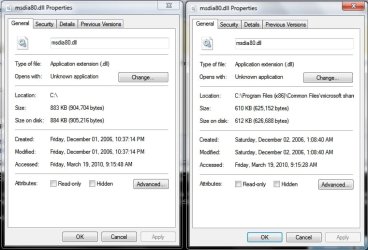
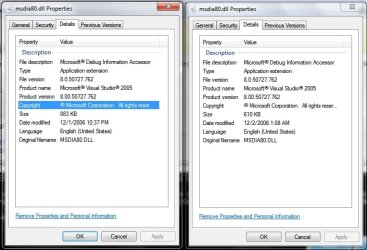
Internally it says it is version 8.00.50727.762 (SP.050727-7600), but the file is 904,704 bytes instead of the 625,152 bytes it should be. Check the file size against the one in C:\Program Files (x86)\Common Files\Microsoft Shared\VC. If they don't match you may have a bogus file.

I think that in my case this one is malware-related.

Yes, these 2 different msdia80.dll's do not match in size. The orphaned x64 .dll installed at the root of drive is 904,704 bytes and the x32 .dll which is filed and installed correctly is smaller in size at 625,152 bytes.

~Maxx~

ComodoFirewallLogo.png
 

Attachments

  • msdia80.dll X 2.jpg
    msdia80.dll X 2.jpg
    54.9 KB · Views: 87
  • msdia80.dll X 2 Details.jpg
    msdia80.dll X 2 Details.jpg
    57.2 KB · Views: 79

My Computer

Computer Manufacturer/Model Number
HP HPE 270f
OS
Windows 7 x64 Home Premium
CPU
Intel Core i7 930 @ 2.8 Ghz Socket 1366 LGA
Motherboard
Pegatron Truckee v1.04E41
Memory
8 GB 1366 Mhz DDR3 (PC3-10700) RAM
Graphics Card(s)
ATI Radeon 5770 1 GB DDR5 RAM
Sound Card
Realtech High Definition
Monitor(s) Displays
32" Sony Bravia
Screen Resolution
1366 X 768
Hard Drives
Intel 25nm 120 GB Series 320 SSD HD Tune- 265 MBps Read/ 130 MBps Write

LaCie 1TB + 1TB RAID 0 eSATA Drive HD Tune- 160 MBps Read/ 90 MBps Write
Keyboard
Logitech Illuminated
Mouse
Logitech MX Revolution
Internet Speed
36.4 Mbps Maximum on a 37 Mbps Motorola SB501 Modem
Back
Top