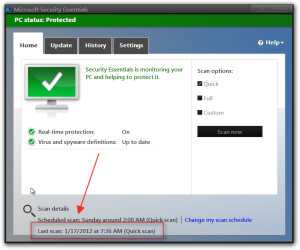
I use Microsoft Security Essentials. I have it set to do a Quick scan every day at 3PM as my computer is almost always on then. I assume it's working but can't check as that information does not seem to be logged anywhere.
Every couple days the MSE icon in the taskbar turns orange indicating I have not done a scan in a while when it should have been done the previous day, certainly several times in the last week or so.
I've uninstalled and reinstalled MSE but it doesn't make any difference.
Anyone have any ideas on how to fix this. It's not a problem, just an annoyance.
Every couple days the MSE icon in the taskbar turns orange indicating I have not done a scan in a while when it should have been done the previous day, certainly several times in the last week or so.
I've uninstalled and reinstalled MSE but it doesn't make any difference.
Anyone have any ideas on how to fix this. It's not a problem, just an annoyance.
My Computer
At a glance
Windows 10 Pro X64Intel Quad Core i7-4770 @ 3.4Ghz16.0GB PC3-12800 DDR3 SDRAM 1600 MHzIntel Integrated HD Graphics
- Computer type
- PC/Desktop
- Computer Manufacturer/Model Number
- Lenovo IdeaCenter 450
- OS
- Windows 10 Pro X64
- CPU
- Intel Quad Core i7-4770 @ 3.4Ghz
- Memory
- 16.0GB PC3-12800 DDR3 SDRAM 1600 MHz
- Graphics Card(s)
- Intel Integrated HD Graphics
- Sound Card
- Realtek HD Audio
- Monitor(s) Displays
- HP 22" LCD
- Screen Resolution
- 1680 x 1050
- Hard Drives
- 250GB Samsung EVO SATA-3 SSD
2TB Seagate ST2000DM001 SATA-2
1.5TB Seagate ST3150041AS SATA
- Keyboard
- Dell USB
- Mouse
- Lenovo USB
- Internet Speed
- Cable via Road Runner 3MB Upload, 30MB Download
- Antivirus
- Windows Defender, MBAM Pro, MBAE
- Browser
- Seamonkey
- Other Info
- UEFI/GPT
PLDS DVD-RW DH16AERSH