Multiboot HDD-W7 + HDD-XP + SSD-W7

AlanRR

New member
Member
Local time
3:38 AM
Messages
57
Location
Kings Lynn, Norfolk, UK
I have an idea I'de like to bounce off the experts here - please excuse if its silly - I'm still learning - because I hope to learn if it is - or want to understand if it is not . . . . .

Presently I have XP(HDD) and W7(HDD) setup as a dual boot system and all is running very good.

I propose to add a SSD to run W7 from to step up the speed ladder.

Have done a lot of reading and thinking - do you think the following would work? (Yes I know AHCI is not an option and if you see my previous thread you'll see I am happy to live with that.)

Add SSD to the system using spare SATA lead and power lead.

Boot into XP and run EaseUS or whatever to clone the dormant W7(HDD) partition to the SSD.

Boot into W7(HDD) and run EasyBCD to add W7(SSD) Partition to MBR?
I assume this will now offer me 3 OSs at boot stage. All SATA drives will be IDE as I understand XP prevents anything AHCI.

Reboot and select W7(SSD) to run.

That's it - or not :eek:

The above seems a nice easy way to achieve what I want, ultimately I guess I will run just W7(SSD) cos it will be the best, with an occasional venture into XP (decreasing with time) until ultimately its just W7(SSD) and the other partitions can be freed up for more storage.

Can you think of any reason why this would not work or might not work - and if not - an explanation would be very much appreciated.
 

My Computer My Computer

At a glance

Windows 7 - 32bitIntel Core2Duo E84002GBAsus NVIDIA GT640
Computer type
PC/Desktop
Computer Manufacturer/Model Number
self build
OS
Windows 7 - 32bit
CPU
Intel Core2Duo E8400
Motherboard
ASUS P5Q SE
Memory
2GB
Graphics Card(s)
Asus NVIDIA GT640
Sound Card
Realtek on mobo
Monitor(s) Displays
2 identical IIyama 19"
Screen Resolution
1280 x 1024
Hard Drives
4 HDD + 1 SSD all SATA
PSU
520W Corsair HX series modular.
Case
Gigabyte - Triton
Cooling
Fans
Keyboard
Logitech
Mouse
Logitech wireless
Internet Speed
2.8M on a good day
Browser
IE11
Other Info
Wacom Bamboo Tablet CTH-470
Not sure whether that would work because of the current location of the bootmgr. Post a picture of disk management and we'll have a look.
 

My Computer My Computer

At a glance

Vista, Windows7, Mint Mate, Zorin, Windows 8from 1.6GHz Duo to i7
Computer Manufacturer/Model Number
HP, Dell, Gateway, Toshiba - 4 laptops and 2 desktops
OS
Vista, Windows7, Mint Mate, Zorin, Windows 8
CPU
from 1.6GHz Duo to i7
Monitor(s) Displays
2x HP w2207
Hard Drives
5x HDD, 7x SSD, 12x Externals
Keyboard
with trackball - no mices
Mouse
Trackball mice
Internet Speed
DSL 6000

My Computer My Computer

At a glance

Windows 10 Pro. 64/ version 1709 Windows 7 Pr...Intel i7-6800K @ 4.3Corsair Platinum 16 gig @2400EVGA GTX 1070 OC
Computer type
PC/Desktop
Computer Manufacturer/Model Number
Home made Desktop
OS
Windows 10 Pro. 64/ version 1709 Windows 7 Pro/64
CPU
Intel i7-6800K @ 4.3
Motherboard
ASUS X-99 Deluxe II
Memory
Corsair Platinum 16 gig @2400
Graphics Card(s)
EVGA GTX 1070 OC
Monitor(s) Displays
Asus 27" LED LCD/VE278Q
Screen Resolution
1920-1080 or 1280-720 HDMI
Hard Drives
INTEL SSD 730-240 Gb Sata 3.0/
PSU
EVGA Platium 1200W
Case
Phanteks Luxe Tempered Glass 8 fans/ one radiator
Cooling
XSPC/ Water Cooled CPU
Keyboard
Das 4 Professional
Mouse
Logitech M705/MX Anywhere 2-S
Internet Speed
100 mbits
Antivirus
Microsoft Security Essentials/ Malwarebytes Premium 3.0/ SAS
Browser
I.E. 11 default/Firefox/ ISP Time Warner Cable/Spectrum
Other Info
LG BluRay Burner/
Sound system-KLipsch-THX/
Icy Dock ssd Hot Swap bays.
Here we are.....
 

Attachments

  • DiskManagement.PNG
    DiskManagement.PNG
    23.8 KB · Views: 5

My Computer My Computer

At a glance

Windows 7 - 32bitIntel Core2Duo E84002GBAsus NVIDIA GT640
Computer type
PC/Desktop
Computer Manufacturer/Model Number
self build
OS
Windows 7 - 32bit
CPU
Intel Core2Duo E8400
Motherboard
ASUS P5Q SE
Memory
2GB
Graphics Card(s)
Asus NVIDIA GT640
Sound Card
Realtek on mobo
Monitor(s) Displays
2 identical IIyama 19"
Screen Resolution
1280 x 1024
Hard Drives
4 HDD + 1 SSD all SATA
PSU
520W Corsair HX series modular.
Case
Gigabyte - Triton
Cooling
Fans
Keyboard
Logitech
Mouse
Logitech wireless
Internet Speed
2.8M on a good day
Browser
IE11
Other Info
Wacom Bamboo Tablet CTH-470
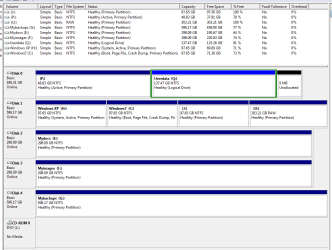
Hmm, you have 2 active partitions, P and H. I suspect that the bootmgr for Windows 7 is on H but you can only make sure if you physically disconnect Disk0 and then try to boot into Win7. Because it could also be that during the installation of Win7, the installer grabbed Disk0 for the Win7 bootmgr.

Another way to check is to make an image of C with command prompt. Use this command:

wbadmin start backup -backupTarget:X: -include:C: -AllCritical -quiet

You have to replace "X" with the volume letter of your backup device.

When you mount the image(s), you will know where the bootmgr is because the "AllCritical" command will automatically grab the right partition. If you watch the command prompt window during the imaging process, you may also see which partitions it grabbed.

Once we know where the bootmgr is, we'll see what we can do.
 

My Computer My Computer

At a glance

Vista, Windows7, Mint Mate, Zorin, Windows 8from 1.6GHz Duo to i7
Computer Manufacturer/Model Number
HP, Dell, Gateway, Toshiba - 4 laptops and 2 desktops
OS
Vista, Windows7, Mint Mate, Zorin, Windows 8
CPU
from 1.6GHz Duo to i7
Monitor(s) Displays
2x HP w2207
Hard Drives
5x HDD, 7x SSD, 12x Externals
Keyboard
with trackball - no mices
Mouse
Trackball mice
Internet Speed
DSL 6000
P: is an old XP system partition and exists here only for historic reasons, it is never booted.

H: is my current XP partition and is the partition booted from when I select XP at boot time.

Disc 0 containing P: and Q: was added after Windows7 was installed, and I expect to remove it as soon as its purpose has been fulfilled. It was extracted from my partners old pc when she bought a new one and installed in mine to enable all her personal files (from Q) to be copied across our network to her new pc.

I would therefore agree with your suspicion that W7 bootmgr is on H:

Hope this (not having to open the case) answer makes things clear.
 

My Computer My Computer

At a glance

Windows 7 - 32bitIntel Core2Duo E84002GBAsus NVIDIA GT640
Computer type
PC/Desktop
Computer Manufacturer/Model Number
self build
OS
Windows 7 - 32bit
CPU
Intel Core2Duo E8400
Motherboard
ASUS P5Q SE
Memory
2GB
Graphics Card(s)
Asus NVIDIA GT640
Sound Card
Realtek on mobo
Monitor(s) Displays
2 identical IIyama 19"
Screen Resolution
1280 x 1024
Hard Drives
4 HDD + 1 SSD all SATA
PSU
520W Corsair HX series modular.
Case
Gigabyte - Triton
Cooling
Fans
Keyboard
Logitech
Mouse
Logitech wireless
Internet Speed
2.8M on a good day
Browser
IE11
Other Info
Wacom Bamboo Tablet CTH-470
OK, if disk0 was installed after the Win7 installation, then things are clear - H is our bootmgr partition. I would do the following:

1. Copy the bootmgr to C: http://www.sevenforums.com/tutorials/209885-bootmgr-move-c-easybcd.html

2. Make an image of C and restore it on the SSD. Make sure you first align the SSD - see here.

You may end up with 2 BCD entries in the bootmgr (XP and 7), but we'll fix that later.
 

My Computer My Computer

At a glance

Vista, Windows7, Mint Mate, Zorin, Windows 8from 1.6GHz Duo to i7
Computer Manufacturer/Model Number
HP, Dell, Gateway, Toshiba - 4 laptops and 2 desktops
OS
Vista, Windows7, Mint Mate, Zorin, Windows 8
CPU
from 1.6GHz Duo to i7
Monitor(s) Displays
2x HP w2207
Hard Drives
5x HDD, 7x SSD, 12x Externals
Keyboard
with trackball - no mices
Mouse
Trackball mice
Internet Speed
DSL 6000
Ok thanks for that - this seems to be moving in a positive direction :)

At this point practical progress will pause as I do not yet have the SSD but I am very much interested in progressing the theory and so far I think I am keeping up with you.

Not sure I fully understand the act of copying the boot manager from H: to C: as the linked how-to article suggests this will deactivate H and activate C. If that happens surely my dual boot system will not boot? :confused:

Would I be right in assuming you may be trying to create the SSD partition as a clone of C: ready with a copy of the boot manager??

I would like at all times to retain my dual boot setup and am hoping this process will lead to a triple boot system allowing me to choose XP(HDD) or W7(HDD) or W7(SSD). In the future (once happy with all the migration) I will just have one single boot system namely W7 on SSD, but for now my cautious nature would be happier not burning my bridges as I go.

You mention making an image of C and restoring it on to the SSD - is this the same as cloning the C partition to the SSD? or have I missed something subtle here?

Not too familiar with the actions you are suggesting - but very much interested understanding and learning what's what and how to go about things - so your patience is very much appreciated.
 

My Computer My Computer

At a glance

Windows 7 - 32bitIntel Core2Duo E84002GBAsus NVIDIA GT640
Computer type
PC/Desktop
Computer Manufacturer/Model Number
self build
OS
Windows 7 - 32bit
CPU
Intel Core2Duo E8400
Motherboard
ASUS P5Q SE
Memory
2GB
Graphics Card(s)
Asus NVIDIA GT640
Sound Card
Realtek on mobo
Monitor(s) Displays
2 identical IIyama 19"
Screen Resolution
1280 x 1024
Hard Drives
4 HDD + 1 SSD all SATA
PSU
520W Corsair HX series modular.
Case
Gigabyte - Triton
Cooling
Fans
Keyboard
Logitech
Mouse
Logitech wireless
Internet Speed
2.8M on a good day
Browser
IE11
Other Info
Wacom Bamboo Tablet CTH-470
If that happens surely my dual boot system will not boot?
The dual boot should still work. The bootmgr is just in another place but the MBR will point there. It always points to the active partition.

Would I be right in assuming you may be trying to create the SSD partition as a clone of C: ready with a copy of the boot manager??
Nah, a clone is something else. You create a primary active aligned partition on the SSD (see my tutorial) and then you just restore the image into it. But don't drag it in the Macrium recovery page. That would assume the alignment of the HDD which we don't want.

You mention making an image of C and restoring it on to the SSD - is this the same as cloning the C partition to the SSD? or have I missed something subtle here?
Cloning is something different. You can try that too. But I prefer to work with images. Then I know what I am doing.

The easiest cloning is with this program. It does the job in 3 clicks. It is on sale today (but hurry) for $9.95. Completely trouble free. I have used it many times.
 

My Computer My Computer

At a glance

Vista, Windows7, Mint Mate, Zorin, Windows 8from 1.6GHz Duo to i7
Computer Manufacturer/Model Number
HP, Dell, Gateway, Toshiba - 4 laptops and 2 desktops
OS
Vista, Windows7, Mint Mate, Zorin, Windows 8
CPU
from 1.6GHz Duo to i7
Monitor(s) Displays
2x HP w2207
Hard Drives
5x HDD, 7x SSD, 12x Externals
Keyboard
with trackball - no mices
Mouse
Trackball mice
Internet Speed
DSL 6000
Ok - bought Paragon at the special offer - ready for when I need it.

Thank you very much for your help so far.

So when I've got my new SSD - installed it - and done the necessary alignment / Paragon migration - will I have a triple boot system? Or still a dual boot? Can I still have a triple or will I be limited to a dual XP/W7(SSD) system?

My present W7 system is only 26GB but maybe might grow a bit yet, but ....

Another thought I am having - go for a 128GB SSD - make 2 partitions (64GB each) - run W7 off the first and have some sort of a backup/recovery image on the 2nd? I've suffered a few virus attacks over the years and the thought of a pristine partition offering near instant recovery rather appeals. Is this too ambitious and would a 2nd partition used in this way be relatively safe from virus attack? What are your thoughts?

Thanks again for your prompt and interesting replies.
 

My Computer My Computer

At a glance

Windows 7 - 32bitIntel Core2Duo E84002GBAsus NVIDIA GT640
Computer type
PC/Desktop
Computer Manufacturer/Model Number
self build
OS
Windows 7 - 32bit
CPU
Intel Core2Duo E8400
Motherboard
ASUS P5Q SE
Memory
2GB
Graphics Card(s)
Asus NVIDIA GT640
Sound Card
Realtek on mobo
Monitor(s) Displays
2 identical IIyama 19"
Screen Resolution
1280 x 1024
Hard Drives
4 HDD + 1 SSD all SATA
PSU
520W Corsair HX series modular.
Case
Gigabyte - Triton
Cooling
Fans
Keyboard
Logitech
Mouse
Logitech wireless
Internet Speed
2.8M on a good day
Browser
IE11
Other Info
Wacom Bamboo Tablet CTH-470
With the Paragon tool you need not do anything - no alignment, no partition, nothing. You install the SSD and run the paragon program. It will discover the SSD automatically and you only have to do 3 easy clicks - you will see. After the migration look into Disk Management because your C partition on the SSD will only be 26GBs. That you have to extend then to cover the whole unallocated space.

The one thing you have to do though is to change the boot order in the BIOS so that the SSD is always first. Then if you want to boot into the systems on the HDD, you have to change the temporary boot order to make the HDD first. The HDD still has a copy of the bootmgr even if you copied it to C on there.

Another thought I am having - go for a 128GB SSD - make 2 partitions (64GB each) - run W7 off the first and have some sort of a backup/recovery image on the 2nd?
That is not a good idea. Make images to an external device instead. No way would I partition such a small SSD. If your SSD system really goes belly up, you can recover it from the image in 20 minutes. And if you want an 'immediate' system, you can always work with the system on the HDD. But remember, any extra system you have you also have to maintain. And that is a pain.

If you want safe internet surfing, use a virtual Linux partition. That's what I do. I have uploaded a ready to go Mint Mate system that you could use. See here. Click on the tile on my OneDrive.
 

My Computer My Computer

At a glance

Vista, Windows7, Mint Mate, Zorin, Windows 8from 1.6GHz Duo to i7
Computer Manufacturer/Model Number
HP, Dell, Gateway, Toshiba - 4 laptops and 2 desktops
OS
Vista, Windows7, Mint Mate, Zorin, Windows 8
CPU
from 1.6GHz Duo to i7
Monitor(s) Displays
2x HP w2207
Hard Drives
5x HDD, 7x SSD, 12x Externals
Keyboard
with trackball - no mices
Mouse
Trackball mice
Internet Speed
DSL 6000
Thank you for that.

Presumably you say the SSD partition will only be 26BG because Paragon will only create a partition large enough to copy my existing W7 installation?

Am I correct in assuming from your explanation in the second paragraph that I will not have a triple boot system as such but that I will retain the ability to run my existing dual boot system when I set my HDD as 1st boot in bios, and that when I want my SDD W7 I just set the SSD as 1st boot?

Not quite what I wanted but I don't see a problem as I seldom load XP these days and hopefully HDD W7 will be very boring in comparison to my SSD W7.

Thank you again for your help - it is much appreciated as I learn how to get my SSD online while still retaining my ability to go back to XP for old times sake.
 

My Computer My Computer

At a glance

Windows 7 - 32bitIntel Core2Duo E84002GBAsus NVIDIA GT640
Computer type
PC/Desktop
Computer Manufacturer/Model Number
self build
OS
Windows 7 - 32bit
CPU
Intel Core2Duo E8400
Motherboard
ASUS P5Q SE
Memory
2GB
Graphics Card(s)
Asus NVIDIA GT640
Sound Card
Realtek on mobo
Monitor(s) Displays
2 identical IIyama 19"
Screen Resolution
1280 x 1024
Hard Drives
4 HDD + 1 SSD all SATA
PSU
520W Corsair HX series modular.
Case
Gigabyte - Triton
Cooling
Fans
Keyboard
Logitech
Mouse
Logitech wireless
Internet Speed
2.8M on a good day
Browser
IE11
Other Info
Wacom Bamboo Tablet CTH-470
1. Yes
2. Yes

If you have questions once the SSD is in your system, post here or send me PM.
 

My Computer My Computer

At a glance

Vista, Windows7, Mint Mate, Zorin, Windows 8from 1.6GHz Duo to i7
Computer Manufacturer/Model Number
HP, Dell, Gateway, Toshiba - 4 laptops and 2 desktops
OS
Vista, Windows7, Mint Mate, Zorin, Windows 8
CPU
from 1.6GHz Duo to i7
Monitor(s) Displays
2x HP w2207
Hard Drives
5x HDD, 7x SSD, 12x Externals
Keyboard
with trackball - no mices
Mouse
Trackball mice
Internet Speed
DSL 6000
One small detail - earlier you mentioned copying the bootmgr to C: from H: (in my case).

Planning to use Paragon to migrate W7 to SSD - would this action still be necessary or will Paragon sort that for me?

SSD now ordered (Sandisk Ultra Plus 128GB) and should be with me by Wednesday next.:)

Thanks.
 

My Computer My Computer

At a glance

Windows 7 - 32bitIntel Core2Duo E84002GBAsus NVIDIA GT640
Computer type
PC/Desktop
Computer Manufacturer/Model Number
self build
OS
Windows 7 - 32bit
CPU
Intel Core2Duo E8400
Motherboard
ASUS P5Q SE
Memory
2GB
Graphics Card(s)
Asus NVIDIA GT640
Sound Card
Realtek on mobo
Monitor(s) Displays
2 identical IIyama 19"
Screen Resolution
1280 x 1024
Hard Drives
4 HDD + 1 SSD all SATA
PSU
520W Corsair HX series modular.
Case
Gigabyte - Triton
Cooling
Fans
Keyboard
Logitech
Mouse
Logitech wireless
Internet Speed
2.8M on a good day
Browser
IE11
Other Info
Wacom Bamboo Tablet CTH-470
Paragon should pick up the bootmgr. Try that first.
 

My Computer My Computer

At a glance

Vista, Windows7, Mint Mate, Zorin, Windows 8from 1.6GHz Duo to i7
Computer Manufacturer/Model Number
HP, Dell, Gateway, Toshiba - 4 laptops and 2 desktops
OS
Vista, Windows7, Mint Mate, Zorin, Windows 8
CPU
from 1.6GHz Duo to i7
Monitor(s) Displays
2x HP w2207
Hard Drives
5x HDD, 7x SSD, 12x Externals
Keyboard
with trackball - no mices
Mouse
Trackball mice
Internet Speed
DSL 6000
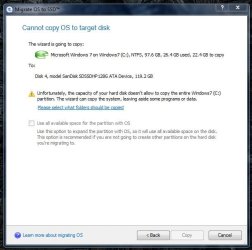
Oh dear - do not understand this - why can Paragon not fit 97GB into 119GB?
 

Attachments

  • problem1.JPG
    problem1.JPG
    45 KB · Views: 9

My Computer My Computer

At a glance

Windows 7 - 32bitIntel Core2Duo E84002GBAsus NVIDIA GT640
Computer type
PC/Desktop
Computer Manufacturer/Model Number
self build
OS
Windows 7 - 32bit
CPU
Intel Core2Duo E8400
Motherboard
ASUS P5Q SE
Memory
2GB
Graphics Card(s)
Asus NVIDIA GT640
Sound Card
Realtek on mobo
Monitor(s) Displays
2 identical IIyama 19"
Screen Resolution
1280 x 1024
Hard Drives
4 HDD + 1 SSD all SATA
PSU
520W Corsair HX series modular.
Case
Gigabyte - Triton
Cooling
Fans
Keyboard
Logitech
Mouse
Logitech wireless
Internet Speed
2.8M on a good day
Browser
IE11
Other Info
Wacom Bamboo Tablet CTH-470
That is weird indeed. I would try again.
 

My Computer My Computer

At a glance

Vista, Windows7, Mint Mate, Zorin, Windows 8from 1.6GHz Duo to i7
Computer Manufacturer/Model Number
HP, Dell, Gateway, Toshiba - 4 laptops and 2 desktops
OS
Vista, Windows7, Mint Mate, Zorin, Windows 8
CPU
from 1.6GHz Duo to i7
Monitor(s) Displays
2x HP w2207
Hard Drives
5x HDD, 7x SSD, 12x Externals
Keyboard
with trackball - no mices
Mouse
Trackball mice
Internet Speed
DSL 6000
I have - several times - I've read all the FAQ's on Paragon site and nothing seems to address any issues of this nature - so I've posted a support ticket to them with the above image - and am now waiting......

Thanks for your speedy reply - shame its not something I've done :confused:
 

My Computer My Computer

At a glance

Windows 7 - 32bitIntel Core2Duo E84002GBAsus NVIDIA GT640
Computer type
PC/Desktop
Computer Manufacturer/Model Number
self build
OS
Windows 7 - 32bit
CPU
Intel Core2Duo E8400
Motherboard
ASUS P5Q SE
Memory
2GB
Graphics Card(s)
Asus NVIDIA GT640
Sound Card
Realtek on mobo
Monitor(s) Displays
2 identical IIyama 19"
Screen Resolution
1280 x 1024
Hard Drives
4 HDD + 1 SSD all SATA
PSU
520W Corsair HX series modular.
Case
Gigabyte - Triton
Cooling
Fans
Keyboard
Logitech
Mouse
Logitech wireless
Internet Speed
2.8M on a good day
Browser
IE11
Other Info
Wacom Bamboo Tablet CTH-470
Was the SSD formatted in NTFS ?
 

My Computer My Computer

At a glance

Vista, Windows7, Mint Mate, Zorin, Windows 8from 1.6GHz Duo to i7
Computer Manufacturer/Model Number
HP, Dell, Gateway, Toshiba - 4 laptops and 2 desktops
OS
Vista, Windows7, Mint Mate, Zorin, Windows 8
CPU
from 1.6GHz Duo to i7
Monitor(s) Displays
2x HP w2207
Hard Drives
5x HDD, 7x SSD, 12x Externals
Keyboard
with trackball - no mices
Mouse
Trackball mice
Internet Speed
DSL 6000
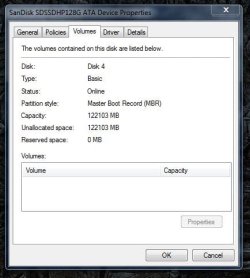
No - I have not specifically formatted it as I remember reading somewhere it was advised not to (see attached image snipped from the Paragon SSD Troubleshooting guide) and they mentioned leaving as unallocated space which is what mine currently shows.

I also read somewhere about not doing a full format - just do a quick format.

I have attached 3 images one from disc-management and one of the Properties of the SSD - and a piece from the Paragon site.

So do you think this suggests I should give it a quick format before using Paragon? In all the stuff I've read from them there's no mention of any need to format.
 

Attachments

  • diacmanagement.JPG
    diacmanagement.JPG
    33.1 KB · Views: 0
  • properties.JPG
    properties.JPG
    32.8 KB · Views: 9
  • LeaveUnallocated.JPG
    LeaveUnallocated.JPG
    19.4 KB · Views: 9

My Computer My Computer

At a glance

Windows 7 - 32bitIntel Core2Duo E84002GBAsus NVIDIA GT640
Computer type
PC/Desktop
Computer Manufacturer/Model Number
self build
OS
Windows 7 - 32bit
CPU
Intel Core2Duo E8400
Motherboard
ASUS P5Q SE
Memory
2GB
Graphics Card(s)
Asus NVIDIA GT640
Sound Card
Realtek on mobo
Monitor(s) Displays
2 identical IIyama 19"
Screen Resolution
1280 x 1024
Hard Drives
4 HDD + 1 SSD all SATA
PSU
520W Corsair HX series modular.
Case
Gigabyte - Triton
Cooling
Fans
Keyboard
Logitech
Mouse
Logitech wireless
Internet Speed
2.8M on a good day
Browser
IE11
Other Info
Wacom Bamboo Tablet CTH-470
Back
Top