Multiboot HDD-W7 + HDD-XP + SSD-W7

Alan, the good thing is that we all learned something. So as long as it works now, let's put it to rest. But Greg is right. It could have been less painful.
 

My Computer My Computer

At a glance

Vista, Windows7, Mint Mate, Zorin, Windows 8from 1.6GHz Duo to i7
Computer Manufacturer/Model Number
HP, Dell, Gateway, Toshiba - 4 laptops and 2 desktops
OS
Vista, Windows7, Mint Mate, Zorin, Windows 8
CPU
from 1.6GHz Duo to i7
Monitor(s) Displays
2x HP w2207
Hard Drives
5x HDD, 7x SSD, 12x Externals
Keyboard
with trackball - no mices
Mouse
Trackball mice
Internet Speed
DSL 6000
Again, had you moved the boot files as Wolfgang advised six days ago and I advised again yesterday, this could have been avoided because the Paragon error would not have arose.

I would not give BCD commands because we have more consumer-friendly automated methods that work better, and another manual method that always works - thousands of times here. Paragon is not the top tech forums on the web.

Have you cloned your drive successfully now? What do you wish to do with XP and old Win7?

Ok - you're right - just a passing thought ???

Yes W7 now successfully cloned/migrated to SSD and working rather pleasingly.

Consumer-friendly methods are always better - but I'm very much in the dark on these issues and admittedly use my system for what it can do for me rather than how I can tweak more mph out of it or play with its construction - but I am very grateful to you both for your support. I have learnt a lot but at my age :o if not used regularly it will probably soon pass into history. :confused:

At one time I always wanted to retain XP partly for old times sake and partly to enable me to go back and see how I did something that I can't get working on W7. Trivial I know. As for W7 HDD - probably similar reasons.

See next post for an idea I have for the future of XP (if not W7 HDD)
 

My Computer My Computer

At a glance

Windows 7 - 32bitIntel Core2Duo E84002GBAsus NVIDIA GT640
Computer type
PC/Desktop
Computer Manufacturer/Model Number
self build
OS
Windows 7 - 32bit
CPU
Intel Core2Duo E8400
Motherboard
ASUS P5Q SE
Memory
2GB
Graphics Card(s)
Asus NVIDIA GT640
Sound Card
Realtek on mobo
Monitor(s) Displays
2 identical IIyama 19"
Screen Resolution
1280 x 1024
Hard Drives
4 HDD + 1 SSD all SATA
PSU
520W Corsair HX series modular.
Case
Gigabyte - Triton
Cooling
Fans
Keyboard
Logitech
Mouse
Logitech wireless
Internet Speed
2.8M on a good day
Browser
IE11
Other Info
Wacom Bamboo Tablet CTH-470
Correct - W7 SSD now boots by default.

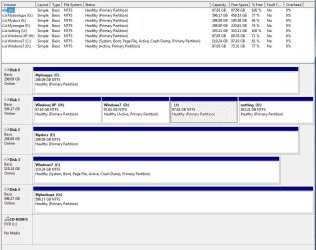
Please find attached a disc management capture.

Firstly - won't I have to set the XP partition to active? Or maybe not if Disk 1 already has a loader on partition D (wonder if it'll look like my original dual boot system offering the 2 HDD based OS's)

I'll try altering boot drive in BIOS (to disk 1)and report back.
 

My Computer My Computer

At a glance

Windows 7 - 32bitIntel Core2Duo E84002GBAsus NVIDIA GT640
Computer type
PC/Desktop
Computer Manufacturer/Model Number
self build
OS
Windows 7 - 32bit
CPU
Intel Core2Duo E8400
Motherboard
ASUS P5Q SE
Memory
2GB
Graphics Card(s)
Asus NVIDIA GT640
Sound Card
Realtek on mobo
Monitor(s) Displays
2 identical IIyama 19"
Screen Resolution
1280 x 1024
Hard Drives
4 HDD + 1 SSD all SATA
PSU
520W Corsair HX series modular.
Case
Gigabyte - Triton
Cooling
Fans
Keyboard
Logitech
Mouse
Logitech wireless
Internet Speed
2.8M on a good day
Browser
IE11
Other Info
Wacom Bamboo Tablet CTH-470
Ooops - forgot management image.
 

Attachments

  • DiscManagement.JPG
    DiscManagement.JPG
    111.4 KB · Views: 2

My Computer My Computer

At a glance

Windows 7 - 32bitIntel Core2Duo E84002GBAsus NVIDIA GT640
Computer type
PC/Desktop
Computer Manufacturer/Model Number
self build
OS
Windows 7 - 32bit
CPU
Intel Core2Duo E8400
Motherboard
ASUS P5Q SE
Memory
2GB
Graphics Card(s)
Asus NVIDIA GT640
Sound Card
Realtek on mobo
Monitor(s) Displays
2 identical IIyama 19"
Screen Resolution
1280 x 1024
Hard Drives
4 HDD + 1 SSD all SATA
PSU
520W Corsair HX series modular.
Case
Gigabyte - Triton
Cooling
Fans
Keyboard
Logitech
Mouse
Logitech wireless
Internet Speed
2.8M on a good day
Browser
IE11
Other Info
Wacom Bamboo Tablet CTH-470
Disk 1 should boot since you have an active partition on there. Question is whether you want to keep that - e.g. as a backup.
 

My Computer My Computer

At a glance

Vista, Windows7, Mint Mate, Zorin, Windows 8from 1.6GHz Duo to i7
Computer Manufacturer/Model Number
HP, Dell, Gateway, Toshiba - 4 laptops and 2 desktops
OS
Vista, Windows7, Mint Mate, Zorin, Windows 8
CPU
from 1.6GHz Duo to i7
Monitor(s) Displays
2x HP w2207
Hard Drives
5x HDD, 7x SSD, 12x Externals
Keyboard
with trackball - no mices
Mouse
Trackball mice
Internet Speed
DSL 6000
Yep W7 booted off the original HDD - I can hear it :D

No choice - so it obviously does not see the "other" OS - XP.

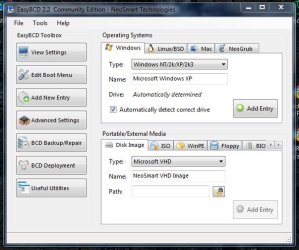
Would it be as simple as running EasyBCD to add XP (as per attached image)???

PS: is there an easier way to see what you just booted off - rather than listening and trying to judge whether its SSD or HD?
 

Attachments

  • EasyBCD_ADD.JPG
    EasyBCD_ADD.JPG
    53.3 KB · Views: 10

My Computer My Computer

At a glance

Windows 7 - 32bitIntel Core2Duo E84002GBAsus NVIDIA GT640
Computer type
PC/Desktop
Computer Manufacturer/Model Number
self build
OS
Windows 7 - 32bit
CPU
Intel Core2Duo E8400
Motherboard
ASUS P5Q SE
Memory
2GB
Graphics Card(s)
Asus NVIDIA GT640
Sound Card
Realtek on mobo
Monitor(s) Displays
2 identical IIyama 19"
Screen Resolution
1280 x 1024
Hard Drives
4 HDD + 1 SSD all SATA
PSU
520W Corsair HX series modular.
Case
Gigabyte - Triton
Cooling
Fans
Keyboard
Logitech
Mouse
Logitech wireless
Internet Speed
2.8M on a good day
Browser
IE11
Other Info
Wacom Bamboo Tablet CTH-470
Would it be as simple as running EasyBCD to add XP (as per attached image)???

PS: is there an easier way to see what you just booted off - rather than listening and trying to judge whether its SSD or HD?
With EasyBCD you should be able to add XP to the bootmgr. Make sure you do that from the HDD system unless you want that on the SSD system too.

Just put something into one system (e.g. a picture on the desktop) that is not in the other system. Then you can tell them apart.
 

My Computer My Computer

At a glance

Vista, Windows7, Mint Mate, Zorin, Windows 8from 1.6GHz Duo to i7
Computer Manufacturer/Model Number
HP, Dell, Gateway, Toshiba - 4 laptops and 2 desktops
OS
Vista, Windows7, Mint Mate, Zorin, Windows 8
CPU
from 1.6GHz Duo to i7
Monitor(s) Displays
2x HP w2207
Hard Drives
5x HDD, 7x SSD, 12x Externals
Keyboard
with trackball - no mices
Mouse
Trackball mice
Internet Speed
DSL 6000
In reverse order...

What a simple idea changing the wallpaper - I'll make one with SSD somewhere subtle and the other with HDD on the wallpaper. Brill.

So before I do the EasyBCD bit - can I just run this past you...

In W7(HDD) - run easyBCD and Add the partition where XP is - then I'll get the usual dual boot option at boot time and be able to set the default OS and the wait time.

AND

In W7(SSD) - run easyBCD and Add the partition where XP is - then I'll get the usual dual boot option at boot time and be able to set the default OS and the wait time.

Then I would only have to edit the boot drive if I wanted to specifically get to the HDD W7/XP choice as opposed to what I think might be the default - namely the W7 SSD vs XP HDD.?
 

My Computer My Computer

At a glance

Windows 7 - 32bitIntel Core2Duo E84002GBAsus NVIDIA GT640
Computer type
PC/Desktop
Computer Manufacturer/Model Number
self build
OS
Windows 7 - 32bit
CPU
Intel Core2Duo E8400
Motherboard
ASUS P5Q SE
Memory
2GB
Graphics Card(s)
Asus NVIDIA GT640
Sound Card
Realtek on mobo
Monitor(s) Displays
2 identical IIyama 19"
Screen Resolution
1280 x 1024
Hard Drives
4 HDD + 1 SSD all SATA
PSU
520W Corsair HX series modular.
Case
Gigabyte - Triton
Cooling
Fans
Keyboard
Logitech
Mouse
Logitech wireless
Internet Speed
2.8M on a good day
Browser
IE11
Other Info
Wacom Bamboo Tablet CTH-470
I would not muck up the SSD with the XP BCD. The purpose of the SSD is a fast boot (among other things). Why hold that up with an extra boot selection - especially since you do not plan to use XP that often..
 

My Computer My Computer

At a glance

Vista, Windows7, Mint Mate, Zorin, Windows 8from 1.6GHz Duo to i7
Computer Manufacturer/Model Number
HP, Dell, Gateway, Toshiba - 4 laptops and 2 desktops
OS
Vista, Windows7, Mint Mate, Zorin, Windows 8
CPU
from 1.6GHz Duo to i7
Monitor(s) Displays
2x HP w2207
Hard Drives
5x HDD, 7x SSD, 12x Externals
Keyboard
with trackball - no mices
Mouse
Trackball mice
Internet Speed
DSL 6000
Yeah - fair point - you may well be seeing into the future better than I am :D

Changed my wallpaper for HHD experience - see attached.
 

Attachments

  • bottomrightscreen2.JPG
    bottomrightscreen2.JPG
    70.2 KB · Views: 0

My Computer My Computer

At a glance

Windows 7 - 32bitIntel Core2Duo E84002GBAsus NVIDIA GT640
Computer type
PC/Desktop
Computer Manufacturer/Model Number
self build
OS
Windows 7 - 32bit
CPU
Intel Core2Duo E8400
Motherboard
ASUS P5Q SE
Memory
2GB
Graphics Card(s)
Asus NVIDIA GT640
Sound Card
Realtek on mobo
Monitor(s) Displays
2 identical IIyama 19"
Screen Resolution
1280 x 1024
Hard Drives
4 HDD + 1 SSD all SATA
PSU
520W Corsair HX series modular.
Case
Gigabyte - Triton
Cooling
Fans
Keyboard
Logitech
Mouse
Logitech wireless
Internet Speed
2.8M on a good day
Browser
IE11
Other Info
Wacom Bamboo Tablet CTH-470
In post #1 you stated
Boot into XP and run EaseUS or whatever to clone the dormant W7(HDD) partition to the SSD.
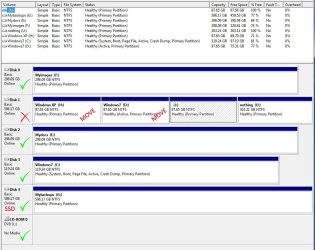
Looking at the latest Disk Management it seems the only partition you need on Disk 1 is the XP [H] partition.
Do you have a reason for wanting to keep the dormant Win 7 [D] partition/installation ?
Disk 1 [J] and look unused.
All this seems like wasted HD space to me.
If you get rid of the dormant Win 7 on the HD, it can't ever bootup.
 

My Computer My Computer

At a glance

Multi-Boot W7_Pro_x64 W8.1_Pro_x64 W10_Pro_x6...AMD Athlon II x4 6206GB GSkill DDR2 800AMD 4670 GPU + AMD 4200 IGP
Computer type
PC/Desktop
Computer Manufacturer/Model Number
home built
OS
Multi-Boot W7_Pro_x64 W8.1_Pro_x64 W10_Pro_x64 +Linux_VMs +Chromium_VM
CPU
AMD Athlon II x4 620
Motherboard
Gigabyte GA-MA785G-UD3H
Memory
6GB GSkill DDR2 800
Graphics Card(s)
AMD 4670 GPU + AMD 4200 IGP
Sound Card
on board Realtek ALC889A
Monitor(s) Displays
RCA 40" LCD TV, Insignia 32" LCD TV, HP 15" LCD monitor
Screen Resolution
1680 x 1050
Hard Drives
OCZ Vertex 3 120GB,
Samsung F3 1TB (3),
Several others - WD, Seagate, Hitachi, ...
PSU
Corsair 500 W
Case
Rosewill mid tower
Cooling
CM 90mm rifle
Keyboard
Gyration wireless, Logitech wireless, Dell USB wired
Mouse
Gyration wireless, Logitech wireless, V7 USB wired
Internet Speed
Spectrum - 100Mbps D / 10Mbps U
Antivirus
Avast, MBAM3, EMET, WinPatrol
Browser
Pale Moon, Firefox, IE
Other Info
2 multi-boot PC's
Mainly HTPC/Office/Gen purpose (no gaming).
Trendnet USB KVM.
LG DVD burner/Blue Ray Player.
Tray system for removable SATA backup drives.

Not currently OCd, under-volted.
I use Hybrid sleep, rarely re-boot or shutdown.

Hauppauge HD-PVR, Avermedia PCIe TV Tuner, Hauppauge PCI TV Tuner.
David: a fair point as realistically I probably won't go back into W7 HDD - but I am attracted to having it as a backup - and I like the idea of retaining the ability to revisit XP.

Yeah there is wasted HD space - but I'm not bothered or desperate for space ATM.

Your interest appreciated.
 

My Computer My Computer

At a glance

Windows 7 - 32bitIntel Core2Duo E84002GBAsus NVIDIA GT640
Computer type
PC/Desktop
Computer Manufacturer/Model Number
self build
OS
Windows 7 - 32bit
CPU
Intel Core2Duo E8400
Motherboard
ASUS P5Q SE
Memory
2GB
Graphics Card(s)
Asus NVIDIA GT640
Sound Card
Realtek on mobo
Monitor(s) Displays
2 identical IIyama 19"
Screen Resolution
1280 x 1024
Hard Drives
4 HDD + 1 SSD all SATA
PSU
520W Corsair HX series modular.
Case
Gigabyte - Triton
Cooling
Fans
Keyboard
Logitech
Mouse
Logitech wireless
Internet Speed
2.8M on a good day
Browser
IE11
Other Info
Wacom Bamboo Tablet CTH-470
Can you boot into XP as well as old Win7 now? Yes or no?

When you're ready to remove either, post back a Disk Mgmt screenshot.
 
Yes - got both XP and W7 running as a dual boot off the HDD.

When I set the HDD in BIOS it just went straight into W7 - but I have run easyBCD and added XP and now when that drive is set in BIOS I get the usual dual boot decision to make - and XP runs ok.

I am presently considering retiring the 600GB Disk 1 before it dies on me. >36000hrs on the clock and under a yellow Caution from CrystalDisk.

I plan to install a much newer 200GB HDD split into 2 equal partitions, one for XP and the other for W7 (as a standby backup), dual booting.

I can temporarily remove disk 4 to make space for the migration/clone exercise as I only have 6 sata sockets.

So now I need to find the best way to clone/migrate XP and W7 to the fresh 200GB drive. I can then retire Disk1 and reconnect Disk4.

Maybe this exercise is easier as both source partitions will be dormant as I run the show from W7 SSD.

I have easyBCD, EaseUS and Paragon MigrateOStoSSD at my disposal so this should be easy.
 

Attachments

  • DiscManagement2.JPG
    DiscManagement2.JPG
    106.7 KB · Views: 0

My Computer My Computer

At a glance

Windows 7 - 32bitIntel Core2Duo E84002GBAsus NVIDIA GT640
Computer type
PC/Desktop
Computer Manufacturer/Model Number
self build
OS
Windows 7 - 32bit
CPU
Intel Core2Duo E8400
Motherboard
ASUS P5Q SE
Memory
2GB
Graphics Card(s)
Asus NVIDIA GT640
Sound Card
Realtek on mobo
Monitor(s) Displays
2 identical IIyama 19"
Screen Resolution
1280 x 1024
Hard Drives
4 HDD + 1 SSD all SATA
PSU
520W Corsair HX series modular.
Case
Gigabyte - Triton
Cooling
Fans
Keyboard
Logitech
Mouse
Logitech wireless
Internet Speed
2.8M on a good day
Browser
IE11
Other Info
Wacom Bamboo Tablet CTH-470
You can also make 1 image of both partitions with free Macrium and dump them into the the 2 partitions of the new disk. You have plenty of space on F to store the image of the 2 partitions. And it gives you some practice with Macrium.

Advantage is that you don't have to take out any third disk. Just swap the new for the old once the images are on F.
 

My Computer My Computer

At a glance

Vista, Windows7, Mint Mate, Zorin, Windows 8from 1.6GHz Duo to i7
Computer Manufacturer/Model Number
HP, Dell, Gateway, Toshiba - 4 laptops and 2 desktops
OS
Vista, Windows7, Mint Mate, Zorin, Windows 8
CPU
from 1.6GHz Duo to i7
Monitor(s) Displays
2x HP w2207
Hard Drives
5x HDD, 7x SSD, 12x Externals
Keyboard
with trackball - no mices
Mouse
Trackball mice
Internet Speed
DSL 6000
You can clone XP to then new disk but I'd only save a backup image of Win7 from the SSD to storage on that or another disk, since there's no need to have two Win7's as you've said except as backup and the proper backup for your new SSD install is as a backup image when it's running best.

So make sure you've followed everything you want that works best from Clean Reinstall Windows 7.

Clone XP to the new disk, adjusting the borders to take as much or little of the disk as you want. You adjust these borders after you drag the partition to the new disk at the link just below it.

Remember that you don't need to go into BIOS to change from HD or SSD but can use the one-time BIOS boot menu interrupt key which should be given on first screen. On most Asus' this is the F8 key but it may be different on yours so look on the first boot screen for its listing, or read the Manual on the mobo's Support Downloads webpage.
 
Thanks gents - much to go on and some ideas to think about - hopefully get some time over the weekend to have a play - I just knew it would be easy. :)

Greg I'm not sure I understand what you mean by the "one-time BIOS boot menu interrupt key"

What I normally do is hit Del at the appropriate point and this gets me a BIOS screen where I nip to Boot and change the disc to boot from - then do a Save and Exit to continue booting.

Is this what you mean - or is there some magical alternative that I know nothing about?

The idea of a W7 image appeals - is restoring an image easy? Can be done from within XP?

Thanks again.
 

My Computer My Computer

At a glance

Windows 7 - 32bitIntel Core2Duo E84002GBAsus NVIDIA GT640
Computer type
PC/Desktop
Computer Manufacturer/Model Number
self build
OS
Windows 7 - 32bit
CPU
Intel Core2Duo E8400
Motherboard
ASUS P5Q SE
Memory
2GB
Graphics Card(s)
Asus NVIDIA GT640
Sound Card
Realtek on mobo
Monitor(s) Displays
2 identical IIyama 19"
Screen Resolution
1280 x 1024
Hard Drives
4 HDD + 1 SSD all SATA
PSU
520W Corsair HX series modular.
Case
Gigabyte - Triton
Cooling
Fans
Keyboard
Logitech
Mouse
Logitech wireless
Internet Speed
2.8M on a good day
Browser
IE11
Other Info
Wacom Bamboo Tablet CTH-470
Every BIOS has a boot menu key. It's normally listed on the first boot screen. If not I already suggested ways how to find out what it is. Did you try these before asking me again?
 
Back
Top