
louism957
New member
So, my bluescreens are back.
I've previously run the SeaTools hard drive diagnostic program and all three of my hard drives have passed which more or less rules them out. I've run Memtest for only about 10 minutes but haven't come across any errors. I'll run it overnight tonight though to be perfectly sure that the ram isn't the problem. I also haven't been able to recreate the errors by doing anything specific. They'll usually happen at any point whether that's rendering a video with After Effects, browsing Google Chrome or just using Skype.
Also, I ran TDSSKiller and it came up with this:
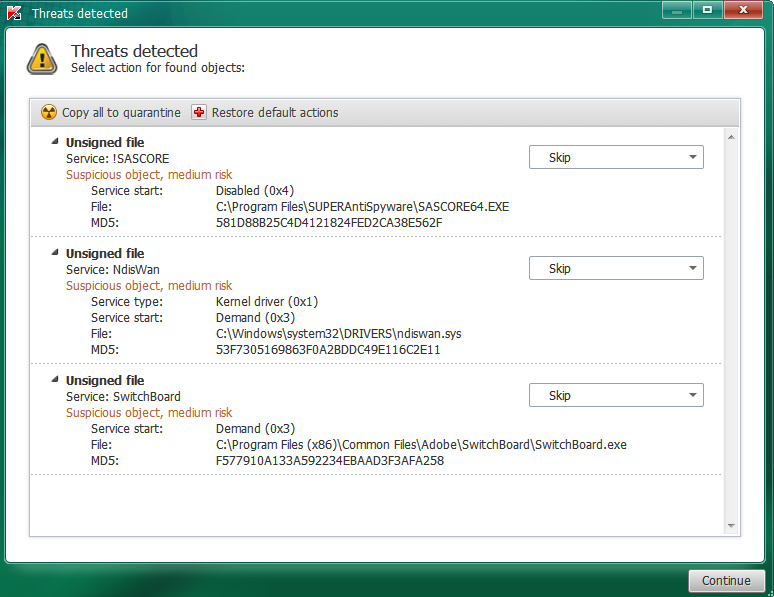
Are any of these bad? What could possibly be causing these bluescreens?
Update:
After looking through other threads, I decided to stress test my PC by running Prime95. My CPU speed is set to stock.

I've previously run the SeaTools hard drive diagnostic program and all three of my hard drives have passed which more or less rules them out. I've run Memtest for only about 10 minutes but haven't come across any errors. I'll run it overnight tonight though to be perfectly sure that the ram isn't the problem. I also haven't been able to recreate the errors by doing anything specific. They'll usually happen at any point whether that's rendering a video with After Effects, browsing Google Chrome or just using Skype.
Also, I ran TDSSKiller and it came up with this:
Are any of these bad? What could possibly be causing these bluescreens?
Update:
After looking through other threads, I decided to stress test my PC by running Prime95. My CPU speed is set to stock.
Last edited:
My Computer
- Computer type
- PC/Desktop
- Computer Manufacturer/Model Number
- Custom Build
- OS
- Windows 7 Ultimate x64
- CPU
- AMD Athlon II X3 455 3.3ghz
- Motherboard
- BIOSTAR A780L3L
- Memory
- 8GB DDR3 1333mhz PC3-10700
- Graphics Card(s)
- AMD Radeon HD 6670 1GB DDR5
- Sound Card
- Realtek High Definition Audio ALC662
- Screen Resolution
- 1024x768
- Hard Drives
- 2x Seagate ST380011A 80GB
1x Seagate ST96812AS 60GB
- PSU
- Arctic Cooling AX-500F
- Case
- Arctic Cooling Silentium T2 Pro
- Cooling
- Stock AMD CPU Cooler
- Mouse
- Logitech
- Antivirus
- SuperAntiSpyware
- Browser
- Google Chrome

