multiple explorer.exe's

Bradmrj

New member
Local time
5:18 AM
Messages
2
I get this problem where for some reason my windows 7 ultimate 64bit likes to generate about 10+ explorer.exe's in the task manager. When i close them all down only 1 actually removes my task-bar. here's a screen shot of my task-manager after the computer running for a little while.

ddgcc6.png


I had this problem even with the release candidate version of windows 7.
 

My Computer

OS
windows 7 ultimate x64
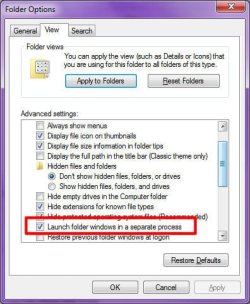
Go to folder options

Control Panel>Appearance and Personalization>folder options>View>Disable launch folders in a separate process
 

My Computer

Computer type
PC/Desktop
Computer Manufacturer/Model Number
Custom Build
OS
Windows 10 Pro x64, Arch Linux
CPU
Intel Core 2 Quad Q8200 OC'd 3.08GHz
Motherboard
Asus Rampage formula LGA775
Memory
8GB DDR2 900Mhz
Graphics Card(s)
MSI GT730 2GB GDDR5 (Kepler)
Sound Card
Supreme FX2
Monitor(s) Displays
Samsung LS22F350 LED
Screen Resolution
1080P
Hard Drives
Kingston SSDNow UV400 120GB, 500GB Hitachi, 2TB Samsung, 500GB Seagate FreeAgent, 640GB Samsung, 160GB Toshiba (Arch)
PSU
AeroCool 500W Bronze
Cooling
Cooler Master V6 + 3X fans
Keyboard
Prolink keyboard
Mouse
Logitech M705
Internet Speed
1MiB/s
Browser
Chrome Beta

My Computer

Computer type
PC/Desktop
Computer Manufacturer/Model Number
Dell XPS 420
OS
Windows 10, Home Clean Install
CPU
Intel Core2 processsor Q8200(2.33Ghz 1333FSB) Quad Core Tech
Motherboard
Dell
Memory
6 gb
Graphics Card(s)
ATI Radeon 256MB HD3650
Sound Card
Intergrated 7.1 Channel Audio
Monitor(s) Displays
Dell SP2009W 20"
Hard Drives
640 GB Serial ATA Hard drive
Cooling
Fan
Keyboard
Dell USB Keyboard
Mouse
Dell Premium Optical USB
Internet Speed
DSL 2.85
Go to folder options

Control Panel>Appearance and Personalization>folder options>View>Disable launch folders in a separate process

Image1.jpg

I like to keep "Launch folder windows in a separate process" because I at any given point, especially when I'm organizing files, have lots of Explorer windows open (my record is 23 at once), and if on crashes (bad codec, corrupt files, whatever...), then only that one window will close. Not all of them.

If you have limited memory resources, perhaps you should turn the option off?
 

My Computer

Computer type
PC/Desktop
Computer Manufacturer/Model Number
Virtual Machine
OS
Windows 7 Professional 32-bit SP1
CPU
AMD A4/A6
Motherboard
Intel Corporation 440BX Desktop Reference Platform
Memory
3.00GB EDO
Graphics Card(s)
VMware SVGA 3D
Sound Card
High Definition Audio Device
Monitor(s) Displays
Generic Non-PnP Monitor on VMware SVGA 3D
Screen Resolution
1440x900
Hard Drives
1 x 60GB VMware Virtual SATA Hard Drive ATA Device
Antivirus
Kaspersky Total Security
I have the option unchecked. And at the time of the screen shot the only applications running were windows media player and steam.
 

My Computer

OS
windows 7 ultimate x64
Back
Top