Multiple External Hard Drives on Laptops

Vosberg1

Is there not a cause?
Member
Local time
10:12 PM
Messages
46
Location
Post Falls ID
OK, i got a good question. I have two Seagate Passport External Harddrives. I am trying to link both of them to my laptop. Now, i have a weird issue. When both are linked, in Device Manager it shows both as active, and functioning properly, but only one will show up. When i look at status, one will show as "online", the other will show up as "offline". The sizes on the drives are 320, and 500 gb respectivly. Both show up with the same name in device manager. I was wondering if anybody has any ideas on this issue. I am a little confused. Is it compat issues, not enough power, or is it because both have the same name? Can anyone shed some light on this?
 

My Computer

Computer Manufacturer/Model Number
Toshiba
OS
Windows 7 Ultimate x86
CPU
1.66 Ghz
Memory
3 Gb
Screen Resolution
1280x800
Hard Drives
75 GB Seagate
320 Gb Seagate Ext
500 Gb Seagate Ext
Mouse
Logitech
Other Info
Laptop A105
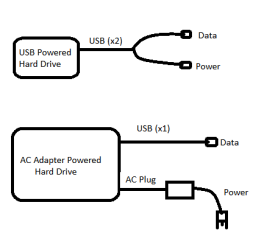
I assume you're referring to Western Digital Passport drives. Passport drives are smaller and don't have their own power supplies. Due to this, they require up to two usb ports in order to be functional.

In order to connect one of these usb powered drives to a laptop you'll either need a high powered usb port, or two usb ports. A normal external hard drive requires a usb port for data and an ac adapter for power.

harddrives.png

In other words, you either need four usb ports, or enough power for the hard drives. You are lacking one or the other.

The best way to connect multiple usb powered drives at the same time is to purchase a powered usb hub. A powered USB hub will power the drives and allow them to connect to your pc. This Sabrent 7-PORT USB Hub w/ AC Adapter is what I use and it works perfectly.
 
Last edited:

My Computer

Computer Manufacturer/Model Number
Apple Macbook Pro (April 2009)
OS
W7 Ult. x64 | OS X
CPU
Intel Mobile Core 2 Duo 2.93Ghz [T9800 Penryn]
Motherboard
NVIDIA nForce 730i Rev. B1 [Mac-F2268EC8 (U2E1)]
Memory
4096MB Samsung DDR3 Dual Channel [PC3-8500F 1066Mhz]
Graphics Card(s)
NVIDIA GeForce 9600M GT 512MB [G96M Rev. C1]
Sound Card
SB X-Fi Surround 5.1 USB | Onboard Realtek (Disabled)
Monitor(s) Displays
Acer x223wbd 22" | Apple Anti-Glare 17" (Disabled)
Screen Resolution
{Current} 1440x900 {Acer} 1680x1050 {Apple} 1920x1200
Hard Drives
{Internal}
Seagate Momentus 320GB 2.5" 7200RPM [ST9320421AS]

{Externals}
LaCie 320GB USB 2.0 HDD [301284UR]
LaCie 750GB USB 2.0 FW400 eSATA HDD [301314U]
LaCie 1TB USB 2.0 HDD [301304UR]
PSU
Magsafe
Case
Aluminum/Unibody (MBP52)
Cooling
2 x 6000 RPM Fans
Keyboard
Logitech G-15v2 [PN 920-000379]
Mouse
Logitech G-9 [PN 910-000338]
Internet Speed
12Mbps/2.5Mbps w/ 24Mbps Speed Boost [Comcast]
Other Info
Logitech X-540 Speakers [PN 970223-0122]
Sennheiser PC-151 Headset
OK, that makes good sence, got one question, is there a splitter for the USB cables, where i could run the HD's off of the USB prots, the USB cord supplyed is single ended. And, thanks for the quick reply.
 

My Computer

Computer Manufacturer/Model Number
Toshiba
OS
Windows 7 Ultimate x86
CPU
1.66 Ghz
Memory
3 Gb
Screen Resolution
1280x800
Hard Drives
75 GB Seagate
320 Gb Seagate Ext
500 Gb Seagate Ext
Mouse
Logitech
Other Info
Laptop A105
If the USB Cord is single ended then it's going to rely on being plugged into a high powered usb port. Most laptops can only sustain enough power to output one high powered port at a time so until you purchase a self powered usb hub, you may only be able to connect to one hard drive at a time. If you want a cable with two connections, you can purchase them. They are either called USB Dual Power Cable, USB mini B to AA Y Cable, mini B to Dual A or any combination of those options.

Here are a few examples:

LaCie (Short) @ B&H
Generic 3' @ Amazon.com
 

My Computer

Computer Manufacturer/Model Number
Apple Macbook Pro (April 2009)
OS
W7 Ult. x64 | OS X
CPU
Intel Mobile Core 2 Duo 2.93Ghz [T9800 Penryn]
Motherboard
NVIDIA nForce 730i Rev. B1 [Mac-F2268EC8 (U2E1)]
Memory
4096MB Samsung DDR3 Dual Channel [PC3-8500F 1066Mhz]
Graphics Card(s)
NVIDIA GeForce 9600M GT 512MB [G96M Rev. C1]
Sound Card
SB X-Fi Surround 5.1 USB | Onboard Realtek (Disabled)
Monitor(s) Displays
Acer x223wbd 22" | Apple Anti-Glare 17" (Disabled)
Screen Resolution
{Current} 1440x900 {Acer} 1680x1050 {Apple} 1920x1200
Hard Drives
{Internal}
Seagate Momentus 320GB 2.5" 7200RPM [ST9320421AS]

{Externals}
LaCie 320GB USB 2.0 HDD [301284UR]
LaCie 750GB USB 2.0 FW400 eSATA HDD [301314U]
LaCie 1TB USB 2.0 HDD [301304UR]
PSU
Magsafe
Case
Aluminum/Unibody (MBP52)
Cooling
2 x 6000 RPM Fans
Keyboard
Logitech G-15v2 [PN 920-000379]
Mouse
Logitech G-9 [PN 910-000338]
Internet Speed
12Mbps/2.5Mbps w/ 24Mbps Speed Boost [Comcast]
Other Info
Logitech X-540 Speakers [PN 970223-0122]
Sennheiser PC-151 Headset
Thanks for the replys, that helps much. I was a little frustrated last night trying to set this up!
 

My Computer

Computer Manufacturer/Model Number
Toshiba
OS
Windows 7 Ultimate x86
CPU
1.66 Ghz
Memory
3 Gb
Screen Resolution
1280x800
Hard Drives
75 GB Seagate
320 Gb Seagate Ext
500 Gb Seagate Ext
Mouse
Logitech
Other Info
Laptop A105
Back
Top