
My MotherBoard and BIOS

Static

New member
Power User
Local time
3:36 AM
Messages
173
Hi all. I need some help. I need to know what motherboard I have. I downloaded everest and used it to try and help. and it just confused me further.

I am mostly interested in 2 things.

1. Discovering what Motherboard I have so I know for the future.

2. Updating my BIOS before I fresh install 7229 tomorrow.

Can anyone help me? either just interpret this everest report for me, or if you feel comfortable with it seeing as I have never done this, find me the driver itself. I made it as far as the ECS website yesterday from this thing.
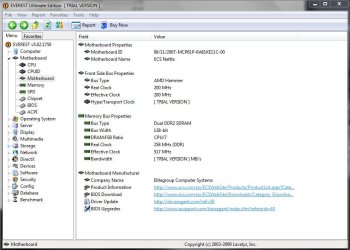
Everest MoBo.JPG
 

My Computer My Computer

At a glance

Windows 7 RC - 7100 64bitAMD Athlon(tm) 64 x2 4800+ 2.50Ghz Dual Core4 gig Kingston DDR2XFX Nvidia GeForce GTS 250
OS
Windows 7 RC - 7100 64bit
CPU
AMD Athlon(tm) 64 x2 4800+ 2.50Ghz Dual Core
Motherboard
Hewlett Packard
Memory
4 gig Kingston DDR2
Graphics Card(s)
XFX Nvidia GeForce GTS 250
Sound Card
na
Monitor(s) Displays
22" Samsung LCD Syncmaster
Screen Resolution
1680x1050
Hard Drives
300gig Western Digital
PSU
BFG Tech 550watt
Case
Crap stock Dell
Cooling
Side panel open on case, and a box fan blowing in.
Keyboard
G15
Mouse
G9
Internet Speed
Bike Messenger

My Computer My Computer

At a glance

Windows 7 Professional x64Intel Core i7 8604GB DDR3 Mushkin 1600Mhz @ 7-8-7-20MSI GTS250 1GB DDR3 Twin Frozr
Computer Manufacturer/Model Number
Keeps changing - (Custom)
OS
Windows 7 Professional x64
CPU
Intel Core i7 860
Motherboard
Gigabyte GA-P55-UD4P
Memory
4GB DDR3 Mushkin 1600Mhz @ 7-8-7-20
Graphics Card(s)
MSI GTS250 1GB DDR3 Twin Frozr
Sound Card
Onboard realtek
Monitor(s) Displays
Samsung SyncMaster 24" P2450 + Samsung 20" 2033
Screen Resolution
1920 X 1080 and 1600 X 900 (#2 system 1440 X 900)
Hard Drives
Patriot Inferno 120GB SSD + 3 WD Blue 640GB drives
PSU
Corsair 750 HX Modular
Case
Lancool PC-K62
Cooling
Cooler Master TX3 CPU cooler and 4-140mm and 1-120mm case
Keyboard
Gigabyte USB keyboard
Mouse
Microsoft wireless laser mouse 5000
Internet Speed
7 Mb down 1.5 up
Other Info
System #2: AMD Phenom II X6 1055T (Freezer 7 Pro cooler) - Gigabyte 880GMA-UD2H - WD 500GB Black - 9500GT (1GB) 500W OCZ modular PSU - Antec 200 case. System #3 (LapTop) Core 2 Duo T6670 - 320GB 7200RPM HD - 4GB DDR3 RAM.
You want to brick your motherboard, use a bios from ECS. You want it to keep running, only use a bios from HP. The board may have been made by ECS, but the bios is pure HP.
 

My Computer My Computer

At a glance

Win 7 Ultimate x64FX-8350 @ 4.6 GHz so farADATA XPG V1 Series Black 8GB DDR3 1600Sapphire R9 270x Dual-X
Computer type
PC/Desktop
Computer Manufacturer/Model Number
Me
OS
Win 7 Ultimate x64
CPU
FX-8350 @ 4.6 GHz so far
Motherboard
Asus M5A97 EVO
Memory
ADATA XPG V1 Series Black 8GB DDR3 1600
Graphics Card(s)
Sapphire R9 270x Dual-X
Sound Card
Xonar DGX w/ Corsair Vengence 1300
Monitor(s) Displays
Acer S232HL Abid
Screen Resolution
1920x1080
Hard Drives
120 GB OCZ Vertex 3
500 GB Seagate 7200.12
PSU
Antec Earthwatts 650W Green
Case
Antec Three Hundred
Cooling
Cooler Master 212 EVO
Keyboard
Logitech G510
Mouse
Logitech G500s
Internet Speed
35000/3000
just downloacdpu-z from www.cpuid.com, it will tell u all u need to know bout ur board and cpu.
 

My Computer My Computer

At a glance

Windows 7 Ultimate 64BitAMD Athlon x4 650 3Ghz4gbATI Radeon 3000 series Onboard
OS
Windows 7 Ultimate 64Bit
CPU
AMD Athlon x4 650 3Ghz
Motherboard
ASUS
Memory
4gb
Graphics Card(s)
ATI Radeon 3000 series Onboard
You want to brick your motherboard, use a bios from ECS. You want it to keep running, only use a bios from HP. The board may have been made by ECS, but the bios is pure HP.

Do NOT overthink this. Your machine has a model number and a serial number (or other unique ID number provided by the LABELED company on the machine). Get your BIOS from that information ONLY.

You are dealing with the nature of what was once known as "IBM clones". There are almost as many different manufacturers involved in making your PC as there are components and chips. HP basically makes two things - the case and the BIOS.

Labeled machines are almost always built from DE-manufactured motherboards. Components/circuits/chips are removed from the baseline model. This is done because HP and Dell and Sony (etc) do not sell upgrade kits, they sell new computers.

Stormy is correct. Unless you want to buy a new computer, get your BIOS update from HP. Nate42nd is also correct - upgrade to Windows 7 FIRST. Only then will you know if you need a BIOS update.

BIOS updates are not the same as Windows updates or even driver updates. The changes, in all likelihood, do not apply to you.
 
ok I got no problems so far. I just thought an update might make things speedier. so no worries then i wont search for it
 

My Computer My Computer

At a glance

Windows 7 RC - 7100 64bitAMD Athlon(tm) 64 x2 4800+ 2.50Ghz Dual Core4 gig Kingston DDR2XFX Nvidia GeForce GTS 250
OS
Windows 7 RC - 7100 64bit
CPU
AMD Athlon(tm) 64 x2 4800+ 2.50Ghz Dual Core
Motherboard
Hewlett Packard
Memory
4 gig Kingston DDR2
Graphics Card(s)
XFX Nvidia GeForce GTS 250
Sound Card
na
Monitor(s) Displays
22" Samsung LCD Syncmaster
Screen Resolution
1680x1050
Hard Drives
300gig Western Digital
PSU
BFG Tech 550watt
Case
Crap stock Dell
Cooling
Side panel open on case, and a box fan blowing in.
Keyboard
G15
Mouse
G9
Internet Speed
Bike Messenger
You know, I never read any of this before & on my old
Gateway 500X (Intel 845GRG (Essex) mobo) I updated the
bios from INTEL for the 845 chipset with no problems at all.
Didn't brick it or anything...all it did was update it & get rid of the "Gateway" logo & replace it will "Intel" when it would post.
I did this with every HW component in the system as all the updates at Gateway were years old!!! (I've done this ever since too...getting the updates directly from the manufacturer)

I also OCed my my P4 2.4GHz to 2.66GHz with a Locked bios using CPUFSB. :D

I'm just saying...I know a TON more now as that was 8 years ago & now I am running a new faster system.
I guess I was lucky I didn't brick the mobo heh... ;)
 

My Computer My Computer

At a glance

Windows® 7 Ultimate x64 SP1Intel Core 2 Duo E8400 (E0) @ 4.0GHzG.SKILL-F2-8500CL5D-4GBPK (2x2Gbs) (5-5-5-15)...EVGA GTX 470 SC (845/1690/2000) 160Gbs
Computer Manufacturer/Model Number
ABS Tech Ultimate X9
OS
Windows® 7 Ultimate x64 SP1
CPU
Intel Core 2 Duo E8400 (E0) @ 4.0GHz
Motherboard
ASUS P5Q Pro Turbo / 1780 FSB
Memory
G.SKILL-F2-8500CL5D-4GBPK (2x2Gbs) (5-5-5-15) @ 1067Mhz
Graphics Card(s)
EVGA GTX 470 SC (845/1690/2000) 160Gbs
Sound Card
VIA HD Audio / Boston Acoustics
Monitor(s) Displays
Acer X222W HD 22" LCD 2500:1 / 5ms
Screen Resolution
1680x1050
Hard Drives
Seagate Barracuda SATAII 2 x 320GB
Seagate Barracuda SATAII 1Tb
Intel® Rapid Storage Technology v10.1.0.1008
AHCI-NCQ Enabled
PSU
Silent Pro GOLD 80 PLUS 800w /95% efficiency / SLI-Crossfire
Case
ABS Stealth Black-Custom
Cooling
CoolerMaster V6GT 6 Heatpipe 200w CPU Cooler
Keyboard
Logitech G15 Gaming Keyboard (Old Style Blue!)
Mouse
Logitech MX518 Gaming Mouse
Internet Speed
1Mbs-up/ 6Mbs-down
...I guess I was lucky I didn't brick the mobo...
Excellent example. You provided a link directly to your specific machine, replete with serial number. I did not browse thru the Gateway site, rather I will use Dell as an example (as a Dell Partner, as I am more familiar with their site).

If you go to Dell and look up a machine, with or without a specific Service Tag (serial number), you will see a variety of driver options for various onboard components. You could do a comparison of the original configuration and the current configuration, and with some effort, discern which of the drivers your machine actually uses. Why does Dell list drivers for a Service Tag if that specific machine does not have the component? The cynic in me says, "Because it is in their interest to create hardware problems", but that is for another discussion.

You can use chip mfgr drivers because you are addressing an instruction set for a single component. For the most part, OEMs do not ADD or unlock functionality on the chip(set), and if they do, they tend to be well-funded major players with good suport sites and easy to access driver updates, mailing lists, et cetera.

BIOS is another matter. You are addressing an instruction set for multiple components. Some MOBOs, for whatever reason, are built/rebuilt/debuilt with imperfectly compatible components. It is possible to load a BIOS that will include instructions for a component that has no register for that function. When you see that happen, it is often called a freeze or lockup. A person can easily spend more money and time in diagnostics and repair bills than the board (and CPU) cost in the first place.

Bottom line: Update BIOS to solve a problem, not to satisfy desire.
 
Excellent example. You provided a link directly to your specific machine, replete with serial number. I did not browse thru the Gateway site, rather I will use Dell as an example (as a Dell Partner, as I am more familiar with their site).

Bottom line: Update BIOS to solve a problem, not to satisfy desire.

Yea, I always put the direct links to what I'm talking about as "some" people understand pictures better than words...& it is the EXACT Complete information on everything of that make & model Gateway computer & drivers being used. Thanks for noticing that detail... :D
There's so many news ones out since then that they don't even list this one as its so OLD... :sarc:
 

My Computer My Computer

At a glance

Windows® 7 Ultimate x64 SP1Intel Core 2 Duo E8400 (E0) @ 4.0GHzG.SKILL-F2-8500CL5D-4GBPK (2x2Gbs) (5-5-5-15)...EVGA GTX 470 SC (845/1690/2000) 160Gbs
Computer Manufacturer/Model Number
ABS Tech Ultimate X9
OS
Windows® 7 Ultimate x64 SP1
CPU
Intel Core 2 Duo E8400 (E0) @ 4.0GHz
Motherboard
ASUS P5Q Pro Turbo / 1780 FSB
Memory
G.SKILL-F2-8500CL5D-4GBPK (2x2Gbs) (5-5-5-15) @ 1067Mhz
Graphics Card(s)
EVGA GTX 470 SC (845/1690/2000) 160Gbs
Sound Card
VIA HD Audio / Boston Acoustics
Monitor(s) Displays
Acer X222W HD 22" LCD 2500:1 / 5ms
Screen Resolution
1680x1050
Hard Drives
Seagate Barracuda SATAII 2 x 320GB
Seagate Barracuda SATAII 1Tb
Intel® Rapid Storage Technology v10.1.0.1008
AHCI-NCQ Enabled
PSU
Silent Pro GOLD 80 PLUS 800w /95% efficiency / SLI-Crossfire
Case
ABS Stealth Black-Custom
Cooling
CoolerMaster V6GT 6 Heatpipe 200w CPU Cooler
Keyboard
Logitech G15 Gaming Keyboard (Old Style Blue!)
Mouse
Logitech MX518 Gaming Mouse
Internet Speed
1Mbs-up/ 6Mbs-down
Back
Top