Need for Speed: Shift; not working

nikkula

New member
Local time
1:21 PM
Messages
8
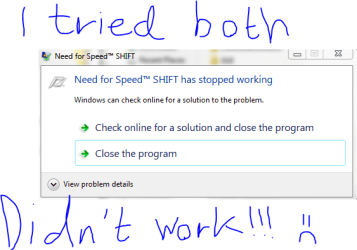
Well i try to play nfs:s obviously.....the installation ran smoothly without problems but when i click the application for nfs:s it directly becomes (not responding) and i have to either (check for solution online) or (close program)
 

Attachments

  • Capture.PNG
    Capture.PNG
    15.3 KB · Views: 427

My Computer My Computer

OS
Windows 7, Build 7100
CPU
Intel E7400 Dual Core, 2,8 ghz (clocked to 3,4 ghz)
Motherboard
Msi p43 Neo
Memory
Corsair twin2x 6400 ddr2 4x1gb
Graphics Card(s)
Sapphire Radeon 4850 512mb
Sound Card
built in
Monitor(s) Displays
Benq e2200 hd
Screen Resolution
1920x1080
Hard Drives
Western digital 500gb
PSU
480 watt
Case
Advance Gladiator 8508
Cooling
Zalman Cnps 9700 in CPU, Accelero s1 + turbo module on GPU
Keyboard
Saitek Eclipse (first generation)
Mouse
Microsoft intellimouse 3.0
Internet Speed
down: 1.6 mb/s up: 0.6 mb/s
I am assuming your video, audio & monitor drivers are up to date?

Have you checked online for a solution or it doesn't give you any? Typical that it won't ;)

Some games don't like to run with Overclocked machines, more so those that are badly coded or cheap PC ports
 

My Computer My Computer

Computer type
PC/Desktop
Computer Manufacturer/Model Number
Custom Built... Intel/Nvidia/ASRock
OS
Windows 7 x64 (Ultimate)
CPU
Intel i5-4670K
Motherboard
ASRock Z87 Extreme 6
Memory
8GBs Ripjaws 2133Mhz
Graphics Card(s)
Asus GTX660 (2GBs)
Sound Card
Onboard Realtek HD
Monitor(s) Displays
Acer AL2216W
Screen Resolution
1680 x 1050
Hard Drives
Samsung 840 SSD 120GBs
Samsung 750GB 32MB cache
1.5 TB
PSU
PC Cooling 750w Silencer
Case
Thermaltake Spedo Advance
Cooling
Std Cooler
Keyboard
Logitech G15
Mouse
Logitech G9
Internet Speed
Comcast 20Mbit
Antivirus
Avast
Browser
Firefox
I have the exact same problem, the game loads just fine, but when i start a race, and are about to take off it freezes. I searched the net and found a little tweak, that kinda worked, now i can drive for 30 seconds before freezing. I really hope someone has the solution for this problem, cause i really wont to fix this. In the start there wasnt no problems loading tracks, driving etc, i found out it might have something to do with the graphicsconfig.xml, but it wasnt it :(
 
This is the solution:

Don't know if this will help but don't hurt to try. Edit your graphicsconfig ( goto C:\users\yourname\documents\NFS SHIFT\

I edit mine to this =
<xml version="1.0" ?>
<Reflection>
<class name="BRTTIRefCount" base="root class" />
<class name="BPersistent" base="BRTTIRefCount">
<prop name="Name" type="String" />
</class>
<class name="GraphicConfigData" base="BPersistent">
<prop name="Mode" type="Fct" />
<prop name="Vsync" type="Fct" />
<prop name="Windowed" type="Fct" />
<prop name="TextureFilter" type="Fct" />
<prop name="TextureResolution" type="Fct" />
<prop name="Brightness" type="Fct" />
<prop name="CarDetailLevel" type="Fct" />
<prop name="TrackDetailLevel" type="Fct" />
<prop name="ShadowDetailLevel" type="Fct" />
<prop name="MotionblurLevel" type="Fct" />
<prop name="EffectsDetailLevel" type="Fct" />
</class>
<data class="GraphicConfigData" id="0xBB11E0">
<prop name="Name" data="" />
<prop name="Mode" adapter="0" width="1024" height="768" antialias="8" refresh="75" />
<prop name="Vsync" vsync="0" />
<prop name="Windowed" windowed="0" />
<prop name="TextureFilter" texturefilter="0" />
<prop name="TextureResolution" textureresolution="0" />
<prop name="Brightness" brightness="10" />
<prop name="CarDetailLevel" cardetaillevel="0" />
<prop name="TrackDetailLevel" trackdetaillevel="0" />
<prop name="ShadowDetailLevel" shadowdetaillevel="0" />
<prop name="MotionblurLevel" motionblurLevel="0" />
<prop name="EffectsDetailLevel" effectsdetaillevel="2" />
</data>
</Reflection>

Also in game settings goto custem controler and set your keys up ( I use xbox360 pad ) and did not set the online player name key or gears.

Started the game and its working fine, you can change your settings higher when ever you like ( dont know if it will crash mine ) but the above got the game going for me.

Well hope it works for all or some like it has me, and good luck.

And I am using the onboard geforce 8200 in hybrid with 8400gs using nforce 15.26 drivers.

Source: Got mine working at last - Need for Speed Technical Help - Need for Speed: EA Forums

As you see on the source site it has helped a lot of people, so it is worth a try ;)

Also seems like the eye candy can be turned on again after this:

Quote: I have done this too , afterwards i have changed my ingame settings back to some more eyecandy and my game is still working.
Thanks for this tip , have been searching for awhile and was getting pretty frustrated.


Edit: Sorry about the missing < :( It is edited now
 
Last edited:
Well i thank you for trying but the thing is i cant even START the game before it crashes. imagine that u click on the application to start game and it crashes 1 second after you click
 

My Computer My Computer

OS
Windows 7, Build 7100
CPU
Intel E7400 Dual Core, 2,8 ghz (clocked to 3,4 ghz)
Motherboard
Msi p43 Neo
Memory
Corsair twin2x 6400 ddr2 4x1gb
Graphics Card(s)
Sapphire Radeon 4850 512mb
Sound Card
built in
Monitor(s) Displays
Benq e2200 hd
Screen Resolution
1920x1080
Hard Drives
Western digital 500gb
PSU
480 watt
Case
Advance Gladiator 8508
Cooling
Zalman Cnps 9700 in CPU, Accelero s1 + turbo module on GPU
Keyboard
Saitek Eclipse (first generation)
Mouse
Microsoft intellimouse 3.0
Internet Speed
down: 1.6 mb/s up: 0.6 mb/s
Well i thank you for trying but the thing is i cant even START the game before it crashes. imagine that u click on the application to start game and it crashes 1 second after you click
You could try to make a thread at the EA Technical help forum (See source in previous post), there is probably more people that know about this than us. ;)
 
I have the same problem. The file graphicsconfig.xml is overwritten every time I run the game, no matter how I change the data manually.
 

My Computer My Computer

OS
Windows 7
thanx bro this thing worked for me I hope it works for others even...
 

My Computer My Computer

OS
windows 7 home basicX64
I have the same problem. The file graphicsconfig.xml is overwritten every time I run the game, no matter how I change the data manually.
Try making the file read only by right clicking the file and then clicking properties then tick the box next to read only. I had to do that to keep black ops from changing my custom settings in the file at start up.

EDIT:LOL i just noticed it was a Necro post anyways will leave it anyways just in case somebody stumbles among this.
 

My Computer My Computer

Computer type
PC/Desktop
Computer Manufacturer/Model Number
custom build
OS
Windows 10 64bit
CPU
AMD Phenom II X4 925 (Deneb)(2.8GHz) OC 3.4GHz
Motherboard
M5A78L-MLX Plus
Memory
Corsair Vengeance DDR3 4GBX2 (8192MB)
Graphics Card(s)
XFX HD 6870 1GB (OC)- 940MHz core, mem 1150MHz
Monitor(s) Displays
Vizio 26' 1920x1080 / Acer 1336x768
Screen Resolution
1920x1080 60Hz /1336x768
Hard Drives
Kingston Digital 60GB SSDNow V300/500gb HDD Western Digital 7200rpm (/WD 160GB HDD 7200rpm
PSU
CORSAIR CX600 600w
Case
AZZA Orion 202 EVO
Cooling
cooler master hyper TX3 cpu cooler
Keyboard
Razer DeathStalker
Mouse
Logitech Optical Gaming Mouse G400
Antivirus
Defualt on win 10
Browser
Firefox
Other Info
cpu is overclocked in bios
Back
Top