
You are using an out of date browser. It may not display this or other websites correctly.
You should upgrade or use an alternative browser.
You should upgrade or use an alternative browser.
Solved Need help setting up with SSD & HDD duo setup
- Thread starter dpcrowley
- Start date
I just unplugged my HDD and rebooted. made sure my SSD was in sata port 0. this is what i get when i reboot
So with the HDD disconnected you can reboot the system and it starts up fine?
If so then just delete the 100MB partition on the HDD and create one partition on that drive.
My Computer
- OS
- 7 x64

- Local time
- 1:34 AM
- Messages
- 12,011
I just unplugged my HDD and rebooted. made sure my SSD was in sata port 0. this is what i get when i reboot
This looks good.
You don't need a System Reserved at all on any drive. I don't have it.
Most people have a System Reserved and you would have one if you disconnected all drives and started over. But you don't need it. The System Reserved contains boot files necessary to boot. In your case, you have installed the boot files on the C drive instead of System Reserved---which is fine and some would say preferable.
Just connect the HDD to port 1 and delete ALL partitions from it.
That will leave you with 100 per cent unallocated space.
Then make a single partition on the HDD and format it.
Then post another pic showing all drives connected.
My Computer
- Computer type
- PC/Desktop
- Computer Manufacturer/Model Number
- Ignatz Special; 4 speed manual gearbox; factory air conditioning; one of one
- OS
- Windows 7 Home Premium SP1, 64-bit
- CPU
- Intel Skylake i5-6600K, not overclocked
- Motherboard
- AsRock Z170M Extreme 4, micro ATX
- Memory
- 8 GB HyperX DDR4-2666 (2 x 4 GB)
- Graphics Card(s)
- none; graphics are integrated on CPU
- Sound Card
- onboard: Realtek ALC1150; external: USB Behringer UF0-202
- Monitor(s) Displays
- Dell S2340M 23 inch IPS
- Screen Resolution
- 1600 x 900
- Hard Drives
- System: Crucial MX100 series SSD, 128 GB;
Data: Samsung Spinpoint 103SJ, 1 TB;
Backup: WD Caviar Green WD30EZRX-00D8PB0, 3 TB
- PSU
- Rosewill SilentNight 500 watt fanless, semi-modular
- Case
- Antec Solo II
- Cooling
- Noctua NH-U12S; Noctua F12 intake, Noctua S12A exhaust
- Keyboard
- Microsoft 200 6JH-00001 USB
- Mouse
- Dell or Microsoft optical wired; USB
- Antivirus
- Microsoft Security Essentials and Malwarebytes Premium
- Browser
- Pale Moon
- Other Info
- All fans PWM; speeds at idle: CPU circa 500 rpm; intake circa 600 rpm; exhaust circa 600 rpm; CPU temps 27 idle and 47 C load in a warm room (27 C/81 F) when running Intel Extreme Tuning Utility stress test.
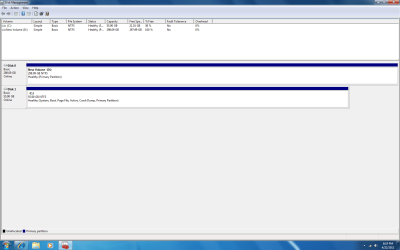
so this is it with a partition created. i don't know why it is switching disks like that but i am positive that the ssd is in port 0 and the hdd in is port 1. I am not a big performance freak so if this isnt going to be a big issue, i don't really need to worry about it
Attachments
My Computer
- OS
- Windows 7 Professions 64-bit
- Local time
- 1:34 AM
- Messages
- 12,011
so this is it with a partition created. i don't know why it is switching disks like that but i am positive that the ssd is in port 0 and the hdd in is port 1. I am not a big performance freak so if this isnt going to be a big issue, i don't really need to worry about it
I operated with C as disk 1 and an HDD as disc 0 for years and never had a problem.
But I have heard it can cause problems in certain circumstances.
It's up to you, but I would start all over and get it right.
Disconnect the HDD, boot from the Windows disc, and delete all partitions from the SSD when you come to the partition screen. Look for "drive options, advanced" in the lower right portion of the screen. Take that choice and delete all partitions. Then continue reinstalling Windows.
Don't connect the HDD until all is well with Windows on disc 1 on the SSD.
I'm not sure why it is doing this.
You might take a look in the BIOS right now to confirm that it sees things in the same way shown in Disk Management---SSD as disc 1; HDD as disc 0.
My Computer
- Computer type
- PC/Desktop
- Computer Manufacturer/Model Number
- Ignatz Special; 4 speed manual gearbox; factory air conditioning; one of one
- OS
- Windows 7 Home Premium SP1, 64-bit
- CPU
- Intel Skylake i5-6600K, not overclocked
- Motherboard
- AsRock Z170M Extreme 4, micro ATX
- Memory
- 8 GB HyperX DDR4-2666 (2 x 4 GB)
- Graphics Card(s)
- none; graphics are integrated on CPU
- Sound Card
- onboard: Realtek ALC1150; external: USB Behringer UF0-202
- Monitor(s) Displays
- Dell S2340M 23 inch IPS
- Screen Resolution
- 1600 x 900
- Hard Drives
- System: Crucial MX100 series SSD, 128 GB;
Data: Samsung Spinpoint 103SJ, 1 TB;
Backup: WD Caviar Green WD30EZRX-00D8PB0, 3 TB
- PSU
- Rosewill SilentNight 500 watt fanless, semi-modular
- Case
- Antec Solo II
- Cooling
- Noctua NH-U12S; Noctua F12 intake, Noctua S12A exhaust
- Keyboard
- Microsoft 200 6JH-00001 USB
- Mouse
- Dell or Microsoft optical wired; USB
- Antivirus
- Microsoft Security Essentials and Malwarebytes Premium
- Browser
- Pale Moon
- Other Info
- All fans PWM; speeds at idle: CPU circa 500 rpm; intake circa 600 rpm; exhaust circa 600 rpm; CPU temps 27 idle and 47 C load in a warm room (27 C/81 F) when running Intel Extreme Tuning Utility stress test.
I wouldn't worry about it. This has been discussed a number of times on this forum and quite frankly no one knows why this happens. There is not a clear one to one relationship between sata port 0 and Disk 0.so this is it with a partition created. i don't know why it is switching disks like that but i am positive that the ssd is in port 0 and the hdd in is port 1. I am not a big performance freak so if this isnt going to be a big issue, i don't really need to worry about it
Read this from MS
The disk drive numbers may not correspond as expected to the SATA channel numbers when you set up Windows Vista, Windows Server 2008, Windows Server 2008 R2, or Windows 7 on a computer that has multiple SATA or RAID disks
The most logical explanation I've seen so far is here
http://www.sevenforums.com/installa...rt-disk-management-vs-bios-2.html#post1519407
My Computer
- Computer type
- PC/Desktop
- Computer Manufacturer/Model Number
- Own build
- OS
- Windows 7x64 Home Premium SP1
- CPU
- Intel i7 2600k
- Motherboard
- ASUS P8Z68 Deluxe
- Memory
- G.Skill Ripjaws (DDR3-1600) 2x4GB
- Graphics Card(s)
- Nvidia GeForce GTS 450; Intel HD Graphics 3000(GT2+)
- Monitor(s) Displays
- Dell Ultrasharp IPS panel U2311H, Samsung SyncMaster P2350
- Screen Resolution
- 1920x1080
- Hard Drives
- Samsung 850 Pro SSD 256GB, Samsung SSD 840 120GB, Seagates 1TB Barracuda ST31000528AS x2
- PSU
- Seasonic M12II 520W
- Case
- Lian Li Lancool PC-K60
- Cooling
- Case: 1x120mm, 3x140mm CPU: Hyper 212+
- Keyboard
- Logitech MK520 (wireless)
- Mouse
- Logitech MK520
- Internet Speed
- 6-7 Mbps
- Antivirus
- Norton Security Premium, Malwarebytes on 2 (MSE on 3rd PC)
- Browser
- FireFox
- Other Info
- Audio: Logitech Z523 2.1

You are good. Don't worry about the port0 thing. The way you did the installation, it is irrelevant.
The reason why it is recommended to have the designated OS disk on port0 is because the Win7 installer has this habit to install the bootmgr (and often the 100MB system reserved partition) on the disk with the lowest port number.
But since you installed with only the SSD connected, this problem did not occur. And the reason why you did not get another 100MB active system partition during the reinstalltion on the SSD was because you already had a primary partition on the SSD into which you installed.
The reason why it is recommended to have the designated OS disk on port0 is because the Win7 installer has this habit to install the bootmgr (and often the 100MB system reserved partition) on the disk with the lowest port number.
But since you installed with only the SSD connected, this problem did not occur. And the reason why you did not get another 100MB active system partition during the reinstalltion on the SSD was because you already had a primary partition on the SSD into which you installed.
My Computer
- Computer Manufacturer/Model Number
- HP, Dell, Gateway, Toshiba - 4 laptops and 2 desktops
- OS
- Vista, Windows7, Mint Mate, Zorin, Windows 8
- CPU
- from 1.6GHz Duo to i7
- Monitor(s) Displays
- 2x HP w2207
- Hard Drives
- 5x HDD, 7x SSD, 12x Externals
- Keyboard
- with trackball - no mices
- Mouse
- Trackball mice
- Internet Speed
- DSL 6000
Similar threads
- Replies
- 19
- Views
- 3K

- Replies
- 1
- Views
- 982


- Replies
- 1
- Views
- 661

- Replies
- 10
- Views
- 9K