Need help troubleshooting internet connection - looking for tutorial

arayfo1

New member
Power User
VIP
Local time
9:41 AM
Messages
276
Hi, I'm needing help troubleshooting my internet connection. I was thinking there might be a troubleshooting tutorial in the archives here, but I didn't find what I was looking for.

I'm thinking I might have a virus. I am currently using C-cleaner, Super-Anti Spyware, Malwarebytes, Microsoft Security Essentials. I'm not sure what other programs I could use to help remove the virus, assuming it is a virus. The reason I suspect it's a virus is because I have had an intermittent connection. And I can't really condemn the router as my smart phone seems to work perfectly fine while browsing the internet in wifi mode.

This is a Win7 PC. The computer which is hooked directly to my modem is a Win8 PC. The Win 7 machine receives a signal via the router/modem. The modem & router is an all-in-one box which was provided by my ISP. The last time it was behaving this way I wiped the machine and reinstalled Windows. I'm trying to avoid doing that again if possible.

Thanks for your help,

Adam
 

My Computer

Computer type
PC/Desktop
Computer Manufacturer/Model Number
Acer Aspire m3202
OS
Windows 7 Home Premium 64 bit
Antivirus
not at the moment - just reinstalled
Basic Requirements Before Posting your Networking Thread

1. Is this a wired or wireless connection issue?

Wireless

2. Who is your Internet Service Provider (ISP)?

Cable One

3. What type of Broadband connection are you using?

Cable

4. What is the exact Make and Model of your Modem, Router or Modem/Router Combo - Linksys, D-Link, Netgear, TP-LINK, etc.

Motorola Surfboard SBG6580

5. What is the Name of the Anti-Virus, Security or Firewall Software installed from the problematic computer - McAfee, Norton, Eset, Webroot, Zone Alarm, etc.

Microsoft Security Essentials
 

My Computer

Computer type
PC/Desktop
Computer Manufacturer/Model Number
Acer Aspire m3202
OS
Windows 7 Home Premium 64 bit
Antivirus
not at the moment - just reinstalled
Microsoft Windows [Version 6.1.7601]
Copyright (c) 2009 Microsoft Corporation. All rights reserved.

C:\Windows\system32>ipconfig/all

Windows IP Configuration

Host Name . . . . . . . . . . . . : Adam-PC
Primary Dns Suffix . . . . . . . :
Node Type . . . . . . . . . . . . : Hybrid
IP Routing Enabled. . . . . . . . : No
WINS Proxy Enabled. . . . . . . . : No

Ethernet adapter Local Area Connection:

Media State . . . . . . . . . . . : Media disconnected
Connection-specific DNS Suffix . :
Description . . . . . . . . . . . : Generic Marvell Yukon 88E8070 based Ether
net Controller
Physical Address. . . . . . . . . : 00-00-00-00-00-00
DHCP Enabled. . . . . . . . . . . : No
Autoconfiguration Enabled . . . . : Yes

Wireless LAN adapter Wireless Network Connection:

Connection-specific DNS Suffix . :
Description . . . . . . . . . . . : Realtek 8185 Extensible 802.11b/g Wireles
s Device
Physical Address. . . . . . . . . : 00-06-4F-7E-A8-60
DHCP Enabled. . . . . . . . . . . : Yes
Autoconfiguration Enabled . . . . : Yes
Link-local IPv6 Address . . . . . : fe80::ad6d:2c07:99d1:e549%10(Preferred)
IPv4 Address. . . . . . . . . . . : 192.168.0.8(Preferred)
Subnet Mask . . . . . . . . . . . : 255.255.255.0
Lease Obtained. . . . . . . . . . : Thursday, January 01, 2015 8:21:28 PM
Lease Expires . . . . . . . . . . : Thursday, January 01, 2015 10:05:56 PM
Default Gateway . . . . . . . . . : 192.168.0.1
DHCP Server . . . . . . . . . . . : 192.168.0.1
DHCPv6 IAID . . . . . . . . . . . : 268437071
DHCPv6 Client DUID. . . . . . . . : 00-01-00-01-1A-64-1F-3E-00-00-00-00-00-00

DNS Servers . . . . . . . . . . . : 24.116.0.53
24.116.2.50
NetBIOS over Tcpip. . . . . . . . : Enabled

Tunnel adapter isatap.{A8D2F1B9-7C72-4E41-826B-EE8A3AA74459}:

Media State . . . . . . . . . . . : Media disconnected
Connection-specific DNS Suffix . :
Description . . . . . . . . . . . : Microsoft ISATAP Adapter
Physical Address. . . . . . . . . : 00-00-00-00-00-00-00-E0
DHCP Enabled. . . . . . . . . . . : No
Autoconfiguration Enabled . . . . : Yes

Tunnel adapter Teredo Tunneling Pseudo-Interface:

Media State . . . . . . . . . . . : Media disconnected
Connection-specific DNS Suffix . :
Description . . . . . . . . . . . : Teredo Tunneling Pseudo-Interface
Physical Address. . . . . . . . . : 00-00-00-00-00-00-00-E0
DHCP Enabled. . . . . . . . . . . : No
Autoconfiguration Enabled . . . . : Yes

Tunnel adapter Reusable ISATAP Interface {4C657E26-652F-40D1-AE6E-40154387A069}:


Media State . . . . . . . . . . . : Media disconnected
Connection-specific DNS Suffix . :
Description . . . . . . . . . . . : Microsoft ISATAP Adapter #2
Physical Address. . . . . . . . . : 00-00-00-00-00-00-00-E0
DHCP Enabled. . . . . . . . . . . : No
Autoconfiguration Enabled . . . . : Yes

C:\Windows\system32>
 

My Computer

Computer type
PC/Desktop
Computer Manufacturer/Model Number
Acer Aspire m3202
OS
Windows 7 Home Premium 64 bit
Antivirus
not at the moment - just reinstalled
What happens if the Windows 7 computer is hard-wired to the modem/router? My computers are almost always hard-wired to my DSL modem/router. When I use wireless, sometimes I also lose internet connection, or, file-transfer ability -- reboot time, all is well for a long while.
 

My Computer

Computer type
PC/Desktop
Computer Manufacturer/Model Number
Antec desktop; Acer Aspire laptops
OS
Windows 7 Professional 64-bit
CPU
Desktop i5; Acers i5 & i7
Memory
desktop 16GB; 1 Acer 8GB & 1 Acer 16GB
Hard Drives
1TB split into 2 equal partitions [OS and data] usable by RJS
Internet Speed
AT&T DSL
Browser
FF, GChrome, msIE
Other Info
Windows 7 Firewall, Emsisoft AM/AV, MSE [scan-only], SpywareBlaster, Ruiware/BillP combine
Hello, Roland. The Win7 machine is located on the other side of the house far away from the modem/router. In other words, if I go through all of the trouble of relocating the desktop to the other side of the house I might as well just go ahead and wipe the machine (which I am hoping to avoid). I don't think I'm ready to condemn the router as my smartphone seems to be receiving a wifi signal without interruption. However, I'm wondering if there is anything my ISP could do to assist me with my problem. I would like to save that as a last resort though or at least until I have ascertained whether or not it is simply a virus which is causing the interruption.
 

My Computer

Computer type
PC/Desktop
Computer Manufacturer/Model Number
Acer Aspire m3202
OS
Windows 7 Home Premium 64 bit
Antivirus
not at the moment - just reinstalled
Hi Adam,

Thanks for posting all of the information up front.

I reviewed last year's thread and I wonder if you still have static addresses configured. Looking at the information you posted, I don't believe you do still have static address, but it's worth asking.

You mention some AV pgms, but neglected to say if they were run or if they found any viruses.
Here's a pretty good bug finder:

AdwCleaner is a two step process. Scan then Clean

Click here to download AdwCleaner (author: Xplode)
--> save the application to your Desktop.

  • Right-click AdwCleaner.exe on your Desktop and select Run As Administrator to run the scanner with full privilege rights.
    AdwCleaner is a standalone executable, there is no install.

  • Click on the Scan button.
    • AdwCleaner begins scanning your system. It might take some time to complete.

    • Review the detected objects grouped under each of the tabs.
      --> If there is something you KNOW should NOT be cleaned, clear the checkbox
      picture.php
      next to the object. If you're not sure about an object, paste the scan logfile (AdwCleaner[R#].txt) in a new post for a member to review and advise you.
      Otherwise, go to the next step.

  • After the scan has finished and you have reviewed the objects to be cleaned, click on the Clean button.
    • Answer OK to the close all programs prompt, then follow the onscreen prompts.
    • Answer OK to the restart the computer prompt to complete the removal process.
      The AdwCleaner log file is opened in your default Text editor when the machine has restarted.
      Each time AdwCleaner runs, the log file number [#] is incremented, the highest number is the most recent. There are two log files, one for the scan (AdwCleaner[R#].txt) and one for the clean (AdwCleaner[S#].txt).
Paste the entire clean logfile (AdwCleaner[S#].txt) in your next post.
--> AdwCleaner logs are located in the C:\AdwCleaner folder if you need to reference them again

Let members know the results of the AdwCleaner Scan and Clean


You also mention that this is intermittent and that you phone can reliably connect. How often are you dropped from the router?

A few quick things to try and then I'm hitting the sack:
1) Reposition the machine a bit closer to the router, even a few inches often makes a difference.
Make sure there aren't any other devices that transmit RF signals near your PC (cordless phones, microwave ovens, fluorescent lamps....). Move any of those things further away from the machine than they are now.

2) If you haven't already restarted the machine, do so now.

3) Reset the network configuration:
Download View attachment TCPIPreset.bat
the default save location is
C:\Users\YourLoginID\Downloads

Launch and elevated Command Prompt (right click, Run as Administrator)
Change Directory (cd) to your Downloads folder
Enter the following command exactly as typed
cd %USERPROFILE%\Downloads
TCPIPreset​

The batch file pauses a few times so you can see the results - grab the output and post here if there are any errors or if you have any questions. Some of the commands do not have any output ... they just do what they're supposed to do quietly :)

That's about all I can think of tonight.

I'll check back some time tomorrow. Hopefully you'll have a more reliable and stable connection after trying the above. There are many factors that affect a connection, the fact that you can connect but get occasionally dropped is a tweaking thing, not a sledgehammer reinstall thing. It happens to me all the time, and I play with the settings until I get better throughput or reliability.


G'nite

Bill
.
 

My Computer

Computer type
Laptop
Computer Manufacturer/Model Number
HP Pavilion dv6-6c10us
OS
x64 (6.3.9600) Win8.1 Pro & soon dual boot x64 (6.1.7601) Win7_SP1 HomePrem
CPU
AMD A6-3420M APU with Radeon(tm) HD Graphics
Motherboard
Hewlett-Packard 1805
Memory
6.00 GB
Graphics Card(s)
AMD Radeon(TM) HD 6520G
Sound Card
(1) AMD High Definition Audio Device (2) IDT High Definiti
Monitor(s) Displays
HP W2072a 20" LCD (1600 x 900) @ 60 Hz
Screen Resolution
1366 x 768 x 32 bits (4294967296 colors) @ 60 Hz
Hard Drives
ST640LM0 00 HM641JI SATA Disk Device
Keyboard
Logitech k520 wireless KB
Mouse
Logitech m320 wireless mouse (bundled with KB)
Internet Speed
15/5 | 54 MB Wireless 'n'
Antivirus
Realtime: Defender or Avast | On-demand: Malwarebytes, ESET
Browser
IE 11 on Win8, IE 10 on win 7
Other Info
Media: [Gimp, Audacity, VLC] || Comm: [WEmail 2012, Skype] || Productivity: [OpenOffice,| Textpad] || Utils: [Sysinternals, cCleaner, Speccy, Defraggler]
Hi, Bill. Thanks for the quick reply. I just scanned my machine again with the Super Anti-Spyware program and it detected 77 adware objects to be removed. I don't know why one moment it only detects 2 threats and then the next day it detects 77, but for right this moment I seem to be getting a good connection. I think I'll give it a day or two before I click the solved button, but again I appreciate it but I guess I should let you get back to whatever it is you were doing.

Thanks a lot,

Adam

---------

I'm just now looking over your comment on this thread. I'll have a look at the program you recommended and check back in with you tomorrow. Thanks again, Bill, and have a good night.
 

My Computer

Computer type
PC/Desktop
Computer Manufacturer/Model Number
Acer Aspire m3202
OS
Windows 7 Home Premium 64 bit
Antivirus
not at the moment - just reinstalled
Are there any of these I should NOT clean using the cleaning tool you recommended?

# AdwCleaner v4.106 - Report created 01/01/2015 at 23:15:49
# Updated 21/12/2014 by Xplode
# Database : 2015-01-01.1 [Live]
# Operating System : Windows 7 Home Premium Service Pack 1 (64 bits)
# Username : Adam - ADAM-PC
# Running from : C:\Users\Adam\Downloads\AdwCleaner.exe
# Option : Scan

***** [ Services ] *****


***** [ Files / Folders ] *****

Folder Found : C:\Program Files (x86)\globalUpdate
Folder Found : C:\Program Files (x86)\PC Drivers HeadQuarters
Folder Found : C:\Users\Adam\AppData\Local\CrashRpt
Folder Found : C:\Users\Adam\AppData\Local\globalUpdate
Folder Found : C:\Users\Public\Documents\ShopperPro

***** [ Scheduled Tasks ] *****

Task Found : YTDownloader

***** [ Shortcuts ] *****


***** [ Registry ] *****

Key Found : HKCU\Software\GlobalUpdate
Key Found : HKCU\Software\Myfree Codec
Key Found : [x64] HKCU\Software\GlobalUpdate
Key Found : [x64] HKCU\Software\Myfree Codec
Key Found : HKLM\SOFTWARE\Classes\AppID\{4D076AB4-7562-427A-B5D2-BD96E19DEE56}
Key Found : HKLM\SOFTWARE\Classes\AppID\secman.DLL
Key Found : HKLM\SOFTWARE\Classes\CLSID\{66EEF543-A9AC-4A9D-AA3C-1ED148AC8EEE}
Key Found : HKLM\SOFTWARE\Classes\CLSID\{826D7151-8D99-434B-8540-082B8C2AE556}
Key Found : HKLM\SOFTWARE\Classes\Interface\{66EEF543-A9AC-4A9D-AA3C-1ED148AC8EEE}
Key Found : HKLM\SOFTWARE\Classes\Interface\{66EEF543-A9AC-4A9D-AA3C-1ED148AC8FFE}
Key Found : HKLM\SOFTWARE\Classes\protector_dll.protectorbho
Key Found : HKLM\SOFTWARE\Classes\protector_dll.protectorbho.1
Key Found : HKLM\SOFTWARE\Classes\secman.OutlookSecurityManager
Key Found : HKLM\SOFTWARE\Classes\secman.OutlookSecurityManager.1
Key Found : HKLM\SOFTWARE\Classes\TypeLib\{11549FE4-7C5A-4C17-9FC3-56FC5162A994}
Key Found : HKLM\SOFTWARE\GlobalUpdate
Key Found : HKLM\SOFTWARE\Myfree Codec
Key Found : [x64] HKLM\SOFTWARE\Classes\CLSID\{03EB0E9C-7A91-4381-A220-9B52B641CDB1}
Key Found : [x64] HKLM\SOFTWARE\Classes\Interface\{66EEF543-A9AC-4A9D-AA3C-1ED148AC8EEE}
Key Found : [x64] HKLM\SOFTWARE\Classes\Interface\{66EEF543-A9AC-4A9D-AA3C-1ED148AC8FFE}
Key Found : [x64] HKLM\SOFTWARE\ShopperPro
Key Found : [x64] HKLM\SOFTWARE\YTDownloader
Value Found : HKCU\SOFTWARE\Microsoft\Windows\CurrentVersion\Run [YTDownloader]

***** [ Browsers ] *****

-\\ Internet Explorer v11.0.9600.17496


-\\ Mozilla Firefox v34.0.5 (x86 en-US)


-\\ Google Chrome v39.0.2171.95

[C:\Users\Adam\AppData\Local\Google\Chrome\User Data\Default\Web data] - Found [Search Provider] : hxxp://search.aol.com/aol/search?q={searchTerms}
[C:\Users\Adam\AppData\Local\Google\Chrome\User Data\Default\Web data] - Found [Search Provider] : hxxp://www.ask.com/web?q={searchTerms}
[C:\Users\Adam\AppData\Local\Google\Chrome\User Data\Default\Web data] - Found [Search Provider] : hxxp://www-search.net/search.aspx?s=E9Nztugdu0338,8afe833c-c74d-4537-bfad-dc4fc1775467,&q={searchTerms}

-\\ Opera v26.0.1656.60

[C:\Users\Adam\AppData\Roaming\Opera Software\Opera Stable\preferences] - Found [Extension] : aaipilfmheplbcghignccoiiebekkdhe
[C:\Users\Adam\AppData\Roaming\Opera Software\Opera Stable\preferences] - Found [Extension] : elchiiiejkobdbblfejjkbphbddgmljf
[C:\Users\Adam\AppData\Roaming\Opera Software\Opera Stable\preferences] - Found [Extension] : ffhfoagmjcnkolneahbpagjcjjaeofbg
[C:\Users\Adam\AppData\Roaming\Opera Software\Opera Stable\preferences] - Found [Extension] : hjghiofiijcepdnocbgefbdlbckjfheg
[C:\Users\Adam\AppData\Roaming\Opera Software\Opera Stable\preferences] - Found [Extension] : iklgpchfbohgmghgfagediakopecfmbm
[C:\Users\Adam\AppData\Roaming\Opera Software\Opera Stable\preferences] - Found [Extension] : kfgaibfbmkjgmimhbbaikfnpkkjkpoan
[C:\Users\Adam\AppData\Roaming\Opera Software\Opera Stable\preferences] - Found [Extension] : lmnbobhffedhdhfpcjkjphcfpeeiocdn
[C:\Users\Adam\AppData\Roaming\Opera Software\Opera Stable\preferences] - Found [Extension] : kjpifmjicccpbkfjdkehimhgklfkbanh
[C:\Users\Adam\AppData\Roaming\Opera Software\Opera Stable\preferences] - Found [Extension] : hoidflomjnnnbiemmkjdjkkialmhbago
[C:\Users\Adam\AppData\Roaming\Opera Software\Opera Stable\preferences] - Found [Extension] : ekpibplnnkfdcafdpoekhoffegcajene
[C:\Users\Adam\AppData\Roaming\Opera Software\Opera Stable\preferences] - Found [Extension] : ipljmghelflfikejmgkmlmpjmehfjodc
[C:\Users\Adam\AppData\Roaming\Opera Software\Opera Stable\preferences] - Found [Extension] : ejddjnilmdncjilbfjgameihlklfpohp
[C:\Users\Adam\AppData\Roaming\Opera Software\Opera Stable\preferences] - Found [Extension] : eagomcfjiefffhpaejnlpjccikpipdoe
[C:\Users\Adam\AppData\Roaming\Opera Software\Opera Stable\preferences] - Found [Extension] : aonedlchkbicmhepimiahfalheedjgbh

*************************

AdwCleaner[R0].txt - [4729 octets] - [01/01/2015 23:15:49]

########## EOF - C:\AdwCleaner\AdwCleaner[R0].txt - [4789 octets] ##########
 

My Computer

Computer type
PC/Desktop
Computer Manufacturer/Model Number
Acer Aspire m3202
OS
Windows 7 Home Premium 64 bit
Antivirus
not at the moment - just reinstalled
"You also mention that this is intermittent and that you phone can reliably connect. How often are you dropped from the router?"

The phone doesn't seem to have any trouble staying connected. The Win7 machine, however, will be connected long enough for me to play around on FB for maybe 5 minutes or so and then once I refresh the page or open up a new tab it just gives a "page not available" message. Whenever I say the signal is intermittent what I mean is that the icon in the system tray will show no internet, but then the icon will change as if it's indicating that I have a connection, but then whenever I try to open up a new tab it still indicates that the web page is not available. So it makes it difficult to gauge just how often the connection is being lost. It has been flakey for a few weeks now. Meaning I can usually clean my cookies and restart and it will work fine for an hour or two, but now it's getting to the point that I can barely get a connection at all. Until tonight whenever I removed the 77 adware cookies with the Super-anti spyware tool and everything seems to be okay again. *crossing fingers*

But I would still like to try this tool you recommended. I just don't wanna screw myself up and clean something that doesn't need cleaning.

"I reviewed last year's thread and I wonder if you still have static addresses configured. Looking at the information you posted, I don't believe you do still have static address, but it's worth asking."

I do still have static addresses configured. I had intended to change them, but you insisted that I leave them static as long as everything seemed to be in working order so that's what I did. I'll go and have a look just to be sure, but it should still be static.

"You mention some AV pgms, but neglected to say if they were run or if they found any viruses."

I ran Microsoft Security Essentials but didn't detect any viruses. I have considered downloading Avast AV program. Thoughts?

"The batch file pauses a few times so you can see the results - grab the output and post here if there are any errors or if you have any questions."

I'll try this step here in a few minutes and post the results in my next post.

Edit: On second thought, after reviewing my IP address configuration I think I should wait for your input before following this step.

". . .the fact that you can connect but get occasionally dropped is a tweaking thing, not a sledgehammer reinstall thing."

Great, I was hoping that was the case.
 
Last edited:

My Computer

Computer type
PC/Desktop
Computer Manufacturer/Model Number
Acer Aspire m3202
OS
Windows 7 Home Premium 64 bit
Antivirus
not at the moment - just reinstalled
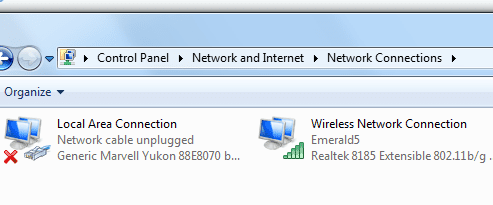
Control Panel>Network and Internet>Network Connections>

1. Local Area Network - I have a network cable unplugged.
2. LAN IPV6 address appears to be dynamic.
3. LAN IPV4 address appears to be static.
4. The IPV4 DSN server address is set to static, but there are no numbers entered. I can take a picture if needed.
5. The IPV6 DSN server address is set to dynamic.

1. Wireless Network Connection seems to be connected.
2. WNC IPV6 address appears to be dynamic.
3. WNC IPV4 address appears to be dynamic.


Do you think I should try uninstalling the LAN driver to see if it will automatically reinstall itself after restarting, or perhaps I should set the IPV4 address to dynamic to see if that resolves the problem?
 

My Computer

Computer type
PC/Desktop
Computer Manufacturer/Model Number
Acer Aspire m3202
OS
Windows 7 Home Premium 64 bit
Antivirus
not at the moment - just reinstalled
Copied text after using cleaning tool Bill recommended:

# AdwCleaner v4.106 - Report created 02/01/2015 at 04:50:14
# Updated 21/12/2014 by Xplode
# Database : 2015-01-01.1 [Live]
# Operating System : Windows 7 Home Premium Service Pack 1 (64 bits)
# Username : Adam - ADAM-PC
# Running from : C:\Users\Adam\Downloads\AdwCleaner.exe
# Option : Clean

***** [ Services ] *****


***** [ Files / Folders ] *****

Folder Deleted : C:\Program Files (x86)\globalUpdate
Folder Deleted : C:\Program Files (x86)\PC Drivers HeadQuarters
Folder Deleted : C:\Users\Adam\AppData\Local\globalUpdate
Folder Deleted : C:\Users\Adam\AppData\Local\CrashRpt
Folder Deleted : C:\Users\Public\Documents\ShopperPro

***** [ Scheduled Tasks ] *****

Task Deleted : YTDownloader

***** [ Shortcuts ] *****

Shortcut Disinfected : C:\Users\Public\Desktop\Google Chrome.lnk
Shortcut Disinfected : C:\Users\Public\Desktop\Mozilla Firefox.lnk
Shortcut Disinfected : C:\Users\Public\Desktop\Opera.lnk
Shortcut Disinfected : C:\ProgramData\Microsoft\Windows\Start Menu\Programs\Opera.lnk
Shortcut Disinfected : C:\Users\Adam\AppData\Roaming\Microsoft\Internet Explorer\Quick Launch\User Pinned\TaskBar\Opera.lnk

***** [ Registry ] *****

Key Deleted : HKLM\SOFTWARE\Classes\AppID\secman.DLL
Key Deleted : HKLM\SOFTWARE\Classes\protector_dll.protectorbho
Key Deleted : HKLM\SOFTWARE\Classes\protector_dll.protectorbho.1
Key Deleted : HKLM\SOFTWARE\Classes\secman.OutlookSecurityManager
Key Deleted : HKLM\SOFTWARE\Classes\secman.OutlookSecurityManager.1
Value Deleted : HKCU\SOFTWARE\Microsoft\Windows\CurrentVersion\Run [YTDownloader]
Key Deleted : HKLM\SOFTWARE\Classes\AppID\{4D076AB4-7562-427A-B5D2-BD96E19DEE56}
Key Deleted : HKLM\SOFTWARE\Classes\CLSID\{66EEF543-A9AC-4A9D-AA3C-1ED148AC8EEE}
Key Deleted : HKLM\SOFTWARE\Classes\CLSID\{826D7151-8D99-434B-8540-082B8C2AE556}
Key Deleted : HKLM\SOFTWARE\Classes\Interface\{66EEF543-A9AC-4A9D-AA3C-1ED148AC8EEE}
Key Deleted : HKLM\SOFTWARE\Classes\Interface\{66EEF543-A9AC-4A9D-AA3C-1ED148AC8FFE}
Key Deleted : HKLM\SOFTWARE\Classes\TypeLib\{11549FE4-7C5A-4C17-9FC3-56FC5162A994}
Key Deleted : [x64] HKLM\SOFTWARE\Classes\CLSID\{03EB0E9C-7A91-4381-A220-9B52B641CDB1}
Key Deleted : [x64] HKLM\SOFTWARE\Classes\Interface\{66EEF543-A9AC-4A9D-AA3C-1ED148AC8EEE}
Key Deleted : [x64] HKLM\SOFTWARE\Classes\Interface\{66EEF543-A9AC-4A9D-AA3C-1ED148AC8FFE}
Key Deleted : HKCU\Software\GlobalUpdate
Key Deleted : HKCU\Software\Myfree Codec
Key Deleted : HKLM\SOFTWARE\GlobalUpdate
Key Deleted : HKLM\SOFTWARE\Myfree Codec
Key Deleted : [x64] HKLM\SOFTWARE\ShopperPro
Key Deleted : [x64] HKLM\SOFTWARE\YTDownloader

***** [ Browsers ] *****

-\\ Internet Explorer v11.0.9600.17496


-\\ Mozilla Firefox v34.0.5 (x86 en-US)


-\\ Google Chrome v39.0.2171.95

[C:\Users\Adam\AppData\Local\Google\Chrome\User Data\Default\Web Data] - Deleted [Search Provider] : hxxp://search.aol.com/aol/search?q={searchTerms}
[C:\Users\Adam\AppData\Local\Google\Chrome\User Data\Default\Web Data] - Deleted [Search Provider] : hxxp://www.ask.com/web?q={searchTerms}
[C:\Users\Adam\AppData\Local\Google\Chrome\User Data\Default\Web Data] - Deleted [Search Provider] : hxxp://www-search.net/search.aspx?s=E9Nztugdu0338,8afe833c-c74d-4537-bfad-dc4fc1775467,&q={searchTerms}

-\\ Opera v26.0.1656.60

[C:\Users\Adam\AppData\Local\Google\Chrome\User Data\Default\Web Data] - Deleted [Search Provider] : hxxp://search.aol.com/aol/search?q={searchTerms}
[C:\Users\Adam\AppData\Local\Google\Chrome\User Data\Default\Web Data] - Deleted [Search Provider] : hxxp://www.ask.com/web?q={searchTerms}
[C:\Users\Adam\AppData\Local\Google\Chrome\User Data\Default\Web Data] - Deleted [Search Provider] : hxxp://www-search.net/search.aspx?s=E9Nztugdu0338,8afe833c-c74d-4537-bfad-dc4fc1775467,&q={searchTerms}
[C:\Users\Adam\AppData\Roaming\Opera Software\Opera Stable\preferences] - Deleted [Extension] : aaipilfmheplbcghignccoiiebekkdhe
[C:\Users\Adam\AppData\Roaming\Opera Software\Opera Stable\preferences] - Deleted [Extension] : elchiiiejkobdbblfejjkbphbddgmljf
[C:\Users\Adam\AppData\Roaming\Opera Software\Opera Stable\preferences] - Deleted [Extension] : ffhfoagmjcnkolneahbpagjcjjaeofbg
[C:\Users\Adam\AppData\Roaming\Opera Software\Opera Stable\preferences] - Deleted [Extension] : hjghiofiijcepdnocbgefbdlbckjfheg
[C:\Users\Adam\AppData\Roaming\Opera Software\Opera Stable\preferences] - Deleted [Extension] : iklgpchfbohgmghgfagediakopecfmbm
[C:\Users\Adam\AppData\Roaming\Opera Software\Opera Stable\preferences] - Deleted [Extension] : kfgaibfbmkjgmimhbbaikfnpkkjkpoan
[C:\Users\Adam\AppData\Roaming\Opera Software\Opera Stable\preferences] - Deleted [Extension] : lmnbobhffedhdhfpcjkjphcfpeeiocdn
[C:\Users\Adam\AppData\Roaming\Opera Software\Opera Stable\preferences] - Deleted [Extension] : kjpifmjicccpbkfjdkehimhgklfkbanh
[C:\Users\Adam\AppData\Roaming\Opera Software\Opera Stable\preferences] - Deleted [Extension] : hoidflomjnnnbiemmkjdjkkialmhbago
[C:\Users\Adam\AppData\Roaming\Opera Software\Opera Stable\preferences] - Deleted [Extension] : ekpibplnnkfdcafdpoekhoffegcajene
[C:\Users\Adam\AppData\Roaming\Opera Software\Opera Stable\preferences] - Deleted [Extension] : ipljmghelflfikejmgkmlmpjmehfjodc
[C:\Users\Adam\AppData\Roaming\Opera Software\Opera Stable\preferences] - Deleted [Extension] : ejddjnilmdncjilbfjgameihlklfpohp
[C:\Users\Adam\AppData\Roaming\Opera Software\Opera Stable\preferences] - Deleted [Extension] : eagomcfjiefffhpaejnlpjccikpipdoe
[C:\Users\Adam\AppData\Roaming\Opera Software\Opera Stable\preferences] - Deleted [Extension] : aonedlchkbicmhepimiahfalheedjgbh

*************************

AdwCleaner[R0].txt - [4897 octets] - [01/01/2015 23:15:49]
AdwCleaner[S0].txt - [5696 octets] - [02/01/2015 04:50:14]

########## EOF - C:\AdwCleaner\AdwCleaner[S0].txt - [5756 octets] ##########
 

My Computer

Computer type
PC/Desktop
Computer Manufacturer/Model Number
Acer Aspire m3202
OS
Windows 7 Home Premium 64 bit
Antivirus
not at the moment - just reinstalled
Thanks Adam,

AdwCleaner is one of the best and safest tools I know of to clean up a system. It found and cleaned a bunch of things that are known buggers and it 'repaired' your browsers search as well.

Don't worry about the tracking cookies found by any AV scan - they're just cookies ... the number of things found will change as you visit different sites. For the most part, these cookies are harmless.

Your system was apparently infected (ask toolbar, shopperPro - I'm not certain about the other things found, but I trust AdwCleaner).

There's always a debate about AV pgms ... I use MSE at the moment, but have used Avast and AVG in the past - all do a good job and all are free. You only need ONE active real time AV pgm running at any given time though - pick one and uninstall any others - they fight for resources and might cause some conflicts if more than one is running.
A good followup to AdwCleaner is Old Timer-Temp File Cleaner (TFC)
Restart your machine in case there are any system operations pending
Click here to download Old Timer-TFC.
>> save the application to your Desktop.
:info: Old Timer-TFC is a standalone application, there is no install.

:warn:Save your work and close all open windows.
TFC will close ALL open programs including your browser!

Right click, run as administrator TFC

Click the Start button to begin the cleaning up temporary files and folders.
:warn: Do not work on other things while TFC is running - most applications use some sort of temporary files. Just let TFC run by itself on the machine until it completes.

:busted: If TFC prompts you to reboot, do so immediately.
:busted: If TFC does NOT prompt you, then reboot your machine immediately after TFC has completed.
Run TFC, even if you decide not to run the MalwareTips guide below

   Information
Malware scanners often reset defaults to easily accomplish their task of cleaning. Browser homepage and search engines are good examples of things that might get reset. This means that you might have to change a setting back to your preference - it's a minor inconvenience and a small price to pay for a clean system.

If you want to be extra certain about cleaning viruses, MalwareTips has a good shotgun approach tutorial.
How to easily clean an infected computer (Malware Removal Guide)
It's a lot of scans and it takes a while, but if you decide to run through the guide, do it in one session. This is a project - don't attempt to do it piecemeal - that will give Malware a chance to re-root. Some scanners take a long time, others run fairly quickly - I'd plan for 8-9 hours of maintenance time (nothing but scanning your system - no games, no surfing the net ...)
:note: Step 5: RogueKiller is one scan I do NOT recommend.
Some people have reported issues after running it (I'm not sure why), so just skip Step 5

Do the steps in the order given - don't skip any (other than step 5;))
Run them all (except step 5) even if the reports come up clean.
Follow the instructions, reboot if instructed.
DO NOT reboot after Rkill (step 2)​
Make sure you pay attention when you install the scanners
- some offer other software at install time
- uncheck any 'extra' software (usually a toolbar or browser)
When you've run all of the scanners, reboot a final time
then follow the instructions in OPTION TWO of http://www.sevenforums.com/tutorials/1538-sfc-scannow-command-system-file-checker.html

Copy C:\Windows\Logs\CBS\CBS.log to your Desktop (it is a protected file so you cannot attach the original)

Attach the copy of the entire CBS.log to a new post (you might have to zip it if it's too large)

Bill
.
 

My Computer

Computer type
Laptop
Computer Manufacturer/Model Number
HP Pavilion dv6-6c10us
OS
x64 (6.3.9600) Win8.1 Pro & soon dual boot x64 (6.1.7601) Win7_SP1 HomePrem
CPU
AMD A6-3420M APU with Radeon(tm) HD Graphics
Motherboard
Hewlett-Packard 1805
Memory
6.00 GB
Graphics Card(s)
AMD Radeon(TM) HD 6520G
Sound Card
(1) AMD High Definition Audio Device (2) IDT High Definiti
Monitor(s) Displays
HP W2072a 20" LCD (1600 x 900) @ 60 Hz
Screen Resolution
1366 x 768 x 32 bits (4294967296 colors) @ 60 Hz
Hard Drives
ST640LM0 00 HM641JI SATA Disk Device
Keyboard
Logitech k520 wireless KB
Mouse
Logitech m320 wireless mouse (bundled with KB)
Internet Speed
15/5 | 54 MB Wireless 'n'
Antivirus
Realtime: Defender or Avast | On-demand: Malwarebytes, ESET
Browser
IE 11 on Win8, IE 10 on win 7
Other Info
Media: [Gimp, Audacity, VLC] || Comm: [WEmail 2012, Skype] || Productivity: [OpenOffice,| Textpad] || Utils: [Sysinternals, cCleaner, Speccy, Defraggler]
Thanks a lot, Bill. I'll check out Old Timer-Temp File Cleaner now & I may try the shotgun approach some time tomorrow or Sunday. Did you happen to read my comment about having a network cable unplugged? I also noticed that the IPV4 address on the LAN was set to static whereas everything else was set to dynamic.
 

My Computer

Computer type
PC/Desktop
Computer Manufacturer/Model Number
Acer Aspire m3202
OS
Windows 7 Home Premium 64 bit
Antivirus
not at the moment - just reinstalled
I was receiving a *CONNECTION WAS RESET* message each time I tried to open up a new tab so I decided I would try to set the IPV4 LAN address to dynamic to see if that would make a difference. I also deleted the LAN driver and then restarted the machine. I'm still getting the same *network cable unplugged* message, but I do seem to have a connection for right this moment.
 

My Computer

Computer type
PC/Desktop
Computer Manufacturer/Model Number
Acer Aspire m3202
OS
Windows 7 Home Premium 64 bit
Antivirus
not at the moment - just reinstalled
I saw that you said there is no cable plugged in, but it sounds like you're getting a message - can you post a screen shot?

Making changes to the IP configuration will reset the connection - that is normal.

Setting the address to dynamic is fine (I doubt it will make a difference though - it might if there were collisions on the static address) - we made it static last Jan to try to get you connected then. If you have a lot of issues connecting or staying connected after setting it to a dynamic address, then revert to the static one. If you don't remember what it was, look back at the information you posted in the beginning of this thread.

Since you're not using the Ethernet connection, you could, if you want to, disable the device in network connection and sharing - change adapter settings - disable Ethernet (not your wireless adapter). You'll have to remember that you did this if you ever connect wired - you'll have to enable the adapter then. Let's see the message you're seeing.

Bill
.
 

My Computer

Computer type
Laptop
Computer Manufacturer/Model Number
HP Pavilion dv6-6c10us
OS
x64 (6.3.9600) Win8.1 Pro & soon dual boot x64 (6.1.7601) Win7_SP1 HomePrem
CPU
AMD A6-3420M APU with Radeon(tm) HD Graphics
Motherboard
Hewlett-Packard 1805
Memory
6.00 GB
Graphics Card(s)
AMD Radeon(TM) HD 6520G
Sound Card
(1) AMD High Definition Audio Device (2) IDT High Definiti
Monitor(s) Displays
HP W2072a 20" LCD (1600 x 900) @ 60 Hz
Screen Resolution
1366 x 768 x 32 bits (4294967296 colors) @ 60 Hz
Hard Drives
ST640LM0 00 HM641JI SATA Disk Device
Keyboard
Logitech k520 wireless KB
Mouse
Logitech m320 wireless mouse (bundled with KB)
Internet Speed
15/5 | 54 MB Wireless 'n'
Antivirus
Realtime: Defender or Avast | On-demand: Malwarebytes, ESET
Browser
IE 11 on Win8, IE 10 on win 7
Other Info
Media: [Gimp, Audacity, VLC] || Comm: [WEmail 2012, Skype] || Productivity: [OpenOffice,| Textpad] || Utils: [Sysinternals, cCleaner, Speccy, Defraggler]
Network cable unplugged
 

Attachments

  • network cable unplugged snip.PNG
    network cable unplugged snip.PNG
    26.3 KB · Views: 25

My Computer

Computer type
PC/Desktop
Computer Manufacturer/Model Number
Acer Aspire m3202
OS
Windows 7 Home Premium 64 bit
Antivirus
not at the moment - just reinstalled
"Making changes to the IP configuration will reset the connection - that is normal."

No, I meant the message that I receive within the actual browser page whenever I attempt to open up a new tab or click on a link on any website whenever the internet connection is being interrupted. Instead of "This web page is not available" it will say "connection was reset". This occurred prior to making any changes to the IP configuration. I would take a snapshot, but it's not currently giving that message.

Okay, I will disable it (LAN) for now, but I'm not sure that will make a difference. At this point, I'm thinking I might need to do like you suggested and try the shotgun tutorial approach, but I am open to suggestions.

Edit: I don't know why I keep calling it LAN whenever it's called a Local Area Connection. Sorry about that.
 

My Computer

Computer type
PC/Desktop
Computer Manufacturer/Model Number
Acer Aspire m3202
OS
Windows 7 Home Premium 64 bit
Antivirus
not at the moment - just reinstalled
Local Area Network (LAN) - same thing :)

I only suggested disabling the Ethernet adapter as a workaround to the "cable not plugged in" message since I'm not clear on where you're seeing that. If it's in the adapter window, don't sweat it ... that's just telling you that there isn't a cable plugged in on the adapter. If there is a message that pops up telling you there is no cable plugged in, then that's something else and disabling the Ethernet adapter should stop that message.

Ah, I see - "connection reset" when you open a new tab. Hmmmm, does it connect to the page you tried to open in the tab?
This does sound to me as though there's still something you need to clean up - see if the shotgun Malware guide resolves the issue.

Post the logs from the scans here so a member can review what was found and cleaned. You can do that after all scans are completed.

Bill
.
 

My Computer

Computer type
Laptop
Computer Manufacturer/Model Number
HP Pavilion dv6-6c10us
OS
x64 (6.3.9600) Win8.1 Pro & soon dual boot x64 (6.1.7601) Win7_SP1 HomePrem
CPU
AMD A6-3420M APU with Radeon(tm) HD Graphics
Motherboard
Hewlett-Packard 1805
Memory
6.00 GB
Graphics Card(s)
AMD Radeon(TM) HD 6520G
Sound Card
(1) AMD High Definition Audio Device (2) IDT High Definiti
Monitor(s) Displays
HP W2072a 20" LCD (1600 x 900) @ 60 Hz
Screen Resolution
1366 x 768 x 32 bits (4294967296 colors) @ 60 Hz
Hard Drives
ST640LM0 00 HM641JI SATA Disk Device
Keyboard
Logitech k520 wireless KB
Mouse
Logitech m320 wireless mouse (bundled with KB)
Internet Speed
15/5 | 54 MB Wireless 'n'
Antivirus
Realtime: Defender or Avast | On-demand: Malwarebytes, ESET
Browser
IE 11 on Win8, IE 10 on win 7
Other Info
Media: [Gimp, Audacity, VLC] || Comm: [WEmail 2012, Skype] || Productivity: [OpenOffice,| Textpad] || Utils: [Sysinternals, cCleaner, Speccy, Defraggler]
see if the shotgun Malware guide resolves the issue.

Post the logs from the scans here so a member can review what was found and cleaned. You can do that after all scans are completed.

Bill
.

Okay, I had problems getting a connection long enough to try the shotgun malware guide this evening. I will try again first thing tomorrow morning and check back in with you some time tomorrow night if not the following morning.
 

My Computer

Computer type
PC/Desktop
Computer Manufacturer/Model Number
Acer Aspire m3202
OS
Windows 7 Home Premium 64 bit
Antivirus
not at the moment - just reinstalled
Maybe some time this weekend. I suddenly got busy.
 

My Computer

Computer type
PC/Desktop
Computer Manufacturer/Model Number
Acer Aspire m3202
OS
Windows 7 Home Premium 64 bit
Antivirus
not at the moment - just reinstalled
Back
Top