Solved Need quick help about new hard disk partition on win 7 disk management

.Yes, you ended up with what you wanted... with this small 9MB unallocated as the price.

Otherwise, nice work. Mission accomplished.
.
hahaha, you are right..mission accomplished with this small price of 9mb unallocated.
thanks,,,:)
 

My Computer

Computer type
PC/Desktop
Computer Manufacturer/Model Number
Acer Veriton S670/G M670/G
OS
Windows 7 SP1 Ultimate x64
CPU
Intel(R) Core(TM) 2 Due cpu E8400 @ 3.0ghz
Motherboard
Acer EQ45M
Memory
3x2gb DDR3 PC3-10600
Graphics Card(s)
NVIDIA GeForce 9800 GT
Sound Card
Digital Audio (S/PDIF) (High Definition Audio Device)
Monitor(s) Displays
Asus VK222H 22" lcd HDMI wide.
Screen Resolution
1680x1050 @ 60 Hz
Hard Drives
2x1TB WD 10EAR
Internet Speed
4mbps
Browser
FireFox v27.01
hahaha, you are right..mission accomplished with this small price of 9mb unallocated.
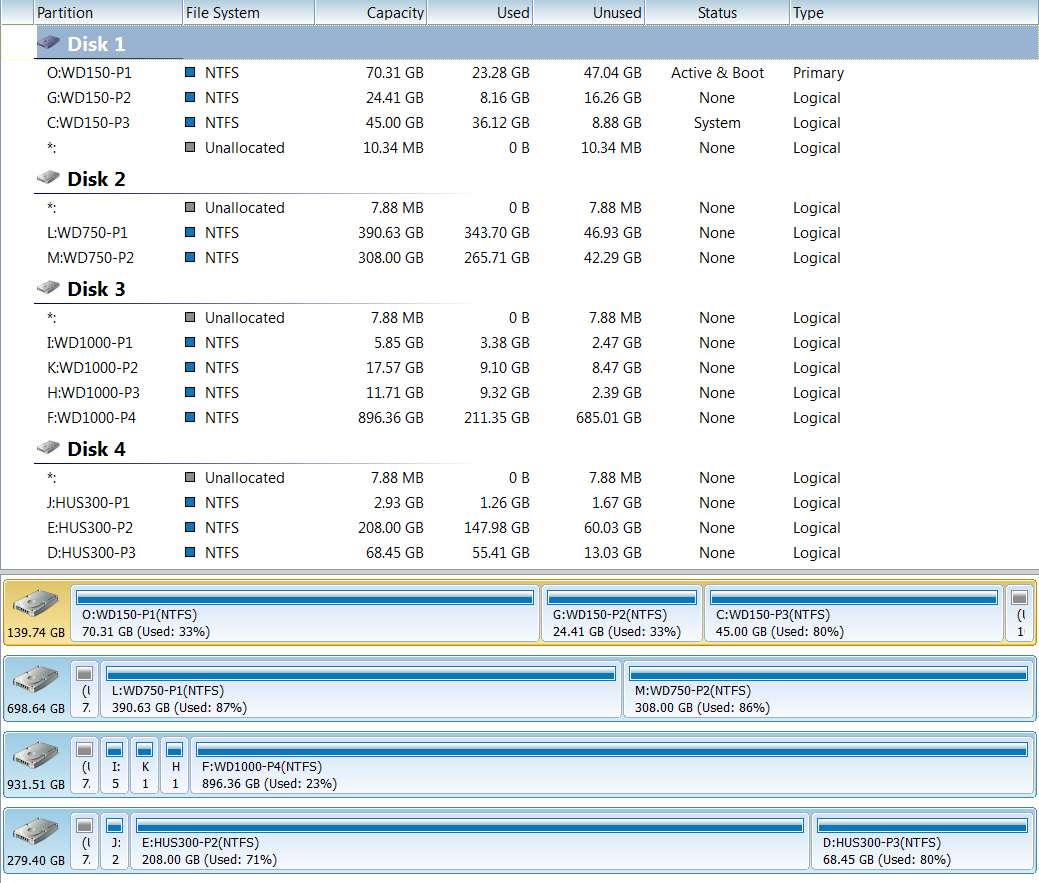
Just in passing, I noticed that even on my own hard drive there is also a 10MB unallocated piece at the very end.

Interesting. I don't have this on my other three drives, but only on my "Disk 1" system drive. I wonder if it's somehow tied to the "active" boot partition being on that drive, or maybe the mixture of "primary" and "logical" partitions on that drive. My other drives have nothing but "logical" partitions on them.

Or, maybe it only comes when you re-size things or delete all the "logical" partitions and then re-create them (which touches that "extended partition" in which they live). Don't know what the real story is.

Or maybe it's simply the "extended partition" overhead, but located at the end of the partition instead of at the front, where it would normally go... simply because of the way in which you created your "logical" partitions.

Note that each of the other drives which are 100% "logical" partitions each have that 7.88MB at the front, which is the "overhead" I mentioned for an "extended partition".

Anyway, take comfort in the fact that you are not alone.

drivespw.jpg
 

My Computer

Computer type
PC/Desktop
Computer Manufacturer/Model Number
Home-built, two systems (1) and (2)
OS
Windows 7 Pro x64 (1), Win7 Pro X64 (2)
CPU
i5-3350p 3.1Ghz/6MB-cache (1); E8400 3.0Ghz/6MB-cache (2)
Motherboard
ASUS P8Z77-V Pro (1); ASUS P5Q3 (2)
Memory
8GB PC3-12800 DDR3 (1); 4GB PC3-10600 DDR3 (2)
Graphics Card(s)
ATI HD7750 (1), (see TV cards); ATI R7 250 (2)
Sound Card
Realtek ALC892 HD Audio (1); Realtek ALC1200 HD Audio (2)
Monitor(s) Displays
Eizo HD2441W LCD, Eizo S2433W (1); Eizo 24" S2433W (2)
Screen Resolution
1920x1200, 1920x1200 (1); 1920x1200 (2)
Hard Drives
(1) 1TB SATA-II (7200RPM), 2x2TB SATA-III (7200RPM), 250GB SATA-III (10000RPM) for OS; 2x2TB external USB 3.0

(2) 320GB SATA-II (7200RPM), 750GB SATA-II (7200RPM), 150GB SATA-II (10000RPM) for OS; 2TB external USB 3.0
PSU
Nesteq ECS-6001 600W (1); Nesteq ECS-5001 500W (2)
Case
Acousti-Case 360 (1) and (2)
Cooling
Noctua NH-U12P SE2 for CPU, 2x120mm case fans (1) and (2)
Keyboard
IBM PS/2 (1) and (2)
Mouse
Logitech MX Revolution wireless (1); Microsoft wired (2)
Internet Speed
100mbps down / 10mbps up
Antivirus
Microsoft Security Essentials; Malwarebyte Anti-Malware Pro
Browser
Firefox
Other Info
Ceton InfiniTV 4-tuner cablecard-enabled TV card as well as Hauppauge HVR-2250 OTA/ATSC 2-tuner TV card in (1), running under Win7 WMC
Anyway, take comfort in the fact that you are not alone.

hahah, yep dear,,, I m satisfy to seeing your drives.:)
or it not created when we doing a brand new hard disk partition first time. as when I m done partition first time, its not created,,:)
 

My Computer

Computer type
PC/Desktop
Computer Manufacturer/Model Number
Acer Veriton S670/G M670/G
OS
Windows 7 SP1 Ultimate x64
CPU
Intel(R) Core(TM) 2 Due cpu E8400 @ 3.0ghz
Motherboard
Acer EQ45M
Memory
3x2gb DDR3 PC3-10600
Graphics Card(s)
NVIDIA GeForce 9800 GT
Sound Card
Digital Audio (S/PDIF) (High Definition Audio Device)
Monitor(s) Displays
Asus VK222H 22" lcd HDMI wide.
Screen Resolution
1680x1050 @ 60 Hz
Hard Drives
2x1TB WD 10EAR
Internet Speed
4mbps
Browser
FireFox v27.01
or it not created when we doing a brand new hard disk partition first time. as when I m done partition first time, its not created,,:)
... yes, this is definitely the one unanswered mystery. Why wasn't it there in your original configuration?

Oh well.

Case closed.
 

My Computer

Computer type
PC/Desktop
Computer Manufacturer/Model Number
Home-built, two systems (1) and (2)
OS
Windows 7 Pro x64 (1), Win7 Pro X64 (2)
CPU
i5-3350p 3.1Ghz/6MB-cache (1); E8400 3.0Ghz/6MB-cache (2)
Motherboard
ASUS P8Z77-V Pro (1); ASUS P5Q3 (2)
Memory
8GB PC3-12800 DDR3 (1); 4GB PC3-10600 DDR3 (2)
Graphics Card(s)
ATI HD7750 (1), (see TV cards); ATI R7 250 (2)
Sound Card
Realtek ALC892 HD Audio (1); Realtek ALC1200 HD Audio (2)
Monitor(s) Displays
Eizo HD2441W LCD, Eizo S2433W (1); Eizo 24" S2433W (2)
Screen Resolution
1920x1200, 1920x1200 (1); 1920x1200 (2)
Hard Drives
(1) 1TB SATA-II (7200RPM), 2x2TB SATA-III (7200RPM), 250GB SATA-III (10000RPM) for OS; 2x2TB external USB 3.0

(2) 320GB SATA-II (7200RPM), 750GB SATA-II (7200RPM), 150GB SATA-II (10000RPM) for OS; 2TB external USB 3.0
PSU
Nesteq ECS-6001 600W (1); Nesteq ECS-5001 500W (2)
Case
Acousti-Case 360 (1) and (2)
Cooling
Noctua NH-U12P SE2 for CPU, 2x120mm case fans (1) and (2)
Keyboard
IBM PS/2 (1) and (2)
Mouse
Logitech MX Revolution wireless (1); Microsoft wired (2)
Internet Speed
100mbps down / 10mbps up
Antivirus
Microsoft Security Essentials; Malwarebyte Anti-Malware Pro
Browser
Firefox
Other Info
Ceton InfiniTV 4-tuner cablecard-enabled TV card as well as Hauppauge HVR-2250 OTA/ATSC 2-tuner TV card in (1), running under Win7 WMC

My Computer

Computer type
PC/Desktop
Computer Manufacturer/Model Number
Acer Veriton S670/G M670/G
OS
Windows 7 SP1 Ultimate x64
CPU
Intel(R) Core(TM) 2 Due cpu E8400 @ 3.0ghz
Motherboard
Acer EQ45M
Memory
3x2gb DDR3 PC3-10600
Graphics Card(s)
NVIDIA GeForce 9800 GT
Sound Card
Digital Audio (S/PDIF) (High Definition Audio Device)
Monitor(s) Displays
Asus VK222H 22" lcd HDMI wide.
Screen Resolution
1680x1050 @ 60 Hz
Hard Drives
2x1TB WD 10EAR
Internet Speed
4mbps
Browser
FireFox v27.01
Why wasn't it there in your original configuration?

Later, I change my mind,,
No, I realize you changed your mind about partition sizes.

But I mean with your original partition sizing, why was there no visible small unallocated piece? Even though you ultimately changed you mind and wanted to reconfigure partitions somewhat, why in the original sizing was there no "leftover" small piece?

I can only think it had something to do with the fact that with the original partition creations, EVERYTHING to the right of C ("primary") was initially unallocated. As each new "logical" partition got allocated, the "extended partition" kept being increased in size to cover the latest new partition to be defined. In fact, at any point you could have actually then defined a new "primary" partition if you'd wanted to, in the unallocated space.

And the last partition defined must have pushed the "extended partition" boundary right up to the end of the drive. Until that point, the upper limit of the "extended partition" only went as far as the right edge of the last "logical" partition you'd defined.

When you began to delete, re-size, move, etc., with all unallocated space to the left of G, rather than to the right of G, then this was now all being done WITHIN the now existing "extended partition" which started at the right edge of C and went to the end of the drive, covering all the space on the drive not allocated to "system reserved" and C. The upper limit of the "extended partition" remained at the end of the drive.

The "extended partition" itself did not shrink or change size with your adjustments to the "logical" partitions inside of it. There was just new "logical unallocated" space created within the static boundaries of the "extended partition", comparable to "logical" partitions within the static boundaries.

Anyway, I suspect there is a subtle sector/partition boundary calculation difference between (a) your initial situation when all you'd allocated was the 30GB C during the Win7 install itself and the entire rest of the drive truly unallocated, and (b) your "logical" partition size adjustments within an already defined "extended partition" that runs from the right-edge of C through the end of the drive.

I suspect that if you started all over, and did a "delete ALL partitions" (thus returning the entire drive to unallocated status), and then reinstalled Win7 once again to a 30GB partition, and then again started allocating "logical" partitions from the unallocated space (but with the proper sizes this time), that you would again end up with zero "extra"... as you saw that very first time.

 

My Computer

Computer type
PC/Desktop
Computer Manufacturer/Model Number
Home-built, two systems (1) and (2)
OS
Windows 7 Pro x64 (1), Win7 Pro X64 (2)
CPU
i5-3350p 3.1Ghz/6MB-cache (1); E8400 3.0Ghz/6MB-cache (2)
Motherboard
ASUS P8Z77-V Pro (1); ASUS P5Q3 (2)
Memory
8GB PC3-12800 DDR3 (1); 4GB PC3-10600 DDR3 (2)
Graphics Card(s)
ATI HD7750 (1), (see TV cards); ATI R7 250 (2)
Sound Card
Realtek ALC892 HD Audio (1); Realtek ALC1200 HD Audio (2)
Monitor(s) Displays
Eizo HD2441W LCD, Eizo S2433W (1); Eizo 24" S2433W (2)
Screen Resolution
1920x1200, 1920x1200 (1); 1920x1200 (2)
Hard Drives
(1) 1TB SATA-II (7200RPM), 2x2TB SATA-III (7200RPM), 250GB SATA-III (10000RPM) for OS; 2x2TB external USB 3.0

(2) 320GB SATA-II (7200RPM), 750GB SATA-II (7200RPM), 150GB SATA-II (10000RPM) for OS; 2TB external USB 3.0
PSU
Nesteq ECS-6001 600W (1); Nesteq ECS-5001 500W (2)
Case
Acousti-Case 360 (1) and (2)
Cooling
Noctua NH-U12P SE2 for CPU, 2x120mm case fans (1) and (2)
Keyboard
IBM PS/2 (1) and (2)
Mouse
Logitech MX Revolution wireless (1); Microsoft wired (2)
Internet Speed
100mbps down / 10mbps up
Antivirus
Microsoft Security Essentials; Malwarebyte Anti-Malware Pro
Browser
Firefox
Other Info
Ceton InfiniTV 4-tuner cablecard-enabled TV card as well as Hauppauge HVR-2250 OTA/ATSC 2-tuner TV card in (1), running under Win7 WMC
I suspect that if you started all over, and did a "delete ALL partitions" (thus returning the entire drive to unallocated status), and then reinstalled Win7 once again to a 30GB partition, and then again started allocating "logical" partitions from the unallocated space (but with the proper sizes this time), that you would again end up with zero "extra"... as you saw that very first time.
.
I can't do that now, because I put all older hard drive data to the new 1tb hard drive, and download some more data too,
that thing that you tell, I was also wish to do, but now, its not happening, because of new data...
:(
.
I'll make plan for this,, if a empty hard drive I arrange from some where, then I'll do it..
 

My Computer

Computer type
PC/Desktop
Computer Manufacturer/Model Number
Acer Veriton S670/G M670/G
OS
Windows 7 SP1 Ultimate x64
CPU
Intel(R) Core(TM) 2 Due cpu E8400 @ 3.0ghz
Motherboard
Acer EQ45M
Memory
3x2gb DDR3 PC3-10600
Graphics Card(s)
NVIDIA GeForce 9800 GT
Sound Card
Digital Audio (S/PDIF) (High Definition Audio Device)
Monitor(s) Displays
Asus VK222H 22" lcd HDMI wide.
Screen Resolution
1680x1050 @ 60 Hz
Hard Drives
2x1TB WD 10EAR
Internet Speed
4mbps
Browser
FireFox v27.01
Back
Top