
Need to free up space in D drive

NeedHelp12

New member
Local time
9:44 AM
Messages
2
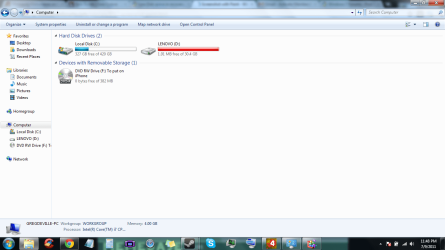
I was having some issues while spending time with some friends via the internet (primarily while playing Left 4 Dead 2), and my computer kept on freezing and locking up. I think it might be due to too much space on my computer being taken up, thus making it to where my computer didn't have enough space to play Left 4 Dead 2. I think I'm attaching a picture of what the My Computer screen looks like.

Yes, I know this isn't a pressing matter, but I do occasionally want to have fun with my family, and this is one of the only ways, as naturally some of my family lives in a different state. Anyway, I need some help, seeing as how I'm not very computer-wise, and have no clue what's going on. Suggestions?
 

Attachments
  • Computer screen.png
    Computer screen.png
    61.4 KB · Views: 181

My Computer My Computer

At a glance

Windows 7 64 bit
OS
Windows 7 64 bit
hello?
 

My Computer My Computer

At a glance

Windows 7 64 bit
OS
Windows 7 64 bit
Have you been using the drive for backup purposes?

I'll lay odds it's your recovery partition and as such should only contain the image used to recover your system and should not be used for anything else.
 

My Computer My Computer

At a glance

Windows 7 Ultimate SP1 64-BitIntel Core i7 870 @ 2.93GHz8Gb Dual-Channel DDR3 @ 664MHznVidia GeForce GTX 460 1024MB dedicated RAM
Computer Manufacturer/Model Number
HP Pavilion Elite 495UK
OS
Windows 7 Ultimate SP1 64-Bit
CPU
Intel Core i7 870 @ 2.93GHz
Motherboard
MSI 2A9C (CPU1)
Memory
8Gb Dual-Channel DDR3 @ 664MHz
Graphics Card(s)
nVidia GeForce GTX 460 1024MB dedicated RAM
Sound Card
Realtek HD Audio
Monitor(s) Displays
HP2310i
Screen Resolution
1920 x 1080
Hard Drives
1x1954GB Hitachi HDS22020ALA 330 (RAID), 1x1954GB Hitachi External for backup and storage
PSU
460W
Case
HP Elite
Cooling
Air cooled
Keyboard
Logitech K750 solar-powered keyboard
Mouse
Logitech Wireless M180 mouse
Internet Speed
2Mb
Other Info
Pure Avanti Flow Internet Radio with iPod Dock, 64Gb iPod, HP USB Speakers, Sony MDR-V500 Headphones, Sony Vaio F-Series Laptop
I was having some issues while spending time with some friends via the internet (primarily while playing Left 4 Dead 2), and my computer kept on freezing and locking up. I think it might be due to too much space on my computer being taken up, thus making it to where my computer didn't have enough space to play Left 4 Dead 2. I think I'm attaching a picture of what the My Computer screen looks like.

Yes, I know this isn't a pressing matter, but I do occasionally want to have fun with my family, and this is one of the only ways, as naturally some of my family lives in a different state. Anyway, I need some help, seeing as how I'm not very computer-wise, and have no clue what's going on. Suggestions?


D drive is full

Your Recovery D partition is set up by your computer manufacturer in case of serious problems in your system.
You use that to restore your sytem.

You are NOT supposed to touch it.... not to add or remove anything to or from it.

Have you been using the D drive for scheduled File Backups ?
If that is the case, call you computer manufacturer, tell them the situation.......

1. Ask them for a set of recovery DVDs in the event that you have to to re-install from it, if you don't have a set made yourself.
2. Ask them how to remove the backup files or any items that are NOT supposed to be there.
They created the recovery partition, they know perfectly how to take care of it.
Let them teach you how to.


Adding :
Purchase an external hard drive and use it for files backup.
It cost under $100. Some even cheaper.
 
Last edited:

My Computer My Computer

At a glance

Windows 7 Home Premium 64-bit, SP1Intel Pentium P6200, Cores 2, 2.13 GHz4 GBIntel HD
Computer Manufacturer/Model Number
Acer Aspire 7741Z
OS
Windows 7 Home Premium 64-bit, SP1
CPU
Intel Pentium P6200, Cores 2, 2.13 GHz
Memory
4 GB
Graphics Card(s)
Intel HD
Sound Card
unknown
Monitor(s) Displays
17.3 inches
Screen Resolution
1600 x 900
Hard Drives
640 GB, 5400 PRM
Don't mess with the D drive. If you already have, then follow advice you have received regarding restoration thereof.

You have plenty of room on your C Drive.

So let's address the issue of why your computer is not running as you believe it should.

What anti-virus software are you using?

Some anti-virus software are very interfering.

The least intrusive, and the very best in my opinion, is FREE and is from Microsoft. (No, I do not work for Microsoft.) I recommend only Microsoft Security Essentials (link in my signature).

Download and run CCleaner. (Link in my sig).

Run the Cleaner portion thereof. After that use the following procedure:

LIST OF STARTUP PROGRAMS USING CCLEANER


CCleaner | Tasks icon | Startup tab | click on Save to text file button (bottom right side)

Using the PAPER CLIP icon in the top panel of a Message Reply window, attach the .txt file generated by CCleaner.
 

My Computer My Computer

At a glance

MS Windows 7 Ultimate SP1 64-bitAMD A10-4600M6.00 GB Dual-Channel DDR3 @ 798MHz (11-11-12-28)AMD Radeon HD 7660G
Computer Manufacturer/Model Number
Toshiba Satellite S875D-S7239 laptop
OS
MS Windows 7 Ultimate SP1 64-bit
CPU
AMD A10-4600M
Motherboard
AMD Pumori (Socket FT1)
Memory
6.00 GB Dual-Channel DDR3 @ 798MHz (11-11-12-28)
Graphics Card(s)
AMD Radeon HD 7660G
Sound Card
High Definition Audio Device
Monitor(s) Displays
Generic PnP Monitor (1600x900@60Hz)
Screen Resolution
1600x900@60Hz
Hard Drives
SSD 119GB Corsair CSSD-V128GB2 ATA Device
Keyboard
Standard PS/2 Keyboard
Mouse
HP Wireless Optical Mobile Mouse Model FHA-3410
Internet Speed
What the local pub, local coffee shop offers.
Other Info
Optical Drive:MATSHITA BD-CMB UJ160B ATA Device


Also have an Asus ha1002xp netbook with Win 7 Ultimate installed.
Back
Top