Neither DVD reader/writer reading any discs

Bobazonski

Banned
Local time
1:56 AM
Messages
14
Location
Las Vegas, Nevada
I have no idea what caused this. I have two DVD drives--one 22X and one 24X, both made by LG-HITACHI--and I hardly ever use them. It is normal for me to go weeks at a time without using them, and during one of these periods they both stopped working (the time span makes it impossible to find a cause).

I have searched other forums and haven't returned anything that helped me.

Here are some things that I've tried/observed:

-No exclamation points in device manager
-Rerouted wires in my computer a while ago and may have accidentally reversed SATA cables, but tried both ways and found this not to be the case.
-When a disc is in, the green light blinks on and off for about a minute, then has about 10 seconds during which it stops flashing, then continues. While flashing, Explorer locks up if I try to access the drive, and the drive cannot be ejected (with the button, OR with right-click>eject in Explorer). When the light is off, it says "insert a disc" and the disc can be ejected either way.
-Will not read any discs, I have tried a DVD, a computer game, and a driver disc
-Both drives have the same issue, so it's not like the drive is a lemon

Possible theories:
-Since both are made by the same company, is it causing interference with the software?
-No clue.

Please post some ideas, because it's really debilitating not to have any disc drives.
 

My Computer My Computer

OS
Windows 7 Home Premium x64
CPU
AMD Athlon II X2 245 @ 2.9GHz
Motherboard
Gigabyte GA-MA785GM-US2H
Memory
2x4GB DDR2 667MHz
Graphics Card(s)
nVidia GeForce 9600 GSO w/768MB DDR2
Sound Card
Realtek onboard (785 chipset)
Monitor(s) Displays
HANNS•G HH251 25"
Screen Resolution
1920x1080
Hard Drives
Seagate Barracuda 250GB @ 7200RPM
Samsung SpinPint 1TB @ 5400RPM
PSU
400W
Case
Cooler MAster 310 Elite
Cooling
Stock CPU, 2 case fans
Keyboard
GIGABYTE wireless multimedia
Mouse
Wireless IntelliMouse Explorer 2.0
Internet Speed
6-8 Mbps
You may have two identical drives and windows could care less.

First if you have not already tried this I would give it a try:

Go back into device manager and delete both drives then shut the system down. Unplug the SATA cable from one of the drives and reboot and see if windows finds it and installs it correctly and if so test that one drive and see if it is working now.

By chance if this corrects that drives problems then, shut down, reconnect the SATA cable to the other drive and reboot and hopefully that will install the second dive and then test it.

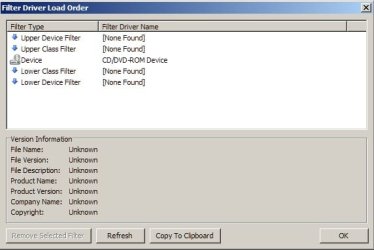
If all that fails then download ImgBurn and go into Settings and click on "Filter Driver Load Order" and take a screen capture of that and post it back here so I can see if you might have some bad filters on the system.

Hope this helps
 

My Computer My Computer

Computer Manufacturer/Model Number
My Build
OS
win7 Ult 64
CPU
i7 3930K & 3960X
Motherboard
ASUS P9X79 Deluxe
Memory
16GB G-Skill 2133MHz
Graphics Card(s)
Sapphire HD 7970
Sound Card
On-board
Monitor(s) Displays
ASUS 27 inch
Screen Resolution
1920X1080
Hard Drives
Crucial M4 256GB, 1.5TB WD Black for Data/Images
PSU
Corsair AX1200
Case
NZXT 810
Cooling
Custom Loop, Swiftech HDBlock
Keyboard
Mionix
Mouse
Mionix
Internet Speed
Cable

My Computer My Computer

Computer Manufacturer/Model Number
HP, Dell, Gateway, Toshiba - 4 laptops and 2 desktops
OS
Vista, Windows7, Mint Mate, Zorin, Windows 8
CPU
from 1.6GHz Duo to i7
Monitor(s) Displays
2x HP w2207
Hard Drives
5x HDD, 7x SSD, 12x Externals
Keyboard
with trackball - no mices
Mouse
Trackball mice
Internet Speed
DSL 6000
May be it is a filter problem. Here is the fix: Your CD or DVD drive can't read or write media

I tried doing this, but the wizard displayed a message saying it couldn't continue because an error occurred. Re-launching the wizard shows a dialog box saying that the previous instance couldn't continue due to an error. :(


I have not previously have a chance, but in a couple minutes now I'll try Kipper's suggestion.
 

My Computer My Computer

OS
Windows 7 Home Premium x64
CPU
AMD Athlon II X2 245 @ 2.9GHz
Motherboard
Gigabyte GA-MA785GM-US2H
Memory
2x4GB DDR2 667MHz
Graphics Card(s)
nVidia GeForce 9600 GSO w/768MB DDR2
Sound Card
Realtek onboard (785 chipset)
Monitor(s) Displays
HANNS•G HH251 25"
Screen Resolution
1920x1080
Hard Drives
Seagate Barracuda 250GB @ 7200RPM
Samsung SpinPint 1TB @ 5400RPM
PSU
400W
Case
Cooler MAster 310 Elite
Cooling
Stock CPU, 2 case fans
Keyboard
GIGABYTE wireless multimedia
Mouse
Wireless IntelliMouse Explorer 2.0
Internet Speed
6-8 Mbps
You may have two identical drives and windows could care less.

First if you have not already tried this I would give it a try:

Go back into device manager and delete both drives then shut the system down. Unplug the SATA cable from one of the drives and reboot and see if windows finds it and installs it correctly and if so test that one drive and see if it is working now.

By chance if this corrects that drives problems then, shut down, reconnect the SATA cable to the other drive and reboot and hopefully that will install the second dive and then test it.

If all that fails then download ImgBurn and go into Settings and click on "Filter Driver Load Order" and take a screen capture of that and post it back here so I can see if you might have some bad filters on the system.

Hope this helps

Unfortunately, the first steps failed--with only one drive connected, that drive displayed the same behavior as before even though Windows automatically "installed correctly" the drivers.

Using Imgburn, "none found" is displayed for every filter.
 

Attachments

  • imgburn.jpg
    imgburn.jpg
    24.6 KB · Views: 6

My Computer My Computer

OS
Windows 7 Home Premium x64
CPU
AMD Athlon II X2 245 @ 2.9GHz
Motherboard
Gigabyte GA-MA785GM-US2H
Memory
2x4GB DDR2 667MHz
Graphics Card(s)
nVidia GeForce 9600 GSO w/768MB DDR2
Sound Card
Realtek onboard (785 chipset)
Monitor(s) Displays
HANNS•G HH251 25"
Screen Resolution
1920x1080
Hard Drives
Seagate Barracuda 250GB @ 7200RPM
Samsung SpinPint 1TB @ 5400RPM
PSU
400W
Case
Cooler MAster 310 Elite
Cooling
Stock CPU, 2 case fans
Keyboard
GIGABYTE wireless multimedia
Mouse
Wireless IntelliMouse Explorer 2.0
Internet Speed
6-8 Mbps
You do not have any bad filters, actually you don't have any filters. LOL

You having tried the quick fix and the suggestions I offered up the only thing I would do now is if you have access to a know working drive from another system in the house or a friend or someone that you can borrow and toss it on your system and see if you have the same problem and if so then it might time for a repair install of windows as a minimum.

Sorry I couldn't help you out my friend
 

My Computer My Computer

Computer Manufacturer/Model Number
My Build
OS
win7 Ult 64
CPU
i7 3930K & 3960X
Motherboard
ASUS P9X79 Deluxe
Memory
16GB G-Skill 2133MHz
Graphics Card(s)
Sapphire HD 7970
Sound Card
On-board
Monitor(s) Displays
ASUS 27 inch
Screen Resolution
1920X1080
Hard Drives
Crucial M4 256GB, 1.5TB WD Black for Data/Images
PSU
Corsair AX1200
Case
NZXT 810
Cooling
Custom Loop, Swiftech HDBlock
Keyboard
Mionix
Mouse
Mionix
Internet Speed
Cable
Thanks for the help anyway. The guest room at our house has an old IDE drive and I'd imagine that should work, since I have a feeling the problem has something to do with the SATA connections. Reinstalling Windows would be the biggest pain in my a$$... I'll have to wait for summer for enough time to reinstall hundreds of programs... lol
 

My Computer My Computer

OS
Windows 7 Home Premium x64
CPU
AMD Athlon II X2 245 @ 2.9GHz
Motherboard
Gigabyte GA-MA785GM-US2H
Memory
2x4GB DDR2 667MHz
Graphics Card(s)
nVidia GeForce 9600 GSO w/768MB DDR2
Sound Card
Realtek onboard (785 chipset)
Monitor(s) Displays
HANNS•G HH251 25"
Screen Resolution
1920x1080
Hard Drives
Seagate Barracuda 250GB @ 7200RPM
Samsung SpinPint 1TB @ 5400RPM
PSU
400W
Case
Cooler MAster 310 Elite
Cooling
Stock CPU, 2 case fans
Keyboard
GIGABYTE wireless multimedia
Mouse
Wireless IntelliMouse Explorer 2.0
Internet Speed
6-8 Mbps
Fixed

Finally got this fixed. I grabbed an old IDE drive and when I went to plug it in, while searching for an open molex power connector, I saw a little gold wire sticking straight up. Turns out it fell out of the 1x molex to 2x SATA I had used to plug BOTH these drives in.

Basically, the drives were getting enough power to be detected but not to spin the disc, which required that extra voltage.

It's just my luck that the least likely item would be the failure. Luckily it's working nicely now, and won't cost me a dime to fix, just some electrical tape =P

Thanks everyone, I know it would have been impossible for any of you to know this was the cause, just tells me I need to check EVERYTHING, no matter how unlikely. Thanks anyway to everyone.
 

My Computer My Computer

OS
Windows 7 Home Premium x64
CPU
AMD Athlon II X2 245 @ 2.9GHz
Motherboard
Gigabyte GA-MA785GM-US2H
Memory
2x4GB DDR2 667MHz
Graphics Card(s)
nVidia GeForce 9600 GSO w/768MB DDR2
Sound Card
Realtek onboard (785 chipset)
Monitor(s) Displays
HANNS•G HH251 25"
Screen Resolution
1920x1080
Hard Drives
Seagate Barracuda 250GB @ 7200RPM
Samsung SpinPint 1TB @ 5400RPM
PSU
400W
Case
Cooler MAster 310 Elite
Cooling
Stock CPU, 2 case fans
Keyboard
GIGABYTE wireless multimedia
Mouse
Wireless IntelliMouse Explorer 2.0
Internet Speed
6-8 Mbps
Back
Top