
Solved Netmeter problem

crgibson

New member
Member
VIP
Local time
4:47 AM
Messages
145
Location
Southern Oregon
I have been using Netmeter for over 3 years and just started have a problem. Upon booting I get the following:

Netmeter.PNG

I have uninstalled (using Revo) and reinstalled - Same problem.

Installed to C:\Programs Files instead of Programs Files (x86) - No joy.

After a reinstall I have no problem for about 2 days (without rebooting) and then the above message appears and when I click OK the program shuts down.

Any suggestions?
 

Attachments
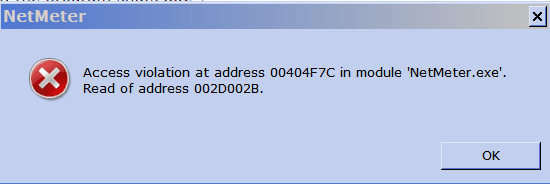
  • Netmeter.PNG
    Netmeter.PNG
    3.9 KB · Views: 34

My Computer

Computer type
PC/Desktop
Computer Manufacturer/Model Number
Custom
OS
Win 7 HP 64bit w/SP1
CPU
AMD Athlon 64 X2 5200+
Motherboard
Gigabyte Technology Co., Ltd. GA-MA770-UD3 (Socket M2)
Memory
6.0GB Dual-Channel DDR2 @ 387MHz (5-5-5-18)
Graphics Card(s)
Acer AL1906 @ 1280x1024 512MB GeForce 9500 GT (XFX Pine Grou
Sound Card
Realtek High Definition Audio
Monitor(s) Displays
Acer Generic PnP Monitor
Hard Drives
Crucial 128 gig M4 SSD
Seagate Backup 5T
Seagate GoFlex 2T
WDC WD1600JS-00NCB1 USB 1500 Gig
Seagate Backup 3T
Keyboard
Logitech HID-Compliant Keyboard
Mouse
PS/2 Compatible Mouse
Internet Speed
Cable broadband (up to 50Mbps)
Other Info
Nightly runs of Super AntiSpyware, CCleaner and Malware Anti-Malware and System Restore.
Boot into Safe Mode with Networking and see if the same problem occurs there. Which version are you using?

==- Readerror -==

A Guy
 

My Computer

Computer type
PC/Desktop
OS
Windows 10 Home x64
CPU
INTEL Core i5-750 Quad-Core 3.37GHz
Motherboard
ASUS P7P55D
Memory
HyperX Fury Black Series 8GB (2 x 4GB) 1866Mhz
Graphics Card(s)
EVGA GeForce GTX 750 Superclocked 1GB 128-Bit GDDR5
Monitor(s) Displays
LG 32MA68HY 32" IPS
Screen Resolution
1920 x 1080
Hard Drives
Samsung 840 Evo 120GB, SEAGATE 500GB Barracuda® 7200.12, SATA 3 Gb/s, 7200 RPM, 16MB cache
PSU
ANTEC TruePower New TP-550, 80 PLUS, 550W
Case
ANTEC Three Hundred Illusion
Cooling
COOLER MASTER Hyper 212 Plus, 4 x 120mm 1 x 140mm Noctua's
Internet Speed
85 + Mbps
Antivirus
Avast
Browser
Vivaldi
A Guy - Thanks for your reply. I rebooted into safe mode with network, and tried to start Netmeter. Got the same message as above. Using Netmeter v114 beta (I do not find anything later).

Any ideas?
 

My Computer

Computer type
PC/Desktop
Computer Manufacturer/Model Number
Custom
OS
Win 7 HP 64bit w/SP1
CPU
AMD Athlon 64 X2 5200+
Motherboard
Gigabyte Technology Co., Ltd. GA-MA770-UD3 (Socket M2)
Memory
6.0GB Dual-Channel DDR2 @ 387MHz (5-5-5-18)
Graphics Card(s)
Acer AL1906 @ 1280x1024 512MB GeForce 9500 GT (XFX Pine Grou
Sound Card
Realtek High Definition Audio
Monitor(s) Displays
Acer Generic PnP Monitor
Hard Drives
Crucial 128 gig M4 SSD
Seagate Backup 5T
Seagate GoFlex 2T
WDC WD1600JS-00NCB1 USB 1500 Gig
Seagate Backup 3T
Keyboard
Logitech HID-Compliant Keyboard
Mouse
PS/2 Compatible Mouse
Internet Speed
Cable broadband (up to 50Mbps)
Other Info
Nightly runs of Super AntiSpyware, CCleaner and Malware Anti-Malware and System Restore.
I have seen 2 major complaints while searching. One is the "Access violation", the other is "Nothing to monitor". Sometimes they are combined. Both mention removing additional/redundant ISATAP network interfaces. These problems also appear after installing VPN and programs like Teamviewer or Hamachi. Have a look at the post by hoakerk near the bottom of this discussion.

New NetMeter Beta Build 1.1.4

There are similar discussions about removing these additional interfaces. The trick is, which are redundant, and which are needed by IPV6, etc. I'd suggest making a full system image before making changes so you can revert to the last good step if something goes awry. If your ISP isn't using IPV6 now, you could conceivably have issues with that later, even if everything works fine now.

I'd recommend their forum, but I see posts from July with no replies.

Support (English)

A Guy
 

My Computer

Computer type
PC/Desktop
OS
Windows 10 Home x64
CPU
INTEL Core i5-750 Quad-Core 3.37GHz
Motherboard
ASUS P7P55D
Memory
HyperX Fury Black Series 8GB (2 x 4GB) 1866Mhz
Graphics Card(s)
EVGA GeForce GTX 750 Superclocked 1GB 128-Bit GDDR5
Monitor(s) Displays
LG 32MA68HY 32" IPS
Screen Resolution
1920 x 1080
Hard Drives
Samsung 840 Evo 120GB, SEAGATE 500GB Barracuda® 7200.12, SATA 3 Gb/s, 7200 RPM, 16MB cache
PSU
ANTEC TruePower New TP-550, 80 PLUS, 550W
Case
ANTEC Three Hundred Illusion
Cooling
COOLER MASTER Hyper 212 Plus, 4 x 120mm 1 x 140mm Noctua's
Internet Speed
85 + Mbps
Antivirus
Avast
Browser
Vivaldi
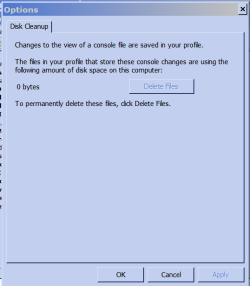
A Guy - Thanks for the links. I found that in device manager/file/options that there is a disk cleanup (see below). I click on apply and then started Netmeter. It started without the error message. I will mark this as solved but if I have further problems I will post here again.

Thanks again.
 

Attachments

  • Device manager option.PNG
    Device manager option.PNG
    8.7 KB · Views: 13
Last edited:

My Computer

Computer type
PC/Desktop
Computer Manufacturer/Model Number
Custom
OS
Win 7 HP 64bit w/SP1
CPU
AMD Athlon 64 X2 5200+
Motherboard
Gigabyte Technology Co., Ltd. GA-MA770-UD3 (Socket M2)
Memory
6.0GB Dual-Channel DDR2 @ 387MHz (5-5-5-18)
Graphics Card(s)
Acer AL1906 @ 1280x1024 512MB GeForce 9500 GT (XFX Pine Grou
Sound Card
Realtek High Definition Audio
Monitor(s) Displays
Acer Generic PnP Monitor
Hard Drives
Crucial 128 gig M4 SSD
Seagate Backup 5T
Seagate GoFlex 2T
WDC WD1600JS-00NCB1 USB 1500 Gig
Seagate Backup 3T
Keyboard
Logitech HID-Compliant Keyboard
Mouse
PS/2 Compatible Mouse
Internet Speed
Cable broadband (up to 50Mbps)
Other Info
Nightly runs of Super AntiSpyware, CCleaner and Malware Anti-Malware and System Restore.
Interesting! I hope that was it ;)

A Guy
 

My Computer

Computer type
PC/Desktop
OS
Windows 10 Home x64
CPU
INTEL Core i5-750 Quad-Core 3.37GHz
Motherboard
ASUS P7P55D
Memory
HyperX Fury Black Series 8GB (2 x 4GB) 1866Mhz
Graphics Card(s)
EVGA GeForce GTX 750 Superclocked 1GB 128-Bit GDDR5
Monitor(s) Displays
LG 32MA68HY 32" IPS
Screen Resolution
1920 x 1080
Hard Drives
Samsung 840 Evo 120GB, SEAGATE 500GB Barracuda® 7200.12, SATA 3 Gb/s, 7200 RPM, 16MB cache
PSU
ANTEC TruePower New TP-550, 80 PLUS, 550W
Case
ANTEC Three Hundred Illusion
Cooling
COOLER MASTER Hyper 212 Plus, 4 x 120mm 1 x 140mm Noctua's
Internet Speed
85 + Mbps
Antivirus
Avast
Browser
Vivaldi
Just an update. After 1 week I have had no problems with Netmeter. Hope this helps someone else who is having the problem.:)
 

My Computer

Computer type
PC/Desktop
Computer Manufacturer/Model Number
Custom
OS
Win 7 HP 64bit w/SP1
CPU
AMD Athlon 64 X2 5200+
Motherboard
Gigabyte Technology Co., Ltd. GA-MA770-UD3 (Socket M2)
Memory
6.0GB Dual-Channel DDR2 @ 387MHz (5-5-5-18)
Graphics Card(s)
Acer AL1906 @ 1280x1024 512MB GeForce 9500 GT (XFX Pine Grou
Sound Card
Realtek High Definition Audio
Monitor(s) Displays
Acer Generic PnP Monitor
Hard Drives
Crucial 128 gig M4 SSD
Seagate Backup 5T
Seagate GoFlex 2T
WDC WD1600JS-00NCB1 USB 1500 Gig
Seagate Backup 3T
Keyboard
Logitech HID-Compliant Keyboard
Mouse
PS/2 Compatible Mouse
Internet Speed
Cable broadband (up to 50Mbps)
Other Info
Nightly runs of Super AntiSpyware, CCleaner and Malware Anti-Malware and System Restore.
Back
Top