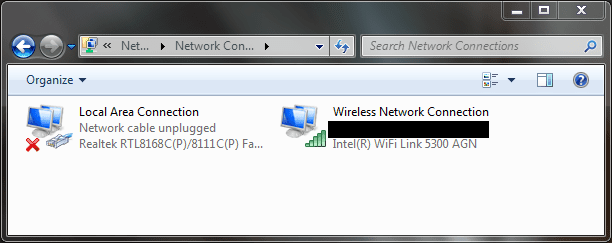
Network card - Ethernet not plugged in

I'm giving up now lol. I just reinstalled the win7 and go step by step from the initial driver to the lastest one. Even when Im writing this reply, "the cable has been unplugged". What a shame, great OS but ****ty network...
Well, it sucks you are having network issues. This is not a problem on my computers.....

The only thing I can think of is that the card is not supported under Seven, which makes no sense if it works on Vista...

~Lordbob
 

My Computer My Computer

Computer Manufacturer/Model Number
Hera
OS
Windows 7 Ultimate x64, Mint 9
CPU
Intel i5-2500k
Motherboard
ASUS P8P67 Pro
Memory
2x 4Gb Corsair VENGEANCE DDR3-1600
Graphics Card(s)
NVidia GeForce N260GTX Twin Frozr
Sound Card
Realtek HD OnBoard Audio
Monitor(s) Displays
ASUS 24" Monitor
Screen Resolution
1920x1080
Hard Drives
G.SKILL Phoenix Series 60GB SATA II MLC Internal Solid State Drive (SSD)
SAMSUNG Spinpoint F3R 1TB 7200 RPM 32MB Cache SATA II
PSU
Cooler Master Real Power Pro 750W
Case
Cooler Master Haf 932
Cooling
Fans
Keyboard
Razer Tarantula
Mouse
Razer Lachesis
Internet Speed
not fast enough
I know what you mean lol. Atm i will use windows 7 when Im not playing game and back to vista when my mates call me ... Hope after October, they will fix this problem lol. As I can see, it is not only me who has this problem.
 

My Computer My Computer

Computer Manufacturer/Model Number
Laptop Asus X51a
OS
windows 7
CPU
T9400
Motherboard
M51A
Memory
4gb
Graphics Card(s)
intel GMAX4500HD
I know what you mean lol. Atm i will use windows 7 when Im not playing game and back to vista when my mates call me ... Hope after October, they will fix this problem lol. As I can see, it is not only me who has this problem.
Indeed. That would work.

We can still mess with it however. Have you tried the x32 driver as well?

~Lordbob
 

My Computer My Computer

Computer Manufacturer/Model Number
Hera
OS
Windows 7 Ultimate x64, Mint 9
CPU
Intel i5-2500k
Motherboard
ASUS P8P67 Pro
Memory
2x 4Gb Corsair VENGEANCE DDR3-1600
Graphics Card(s)
NVidia GeForce N260GTX Twin Frozr
Sound Card
Realtek HD OnBoard Audio
Monitor(s) Displays
ASUS 24" Monitor
Screen Resolution
1920x1080
Hard Drives
G.SKILL Phoenix Series 60GB SATA II MLC Internal Solid State Drive (SSD)
SAMSUNG Spinpoint F3R 1TB 7200 RPM 32MB Cache SATA II
PSU
Cooler Master Real Power Pro 750W
Case
Cooler Master Haf 932
Cooling
Fans
Keyboard
Razer Tarantula
Mouse
Razer Lachesis
Internet Speed
not fast enough
hmm i havent tried x32 lastest driver yet but i guess i could give it a go. Finger cross
 

My Computer My Computer

Computer Manufacturer/Model Number
Laptop Asus X51a
OS
windows 7
CPU
T9400
Motherboard
M51A
Memory
4gb
Graphics Card(s)
intel GMAX4500HD
Well none works so far ... I wonder if anyone here know the reason why that, when Im using vista, if I click on "see full network map" in network and sharing centre, my network connection drop, cable unplugged. I think It could be something to do with windows 7 where maybe it just auto load the full network map every now and then which caused network dropage? Anyone know how to disble that? This is just my thought.
 

My Computer My Computer

Computer Manufacturer/Model Number
Laptop Asus X51a
OS
windows 7
CPU
T9400
Motherboard
M51A
Memory
4gb
Graphics Card(s)
intel GMAX4500HD
Make sure that the ethernet is enabled, and turn off Wireless

~Lordbob
 

My Computer My Computer

Computer Manufacturer/Model Number
Hera
OS
Windows 7 Ultimate x64, Mint 9
CPU
Intel i5-2500k
Motherboard
ASUS P8P67 Pro
Memory
2x 4Gb Corsair VENGEANCE DDR3-1600
Graphics Card(s)
NVidia GeForce N260GTX Twin Frozr
Sound Card
Realtek HD OnBoard Audio
Monitor(s) Displays
ASUS 24" Monitor
Screen Resolution
1920x1080
Hard Drives
G.SKILL Phoenix Series 60GB SATA II MLC Internal Solid State Drive (SSD)
SAMSUNG Spinpoint F3R 1TB 7200 RPM 32MB Cache SATA II
PSU
Cooler Master Real Power Pro 750W
Case
Cooler Master Haf 932
Cooling
Fans
Keyboard
Razer Tarantula
Mouse
Razer Lachesis
Internet Speed
not fast enough
of course ethernet is enable and i dont have wireless network around so ... I dont see this as a problem. Btw as other people suggested that win x64 is givign us this problem, Maybe I really need the x86 win7 .... Damn
 

My Computer My Computer

Computer Manufacturer/Model Number
Laptop Asus X51a
OS
windows 7
CPU
T9400
Motherboard
M51A
Memory
4gb
Graphics Card(s)
intel GMAX4500HD
of course ethernet is enable and i dont have wireless network around so ... I dont see this as a problem. Btw as other people suggested that win x64 is givign us this problem, Maybe I really need the x86 win7 .... Damn
No no, disable wireless in the Wireless connections menu:
*see attached*

~Lordbob
 

Attachments

  • Capture.PNG
    Capture.PNG
    18 KB · Views: 51

My Computer My Computer

Computer Manufacturer/Model Number
Hera
OS
Windows 7 Ultimate x64, Mint 9
CPU
Intel i5-2500k
Motherboard
ASUS P8P67 Pro
Memory
2x 4Gb Corsair VENGEANCE DDR3-1600
Graphics Card(s)
NVidia GeForce N260GTX Twin Frozr
Sound Card
Realtek HD OnBoard Audio
Monitor(s) Displays
ASUS 24" Monitor
Screen Resolution
1920x1080
Hard Drives
G.SKILL Phoenix Series 60GB SATA II MLC Internal Solid State Drive (SSD)
SAMSUNG Spinpoint F3R 1TB 7200 RPM 32MB Cache SATA II
PSU
Cooler Master Real Power Pro 750W
Case
Cooler Master Haf 932
Cooling
Fans
Keyboard
Razer Tarantula
Mouse
Razer Lachesis
Internet Speed
not fast enough
THIS PROBLEM IS DRIVING ME CRAZY!! F This s*%# seriously.. WORKS Fine for hours then all of a sudden "ETHERNET CABLE NOT PLUGGED IN" i mean come on What did windows 7 do wrong? never had this problem like 1 week ago.
 

My Computer My Computer

Computer Manufacturer/Model Number
Custom built
OS
W 7
CPU
Intel Core 17 950
Motherboard
Evga x58 snd Classified
Memory
6gig Corsair 1800mhx
Graphics Card(s)
2x Evga geforce 285's
Sound Card
Creative XFI Titanium Champion series
Monitor(s) Displays
Asus 23 inch hd monitor thingy
Hard Drives
Segate 1.5tb barracuda
Case
Cool master haf 932
Cooling
Random fan
Welcome to the club mushroom :D. At least I am not the only one hahahah... still trying to figure that though. @lordbob : nah doesnt work, still drop >.<
 

My Computer My Computer

Computer Manufacturer/Model Number
Laptop Asus X51a
OS
windows 7
CPU
T9400
Motherboard
M51A
Memory
4gb
Graphics Card(s)
intel GMAX4500HD
THIS PROBLEM IS DRIVING ME CRAZY!! F This s*%# seriously.. WORKS Fine for hours then all of a sudden "ETHERNET CABLE NOT PLUGGED IN" i mean come on What did windows 7 do wrong? never had this problem like 1 week ago.
Mushroom, we are working on this.... Patience. It is a lot to ask, but we can ask for nothing else.
Patience.

Welcome to the club mushroom :D. At least I am not the only one hahahah... still trying to figure that though. @lordbob : nah doesnt work, still drop >.<
Still no luck huh? Hmmm....
Try Disabling the local connection, and then reinstall the drivers.

~Lordbob
 

My Computer My Computer

Computer Manufacturer/Model Number
Hera
OS
Windows 7 Ultimate x64, Mint 9
CPU
Intel i5-2500k
Motherboard
ASUS P8P67 Pro
Memory
2x 4Gb Corsair VENGEANCE DDR3-1600
Graphics Card(s)
NVidia GeForce N260GTX Twin Frozr
Sound Card
Realtek HD OnBoard Audio
Monitor(s) Displays
ASUS 24" Monitor
Screen Resolution
1920x1080
Hard Drives
G.SKILL Phoenix Series 60GB SATA II MLC Internal Solid State Drive (SSD)
SAMSUNG Spinpoint F3R 1TB 7200 RPM 32MB Cache SATA II
PSU
Cooler Master Real Power Pro 750W
Case
Cooler Master Haf 932
Cooling
Fans
Keyboard
Razer Tarantula
Mouse
Razer Lachesis
Internet Speed
not fast enough
hmm from what I see, there are more and more people getting this problem... @lordbob: same as always, even though I dont know what is the different when we disable and reinstall compare to the fresh install. But yea still no luck ...
 

My Computer My Computer

Computer Manufacturer/Model Number
Laptop Asus X51a
OS
windows 7
CPU
T9400
Motherboard
M51A
Memory
4gb
Graphics Card(s)
intel GMAX4500HD
even though I dont know what is the different when we disable and reinstall compare to the fresh install.

So it works for some time after a fresh install? Are automatic updates turned on or off? I have had a problem in the past where an XP system kept getting the video driver from Windows updates and over writing the newer driver from the manufacturer. Windows update driver didn't work but kept getting installed. Just an idea.... turn auto update off?
 

My Computer My Computer

Computer Manufacturer/Model Number
ultraplanet - model 23
OS
Windows 7
CPU
P4 3.0 HT
Motherboard
Intel DQ965GF
Memory
4 gigs of Crucial DDR2
Graphics Card(s)
nVidia GeForce 7800GT 256MB 256-bit w/ ACCELS1 Rev 2
Sound Card
on board
Monitor(s) Displays
HP 2509m
Screen Resolution
1920x1080
Hard Drives
2x 320gb Seagate Barracuda's - SATA 3Gbit/s - RAID-0 array
PSU
650 watt
Case
Antec
Cooling
Cool Master
Keyboard
Logitech diNovo Media Desktop
Mouse
see keyboard
Internet Speed
comcast cable
Other Info
7 Ultimate and 7 Pro twice each at home - Gigabit on the Network - Tomato on the Linksys - I freely share my wireless with my neighbors (8-10 additional devices)
hmm from what I see, there are more and more people getting this problem... @lordbob: same as always, even though I dont know what is the different when we disable and reinstall compare to the fresh install. But yea still no luck ...

Lordof

I just searched and didnt find any other ppl with this porblem can you point me to some of them:?

Ken
 

My Computer My Computer

Computer Manufacturer/Model Number
HP Pavillion dv-7 1005 Tx
OS
Win 8 Release candidate 8400
CPU
[email protected]
Memory
4 gigs
Graphics Card(s)
Nvidia 9600M
Sound Card
HD built-in
Monitor(s) Displays
17" Wxga
Screen Resolution
1440x900
Cooling
none
Internet Speed
45Mb down 5Mb up
My laptop has the same card, working perfectly. Realtec cards normally are really reliable. I'm not so sure we are searching the answer in a right place.

Please could you tell the mark and the model of your router, let's see if we find something there.

Kari
 

My Computer My Computer

Computer type
Laptop
Computer Manufacturer/Model Number
HP ENVY 17-1150eg
OS
Windows 10 Pro x64 EN-GB
CPU
1.6 GHz Intel Core i7-720QM Processor
Memory
6 GB
Graphics Card(s)
ATI Mobility Radeon HD 5850 Graphics
Sound Card
Beats sound system with integrated subwoofer
Monitor(s) Displays
17" laptop display, 22" LED and 32" Full HD TV through HDMI
Screen Resolution
1600*900 (1), 1920*1080 (2&3)
Hard Drives
Internal: 2 x 500 GB SATA Hard Disk Drive 7200 rpm
External: 2TB for backups, 3TB USB3 network drive for media
Cooling
As Envy runs a bit warm, I have it on a Cooler Master pad
Keyboard
Logitech diNovo Media Desktop Laser (bluetooth)
Mouse
Logitech Performance Mouse MX
Internet Speed
50/10 Mbps VDSL
Antivirus
Windows Defender 4.3.9431.0
Browser
Maxthon 3.5.2., IE11
hmm from what I see, there are more and more people getting this problem... @lordbob: same as always, even though I dont know what is the different when we disable and reinstall compare to the fresh install. But yea still no luck ...
No, no. I meant uninstall and reinstall the driver. Make sure you get all the old driver off, then reinstall it.

My laptop has the same card, working perfectly. Realtec cards normally are really reliable. I'm not so sure we are searching the answer in a right place.

Please could you tell the mark and the model of your router, let's see if we find something there.

Kari
You bring up a good point, one I usually forget. The card may just be broken........

~Lordbob
 

My Computer My Computer

Computer Manufacturer/Model Number
Hera
OS
Windows 7 Ultimate x64, Mint 9
CPU
Intel i5-2500k
Motherboard
ASUS P8P67 Pro
Memory
2x 4Gb Corsair VENGEANCE DDR3-1600
Graphics Card(s)
NVidia GeForce N260GTX Twin Frozr
Sound Card
Realtek HD OnBoard Audio
Monitor(s) Displays
ASUS 24" Monitor
Screen Resolution
1920x1080
Hard Drives
G.SKILL Phoenix Series 60GB SATA II MLC Internal Solid State Drive (SSD)
SAMSUNG Spinpoint F3R 1TB 7200 RPM 32MB Cache SATA II
PSU
Cooler Master Real Power Pro 750W
Case
Cooler Master Haf 932
Cooling
Fans
Keyboard
Razer Tarantula
Mouse
Razer Lachesis
Internet Speed
not fast enough
The fact that I live on campus and connected to the UNi server, I dont think I know what kind of router the uni use and even if i know, it is impossible for me to fix it. @zigzag: well, i saw that there are a few of people have this connection droppage just like me, the net working fine but then It says that "network cable unplugged" then replug itself, and it keeps doing that the whole time.
 

My Computer My Computer

Computer Manufacturer/Model Number
Laptop Asus X51a
OS
windows 7
CPU
T9400
Motherboard
M51A
Memory
4gb
Graphics Card(s)
intel GMAX4500HD
The fact that I live on campus and connected to the UNi server, I dont think I know what kind of router the uni use and even if i know, it is impossible for me to fix it. @zigzag: well, i saw that there are a few of people have this connection droppage just like me, the net working fine but then It says that "network cable unplugged" then replug itself, and it keeps doing that the whole time.
The card in your laptop....

~Lordbob
 

My Computer My Computer

Computer Manufacturer/Model Number
Hera
OS
Windows 7 Ultimate x64, Mint 9
CPU
Intel i5-2500k
Motherboard
ASUS P8P67 Pro
Memory
2x 4Gb Corsair VENGEANCE DDR3-1600
Graphics Card(s)
NVidia GeForce N260GTX Twin Frozr
Sound Card
Realtek HD OnBoard Audio
Monitor(s) Displays
ASUS 24" Monitor
Screen Resolution
1920x1080
Hard Drives
G.SKILL Phoenix Series 60GB SATA II MLC Internal Solid State Drive (SSD)
SAMSUNG Spinpoint F3R 1TB 7200 RPM 32MB Cache SATA II
PSU
Cooler Master Real Power Pro 750W
Case
Cooler Master Haf 932
Cooling
Fans
Keyboard
Razer Tarantula
Mouse
Razer Lachesis
Internet Speed
not fast enough
lol, I'm telling you that the card is working fine. 100% sure of it since if it was broken, vista would have the same problem wouldnt it? And besides what do you want to know about my internet card? My NIC: Realtek RTL8168C(P)/8111C(P). Just one point I have mention that, if i go to the network and sharing, click on full map, the network disconnects immidiately, i just wonder if by chance, win7 when it refreshing, it also try to refresh the network full map which cause disconnected?
 

My Computer My Computer

Computer Manufacturer/Model Number
Laptop Asus X51a
OS
windows 7
CPU
T9400
Motherboard
M51A
Memory
4gb
Graphics Card(s)
intel GMAX4500HD
lol, I'm telling you that the card is working fine. 100% sure of it since if it was broken, vista would have the same problem wouldnt it? And besides what do you want to know about my internet card? My NIC: Realtek RTL8168C(P)/8111C(P). Just one point I have mention that, if i go to the network and sharing, click on full map, the network disconnects immidiately, i just wonder if by chance, win7 when it refreshing, it also try to refresh the network full map which cause disconnected?
Oh yeah, duh.

Sorry, I am pretty tired. Should probably go to sleep....

~Lordbob
 

My Computer My Computer

Computer Manufacturer/Model Number
Hera
OS
Windows 7 Ultimate x64, Mint 9
CPU
Intel i5-2500k
Motherboard
ASUS P8P67 Pro
Memory
2x 4Gb Corsair VENGEANCE DDR3-1600
Graphics Card(s)
NVidia GeForce N260GTX Twin Frozr
Sound Card
Realtek HD OnBoard Audio
Monitor(s) Displays
ASUS 24" Monitor
Screen Resolution
1920x1080
Hard Drives
G.SKILL Phoenix Series 60GB SATA II MLC Internal Solid State Drive (SSD)
SAMSUNG Spinpoint F3R 1TB 7200 RPM 32MB Cache SATA II
PSU
Cooler Master Real Power Pro 750W
Case
Cooler Master Haf 932
Cooling
Fans
Keyboard
Razer Tarantula
Mouse
Razer Lachesis
Internet Speed
not fast enough
Back
Top